1
Securing the ZoneAlarm Router against Theft
Securing the ZoneAlarm Router against Theft
The ZoneAlarm router features a security slot to the rear of the right panel, which enables
you to secure your router against theft, using an anti-theft security device.
Note: Anti-theft security devices are available at most computer hardware stores.
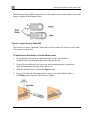
This procedure explains how to install a looped security cable on your router. A looped
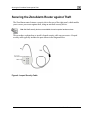
security cable typically includes the parts shown in the diagram below.
Figure 4: Looped Security Cable
34
Check Point ZoneAlarm User Guide