1
EPSON EPL-N1200
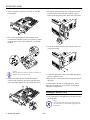
If you need to change SelecType settings, follow these
steps:
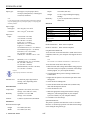
OneTouch mode setting options
Setting
Options
Description
Paper Source
Auto
MP (built-in tray)
LC1 (lower cassette 1)
LC2 (lower cassette 2)
Selects the tray to load
paper from; Auto loads
from the tray containing
paper that matches the
Page Size setting below
Page Size
A4, A5, B5, LT, HLT, LGL,
GLT, GLG, EXE, F4, MON,
C10, DL, C5, C6, IB5, CTM
Selects the page size of the
image to be produced
Manual Feed
On
Off
Turns manual feed mode
on or off for the built-in
paper tray
Orientation
Portrait
Landscape
Selects the print direction
on the page
RITech
Dark
Medium
Light
Off
Sets the RITech
(Resolution Improvement
Technology) setting for
your print job
Copies
1 to 999
Selects the number of
copies to print
MP Tray Size
A4, A5, B5, LT, HLT, LGL,
GLT, GLG, EXE, F4, MON,
C10, DL, C5, C6, IB5
Selects the size of paper
loaded in the built-in paper
tray
Toner Save
On
Off
Sets the amount of toner
used in your print job; for
draft copies, set to On to
use approximately 50%
less toner for a lighter
printout
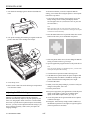
1. Make sure the printer is turned on and the On Line light is
on.
2. Press the Menu button on the control panel.
You have now entered SelecType mode, which changes
the functions of the control panel buttons as described in
the table below.
Using SelecType
The SelecType button accesses a series of menus and
options that are shown on the control panel display.
Although you can set some of the SelecType options
through your driver software, you need to use the printer’s
control panel to access functions like the following:
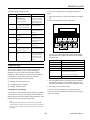
Button
Function
Menu
Selects a new SelecType menu
Item
Selects a new menu item
Value
Changes the setting of an item
Enter
Saves the new setting of an item
Alt
Used with Menu, Item, and Value to scroll
through selections in reverse order
Used with Continue to reset the printer
On Line or SelecType
Exits SelecType mode
❏ Checking the amount of toner remaining
❏ Configuring interface channels
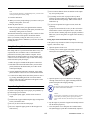
3. Press the Menu button to select the SelecType menu that
includes the setting you want to change. Then press the
Item and Value buttons as necessary to change the setting.
❏ Changing emulation modes
4. Press Enter to save the new setting.
Changing SelecType Settings
5. Press On Line or SelecType to exit SelecType mode.
❏ Changing the memory buffer size
See the next section for tables describing all the SelecType
menus and settings.
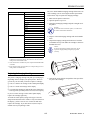
You can look at your current SelecType settings by printing
a status sheet. To do this, wait until the printer warms up
(Ready appears on the control panel display and the On Line
light is on); then press the Enter button twice.
Note:
Some application programs may send commands to your printer that
override SelecType settings. If you do not get the results you expect from
SelecType, check your application software settings to see if they affect
your output.
1/97
EPSON EPL-N1200 - 7