1
Configuring Slots and Ports on a Switch
IP Fragmentation within a VLAN
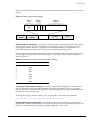
ExtremeWare XOS supports IP fragmentation within a VLAN. This feature does not require you to
configure the MTU size. To use IP fragmentation within a VLAN:
1 Enable jumbo frames on the incoming port.
2 Add the port to a VLAN.
3 Assign an IP address to the VLAN.
4 Enable IP forwarding on the VLAN.
If you leave the MTU size configured to the default value when you enable jumbo frame support on a
port on the VLAN, you will receive a warning that the IP MTU size for the VLAN is not set at
maximum jumbo frame size. You can ignore this warning if you want IP fragmentation within the
VLAN, only. However, if you do not use jumbo frames, IP fragmentation can be used only for traffic
that stays within the same VLAN. For traffic that is set to other VLANs to use IP fragmentation, all
ports in the VLAN must be configured for jumbo frame support.
Load Sharing on the Switch
The load-sharing feature allows you to increase bandwidth and availability by using a group of ports to
carry traffic in parallel between switches. Trunking and load sharing are terms that have been used
interchangeably in Extreme Networks documentation to refer to the same feature, which allows
multiple physical ports to be aggregated into one logical port. Refer to IEEE 802.3ad for more
information on this feature. The advantages to load sharing include an increase in bandwidth and link
redundancy.
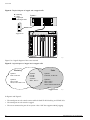
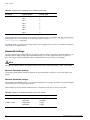
Load sharing allows the switch to use multiple ports as a single logical port. For example, VLANs see
the load-sharing group as a single logical port. And, although you can only reference the master port of a
load-sharing group to a Spanning Tree Domain (STPD), all the ports of a load-sharing group actually
belong to the specified STPD. Most load-sharing algorithms guarantee packet sequencing between
clients.
Load sharing is disabled by default.
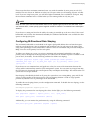
If a port in a load-sharing group fails, traffic is redistributed to the remaining ports in the load-sharing
group. If the failed port becomes active again, traffic is redistributed to include that port.
NOTE
Load sharing must be enabled on both ends of the link, or a network loop may result.
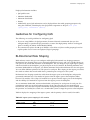
Load sharing is most useful when:
• The egress bandwidth of traffic exceeds the capacity of a single link.
• Multiple links are used for network resiliency.
In both situations, the aggregation of separate physical links into a single logical link multiplies total
link bandwidth in addition to providing resiliency against individual link failures. ExtremeWare XOS
supports load-sharing groups across multiple modules, so resiliency is also provided against individual
module failures.
74
ExtremeWare XOS 11.0 Concepts Guide