1
All Windows-compatible processors supported
PERIPHERALS
DVD-ROM drive
Network Interface Card
MISCELLANEOUS
ALLOCATION UNIT SIZE OF THE NTFS VOLUMES
The cluster size or the allocation unit size of an NTFS volume in a virtual machine must be multiple of 1024 bytes. You can set the cluster size before
formatting a volume. The default cluster size is 4096 bytes.
.NET FRAMEWORK
.NET Framework 2.0 is automatically installed. Note that .NET Framework 2.0 can co-exist with other versions of this software.
MICROSOFT VISUAL C++
Microsoft Visual C++ 2008 Redistributable Package is automatically installed. Note that Visual C++ 2008 Redistributable Package can co-exist with other
versions of this software.
NETWORK
TCP/IP Services configured on the computer.
NOTES ON VIRTUAL SERVER IDATAAGENT INSTALLATIONS FOR VMWARE
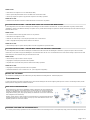
For VMware, the Virtual Server iDataAgent is installed on a proxy computer that can communicate with the host computer.
Ensure that the VDDK 5.1 is not installed on any host.
SUPPORT FOR VCB ENVIRONMENT
The following utilities must be installed prior to performing any backup operations in the VCB Environment using the Virtual Server iDataAgent (these packages
can be obtained from the VMware web site):
z
z
VMware Consolidated Backup (refer to the VMware customer support web site for support information for the VMware Consolidated Backup utility.)
{
The Virtual Server iDataAgent supports all modes supported by the VMware Consolidated Backup utility.
{
Refer to the VMware customer support web site for support information for the VMware Consolidated Backup utility.
VMware Converter 4.0.1(refer to the VMware customer support web site for support information for the VMware Converter utility.)
{
Ensure that the guest operating systems are using the supported version of the VMware Converter.
{
The vCenter Converter Standalone 4.0.1 package must be installed for Windows Vista and Windows Server 2008 environments.
Ensure that the latest version of VMware Consolidated Backup and that VMware Converter 4.0.1 are installed.
z
Restores of entire virtual machines from ESX Server 4.0 to a prior version of ESX Server are not supported.
z
Virtual machines from ESX Server 3.5 can be backed up through vcbmounter, but they are restored through vStorage.
DISCLAIMER
Minor revisions and/or service packs that are released by application and operating system vendors are supported by our software but may not be individually listed in our System
Requirements. We will provide information on any known caveat for the revisions and/or service packs. In some cases, these revisions and/or service packs affect the working of our software.
Changes to the behavior of our software resulting from an application or operating system revision/service pack may be beyond our control. The older releases of our software may not support
the platforms supported in the current release. However, we will make every effort to correct the behavior in the current or future releases when necessary. Please contact your Software
Provider for any problem with a specific application or operating system.
Additional considerations regarding minimum requirements and End of Life policies from application and operating system vendors are also applicable
Page 13 of 13