1
Svenska
Nederlands
Italiano
Français
Español
Deutsch
Dansk
English
SYSTEM SETUP
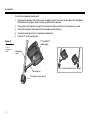
To install the microphone stand bracket:
1.
Determine the diameter of the shaft on your microphone stand. The cutouts on the edge of the Microphone
Stand Bracket Quick Setup Guide can help you determine the diameter.
2.
Remove the inserts (Figure 8 on page 9) from the bracket and re-insert them for the diameter you need.
3.
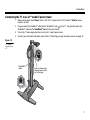
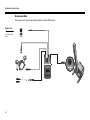
Attach the microphone stand bracket to the microphone stand (Figure 9).
4.
Attach the mounting bar to the microphone stand bracket.
5.
Place the T1 on the mounting bar.
Figure 9
Mounting the
T1 on a
microphone
stand
T1 ToneMatchTM
audio engine
Microphone
stand
The T1 can be mounted to the left or right.
Mounting bar
Microphone stand bracket
10