1
Descriptions and Functions
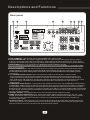
Rear panel
10
11
13
12
14
15
16
17
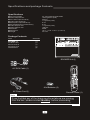
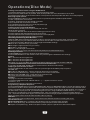
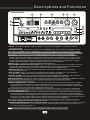
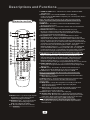
10.AC~IN TERMINAL - Connect AC MAIN POWER CORD from the wall outlet to this terminal.
11.AC POWER outlet - This outlet provides AC POWER to an external device.
Note: Do not connect any device with a power consumption level higher than 200W.
12.PRE-OUT jacks-Connect one end of ¼-inch cables to the left and right PRE-OUT jacks on the BOOMER.
Connect one end of the ¼-inch cables to the left and right AUDIO/LINE/AUX INPUT jacks on the
external device.
13.AV 1 / 2 INPUT jacks - These jacks are for connecting AUDIO/VIDEO OUTPUT from external AV
SOURCES. Connect RCA-style AV cables (R, W, Y) from these jacks to the AV OUTPUT jacks
on your external AV devices.
14.VIDEO OUT 1-2 JACKS (RCA) - These jacks are for connecting the BOOMER's VIDEO OUTPUT to TV
or DISPLAY devices. Connect RCA-type patch cables from these jacks to the VIDEO INPUT jacks
on the connecting TV or display devices.
15.AUDIO OUT 1-2 JACKS (RCA) - These jacks are for connecting the BOOMER AUDIO OUTPUT to an amplifier,
recording or mixing devices. Connect paired RCA-type patch cables from these jacks to the appropriate
INPUT jacks on external audio devices.
16.BALANCED AUDIO OUTPUT jacks - These XLR jacks are for connecting MASTER output to an
external device with balanced cables.
17.BALANCED MIC 1-2 INPUT (XLR) - These jacks are for connecting microphones via BALANCED
XLR-type microphone cables.
22