1
Telephone Sites
About Telephone Sites
A telephone site is the location where the telephone resides. Each telephone site has its own
circuit address (Bay, Slot/Circuit). All of the circuit addresses belonging to the system site are
listed in the Phone Data window.
Note
You must connect to the system site supporting the telephone sites before you can make telephone
changes in this application.
Tip
Double-clicking on the Phone Data icon in the Site Navigation window opens the Phone Data window.
Function on the menu bar also provides access to the Phone Data window.
About the Phone Data Window
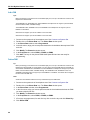
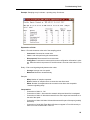
The Phone Data window displays the circuit addresses (Bay, Slot, Circuit) for the desktop
devices (set types).
The desktop devices will vary depending on the SX-200 ICP platform type (CX or MX). The
desktop device can be an ONS telephone station, an IP Phone or Conference Unit, a
SUPERSET telephone, a SUPERSET Subattendant telephone, a 5220 Subattendant
telephone (5020, 5220, 5220 Dual Boot, or 5224 Dual Boot IP Phone), a PKM Interface Unit,
a DMP Unit (Music-on-Hold/Pager Unit), a COV (COV voicemail system or SUPERSET 3 or
SUPERSET 4 telephone), a SpectraLink NetLink Wireless telephone, or a third-party door
opener.
The Phone Data window also displays the extension number and the name of the telephone
user.
The Phone Data window is a read-only screen. You can not edit in this window. A display option
lets you see, the unprogrammed, the programmed, or all of the desktop devices. The Buttons
on the bottom of this window provide access to the add, delete, move, and modify functionality.
Note
The Add button on the Phone Data window is only available when an unprogrammed circuit address is
selected.
The Delete, Move and Modify buttons on the Phone Data window are only available when a programmed
circuit address is selected.
Double clicking the device/set type twice opens the Extension window for that set type. The Extension
window identifies the set and lets you program the telephone features.
Clicking on the field name, sorts the contents of that field in ascending/descending order.
The circuit address for the door opener is always Bay1, Slot 13, and Circuit 30.
21