1
Installation and Operation, cont’d
4.
5.
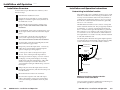
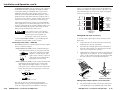
For all models, carefully place the interface through
the opening in the wall or furniture and into the wall
box (if one is used). Take care not to damage the
cables.
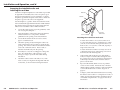
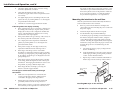
Mount the interface faceplate to the wall box with the
provided machine screws (as shown below), or attach
the interface directly to the furniture with wood or
metal screws.
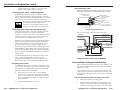
Application diagrams
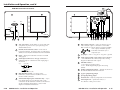
Below are examples of typical system installations that
incorporate RGB 400 series interfaces. Many other
configurations are possible. Extron offers a variety of
laptop and monitor breakout cables for easy connection of
PCs, Macintosh, Sun or SGI computers.
VIDEO
S-VIDEO
L
R
HIGH Z
INPUT
75 Ohm
AUTO POWER
A
U
D
I
O
PC
NETWORK
H. SHIFT
Extron
RGB 404
LBC Cable
Cable Clamp
RJ45 Network
Cable
Laptop Computer
S-V
VID
ID
EO
EO
R
HIG
T
PU
IN
75
H
Z
Oh
m
L
A
U
D
I
O
PC
NE
OR
TW
K
Video Cassette Player
An RGB 404 application featuring a laptop
and network and S-video pass-through
connections
Install Cable
RGB 404
Mounting the interface to the wall box
INPUT
HIGH Z
75 Ohm
6.
7.
Reconnect the input cables to the interface via the
front panel connectors.
AUTO POWER
AUDIO
H. SHIFT
Extron
Reconnect the power cables and restore power to the
equipment.
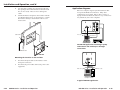
RGB 406
MBC Cable
Audio Cable
SVGA Compatible
Computer w/ Audio
A typical RGB 406 application
2-22
RGB 400 Series • Installation and Operation
RGB 400 Series • Installation and Operation
2-23