1
1/96
D12 Camera Manual Part 1
D12 CAMERA MANUAL PART 1
1
INTRODUCTION
8
1.1
The Concept behind the MOBOTIX D12
9
1.2
Product Advantages of the MOBOTIX D12
14
1.3 The MOBOTIX D12D-Fixdome Outdoor
1.3.1 The Concept of the MOBOTIX D12D-Outdoor
1.3.2 Product Advantages of the MOBOTIX D12D-Outdoor
16
16
18
1.4
Feature List
19
1.5
Hard- and Software Differences of the MOBOTIX D10/D12
21
1.6 Important Notes
1.6.1 Password for the Administration Menu
1.6.2 Password for ISDN Dial-In
1.6.3 Permanently Deactivating the Microphone
1.6.4 Starting the Camera Using the Factory IP Address
1.6.5 Resetting the Camera to Factory Defaults
1.6.6 Activating Event Control for Security Applications
1.6.7 Deactivating Text and Logo Options
1.6.8 Deactivating the Daily Reboot of the Camera
1.6.9 ISDN Compatibility Note
1.6.10 Browser Hints
1.6.11 Safety Notes for Operating MOBOTIX Cameras
1.6.12 Additional Information
22
22
22
22
23
23
23
23
24
24
24
24
25
2
INSTALLING THE CAMERA & THE OUTDOOR WALL MOUNT 26
2.1
Quick Start
26
2.2
2.2.1
2.2.2
2.2.3
2.2.4
Delivered Parts, Camera Components and Dimensions
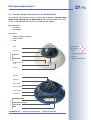
Delivered Parts and Camera Components of the MOBOTIX D12D
Camera Casing and Connectors of the MOBOTIX D12D
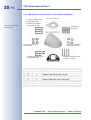
Delivered Parts and Components of the Outdoor Wall Mount
Dimensions of the Outdoor Wall Mount
26
26
27
28
29
2.3
Optional Accessories
30
2.4
2.4.1
2.4.2
2.4.3
2.4.4
2.4.5
2.4.6
2.4.7
2.4.8
Planning Where to Install the Camera
Mounting to a Ceiling
Fixing to a Wall
Installation Using the Outdoor Wall Mount
Deciding on the Connections (Network/ISDN/RS232)
Selecting the Power Supply
Using Uninterruptible Power Supplies (UPS)
Providing the Connections (Network/ISDN/RS232)
Further Options
32
32
32
33
34
36
37
38
38
2.5
MOBOTIX D12 Lens Options
39
© MOBOTIX AG • Security-Vision-Systems • Made in Germany
www.mobotix.com • [email protected] • 23.11.2006