1
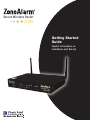
Secure Wireless Router
Z100G
Getting Started
Guide
Helpful Information on
Installation and Set-Up
Thank you for purchasing ZoneAlarm Secure
Wireless Router Z100G, the first complete
security solution for home networks.
®
This Getting Started Guide will help you understand and effectively use ZoneAlarm® Secure Wireless Router
Z100G. We’ve made the product simple to set up and provide you with step-by-step instructions.
Table of Contents
Overview.............................................................................................................................. 3
What do you need in order to begin the installation?........................................................ 3
Section One: Getting Started.............................................................................................. 3
Part 1: Connecting the Antennas.................................................................................... 3
Part 2: Power Up Your ZoneAlarm Secure Wireless Router Z100G.............................. 3
Part 3: Connect Your Network......................................................................................... 4
Part 4: Configure Your PCs.............................................................................................. 5
Section Two: Setup Wizard................................................................................................. 6
Part 1: Starting the Wizard.............................................................................................. 6
Part 2: Connect to the Internet........................................................................................ 7
Part 3: Setting Time and Date....................................................................................... 13
Part 4: Configuring Your Secure Wireless Network...................................................... 14
Part 5: Changing the Product Key................................................................................ 16
Section Three: Subscription Security Services................................................................ 18
Part 1: Activate Your ZoneAlarm® Secure Wireless Router Z100G............................. 18
Part 2: Connecting to a Service Center........................................................................ 19
Section Four: Additional Feature Configuration.............................................................. 22
Part 1: Setting Up Network Antivirus Protection.......................................................... 22
Part 2: Configuring Your Network Security Level......................................................... 24
Part 3: Configuring SmartDefense™ Security Settings................................................. 25
Part 4: Printer Sharing Setup........................................................................................ 27
Section Five: Configure a Computer to Connect to the Wireless Network.................... 34
Section Six: Software Updates and Technical Support................................................... 35
Overview
ZoneAlarm® Secure Wireless Router Z100G is the first comprehensive security solution for home networks.
Developed and supported by SofaWare Technologies, an affiliate of Check Point Software Technologies, the
worldwide leader in securing the Internet, ZoneAlarm® Secure Wireless Router Z100G incorporates the same
powerful Check Point® security technology chosen by 98% of the Fortune 500 companies. It features a firewall, a customizable antivirus gateway, an integrated print server, intrusion prevention, Super G 108 Mbps
speed, extended wireless range, and a high-performance, remote wireless access point.
Package Contents
The ZoneAlarm® Secure Wireless Router Z100G package includes the following:
•Black
ZoneAlarm® Secure
Wireless Router Z100G
• Two black antennas
• Power adapter
• Orange Ethernet cable
• Gray USB extension cable
•Wall-mounting
kit, including two plastic
conical anchors and two crosshead screws
•Getting Started Guide
• Additional documentation CD-ROM
(e.g., User Guide) with 15-day trial version
of ZoneAlarm Internet Security Suite
•End-User License Agreement
What do you need in order to begin the installation?
•A
cable or DSL modem and Internet
connection.
•A computer with a wired NIC (Network
Interface Card) to be used for initial
configuration.
•A
Web browser. Internet Explorer® 5.0
or higher or Mozilla FireFox® 1.0 or
higher are recommended.
•Wired or wireless NIC installed on each
computer you want to connect to the
network.
Section One: Getting Started
Part 1: Connecting the Antennas
• Carefully
screw the two supplied antennas onto the antenna connectors marked ANT1 and ANT2 on the
ZoneAlarm® Secure Wireless Router Z100G rear panel.
•Bend
the antennas at the hinges, so that they point upwards.
Part 2: Power Up Your ZoneAlarm Secure Wireless Router Z100G
• Connect
the power adapter to the PWR port on the ZoneAlarm® Secure Wireless Router Z100G appliance
rear panel, and then plug the adapter into a power outlet.
• The
PWR/SEC LED on the front panel will start flashing, indicating that your ZoneAlarm® Secure Wireless
Router Z100G is now on.
Part 3: Connect Your Network
•Connect
one end of the network cable provided with your ZoneAlarm® Secure Wireless Router Z100G to
the WAN port on the appliance rear panel, and connect the other end to your cable or DSL modem, as
shown in the figure below.
•Make
•The
sure your DSL or cable modem is powered on.
WAN LED will light up, indicating proper connection to your modem.
•Connect
one end of your network cable to one of the four LAN ports, and connect the other end to your
PC. If you have additional PCs or other network devices you wish to connect with a cable, you can connect them to the LAN ports.
•A
corresponding LAN LED will light up, indicating each connected computer.
Part 4: Configure Your PCs
Before continuing, make sure all your PCs are configured correctly.
For Windows® XP Operating Systems:
•Open
the Control Panel window by clicking
choosing Control Panel.
, choosing Settings, and then
•Select
Network and Internet Connections, double click to open.
•Select
Local Area Connection, double click to open.
•Select
Properties.
Select Internet Protocol (TCP/IP).
Select Properties.
Select Obtain an IP address
automatically.
Select Obtain DNS Server address
automatically.
Select OK and then close.
If prompted to restart your PC, click Yes. Restart your DSL or Cable Modem.
Note: The configuration process varies between operating systems. If you are using a Macintosh or another
operating system, please consult the ZoneAlarm Secure Wireless Router Z100G User Guide provided on the
enclosed CD-ROM.
Section Two: Setup Wizard
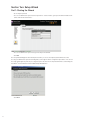
Part 1: Starting the Wizard
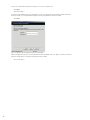
• Go
to http://my.firewall
• Choose
an administrator password. It is important to select a hard to guess password that includes both
letters and numerical characters.
• Choose
• Click
an administrator password. Type in both password fields.
OK.
The setup wizard will appear automatically the first time you access the http://my.firewall interface, after
choosing an administrator password. It will guide you through the basic configuration procedures. You can run
the setup wizard again any time by choosing Setup from the menu in the my.firewall interface, and clicking the
ZoneAlarm® Secure Wireless Router Z100G Setup Wizard button.
• Click
Next.
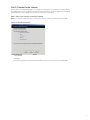
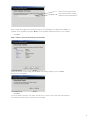
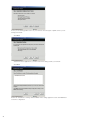
Part 2: Connect to the Internet
The first part of the setup wizard guides you through the configuration of your Internet connection. Before
proceeding, make sure no computers are currently using your Internet connection and that the ZoneAlarm®
Secure Wireless Router Z100G is the only device connected to your modem.
Step 1: Select your Internet connection method.
Note: If you are not certain what type of connection to choose, contact your Internet Service Provider.
Option 1: PPPoE Connection
• Select
• Click
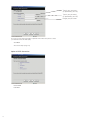
• Fill
PPPoE.
Next.
out the form with the login information provided to you by your Internet Service Provider (ISP).
Type in your username
(as provided by your ISP)
Type in your password
(as provided by your ISP)
Retype your password
If you do not have all the information required to fill out this form, please contact
your Internet Service Provider (ISP).
• Click
Next.
• Proceed
to Step 2 (Page 12).
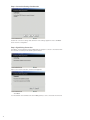
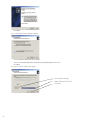
Option 2: PPTP Connection
• Select
• Click
PPTP.
Next.
Fill out the form with the login information provided to you by your Internet Service Provider (ISP).
Type in your username
(as provided by your ISP)
Type in your password
(as provided by your ISP)
Retype your password
Type your Service Name
(as provided by your ISP)
Type the IP address of the
PPTP modem
Type the local IP address
required for accessing
The subnet mask of the
PPTP modem
If you do not have all the information required to fill out this form, please contact your
Internet Service Provider (ISP).
• Click
Next.
• Proceed
to Step 2 (Page 12).
Option 3: Cable Modem Connection
• Select
• Click
•
Cable Modem.
Next.
Proceed to Step 2 (Page 12).
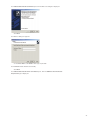
Option 4: Static IP Connection
• Select
• Click
Static IP.
Next.
Fill out the form with the login information provided to you by your Internet Service Provider (ISP).
The static IP address provided to you by your ISP.
Select the subnet mask
that applies to the static IP
address provided to you by
your ISP.
The IP address of the
Default Gateway as provided to you by your ISP.
The Primary DNS Server IP
address.
The Secondary DNS server
IP address (this field is
optional)
If you do not have all the information required to fill out this form, please contact
your Internet Service Provider (ISP).
• Click
Next.
• Proceed
10
to Step 2 (Page 12).
The WINS server IP address
(this field is optional)
Option 5: DHCP (Dynamic IP) connection
•
No further settings are required.
• Select
• Click
DCHP.
Next.
• Proceed
to Step 2 (Page 12).
11
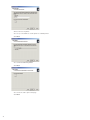
Step 2: Connection Settings Confirmation
Review the connection settings and click Next. If the settings appear incorrect, click Back
and correct the configuration.
Step 3: Establishing Connection
ZoneAlarm® Secure Wireless Router Z100G will now attempt to connect to the Internet with
the selected connectivity method and login information.
Upon a successful connection, a finish screen appears.
• Click
Next.
Your ZoneAlarm® Secure Wireless Router Z100G gateway is now connected to the Internet.
12
Part 3: Setting Time and Date
Setting the correct time and date on your ZoneAlarm® Secure Wireless Router Z100G will ensure the event log
provides you with the correct event time and remote access VPN connections function properly.
Make sure the date and time on your computer are set correctly and then select Your Computer’s Clock.
• Click
Next.
• Click
Next.
13
Part 4: Configuring Your Secure Wireless Network
The setup wizard allows you to configure all the required settings for your wireless connection, including security parameters. For more information on the options available, please see page 97 in the ZoneAlarm® Secure
Wireless Router Z100G User Guide provided on the enclosed CD-ROM.
Step 1: Wireless Network Configuration
Choose Enable Wireless
networking to activate your
wireless network
Type a name for your network, up to 32 characters.
You may use letters and
numeric characters.
For example: “SmithFamily”
Choose your country
Choose 802.11g Super
(11/54/108)
Choose Automatic
• Click
Next.
Step 2: Wireless Security Configuration
• Choose
WPA-Personal.
Note: WPA-Personal is the recommended method of encryption for home and home office wireless networks.
To learn about other wireless encryption methods, please refer to page 98 in the ZoneAlarm Secure Wireless
Router Z100G User Guide provided on the enclosed CD-ROM.
• Click
14
Next.
Enter your pass-phrase here.
Click here to create a randomized pass-phrase automatically.
Select a hard to guess phrase 8-63 characters long. It is recommended you use both letters and digits. For
example: “Live Long and Prosper 1701”. Note: You can use blanks and the pass-phrase is case-sensitive.
• Click
Next.
Step 3: Wireless Connection Settings Confirmation
Review the wireless security settings and click Next. If the settings appear incorrect, click Back
and correct the configuration
• Click
Next.
Your secure wireless network is now active. To learn how to connect your PCs and other network devices
to the wireless network, please see Section Five in this guide.
15
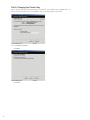
Part 5: Changing the Product Key
Unless otherwise instructed when purchasing your ZoneAlarm® Secure Wireless Router Z100G, there is no
need to change the product key of your appliance, and you may skip this part of the wizard.
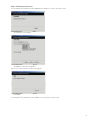
Choose Keep these Settings.
16
• Click
Next.
• Click
Next.
Connecting to a service center allows you to receive software and security updates as well as value-added
security services. If the service center login information was already supplied to you by your Internet Service
Provider or Network Security Service Provider, please proceed to Connecting to a Service Center, Section
Three, Part 2 in this guide. Otherwise, deselect Connect to a Service Center.
• Click
Next.
• Click
Finish.
Congratulations!
You have completed the basic installation and configuration process of your ZoneAlarm® Secure Wireless
Router Z100G. It is now ready to securely connect your PCs to the Internet.
17
Section Three: Subscription Security Services
In order to receive comprehensive security services for your ZoneAlarm® Secure Wireless Router Z100G such
as antivirus and security updates, you need to activate your subscription and connect to a service center.
Part 1: Activate Your ZoneAlarm® Secure Wireless Router Z100G
In case the value-added services are provided to you by your Internet Service Provider or Network Security
Service Provider, proceed to Step 2 (page 19).
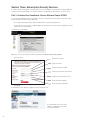
• Go
to http://my.firewall and log in with the administrator username and password.
• In
the welcome screen, locate your MAC address and your purchase code. These are required in order to
activate your free subscription.
To activate your subscription:
Make sure you are connected to the Internet and click on Activate Your Free Subscription.
• Fill
out the form.
Type your full name.
Type your email.
Type your phone number.
Choose your country from the list.
Choose your state from the list.
Enter your MAC address.
Enter your purchase code.
• Click
Send.
A confirmation screen appears to approve the form has been sent.
An e-mail will be sent to the e-mail
address you filled in the form, with
your login information.
18
Part 2: Connecting to a Service Center
Upon receiving your service center login information, proceed with your service center connection.
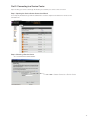
Step 1: Opening the Service Center Connection Wizard
Go to http://my.firewall and log in with the administrator username and password and click on Services in the
left hand menu.
• Click
Connect.
Step 2: Choosing a Service Center
• Choose
Connect to a Service Center.
Choose Connect to a Service Center
19
In case you followed the instructions in Step 1, choose zone.sofaware.com.
• Click
Next.
• Proceed
to Step 3.
In case the value-added services are provided to you by your Internet Service Provider or Network Security
Service Provider, choose Specified IP and type the IP as provided by the Service Provider.
• Click
Next.
Type your gateway ID and registration key, and click Next.
If this form appears and you do not have all the information required to fill out it, please contact your Internet
Service Provider (ISP) or your Network Security Service Provider.
• Proceed
20
to Step 3.
Step 3: Establishing Connection
Your ZoneAlarm® Secure Wireless Router Z100G will now attempt to connect to the service center.
• A
confirmation screen appears.
• Click
Next to confirm the configuration.
Upon a successful connection, a finish screen appears.
• Click
Finish.
Your ZoneAlarm® Secure Wireless Router Z100G is now connected to a service center.
21
Section Four: Additional Feature Configuration
Part 1: Setting Up Network Antivirus Protection
Note: This option is available once your ZoneAlarm® Secure Wireless Router Z100G is connected to a service center
and subscribed to antivirus updates. To connect to the service center, please see Section Three of this guide.
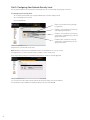
Activating Antivirus Protection:
• Go
to http://my.firewall and log in with the administrator username and password.
Choose Antivirus from the left-hand
side menu.
• Drag
the lever to On to activate the antivirus.
Antivirus protection is now enabled on your ZoneAlarm® Secure Wireless Router Z100G.
The ZoneAlarm® Secure Wireless Router Z100G network antivirus includes a flexible mechanism that allows you
to define exactly which traffic should be scanned, by specifying the protocol, ports, and source and destination
IP addresses.
The standard antivirus policy is suitable if you wish to scan incoming and outgoing e-mail traffic only. If you wish
to scan additional traffic, you need to define a custom antivirus policy rule.
Creating Additional Antivirus Rules:
In the Antivirus menu, choose the Policy tab.
• Click
on Add Rule.
Scan and block viruses in incoming or outgoing connections.
Pass traffic in incoming or outgoing connections without scanning.
Choose the action to be performed with incoming or outgoing connections.
• Click
22
Next.
Applies the rule on all traffic.
Applies the rule on a standard
type of traffic (such as web traffic).
Choose a service from the list.
Applies the rule on a custom type
traffic. Choose a protocol from the
list and insert port range.
Choose the type of traffic to apply the rule on. The rule can be applied on all traffic, standard type of traffic
(such as web traffic), or on a custom type of service.
• Click
Next.
Select connection source.
Select connection destination.
Select data direction.
Choose the destination and source of the traffic the rule will be applied on.
• Click
Next.
Review the description of the rule you created and click Finish. If the description of the rule appears incorrect,
click Back and correct the configuration.
To learn more about the ZoneAlarm® Secure Wireless Router Z100G antivirus and about antivirus policy configuration, please refer to page 199 in the ZoneAlarm® Secure Wireless Router Z100G User Guide provided on
the enclosed CD-ROM.
23
Part 2: Configuring Your Network Security Level
The security level defines the security policy the firewall enforces for all incoming and outgoing connections.
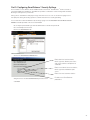
To configure your security level
• Go
to http://my.firewall and log in using the administrator username and password.
• Choose
• Click
Security from the menu.
on Firewall tab.
Blocks all the traffic passing through
this gateway.
Enforces strict control on all incoming
and outgoing connections.
Enforces strict control on all incoming
connections, while permitting safe outgoing connections.
Enforces basic control on incoming
connections, while permitting all outgoing connections.
Drag the lever to the desired security level.
Note: Medium security level is the default level and is recommended for most cases. Leave it
unchanged unless you have a specific need for a higher or lower security level.
A message notifying change in the firewall security policy is saved successfully appeared.
You can learn more about what each level means by referring to page 138 in the ZoneAlarm®
Secure Wireless Router Z100G User Guide provided on the enclosed CD-ROM.
24
Part 3: Configuring SmartDefense™ Security Settings
The ZoneAlarm® Secure Wireless Router Z100G includes Check Point® SmartDefense™ Services, based on
Check Point Application Intelligence. SmartDefense provides a combination of attack safeguards and attackblocking tools that protect your network.
Among others, SmartDefense aids proper usage of Internet resources, such as, instant messaging, Peer-toPeer (P2P) file sharing, file-sharing operations, and File Transfer Protocol (FTP) uploading.
You can learn more about SmartDefense by referring to page 151 in the ZoneAlarm Secure Wireless Router
Z100G User Guide provided on the enclosed CD-ROM.
•Go to http://my.firewall and log in with the administrator username and password.
•Choose Security from the menu.
•Click on the SmartDefense tab.
• Click
on the SmartDefense Wizard button.
Blocks denial of service attacks,
blocks spyware, detects port scans,
and strictly enforces compliance to
standards.
Blocks most denial of service attacks,
blocks spyware and detects port
scans.
Blocks the most common attacks.
• Drag
the lever to the desired SmartDefense protection level.
• Click
Next.
Disables most SmartDefense
protections.
25
In case you are running public servers on your network, select the types of public servers you are
running from the list.
• Click
Next.
• Select
• Click
from the list applications you want to block from being used in your network.
Next.
Review the SmartDefense settings and click Finish. If the settings appear incorrect, click Back and
correct the configuration.
26
Part 4: Printer Sharing Setup
ZoneAlarm® Secure Wireless Router Z100G includes a built-in print server, enabling you to connect USBbased printers to the appliance and share them across the network (up to four when using computers that
use Windows 2000/XP operating system, and one when using computers with a MAC OS X operating
system). The ZoneAlarm® Secure Wireless Router Z100G automatically detects printers as they are plugged
in, and they immediately become available for printing. Usually, no special configuration is required on the
ZoneAlarm® Secure Wireless Router Z100G.
To configure a printer in your network:
Connect the printer:
•Connect
one end of a USB cable to a USB port at the back of the unit. If needed, you can
use the provided USB extension cord.
•Connect
•Turn
the other end to your printer.
the printer on.
•Go
to http://my.firewall and log in with the administrator username and password. Click Setup
in the left hand menu, and select the Printers tab in the top menu.
If the ZoneAlarm® Secure Wireless Router Z100G detected the printer, the printer is listed on the page.
If the printer is not listed, ensure that the printer is properly connected, and then click Refresh to refresh
the printers list.
Note the port
number allocated to
the printer.
The port number appears in the Printer Server TCP Port field. This port number will be used in the
printer configuration on your PC.
Configuring Your PCs to Use the Printer:
For Windows 2000/XP Operating Systems:
• Open
the Control Panel window by clicking
• Click
Printers and Faxes. The Printers and Faxes window opens.
• Right-click
and then choosing Control Panel.
in the window, and click Add Printer in the popup menu.
The Add Printer Wizard opens with the Welcome dialog box displayed.
27
• Click
Next.
The Local or Network Printer dialog box appears.
• Click
Local printer attached to this computer.
• Deselect
• Click
the Automatically detect and install my Plug and Play printer check box.
Next.
The Select a Printer Port dialog box appears.
Click Create a new port.
Select Standard TCP/IP Port.
Click Next.
28
The Add Standard TCP/IP Port Wizard opens with the Welcome dialog box displayed.
• Click
Next.
The Add Port dialog box appears.
•
In the Printer Name or IP Address field, type “my.firewall”.
The Port Name field is filled in automatically.
• Click
Next.
The Add Standard TCP/IP Printer Port Wizard opens, with the Additional Port Information
Required dialog box displayed.
29
• Choose
• Click
Custom.
Settings.
The Configure Standard TCP/IP Port Monitor dialog box opens.
In the Port Number field, type the printer’s port number, as shown in the Printers page in the ZoneAlarm®
Secure Wireless Router Z100G interface. See illustration on Page 27 of this guide for details.
• In
the Protocol area, select Raw.
• Click
OK.
The Add Standard TCP/IP Printer Port Wizard reappears.
30
• Click
Next.
• Click
Finish.
Select your printer manufacturer and model from the list. If your printer does not appear in the lists, insert the
CD supplied with your printer in the computer CD-ROM drive, and click Have Disk.
• Click
Next.
31
• Enter
a name for the printer.
• Choose
• Click
• Choose
• Click
32
Do not share this printer.
Next.
• Choose
• Click
if you would like to use this printer as a default printer.
Next.
Yes in order to print a test page.
Next.
• Review
the printer settings and click Finish. If the settings appear incorrect, click Back and
correct the configuration.
Now you need to do the following:
• The
printer appears in the Printers and Faxes window.
• Right-click
the printer and click Properties in the popup menu.
The printer’s Properties dialog box opens.
• Go
• In
to the Ports tab.
the list box, select the port you added. The port’s name is my.firewall.
• Click
OK.
Network printer setup is done.
33
Section Five: Configure a Computer
to Connect to the Wireless Network
Before continuing, make sure the PC you want to connect to the wireless network is configured correctly, and
has a wireless Network Access Card installed.
For Windows XP Operating Systems:
• Once
a wireless network is detected, a notifying icon will appear in the system tray in the lower right area
of the screen.
• Right-click
the wireless network icon in the system tray area in the lower right area of your screen, and
then click View Available Wireless Networks.
• The
Wireless Network Connection window appears and displays your wireless network listed with the
SSID you chose in the procedure described in Part 4 of Section Two in this guide.
• Choose
your network, and then click Connect in the lower right corner.
If you do not see your network, click Refresh network list in the upper left corner.
34
A connection window will pop up.
Type here the personal security
key you typed in the wireless
network configuration procedure,
Part 4 of Section Two in this guide.
• Click
• Wait
Connect.
Re-type the personal
security key.
while connects to the wireless network.
• Wireless
network connection screen will now indecate the connection has been established.
The wireless network connection icon in your system tray in the lower right area of the screen will change to
indicating you are connected.
Note: The settings are automatically saved in the computer. In the future, you should not have to repeat this
procedure for this computer.
Section Six: Software Updates and Technical Support
For technical support, please go to www.zonelabs.com/support. Free basic online installation support provided for 90 days from the date of installation. Optional premium support available.
Free 90 days of comprehensive security services is included. Security threats are on the rise. It is important
to keep your appliance’s security software up-to-date with the latest security releases. You can also enjoy a
wealth of add-on security services in simple, flexible packages delivered to your appliance transparently and
regularly for the ultimate Internet experience. To learn more, go to: www.zonelabs.com/z100g
35
© 2003–2006 Check Point Software Technologies Ltd. All rights reserved. Check Point, Check Point logo, DefenseNet, IMsecure, OSFirewall, Safe@
Office, SmartDefense, SmartDefense Advisor, TrueVector, ZoneAlarm, ZoneAlarm Anti-Spyware, ZoneAlarm Antivirus, ZoneAlarm Internet Security Suite,
ZoneAlarm Pro, ZoneAlarm Secure Wireless Router, Zone Labs, and the Zone Labs logo are trademarks or registered trademarks of Check Point Software
Technologies Ltd. or its affiliates. All other product names mentioned herein are trademarks or registered trademarks of their respective owners. The
products described in this document are protected by U.S. Patent No. 5,606,668, 5,835,726, 6,496,935, 6,873,988, and 6,850,943 and may be protected by
other U.S. Patents, foreign patents, or pending applications.
US Headquarters:
800 Bridge Parkway · Redwood City, CA 94065
Tel (650) 628 2000 · Fax (650) 654 4233
www.zonealarm.com
P/N 702238
36