1
Features
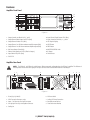
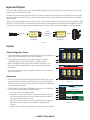
Amplifier Front Panel
1
A
CXDQ
2
3
4
5
6
7
8
9
10
11
MUTE
B
OUTPUT
MUTE
NETWORK
AMPLIFIER
C
MUTE
12
D
NEXT
MUTE
GAIN
13
LIM
-10
PREV
14
15
ID
16
17
-20
SEL
SEL
SEL
SEL
CLIP
SIG
2 INPUT 3
1
FAULT
4
— Figure 2 —
1. Output channels are labeled A, B, C, and D
10. Input Channel Signal-Present LEDs (Blue)
2. Output Channel Mute Buttons and LEDs (Red)
11. Input channels are labeled 1, 2, 3, and 4
3. Output Channel Limiter LEDs (Red)
12. LCD Graphic Display
4. Output Channel -10 dB below maximum amplifier output (Blue)
13. NEXT Button
5. Output Channel -20 dB below maximum amplifier output (Blue)
14. PREV Button
6. Soft Power Button (Green/Red)
15. MASTER CONTROL Knob
7. Channel Select Buttons and LEDs (Blue for Output)
16. ID Button
8. Input Channel Clip LEDs (Red)
17. Pinhole Reset
9. FAULT LED
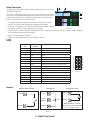
Amplifier Rear Panel
NOTE: The CXD4.3Q , and CXD4.5Q models have a different rear panel configuration than the CXD4.2Q amplifier. The difference is
that the position of the fan and the eight-pin Euro-style connector and associated information are interchanged.
1
2
LAN A LAN B
3
ROUTABLE INPUTS
1
2
4
3
4
+
+
CH B
+
CH C
+
CH D
CH A
1
2
3
4
5
6
7
8
9
10
11
12
13
14
15
16
5
CH AB
T1+ T2T3+ T4-
T1
T2
CH CD
T5+ T6T7+ T8-
T3
T4
T5
CH A+B
T1+ T3-
T6
CH C+D
T5+ T7-
T7
T8
CH AB+CD
T1+ T5T3+ T7-
CH ABC
T1+ T2T3+ T4T5+ T6CH ABCD
T1+ T2T3+ T4T5+ T6T7+ T8-
— Figure 3 —
1. RJ-45 Q-Sys Q-LAN A/B
6. AC Power Switch
2. GPIO Euro-style Connector, 16-pin
7. Locking IEC Power Connection
3. Inputs - Four three-pin Euro-style Connectors
8. Rear Rack-mount Bracket
4. One eight-pin Euro-style Loudspeaker Connector
9. Front Rack-mount Brackets
5. Cooling fan
5 (DRAFT 2014/08/09)
6
7
8
9