1
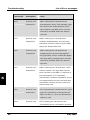
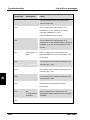
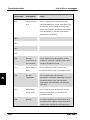
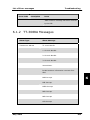
Operation Menu System - Super User You may also edit the LES names in the “Default LES” list. Press to start editing the selected name. You may clear the name by pressing . An Allowed LES list can be selected under the Service User menu. If an Allowed LES list exists, only the LES's in this list can be selected under Default and Preferred LES. An Allowed LES list contains all available LES operators in the selected ocean region. Those operators marked with * can be used as Default LES operators and thus appears in the Default LES list above. If all LES operators are allowed and can be used there are no markings. As there are many operators, you can use PreferredLES to make selections easier. The Preferred LES list can be used to indicate in which order LES operators should appear on the Default LES list. This is done by pressing for each LES intended to be on the list and in the order they should appear in the Default LES list. Press to update the preferred LES list. To remove a LES from the list, press and then to update the list. 4 The Reset LES command reset all the LES names to default names. 4.4.24 Additional Features Mail Box RJ11 Setup LES Config Add. Features STU PIN _ STU Disabled STU Setup 62 May 2005