1
Autodesk
Network Licensing Guide
February 2006
Copyright© 2006 Autodesk, Inc.
All Rights Reserved
This publication, or parts thereof, may not be reproduced in any form, by any method, for any purpose.
AUTODESK, INC., MAKES NO WARRANTY, EITHER EXPRESS OR IMPLIED, INCLUDING BUT NOT LIMITED
TO ANY IMPLIED WARRANTIES OF MERCHANTABILITY OR FITNESS FOR A PARTICULAR PURPOSE
REGARDING THESE MATERIALS, AND MAKES SUCH MATERIALS AVAILABLE SOLELY ON AN "AS-IS"
BASIS.
IN NO EVENT SHALL AUTODESK, INC., BE LIABLE TO ANYONE FOR SPECIAL, COLLATERAL, INCIDENTAL,
OR CONSEQUENTIAL DAMAGES IN CONNECTION WITH OR ARISING OUT OF PURCHASE OR USE OF
THESE MATERIALS. THE SOLE AND EXCLUSIVE LIABILITY TO AUTODESK, INC., REGARDLESS OF THE
FORM OF ACTION, SHALL NOT EXCEED THE PURCHASE PRICE OF THE MATERIALS DESCRIBED HEREIN.
Autodesk, Inc., reserves the right to revise and improve its products as it sees fit. This publication describes the state of the
product at the time of publication, and may not reflect the product at all times in the future.
Autodesk Trademarks
The following are registered trademarks of Autodesk, Inc., in the USA and other countries: 3D Studio, 3D Studio MAX, 3D
Studio VIZ, 3ds Max, ActiveShapes, Actrix, ADI, AEC-X, ATC, AUGI, AutoCAD, AutoCAD LT, Autodesk, Autodesk Envision,
Autodesk Inventor, Autodesk Map, Autodesk MapGuide, Autodesk Streamline, Autodesk WalkThrough, Autodesk World,
AutoLISP, AutoSketch, Backdraft, Bringing information down to earth, Buzzsaw, CAD Overlay, Character Studio, Cinepak,
Cinepak (logo), Civil 3D, Cleaner, Codec Central, Combustion, Design Your World, Design Your World (logo), EditDV, Education
by Design, Gmax, Heidi, HOOPS, i-drop, IntroDV, Lustre, Mechanical Desktop, ObjectARX, Powered with Autodesk Technology
(logo), ProjectPoint, RadioRay, Reactor, Revit, Visual, Visual Construction, Visual Drainage, Visual Hydro, Visual Landscape,
Visual Roads, Visual Survey, Visual Toolbox, Visual Tugboat, Visual LISP, Volo, WHIP!, and WHIP! (logo).
The following are trademarks of Autodesk, Inc., in the USA and other countries: AutoCAD Learning Assistance, AutoCAD
Simulator, AutoCAD SQL Extension, AutoCAD SQL Interface, AutoSnap, AutoTrack, Built with ObjectARX (logo), Burn, CAiCE,
Cinestream, Cleaner Central, ClearScale, Colour Warper, Content Explorer, Dancing Baby (image), DesignCenter, Design
Doctor, Designer's Toolkit, DesignKids, DesignProf, DesignServer, Design Web Format, DWF, DWFit, DWG Linking, DWG
TrueConvert, DWG TrueView, DXF, Extending the Design Team, GDX Driver, Gmax (logo), Gmax ready (logo), Heads-up
Design, Incinerator, jobnet, LocationLogic, ObjectDBX, Plasma, PolarSnap, Productstream, RealDWG, Real-time Roto, Render
Queue, Topobase, Toxik, Visual Bridge, Visual Syllabus, and Wiretap.
Autodesk Canada Co. Trademarks
The following are registered trademarks of Autodesk Canada Co. in the USA and/or Canada and other countries: Discreet,
Fire, Flame, Flint, Flint RT, Frost, Glass, Inferno, MountStone, Riot, River, Smoke, Sparks, Stone, Stream, Vapour, Wire.
The following are trademarks of Autodesk Canada Co., in the USA, Canada, and/or other countries: Backburner, Multi-Master
Editing.
Third Party Trademarks
All other brand names, product names or trademarks belong to their respective holders.
Third Party Software Program Credits
ACIS Copyright© 1989-2001 Spatial Corp. Portions Copyright© 2002 Autodesk, Inc.
AnswerWorks 4.0© 1997-2003 WexTech Systems, Inc. Portions of this software© Vantage-Knexys. All rights reserved.
Copyright© 1997 Microsoft Corporation. All rights reserved.
Copyright© 1988-1997 Sam Leffler.
Copyright© 1991-1997 Silicon Graphics, Inc.
AutoCAD® 2007 and AutoCAD LT® 2007 are produced under a license of data derived from DIC Color Guide® from Dainippon
Ink and Chemicals, Inc. Copyright© Dainippon Ink and Chemicals, Inc. All rights reserved. DIC and DIC Color Guide are
registered trademarks of Dainippon Ink and Chemicals, Inc.
International CorrectSpell™ Spelling Correction System© 1995 by Lernout & Hauspie Speech Products, N.V. All rights reserved.
InstallShield™ 3.0. Copyright© 1997 InstallShield Software Corporation. All rights reserved.
Macromedia® and Flash® are registered trademarks or trademarks of Adobe Systems Incorporated in the United States or
other countries.
PANTONE® Colors displayed in the software application or in the user documentation may not match PANTONE-identified
standards. Consult current PANTONE Color Publications for accurate color.
PANTONE® and other Pantone, Inc. trademarks are the property of Pantone, Inc.© Pantone, Inc., 2002
Pantone, Inc. is the copyright owner of color data and/or software which are licensed to Autodesk, Inc., to distribute for use
only in combination with certain Autodesk software products. PANTONE Color Data and/or Software shall not be copied onto
another disk or into memory unless as part of the execution of this Autodesk software product.
Portions Copyright© 1991-1996 Arthur D. Applegate. All rights reserved.
Portions of this software are based on the work of the Independent JPEG Group.
RAL DESIGN© RAL, Sankt Augustin, 2002
RAL CLASSIC© RAL, Sankt Augustin, 2002
Representation of the RAL Colors is done with the approval of RAL Deutsches Institut für Gütesicherung und Kennzeichnung
e.V. (RAL German Institute for Quality Assurance and Certification, re. Assoc.), D-53757 Sankt Augustin.
Typefaces from the Bitstream® typeface library copyright 1992.
Typefaces from Payne Loving Trust© 1996. All rights reserved.
Printed manual and help produced with Idiom WorldServer™.
GOVERNMENT USE
Use, duplication, or disclosure by the U.S. Government is subject to restrictions as set forth in FAR 12.212 (Commercial
Computer Software-Restricted Rights) and DFAR 227.7202 (Rights in Technical Data and Computer Software), as applicable.
1 2 3 4 5 6 7 8 9 10
Contents
Chapter 1
Quick Start to Autodesk Network Licensing . . . . . . . . . . . . 1
How to Install the Network License Manager . . . . . . . . . .
How to Install and Use the Network License Activation Utility .
How to Configure a License Server . . . . . . . . . . . . . . . .
How to Install and Use SAMreport-Lite (Optional) . . . . . . .
Chapter 2
.
.
.
.
.
.
.
.
.
.
.
.
.
.
.
.
.2
.2
.5
.6
Introduction to Autodesk Network Licensing . . . . . . . . . . . 7
Network License Manager . . . . . . . . . . . . . . . . . . . . . . . . . 8
System Requirements for the Network License Manager . . . . . . 8
Network License Activation Utility . . . . . . . . . . . . . . . . . . . . 8
FLEXlm Configuration Tools . . . . . . . . . . . . . . . . . . . . . . . . 9
Update FLEXlm from a Previous Version . . . . . . . . . . . . . . 9
Utilities for License Server Management . . . . . . . . . . . . . . 10
The Options File . . . . . . . . . . . . . . . . . . . . . . . . . . 11
SAMreport-Lite License Reporting Tool . . . . . . . . . . . . . . . . . . 11
Chapter 3
Plan Your Network Licensing . . . . . . . . . . . . . . . . . . . 13
Plan Your License Server Configuration .
Single License Server Model . . . . .
Distributed License Server Model . .
Redundant License Server Model . .
Learn About Your License . . . . . . . . .
License Operation and Availability .
.
.
.
.
.
.
.
.
.
.
.
.
.
.
.
.
.
.
.
.
.
.
.
.
.
.
.
.
.
.
.
.
.
.
.
.
.
.
.
.
.
.
.
.
.
.
.
.
.
.
.
.
.
.
.
.
.
.
.
.
.
.
.
.
.
.
.
.
.
.
.
.
.
.
.
.
.
.
.
.
.
.
.
.
.
.
.
.
.
.
. 14
. 14
. 14
. 15
. 16
. 16
v
License Files . . . . . . . . . . . . . . . . . . . . . . . . . . .
License File Examples . . . . . . . . . . . . . . . . . . . . . .
Example of a License File Not Specific to a Product . . .
Example of a License File for a Single or Distributed
Server . . . . . . . . . . . . . . . . . . . . . . . . . .
Example of a License File for a Redundant Server . . . .
Example of a License File for Combined Autodesk Product
Versions . . . . . . . . . . . . . . . . . . . . . . . . .
Example of Additional Parameters in a License File . . .
Package License File Examples . . . . . . . . . . . . . . . . .
Example of a Package License File for a Single Server . .
Example of a Package License File for a Distributed
Server . . . . . . . . . . . . . . . . . . . . . . . . . .
Example of a Package License File for a Redundant
Server . . . . . . . . . . . . . . . . . . . . . . . . . .
Example of a Package License File for Combined Autodesk
Product Versions . . . . . . . . . . . . . . . . . . . .
License Types and Behaviors . . . . . . . . . . . . . . . . . .
Heartbeat Signal . . . . . . . . . . . . . . . . . . . . . . . . .
Chapter 4
. . 17
. . 19
. . 20
. . 20
. . 20
.
.
.
.
. 21
. 22
. 22
. 22
. . 23
. . 24
. . 24
. . 26
. . 26
Network Licensing Tools . . . . . . . . . . . . . . . . . . . . . 27
Install the Autodesk Network License Manager . . . .
Install the Network License Activation Utility . . . . .
Use the Network License Activation Utility . . . . . .
Obtain the Server Host Name and Host ID Manually .
Configure the License Server . . . . . . . . . . . . . .
Stop and Restart the License Server . . . . . . . . . . .
Set Up and Use an Options File . . . . . . . . . . . . .
Create a Report Log . . . . . . . . . . . . . . . .
Configure License Borrowing . . . . . . . . . . .
Set Up License Timeout . . . . . . . . . . . . . .
Uninstall the Network License Manager . . . . . . . .
.
.
.
.
.
.
.
.
.
.
.
.
.
.
.
.
.
.
.
.
.
.
.
.
.
.
.
.
.
.
.
.
.
.
.
.
.
.
.
.
.
.
.
.
.
.
.
.
.
.
.
.
.
.
.
.
.
.
.
.
.
.
.
.
.
.
.
.
.
.
.
.
.
.
.
.
.
.
.
.
.
.
.
.
.
.
.
.
. 28
. 29
. 29
. 32
. 33
. 34
. 35
. 36
. 37
. 38
. 38
Glossary . . . . . . . . . . . . . . . . . . . . . . . . . . . . . . 41
Index . . . . . . . . . . . . . . . . . . . . . . . . . . . . . . . 45
vi | Contents
Quick Start to Autodesk
Network Licensing
1
Setting up network licenses for an Autodesk product requires
In this chapter
careful planning and execution. This section gives you quick,
■ How to Install the
step-by-step instructions about how to set up a network
licensed environment, and assumes that you are familiar with
the terminology and processes required to successfully set up
Network License
Manager
■ How to Install and Use
the Network License
Activation Utility
■ How to Configure a
an Autodesk product to run on a network. If you are not
familiar with network licensing, please read the entire Network
Licensing Guide for further details before you attempt to set up
License Server
■ How to Install and Use
SAMreport-Lite
(Optional)
a network license server.
1
How to Install the Network License Manager
The Network License Manager is used to configure and manage the license
servers.
To install your Network License Manager
1 In the Media Browser, click the Install tab.
2 On the Install tab, click Network Deployment.
3 Under Install the Network License Components, click Network License
Manager.
4 On the Autodesk Network License Manager Setup page, click Next.
5 On the License Agreement page, read the license agreement and click I
Accept, and then click Next.
NOTE If you do not agree to the terms of the license, click Cancel to cancel
the installation.
6 On the Destination Folder page, either accept the default folder or click
Browse to specify a different location. If you enter a path that does not
exist, a new folder is created using the name and location you provide.
Click Next.
WARNING Do not install the Network License Manager on a remote drive.
When you install the Network License Manager files, you must provide a
path to a local drive. You must specify the drive letter; the universal naming
convention (UNC) is not supported.
7 On the Ready to Install the Application page, click Next to install the
Network License Manager.
8 Click Finish.
How to Install and Use the Network License
Activation Utility
With the Network License Activation utility, you can obtain licenses over the
Internet, which saves time and effort in setting up a network licensed version
of an Autodesk product; in addition, you can register your product, get
2 | Chapter 1 Quick Start to Autodesk Network Licensing
automated support for email if you cannot obtain a license over the Internet,
and save and migrate license files automatically.
To install the Network License Activation utility
1 In the Media Browser, click the Install tab.
2 On the Install tab, click Network Deployment.
3 Under Install the Network License Components, click Network License
Activation Utility.
4 On the [Autodesk product name] Network License Activation Setup page,
click Next.
5 On the License Agreement page, read the license agreement and click I
Accept. Click Next.
NOTE If you do not agree to the terms of the license, click Cancel to cancel
the installation.
6 On the Destination Folder page, either accept the default folder or click
Browse to specify a different location. If you enter a path that does not
exist, a new folder is created using the name and location you provide.
Click Next.
7 On the Ready to Install the Application page, click Next to install the
Network Activation utility.
8 Click Finish.
To use the Network License Activation utility
1 Click Start menu (Windows) ➤ All Programs (or Programs) ➤ Autodesk
➤ Network License Manager ➤ [Autodesk product name] Network License
Activation Utility.
2 On the Obtain a Network License page, review how this utility works
and the requirements for using it. Click Next.
3 On the Server Information page, enter the product serial number.
NOTE If you are modifying an existing license file or obtaining a new license
for an existing product, your previously entered information might be
displayed. Make sure that the serial number that is displayed is the one you
want to license. If it is not, enter the correct product serial number.
How to Install and Use the Network License Activation Utility | 3
4 In the License Server Model section, click a license server model. For
more information about each license server model, click the ? button.
5 In the Server Host Name box, enter a server host name or click the [...]
button to locate the name of each server you plan to use.
6 In the Host ID box, for each server host name you entered in the previous
step, click Lookup to have the utility automatically locate the host ID
for the server, or enter the host ID manually.
NOTE If your server has more than one network adapter, select the one that
that corresponds to a physical network adapter. To determine which adapters
are physical, enter ipconfig /all at a Windows command prompt and view
the Description field above each physical address. If there is more than one
physical network adapter, you can use any one of them, as long as it was
listed when you ran ipconfig /all. Logical devices such as VPN adapters, PPP
adapters, and modems may be listed but are not usable for licensing.
7 If you chose Distributed Server in step 4, the Seats box is displayed. In
the Seats box, enter the number of seats for each license server. Click
Next.
8 On the Confirm Server Information page, review the server information
you entered. Click Next.
9 If the Register and License Your Autodesk Product page is displayed, do
all of the following. Click Next.
■ In the This Product Is To Be Registered To option, select Company or
Individual.
■ In the Select Country or Region section, select your country or region
of residence.
■ In the Is This an Upgrade section, select Yes or No.
10 If the Registration Information page is displayed, enter your registration
information. Click Next.
11 If the Confirm Information page is displayed, review your registration
information. Click Next.
12 If the Connecting page is displayed, click Next to connect to the Internet
to obtain your network license.
13 On the Licenses Received page, in the Save License File for [computer
name] dialog box, enter the location where you want to save your license
file, or click Browse to navigate to the location.
4 | Chapter 1 Quick Start to Autodesk Network Licensing
NOTE It is recommended that you save your license file to the same location
where you installed the Network License Manager.
14 If you have an existing license file from another Autodesk product, select
one of the following options:
■ Insert the New License Information Into It. Adds the new
license information into the existing license file.
■ Overwrite the Existing License File. Replaces the entire contents
of the existing license file with the new license information. Select
this option only if you no longer require any part of the existing license
file contents.
15 Click Next.
16 On the License Activation Successful page, click Print to save a printed
copy of the license information, or click Done to complete the transaction
and exit the Network Activation utility.
How to Configure a License Server
You configure a license server so that you can manage the Autodesk product
licenses you received when you ran the Network License Activation utility.
Configure the license server with the lmtools.exe utility.
To configure your license server
1 Click Start menu (Windows) ➤ All Programs (or Programs) ➤ Autodesk
➤ Autodesk Network License Manager ➤ LMTOOLS.
2 In the Lmtools program, on the Service/License File tab, select the
Configure Using Services option.
3 Click the Config Services tab.
4 On the Config Services tab, in the Service Name list, select a service name
or do one of the following:
■ If a service name is selected, verify that it is the one you want to use
to manage licenses.
■ If no service name exists, enter the service name you want to use to
manage licenses.
How to Configure a License Server | 5
NOTE If you have more than one software vendor using FLEXlm® for license
management, the Service Name list contains more than one option.
5 In the Path to Lmgrd.exe File box, enter the path to the Network License
Manager daemon (lmgrd.exe), or click Browse to locate the file.
By default, this daemon is installed in the Program Files\Autodesk Network
License Manager folder.
6 In the Path to the License File box, enter the path to your license file,
or click Browse to locate the file.
7 In the Path to the Debug Log File box, enter a path to create a debug
log, or click Browse to locate an existing log file.
8 To run lmgrd.exe as a service, select Use Services.
9 To automatically start lmgrd.exe when the system starts, select Start Server
at Power Up.
10 Click Save Service to save the new configuration under the service name
you selected in step 4. Then click Yes.
11 On the Start/Stop/Reread tab, do one of the following:
■ If a service has not yet been defined for Autodesk, click Start Server
to start the license server.
■ If a service for Autodesk is already defined and running, click ReRead
to refresh the Network License Manager with any changes made to
the license file or Options file.
The license server starts running and is ready to respond to client
requests.
12 Close lmtools.exe.
How to Install and Use SAMreport-Lite
(Optional)
SAMreport-Lite is a reporting tool that helps you track network license usage.
With SAMreport-Lite technology from Macrovision Corporation, you can
monitor client usage for all software that uses FLEXlm® to manage network
licenses.
To learn more about installing and using SAMreport-Lite, see the SAMreport-Lite
User's Guide, which is located in your Autodesk product's Help system or on
the Documentation tab of the Media Browser.
6 | Chapter 1 Quick Start to Autodesk Network Licensing
Introduction to Autodesk
Network Licensing
2
Autodesk Network licensing tools include the Network License
In this chapter
Manager, the Network License Activation utility, the FLEXlm
■ Network License
Manager
configuration tools, and SAMreport-Lite. Each tool is described
in the sections that follow.
■ Network License
Activation Utility
■ FLEXlm Configuration
Tools
■ SAMreport-Lite License
Reporting Tool
7
Network License Manager
You use the Network License Manager as part of a network installation and
deployment of an Autodesk® product. The Network License Manager works
with the Deployment wizard to install your Autodesk product and manage
licenses from a network. The Network License Manager is used to configure
and manage the license servers. With the Deployment wizard, you set up a
deployment of an Autodesk product on a network.
For more information about deploying an Autodesk product from a network
location, see the Network Administrator's Guide, located in the Autodesk product
Media Browser or in your product's Help system.
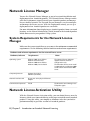
System Requirements for the Network License
Manager
Make sure that your network license server meets the minimum recommended
requirements. See the following table for hardware and software requirements.
Hardware and software requirements for the network license server
Hardware/software
Requirement
Operating system
Windows 2003 Server Edition
Windows XP Professional
Windows 2000 Server Edition
Windows 2000, Service Pack 4
Computer/processor
Pentium III or higher
450 Mhz (minimum)
Network interface card
At least one active physical Ethernet
adaptor
Communication protocol
TCP/IP
Notes
The Network License Manager
supports Ethernet network
configurations only.
The redundant license server model
is supported only on Windows 2000
Server Edition and Windows 2003
Server.
The Network License Manager uses
TCP packet types.
Network License Activation Utility
With the Network License Activation utility, you can obtain licenses over the
Internet, which saves time and effort in setting up a network licensed Autodesk
product. Using this utility, you simplify or automate tasks that you had to
perform manually in previous versions of Autodesk products.
8 | Chapter 2 Introduction to Autodesk Network Licensing
In addition, the utility registers your product, provides automated support for
email if you cannot obtain a license over the Internet, and saves and migrates
license files automatically so that you don't have to.
NOTE It is recommended that you use the Network License Activation utility to
obtain your license file. However, if you are unable to connect to the Internet to
obtain a license file, see “Obtain the Server Host Name and Host ID Manually” on
page 32.
FLEXlm Configuration Tools
The Network License Manager uses FLEXlm® license management technology
from Macrovision Corporation. FLEXlm provides administrative tools that
help to simplify management of network licenses. You can use FLEXlm tools
to monitor network license status, reset licenses lost to a system failure,
troubleshoot license servers, and update existing license files on the fly.
Update FLEXlm from a Previous Version
AutoCAD 2007-based products require FLEXlm version 10.8 or higher. If you
are currently using a version of FLEXlm that is lower than 10.8, you will need
to upgrade to version 10.8 or higher.
To determine what version of FLEXlm is installed, you need to verify the
version of the following three files:
■ lmgrd.exe
■ lmtools.exe
■ adskflex.exe
NOTE If the server where you plan to install the Autodesk Network License
Manager has FLEXlm installed for another product, you must make sure that the
version of lmgrd.exe is the most current version.
To verify the version of lmutil.exe, lmtools.exe, or adskflex.exe
1 Click Start menu (Windows) ➤ All Programs (or Programs) ➤ Autodesk
➤ Network License Manger ➤ LMTOOLS.
2 In lmtools.exe, click the Utility tab.
FLEXlm Configuration Tools | 9
3 On the Utility tab, enter the location of the file, or click the Browse
button to locate the file and click Open. The file location should look
something like this:
C:\Program Files\Autodesk Network License Manager\lmutil.exe
4 On the Utility tab, click Find Version.
The version number of the file you selected is displayed. If you need to
update your version of FLEXlm, see “To update FLEXlm”.
To update FLEXlm
1 Back up your license files.
2 Click Start menu (Windows) ➤ All Programs (or Programs) ➤ Autodesk
➤ Network License Manger ➤ LMTOOLS.
3 In the LMTOOLS program, click the Start/Stop/Reread tab.
4 On the Start/Stop/Reread tab, click Stop Server.
5 Close lmtools.exe.
6 Uninstall the Network License Manager. For details about uninstalling
the Network License Manager, see “Uninstall the Network License
Manager” on page 38.
7 Install the Network License Manager. For details about installing the
Network License Manager, see “Install the Autodesk Network License
Manager” on page 28.
NOTE Version 10.8 of the FLEXlm license manager that ships with AutoCAD
2007-based products is backwards compatible and will administer licenses for the
Autodesk 2006-, 2005-, 2004-, and 2002-based products.
Utilities for License Server Management
FLEXlm provides two utilities for managing the license server. These tools are
located in the [Autodesk product name]\Program Files\Autodesk Network License
Manager folder.
■ lmtools.exe. Provides a Microsoft® Windows graphical user interface for
managing the license server.
■ lmutil.exe. Provides a set of command line options for managing the
license server.
10 | Chapter 2 Introduction to Autodesk Network Licensing
You can use lmtools.exe or lmutil.exe to perform the following server
management tasks:
■ Start, stop, and restart the server.
■ Configure, update, and reread the license file.
■ Diagnose system or license problems.
■ View server status, including active license status.
The Options File
Another component of FLEXlm is the Options file. You create this file to set
specific configuration options. For information about creating and using an
options file, see “Set Up and Use an Options File” on page 35.
Use the Options file to set parameters for the following server-related features:
■ Report log file. A compressed, encrypted file is created that generates
accurate usage reports on license activity for use by SAMreport-Lite. For
more information about SAMreport-Lite, see the SAMreport-Lite User's Guide,
which you can access on the Documentation tab of the Media Browser.
■ License borrowing. If your Autodesk product supports the license
borrowing feature, you can allow users to borrow an Autodesk product
license from a network license server so that they can use the product
without being connected to the license server. A license can be borrowed
for a limited period of time.
■ License timeout. With license timeout, you can set a timeout period on
your license server. When set, license timeout returns a license to the license
server when a connection with the workstation is lost, or if a license is
checked out but the Autodesk product is idle on a workstation for longer
than the timeout period you define.
For more information about configuration options, see “Configure the License
Server” on page 33.
For specific information about using FLEXlm configuration tools, see the
FLEXlm documentation by navigating to C:\Program Files\Autodesk Network
License Manager\Docs\FlexUser\TOC.htm.
SAMreport-Lite License Reporting Tool
While not part of the network installation, a version of SAMreport called
SAMreport-Lite is available to help you track network license usage. With
The Options File | 11
SAMreport-Lite technology from Macrovision Corporation, you can monitor
client usage for all software that uses FLEXlm to manage network licenses.
SAMreport-Lite generates usage reports in a variety of output formats including
HTML, text, and Report Interchange Format. For more information about the
SAMreport-Lite features and for instructions on installing SAMreport-Lite, see
the SAMreport-Lite User's Guide.
NOTE You can install SAMreport-Lite and access the SAMreport-Lite User's Guide
from the Autodesk product Media Browser.
For additional information about SAMreport-Lite, and for updates and fixes
for this feature, visit the Autodesk website at:
www.autodesk.com/samreportlite
12 | Chapter 2 Introduction to Autodesk Network Licensing
Plan Your Network
Licensing
3
This section contains information that you need to know
In this chapter
before you set up a network license server. The section includes
■ Plan Your License Server
Configuration
information about supported license server models, license
operation and availability, network license file definitions and
■ Learn About Your
License
parameters, license file examples, license types and behaviors,
and the license server heartbeat signal.
13
Plan Your License Server Configuration
You must decide which license server model to use for managing your
Autodesk® product licenses on a server. Autodesk supports the following
network license server models:
■ Single license server model
■ Distributed license server model
■ Redundant license server model
Single License Server Model
In the single license server model, the Network License Manager is installed
on a single server, so license management and activity is restricted to this
server. A single license file represents the total number of licenses available
on the server.
Advantages of the Single License Server Model
■ Because all license management takes place on a single server, you have
just one point of administration and one point of failure.
■ Of the three license server models, this configuration requires the least
amount of maintenance.
Disadvantage of the Single License Server Model
■ If the single license server fails, the Autodesk product cannot run until the
server is back online.
Distributed License Server Model
In the distributed license server model, licenses are distributed across more
than one server. A unique license file is required for each server. To create a
distributed license server, you must run the Network License Manager on each
server that is part of the distributed server pool.
Advantages of the Distributed License Server Model
■ Servers can be distributed across a wide area network (WAN); they do not
need to exist on the same subnet.
14 | Chapter 3 Plan Your Network Licensing
■ If one server in the distributed server pool fails, the licenses on the
remaining servers are still available.
■ The distributed license server model is supported on Windows XP®
Professional and on both the workstation and server editions of Windows®
2000 and Windows 2003 Server.
■ If you need to replace a server in the distributed server pool, you do not
need to rebuild the entire pool.
■ Server replacement is easier than in a redundant server pool, where you
must reactivate the entire pool.
Disadvantage of the Distributed License Server Model
■ If a server in the distributed server pool fails, the licenses on that server are
unavailable.
Redundant License Server Model
In the redundant license server model, you use three servers to authenticate
a single license file. One server acts as the master, while the other two provide
backup if the master server fails. With this configuration, licenses continue
to be monitored and issued as long as at least two servers are still functional.
The license file on all three servers is the same.You must install the Network
License Manager on each server.
In the redundant license server model, all servers must reside on the same
subnet and have consistent network communications. (Slow, erratic, or dial-up
connections are not supported.)
Advantage of the Redundant License Server Model
■ If one of the three servers fails, all licenses that are managed in the server
pool are still available.
Disadvantages of the Redundant License Server Model
■ If more than one server fails, no licenses are available.
■ All three servers must reside on the same subnet and have reliable network
communications. The redundant server pool doesn't provide network fault
tolerance.
■ The redundant license server model is supported only on Windows 2000
Server Edition and Windows 2003 Server Edition. The redundant license
server model is not supported on Windows XP or Windows 2000.
Redundant License Server Model | 15
■ If one of the three servers is replaced, the complete redundant server pool
must be rebuilt.
■ If your Autodesk product supports license borrowing and licenses are
borrowed from a redundant license server pool, you must restart the license
server after you stop the Network License Manager.
Learn About Your License
In this section, you learn about license operation and availability, the license
file, license types and behaviors, and the heartbeat signal.
License Operation and Availability
When a user starts an Autodesk product, the product determines the server
from which it should try to obtain a license. The product then requests a
license through the TCP/IP network protocol to the license server.
If the number of available licenses has not been exceeded on the license server,
the Network License Manager assigns a license to the workstation. A product
session then starts on the workstation, and the number of available licenses
on the license server is reduced by one.
Likewise, when a user exits a product, the Network License Manager frees a
license for another user. If a user runs multiple sessions of an Autodesk product
on an individual workstation, only one license is used. When the last session
is closed, the license is freed.
The following three processes manage the distribution and availability of
licenses:
■ License manager daemon (lmgrd.exe). Handles the original contact
with the application, and then passes the connection to the vendor daemon.
The lmgrd.exe daemon is used to communicate with the vendor daemon
only; lmgrd.exe does not authenticate or dispense licenses, but rather passes
user requests to the vendor daemon. By using this approach, a single
lmgrd.exe daemon can be used by multiple software vendors to provide
license authentication. The lmgrd.exe daemon starts and restarts the vendor
daemons as needed.
■ Autodesk vendor daemon (adskflex.exe). Keeps track of the licenses
that are checked out and the workstations that are using them. Each software
vendor has a unique vendor daemon to manage vendor-specific licensing.
As its name implies, the adskflex.exe vendor daemon is specific to Autodesk
products.
16 | Chapter 3 Plan Your Network Licensing
NOTE If the adskflex.exe vendor daemon terminates for any reason, all users lose
their licenses until lmgrd.exe restarts the vendor daemon or the problem causing
the termination is resolved.
■ License file. A text file that has vendor-specific license information.
License Files
The network license file you receive from Autodesk contains licensing
information required for a network installation. You obtain license file data
when you register your Autodesk product.
The license file contains information about network server nodes and vendor
daemons. It also contains an encrypted digital signature that is created when
Autodesk generates the file.
The license file is located on a network share that you specify in the
Deployment wizard. That network share must be accessible to every user who
runs the product from a network installation.
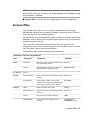
The following table defines each license file parameter.
Definitions of license file parameters
Line
SERVER
Parameter
Definition
Example
Host Name
Host name of the server where the Network labserver
License Manager resides
Host ID
Ethernet address of the server where the
Network License Manager resides
03D054C0149B
USE_SERVER
[None]
VENDOR
Vendor Daemon
Name of the server-side Autodesk vendor adskflex.exe
daemon
Port Number
Network port number reserved and
port=2080
assigned for use only by Autodesk products
running the Autodesk vendor daemon
Name
Name of feature code group
Vendor Daemon
Name of the server-side Autodesk vendor adskflex.exe
daemon
Version
Internal version number reference
1.000
COMPONENTS
List of feature codes supported in the
package
COMPONENTS=
"526000REVIT_9_OF\
PACKAGE
SERIES_1
License Files | 17
Definitions of license file parameters
Line
Parameter
Definition
Example
51200ACD_2007_OF\
513001INVBUN_11_OF"
OPTIONS
INCREMENT
OPTIONS=SUITE
SUPERSEDE
Replacement for any existing Increment
SUPERSEDE
line of the same feature code from any
license files on the same license server that
have a date earlier than the defined Issue
Date
Issue Date
Date the license was issued
SIGN
Encrypted signature used to authenticate SIGN=0 SIGN2=0
the attributes of the license file
Feature Code
Product supported by the license file
51200ACD_2007_0F
If there is an INCREMENT PLIST parameter
in the license file, it defines the priority of
license usage when the same feature code
exists on an INCREMENT line.
For more information, see
“Example of Additional Parameters in a
License File” on page 22
Vendor Daemon
Name of the server-side Autodesk vendor adskflex.exe
daemon
Version
Internal version number reference
1.000
Expiration Date
Amount of time the licenses are available
permanent
Number of Licenses Number of licenses supported by the
license file
ISSUED=15-jul-2006
25
VENDOR_STRING
License usage type and license behavior of COMMERCIAL
the product that is supported by the license
file.
A VENDOR_STRING parameter that exists
under an INCREMENT PLIST line
determines the order in which product
licenses are used, based on the feature
code list.
For more information, see “Example of
Additional Parameters in a License File” on
page 22.
SUPERSEDE
Replacement for any existing Increment
line of the same feature code from any
18 | Chapter 3 Plan Your Network Licensing
SUPERSEDE
Definitions of license file parameters
Line
Parameter
Definition
Example
license files on the same license server that
have a date earlier than the defined Issue
Date
BORROW
Definition of the license borrowing period BORROW=4320
for the licenses defined under the same
increment line.
In this example, the maximum period that
licenses can be borrowed is 4320 hours
(180 days), unless otherwise noted (for
example, BORROW=2880 means that
licenses can be borrowed for a maximum
of 2880 hours, or 120 days)
License borrowing is disabled when this
parameter is absent in the license file
DUP_GROUP
Definition of multiple license requests when DUP_GROUP=UH
the same user and same host share the
same license
ISSUED
Date that the license file was generated
by Autodesk
15-jul-2006
Serial Number
Serial number of the Autodesk product
123-12345678
SIGN
Encrypted signature used to authenticate SIGN=6E88EFA8D44C
the attributes of the license file
License File Examples
License file examples are provided in this document to help you understand
how the license files work for your particular network setup. Autodesk provides
a standard license file for individual products and a license file with additional
parameters for products that are sold both individually and as part of a product
set.
■ Standard License File. If you purchase one or more individual products
that are not offered as part of a suite of products, you receive a standard
license file.
■ Standard License File with Additional Parameters. If you purchase
Autodesk products that are included in a product set and are also sold as
an individual product, you receive a standard license file with additional
parameters included in the license file. The additional parameters define
License File Examples | 19
the sequence for license usage so that the individual product license is used
before the license for the product set.
Autodesk license file examples include a license file not specific to a product,
completed license files for single, distributed, and redundant server models,
a combined product version license file, and an example of additional
parameters added to a standard license file.
Example of a License File Not Specific to a Product
Here is an example of the contents of a license file and the parameters
associated with each line:
SERVER ServerName HostID
USE_SERVER
VENDOR adskflex port=portnumber
INCREMENT feature_code Adskflex Version ExpDate \
NumberofLicenses \
VENDOR_STRING=UsageType:Behavior BORROW=4320 SUPERSEDE \
DUP_GROUP=DupGrp ISSUED=IssueDate SN=SerialNumber \
SIGN=
Example of a License File for a Single or
Distributed Server
Here is an example of a completed license file for a single or distributed license
server model:
SERVER Server2 2a34567f90d3
USE_SERVER
VENDOR adskflex port=2080
INCREMENT 51200ACD_2007_0F adskflex 1.000 permanent 3 \
VENDOR_STRING=commercial:permanent BORROW=4320 SUPERSEDE \
DUP_GROUP=UH ISSUED=15-jul-2006 SN=123-12345678 SIGN="1707 \
9EAC CBCB 2405 692E 4A89 FC45 C009 E360 944A 14BA E99C 9B24 \
5A1B 4A44 083A BE5F 3827 AA26 30CC 2AC2 D6B3 A61B AB5E 492E \
3EBD 0B48 4E75 193A DA82" SIGN2="004A FC90 AB47 3F6B 59BC \
6681 6971 A76A BA52 98E2 5671 26B3 0E78 791B 109F 0591 7DC3 \
F09F 4D8D 4FB7 E341 4A03 CD68 1D77 27F8 8555 9CF7 9380"
Example of a License File for a Redundant Server
Here is an example of a completed license file for a redundant license server
model:
20 | Chapter 3 Plan Your Network Licensing
SERVER Server1 1a34567c90d2 27005
SERVER Server2 2a34567f90d3 27005
SERVER Server3 3a34567b90d4 27005
USE_SERVER
VENDOR adskflex port=2080
INCREMENT 51200ACD_2007_0F adskflex 1.000 permanent 3 \
VENDOR_STRING=commercial:permanent BORROW=4320 SUPERSEDE \
DUP_GROUP=UH ISSUED=15-jul-2006 SN=123-12345678 SIGN="1707 \
9EAC CBCB 2405 692E 4A89 FC45 C009 E360 944A 14BA E99C 9B24 \
5A1B 4A44 083A BE5F 3827 AA26 30CC 2AC2 D6B3 A61B AB5E 492E \
3EBD 0B48 4E75 193A DA82" SIGN2="004A FC90 AB47 3F6B 0E6D \
6681 6971 A76A BA52 98E2 5671 26B3 0E78 791B 109F 0591 7DC3 \
F09F 4D8D 4FB7 E341 4A03 CD68 1D77 27F8 8555 9CF7 DEDD 9380"
NOTE The redundant server model requires the addition of a port number (the
default is 27005) for each server.
Example of a License File for Combined Autodesk
Product Versions
You can combine a license file for different releases of the same Autodesk
product or for different Autodesk products, and run all products from one
license server. For example, you can combine a license file for AutoCAD 2007
with license files for AutoCAD and AutoCAD Map.
Here is an example of the contents of a combined license file:
SERVER Servername HostID
USE_SERVER
VENDOR adskflex port=2080
INCREMENT 42600ACD_2004_0F adskflex 1.000 permanent 3 \
VENDOR_STRING=commercial:permanent BORROW=4320 SUPERSEDE \
DUP_GROUP=UH ISSUED=22-jun-2003 SN=123-12345678 \
SIGN=6E88EFA8D44C
INCREMENT 51200ACD_2007_0F adskflex 1.000 permanent 3 \
VENDOR_STRING=commercial:permanent BORROW=4320 SUPERSEDE \
DUP_GROUP=UH ISSUED=15-jul-2006 SN=123-12345678 SIGN="1707 \
9EAC CBCB 2405 692E 4A89 FC45 C009 E360 944A 14BA E99C 9B24 \
5A1B 4A44 083A BE5F 3827 AA26 30CC 2AC2 D6B3 A61B AB5E 492E \
3EBD 0B48 4E75 193A DA82" SIGN2="004A FC90 AB47 3F6B 59BC \
6681 6971 A76A BA52 98E2 5671 26B3 0E78 791B 109F 0591 7DC3 \
F09F 4D8D 4FB7 E341 4A03 CD68 1D77 27F8 8555 9CF7 DEDD 9380"
INCREMENT 51700MAP_2007_0F adskflex 1.000 permanent 3 \
VENDOR_STRING=commercial:permanent BORROW=4320 SUPERSEDE \
DUP_GROUP=UH ISSUED=15-jul-2006 SN=123-12345678 SIGN="1707 \
9EAC CBCB 2405 692E 4A89 FC45 C009 E360 944A 14BA E99C 9B24 \
5A1B 4A44 083A BE5F 3827 AA26 30CC 2AC2 D6B3 A61B AB5E 492E \
3EBD 0B48 4E75 193A DA82" SIGN2="004A FC90 AB47 3F6B 59BC \
6681 6971 A76A BA52 98E2 5671 26B3 0E78 791B 109F 0591 7DC3 \
F09F 4D8D 4FB7 E341 4A03 CD68 1D77 27F8 8555 9CF7 DEDD 9380"
License File Examples | 21
Example of Additional Parameters in a License
File
For Autodesk products that are included in a product set and are also sold as
an individual product, licenses are allocated based on a sequence of priorities
defined in the license file. For those products, information similar to the
following example appears in a license file:
INCREMENT PLIST adskflex 1.000 permanent 1 \
VENDOR_STRING=A07:51600ACD
LAND_2007_0F:52200CIV3D_2007_0F;B07:51900AMECH_PP_2007_0F:51300IN
VBUN_11_0F:51400INVPRO_11_0F07:51900AMECH_PP_2007_0F:51300IN
VBUN_11_0F:51400INVPRO_11_0F
SUPERSEDE ISSUED=15-jul-2006 SIGN="14C8 A29F BA92 C89A F132 \
BE66 0206 D8BE F9B7 3FB5 9229 FEB8 2E8D 995E EBB5 1B9E 0142 \
C933 9483 D0D0 CA94 6532 1CB5 37D7 03CD B085 7301 7484 CA71 \
2861" SIGN2="0B21 109E EED0 4863 A6E9 6A65 8C7B 6D0B 0B04 \
2F22 355F 433B 2D81 A540 1D45 55A1 DA71 4024 DA50 35E2 \
0089 3081 724E 860B A11F EBBE 3641 A1D5"
Package License File Examples
Autodesk offers a package license file option, which allows you use a set of
products that are packaged and sold together, while controlling the overall
number of licenses you purchased.
Through package licenses, you receive a single license file to run any
combination of the packaged products, up to the total number of seats
purchased.
For example, if you purchased 100 seats for three Autodesk products, you can
use a single license file to run any combination of three products in that
package, up to 100 seats.
Following are some package license file examples for single, distributed, and
redundant license servers, and one for combined Autodesk product versions.
Example of a Package License File for a Single
Server
Here is an example of a completed license file for a single license server model:
22 | Chapter 3 Plan Your Network Licensing
SERVER Server2 2a34567f90d3
USE_SERVER
VENDOR adskflex port=2080
PACKAGE SERIES_1 adskflex 1.000 COMPONENTS="48400REVIT_6_0F \
51200ACD_2007_0F 51300INVBUN_11_0F" OPTIONS=SUITE SUPERSEDE \
ISSUED=15-jul-2006 SIGN="1707 9EAC CBCB 2405 692E 4A89 \
AA26 30CC 2AC2 D6B3 A61B AB5E 492E 3EBD 0B48 4E75 193A DA82" \
FC45 C009 E360 944A 14BA E99C 9B24 5A1B 4A44 083A BE5F 3827 \
SIGN2="004A FC90 AB47 3F6B 59BC 0E6D 6681 6971 A76A BA52 98E2 \
5671 26B3 0E78 791B 109F 0591 7DC3 F09F 4D8D 4FB7 E341 4A03 \
CD68 1D77 27F8 8555 9CF7 DEDD 9380"
INCREMENT SERIES_1 adskflex 1.000 permanent 150 \
VENDOR_STRING=commercial:permanent BORROW=4320 DUP_GROUP=UH \
SUITE_DUP_GROUP=UHV SN=123-12345678 SIGN="1707 9EAC CBCB \
692E 4A89 FC45 C009 E360 944A 14BA E99C 9B24 5A1B 4A44 BE5F \
3827 AA26 30CC 2AC2 D6B3 A61B AB5E 492E 3EBD 0B48 DA82" \
SIGN2="004A FC90 AB47 3F6B 59BC 0E6D 6681 6971 A76A BA52 \
5671 26B3 0E78 791B 109F 0591 7DC3 F09F 4D8D 4FB7 E341 4A03 \
CD68 1D77 27F8 8555 9CF7 DEDD 9380"
Example of a Package License File for a Distributed
Server
Here is an example of a completed license file for a distributed license server
model:
SERVER Server2 2a34567f90d3
USE_SERVER
VENDOR adskflex port=2080
PACKAGE SERIES_1 adskflex 1.000 COMPONENTS="52600REVIT_9_0F \
51200ACD_2007_0F 51300INVBUN_11_0F" OPTIONS=SUITE SUPERSEDE
ISSUED=15-jul-2006 SIGN="1707 9EAC CBCB 2405 692E 4A89 \
FC45 C009 E360 944A 14BA E99C 9B24 5A1B 4A44 083A BE5F 3827
AA26 30CC 2AC2 D6B3 A61B AB5E 492E 3EBD 0B48 4E75 DA82" \
SIGN2="004A FC90 AB47 3F6B 59BC 0E6D 6681 6971 A76A BA52 \
5671 26B3 0E78 791B 109F 0591 7DC3 F09F 4D8D 4FB7 E341 4A03
CD68 1D77 27F8 8555 9CF7 DEDD 9380"
INCREMENT SERIES_1 adskflex 1.000 permanent 150 \
VENDOR_STRING=commercial:permanent BORROW=4320 DUP_GROUP=UH
SUITE_DUP_GROUP=UHV SN=123-12345678 SIGN="1707 9EAC CBCB \
692E 4A89 FC45 C009 E360 944A 14BA E99C 9B24 5A1B 4A44 083A
3827 AA26 30CC 2AC2 D6B3 A61B AB5E 492E 3EBD 0B48 DA82" \
SIGN2="004A FC90 AB47 3F6B 59BC 0E6D 6681 6971 A76A BA52 \
5671 26B3 0E78 791B 109F 0591 7DC3 F09F 4D8D 4FB7 E341 4A03
CD68 1D77 27F8 8555 9CF7 DEDD 9380"
\
\
\
\
\
\
Package License File Examples | 23
Example of a Package License File for a Redundant
Server
Here is an example of a completed license file for a redundant license server
model:
SERVER Server1 1a34567c90d2 27005
SERVER Server2 2a34567f90d3 27005
SERVER Server3 3a34567b90d4 27005
USE_SERVER
VENDOR adskflex port=2080
PACKAGE SERIES_1 adskflex 1.000 COMPONENTS="52500REVIT_9_0F \
51200ACD_2007_0F 51300INVBUN_11_0F" OPTIONS=SUITE SUPERSEDE
ISSUED=15-jul-2006 SIGN="1707 9EAC CBCB 2405 692E 4A89 \
FC45 C009 E360 944A 14BA E99C 9B24 5A1B 4A44 083A BE5F \
AA26 30CC 2AC2 D6B3 A61B AB5E 492E 3EBD 0B48 4E75 DA82" \
SIGN2="004A FC90 AB47 3F6B 59BC 0E6D 6681 6971 A76A BA52 \
5671 26B3 0E78 791B 109F 0591 7DC3 F09F 4D8D 4FB7 E341 4A03
CD68 1D77 27F8 8555 9CF7 DEDD 9380"
INCREMENT SERIES_1 adskflex 1.000 permanent 150 \
VENDOR_STRING=commercial:permanent BORROW=4320 DUP_GROUP=UH
SUITE_DUP_GROUP=UHV SN=123-12345678 SIGN="1707 9EAC CBCB \
692E 4A89 FC45 C009 E360 944A 14BA E99C 9B24 5A1B 4A44 BE5F
3827 AA26 30CC 2AC2 D6B3 A61B AB5E 492E 3EBD 0B48 DA82" \
SIGN2="004A FC90 AB47 3F6B 59BC 0E6D 6681 6971 A76A BA52 \
5671 26B3 0E78 791B 109F 0591 7DC3 F09F 4D8D 4FB7 E341 4A03
CD68 1D77 27F8 8555 9CF7 DEDD 9380"
\
\
\
\
\
Example of a Package License File for Combined
Autodesk Product Versions
In this example, the first 50 AutoCAD 2007 product (51200ACD_2007_0F)
licenses that are borrowed are decremented against the top Increment line.
The 51st license is decremented from the Package line:
24 | Chapter 3 Plan Your Network Licensing
SERVER Server1 1a34567c90d2 27005
USE_SERVER
VENDOR adskflex port=2080
INCREMENT 51200ACD_2007_0F adskflex 1.000 permanent 50 \
VENDOR_STRING=commercial:permanent BORROW=4320 SUPERSEDE \
DUP_GROUP=UH ISSUED=22-mar-2005 SN=123-12345678 \
SIGN=6E88EFA8D44C
PACKAGE SERIES_1 adskflex 1.000 COMPONENTS="52600REVIT_9_0F \
51200ACD_2007_0F 51300INVBUN_11_0F" OPTIONS=SUITE SUPERSEDE
ISSUED=15-jul-2006 SIGN="1707 9EAC CBCB 2405 692E 4A89 \
FC45 C009 E360 944A 14BA E99C 9B24 5A1B 4A44 083A BE5F \
AA26 30CC 2AC2 D6B3 A61B AB5E 492E 3EBD 0B48 4E75 DA82" \
SIGN2="004A FC90 AB47 3F6B 59BC 0E6D 6681 6971 A76A 98E2 \
5671 26B3 0E78 791B 109F 0591 7DC3 F09F 4D8D 4FB7 E341 4A03
CD68 1D77 27F8 8555 9CF7 DEDD 9380"
INCREMENT SERIES_1 adskflex 1.000 permanent 150 \
VENDOR_STRING=commercial:permanent BORROW=4320 DUP_GROUP=UH
SUITE_DUP_GROUP=UHV SN=123-12345678 SIGN="1707 9EAC CBCB \
692E 4A89 FC45 C009 E360 944A 14BA E99C 9B24 5A1B 4A44 083A
3827 AA26 30CC 2AC2 D6B3 A61B AB5E 492E 3EBD 0B48 DA82" \
SIGN2="004A FC90 AB47 3F6B 59BC 0E6D 6681 6971 A76A BA52 \
5671 26B3 0E78 791B 109F 0591 7DC3 F09F 4D8D 4FB7 E341 4A03
CD68 1D77 27F8 8555 9CF7 DEDD 9380"
\
\
\
\
\
In the following example, the first 150 AutoCAD 2007 product
(51200ACD_2007_0F) licenses that are borrowed are decremented against the
Package/Increment line. The 151st license is decremented from the Increment
line:
SERVER Server1 1a34567c90d2 27005
USE_SERVER
VENDOR adskflex port=2080
PACKAGE SERIES_1 adskflex 1.000 COMPONENTS="52600REVIT_9_0F \
48800ACD_2006_0F 46400INVBUN_9_0F" OPTIONS=SUITE SUPERSEDE \
ISSUED=10-mar-2005 SIGN="1707 9EAC CBCB 2405 692E 4A89 \
FC45 C009 E360 944A 14BA E99C 9B24 5A1B 4A44 083A BE5F \
30CC 2AC2 D6B3 A61B AB5E 492E 3EBD 0B48 4E75 193A DA82" \
SIGN2="004A FC90 AB47 3F6B 59BC 0E6D 6681 6971 A76A BA52 \
5671 26B3 0E78 791B 109F 0591 7DC3 F09F 4D8D 4FB7 E341 \
CD68 1D77 27F8 8555 9CF7 DEDD 9380"
INCREMENT SERIES_1 adskflex 1.000 permanent 150 \
VENDOR_STRING=commercial:permanent BORROW=4320 DUP_GROUP=UH \
SUITE_DUP_GROUP=UHV SN=123-12345678 SIGN="1707 9EAC CBCB \
692E 4A89 FC45 C009 E360 944A 14BA E99C 9B24 5A1B 4A44 \
3827 AA26 30CC 2AC2 D6B3 A61B AB5E 492E 3EBD 0B48 DA82" \
SIGN2="004A FC90 AB47 3F6B 59BC 0E6D 6681 6971 A76A BA52 \
5671 26B3 0E78 791B 109F 0591 7DC3 F09F 4D8D 4FB7 E341 4A03 \
CD68 1D77 27F8 8555 9CF7 DEDD 9380"
INCREMENT 48800ACD_2006_0F adskflex 1.000 permanent 50 \
VENDOR_STRING=commercial:permanent BORROW=4320 SUPERSEDE \
DUP_GROUP=UH ISSUED=22-apr-2005 SN=123-12345678 \
SIGN=6E88EFA8D44C
Package License File Examples | 25
License Types and Behaviors
Autodesk supports dynamic product usage and license behaviors. This means
that you can purchase a specific type of behavior with a specific license and
change that license at a later date without having to uninstall and reinstall
the Autodesk product.
License types include the following:
■ Commercial. A license for a product that was purchased commercially.
■ Not for Resale. A license for a product that is not sold commercially.
■ Educational (EDU)/Institution. A license designed specifically for
educational institutions.
■ Student Portfolio. A license for students who are using an Autodesk
product as part of their curriculum.
License behaviors are as follows:
■ Permanent. Enables permanent use of an Autodesk product.
■ Term Extendable. Enables access to an Autodesk product for a limited
period of time. The term can be extended at any time.
■ Term Non-Extendable. Enables an Autodesk product for a limited period
of time. The term cannot be extended.
Heartbeat Signal
When an Autodesk product is running, it communicates with the license
server at regular intervals using a communication method known as the
“heartbeat” signal. If the heartbeat signal is lost, the server tries to reconnect.
If the server cannot reconnect, the user receives a license error.
If the product stops working because it has lost a connection to the server,
you must shut down the product, and then restart it. If the problem causing
the original loss of the heartbeat signal is resolved and there are available
licenses on the server, the program can be restarted.
26 | Chapter 3 Plan Your Network Licensing
Network Licensing Tools
4
This section includes information for installing and configuring
In this chapter
the Autodesk Network License Manager on a network, and
■ Install the Autodesk
installing and using the Network License Activation utility.
Network License
Manager
■ Install the Network
License Activation Utility
■ Use the Network License
Activation Utility
■ Obtain the Server Host
Name and Host ID
Manually
■ Configure the License
Server
■ Stop and Restart the
License Server
■ Set Up and Use an
Options File
■ Uninstall the Network
License Manager
27
Install the Autodesk Network License Manager
You can install the Network License Manager before or after you use the
Network Installation wizard. The order in which you install the network
applications does not matter, as long as you install everything you need and
you provide consistent license server information across the network
applications.
If an earlier version of the Network License Manager is already installed on
the computer, you should upgrade by installing the Autodesk Network License
Manager into the same folder where the older version is located. If you choose
a different installation folder, you will have two versions of the Network
License Manager on the computer.
To install the Autodesk Network License Manager
1 In the Media Browser, click the Install tab.
2 On the Install tab, click Network Deployment.
3 Under Install the Network License Components, click Network License
Manager.
4 On the Autodesk Network License Manager Setup page, click Next.
5 On the License Agreement page, read the license agreement and click I
Accept, and then click Next.
NOTE If you do not agree to the terms of the license, click Cancel to cancel
the installation.
6 On the Destination Folder page, either accept the default folder
(C:\Program Files\Autodesk Network License Manager\) or click Browse to
specify a different location. If you enter a path that does not exist, a new
folder is created using the name and location you provide. Click Next.
WARNING Do not install the Network License Manager on a remote drive.
When you install the Network License Manager files, you must provide a
path to a local drive. You must specify the drive letter; the universal naming
convention (UNC) is not supported.
7 On the Ready to Install the Application page, click Next to install the
Network License Manager.
8 Click Finish.
28 | Chapter 4 Network Licensing Tools
Install the Network License Activation Utility
Install the Network License Activation utility so you will be able to obtain a
license file over the internet.
To install the Network License Activation utility
1 In the Media Browser, click the Install tab.
2 On the Install tab, click Network Deployment.
3 Under Install the Network License Components, click Network License
Activation Utility.
4 On the [Autodesk product name] Network License Activation Setup page,
click Next.
5 On the License Agreement page, read the license agreement and click I
Accept. Click Next.
NOTE If you do not agree to the terms of the license, click Cancel to cancel
the installation.
6 On the Destination Folder page, either accept the default folder or click
Browse to specify a different location. If you enter a path that does not
exist, a new folder is created using the name and location you provide.
Click Next.
7 On the Ready to Install the Application page, click Next to install the
Network License Activation utility.
8 Click Finish.
Use the Network License Activation Utility
With the Network License Activation utility, you can obtain licenses over the
Internet. In addition, it registers your product, provides automated support
for email if you cannot obtain a license over the Internet, and saves and
migrates license files automatically.
When you want to use the Network License Activation utility to obtain a
license file, make sure you have the following information available:
■ License server information, including host name(s) and host ID(s)
■ Serial number of previous product (for upgrades only)
Install the Network License Activation Utility | 29
■ Access to a location where license files can be saved
To use the Network License Activation utility
1 Click Start menu (Windows) ➤ All Programs (or Programs) ➤ Autodesk
➤ Network License Manager ➤ [Autodesk product name] Network License
Activation.
2 On the Obtain a Network License page, review how this utility works
and the requirements for using it. Click Next.
3 On the Server Information page, enter the product serial number.
NOTE If you are modifying an existing license file or obtaining a new license
for an existing product, your previously entered information might be
displayed. Make sure that the serial number that is displayed is the one you
want to license. If it is not, enter the correct product serial number.
4 In the License Server Model section, click a license server model. For
more information about each license server model, click the ? button.
5 In the Server Host Name box, enter a server host name or click the [...]
button to locate the name of each server you plan to use.
6 In the Host ID box, for each server host name you entered in the previous
step, click Lookup to have the utility automatically locate the host ID
for the server, or enter the host ID manually.
NOTE If your server has more than one network adapter, select the one that
corresponds to a physical network adapter. To determine which adapters
are physical, type ipconfig /all at a Windows command prompt and view
the Description field above each physical address. If there is more than one
physical network adapter, you can use any one of them, as long as it was
listed when you ran ipconfig /all. Logical devices such as VPN adapters, PPP
adapters, and modems may be listed but are not usable for licensing.
7 If you chose Distributed Server in step 4, the Seats box is displayed. In
the Seats box, enter the number of seats for each license server. Click
Next.
8 On the Confirm Server Information page, review the server information
you entered. Click Next.
30 | Chapter 4 Network Licensing Tools
9 If the Register and License Your Autodesk Product page is displayed, do
all of the following, and then click Next.
■ In the This Product Is To Be Registered To option, select Company or
Individual.
■ In the Select Country or Region section, select your country or region
of residence.
■ In the Is This an Upgrade section, select Yes or No.
10 If the Registration Information page is displayed, enter your registration
information. Click Next.
11 If the Confirm Information page is displayed, review your registration
information. Click Next.
12 If the Connecting page is displayed, click Next to connect to the Internet
to obtain your network license.
13 On the Licenses Received page, in the Save License File for [computer
name] dialog box, enter the location where you want to save your license
file, or click Browse to navigate to the location.
NOTE It is recommended that you save your license file to the location
where you installed the Network License Manager.
14 If you have an existing license file from another Autodesk product, select
one of the following options:
■ Insert the New License Information Into It. Adds the new
license information into the existing license file.
■ Overwrite the Existing License File. Replaces the entire contents
of the existing license file with the new license information. Select
this option only if you no longer require any part of the existing license
file contents.
15 Click Next.
16 On the License Activation Successful page, click Print to save a printed
copy of the license information, or click Done to complete the transaction
and exit the Network Activation utility.
Use the Network License Activation Utility | 31
Obtain the Server Host Name and Host ID
Manually
If you are unable to use the Network License Activation utility to obtain your
server host name and host ID, you can obtain this information manually.
Autodesk uses the server host name, host ID, and product serial number to
generate a license file.
To obtain the information manually, you can use the Windows command
prompt or you can run the lmtools.exe utility. If you use lmtools.exe, do not
run it on a remote workstation.
To obtain the host name and ID using the Windows command prompt
1 Click Start menu (Windows) ➤ All Programs (or Programs) ➤
Accessories ➤ Command Prompt.
2 At the Windows command prompt, enter the following command, and
then press ENTER:
ipconfig /all
3 Locate the Host Name line, and write down the host name.
4 Locate the Physical Address line. Write down the physical address without
the dashes. This is your twelve-character host ID.
NOTE If your server has more than one network adapter, select the one that
that corresponds to a physical network adapter. To determine which adapters
are physical: in the Windows command prompt, enter ipconfig /all, and
then view the Description field above each physical address. If there is more
than one physical network adapter, it does not matter which one you use.
You just need to make sure that it is properly installed and is functional.
Devices such as VPN adapters, PPP adapters, and modems are not valid.
5 Close the Windows command prompt.
To obtain the host name and ID using lmtools.exe
1 Click Start menu (Windows) ➤ All Programs (or Programs) ➤ Autodesk
➤ Autodesk Network License Manager ➤ LMTOOLS.
2 In the Lmtools program, click the Systems Settings tab.
3 On the Systems Settings tab, locate the Computer/Hostname box. Copy
the host name and paste the information into a text editor.
32 | Chapter 4 Network Licensing Tools
4 Locate the Ethernet Address box. The ethernet address is the host ID. It
consists of twelve characters. Write down the information. If your
ethernet address is more than twelve characters, write down the first
twelve characters only.
NOTE If your server has more than one ethernet adapter, select the one
that corresponds to the physical network adapter.
5 Close lmtools.exe.
Configure the License Server
You configure a license server so that you can manage your Autodesk product
licenses. Configure the license server with the lmtools.exe utility.
To configure the license server
1 Click Start menu (Windows) ➤ All Programs (or Programs) ➤ Autodesk
➤ Network License Manager ➤ LMTOOLS.
2 In the Lmtools program, on the Service/License File tab, select the
Configure Using Services option.
3 Click the Config Services tab.
4 On the Config Services tab, in the Service Name list, select a service name
or do one of the following:
■ If a service name is selected, verify that it is the one you want to use
to manage licenses.
■ If no service name exists, enter the service name you want to use to
manage licenses.
NOTE If you have more than one software vendor using FLEXlm® for license
management, the Service Name list contains more than one option.
5 In the Path to Lmgrd.exe File box, enter the path to the Network License
Manager daemon (lmgrd.exe), or click Browse to locate the file.
By default, this daemon is installed in the \Program Files\Autodesk Network
License Manager folder.
6 In the Path to the License File box, enter the path to your license file,
or click Browse to locate the file.
Configure the License Server | 33
7 In the Path to the Debug Log File box, enter a path to create a debug
log, or click Browse to locate an existing log file.
8 To run lmgrd.exe as a service, select Use Services.
9 To automatically start lmgrd.exe when the system starts, select Start Server
at Power Up.
10 Click Save Service to save the new configuration under the service name
you selected in step 4. Click Yes.
11 Click the Start/Stop/Reread tab.
12 On the Start/Stop/Reread tab, do one of the following:
■ If a service has not yet been defined for Autodesk, click Start Server
to start the license server.
■ If a service for Autodesk is already defined and running, click ReRead
License File to refresh the Network License Manager with any changes
made to the license file or Options file.
The license server starts running and is ready to respond to client
requests.
13 Close lmtools.exe.
Stop and Restart the License Server
Before you can perform any system maintenance on your license server, you
must stop the license server. When you have completed maintenance, you
can restart the license server.
To stop the license server
1 Click Start menu (Windows) ➤ All Programs (or Programs) ➤ Autodesk
➤ Autodesk Network License Manager ➤ LMTOOLS.
2 In the Lmtools program, on the Service/License File tab, select the
Configure Using Services option.
3 Select the service name for the license server you want to start manually.
4 Click the Start/Stop/Reread tab.
5 On the Start/Stop/Reread tab, click Stop Server.
6 Close lmtools.exe.
34 | Chapter 4 Network Licensing Tools
To restart the license server
1 Click Start menu (Windows) ➤ All Programs (or Programs) ➤ Autodesk
➤ Autodesk Network License Manager ➤ LMTOOLS.
2 In the Lmtools program, on the Service/License File tab, select the
Configure Using Services option.
3 Select the service name for the license server you want to start manually.
4 Click the Start/Stop/Reread tab.
5 On the Start/Stop/Reread tab, click Start Server to restart the license
server.
Set Up and Use an Options File
With an Options file, you set configuration options for managing licenses on
each license server that you set up. An Options file sets parameters that the
license file reads and the Lmgrd program executes.
If you want have the same license behavior on some or all of your license
servers, you must save the same Options file to each of those license servers.
If you want to specify different license behavior on different license servers,
you must create an Options file for each license behavior. You must save each
Options file to the server where you want specific license behavior.
NOTE For Options file changes to take effect on a license server, you must save
the Options file, and then use lmtools.exe to reread the license file.
With an Options file, you can do the following:
■ “Create a Report Log” on page 36
■ “Configure License Borrowing” on page 37
■ “Set Up License Timeout” on page 38
Here is an example of the contents of an Options file:
REPORTLOG=c:\test\report.rl
BORROW_LOWWATER Autodesk_f1 3
TIMEOUT Autodesk_f1 7200
You can also set up advanced license parameters, such as reserving a license,
restricting license usage, or defining groups of users. To learn more about
Set Up and Use an Options File | 35
setting advanced Options file parameters, see the FLEXlm documentation in
the Program Files\Autodesk Network License Manager\docs\FlexUser folder.
To create an Options file
1 Open a text editor, enter the parameters you want, and then save the
document as a file named adskflex.opt to the same location where you
saved the license file.
NOTE Make sure you save the file with the extension .opt. The default
extension .txt is not recognized by the Network License Manager.
2 Click Start menu (Windows) ➤ All Programs (or Programs) ➤ Autodesk
➤ Autodesk Network License Manager ➤ LMTOOLS.
3 In the Lmtools program, on the Start/Stop/Reread tab, click ReRead
License File.
4 Close lmtools.exe.
Create a Report Log
In the Options file, you can create a report log file that is used with
SAMreport-Lite.
To create a report log
1 In a text editor, open the Options file, adskflex.opt.
2 In the Options file, enter the following syntax on its own line (with
REPORTLOG entered in uppercase, as shown):
REPORTLOG [+]report_log_path
For example, the syntax REPORTLOG +"c:\My Documents\report.rl"
means that a report log named report.rl is located in the folder c:\My
Documents.
NOTE Path names that contain spaces must be enclosed in quotation marks.
In the REPORTLOG syntax, “[+]” means that entries to the log file you
create are appended rather than replaced each time the Network License
Manager is restarted. (It is recommended that you use this option so that
you retain a history of log entries.)
36 | Chapter 4 Network Licensing Tools
Configure License Borrowing
If your Autodesk product supports the license borrowing feature, you can use
the Options file to configure license borrowing options. For example, you can
define the maximum number of licenses that cannot be borrowed from your
network at any one time. In addition, you can define which users can borrow
an Autodesk product license. Licenses are borrowed per user, not per machine.
NOTE If your Autodesk product supports license borrowing, and licenses are
borrowed from a redundant license server pool, you must restart the license server
after you stop the Network License Manager.
At the end of a borrow period, the borrowed license is automatically disabled
on the user's computer and becomes available again on the license server.
Users can also return a license before a borrow period has ended.
To set license borrowing parameters
1 In the Options file, enter the following syntax on its own line (with
BORROW_LOWWATER entered in uppercase, as shown):
BORROW_LOWWATER feature_code n
In the BORROW syntax, “feature_code” is the name of the product in
the license file, and “n” is the number of licenses that cannot be
borrowed.
For example, the syntax BORROW_LOWWATER Autodesk_f1 3 means
that for the product Autodesk_f1, three licenses cannot be borrowed
from the license server.
2 Enter the following syntax on the next line (with
MAX_BORROW_HOURS entered in uppercase, as shown):
MAX_BORROW_HOURS feature_code n
In this syntax, “n” is the number of hours that a license can be borrowed.
For example, the syntax MAX_BORROW_HOURS Autodesk_f1 360 means
that for product Autodesk_f1, licenses can be borrowed for 360 hours,
or 15 days.
NOTE Licenses are borrowed in increments of 24 hours only. Any number
that is more than a 24-hour increment is not used. For example, the number
365 would be rounded down to 360 hours, or 15 days.
Configure License Borrowing | 37
For more information about setting up the license borrowing feature, see the
FLEXlm documentation in the Program Files\Autodesk Network License
Manager\Docs\FlexUser folder.
NOTE Users can borrow a license in an Autodesk product by clicking the Tools
menu ➤ License Borrowing, or by entering borrowlicense on the Autodesk
product command line. Help for this feature is available in the Borrow a License
for [Autodesk product name] window and in \Program Files\[Autodesk product
name]\Help\[Autodesk product name]_brw.chm.
Set Up License Timeout
License timeout is set in the Options file to determine how long a product
session can be idle before the license is reclaimed by the license server. When
you set this flag in the Options file, a user's license is reclaimed by the license
server if the product is idle on a workstation for more than the timeout period
you define.
If a user's license is lost because of the idle timeout, the product attempts to
claim a new license once the user uses the product again. If no license is
available, the user can save work before the product shuts down.
To set license timeout parameters
■ In the Options file, enter the following syntax on its own line (with
TIMEOUT entered in uppercase, as shown):
TIMEOUT feature_code n
In the TIMEOUT syntax, “feature_code” is the name of the product (referred
to in the INCREMENT line in the license file), and “n” is the number of
seconds before an inactive license is reclaimed by the license server.
For example, the syntax TIMEOUT Autodesk_f1 7200 means that for the
product Autodesk_f1, the license timeout period is set for 7200 seconds, or
two hours.
For more information about using the license timeout feature, see the FLEXlm
documentation in the Program Files\Autodesk Network License
Manager\Docs\FlexUser folder.
Uninstall the Network License Manager
You can uninstall the Network License Manager from the license server. When
you uninstall the Network License Manager, licenses are no longer available
to your users.
38 | Chapter 4 Network Licensing Tools
To uninstall the Network License Manager
1 Click Start menu (Windows) ➤ All Programs (or Programs) ➤ Autodesk
➤ Autodesk Network License Manager ➤ LMTOOLS.
2 In the Lmtools program, on the Service/License File tab, select the
Configure Using Services option.
3 In the Lmtools program, click the Start/Stop/Reread tab.
4 On the Start/Stop/Reread tab, click Stop Server.
5 Close lmtools.exe.
6 In the Windows Control Panel, double-click Add/Remove Programs.
7 In the Add/Remove Programs window, click Autodesk Network License
Manager. Click Remove.
8 If prompted, restart your computer.
NOTE You must manually delete files that you created for use with the Network
License Manager (such as log files, license files, and the Options file). They are not
automatically deleted when you uninstall the Network License Manager.
Uninstall the Network License Manager | 39
40
Glossary
adskflex.exe The Autodesk vendor daemon used with the FLEXlm
license technology. This daemon keeps track of the Autodesk
licenses that are checked out and the workstations that are using
the licenses.
ADSKFLEX_LICENSE_FILE In a distributed license server
configuration, the environment variable used to point a
workstation to the distributed license servers.
borrowed license A license that allows you to use an Autodesk
product for a limited period of time without having to buy a
separate license or have network access to the license server.
Previous versions of your Autodesk product may have used the
License Configuration Switcher.
daemon A program that runs continuously in the background
of a computer. The daemon handles requests from the computer
and then forwards the requests to other programs or processes.
The Network License Manager uses two daemons: the vendor
daemon (adskflex.exe) and the license manager daemon
(lmgrd.exe).
debug log file A file used with FLEXlm to log connection activity
(such as license failure or starting and stopping) between the
Network License Manager and the workstation.
deployment The files and folders created on a server and used
by workstations to install Autodesk programs.
distributed server A license server configuration option in which
several servers are used to manage license distribution. Each
distributed license server has a unique license file and a fixed
number of licenses. If one distributed license server fails, the
other servers are still able to distribute their licenses.
ethernet address See host ID.
41 | Glossary
FLEXlm The Macrovision Corporation license management
technology implemented in the Autodesk family of products.
heartbeat signal The communication signal between the
Network License Manager and the workstation to verify that the
workstation is accessible and has an active Autodesk product
session running.
host ID The unique hardware address of a network adapter. Also
known as ethernet address or physical address.
host name The TCP/IP name associated with a computer.
FLEXlm technology uses the host name as a parameter; the host
name must be distinguished from the NetBIOS (server) name.
idle A state of inactivity in your product that prompts a network
license server to reclaim a license. Your product may be
considered idle for a number of reasons, such as when there
have been no keystrokes or mouse clicks within the product or
if no commands, LISP expressions, menu macros, or scripts are
in progress for the period of time that is defined in the Options
file. See also license timeout.
JRE (Java Runtime Environment) A program that is required
to run Java programs. This program must be installed with
SAMreport-Lite.
license configuration switcher See borrowed license.
license file A file used with FLEXlm that controls the number
of available seats. This file must be in ASCII plain text format.
license server A server that contains the Network License
Manager.
license timeout A feature that allows you to set up a timeout
period on your license server to automatically return an idle
license to the server so that it is available for use again.
licpath.lic In both single and redundant server configurations,
the file used to point the workstation to the FLEXlm license
server. Licpath.lic is located in the root installation folder.
lmgrd.exe The license manager daemon. This daemon handles
the original contact with the program, and then passes the
connection to the vendor demon, adskflex.exe.
42 | Glossary
lmtools.exe A graphical user interface utility used to administer
the FLEXlm license technology. (Lmutil.exe is the command line
version of this utility.)
lmutil.exe A command line utility used to administer the FLEXlm
license technology. (Lmtools.exe is the graphical user interface
version of this utility.)
master daemon See lmgrd.exe.
Network License Activation utility A utility that allows network
administrators to license and authorize network versions of an
Autodesk product over the Internet.
network license installation A type of installation that requires
you to install and run the Network License Manager from a
network server. You must install and configure the Network
License Manager before clients can run the Autodesk product.
Network License Manager The technology used by Autodesk
for network license management.
Options file The file used by FLEXlm to control license manager
parameters, such as reserving licenses and creating report logs
used with SAMreport-Lite.
physical address See host ID.
redundant server A license server configuration option in which
three servers are used to administer licenses. The redundant
servers share a license file and a pool of licenses. The redundant
server pool remains functional as long as two of the three servers
are running.
report log file A file used with FLEXlm and SAMreport-Lite.
This log file provides information about network license usage.
The Options file creates the report log.
runtree The location of Autodesk product program files, such
as acad.exe.
SAMreport-Lite A version of Macrovision Corporation's
SAMreport tool. SAMreport-Lite is included on the Autodesk
product CD-ROM.
vendor daemon See adskflex.exe.
43 | Glossary
workstation A desktop computer used by an individual user on
a network.
44 | Glossary
Index
A
AdLM. See Network License Manager
ADSKFLEX_LICENSE_FILE environment
variable 41
adskflex.exe (Autodesk vendor
daemon) 9, 16–17, 41
determining the version installed 9
termination of 17
append symbol (report log file) (\ 36
Autodesk License Manager. See Network
License Manager
Autodesk products 8, 16, 20–21, 24, 26,
30–31, 42–43
deploying from network locations 8
heartbeat signal between license
servers and 26, 42
idle state 42
license file not specific to 20
license files for combined product
versions 21, 24
license requests 16
registering 30
registering (network) 31
runtree program file location 43
Autodesk vendor daemon. See adskflex.exe
communication protocol 8
Network License Manager
requirement 8
configuring 11, 33, 35, 37–38
license borrowing 11, 37
license servers 33, 35
with Options file 35
license timeout 11, 38
D
daemons 16, 41
defined 41
master daemon. See lmgrd.exe (license
manager daemon)
vendor daemons
See also adskflex.exe (Autodesk
vendor daemon)
debug log file 41
deployment, defined 41
distributed license server model 14, 20,
23, 41
package license file example 23
standard license file example 20
DUP_GROUP license file parameter
definition 17
B
E
BORROW license file parameter
definitions 17
borrow. See license borrowing
borrowed licenses 41
See also license borrowing
borrowing licenses 38
borrowlicense command 26
Educational (EDU)/Institution
licenses 26
Ethernet adapters, selecting 33
Ethernet address. See host ID (license
server)
example license files 19, 22
F
C
cascading license file examples
Commercial licenses 26
22
files (Network License Manager)
installing 28
uninstalling 39
28, 39
45 | Index
FLEXlm 42
FLEXlm tools 9–11
backwards compatibility 10
backwards compatibility of version
10.1.5 10
determining the version installed 9
license server management
utilities 10
Options file 11
system requirements 9
updating 9–10
uses 9
H
heartbeat signal 26, 42
host ID (license server) 30, 42
entering 30
host name (license server) 32, 42
obtaining 32
I
idle state (Autodesk products) 42
idle timeout. See license timeout
INCREMENT license file parameter
definitions 17
installing 3, 12, 28–29
Network License Activation
Utility 3, 29
Network License Manager 28
SAMreport-Lite 12
ISSUED license file parameter
definition 17
J
Java Runtime Environment (JRE)
JRE (Java Runtime Environment)
L
license borrowing 11, 37–38
configuring 11, 37
using 38
46 | Index
42
42
license configuration switchers. See
borrowed licenses
license file 3, 9, 17, 19, 22, 30–31, 42
additional parameters in 22
cascading license examples 22
examples 19
insert new file/overwrite existing file
options 31
modifying 30
obtaining license file data 9
overwriting 3, 30
package examples 22
parameter definitions 17
save location 31
standard examples 19
license manager daemon. See lmgrd.exe
license servers 10, 14, 26, 33–35, 42
configuring 14, 33
models 14
heartbeat signal between Autodesk
products and 26, 42
host ID. See host ID
host name. See host name
management utilities 10
models 14
restarting 35
saving configurations 34
stopping 34
system maintenance
requirement 34
license timeout 11, 38, 42
configuring 11, 38
license usage reports. See report log files
license usage reports. See SAMreport-Lite
license reporting tool
licenses (network licenses) 16–17, 26,
35, 41, 43
advanced parameters 35
availability 16
behaviors (term limits) 26, 35
specifying 35
borrowed licenses
See also license borrowing
installation 43
loss through vendor daemon
termination 17
manager. See Network License
Manager
operation 16
servers. See license servers
timeout. See license timeout
types (usage types) 26
usage reports. See report log files
usage reports. See SAMreport-Lite
license reporting tool
licpath.lic 42
lmgrd.exe (license manager daemon) 9,
16, 33–34, 42
determining the version installed 9
folder path 33
starting on system startup 34
lmtools.exe utility 9–10, 32–33, 43
configuring license servers with 33
determining the version installed 9
folder location 10
obtaining license server host name
and ID with 32
lmutil.exe utility 9–10, 43
determining the version installed 9
folder location 10
log files 41
debug log file 41
See also report log files
M
master daemon. See lmgrd.exe (license
manager daemon)
monitoring license usage. See report log
files
monitoring license usage. See
SAMreport-Lite license reporting
tool
multiple license servers, models 14
N
network adapters 30
selecting 30
Network Installation wizard
8
Network License Activation Utility 2–3,
8, 29–30, 43
installing 3, 29
uses 2, 8, 29
using 3, 30
Network License Authorization utility 8,
43
network license installation 43
Network License Manager 8, 14, 16, 28,
39, 41, 43
daemons 16, 41
files 28, 39
installing 28
uninstalling 39
installing 28
license operation 16
license server models 14
uninstalling 39
upgrading 28
network license servers. See license servers
network licenses
See also licenses
network licensing
tools. See Network License Activation
utility
Not for Resale licenses 26
Number of Licenses license file parameter
definition 17
O
Options file (FLEXlm) 11, 35–38, 43
configuring license borrowing 11,
37
configuring license servers 35
configuring license timeout 11, 38
creating 36
creating report log files 11, 36
example 35
uses 11, 35
overwriting 3, 30
license file 3, 30
P
package license file examples
22
47 | Index
PACKAGE license file parameter
definitions 17
parameters in license files 22
path names, entering names with
spaces 36
Permanent licenses 26
physical address. See host ID (license
server)
physical network adapters 30
selecting 30
plus sign, bracketed (\ 36
products. See Autodesk products
R
redundant license server model 15, 20,
24, 42–43
licpath.lic path file 42
package license file example 24
standard license file example 20
registering Autodesk products 30–31
report log files (license usage) 11, 36, 43
creating 11, 36
See also SAMreport-Lite license
reporting tool
restarting, license servers 35
runtree Autodesk product program file
location 43
S
sample license files 19, 22
SAMreport-Lite license reporting tool 11,
43
See also report log files
Serial Number license file parameter
definition 17
server host name. See host name (license
server)
SERVER license file parameter
definitions 17
servers 20
license. See license servers
sample license files 20
service names (for managing licenses),
selecting 33
48 | Index
setting up. See configuring
SIGN license file parameter definition 17
single license server model 14, 20, 22,
42
licpath.lic path file 42
package license file example 22
standard license file example 20
standard license file examples 19
starting 34–35
license server 35
restarting 35
lmgrd.exe license manager daemon on
system startup 34
See also restarting
stopping license servers 34
Student Portfolio licenses 26
SUPERSEDE license file parameter
definition 17
T
Term Extendable licenses 26
Term Non-Extendable licenses 26
timeout feature (licenses). See license
timeout
U
uninstalling 39
Network License Manager 39
updating 9–10
FLEXlm tools 9–10
upgrading Network License Manager 9,
28
V
vendor daemons 16
See also adskflex.exe (Autodesk vendor
daemon)
VENDOR license file parameter
definitions 17
VENDOR_STRING license file parameter
definition 17
W
Windows command prompt, obtaining
license server host name and ID
from 32
workstations, defined 44
49 | Index
50