1
MIN-MAX-AVG Recording Modes
The HD300 has several MIN-MAX-AVG modes described separately below. MIN-MAXAVG functions are available for all measurements made with the vane sensor (air velocity,
air flow, and air temperature).
Continuous Moving Average
In the Continuous Moving Average mode the meter displays the continuous average
of the measured readings for up to a 10 hour period.
1. Turn the meter ON.
2. Place the sensor in the air stream.
3. Press the MAX-MIN button in the lower keypad area for air velocity / flow.
4. Press the MAX-MIN button in the upper keypad area for air temperature.
5. The meter will begin averaging readings once per second.
Single Point Min-Max-Avg
In the Single Point Average Mode the meter takes a reading once per second and
stores the highest, lowest, and average readings.
1. Turn the meter ON.
2. Place the sensor in the air stream.
3. Press the MAX-MIN button (lower keypad area for air velocity/flow; upper
keypad area for air temperature) to enter the REC mode and display only
the highest reading (display will show REC MAX).
4. Press again to view the MIN value (display will show REC MIN). Now the
display will show only the lowest reading.
5. Press again to view the AVG value (display will show REC AVG).
6. To return to normal operation mode, press and hold the MAX-MIN button
until two tones are heard.
Multi-point Average
In the Multi-Point Average Mode the meter averages up to 20 Air Velocity readings.
1. Turn the meter ON.
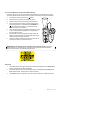
2. Press and hold the AVG button for 2 seconds (until two beeps are heard). A
‘0’ will display in the upper right hand corner of the LCD and ‘AVG’ will
appear on the bottom of the LCD.
3. Place the sensor in the air stream under test.
4. Press the AVG button momentarily to capture the reading (a single tone will
be heard) and the HOLD and AVG icons will appear on the bottom of the
LCD. The ‘0’ that was displayed previously will increment to ‘1’. This
number will increment with each successive press of the AVG button.
5. Take more readings (up to a maximum of 20) in the same fashion as
described in step 4.
6. The LCD will display the average of all the readings taken since the multipoint mode was accessed in step 2.
7. To return to normal operation, press and hold the AVG button for 2 seconds
(until two tones are heard).
8. To clear the stored readings after exiting the Multi-point Average mode,
press the AREA button once.
6
HD300 V2.0 11/07