1
9. Power Status Indication
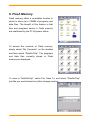
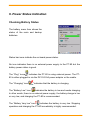
Checking Battery Status
The battery menu item shows the
status of the main and backup
batteries.
Status bar icons indicate the on-board power status.
No icon indicates there is no external power supply to the PT-80 but the
battery power status is good.
The “Plug” icon
indicates the PT-80 is using external power. The PT-
80 is either plugged-in via the DC 5V/2.5A power adapter or the cradle.
The “Charging” icon
The “Battery Low” icon
indicates that the battery is charging.
indicates the battery is low and needs charging.
In other words, there is no external power supply, the battery charge is low
or very low, and charging the PT-80 is recommended.
The “Battery Very low” icon
indicates the battery is very low. Stopping
operation and charging the PT-80 immediately is highly recommended.
Quick Reference Guide
19