1
Form Tear Off
Form Tear Off
Note: Don't use forms tear off when printing on labels or multipart forms. Labels should only be
fed from the bottom of the printer.
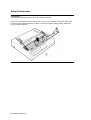
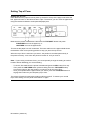
To activate this feature, press the MODE button and use the GROUP, ITEM and SET buttons
to change the FORM TEAR OFF setting to 500 ms (1). (See Chapter 5 ( ) for details on how to
use the menu). Press the MODE button to exit the Menu mode, then use the TOF/QUIET
and FORM FEED or LINE FEED buttons to set the top of form as described above (2).
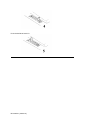
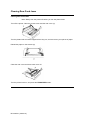
When you release the TOF/QUIET button, the paper advances to the tear bar, located
under the clear top of the access cover (3).
Note: You can check the initial printing position at any time: press the SEL button, then
press TOF/QUIET; the paper will move down to the initial printing position until you release
the button.
The page stays in the tear off position until the printer receives data; then moves down to
the printing position to print. Afew seconds after printing stops, the paper moves up to the
tear off position.
Note: Some programs pause occasionally while sending data. If the pause lasts more than two
seconds, the paper will advance to the tear off position until more data is received. This extra
paper movement can cause uneven print registration in graphics. If you have this problem, use
the menu to deactivate forms tear off.
ML 320/321 ( 96-02-01 )