1
Clearing Rear-Feed Jams
Clearing Rear-Feed Jams
Note: Always turn the printer off before you turn the platen knob!
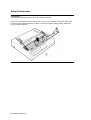
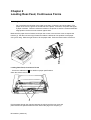
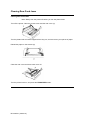
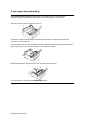
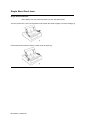
Turn off the printer. Open the access cover and the rear cover (1).
Turn the platen knob to back the paper all the way out, and remove any torn pieces of paper.
Reload the paper on the tractors (2).
Close the rear cover and the access cover (3).
Turn the printer back on, and press the FORM FEED button.
ML 320/321 ( 96-02-01 )