1
Getting Started
Figure 1. Battery Pack Installation & Removal
Scanner
Alignment Pins
Battery
Pack
Release Latch
Release Latch
Verifying Scanner Operation Before Linking
to the Base Station
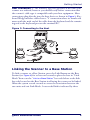
Once a charged Battery Pack has been installed in the scanner, scan a
good sample bar code of the symbology1 type your scanner is programmed to read. If unsure how to do this, see the section on How to
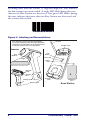
Scan in this manual. Tip: The part number bar code on the back cover
of this manual is a Code 39 symbology sample.
The system may signal with one or a combination of indicators depending upon how the scanner and Base Station are programmed to respond
(see LED and Beeper Indications for details). If your scanner fails to read
a sample bar code of a symbology it is programmed to read, turn to the
section titled, Troubleshooting.
1. To enable more bar code symbology types, reference the Product Reference Guide
(PRG).
Quick Reference Guide
3