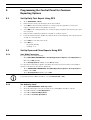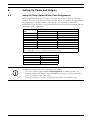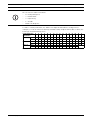
1
16
en | Add System Users Locally With a Keypad
GV3 Series v8.11 or Higher
7
Add System Users Locally With a Keypad
7.1
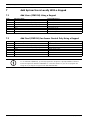
Add Users (CMD 56) Using a Keypad
Step
1
2
3
4
5
6
7
Table 7.1
7.2
Step
1
2
3
4
5
6
7
Table 7.2
Operator Entry
Enter Command 56
Enter passcode and press [ENT].
Enter the user number and press [ENT].
Enter
Enter
Enter the new user’s passcode.
Re-enter the new passcode.
Keypad Response
Enter Passcode
Enter User #
USER # (default name text)
Change Passcode?
Enter New Code
Enter New Again
Code Changed
Adding Users with Command 56
Add Card (CMD 56) for Access Control Only Using a Keypad
Operator Entry
Command 56
Enter passcode and press [ENT]
Enter the user number and press [ENT]
Enter
Next
Enter
Present the credential to the reader.
Keypad Response
Enter Passcode
Enter User #
USER# (default name text)
Change Passcode?
Add Card?
Present Card
Card Added
Adding Cards with Command 56
NOTICE!
To use Add Card (CMD 56), you must program the Assign Door prompt within Command
Center Assignments with the D9210B door controller number. If you do not program the
Assign Door prompt, the keypad reads 9210 NOT READY.
F01U170805 | 02 | 2011.10
Quick Reference Guide
Bosch Security Systems, Inc.