1
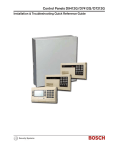
GV3 Series v8.11 or Higher
Table of Contents | en
3
Table of Contents
1
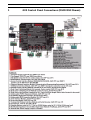
GV3 Control Panel Connections (D9412GV3 Shown)
5
2
Upgrade GV3 Hardware and Programming
7
2.1
Receive Existing Control Panel Programming
7
2.1.1
Receive Existing Control Panel Programming with RPS
7
2.2
Upgrade Hardware to a GV3 Series Control Panel
7
2.2.1
Prepare to Remove Existing Hardware
7
2.2.2
Remove the Existing Control Panel
7
2.2.3
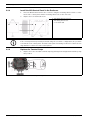
Install the GV3 Control Panel In the Enclosure
8
2.2.4
Replace the Terminal Strips
8
2.3
Upgrade Programming to a GV3 Control Panel Programming
9
2.3.1
Upgrade a GV2 Series, G Series, or Non-G Series Control Panel to a GV3 v8.03 or Later Using Remote
Programming Software (RPS) 5.13 or Later9
3
Programming the Control Panel
10
3.1
RPS Programming over a Network Using the DX4020 Ethernet Network Interface Module
10
3.2
RPS Programming over a Network Using the ITS-DX4020-G GPRS/GSM Communicator
10
3.3
RPS Programming Using the DX4010V2 RS-232/USB Serial Interface Module
10
3.4
RPS Programming Using the Keypad Programming
10
4
Programming to Set Up Central Station Reporting
11
4.1
Basic Telephone Set Up in RPS
11
4.2
Basic Internet Protocol (IP)
11
4.3
Account Number
11
5
Programming the Control Panel for Common Reporting Options
12
5.1
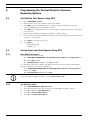
Set Up Daily Test Report Using RPS
12
5.2
Set Up Open and Close Reports Using RPS
12
5.2.1
Area Wide Parameters
12
5.2.2
Set Authority Level
12
6
Setting Up Points and Outputs
13
6.1
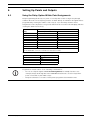
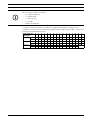
Using the Relay Option Within Point Assignments
13
6.2
Point Index (Default Values)
14
7
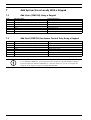
Add System Users Locally With a Keypad
16
7.1
Add Users (CMD 56) Using a Keypad
16
7.2
Add Card (CMD 56) for Access Control Only Using a Keypad
16
8
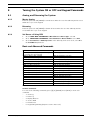
Turning the System ON or OFF and Keypad Commands
17
8.1
Arming and Disarming the System
17
8.1.1
Master Arming
17
8.1.2
Disarming
17
8.1.3
Set Duress +1 Using RPS
17
Bosch Security Systems, Inc.
Quick Reference Guide
F01U170805 | 02 | 2011.10