1
24
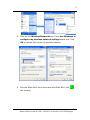
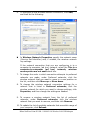
11. To automatically connect to available networks that do not
appear in the Preferred networks list, click Advanced, and
then select the Automatically connect to non-preferred
networks check box.
When
you
enable
automatic
wireless
network
configuration, you can connect to an existing wireless
network, change wireless network connection settings,
configure a new wireless network connection, and specify
preferred wireless networks. You will be notified when new
wireless networks are available. After you select a wireless
network, your wireless network adapter will be automatically
configured to match the settings of that network, and a
network connection attempt will be made.
Note
To configure settings on the Wireless Networks
tab, you must be logged on as an administrator.
For more information, see Microsoft Windows XP
user’s manual.
The BWU603 Wireless LAN USB Adaptor is a ready-to-use device.
Its default configuration is set for the typical Infrastructure Wireless
LAN. Simply install the USB Adaptor onto your computer and it is
ready to use.
In other situations, however, you may change to adjust
configuration settings depending on how you would like to manage
your wireless network. The WLU utility can let you make configuration
changes and perform user-level diagnostics with your BWU603
Wireless LAN USB Adaptor. When you minimize the window, a system
tray icon will be loaded in the toolbar. Clicking on the icon will open
the configuration window again.
Blitzz NetWave Point II USB – 11M 802.11b Wireless LAN USB Adaptor