1
TIMER SETTINGS
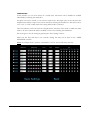
In this window you can set 8 timers on a weekly base. The timers can be disabled or enabled
individually by checking the enable box.
An input zone can be routed to one or more output zones. The input zone can be chosen in the
dropdown list and the output zones can be chosen by checking the checkboxes. The action can be
set to “On” or “Off” which means the routing will be made or released.
Hour and minutes can be chosen from a dropdown list. The days of the week on which the timer
needs to be active (when the timer is enabled) can be set by checking the checkboxes.
Do not forget to save the settings by pressing the “Save Settings” button.
Make sure the date and time is set correctly. Setting the time can be done in the “TIME
SETTINGS” window.
Note: An “Output Zone” can have a maximum of 4 “On” and 4 “Off states each day.
22