1
(Continued)
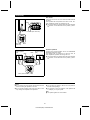
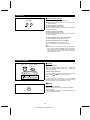
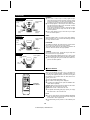
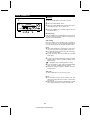
■ Placing the speakers
Center
Front
left
Front
right
When you connect this unit to a DVD player playing a disc
with the
trademark, you can enjoy realistic, powerful
sound by playing the soundtrack through 6 channels; the
front left, front right, center, surround left, surround right and
sub woofer speakers.
Sub
woofer
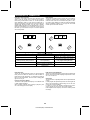
The best sound will be achieved by placing each speaker
the same distance from the listener. Arrange the speakers
so that the layout is as close as possible to the diagram
shown in this illustration.
Surround
left
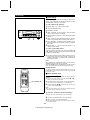
● Front speakers
Surround
right
Same distance
For best performance, place the speakers as shown in the
diagram to the left.
Place a TV halfway between the front left and front right
speakers.
Front
right
Front
left
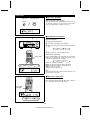
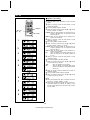
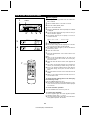
● Center speaker
Center
It is recommended that the center speaker be placed between the left and right front speakers.
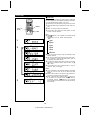
Example: When installed on the wall
● Sub woofer
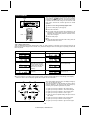
Surround speaker
Place the sub woofer near one of the front speakers, and
orient it toward the listener as much as possible.
Wall
● Surround speakers
23" - 35"
(60 - 90 cm)
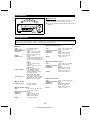
The surround speakers can be used by installing them on
the wall or on stands. Install them 23" - 35" (60 - 90 cm)
above the height of your ears when seated, if possible.
Example: When installed vertically
Note:
The front speakers, center speaker, and sub woofer are
magnetically shielded. The front speakers and sub woofer
may be used by the sides of the TV. The center speaker
may be used on top of the TV. However, some color variation
may occur, depending on the type of TV used.
5/32" (3.8 mm)
If color variations occur ....
Turn off the TV (from the power switch). After 15 - 30 minutes, turn the TV on again.
If the color variation is still present ....
Move the speakers further away from the TV.
3/32" (2.7 mm)
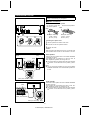
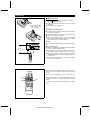
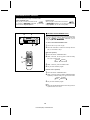
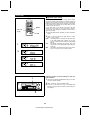
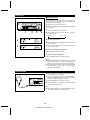
■ To mount the surround speakers on the
Min. 9-27/32" (25 mm) 9/32" (7 mm)
1
Min. 8-1/4" (21 mm)
wall
5/32" (4 mm)
The design of the surround speakers allows them to be hung
on the wall.
Be sure to use the screw type and size shown to the left.
Wall mounting screw
1
Wall surface
Drive one screw into the wall for each speaker as shown
in the illustration.
● Make sure that both the screw and the wall can support
a load of 45 lbs. (20 kg).
● Drive the screws, so there is about a 5/32" (4 mm) space
between the wall and the head of the screw.
● The screw is not included.
2
2
Wall surface
Mount the surround speaker on the wall so that the screw
head is inserted into the slot on the surround speaker.
5
HT-DD5000(SEC) TINSE0009SJZZ