1
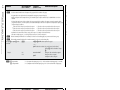
ASCII command (host to switcher) Response (switcher to host) Additional description Create ties Refer also to the MPX Plus 866 A User’s Manual at www.extron.com. MPX Plus 866 A • Remote Control N • Video ties cannot be made between the computer video group and the low resolution video group. • Program audio ties can only be made to the computer/audio output group (outputs 1 through 6). • Mixing audio inputs into the output audio using SIS commands requires a complex command. Refer to the MPX Plus 866 A User's Manual. • Video and audio ties between the low resolution video input group and the low resolution video outputs group are always made with the program audio redirected. In such an operation, the switcher automatically ties the audio to an output in the computer/audio outputs group (outputs 1 through 6) as follows: If the video is tied to output 10, the audio is tied to output 4. If the video is tied to output 7, the audio is tied to output 1. If the video is tied to output 8, the audio is tied to output 2. If the video is tied to output 11, the audio is tied to output 5. If the video is tied to output 9, the audio is tied to output 3. If the video is tied to output 12, the audio is tied to output 6. •Commands can be entered back-to-back in a string, with no spaces. For example: 1*1!02*2&02*04%4*6$. •The matrix switchers support 1-, 2-, and 3-digit numeric entries (1*1!, 02*02&, or 003*003%). N The & tie command for RGB and the % tie command for video can be used interchangeably, but you cannot switch between groups. N The & read tie command for RGB and the % read tie command for video can be used interchangeably. Tie input X! to output X@, video and audio X!*X@! OutX@•InX!•All] (within computer video group) — or — Qik] (within low resolution video group [because of audio redirect]) Tie input X!‘s video and audio to output X@. Example: N 1*3! Out03•In01•All] 11*9! Qik] X! = Input number X@ = Output number Command Tie input 1 video and audio to output 3. Tie input 11 video to output 9 and input 11 audio to output 5. 00 – 08 (computer video input group) or 00, 09 – 14 (low resolution video input group) (00 = untied) 01 – 06 (Computer video and audio output group) or 07 – 12 (low resolution video output group) ASCII command Response Additional description (host to switcher) (switcher to host) X!*X@& OutX@•InX!•RGB] Audio breakaway. 5*4& Out04•In05•RGB] Tie input 5 RGB to output 4. X!*X@% OutX@•InX!•Vid] Audio breakaway switching. 9*7% Out07•In09•Vid] Tie input 9 video to output 7. X!*X@$ OutX@•InX!•Aud] Audio breakaway switching. 12*4$ Out04•In12•Aud] Tie input 12 audio to output 4. X@& X@% X@$ X!] X!] X!] RGBHV input X! is tied to output X@. X!*X#\ TypX!*X#] Set the video format to X# for input X!. Typ11*1] Set input 11 to composite video. X#] Show the video format of input X!. Create ties (continued) MPX Plus 866 A • Remote Control Refer also to the MPX Plus 866 A User’s Manual at www.extron.com. Tie input X! to output X@, computer only Example: (see 2nd Note, above) Tie input X! to output X@, video only Example: (see 2nd Note, above) Tie input X! to output X@, audio only Example: Read computer video output tie Read video output tie Read audio output tie Video input X! is tied to output X@. Audio input X! is tied to output X@. Set input format Set input video format N The only valid input (X!) numbers are 11 through 14. Example: 11*1\ Read input format N X! = Input number X@ = Output number X# = video format X!\ 00 – 08 (computer video input group) or 00, 09 – 14 (low resolution video input group) (00 = untied) 01 – 06 (Computer video and audio output group) or 07 – 12 (low resolution video output group) 1 = composite video 2 = S-video Remote Control, cont’d 4-4 Command 4-5