1
Remote Control, cont’d
3.
Scroll to the Matrix Switchers program and click Install.
4.
Follow the on-screen instructions.
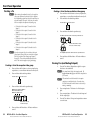
By default, the installation of the DSP Configurator
program creates a C:\Program Files\Extron\
DSP_Configurator directory, and it places the following
four icons into a group folder named “Extron Electronics\
DSP Configurator”:
• DSP Configurator
• DSP Configurator Help
• Uninstall DSP Configurator
• Check for DSP Configurator Updates
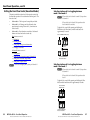
By default, the installation of the Matrix Switchers
Control Program creates a C:\Program Files\Extron\
Matrix_Switchers directory, and it places the following
four icons into a group folder named “Extron Electronics\
Matrix Switchers”:
•
•
•
•
MATRIX Switcher+ Control Program
MATRIX Switcher+ Help
Uninstall MATRIX Switcher
Check for Matrix Updates
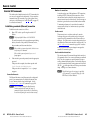
N For a comm port, check the baud
rate displayed in the comm port
selection window. If you need to
change the baud rate, click the Baud
button and double-click the desired
baud rate.
Click OK.
If you selected a serial port in step 2, the Matrix Switchers
Control Program is ready for operation.
3.
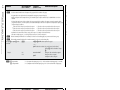
If you selected IP [LAN] in step 2, the IP Connection
window appears.
Starting the program
1.
Click either
For the DSP Configurator program:
Start > Programs > Extron Electronics >
DSP Configurator > DSP Configurator. The program
starts in Emulate mode and is ready for operation
immediately.
N In Emulate mode, changes and settings are stored in the
PC and not sent to the switcher until you select Live
mode and "push' the settings to the switcher. Refer to the
MPX Plus 866 A User's Manual for more information.
For the Matrix Switchers Control Program:
Start > Programs > Extron Electronics >
Matrix Switchers > MATRIX Switcher + Control Pgm. The
Comm Port Selection window appears (see the next page).
Continue to step 2.
2.
4-12
Choose the comm (serial) port that is connected to the
switcher or IP [LAN].
MPX Plus 866 A • Remote Control
Refer also to the MPX Plus 866 A User’s Manual at www.extron.com.
a. Examine the Matrix IP Address field, which displays
the last Matrix IP address entered.
If necessary, enter the correct IP address in the field.
N 192.168.254.254 is the factory-specified default value for
this field.
b. If the switcher is password protected, enter the
appropriate administrator or user password in the
Password field.
c. Click Connect. The Matrix Switchers Control Program
is ready for operation.
MPX Plus 866 A • Remote Control
Refer also to the MPX Plus 866 A User’s Manual at www.extron.com.
4-13