1
Installation
•In the event the
battery loses all
of its power or is
removed, the time
setting will be lost.
• Press SELECT. The minute is flashing. Press or until the screen displays the correct minute.
• Press SELECT. AM or PM is flashing. Press or to choose between AM or PM. Press
SELECT.
Handset ringer style/battery save
ou can select from four different handset ringer styles, or turn the ringer off and extend the
Y
battery life.
1. With the handset in idle (off) mode, press PROG.
2. Press or until the screen displays RINGER: and the current setting.
3. Press SELECT. The current setting blinks, and you will hear a sample of the ring.
4.Press or to select RINGER: 1, 2, 3, 4 or OFF. You will hear a sample of each ring tone.
5. Press SELECT to choose the displayed ringer setting.
If you subscribe to DSL service:
If you receive high speed internet service through your phone line (commonly referred to as DSL)
and you are experiencing interference during conversations and/or your caller ID features aren’t
functioning properly, install a DSL filter to the telephone line between the telephone base and the
telephone line jack. Contact your DSL provider to obtain a DSL filter.
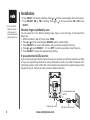
To single telephone jack
(RJ11C)
Telephone line cord
www.vtechphones.com
DSL filter (For DSL users)