1
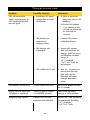
Problem
Possible Cause(s)
Solution(s)
Poor vehicle positioning
performance.
1. GPS Antenna is not
connected.
1. Connect GPS Antenna to
Docking Station.
2. GPS Antenna is
incorrectly located.
2. GPS Antenna needs an
unobstructed view of the
sky from the exterior of
the vehicle. Ensure luggage racks or accessories
are not blocking the
satellite signal to the GPS
Antenna.
3. Carry Case is not placed
in same orientation.
3. Place the bag in its
original orientation.
4. Carry Case has shifted
from its calibrated
position due to a sudden
stop, acceleration
or turn.
4. Eliminate possible
movement of Carry Case.
5. Improper calibration
process due to steep
grade or excessive
acceleration.
5. Conduct Full Calibration.
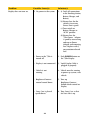
1. Acceleration rate is too
severe for 750M to
accept.
1. Accelerate moderately.
2. Bias and Orientation
Learn Counts are at
upper count limit.
2. The 750M is designed to
have count limits of 20
and 50. This does not
necessarily indicate a
malfunction. Continue
normal operation.
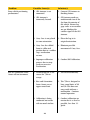
3. Calibration is being
conducted on terrain
with too much incline.
3. Conduct calibration on
terrain that is as level as
possible, less than 2%
grade.
Bias or Orientation Learn
Count will not increment.
24