1
Installation Guide
APA-348 MiniSCSI Plus
Parallel-to-SCSI Host Adapter
R
AA
AAAA
AAAA
AAAA
AA
AAAAAAAA
AAAAAAAA
AAAAAAAA
AAAAAAAA
AAAAAAAA
AAAAAAAA
AAAAAAAA
AAAAAAAA
AAAAAAAA
AAAAAAAA
AAAAAAAA
AAAAAA
AAAAA
AA
APA-348 Installation Guide
AA
AA
AA
AA
AA
Part Number: 510603-00, Rev. A
AA
AA
AA
AA
Print
Spec
Number:
492716-00
AA
AA
AA
AA
Current Date: 5/19/94
ECN Date: 5/31/94 AA
AA
AA
AAAAAAAAAAAAAAAAAAAAAAAAAAAAAAAAAAAAAAAAAAAAAAAAAAAAAA
1 Overview
This Installation Guide explains how to physically
install and configure Adaptec APA-348 MiniSCSI™
Plus Parallel-to-SCSI host adapters. The MiniSCSI
Plus has been designed to provide simple, flexible
control of most SCSI devices. The adapter’s highspeed operation is fully compatible with bidirectional parallel ports, offering excellent performance
while remaining compatible with unidirectional
ports found on many older computers. Both SCSI
and parallel printer interfaces may be operated
simultaneously, with no performance degradation.
Hardware Requirements
■
The parallel port must be standard—i.e., have a
fully IBM®-compatible hardware design, including all ground lines. For highest performance, the
computer’s parallel port must be capable of bidirectional operation.
■
The SCSI device chain must be properly terminated as per ANSI SCSI specifications.
■
The SCSI device(s) connected to the MiniSCSI
Plus must have the standard ANSI SCSIspecification TERMPOWER implemented, since
the adapter draws its power from this line.
■
■
IBM or compatible AT®, PS/2®, or similar
computer.
A 100% IBM-compatible BIOS. Operation with an
incompatible BIOS may be possible but is not
guaranteed.
Checklist
■
APA-348 MiniSCSI Plus host adapter
■
3.5-inch, 1.44-MBytes software diskettes
■
APA-348 MiniSCSI Plus Installation Guide
■
Software User Guide
■
Product Registration card
■
Microsoft® MSCDEX Registration card
If anything is missing, please contact your dealer.
1
A
AAAA
AAAA
AAAA
A
AAAAAAAA
AAAAAAAA
AAAAAAAA
AAAAAAAA
AAAAAAAA
AAAAAAAA
AAAAAAAA
AAAAAAAA
AAAAAAAA
AAAAAAAA
AAAAAAAA
AAAAAA
AA
A
AA
APA-348 Installation Guide
A
AA
A
AA
A
AA
Part
Number:
510603-00,
Rev.
A
A
AA
A
AA
A
AA
Print
Spec
Number:
492716-00
A
AA
A
AA
A
AA
Current
Date:
5/19/94
ECN
Date:
5/31/94
A
AA
A
AAAAAAAAAAAAAAAAAAAAAAAAAAAAAAAAAAAAAAAAAAAAAAAAAAAAAA
AA
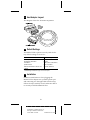
2 Host Adapter Layout
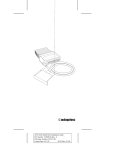
This diagram shows the APA-348 components.
3 Default Settings
The MiniSCSI Plus operates correctly with the factory default settings in most PCs:
Parameter
Host Adapter SCSI ID
Host Adapter Termination
Port Address
Speed Selection
Extended Translation for Drives Over
1 GByte
1
Default Setting
7
Enabled
378h (Options: 278h, 3BCh)
Most Compatible1
Automatic (Enabled)
See Maximizing Performance on page 5 to increase speed.
4 Installation
Hardware installation involves plugging the
MiniSCSI Plus adapter into a parallel printer port
and connecting it to the applicable SCSI device(s).
Follow the steps carefully in each subsection below
to correctly install the MiniSCSI Plus.
2
A
AAAA
AAAA
AAAA
A
AAAAAAAA
AAAAAAAA
AAAAAAAA
AAAAAAAA
AAAAAAAA
AAAAAAAA
AAAAAAAA
AAAAAAAA
AAAAAAAA
AAAAAAAA
AAAAAAAA
AAAAAA
AA
A
AA
APA-348 Installation Guide
A
AA
A
AA
A
AA
Part
Number:
510603-00,
Rev.
A
A
AA
A
AA
A
AA
Print
Spec
Number:
492716-00
A
AA
A
AA
A
AA
Current
Date:
5/19/94
ECN
Date:
5/31/94
A
AA
A
AAAAAAAAAAAAAAAAAAAAAAAAAAAAAAAAAAAAAAAAAAAAAAAAAAAAAA
AA
Connecting the MiniSCSI Plus
WARNING: Turn OFF the computer, printer,
and SCSI devices when connecting or disconnecting the MiniSCSI Plus. This protects
against damage to any components.
Connect the MiniSCSI Plus parallel port connector to
a parallel printer port on your computer. You may
use either LPT1, LPT2 or LPT3—the MiniSCSI Plus
drivers automatically detect which port is in use.
If your parallel printer port has a copy-protection
device (commonly known as a dongle) or other nonprinter product connected to it, you should remove
the device from your printer port and connect it to
the printer passthrough connector on the MiniSCSI
Plus. If this arrangement causes any problems, either
the dongle or the MiniSCSI Plus must be relocated to
a different parallel port.
Connecting SCSI Peripherals
1 Connect the first SCSI device to the SCSI connector on the MiniSCSI Plus.
2 Connect other SCSI devices (up to seven total) by
daisy-chaining them to the first SCSI device.
SCSI devices are daisy-chained by connecting
cables in a single, continuous series called the
SCSI bus. SCSI bus cables must run directly from
one device to the next, with no branches. The
SCSI connector on the MiniSCSI Plus is a 50-pin
Centronics-type external connector.
Caution: The MiniSCSI Plus supports only
single-ended SCSI devices. Do not connect
differential SCSI devices to it. Read the
device’s documentation to determine
whether it is single-ended or differential.
3
A
AAAA
AAAA
AAAA
A
AAAAAAAA
AAAAAAAA
AAAAAAAA
AAAAAAAA
AAAAAAAA
AAAAAAAA
AAAAAAAA
AAAAAAAA
AAAAAAAA
AAAAAAAA
AAAAAAAA
AAAAAA
AA
A
AA
APA-348 Installation Guide
A
AA
A
AA
A
AA
Part
Number:
510603-00,
Rev.
A
A
AA
A
AA
A
AA
Print
Spec
Number:
492716-00
A
AA
A
AA
A
AA
Current
Date:
5/19/94
ECN
Date:
5/31/94
A
AA
A
AAAAAAAAAAAAAAAAAAAAAAAAAAAAAAAAAAAAAAAAAAAAAAAAAAAAAA
AA
Assigning SCSI IDs
If you connect more than one SCSI device to the
MiniSCSI Plus simultaneously, make sure that each
device’s SCSI ID (device number between 0 and 6) is
different; ID 7 is reserved for the adapter and cannot
be changed. IDs must be different to prevent conflicts
when the MiniSCSI Plus communicates with the
devices. See your SCSI device documentation for
details.
Terminating the SCSI Bus
The SCSI devices on both ends of the SCSI bus must
be terminated. See the following subsections for
details on termination.
Terminating the Host Adapter
MiniSCSI Plus termination is set to Enabled by
default. This setting cannot be changed.
Terminating SCSI Peripherals
1 Read the manufacturer’s documentation to determine how to enable or disable termination on
SCSI device(s).
2 Install or enable terminators on the last SCSI
devices at the end of the SCSI bus.
3 Remove terminators or disable termination on all
other peripheral devices in the middle of the SCSI
bus.
4 Be sure the SCSI cables are connected securely.
They may have been loosened if you changed
jumper or switch settings on the peripherals.
Termination Power
The SCSI device(s) connected to the MiniSCSI Plus
provides power to the adapter and, thus, must be
equipped with the standard TERMPOWER output
(which is part of the SCSI connector interface specification). See your SCSI device manual or dealer to
confirm this. The MiniSCSI Plus must have
TERMPOWER to operate.
4
A
AAAA
AAAA
AAAA
A
AAAAAAAA
AAAAAAAA
AAAAAAAA
AAAAAAAA
AAAAAAAA
AAAAAAAA
AAAAAAAA
AAAAAAAA
AAAAAAAA
AAAAAAAA
AAAAAAAA
AAAAAA
AA
A
AA
APA-348 Installation Guide
A
AA
A
AA
A
AA
Part
Number:
510603-00,
Rev.
A
A
AA
A
AA
A
AA
Print
Spec
Number:
492716-00
A
AA
A
AA
A
AA
Current
Date:
5/19/94
ECN
Date:
5/31/94
A
AA
A
AAAAAAAAAAAAAAAAAAAAAAAAAAAAAAAAAAAAAAAAAAAAAAAAAAAAAA
AA
Caution: If you disconnect your SCSI
device(s) from the MiniSCSI Plus while in
use, the adapter loses power and does not
recognize the SCSI device(s) when reconnected. Reboot your computer in this case.
Connecting the Printer
Connect a standard parallel printer cable to the
MiniSCSI Plus printer passthrough connector if you
wish to simultaneously use a parallel printer with
your MiniSCSI Plus. No special configuration or
switching is needed to use your printer.
For U.S. Residents Only: Use the printer cable
included in your kit to connect your
MiniSCSI Plus to your printer. This cable is
shielded to comply with FCC-mandated
requirements for a Class B computing
device. Use of any other printer cable may
result in noncompliance with FCC shielding
requirements and undesirable electronic
interference with other devices.
The printer port on the MiniSCSI Plus is operable
only while it is powered up. The printer passthrough
port on the adapter cannot function if you disconnect or turn OFF the connected SCSI device.
Completing the Installation
1 Turn ON the power for the PC and peripheral(s).
2 Load the software, as explained in the Software
User Guide.
In most cases your PC, MiniSCSI Plus, and peripherals are now ready to use.
5 Maximizing Performance
After your MiniSCSI Plus and software have been
installed, tested, and are working properly, you
may be able to achieve even better performance. In
5
A
AAAA
AAAA
AAAA
A
AAAAAAAA
AAAAAAAA
AAAAAAAA
AAAAAAAA
AAAAAAAA
AAAAAAAA
AAAAAAAA
AAAAAAAA
AAAAAAAA
AAAAAAAA
AAAAAAAA
AAAAAA
AA
A
AA
APA-348 Installation Guide
A
AA
A
AA
A
AA
Part
Number:
510603-00,
Rev.
A
A
AA
A
AA
A
AA
Print
Spec
Number:
492716-00
A
AA
A
AA
A
AA
Current
Date:
5/19/94
ECN
Date:
5/31/94
A
AA
A
AAAAAAAAAAAAAAAAAAAAAAAAAAAAAAAAAAAAAAAAAAAAAAAAAAAAAA
AA
many system configurations, implementing a special data-transfer mode can result in a 15-20% speed
improvement.
Before trying the techniques described below, make
sure your SCSI hardware and software are properly
installed and configured, and running without problems. Attempts to improve performance may not
work on your particular installation. Knowing that
the basic installation is working will aid in determining whether performance enhancements will work
as well. In addition, there is a small chance that data
corruption may occur with incompatible configurations, so make sure that important data on your SCSI
device(s) is backed up before trying this technique.
What is this Technique?
By default, your software is configured to operate in
full handshaking mode, meaning that data transfer via
the MiniSCSI Plus is performed in a manner that
automatically confirms its accuracy. If there are timing, electrical noise, or other problems that disturb
accurate data flow, the error is automatically
detected and corrected without any user intervention. This mode assures that movement of information back and forth is error-free. Full handshaking
requires more interaction by the software, resulting
in somewhat lower performance than if handshaking
were disabled.
You can disable full handshaking and operate your
SCSI installation in blind mode. Many MiniSCSI Plus
configurations operate perfectly and at a much faster
rate in blind mode. The /M software switch allows
you to turn full handshaking mode OFF to test
whether you can use the faster blind mode.
The /M switch has four possible settings and is set in
your config.sys file on the ASPI manager line (see
Additional /M Switch Options on page 9 for more
explanations):
/M0
1
2
3
Standard full handshaking mode (default)
Blind mode enabled for higher performance
Full handshaking, force unidirectional
Blind mode, force unidirectional
6
A
AAAA
AAAA
AAAA
A
AAAAAAAA
AAAAAAAA
AAAAAAAA
AAAAAAAA
AAAAAAAA
AAAAAAAA
AAAAAAAA
AAAAAAAA
AAAAAAAA
AAAAAAAA
AAAAAAAA
AAAAAA
AA
A
AA
APA-348 Installation Guide
A
AA
A
AA
A
AA
Part
Number:
510603-00,
Rev.
A
A
AA
A
AA
A
AA
Print
Spec
Number:
492716-00
A
AA
A
AA
A
AA
Current
Date:
5/19/94
ECN
Date:
5/31/94
A
AA
A
AAAAAAAAAAAAAAAAAAAAAAAAAAAAAAAAAAAAAAAAAAAAAAAAAAAAAA
AA
The /M1 setting enables blind mode, and /M0 (or no
/M entry) is standard full handshaking. The change is
made to the line device=[path]ma348.sys in your
config.sys file, using any standard text editor. For
example, to turn full handshaking off for better performance, the line should look something like this:
device=\tscsi\ma348.sys /m1
After making this change and saving your config.sys
to your boot drive, reboot your computer for the
change to take effect.
Testing Blind Mode Operation
After modifying your config.sys file and rebooting,
immediately conduct some simple tests to determine
whether your installation is compatible with blind
mode. Follow this sequence:
1 Observe the system bootup closely. As the
CD-ROM and/or hard disk drivers load, watch
for messages like No SCSI devices detected, No
Boot Record Found, etc. As MSCDEX loads,
watch for a CDR103: CDROM not High Sierra or
ISO-9660 format error message. If any of these
messages appear, your system configuration does
not support blind mode.
2 If step 1 reveals a problem, you might be able to
operate in blind mode by setting your computer’s
CPU speed to a lower value. This change is generally done with a software setup routine—see your
computer’s documentation for details.
If a computer speed decrease does not help, then
you must remove the /M1 switch from config.sys
immediately and reboot. Continued operation of
an incompatible system will result in SCSI data
corruption.
3 If step 1 reveals no problems during bootup, we
recommend the following additional tests:
a Perform a dir command on all SCSI devices to
see if the directory structure is correctly
reported. Do not run any other DOS commands yet. If a problem is evident (such as
incorrect file names, garbage characters in the
directory listing, etc.), you probably do not
7
A
AAAA
AAAA
AAAA
A
AAAAAAAA
AAAAAAAA
AAAAAAAA
AAAAAAAA
AAAAAAAA
AAAAAAAA
AAAAAAAA
AAAAAAAA
AAAAAAAA
AAAAAAAA
AAAAAAAA
AAAAAA
AA
A
AA
APA-348 Installation Guide
A
AA
A
AA
A
AA
Part
Number:
510603-00,
Rev.
A
A
AA
A
AA
A
AA
Print
Spec
Number:
492716-00
A
AA
A
AA
A
AA
Current
Date:
5/19/94
ECN
Date:
5/31/94
A
AA
A
AAAAAAAAAAAAAAAAAAAAAAAAAAAAAAAAAAAAAAAAAAAAAAAAAAAAAA
AA
have blind mode compatibility and should
remove the /M1 switch from config.sys. If no
problems are noted, proceed to the next step.
b Perform a chkdsk command on all hard disk
drives (without the /F option) and/or a chkcd
(supplied with your software) command on all
CD-ROM drives. If a problem is evident (such
as absurdly wrong numbers being reported),
you probably do not have blind mode compatibility and should remove the /M1 switch from
your config.sys. If no problems are noted, proceed to the next step.
c Try copying a large (greater than 100 KBytes, if
possible) file from the SCSI device to a nonSCSI hard disk or floppy drive. After the copy
is complete, use the DOS comp command to
compare the new copy to the original file. If a
problem is evident (such as the file comparison failing), you probably do not have blind
mode compatibility and should remove the
/M1 switch from your config.sys. If no problems are noted, proceed to the next step.
d Copy a large file from your non-SCSI drive to
a SCSI hard disk device. Again, compare the
two files with the comp command and if a
problem is evident (such as the file comparison failing), you probably do not have blind
mode compatibility and should remove the /
M1 switch from your config.sys.
4 If, after following these procedures, you have
found no problems, it is likely that your system is
fully compatible with blind mode and your
MiniSCSI Plus will now operate considerably
faster than before (see Additional /M Switch
Options on page 9).
5 If you change your computer’s SCSI device configuration, you should rerun the above test
sequence to make sure any newly-added devices
are compatible with blind mode. It is possible that
your system will not operate correctly in blind
mode after you add a new device.
8
A
AAAA
AAAA
AAAA
A
AAAAAAAA
AAAAAAAA
AAAAAAAA
AAAAAAAA
AAAAAAAA
AAAAAAAA
AAAAAAAA
AAAAAAAA
AAAAAAAA
AAAAAAAA
AAAAAAAA
AAAAAA
AA
A
AA
APA-348 Installation Guide
A
AA
A
AA
A
AA
Part
Number:
510603-00,
Rev.
A
A
AA
A
AA
A
AA
Print
Spec
Number:
492716-00
A
AA
A
AA
A
AA
Current
Date:
5/19/94
ECN
Date:
5/31/94
A
AA
A
AAAAAAAAAAAAAAAAAAAAAAAAAAAAAAAAAAAAAAAAAAAAAAAAAAAAAA
AA
6 If you share your MiniSCSI Plus adapter among
several systems or carry it for use on other systems, do not use the /M1 switch unless you are
absolutely sure that the other systems are compatible. Changes may take place to the system
configuration in your absence. It is better to run a
little slower than to take a chance on corrupting
your data.
Additional /M Switch Options
Switch settings /M2 and /M3 correspond to /M0 and
/M1 but force the adapter to operate in undirectional
mode. A few computers (such as the NEC Prospeed
SX/20) are incorrectly seen by the MiniSCSI Plus as
being equipped with a bidirectional parallel port,
instead of the actual unidirectional configuration.
This situation can cause data corruption, but using
/M2 (instead of /M0) or /M3 (instead of /M1) forces the
MiniSCSI Plus to use unidirectional mode and
should fix the problem.
6 Troubleshooting
If you have a problem during installation, check the
items below. Be sure to read the Troubleshooting section in the Software User Guide for other related error
messages and remedies.
Note: You cannot boot from a device connected to your MiniSCSI Plus, because your
computer does not expect to boot from a
device connected to the parallel port. Therefore, your MiniSCSI Plus device drivers
must be loaded during the boot process from
another disk.
■
Make sure all cables are properly connected.
■
Make sure all SCSI devices have unique SCSI IDs.
■
Make sure the SCSI bus is correctly terminated.
Network Installations
If your computer is part of a network installation,
your printer port may be redirected to a network
9
A
AAAA
AAAA
AAAA
A
AAAAAAAA
AAAAAAAA
AAAAAAAA
AAAAAAAA
AAAAAAAA
AAAAAAAA
AAAAAAAA
AAAAAAAA
AAAAAAAA
AAAAAAAA
AAAAAAAA
AAAAAA
AA
A
AA
APA-348 Installation Guide
A
AA
A
AA
A
AA
Part
Number:
510603-00,
Rev.
A
A
AA
A
AA
A
AA
Print
Spec
Number:
492716-00
A
AA
A
AA
A
AA
Current
Date:
5/19/94
ECN
Date:
5/31/94
A
AA
A
AAAAAAAAAAAAAAAAAAAAAAAAAAAAAAAAAAAAAAAAAAAAAAAAAAAAAA
AA
printer. For instance, Novell® NetWare® software
uses the capture command for this purpose. If this is
the case, the software will not detect the hardware at
bootup. The simplest solution is to change your computer’s parallel port hardware to LPT2 or LPT3, or
change your network redirection to a different port.
Older Sharp Laptops
Some older 8086-based Sharp® laptops have a problem with their parallel port and do not work properly
with the MiniSCSI Plus, or with other programs that
use high-speed parallel port data transfer, such as
LapLink® or DeskLink® from Traveling Software.
Sharp offers a free hardware upgrade for customers
experiencing this problem; contact your Sharp dealer
for details.
No SCSI Host Adapter Detected Message Appears at Bootup
The MiniSCSI Plus requires SCSI termination power
to operate. Check for SCSI device termination power
as shown below:
■
Use a voltmeter to measure the voltage available
between pin 38 and ground on the SCSI device’s
connector (see SCSI Connector Pinouts). Make sure
the SCSI device(s) power is ON; it should measure
approximately +5 volts. Very low or no voltage at
pin 25 indicates a problem with termination
power. This condition disables the adapter.
■
Plug a printer into the printer passthrough port.
If the printer can print, you have correct
TERMPOWER.
No SCSI Functions in Use Message Appears at Bootup
The software driver is looking for a different device.
For example, you may have the CD-ROM driver
loaded, but you are trying to work with a hard disk
drive or vice versa. Each Adaptec software driver
recognizes the existence of all SCSI devices attached
to the SCSI chain but only works with the device for
which it is written to communicate. Install the correct
driver or remove an unwanted driver from your
config.sys file with a text editor program.
10
A
AAAA
AAAA
AAAA
A
AAAAAAAA
AAAAAAAA
AAAAAAAA
AAAAAAAA
AAAAAAAA
AAAAAAAA
AAAAAAAA
AAAAAAAA
AAAAAAAA
AAAAAAAA
AAAAAAAA
AAAAAA
AA
A
AA
APA-348 Installation Guide
A
AA
A
AA
A
AA
Part
Number:
510603-00,
Rev.
A
A
AA
A
AA
A
AA
Print
Spec
Number:
492716-00
A
AA
A
AA
A
AA
Current
Date:
5/19/94
ECN
Date:
5/31/94
A
AA
A
AAAAAAAAAAAAAAAAAAAAAAAAAAAAAAAAAAAAAAAAAAAAAAAAAAAAAA
AA
7 SCSI Connector Pinouts
This section documents the SCSI interface connector
on the MiniSCSI Plus as well as typical connectors
found on SCSI devices. Internal SCSI devices commonly use a 50-pin header connector (SCSI specification, Alternative 1), consisting of two rows of 25
male contacts with adjacent contacts 2.54 mm
(0.1 inch) apart, as shown below.
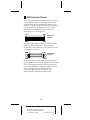
..........................
..........................
Internal SCSI
Connector
A typical single-ended shielded SCSI device 50-pin
connector (SCSI specification, Alternative 2) is
shown below; this connector is most often used with
an external SCSI device.
External SCSI
Connector
Table 1 lists the pin assignments for each connector
type. Definitions of the various signals may be found
in any SCSI design reference book. The SCSI interface is fully defined in ANSI X3.131-1986; this document is available from Global Engineering
Documents, 2805 McGaw Ave, Irvine, CA
92713-9539 USA, telephone (714) 261-1455.
11
A
AAAA
AAAA
AAAA
A
AAAAAAAA
AAAAAAAA
AAAAAAAA
AAAAAAAA
AAAAAAAA
AAAAAAAA
AAAAAAAA
AAAAAAAA
AAAAAAAA
AAAAAAAA
AAAAAAAA
AAAAAA
AA
A
AA
APA-348 Installation Guide
A
AA
A
AA
A
AA
Part
Number:
510603-00,
Rev.
A
A
AA
A
AA
A
AA
Print
Spec
Number:
492716-00
A
AA
A
AA
A
AA
Current
Date:
5/19/94
ECN
Date:
5/31/94
A
AA
A
AAAAAAAAAAAAAAAAAAAAAAAAAAAAAAAAAAAAAAAAAAAAAAAAAAAAAA
AA
Pin
Alt. 1
Internal
1
3
5
7
9
11
13
15
17
19
21
23
25
27
29
31
33
35
37
39
41
43
45
47
49
Pin
Alt. 2
External
1
2
3
4
5
6
7
8
9
10
11
12
13
14
15
16
17
18
19
20
21
22
23
24
25
Function
Gnd
Gnd
Gnd
Gnd
Gnd
Gnd
Gnd
Gnd
Gnd
Gnd
Gnd
Gnd
Open
Gnd
Gnd
Gnd
Gnd
Gnd
Gnd
Gnd
Gnd
Gnd
Gnd
Gnd
Gnd
Function
-DB0
-DB1
-DB2
-DB3
-DB4
-DB5
-DB6
-DB7
-DBP
Gnd
Gnd
Gnd
Termpwr
Gnd
Gnd
-ATN
Gnd
-BSY
-ACK
-RST
-MSG
-SEL
-C/D
-REQ
-I/O
Alt. 1
Internal
2
4
6
8
10
12
14
16
18
20
22
24
26
28
30
32
34
36
38
40
42
44
46
48
50
Alt. 2
External
26
27
28
29
30
31
32
33
34
35
36
37
38
39
40
41
42
43
44
45
46
47
48
49
50
8 Adaptec Customer Support Services
■
For information on software upgrades, new releases, technical
advice, and other topics, call Adaptec’s Electronic Bulletin
Board Service (BBS) 24 hours a day at 408-945-7727;
1200/2400/9600/14400 baud, 8 data bits, 1 stop bit, no parity.
■
For the latest online information about Adaptec products and
services, call the Interactive Fax Service 23 hours a day, 7 days a
week, at 408-957-7150.
■
For technical assistance, call Adaptec’s Technical Support Hot
Line at 800-959-SCSI (7274), or 408-945-2550. M–Th: 6:00 a.m.–
5:00 p.m., F: 6:00 a.m.–3:00 p.m., Pacific Time.
■
To order Adaptec software and SCSI cables, call 800-442-SCSI
(7274), M–F: 6:00 a.m. to 5:00 p.m., Pacific Time. If you are
calling from outside the U.S. and Canada, the number is
408-957-SCSI (7274).
■
To request literature on Adaptec products, call 800-934-2766.
M–F: 5:00 a.m.–6:00 p.m., Pacific Time.
12
A
AAAA
AAAA
AAAA
A
AAAAAAAA
AAAAAAAA
AAAAAAAA
AAAAAAAA
AAAAAAAA
AAAAAAAA
AAAAAAAA
AAAAAAAA
AAAAAAAA
AAAAAAAA
AAAAAAAA
AAAAAA
AA
A
AA
APA-348 Installation Guide
A
AA
A
AA
A
AA
Part
Number:
510603-00,
Rev.
A
A
AA
A
AA
A
AA
Print
Spec
Number:
492716-00
A
AA
A
AA
A
AA
Current
Date:
5/19/94
ECN
Date:
5/31/94
A
AA
A
AAAAAAAAAAAAAAAAAAAAAAAAAAAAAAAAAAAAAAAAAAAAAAAAAAAAAA
AA
FCC Compliance Statement
NOTE: This equipment has been tested and found to comply with the limits
for a Class B digital device, pursuant to Part 15 of the FCC rules. These limits are designed to provide reasonable protection against harmful interference in residential installations. This equipment generates, uses, and can
radiate radio frequency energy, and if not installed and used in accordance
with the instructions, may cause harmful interference to radio communications. However, there is no guarantee that interference will not occur in a
particular installation.
If this equipment does cause interference to radio or television equipment
reception, which can be determined by turning the equipment off and on,
the user is encouraged to try to correct the interference by one or more of the
following measures:
•
•
•
Reorient or relocate the receiving antenna
Move the equipment away from the receiver
Plug the equipment into an outlet on a circuit different from that to
which the receiver is powered
• If necessary, the user should consult the dealer or an experienced radio/
television technician for additional suggestions
CAUTION: Only equipment certified to comply with Class B (computer
input/output devices, terminals, printers, etc.) should be attached to this
equipment, and must have shielded interface cables.
Finally, any change or modifications to the equipment by the user not
expressly approved by the grantee or manufacturer could void the user's
authority to operate such equipment.
Each APA-348 is equipped with an FCC compliance label which shows only
the FCC Identification number. The full text of the associated label follows:
This device complies with part 15 of the FCC rules. Operation is
subject to the following two conditions: (1) this device may not
cause harmful interference and (2) this device must accept any interference received, including interference that may cause undesired
operation.
Adaptec, Inc.
691 South Milpitas Blvd.
Milpitas, CA 95035
Copyright © 1993, 1994 Adaptec, Inc. All rights reserved. Adaptec
and the Adaptec logo are registered trademarks of Adaptec, Inc.
MiniSCSI is a trademark of Trantor Systems Limited, an Adaptec
company. All other trademarks used are owned by their respective owners.
Printed in Singapore
13
A
AAAA
AAAA
AAAA
A
AAAAAAAA
AAAAAAAA
AAAAAAAA
AAAAAAAA
AAAAAAAA
AAAAAAAA
AAAAAAAA
AAAAAAAA
AAAAAAAA
AAAAAAAA
AAAAAAAA
AAAAAA
AA
A
AA
APA-348 Installation Guide
A
AA
A
AA
A
AA
Part
Number:
510603-00,
Rev.
A
A
AA
A
AA
A
AA
Print
Spec
Number:
492716-00
A
AA
A
AA
A
AA
Current
Date:
5/19/94
ECN
Date:
5/31/94
A
AA
A
AAAAAAAAAAAAAAAAAAAAAAAAAAAAAAAAAAAAAAAAAAAAAAAAAAAAAA
AA