1
2a
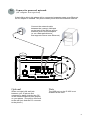
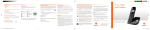
Connect to powered network
(AC adapter not required)
If the LAN to which this phone will be connected supports power-over-Ethernet,
no AC adapter is needed. The phone draws power from the Ethernet network.
Connect the network cable
between the (orange) LAN port
on the back of the phone and an
Ethernet jack in the workspace
(or on a data switch/router
that supports Power-over-Ethernet.)
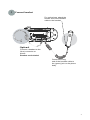
Optional
Note
Share a single LAN wall jack
between your IP phone and
computer by daisy-chaining the PC
off the second Ethernet port (purple)
on your phone. (The phone connects
to the wall jack and the PC connects
to the phone.)
The USB port on the IP 655 is not
enabled at this time.
5