1
24 wire printer
Command Sets
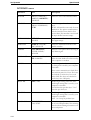
EPSON mode
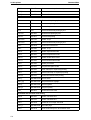
The printer supports the commands shown below.
Command sequence
Function
Horizontal position control
BS
08H
Backspace
HT
09H
Horizontal Tab
CR
0DH
Carriage Return
ESC $
1BH 24H
Set Absolute Print Position
ESC D
1BH 44H
Select Horizontal Tabs
ESC Q
1BH 51H
Set Right Margin
ESC \
1BH 5CH
Set Relative Print Position
ESC a
1BH 61H
Select Justification
ESC l
1BH 6CH
Set Left Margin
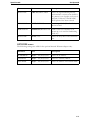
Vertical position control
C-6
LF
0AH
Line Feed
VT
0BH
Vertical Tab
FF
0CH
Form Feed
ESC (C
1BH 28H 43H
Set Page Length in Define Unit
ESC (U
1BH 28H 55H
Set Unit
ESC (V
1BH 28H 56H
Set Absolute Vertical Print Position
ESC (c
1BH 28H 63H
Set Page Format
ESC (v
1BH 28H 76H
Set Relative Vertical Print Position
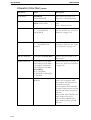
ESC +
1BH 2BH
Select n/360” Line Spacing
ESC /
1BH 2FH
Select Vertical Tab Channel
ESC 0
1BH 30H
Select 1/8” Line Spacing
ESC 2
1BH 32H
Select 1/6” Line Spacing
ESC 3
1BH 33H
Set Graphics Line Spacing (n/180”)
ESC A
1BH 41H
Set n/60” Line Spacing
ESC B
1BH 42H
Set Vertical Tabs
ESC C
1BH 43H
Set Page Length in Lines
ESC C 0
1BH 43H 00H
Set Page Length in Inches
ESC J
1BH 4AH
Perform n/180-inch Line Feed
ESC N
1BH 4EH
Set Skip Over Perforation
ESC O
1BH 4FH
Cancel Skip Over Perforation
ESC b
1BH 62H
Select Vertical Tabs in Channels
ESC j
1BH 6AH
Perform Reverse n/180-inch Line Feed