1
Table of contents
Chapter 1
Introduction
1-1
Features
1-2
Options
1-2
Symbols used
1-3
Important safety instructions
1-4
Safety Precautions
1-4
Chapter 2
Operating the printer
2-1
Overview
2-1
Setting up your printer
2-2
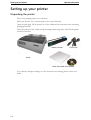
Unpacking the printer
2-2
Placing the printer
2-3
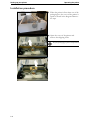
Installation procedure
2-4
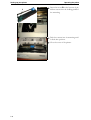
Installing the ribbon cassette
2-5
Connecting the printer
Checking the printer voltage
Connecting the mains power
Connecting the interface cable
Switching on the printer
2-7
2-7
2-7
2-8
2-8
Printer components
2-9
Front view
2-9
Rear view
2-10
Internal view
2-11
Operations of the Control Panel
2-12
LED indicators
2-12
Control panel keys
2-13
Print quality key
Print qualities 9 wire printer
Print qualities 24 wire printer
2-15
2-15
2-15
Character pitch key
2-16
I