1
BRUNTON MAN. MECH. 7/97
9/29/98 9:08 AM
Page 3
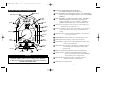
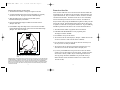
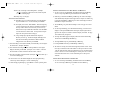
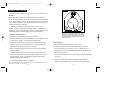
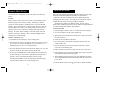
1 POWER: Press and hold POWER to turn the Outback on.
BUTTON AND DISPLAY INFORMATION
Press POWER momentarily to turn the Outback off.
14 GUN SIGHT
NIGHT NAVIGATION 6
2 LIGHT: Press LIGHT to turn the back-light of the LCD on or off. Hold LIGHT for
more than 2 seconds to turn Night Navigation on or off in either Trail Blazing
or Multi-Leg.
7 NUMERIC
HEADING
2 LIGHT
POWER 1
POWER
LIGHT
POINTS
PROGRAM 11
MAG
illuminate the PROGRAM symbol and enter programming mode.
(Example: press MENU once to move from Basic to Trail Blazing or
hold MENU until PROGRAM flashes to enter programming mode)
4 ADVANCE: Press ADVANCE to see the next option or value. (Example: press
8 CARDINAL
PROGRAM
3 MENU: Press MENU to step from one menu option to another. Hold MENU to
12 TRUE/MAG
SYMBOL
ADVANCE to increase a digit from 1 to 2)
5 ENTER: Press ENTER to select an option, value or bearing, to start calibration, or
to start or stop a timer of a leg. (Example: press ENTER to store a
bearing)
6 NIGHT NAVIGATION: For use in Trail Blazing and Multi-Leg, the red and green
9 COMPASS
ROSE
MENU
OPTIONS
10
CLOCK
TIMER
DECLIN
DAMPING
BASIC
TRL BLZR
MULTILEG
BEARING
ADVANCED
ENU
10 M
OPTIONS
13 DISPLAY
WORD
ADVANCE 4
14
3
GUN SIGHT
5 ENTER
MENU
IMPORTANT
To provide tilt compensation, the magnetic sensors inside the Outback are
mechanically gimbaled. This may cause a ÒrattlingÓ noise if the Outback
is shaken or jarred. This is not a defect in the compass, but a result of the
movement of the magnetic sensors.
1
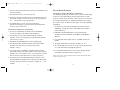
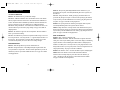
8 CARDINAL POINTS: Direction letters ( N, NE, E, SE, S, SW, W, NW).
9 COMPASS ROSE: A solid arrow points to North. During Day Navigation, arrows
guide you in the right direction.
ENTER
MENU
arrows keep you on course.
7 NUMERIC HEADING: Heading is displayed in 1¡ increments from 0¡ to 359¡.
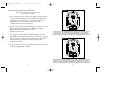
10 MENU OPTIONS: The menu options of the Outback are continuously displayed.
A box around the menu option indicates which option the
Outback is using.
11 PROGRAM: The PROGRAM symbol flashes while in programming mode.
12 TRUE/MAG SYMBOL: The TRUE symbol is illuminated when the heading
reference is true north and the MAG symbol is illuminated
when the heading reference is magnetic north.
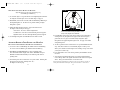
13 DISPLAY WORD: Six alphanumeric characters. The display word shows
instructions, information, options and values.
14 GUN SIGHTS: Used for taking bearings.
2