1
S530D QSG.book Page i Tuesday, May 7, 2002 4:14 PM
S530D
Photo Printer
Quick Start Guide
S530D QSG.book Page ii Tuesday, May 7, 2002 4:14 PM
Canon S530D Photo Printer Quick Start Guide.
Copyright
This guide is copyrighted by Canon U.S.A., Inc. with all rights reserved. Under the copyright laws,
this guide may not be reproduced in any form, in whole or in part, without the prior written consent
of Canon U.S.A., Inc.
© 2002 Canon U.S.A., Inc.
Disclaimer
The purpose of this guide is to aid end users by summarizing pertinent information about your Canon
S530D Photo Printer. All statements, technical information and recommendations in this guide are
believed reliable, but the accuracy and completeness thereof are not guaranteed or warranted, and
they are not intended to be, nor should they be understood to be, representations or warranties
concerning the products described.
Specifications are subject to change without notice.
As an ENERGY STAR partner, Canon U.S.A. Inc., has determined that this product meets
the ENERGY STAR guidelines for energy efficiency.
All information regarding non-Canon products was compiled from publicly available information.
No representation is made regarding the accuracy thereof.
Trademarks
Canon is a registered trademark of Canon Inc. PhotoRecord is a trademark of Canon Information
Systems Research Australia. Macintosh, Mac and the Mac logo are registered trademarks of Apple
Computer, Inc., registered in the U.S. and other countries. CompactFlash is a trademark of SanDisk
Corporation. Memory Stick is a trademark of Sony Corporation. SmartMedia is a trademark of
Toshiba Corporation. Microdrive is a trademark of International Business Machines Corporation.
All other product and brand names are trademarks of their respective owners.
Canon U.S.A., Inc.
One Canon Plaza
Lake Success, NY 11042
Printed in Thailand
S530D QSG.book Page iii Tuesday, May 7, 2002 4:14 PM
Contents
Chapter 1: Basic Printing
Turning Your Printer On and Off . . . . . . . . . . . . . . . . . . . . . . . . . . . .
What Is a Printer Driver? . . . . . . . . . . . . . . . . . . . . . . . . . . . . . . . . . .
Selecting the S530D Photo Printer for Use . . . . . . . . . . . . . . . . . . .
Using Specialty Media . . . . . . . . . . . . . . . . . . . . . . . . . . . . . . . . . . .
Cancelling a Print Job . . . . . . . . . . . . . . . . . . . . . . . . . . . . . . . . . . . .
Setting Driver Options . . . . . . . . . . . . . . . . . . . . . . . . . . . . . . . . . . . .
Changing the Page Setup . . . . . . . . . . . . . . . . . . . . . . . . . . . . . . . . .
2
2
2
3
7
8
9
Chapter 2: Advanced Print Features
Using Recommended Paper or Specialty Media . . . . . . . . . . . . . .
Smoothing Rough or Jagged Edges . . . . . . . . . . . . . . . . . . . . . . . .
Optimizing Color Photographs . . . . . . . . . . . . . . . . . . . . . . . . . . . .
Adjusting Print Quality . . . . . . . . . . . . . . . . . . . . . . . . . . . . . . . . . .
Adjusting Color Balance, Brightness and Saturation . . . . . . . . . .
Saving and Recalling Driver Settings . . . . . . . . . . . . . . . . . . . . . . .
14
14
15
17
18
20
Chapter 3: Printing Without a Computer
Basic Operations . . . . . . . . . . . . . . . . . . . . . . . . . . . . . . . . . . . . . . .
Printing Photos . . . . . . . . . . . . . . . . . . . . . . . . . . . . . . . . . . . . . . . .
Print Options . . . . . . . . . . . . . . . . . . . . . . . . . . . . . . . . . . . . . . . . . .
Maintenance Procedures for Direct Printing . . . . . . . . . . . . . . . . .
Using the Memory Card Utility . . . . . . . . . . . . . . . . . . . . . . . . . . . .
23
29
30
34
36
Chapter 4: Printing Maintenance
Monitoring Ink Levels . . . . . . . . . . . . . . . . . . . . . . . . . . . . . . . . . . .
Replacing Ink Tanks . . . . . . . . . . . . . . . . . . . . . . . . . . . . . . . . . . . .
Aligning the Print Head . . . . . . . . . . . . . . . . . . . . . . . . . . . . . . . . . .
Printing a Nozzle Check Pattern . . . . . . . . . . . . . . . . . . . . . . . . . . .
Cleaning the Print Head . . . . . . . . . . . . . . . . . . . . . . . . . . . . . . . . .
41
43
43
45
47
iii
S530D QSG.book Page iv Tuesday, May 7, 2002 4:14 PM
Contents
Chapter 5: Using Your Photo Applications
What is Exif Print? . . . . . . . . . . . . . . . . . . . . . . . . . . . . . . . . . . . . . . . 49
Installing the Photo Applications . . . . . . . . . . . . . . . . . . . . . . . . . . 50
Using the Photo Applications . . . . . . . . . . . . . . . . . . . . . . . . . . . . . 51
Using Easy-PhotoPrint for Windows . . . . . . . . . . . . . . . . . . . . . . . . 52
Printing on Canon Photo Paper Pro for Borderless Printing 4" x 6" . . . . 56
Chapter 6: Troubleshooting
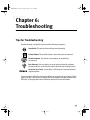
Tips for Troubleshooting . . . . . . . . . . . . . . . . . . . . . . . . . . . . . . . . . 59
Customer Care Center . . . . . . . . . . . . . . . . . . . . . . . . . . . . . . . . . . . 73
Appendix
Installing the Printer Driver . . . . . . . . . . . . . . . . . . . . . . . . . . . . . . . 75
Uninstalling the Printer Driver . . . . . . . . . . . . . . . . . . . . . . . . . . . . 77
Registering Your Canon Product . . . . . . . . . . . . . . . . . . . . . . . . . . . 78
System Requirements . . . . . . . . . . . . . . . . . . . . . . . . . . . . . . . . . . . 78
Safety Information . . . . . . . . . . . . . . . . . . . . . . . . . . . . . . . . . . . . . . 78
Regulatory Information . . . . . . . . . . . . . . . . . . . . . . . . . . . . . . . . . . 82
Product Specifications . . . . . . . . . . . . . . . . . . . . . . . . . . . . . . . . . . . 84
Limited Warranty—U.S. Only . . . . . . . . . . . . . . . . . . . . . . . . . . . . . . 86
Index
iv
. . . . . . . . . . . . . . . . . . . . . . . . . . . . . . . . . . . . . . . . . . . . . . . . . . . . . . . . . . . . . 89
S530D QSG.book Page 1 Tuesday, May 7, 2002 4:14 PM
Chapter 1: Basic Printing
Congratulations on purchasing your new Canon® S530D Photo Printer!
This chapter describes basic features of your S530D Photo Printer and provides
instructions on how to set up and print documents and photographs.
The following topics are presented in this chapter:
•
•
•
•
•
•
•
Turning Your Printer On and Off
What Is a Printer Driver?
Selecting the S530D Photo Printer for Use
Using Specialty Media
Cancelling a Print Job
Setting Driver Options
Changing the Page Setup
This Quick Start Guide describes some of the features of your
S530D Photo Printer and how to use them. For more detailed
information, view the S530D User’s Guide on the Setup
Software & User’s Guide CD-ROM.
Windows®: Driver features, instructions and screen captures
described in this guide reflect Windows XP and may be and/
or look different for Windows 98, Me and Windows 2000.
Also, in various procedures, users are instructed to click the
Properties button. However, depending upon the application
you are using, you may see the Preferences button or another
button instead.
Macintosh®: Driver features, instructions and screen
captures described in this guide reflect Mac® OS 8.6 – 9.x,
and may be and/or look different for Mac OS X.
1
S530D QSG.book Page 2 Tuesday, May 7, 2002 4:14 PM
Basic Printing
Turning Your Printer On and Off
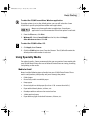
To turn your printer on or off, press the POWER button.
POWER button
• The POWER lamp will flash green when warming
up or when a print job is being sent to the printer.
• The POWER lamp will glow a steady (non-flashing)
green when the printer is ready for use or when
the print job is complete.
• If the POWER lamp flashes orange, see “Handling
Error Messages” on page 69.
What Is a Printer Driver?
Most computers require special software to link the programs you use to create
documents or images with the printer. This special software, called a printer
driver, converts the information from the software application into a format that
the printer can understand, and provides other handy features, such as
monitoring the levels of ink in the printer.
Selecting the S530D Photo Printer for Use
If the S530D is the only printer connected to your computer, it will be used
automatically every time you print. However, if your computer has access to
multiple printers, you can set the S530D as the default (main) printer.
To set the S530D as the default printer in Windows®:
1. Click Start, then:
• Windows XP: Select Control Panel, then Printers and Other Hardware, then
Printers and Faxes.
• Other Windows versions: Select Settings, then Printers.
2. Right-click the Canon S530D printer icon, then click Set as Default Printer.
The Canon S530D printer icon will now display with a checkmark that
indicates it is the default printer.
2
S530D QSG.book Page 3 Tuesday, May 7, 2002 4:14 PM
Basic Printing
To select the S530D from within a Windows application:
If another printer is set as the default printer, you can still select the Canon
S530D for a specific print job from within most applications.
Menus vary from application to application. Consult your
application’s user documentation if the Print option is not listed.
1. From the File menu, click Print.
2. Windows XP: Select Canon S530D from the list, then click Apply.
Other Windows versions: Click OK.
To select the S530D in Mac® OS:
1. Click Apple, then Chooser.
2. Click the S530D printer icon. Close the Chooser. The S530D will remain the
default printer until another is selected.
Using Specialty Media
For optimal results, Canon recommends that you use genuine Canon media with
your S530D Photo Printer. Be sure to follow all instructions on storing, handling
and printing on the media.
Media to Avoid
Never load the following types of media into your S530D Photo Printer. These
media could produce poor quality and jam or damage the printer:
• Folded paper
• Excessively curled or wrinkled paper
• Damp paper
• Excessively thin or thick paper (less than 17 lb. or more than 28 lb.)
•
•
•
•
Paper with adhered photos, stickers, etc.
Envelopes with an embossed or treated surface
3-hole punched paper
Paper with any type of attached fasteners, ribbons, etc.
3
S530D QSG.book Page 4 Tuesday, May 7, 2002 4:14 PM
Basic Printing
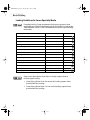
Loading Guidelines for Canon Specialty Media
For optimal results, Canon recommends that you use genuine Canon
media with your S530D Photo Printer. See the S530D User’s Guide on the
Setup Software & User’s Guide CD-ROM for more specific paper handling
instructions.
Media Type
Sheet Feeder Load Limit
Lever Position
Canon Photo Paper Plus Glossy
1 sheet
Left
Canon Matte Photo Paper
10 sheets
Left
Plain paper
100 sheets (17 – 28 lb.)
Left
Canon High Resolution Paper
80 sheets
Left
Canon Photo Paper Pro
1 sheet
Left
Canon Photo Paper Pro 4" x 6"
20 sheets
Left
Canon Photo Paper Pro for Borderless Printing 4" x 6"
20 sheets
Left
Canon High Gloss Photo Film
1 sheet
Left
Canon Glossy Photo Paper
1 sheet
Left
Canon Glossy Photo Cards
20 sheets
Left
Canon Transparencies
30 sheets
Left
Canon Banner Paper
1 sheet (up to 6 connected sheets)
Right
Canon T-Shirt Transfers
1 sheet
Right
#10 Envelopes
10 envelope
Right
Some Canon Specialty media includes a loading support sheet to
facilitate paper feeding.
• Canon Glossy Photo Cards: Do not use the loading support sheet
provided with the package.
• Canon Glossy Photo Paper: Do not use the loading support sheet
provided with the package.
4
S530D QSG.book Page 5 Tuesday, May 7, 2002 4:14 PM
Basic Printing
Loading Media into the S530D
Follow these instructions and tips for loading media into the printer.
• To prevent paper jams, always fan the sheets and align the edges before you
•
•
•
•
•
load them into the printer.
Handle media carefully by its edges.
Never touch the print surface (the glossy or brighter white side of the sheets).
Dirt or fingerprints on the print surface will adversely affect print quality.
To prevent changes in color, never stack printed sheets after they have
been printed.
Cover printed sheets with one sheet of plain paper to protect the printed
surface, even if you intend to store them in clear plastic folders.
For more information on loading media, see the S530D User’s
Guide on the Setup Software & User’s Guide CD-ROM.
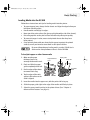
To load plain paper or other Canon media
1. Make sure the paper
thickness lever is set
correctly for the media used.
Paper thickness
lever
Paper guide
Print side
2. Pinch and slide the paper
guide completely to the left.
3. Fan the edges of the sheets
Load limit
mark
to remove static cling.
4. Tap the edges of the stack
against a flat surface so the
stack is aligned.
5. Insert the media into the paper rest, with the print side facing up.
6. Slide the paper guide right to the edge of the media until firmly in place.
7. Select the correct media setting in the printer driver. (See “Chapter 2:
Advanced Print Features” on page 13.
5
S530D QSG.book Page 6 Tuesday, May 7, 2002 4:14 PM
Basic Printing
Caring for Your Photographs
The Canon S530D Photo Printer will generate spectacular results for printing
photographs, especially when used with Canon specialty media. All images are
susceptible to fading over time, but proper care of prints made from your S530D
Photo Printer will ensure that print quality lasts long into the future.
Many environmental factors can impact how long a printout will last before
noticeable image fading occurs. Exposure to sunlight or other light sources,
humidity, temperature, exposure to cigarette smoke and ozone are just some of
the factors that can impact image permanence. While many of these variables
cannot be controlled, there are basic measures that you can take to prolong
image quality:
• Use Canon Photo Paper Pro and genuine Canon inks. Try Canon Photo
Paper Pro or Canon Photo Paper Pro for Borderless Printing (4" x 6").
Both papers are specifically designed to work with genuine Canon inks.
• Mount images under glass to reduce exposure to ozone, cigarette smoke and
other environmental factors that can degrade images.
• Keep printed images out of direct sunlight or other intense light sources.
6
S530D QSG.book Page 7 Tuesday, May 7, 2002 4:14 PM
Basic Printing
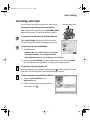
Cancelling a Print Job
You can cancel a print job in progress in several ways:
RESUME/CANCEL button
To cancel a print job using the printer button:
After a print job has started, press the RESUME/CANCEL
button on the printer. The print job will be cancelled.
To cancel a print job using the BJ Status Monitor:
Click Cancel Printing after the print job has started.
The print job will be cancelled and the paper ejected.
To cancel a print job from Windows:
1. Click Start, then:
• Windows XP: Select Control Panel, then Printers
and Other Hardware, then Printers and Faxes.
• Other Windows versions: Select Settings, then Printers.
2. Double-click Canon S530D, click the document name, then press the Delete
key. Click Yes. The print job will be cancelled and the paper ejected.
To cancel a print job using Mac OS:
On your keyboard, press the Apple® Command key ( ) and the period key (.) at the
same time. The print job will be cancelled and the paper ejected.
To cancel a print job using the BJ Print Monitor:
1. Select the BJ Print Monitor in the
Application menu.
2. Click the name of the print job you wish to
cancel, then click
.
7
S530D QSG.book Page 8 Tuesday, May 7, 2002 4:14 PM
Basic Printing
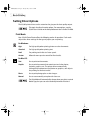
Setting Driver Options
The S530D printer driver can be customized to give you the best quality output.
This topic describes the main options. For more options, see the
S530D User’s Guide on the Setup Software & User’s Guide CD-ROM.
Print Mode
Your S530D Photo Printer offers the following modes of operation. Each mode
adjusts the driver settings for the type of project you are printing.
For Windows:
High
For high quality when printing photos or color documents.
Standard
For high quality when printing text.
Draft
For printing text drafts at a faster speed.
Custom
Allows for more precise control for finer details.
For Mac OS:
Text
Use to print text documents.
Graphic
Use to print documents that contain text and color photos,
business graphics, etc. The printer driver automatically
distinguishes between text and photos or graphics, and adjusts
the printing for the best results.
Photo
Use to print photographs or color images.
Manual
Use to save manually set options for later use.
The Print Mode will automatically change when you select a certain
Media Type, but you can select another print mode if desired.
8
S530D QSG.book Page 9 Tuesday, May 7, 2002 4:14 PM
Basic Printing
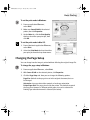
To set the print mode in Windows:
1. From an application File menu,
select Print.
2. Make sure Canon S530D is the selected
printer, then click Properties.
3. On the Main tab, click the Print Quality
that best describes your print job, then
click OK.
To set the print mode in Mac OS:
1. From a Macintosh application File menu,
select Print.
2. Select the Print Mode that best describes
your print job from the drop-down menu.
Changing the Page Setup
You can change how the image is printed without affecting the original image file.
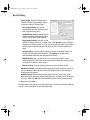
To change the page setup in Windows:
1. From an application File menu, select Print.
2. With Canon S530D as the selected printer, click Properties.
3. Click the Page Setup tab. Here you can change the following options:
Page Size Defaults to the page size set in the original document, but can
be changed.
Orientation Lets you select either portrait or landscape orientation.
Printer Paper Size The page size used by the printer. This defaults to match
the Page Size. However, a different printer paper size can be selected if a
Printing Type other than normal is selected (see below).
9
S530D QSG.book Page 10 Tuesday, May 7, 2002 4:14 PM
Basic Printing
Printing Type Defaults to Normal-size
Printing. Click the drop-down arrow to
select one of these Printing Types:
Fit-to-Page Printing This option
automatically rescales the image to fit
into a specified page size.
Scaled Printing With this option you can
set the scale of the printed image down
to 20% or up to 400% of the original.
Page Layout Printing Lets you set the
number of pages to print on a single sheet. Click Specify to set the number
of pages to a sheet of paper (1 to 16), the print order for those pages (left to
right or right to left) and whether you want to print a border around each
page.
Poster Printing Lets you print an oversized image on multiple pages that
can then be manually joined together. Click Specify to set the image
divisions (how many tiles the image will break into).
Booklet Printing Data is printed in such a manner that pages can be
collated properly in the order of the page numbers when the printed sheets
are folded and stapled at the center.
Banner Printing Used for printing banners on special banner paper.
Borderless Printing Used for printing images that cover the entire surface of
the card without a white border. Use Canon Photo Paper Pro for Borderless
Printing with this feature.
Duplex Printing The document can be printed on both sides of the paper.
When printing is complete, reload paper properly, according to the displayed
message, then click OK. The document will be printed on the opposite side.
4. When done, click OK.
For more feature descriptions, see the S530D User’s Guide on the Setup Software
& User’s Guide CD-ROM or access the online help.
10
S530D QSG.book Page 11 Tuesday, May 7, 2002 4:14 PM
Basic Printing
To change the page setup in Mac OS:
1. Make sure that S530D is the selected printer (from the Apple menu, select
Chooser, then S530D).
2. From an application File menu, click Page Setup. The Page Setup dialog box
will open.
3. From this dialog box, you can change the following:
• Select a paper size from the Paper Size
drop-down list. (If printing a banner, click
the Banner Printing checkbox, then
follow the on-screen instructions. If
printing on borderless paper, click the
Borderless Printing checkbox, then
follow the on-screen instructions.)
• Set a Scale percentage value between 50% and 200% to print the image in
a size different from the original document.
• Click an Orientation icon to change the page orientation.
To save these settings for the next print job, click the Save
Settings checkbox.
4. When done, click OK.
To change the page layout and print order in Mac OS:
1. Make sure that S530D is the selected
printer (from the Apple menu, select
Chooser, then S530D).
2. From an application File menu, click Print.
The Print dialog box will appear.
3. Click Options. The Options dialog box will open.
11
S530D QSG.book Page 12 Tuesday, May 7, 2002 4:14 PM
Basic Printing
4. From the Options dialog box, you can
enter or change the following:
• Under Layout, click the drop-down
arrow to change the number of pages
to print on a sheet (from 1 Page up to
16 Pages).
• If the page layout is other than 1
Page, you can select a different Page
Order specific to the selected page layout.
• If the page layout is other than 1 Page/Sheet Printing, you can also select
whether to print a Border around each page.
• To print in reverse order, check the Print in reverse order box.
• If you are printing more than one copy, check the Print collated pages box
to collate each copy instead of printing all of page 1, then all of page 2, etc.
5. When done, click OK.
For more information on printer driver features, see the S530D
User’s Guide on the Setup Software & User’s Guide CD-ROM,
or use the Mac Balloon Help.
12
S530D QSG.book Page 13 Tuesday, May 7, 2002 4:14 PM
Chapter 2: Advanced Print
Features
This chapter provides information on how to use the S530D photo printer options
to enhance printed color images.
If your print results using pre-set print modes are unsatisfactory, you may be able
to improve the printing quality by:
• Using Recommended Paper or Specialty Media
• Smoothing Rough or Jagged Edges
• Optimizing Color Photographs
• Adjusting Print Quality
• Adjusting Color Balance, Brightness and Saturation
• Saving and Recalling Driver Settings
For more detailed information, see the S530D User’s Guide on the Setup Software
& User’s Guide CD-ROM.
13
S530D QSG.book Page 14 Tuesday, May 7, 2002 4:14 PM
Advanced Print Features
Using Recommended Paper or Specialty Media
You can significantly improve the quality of a picture or an image by using the
recommended paper or specialty media.
Specialty media best suited for printing color are:
• Canon Photo Paper Pro
• Canon Photo Paper Pro 4" x 6"
• Canon Photo Paper Pro for Borderless Printing 4" x 6"
• Canon High Resolution Paper
• Canon Glossy Photo Paper
• Canon High Gloss Photo Film.
These specialty media reproduce colors better than plain paper. See “Using
Specialty Media” on page 3.
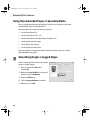
Smoothing Rough or Jagged Edges
Use the Image Optimizer feature to smooth
rough or jagged images.
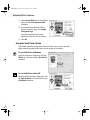
1. From an application File menu,
select Print.
2. Make sure Canon S530D is the selected
printer, then click Properties.
3. Select the Effects tab.
4. Click the Image Optimizer checkbox.
5. When done, click OK.
14
S530D QSG.book Page 15 Tuesday, May 7, 2002 4:14 PM
Advanced Print Features
Optimizing Color Photographs
Depending on the conditions under which you took a photograph, sometimes
the natural colors in the photograph may not be accurately reproduced in the
printed image.
For realistic color reproduction, use the Photo Optimizer PRO feature.
Photo Optimizer PRO adjusts color automatically if the original image color
is unsatisfactory.
To optimize color photographs in Windows:
1. From an application File menu, select Print.
2. Make sure Canon S530D is the selected printer, then click Properties.
3. On the Effects tab, click the Photo
Optimizer PRO checkbox.
When Photo Optimizer PRO is checked,
the Apply Throughout Page option
becomes active. Leave this box
unchecked if you want the S530D to
optimize each image individually. Select
Apply Throughout Page to automatically
correct all images with the same settings.
4. When done, click OK.
To optimize color photographs in Mac OS:
1. From an application File menu, select Print.
2. Select Manual from the Print Mode drop-down list, then click Details. The
Detailed Setting dialog box will open.
15
S530D QSG.book Page 16 Tuesday, May 7, 2002 4:14 PM
Advanced Print Features
3. Select Special Effects in the left column,
then click the Photo Optimizer PRO
checkbox.
4. If you want Photo Optimizer PRO to
process the entire page, check Apply
Throughout Page.
If you want only the photo image
optimized, leave this box unchecked.
5. Click OK.
Using the Vivid Photo Option
Vivid Photo intensifies background colors for fields, trees, oceans and skies,
while maintaining natural skin tones for any people in the images.
To use Vivid Photo in Windows:
Open the Properties dialog box, click the
Effects tab, and then click the Vivid Photo
checkbox.
To use Vivid Photo in Mac OS:
Open the Detailed Setting dialog box, click
the Special effects icon, and then click the
Vivid Photo checkbox.
16
S530D QSG.book Page 17 Tuesday, May 7, 2002 4:14 PM
Advanced Print Features
Adjusting Print Quality
You can create a sharper image by specifying the printer to add more dots of ink
for the image. Keep in mind that the finer the quality, the longer it takes to print a
photograph.
To adjust image quality in Windows:
1. From an application File menu, select Print.
2. Make sure that Canon S530D is the
selected printer, then click Properties.
To print in black only, check
the Grayscale Printing box
on the Main tab. This will
convert color images to
grayscale when printing,
without changing the
original colors in the
document. Then click OK.
3. On the Main tab, under Print Quality, select Custom, then click Set.
4. Slide the Quality slide bar to Fine.
5. Click OK. The Set Print Quality dialog box closes.
6. Click OK.
To adjust image quality in Mac OS:
1. From an application File menu, select Print.
2. Select Manual from the Print Mode
drop-down menu, then click the
Details button. The Detailed Setting
dialog box will appear.
3. Slide the Print Quality slide bar to the
Fine setting.
4. Click OK.
17
S530D QSG.book Page 18 Tuesday, May 7, 2002 4:14 PM
Advanced Print Features
Adjusting Color Balance, Brightness and Saturation
You can enhance color printing by adjusting the color balance, output style
(saturation) and brightness.
For detailed information about these settings, see the
S530D User’s Guide on the Setup Software & User’s Guide CD-ROM.
To adjust color settings in Windows:
1. From an application File menu,
select Print.
2. With Canon S530D as the selected
printer, click Properties.
3. On the Main tab, under Color
Adjustment, select Manual. The Set
button will become active.
4. Click Set, and the Manual Color
Adjustment dialog box will open.
5. Click and drag the Color Balance slide bar for
each color to adjust the color settings. The results
will preview.
6. Click and drag the Intensity slide bar to change the
intensity (saturation) for the image. The results
will preview.
Image Color Management (ICM) is a
feature that automatically adjusts the
image colors. (This feature is only
available in Windows 98, Me, 2000 and
Windows XP.)
To use ICM for automatic color
adjustment, click the Enable ICM
checkbox.
Windows 98/Me users: All other features on this tab (except
Intensity) will become inactive. If you enable ICM, skip to
Step 9 below.
18
S530D QSG.book Page 19 Tuesday, May 7, 2002 4:14 PM
Advanced Print Features
7. Under Print Type, select Photo when printing
photographs. This allows for a wider range of tones.
Set to Graphic when printing graphic images for
crisper, cleaner graphic images.
8. Select a Brightness setting to determine how light
or dark the image will appear when printed.
9. When done, click OK.
To adjust color settings in Mac OS:
1. From a Mac application, select File, then Print.
2. Select Manual from the Print Mode drop-down menu, then click the Details
button.
3. Click the Color icon.
4. Adjust the Color Correction, Gamma
Correction, Color Balance and
Intensity settings for your image.
5. Under Print Type, select Photo when
printing photographs. This allows for
a wider range of tones. Set to Graphic
when printing graphic images for
crisper, cleaner graphic images.
6. Click OK.
19
S530D QSG.book Page 20 Tuesday, May 7, 2002 4:14 PM
Advanced Print Features
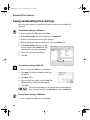
Saving and Recalling Driver Settings
You can assign a name to a combination of driver settings and recall them for
future use.
To save driver settings in Windows:
1. From an application File menu, select Print.
2. With Canon S530D as the selected printer, click Properties.
3. Make the desired printer driver setting changes.
4. Without exiting the Properties dialog box, select the Profiles tab.
5. Click Add to Profiles, then type a name
for your settings in the Name field. You
can also select an icon for this profile.
6. Type a description of your settings.
7. Click OK.
To save driver settings in Mac OS:
1. From an application File menu, select Print.
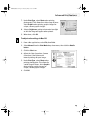
2. Click Apply. The Register Settings dialog box
will appear.
3. Click Apply again.
4. Type a name for the setting, then click OK. The
Register Settings dialog box will reappear.
5. Click Close.
To save the new settings as the default setting for the Manual
icon, click on the name in the Settings list, then click Defaults.
To recall driver settings in Windows:
1. From an application File menu, select Print.
20
S530D QSG.book Page 21 Tuesday, May 7, 2002 4:14 PM
Advanced Print Features
2. With Canon S530D as the selected printer, click Properties.
3. Select the Profiles tab.
4. Highlight the saved setting profile you
want to use.
5. Click Retrieve from Profiles, then click
OK to confirm the profile change. The
profile settings will become active.
6. Click OK again to close the Properties
dialog box.
To recall driver settings in Mac OS:
1. From an application File menu, select Print.
2. Click Apply, then select the name of your saved settings.
3. Click Defaults, then OK.
4. Click Import, then Close.
21
S530D QSG.book Page 22 Tuesday, May 7, 2002 4:14 PM
Advanced Print Features
22
S530D QSG.book Page 23 Tuesday, May 7, 2002 4:14 PM
Chapter 3: Printing
Without a Computer
This chapter describes how to use the printer without the computer to print
photos taken with a digital camera. The following topics are addressed:
• Basic Operations
• Printing Photos
• Print Options
• Maintenance Procedures for Direct Printing
• Using the Memory Card Utility
While the printer’s Operation Panel allows you to print without a computer,
you will need a computer if you plan to use the Memory Card Utility, which you
would install on your computer. Use this utility to perform several tasks
associated with using a memory card, such as selecting the application to be
started when the memory card is inserted and changing the read/write mode
of the memory card slot.
Basic Operations
The following section describes basic operations required for printing, including
how to use the printer’s Operation Panel, and how to use a memory card or attach
a digital camera to the printer.
23
S530D QSG.book Page 24 Tuesday, May 7, 2002 4:14 PM
Printing Without a Computer
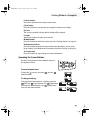
Operation Panel Names and Functions
Shown below is the operations panel found on the printer. Become familiar with
various functions of the panel so you can prepare your photo for printing.
A) Last
When printing a
range of continuous
photo frames,
specify the number
of the last photo. For
specified frame
printing, specify the
number of the photo
to be printed.
H
K
A
B
C
D
E
F
G
L
M
N
O
B) Media Type
Specify the type of
media you plan to use.
C) Layout
Specify the number
of photos to be
printed on one
sheet.
I
J
D) Quality
Specify the print quality.
E) Print Date
Specify whether you wish to print the date of when the photo was taken.
F) Optimize Image
Specify whether the photo is to be adjusted or corrected before printing.
G) Required Sheets
The number of sheets required for printing is displayed. During maintenance,
the step number is displayed. If an error occurs, the error number is displayed.
H) First/-OrderWhen printing a range of continuous photo frames, specify the number of the
first photo. (When printing only one frame, specify the number of photo to be
printed.) For specified frame printing, the specified number (printing order)
is displayed.
24
S530D QSG.book Page 25 Tuesday, May 7, 2002 4:14 PM
Printing Without a Computer
I) Cursor buttons
Press these buttons when setting various items.
J) Print button
Press this button to start printing or to apply the maintenance setting.
K) Cursor
The cursor’s position indicates which setting will be changed.
L) Copies
Specify the number of copies to be printed.
M) Mode button
Press this button to switch the print mode. See “Printing Photos” on page 29.
N) Maintenance button
Press this button to perform printer maintenance operations, such as print
head cleaning. See “Maintenance Procedures for Direct Printing” on page 34.
O) Cancel button
Press this button to stop printing or to stop maintenance.
Operating the Cursor Buttons
Use the Cursor buttons to move between items on
the Operation Panel.
To move between items:
To move the (cursor), press the
(down) buttons.
(up) and
To change a setting:
To change the photo number or a setting, press the
(left) and
(right) buttons. The
(left) button
decreases the photo number; the
(right) button
increases the photo number.
25
S530D QSG.book Page 26 Tuesday, May 7, 2002 4:14 PM
Printing Without a Computer
Using a Memory Card
This section describes how to insert a memory card and print photos directly from
the memory card. To use a digital camera, see “Using a Digital Camera” on
page 28 or refer to the Bubble Jet Direct Reference Manual.
Supported memory cards:
• CompactFlash™ (Use the PC card adapter that comes with this printer)
• SmartMedia™
• Memory Stick™
• Secure Digital™ (SD) Card
• MultiMedia™ Card
• Microdrive™
• Flash ATA card PCMCIA Type (II)
Keep the following tips in mind:
• Format the memory card using your digital camera. This printer does not
support the computer’s unique format.
• Photos that have been edited with the computer may not print properly.
• Use a PC card adapter that is recommended by the memory card you use.
• Photos stored in memory cards that are not supported by the printer cannot
be read.
A Canon adapter for the CompactFlash card is included.
Other memory cards may require purchase of a different
PCMCIA adapter.
26
S530D QSG.book Page 27 Tuesday, May 7, 2002 4:14 PM
Printing Without a Computer
To use a memory card:
The following procedure is different if you are using a memory
card when the printer is connected to the computer. See the
S530D User’s Guide on the Setup Software & User’s Guide CD-ROM.
1. Turn on the printer.
2. Insert the PC card adapter into the card slot all the
way. The indicator lamp will light and the mark will
display. If ‘AT’ is displayed on the panel, it indicates
that images will be corrected automatically when
you’re printing data in formats supporting Exif 2.2
(Exif Print).
3. Insert the PC card adapter into the card slot all the
way. The indicator lamp will light.
If you use your computer to modify content on the memory card,
make sure to print from the computer.
To eject the memory card:
1. Make sure the indicator lamp is not blinking.
If you remove the memory card or switch off the power to the
printer while the indicator lamp is blinking, the data of the
memory card may be destroyed.
2. Press the printer
POWER button to turn
off the printer.
POWER button
Indicator lamp
Eject button
3. Check that the indicator
lamp is off, and press
the Eject button.
4. Pull out the PC card
adapter.
27
S530D QSG.book Page 28 Tuesday, May 7, 2002 4:14 PM
Printing Without a Computer
Using a Digital Camera
You can print photos directly by connecting a compatible Canon digital camera that
has a direct printing function. If you connect the digital camera with a provided direct
interface cable, perform the print operations from the digital camera. For more
information, refer to the Bubble Jet Direct Reference Guide.
Supported Media Types for Digital Cameras
Paper Type
Digital Camera Setting
Photo Paper Pro (4" x 6")
Card #1
Photo Paper Plus Glossy (4" x 6")
Card #2
Photo Paper Pro Perforated (4" x 6")
Card #3
Photo Paper Pro Letter
LTR
Photo Paper Pro A4
A4
To use a digital camera:
1. Turn on the printer.
2. Connect the digital camera to the
printer using either of the cables
that come with the printer.
(To determine which cable to use
with your camera, see the Bubble
Jet Direct Reference Guide.)
3. Turn on the digital camera.
28
Direct Interface
Cable DIF-B100
Direct Interface
Cable DIF-B250
Camera mark
S530D QSG.book Page 29 Tuesday, May 7, 2002 4:14 PM
Printing Without a Computer
4. The
(camera) mark appears.
• The setting for communicating with this printer differs depending
on the camera that you use. Refer to the instructions that come
with the digital camera or the Bubble Jet Direct Reference Guide.
• When printing photos from the digital camera, you will not be
able to use the Operation Panel. For instructions on printing
photos from the digital camera, see the Bubble Jet Direct
Reference Guide.
• To remove the digital camera cable, disconnect the cable
on the printer side and turn off the digital camera.
Printing Photos
When printing without a computer, you can select from five modes: Print Index,
Print All, Print One, Print Selected and DPOF.
To print photos:
1. Insert the memory card.
2. Press the Mode button, and select one of
the following printing methods:
• Print Index: Prints a list of the photos and
photo numbers (shown to the right)
stored on the memory card.
• Print All: Prints all photos found on the memory card. You can also specify a
range to print only some of the photos.
• Print One: Allows you to select and print a single photo from the memory
card.
• Print Selected: Allows you to specify up to 99 photos to be printed in
one batch.
• DPOF: If Digital Print Order Format (DPOF) settings are specified in the digital
camera, the printing begins automatically according to the specified settings.
29
S530D QSG.book Page 30 Tuesday, May 7, 2002 4:14 PM
Printing Without a Computer
3. Set the paper type and the layout. See “Print
Options” on page 30.
4. Load paper into the printer, and press the
Print button.
To stop printing:
Print button
• Press the Cancel button on the Operation Panel.
Cancel button
Print Options
After you’ve selected the printing mode, you can set the type of paper and layout
to be used in printing, the number of print copies, photo correction, quality, and
dated printing.
Setting the Number of Copies
Use this setting to choose the number of copies to print in Print One mode.
• Copies cannot be set in Print Index, Print All, or Print One
mode.
• For DPOF mode, set Copies from the digital camera.
• Copies allows you to specify the number of copies for one
photo. The number of required sheets differs depending on
the setting in Layout. For example, if eight copies in Copies
and four patterns in one sheet in Layout are specified, two
sheets are needed to print.
30
S530D QSG.book Page 31 Tuesday, May 7, 2002 4:14 PM
Printing Without a Computer
To set single frame mode:
1. Move the
the
(cursor) to Copies by pressing
(up) or
(down) button.
2. Set the number of copies (up to 99) by pressing
the
(left) or
(right) button.
Setting the Media Type
You can select from the following media:
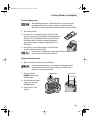
Operation Panel Display
Media Name and Size
[A]
Photo Paper Pro 4" x 6"
[B]
Photo Paper Plus Glossy 4" x 6"
[C]
Photo Paper Pro Perforated 4" x 6"
[D]
Photo Paper Pro Letter
[E]
Photo Paper Pro A4
[F]
Plain Paper Letter
[G]
Plain Paper A4
To set the media type:
1. Press the Mode button to select the desired print mode.
2. Move the
the
(cursor) to Media Type by pressing
(up) or
(down) button.
3. Select the media type by pressing the
or
(left)
(right) button.
Setting the Print Layout
You can set the number of photos (layout) to be printed on one sheet of paper.
• In Index mode, Layout cannot be set.
• In Print One mode, the same photo is lined up in the specified
layout and printed.
• In Print All, Print One and DPOF mode, the sections
containing no photos are left blank.
31
S530D QSG.book Page 32 Tuesday, May 7, 2002 4:14 PM
Printing Without a Computer
To set the print layout:
1. Press the Mode button to select the desired print mode.
2. Move the
(up) or
(cursor) to Layout by pressing the
(down) button.
3. Select the layout by pressing the
or
(left)
(right) button.
Select
to print a borderless photo.
Select
to print a bordered photo.
Setting the Print Quality
You can set the print quality to be high or low.
To set the print quality:
1. Press the Mode button to select the desired print mode.
2. Move the
(cursor) to Quality by pressing the
3. Select the quality by pressing the
When the number of stars (
optimal quality.
(left) or
(up) or
(down) button.
(right) button.
) is high, the photos will be printed with
When the number of stars ( ) is low, the photos will be printed quickly.
Printing the Date on Photos
You can print the date of when the photo was taken.
To print the date:
1. Press the Mode button to select the desired
print mode.
2. Move the
the
(cursor) to Print Date by pressing
(up) or
(down) button.
3. Select OFF (disable)/ON (enable) for date printing
by pressing the
32
(left) or
(right) button.
S530D QSG.book Page 33 Tuesday, May 7, 2002 4:14 PM
Printing Without a Computer
Adjusting Photos
This function automatically corrects photos before printing them.
• If you’re printing images that support the Exif 2.2 standard,
the images will be corrected automatically.
• When image correction is performed, printing may take longer.
• The actual image and coloring may vary depending on the photo.
To adjust photos:
1. Press the Mode button to select the desired print mode.
2. Move the
pressing the
(cursor) to Optimize Image by
(up) or
(down) button.
3. Select OFF (disable)/ON (enable) for image
correction by pressing the
or
(right) button.
(left)
Advanced Photo Adjusting
For more detailed photo correction, two functions are performed:
• A correction for color fogginess and exposure (Photo Optimizer PRO).
• A correction for reproducing vivid colors (Vivid Photo).
To set only one correction function, follow the procedure below.
To do more detailed photo adjusting:
1. Repeatedly press the
(right) button until you see ON next to Optimize Image.
2. Do one of the following:
• To use only the Photo Optimizer PRO function,
repeatedly press the
(right) button until
you see POP[ON] next to Optimize Image.
• To use only the Vivid Photo function, repeatedly
press the
(right) button until you see
VP[ON] next to Optimize Image.
33
S530D QSG.book Page 34 Tuesday, May 7, 2002 4:14 PM
Printing Without a Computer
Maintenance Procedures for Direct Printing
Printing a Nozzle Check Pattern
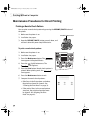
You can print a nozzle check pattern by pressing the RESUME/CANCEL button of
the printer.
1. Make sure the printer is on.
2. Load letter size paper.
3. Keep the RESUME/CANCEL button pressed down, and
release it when the power lamp blinks twice.
To print a nozzle check pattern:
1. Make sure the printer is on.
2. Load letter size paper.
3. Press the Maintenance button. The
icon appears in Required Sheets.
4. Press the
(right) button once. The
icon appears.
5. Press the Print button. Nozzle check pattern is
printed. When printing ends, the
icon appears.
6. Press the Maintenance button to exit.
7. Compare the nozzle check patterns.
• If the lines in the first pattern are broken,
the print head must be cleaned. See
“Cleaning the Print Head” on page 35.
• If the vertical lines in the second pattern
stand out, the print head position must
be aligned. See “Aligning the Print
Head” on page 43.
34
RESUME/CANCEL button
S530D QSG.book Page 35 Tuesday, May 7, 2002 4:14 PM
Printing Without a Computer
Cleaning the Print Head
You can perform print head cleaning by making sure the printer is on, then keeping the
RESUME/CANCEL button pressed down. Release it when the power lamp blinks once.
To clean the print head from the Operation Panel:
1. Press the Maintenance button. The
icon appears in Required Sheets.
2. Press the
The
(right) button twice.
icon is displayed.
3. Press the Print button. Print head cleaning
starts. When cleaning ends, the
icon appears.
4. Press the Maintenance button to exit.
5. Print a nozzle check pattern, and make sure
the pattern prints correctly. See “Printing a Nozzle Check Pattern” on
page 34.
• If there is no improvement, repeat head cleaning up to three times.
• If there is still no improvement, perform head refreshing. See “Refreshing
the Print Head” on page 35.
Refreshing the Print Head
If print head cleaning is not effective, perform print head refreshing, which is a
stronger cleaning process. Perform this operation only when necessary.
To refresh the print head:
1. Press the Maintenance button. The
icon appears in Required Sheets.
2. Press the
(right) button three times. The
icon appears.
3. Press the Print button. Print head refreshing
starts. When refreshing is completed, the
icon is displayed.
4. Press the Maintenance button to exit.
5. Print a nozzle check pattern, and make sure
the pattern prints correctly. See “Printing a Nozzle Check Pattern” on
page 34.
35
S530D QSG.book Page 36 Tuesday, May 7, 2002 4:14 PM
Printing Without a Computer
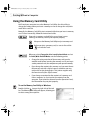
Using the Memory Card Utility
You’ll need your computer to use the Memory Card Utility. Use this utility to
change the settings when you insert a memory card or to change the read/write
mode of the card slot.
Normally, the Memory Card Utility starts automatically when you insert a memory
card. To start it manually, follow the instructions below.
If you eject a memory card while the access lamp is on or
blinking, the memory card may not operate properly.
Always use the Memory Card Utility to eject a memory card.
Before you eject a memory card, be sure to discard the
icon into the Trash.
When you select Change the drive’s read/write attribute and set
the Read/Write-Enabled Mode, note the following points:
• Change the write protection of the memory card to writeenabled mode before inserting the memory card. If you insert
a write-protected card, the computer may not operate normally.
• If you change the contents of a memory card, you must format
the memory card with a digital camera, otherwise you may
not be able to take photographs. This printer supports only
the format used by the digital camera.
• If you change or manipulate the contents of a memory card
from a computer, be sure to print the contents from the
computer. If you print the contents from the Operation Panel,
the information may not print properly.
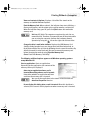
To use the Memory Card Utility in Windows:
Double-click the
icon on the right side of the task
bar. The Memory Card Utility will appear, allowing you
to select among these options:
36
S530D QSG.book Page 37 Tuesday, May 7, 2002 4:14 PM
Printing Without a Computer
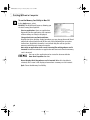
View card contents in Explorer: Displays a list of the files stored on the
memory card within Windows Explorer.
Eject the Memory Card: When selected, the indicator lamp starts blinking, a
message will appear, and the printer gets ready for memory card ejection.
When the indicator lamp goes off, press the Eject button and remove the
memory card.
Windows XP/2000: The computer recognizes the card slot as a
removable disk. Therefore, if you want to turn off the printer while
you are using the computer, perform the hardware removal
operation by using the
icon on the right side of the task bar.
Change the drive’s read/write attribute: Displays the USB Memory Card
Settings dialog box where you can change the mode (Read-only mode, or
Read/write mode) of the card slot by following the on-screen instructions. By
default, the mode is set to Read-only. Be sure to remove the memory card
before changing the mode by using Eject the Memory Card.
Close: Closes the Memory Card Utility.
The following additional options appear on all Windows operating systems
except Windows XP:
Start an application: Starts an application.
Depending on the application, the contents of the
memory card may be displayed.
Auto-start an application when a card is
inserted/Do nothing when a card is inserted:
Determines whether an application will start
each time the memory card is inserted.
You can set the application to be started in advance with the
Auto-Start Properties function.
Do not display this dialog when a card is inserted: When this checkbox is
selected, this screen is not displayed even when a memory card is inserted.
37
S530D QSG.book Page 38 Tuesday, May 7, 2002 4:14 PM
Printing Without a Computer
To use the Memory Card Utility in Mac OS:
In the Apple menu, select
BJ Utility. The BJ Utility will appear, allowing you
to select among these options:
Start an application: Starts an application.
Depending on the application, the contents
of the memory card may be displayed.
Change the drive’s read/write attribute:
Displays the Drive Settings dialog box where you can change the mode (Readonly mode or Read/write mode) of the card slot by following the on-screen
instructions. By default, the mode is set to Read-only. Be sure to eject the
memory card before you change the mode.
Auto-start an application when a card is inserted/Do nothing when a card is
inserted: Determines whether an application will start each time the memory
card is inserted.
You can set the application to be started in advance with the
Auto-Start Properties function.
Do not display this dialog when a card is inserted: When this checkbox is
selected, this screen is not displayed even when a memory card is inserted.
Quit: Closes the Memory Card Utility.
38
S530D QSG.book Page 39 Tuesday, May 7, 2002 4:14 PM
Printing Without a Computer
Setting the Application to be Started
This section applies to all versions of the Windows operating
system except Windows XP.
Set the application to be started whenever a memory card is inserted or Start an
application is clicked.
To set the application to be started in Windows:
1. Open the Memory Card Startup Utility, and then
click Auto-Start Properties. The Auto-Start
Properties dialog box will appear.
2. Specify Start Settings:
• Start the appropriate application
[recommended]: When you select this option,
the system automatically identifies the type
of data stored in the memory card and starts
the appropriate application. When this option
is not selected, the specified application is
not started even if the memory card contains
that type of data.
• Always start the same application: When you select this option, the system
always starts same application regardless of the type of data stored on the
memory card.
To change the application to be started, click the Change the
application button in the Auto-Start Properties dialog box, and
select the application to be started.
3. Click OK.
39
S530D QSG.book Page 40 Tuesday, May 7, 2002 4:14 PM
Printing Without a Computer
To set the application to be started in Mac OS:
1. Open the BJ Utility, and click Autostart Properties. The Auto-Start
Properties dialog box will appear.
2. Specify Start Settings:
• Start the appropriate
application: When you select
this option, the system
automatically identifies the type
of data stored in the memory
card and starts the appropriate
application.
• Always start the same application: When you select this option, the system
always starts same application regardless of the type of data stored on the
memory card.
To change the application to be started, click Change the
application in the Auto-Start Properties dialog box, and select the
application to be started.
3. Click OK.
40
S530D QSG.book Page 41 Tuesday, May 7, 2002 4:14 PM
Chapter 4: Printing
Maintenance
This chapter provides information on how to care for the ink delivery system for
your Canon S530D photo printer. The following topics are addressed:
• Monitoring Ink Levels
• Replacing Ink Tanks
• Aligning the Print Head
• Printing a Nozzle Check Pattern
• Cleaning the Print Head
Monitoring Ink Levels
The print driver allows you to monitor the level of ink in each ink tank.
To monitor ink levels in Windows:
1. Click Start, then:
• Windows XP: Select Control Panel, then Printers and Other Hardware, then
Printers and Faxes.
• Other Windows versions: Select Settings, then Printers.
2. Right-click the Canon S530D icon, then select Properties.
41
S530D QSG.book Page 42 Tuesday, May 7, 2002 4:14 PM
Printing Maintenance
3. Select the Maintenance tab, then click Start Status
Monitor. The BJ Status Monitor window will appear.
The Ink panel displays the ink levels for each tank.
The following icons appear when an ink tank is low
or has run out of ink:
Ink low. Replace ink tank as soon as possible.
Ink out. Replace ink tank immediately.
4. Click the close box on the top right of the window to close the BJ Status Monitor,
then click OK to close the Properties dialog box.
To monitor ink levels in Mac OS:
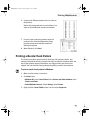
While you’re printing, the BJ Print Monitor can display ink levels, indicating when
they are running low. You must enable background printing to use the
BJ Print Monitor.
1. Select Chooser from the Apple menu.
2. Click the S530D printer icon and click the Backgrounding button to the On
position.
3. Close the Chooser.
4. After starting a print job, select BJ Print
Monitor in the Finder menu. The BJ Print
Monitor opens. Here you can see printer
status and ink status with images.
42
S530D QSG.book Page 43 Tuesday, May 7, 2002 4:14 PM
Printing Maintenance
Replacing Ink Tanks
Follow these steps to replace an empty ink tank.
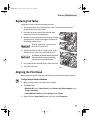
1. Turn on the printer, then open the front cover. The print head holder will
automatically move to the center.
2. Press the tab on the front of the ink tank, then
remove and discard the empty tank.
3. Remove the new ink tank from its package. Pull the
orange tape up, remove the wrapper and twist off
the orange protective cap.
To avoid spilling ink, never press on
the sides of an ink tank.
4. Holding the new ink tank at a slight angle, align it
with the correct color slot, then gently insert it.
Do not force an ink tank into the print head.
If the ink tank does not go in smoothly,
realign it and try again until it does.
5. Press down on the ink tank until it clicks into place.
6. Close the front cover.
Aligning the Print Head
Before using the printer, align the print head to ensure the best quality printing.
To align the print head in Windows:
1. Make sure the printer is on and paper is loaded.
2. Click Start, then:
• Windows XP: Select Control Panel, then Printers and Other Hardware, then
Printers and Faxes.
• Other Windows versions: Select Settings, then Printers.
3. Right-click the Canon S530D printer icon, then select Properties.
43
S530D QSG.book Page 44 Tuesday, May 7, 2002 4:14 PM
Printing Maintenance
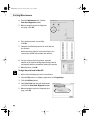
4. From the Maintenance tab, click the
Print Head Alignment button.
5. When prompted to print an alignment
test page, click OK.
6. If the pattern printed successfully,
click Yes.
7. Compare the different patterns for each color on
the printout.
Notice that most patterns have vertical lines, but
some in the middle look smooth and uniform.
8. For each color on the test printout, enter the
number in the Print Head Alignment dialog box that
corresponds with the smoothest looking test pattern.
9. When finished, click OK.
To align the print head in Mac OS:
1. Add a sheet of blank paper in the sheet feeder.
2. From the File menu in a software application, click Page Setup.
3. Click the Utilities button.
4. Select Test Print from the pull-down menu,
and click the Print Head Alignment button.
5. When prompted to print an alignment test
page, click OK.
44
S530D QSG.book Page 45 Tuesday, May 7, 2002 4:14 PM
Printing Maintenance
6. Compare the different patterns for each color on
the printout.
Notice that most patterns have vertical lines, but
some in the middle look smooth and uniform.
7. For each color on the test printout, enter the
number in the Print Head Alignment dialog
box that corresponds with the smoothest
looking test pattern.
8. When finished, click Send.
Printing a Nozzle Check Pattern
The contact area of the print head that discharges ink contains nozzles, tiny
openings from which the ink is sprayed. You may see faded or streaked colors and
text in your printed output if the nozzles are clogged or the print head is not
aligned. You can check for these problems by printing a nozzle check pattern.
To print a nozzle check pattern in Windows:
1. Make sure the printer is turned on.
2. Click Start, then:
• Windows XP: Select Control Panel, then Printers and Other Hardware, then
Printers and Faxes.
• Other Windows versions: Select Settings, then Printers.
3. Right-click the Canon S530D printer icon and select Properties.
45
S530D QSG.book Page 46 Tuesday, May 7, 2002 4:14 PM
Printing Maintenance
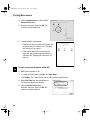
4. Click the Maintenance tab, then click the
Nozzle Check button.
5. Read the messages, then click OK. The
nozzle test pattern will print.
6. Check the nozzle check pattern.
• If the lines in the first pattern are broken, the
print head must be cleaned. See “Cleaning
the Print Head” on page 47.
• If the vertical lines in the second pattern
stand out, the print head position must be
adjusted. See “Aligning the Print Head” on
page 43.
To print a nozzle check pattern in Mac OS:
1. Make sure the printer is on.
2. In a software application, click File, then Page Setup.
3. Click Utilities. The Canon S530D Printer Utility dialog box will display.
4. Select Test Print from the drop-down list.
The test print options will display.
5. Click the Nozzle Check button.
Read the messages, then click OK. The
nozzle test pattern will print.
46
S530D QSG.book Page 47 Tuesday, May 7, 2002 4:14 PM
Printing Maintenance
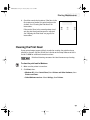
6. Check the nozzle check pattern. If the lines in the
first pattern are broken, the print head must be
cleaned. See “Cleaning the Print Head” for
instructions.
If the vertical lines in the second pattern stand
out, the print head position must be adjusted.
See “Aligning the Print Head” on page 43 for
instructions.
Cleaning the Print Head
If your printed output appears faded, streaked or scratchy, the print head may
need to be cleaned. See the S530D User’s Guide on the Setup Software & User’s
Guide CD-ROM for additional corrective actions.
Print head cleaning consumes ink. Avoid unnecessary cleaning.
To clean the print head in Windows:
1. Make sure the printer is turned on.
2. Click Start, then:
• Windows XP: Select Control Panel, then Printers and Other Hardware, then
Printers and Faxes.
• Other Windows versions: Select Settings, then Printers.
47
S530D QSG.book Page 48 Tuesday, May 7, 2002 4:14 PM
Printing Maintenance
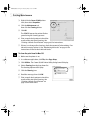
3. Right-click the Canon S530D printer
icon, then select Properties.
4. Click the Maintenance tab,
then click the Cleaning button.
5. Click OK.
The POWER lamp on the printer flashes
green during the cleaning process.
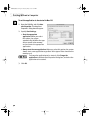
6. Print a nozzle check pattern to check the
results of the print head cleaning. See
“Printing a Nozzle Check Pattern” on page 45 for instructions.
7. If there is no change after cleaning, check the amount of ink remaining. If an
ink tank is empty, replace it. See “Monitoring Ink Levels” on page 41 for
instructions on how to check ink tank levels.
To clean the print head in Mac OS:
1. Make sure the printer is on.
2. In a software application, click File, then Page Setup.
3. Click Utilities. The Canon S530D Printer Utility dialog box will display.
4. Select Cleaning from the drop-down list.
The cleaning options will display.
5. Click the Cleaning icon.
6. Read the message, then click OK.
7. Print a nozzle check pattern to check the
results of the print head cleaning. See
“Printing a Nozzle Check Pattern” on
page 45 for instructions.
48
S530D QSG.book Page 49 Tuesday, May 7, 2002 4:14 PM
Chapter 5: Using Your
Photo Applications
Several photo applications come with your Canon S530D that make it easy to
organize, view, manipulate and print color photographs.
• Easy-PhotoPrint for Windows, which supports Exif 2.2, the new worldwide
•
•
•
standard for digital images, can be used to select, trim and lay out your
photos before printing. Easy-PhotoPrint can be used as a stand-alone
application, or with ZoomBrowser EX version 3.3 or later.
A browser (ZoomBrowser EX for Windows and ImageBrowser for Mac OS)
provides easy viewing of photos and other images stored on your computer.
PhotoRecord for Windows can be used to compile digital photos or images
into “album” layouts, or place multiple images on a single sheet for printing.
From PhotoRecord, you can also make high-quality color prints on Canon
specialty paper.
PhotoStitch helps you to “stitch” together different parts of a single photo or
combine multiple related photos into a panoramic or fully assembled view.
This chapter provides a brief overview of the basic features available with these
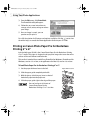
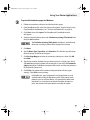
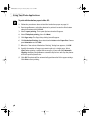
applications, as well as procedures for printing on Canon Photo Paper Pro for
Borderless Printing 4" x 6" paper.
What is Exif Print?
The Canon S530D Photo Printer supports Exif 2.2, the new worldwide standard for
digital images.
When taking a photograph using an Exif 2.2 (Exchangeable Image File Format)compatible camera, additional information, including the camera exposure and
color settings, is automatically recorded in the photograph’s digital file. When
you print these Exif Print-enhanced digital images on your Canon S530D Photo
Printer using the Easy-PhotoPrint software, they are optimized with more colors,
resulting in vibrant, true-to-life photographs.
49
S530D QSG.book Page 50 Tuesday, May 7, 2002 4:14 PM
Using Your Photo Applications
Installing the Photo Applications
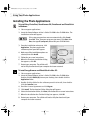
To install Easy-PhotoPrint, ZoomBrowser EX, PhotoRecord and PhotoStitch
in Windows:
1. Close any open applications.
2. Insert the Setup Software & User’s Guide CD-ROM in the CD-ROM drive. The
installation screen will appear.
If the setup program does not run automatically, click Cancel,
then Exit. Then, from your program start menu, click Start, then
Run, then type D:\setup.exe, where D is your CD-ROM drive.
3. From the installation main menu, click
Application. The photo application
software options panel will appear.
4. Make sure all the installation options are
selected, then click Install.
5. Follow the on-screen instructions.
6. When the Terminate Installation dialog
box appears, click OK.
7. Restart your computer. The utilities will
not be fully functional until your computer has been restarted.
To install ImageBrowser and PhotoStitch in Mac OS:
1. Close any open applications.
2. Insert the Setup Software & User’s Guide CD-ROM in the CD-ROM drive.
Double-click the CANON_BJ icon on your desktop, then double-click the
Application folder.
3. Double-click the folder for the software you wish to install, then doubleclick the Installer icon.
4.
5.
6.
7.
8.
50
Read the License Agreement and click Agree.
Click Install. The Destination Folder dialog box will appear.
Select the destination folder, click Start, then follow the on-screen instructions.
When the Installation Has Finished dialog box appears, click OK.
Restart your computer. The utilities will not be fully functional until your
computer has been restarted.
S530D QSG.book Page 51 Tuesday, May 7, 2002 4:14 PM
Using Your Photo Applications
Using the Photo Applications
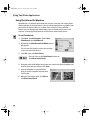
Viewing Images with Easy-PhotoPrint, ZoomBrowser EX and
ImageBrowser
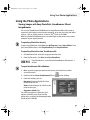
You can use ZoomBrowser EX (Windows) or ImageBrowser (Mac OS) to view or
organize digital images stored on your computer, or to view and copy from other
sources, such as digital cameras, scanners, Zip® disks or CD-ROMs.
With Easy-PhotoPrint (Windows) you can make high-quality photo-size or index
printouts of your digital pictures.
To open Easy-PhotoPrint directly:
To open Easy-PhotoPrint, click Start, then All Programs, then Canon Utilities. From
the Canon Utilities menu, click Easy-PhotoPrint, then Easy-PhotoPrint.
To open Easy-PhotoPrint from ZoomBrowser EX:
1. In ZoomBrowser EX, select the image you want to print.
2. From the File menu, click Print, then Easy-PhotoPrint.
Easy-PhotoPrint is accessible with ZoomBrowser EX version 3.3
or later.
To open ZoomBrowser EX in Windows:
1. Make sure the images you want to view are on your hard drive or other
accessible media.
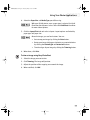
2. Double-click the Canon ZoomBrowser EX icon
on the desktop.
3. From this window, you can:
Navigate through available files from
the panel on the left.
View thumbnail images in a folder in the
panel on the right.
Organize or delete files.
For a full description of all features and
options available, press F1 to view the
online help, or consult the Photo Application
Guide on your CD-ROM.
51
S530D QSG.book Page 52 Tuesday, May 7, 2002 4:14 PM
Using Your Photo Applications
To open ImageBrowser in Mac OS:
1. Make sure the images you want to view are on your hard drive or other
accessible media.
2. Double-click the Canon ImageBrowser
icon on the desktop.
3. From this window you can:
Navigate through available files from
the panel on the left.
View thumbnail images in a folder in the
panel on the right.
Organize or delete files.
For a full description of all features and
options available, use Mac Balloon help, or
consult the Photo Application Guide on your
CD-ROM.
Using Easy-PhotoPrint for Windows
Easy-PhotoPrint is a software application that lets you lay out and trim your
photo-size or index pictures with the click of a mouse. With Easy-PhotoPrint, you
can specify different paper type settings for different printouts. When your photo
layout is complete, you can print and display your high-quality photos.
To use Easy-PhotoPrint:
1. Select the image you want to print either by navigating to the folder where
your photos are stored or by selecting it directly from ZoomBrowser EX.
When Easy-PhotoPrint is started through ZoomBrowser EX, the
folder navigation window will not display.
2. Click the thumbnail for the image you want to print. The
and
buttons below the thumbnail will become active. Using these buttons, you
can increase or decrease the number of copies to be printed.
3. Click the Paper Selection tab, then select Canon S530D from the
drop-down menu.
52
S530D QSG.book Page 53 Tuesday, May 7, 2002 4:14 PM
Using Your Photo Applications
4. Select the Paper Size and Media Type you will be using.
With your S530D printer, once a paper type is selected, the Vivid
Photo function becomes active. Select the Vivid Photo checkbox
for more vibrant photos.
5. Click the Layout/Print tab and select a layout. Layout options are limited by
paper type and paper size.
Above the image, you see four buttons. You can:
• Date stamp your image by clicking the Date button.
• Rotate your image 90 degrees clockwise or counterclockwise
by clicking the Rotate Right and Rotate Left buttons
• Trim the edges of your image by clicking the Trimming button.
6. When done, click Print.
To trim an image using Easy-PhotoPrint:
1. Select the image you want to trim.
2. Click Trimming. The image will preview.
3. Adjust the position of the cropping area around the image.
4. When satisfied, click OK.
53
S530D QSG.book Page 54 Tuesday, May 7, 2002 4:14 PM
Using Your Photo Applications
Using PhotoRecord for Windows
PhotoRecord is a software application that lets you create fun and unique photo
albums with the click of your mouse. You can import your photos or graphics from
your hard disk, digital camera or scanner, then, using the “drag and drop”
feature, you can arrange your album layout. You can rotate your pictures, add
captions, change page backgrounds or add a frame around each picture.
To use PhotoRecord:
1. Click Start, then All Programs, then Canon
PhotoRecord, then PhotoRecord.
2. By default, the PhotoRecord Print Modes wizard
will appear.
You can use this wizard to select your settings,
or you can cancel the wizard.
3. Click File, then click Fetch Photos.
You can also use the Fetch Photos feature on
the Album Control Panel.
4. Navigate to the folder where your photos are stored and select the photos you
want to place into your album. Click Open.
5. Arrange the photos as you would like
them, or let the automatic layout feature
do it for you.
6. When you are ready to print, click Print on
the Album Control Panel.
54
S530D QSG.book Page 55 Tuesday, May 7, 2002 4:14 PM
Using Your Photo Applications
Merging Multiple Images with PhotoStitch
With PhotoStitch, you can merge images in horizontal or vertical sequences, or
“stitch” together digital photos or image documents that have been shot or
scanned in sections. You can also use PhotoStitch to assemble a series of
overlapping images into a seamless panoramic view.
To merge images in Windows:
1. Make sure the images you want to view are on your hard drive or other
accessible media.
2. Click Start, then All Programs, then Canon Utilities. Click PhotoStitch 3.1
from the Utilities menu, then click PhotoStitch from the final menu. The
PhotoStitch Launcher will appear.
3. From this window, click the PhotoStitch
3.1 Merge Images icon. The main
window will appear.
4. Follow the on-screen instructions to
open files, and to arrange, stitch, rotate,
enlarge or reduce your images.
5. Once an image is saved, you can
preview and/or print it.
For a full description of all features and
options available, click the
icon to view the online help, or consult the Photo
Application Guide on your CD-ROM.
To merge images in Mac OS:
1. Make sure the images you want to view are on your hard drive or other
accessible media.
2. From within the ImageBrowser window (see “To open ImageBrowser in
Mac OS” on page 52), select one or more images. The images will highlight.
55
S530D QSG.book Page 56 Tuesday, May 7, 2002 4:14 PM
Using Your Photo Applications
3. From the Edit menu, click PhotoStitch.
The PhotoStitch utility will appear.
4. Follow the on-screen instructions to
arrange, stitch, rotate, enlarge or reduce
your image.
5. Once an image is saved, you can
preview and/or print it.
For a full description of all features and options available, click the
icon to view
the online help, or consult the Photo Application Guide on your CD-ROM.
Printing on Canon Photo Paper Pro for Borderless
Printing 4" x 6"
Included with your S530D is the Canon Photo Paper Pro for Borderless Printing
4" x 6" media. This paper is designed to let you print images that cover the entire
surface of the card without a white border.
This media is intended for use with Easy-PhotoPrint for Windows, PhotoRecord for
Windows, version 1.2 or later, or ImageBrowser for Mac OS, version 1.4 or later.
To load Photo Paper Pro for Borderless Printing 4" x 6":
1. Set the paper thickness lever to the left.
2. Slide the paper guide completely to the left.
3. With the glossy side facing up, insert a sheet of
borderless paper into the paper rest.
4. Slide the paper guide right to the edge of the paper.
You can load up to 20 sheets of
Canon Photo Paper Pro for
Borderless Printing 4" x 6" at a time.
56
Paper thickness lever
S530D QSG.book Page 57 Tuesday, May 7, 2002 4:14 PM
Using Your Photo Applications
To print with borderless paper for Windows:
1. Follow the procedures above to load the borderless paper.
2. From ZoomBrowser EX, select the photo to be printed. To print images using
Easy-PhotoPrint for Windows, see “To Use Easy-PhotoPrint” on page 52.
3. Click Print, then click Layout. The PhotoRecord Print Modes wizard
will appear.
4. Select the desired printer, then select Borderless printing (Tiled photo) from
the Print Mode options.
The Borderless printing (Tiled photo) checkbox is available only
when you are using a printer which supports this feature.
5. Click Next.
6. Specify Media Type, Paper Size and Orientation. The Preview area will show
the print image in relation to the paper.
7. Click Set Page Margins to widen or narrow the printing area, then click OK,
then Next.
8. Specify the number of photo tiles you want to place in a single page. Select
1 (1 row) when printing a photo with no margins. If you select the Automatic
clipping checkbox, PhotoRecord automatically resizes and clips the photos to
fit the specified photo size.
9. Click Finish. The photo will be automatically positioned to fit the paper
settings. Click Print to start printing.
In PhotoRecord, page backgrounds and photo frames are not
available when using the Borderless print (Tiled photo) mode.
However, you can add text blocks, clip your photos (with some
limitations), or specify print quality and number of copies to
print. You cannot resize your photos or modify the layout.
57
S530D QSG.book Page 58 Tuesday, May 7, 2002 4:14 PM
Using Your Photo Applications
To print with borderless paper in Mac OS:
1. Follow the procedures above to load the borderless paper on page 56.
2. From ImageBrowser, select the photo to be printed. Locate the Print button
along the bottom and click Print.
3. Select Layout printing. The Layout Options wizard will appear.
4. Select Tiled photo printing, then click Next.
5. Click Page setup. The Page Setup dialog box will appear.
6. Click Borderless Printing, then select 4 x 6 or Letter under Paper Size. Choose
your Orientation and click OK.
7. When the “You selected Borderless Printing” dialog box appears, click OK.
8. Specify the number of images you want to place in a single page. Select
1(1x1) when printing a photo with no margins. If you select the Automatic
Clipping checkbox, ImageBrowser automatically resizes and clips the photos
to fit the specified photo size.
9. Click OK. The photo will be automatically positioned to fit the paper settings.
Click Print to start printing.
58
S530D QSG.book Page 59 Tuesday, May 7, 2002 4:14 PM
Chapter 6:
Troubleshooting
Tips for Troubleshooting
Troubleshooting usually falls into one of the following categories:
Installation The printer driver will not install properly.
Printed Output The printed output is not coming out as expected.
Printer Hardware The printer is not working or not working
as expected.
Error Message You are getting an error message from the software
(displayed on the screen) or the printer (indicated by flashing lamps).
Customer Care Center Canon offers a full range of customer technical
support options.
If you encounter difficulties during installation or operation of your Canon S530D
printer, quickly scan all topics until you find a description that approximates your
difficulty. Go through the related solutions until you find one that works.
59
S530D QSG.book Page 60 Tuesday, May 7, 2002 4:14 PM
Troubleshooting
Troubleshooting Installation
Problem
Cannot
install the
printer driver
Possible Cause
Try This
Procedure
followed
incorrectly
See “Installing the Printer Driver” on page 75. Follow the installation
instructions from the Easy Setup Instructions packaged with your printer.
Previous or same
printer driver
version already
installed
Always uninstall the previous version of the printer driver before installing
the new version. See “Uninstalling the Printer Driver” on page 77. Try
reinstalling the printer driver. The printer must be turned off before
reinstalling the printer driver. If the problem persists, contact the Canon
Customer Care Center.
Other
applications
running in the
background
Other open applications on your computer can interfere with the
installation routine. Close any software applications, including any virus
detection software, on your computer before reinstalling the printer driver.
See “Installing the Printer Driver” on page 75.
Installation
not starting
automatically
when CD-ROM is
inserted into
drive
WINDOWS
If printer driver installation did not start automatically when you
loaded the CD-ROM:
1. For Windows XP: Click Start, then My Computer, then right-click the
CD-ROM drive, then choose Explore from the drop-down menu.
For other Windows versions: Double-click My Computer on the
Windows desktop, then right-click the CD-ROM drive, then choose
Explore from the drop-down menu.
2. Double-click msetup.exe.
If you install the printer driver by clicking Start, then Run, specify
the correct CD-ROM drive and file name (D:\msetup.exe, where D is
the CD-ROM drive).
MAC OS
Double-click the CD-ROM icon on your desktop.
60
S530D QSG.book Page 61 Tuesday, May 7, 2002 4:14 PM
Troubleshooting
Problem
Possible Cause
Cannot
install the
printer driver
(continued)
Computer cannot
detect a
printer port
Try This
Verify that the correct cable is connected to both your printer and your
computer, and that the connection is secure.
Ensure that the USB cable is connected directly to the computer, bypassing
any USB hubs.
Verify that the printer is turned on and the POWER lamp is a steady (nonblinking) green.
Try plugging the USB cable into another USB port.
If the suggestions above do not work, exit the installation procedure and
reinstall the software again.
Also see the S530D User’s Guide on the Setup Software & User’s Guide
CD-ROM for more information.
CD-ROM drive not
working properly
WINDOWS
Use My Computer to confirm that the CD-ROM is operating
normally:
1. For Windows XP: Click Start, then My Computer, then right-click the
CD-ROM drive, then choose Explore from the drop-down menu.
For other Windows versions: From the Desktop, double-click
My Computer, then right-click the CD-ROM drive, then choose
Explore from the drop-down menu.
2. If the files do not appear, refer to your Windows documentation
for more information.
MAC OS
Open the Apple System Profiler, click Devices and Volumes, then
verify that the CD-ROM icon appears.
61
S530D QSG.book Page 62 Tuesday, May 7, 2002 4:14 PM
Troubleshooting
Troubleshooting Printed Output
Problem
Poor print
quality
62
Possible Cause
Try This
Incorrect printer
driver settings
Altering driver settings may improve the appearance of your printed image.
See “Setting Driver Options” on page 8 for instructions on selecting the
optimum print mode for your print job.
One or more ink
tanks are installed
in the wrong
position or seated
improperly
Verify that the ink tanks are in the correct color slot. Check that they have
been firmly seated. Press down on the ink tanks until they click into place.
See “Replacing Ink Tanks” on page 43.
Color settings
need to be
adjusted
You can enhance the color on your printout. See “Adjusting Color Balance,
Brightness and Saturation” on page 18.
Low ink or ink
tank may need to
be replaced
Verify that you have sufficient ink in the ink tanks. See “Monitoring Ink
Levels” on page 41. If necessary, replace the ink tanks. See “Replacing Ink
Tanks” on page 43.
Print head needs
to be aligned
Perform print head alignment. See “Aligning the Print Head” on page 43.
Print head
clogged
Verify that your print head is working properly by printing a Nozzle Check
Pattern. See “Printing a Nozzle Check Pattern” on page 45. Try cleaning the
print head. See “Cleaning the Print Head” on page 47. If you do not see any
improvements, try print head cleaning three times. See “Print Head Deep
Cleaning” on the S530D Start Here or the Setup Software & User’s Guide
CD-ROM.
Print head may
need to be
replaced
Perform multiple print head cleanings. See “Cleaning the Print Head” on
page 47. If problem persist, contact the Canon Customer Care Center.
S530D QSG.book Page 63 Tuesday, May 7, 2002 4:14 PM
Troubleshooting
Problem
Printout and
screen image
colors appear
differently
Banding
appears on
printed
image
or
White
streaks are in
printout
Smudged or
smeared ink
on paper
Possible Cause
Try This
Incorrect printer
driver settings
Altering driver settings may improve the appearance of your printed image.
See “Setting Driver Options” on page 8 for instructions on selecting the
optimum print mode for your print job.
One or more ink
tanks are installed
in the incorrect
position or seated
improperly
Verify that each ink tank is in the correct color slot and has been firmly
seated. Press down on each ink tanks until it clicks into place. See
“Replacing Ink Tanks” on page 43.
Incorrect media
type setting or
weight
Verify that your media is compatible and/or fit for your print job and that the
media you are using is selected in the driver. See “Using Specialty Media”
on page 3.
Media not loaded
print side up
Check that your media is placed in the printer facing in the correct direction.
See “Loading Plain Paper and Other Canon Media” on page 4.
Print head needs
to be aligned
Perform print head alignment. See “Aligning the Print Head” on page 43.
Print head
nozzles clogged
Verify that your print head is working properly by printing a Nozzle Check
Pattern. See “Printing a Nozzle Check Pattern” on page 45. Then try cleaning
the print head. See “Cleaning the Print Head” on page 47. If you do not see
any improvements, try multiple print head cleanings.
Use of low-quality
paper (plain
paper, copier
paper, etc.)
Use a higher grade of paper (e.g., Photo Paper Pro, Photo Paper Plus Glossy,
or High Resolution Paper). For optimal results, Canon recommends that you
use genuine Canon media with your S530D Photo Printer.
Print head may
need to be
replaced
Perform multiple print head cleanings. See “Cleaning the Print Head” on
page 47.
Paper thickness
lever set
incorrectly
Verify that the paper thickness lever is set properly for the media you’re
using. See “Loading Guidelines for Canon Specialty Media” on page 4.
63
S530D QSG.book Page 64 Tuesday, May 7, 2002 4:14 PM
Troubleshooting
Problem
Meaningless
characters
printed
64
Possible Cause
Try This
Corrupted print
instructions are
stored in the
printer buffer
1. Turn the printer off to clear the printer buffer.
Previous print job
paused before it
was finished
If a previous print job was paused before it was printed, turn the printer and
the computer off, then turn both back on again, or cancel any print jobs
using the BJ Status Monitor or BJ Print Monitor. See “Cancelling a Print Job”
on page 7.
Incorrect printer
driver selected
Check the Printer dialog box to verify that the correct printer driver
is selected.
Bad (corrupted)
file
Create the document again and print it. If it prints successfully, the original
file was corrupted.
2. Turn the printer on again.
S530D QSG.book Page 65 Tuesday, May 7, 2002 4:14 PM
Troubleshooting
Troubleshooting Printer Hardware
Problem
Paper feeds
incorrectly or
paper jam
Possible Cause
Paper jammed during
automatic feed
Try This
Gently pull the jammed paper out of the sheet feeder slot or the
paper output slot, whichever is easier. If the paper will not pull
out of the printer easily, do not force it.
If the paper tears and some of it is left in the printer, turn the
printer off, open the front cover, and remove the pieces of paper.
Reload paper into the automatic sheet feeder then press RESUME/
CANCEL button (next to the POWER button) on the printer.
If you turn the printer off, your print job data will be lost. Print the
job again.
Paper loaded
incorrectly or exceeds
the load limit
Verify that the stack of paper has been loaded correctly, not
exceeding the maximum load limit.
Paper path obstructed
Turn the printer off and unplug the power cord. Then check and
see if there are any obstructions blocking the paper path. If so,
remove the obstructions and try printing again.
65
S530D QSG.book Page 66 Tuesday, May 7, 2002 4:14 PM
Troubleshooting
Problem
Printer will not
print
Possible Cause
Try This
Application error
If this occurs in a specific application, try printing from another
application or contact the software manufacturer.
Previous print job
in queue
Delete any existing print jobs in the printer queue.
WINDOWS XP
1. Click Start, then Control Panel, then Printers and
Other Hardware, then Printers and Faxes.
2. Double-click the Canon S530D printer icon. The Print
Manager window will appear.
3. Select the document in the printer queue to be deleted,
then press Delete to cancel the print job.
MAC OS
1. Open the BJ Print Monitor window (click Finder, then
BJ Print Monitor).
2. Highlight the job to be canceled.
3. Click the Stop Printing icon in the Print Queue
dialog box. The print job will be canceled and the
paper ejected.
Printer not set as
default printer
Verify that your S530D is selected as the default printer. See
“Selecting the S530D Photo Printer for Use” on page 2.
Computer/printer
needs to be reset
Reboot the computer and/or reset the printer.
• To reboot, close all open applications, then restart the
computer.
• To reset the printer, turn it off, then back on.
Printer driver installed
incorrectly
66
Uninstall and reinstall the driver. See “Uninstalling the Printer
Driver” on page 77 or see the “Easy Setup Instructions” in
the S530D User’s Guide on the Setup Software & User’s Guide
CD-ROM.
S530D QSG.book Page 67 Tuesday, May 7, 2002 4:14 PM
Troubleshooting
Problem
Printer is not
responding
Possible Cause
Try This
Power cable is not
securely connected
Verify that the power cable is securely connected to the printer
and plugged into a working outlet.
Printer is not turned on
or is not ready
Verify that the POWER lamp is on and glowing a steady green.
If the light is off, press the POWER button. The green light will
blink as the printer is warming up, then go to a steady (no blink)
state when the printer is ready.
If the POWER lamp is blinking green, this indicates that the
printer is warming up or is processing a print job.
If the POWER lamp blinks orange, or green and orange
alternately, see “Handling Error Messages” on page 69.
Computer/printer
needs to be reset
Reboot the computer and/or reset the printer.
• To reboot, close all open applications, then restart the
computer.
• To reset the printer, turn it off, then back on.
Printer and computer
cabled together
incorrectly
Reconnect the printer cable to the correct port, with the correct
cable. See the “Easy Setup Instructions” in the S530D User’s
Guide on the Setup Software & User’s Guide CD-ROM.
Ensure that the USB cable is connected directly to the computer,
bypassing any USB hubs.
Bad cable
Replace the printer cable.
67
S530D QSG.book Page 68 Tuesday, May 7, 2002 4:14 PM
Troubleshooting
Problem
Printing is slow
Possible Cause
Try This
Incorrect printer driver
settings
Altering driver settings may improve print speed. For example,
draft mode is faster than normal mode, but the quality of the print
is lower. See “Setting Driver Options” on page 8 on for selecting
the optimum print mode for a print job.
Computer resources
are low or not enough
memory
You may not have enough memory (RAM) on your computer. Close
any open applications that are not needed for printing.
Computer resources
are low or not enough
disk space
When a print job is sent to the printer, it first goes to a temporary
print spool. If the file is large and you have limited disk space
available, this can slow or stop printing.
If the problem persists, consider adding more memory to
your computer.
WINDOWS
Delete all temporary files (.tmp).
If you have Windows 98 or later, you can also run the Disk
Cleanup utility.
WINDOWS XP
1. Click Start, then My Computer, then right click the
C: drive icon.
2. Click Properties from the drop-down menu.
3. Click the Disk Clean-up button.
4. Ensure that Temporary files is selected.
5. Click OK.
MAC OS
If you run out of disk space on your computer, copy any
unused files to a Zip disk or other removable media, then
delete the files from your hard disk by dragging them into
the trash.
For OS 8.6 – 9.x users: Allocate more memory to the
application.
Printer tried to
print but no ink
appears on paper
Ink tanks seated
improperly
Check the ink tanks and reseat them if necessary. See “Replacing
Ink Tanks” on page 43.
Print head clogged
Verify that the print head is working properly. See “Printing a
Nozzle Check Pattern” on page 45 or “Cleaning the Print Head”
on page 47.
If necessary, perform multiple print head cleanings. See the
S530D User’s Guide on the Setup Software & User’s Guide
CD-ROM for more information.
68
S530D QSG.book Page 69 Tuesday, May 7, 2002 4:14 PM
Troubleshooting
Handling Error Messages
Problem
Printer does
not print
Possible Cause
Try This
When a printer error occurs, the POWER/ERROR lamp flashes orange between green flashes.
Count the number of orange flashes to determine and resolve the problem:
Alternately
flashes green
and orange
(requires
contacting the
Canon Customer
Care Center)
1. Turn the printer off and unplug the printer from the power supply.
2 orange flashes
(paper is out or
not feeding
correctly)
Replace the paper correctly and press the RESUME/CANCEL button (next to
the POWER button).
3 orange flashes
(paper jam)
If paper has jammed in the printer, clear the jam, replace the paper in the printer
correctly and press the RESUME/CANCEL button (next to the POWER button).
2. Plug the printer back in and turn the printer back on.
If the same error message persists after restarting the printer, contact the
Customer Care Center.
If paper has jammed in the printer, clear the jam and press the RESUME/
CANCEL button. See “Loading Media into the S530D” on page 5 for how to
load different types of media.
For more information, see the troubleshooting topic “Paper feeds
incorrectly or paper jam” on page 65.
4 orange flashes
(empty ink tank)
One of the ink tanks is empty. Replace it. See “Monitoring Ink Levels” on
page 41 and “Replacing Ink Tanks” on page 43 for more information.
6 orange flashes
(no print head
installed)
Install the print head. After installing the print head, you may need to
realign it. See “Aligning the Print Head” on page 43.
7 orange flashes
(defective print
head)
Remove and reinstall the print head. Ensure that the protective cap has been
removed. If re-installing the print head does not resolve the problem, contact
the Customer Care Center to replace it with a new one.
8 orange flashes
(waste tank
almost full)
The printer has a built-in waste ink tank for the ink used during print head
cleaning. Eight flashes indicates that the waste ink tank is nearly full. Press
the RESUME/CANCEL button (next to the POWER button) to cancel the error
so you can continue printing. Before the waste ink tank becomes completely
full, contact the Customer Care Center to have the waste ink tank replaced.
Canon recommends to call the Customer Care Center as soon as this error
occurs. Once the waste ink tank becomes completely full, printing will be no
longer possible.
69
S530D QSG.book Page 70 Tuesday, May 7, 2002 4:14 PM
Troubleshooting
Problem
Possible Cause
Try This
Printer does
not print
(continued)
Printer flashes
green only
When the lamp flashes green, the printer is warming up or is receiving print
data from the computer. This is not an error condition.
Low ink alert
displays in
the BJ Status
Monitor
One or more of
the ink tanks is
low
After the alert displays, you can continue printing for a short time, but have
a replacement ready to install.
WINDOWS
The low ink alert displays in the BJ Status Monitor.
MAC OS
The low ink alert displays in a status dialog before a print job starts.
When Backgrounding is turned on, you can confirm the low ink alert
in the BJ Print Monitor. See the S530 User’s Guide on the Setup
Software & User’s Guide CD-ROM for more information on using the
BJ Print Monitor.
Error
message
displays in
the BJ Status
Monitor
Printer is out of
paper
WINDOWS
The BJ Status Monitor opens and displays a message when an
error occurs.
Ink is low
Read the error message, then click the Guide tab to display more
information about solving the problem.
Paper jam
MAC OS
If Backgrounding is turned on in the Chooser, the BJ Print Monitor
displays an error.
Print head
installed
incorrectly
System error
message
displays
System error
occurred
Follow the instructions in the message to resolve the problem.
If a system error occurs, printing stops.
WINDOWS
A window displays the error message. System errors may include
problems writing to LPT1 or USBPRN, application errors, or general
protection faults. Make sure that the printer is turned on, the printer
and computer are connected securely, and that the printer port is
operating correctly. Restart your computer and try printing again.
MAC OS
The error message contains an error code *XXX, where * is a letter
and XXX is a number, which represents the cause of the error. Make
sure that the printer is turned on, the printer and computer are
connected securely, and that the printer port is operating correctly.
70
S530D QSG.book Page 71 Tuesday, May 7, 2002 4:14 PM
Troubleshooting
Handling Error Messages While Using the Operation Panel
If an error number is displayed on the Operation Panel, correct the error according
to the procedure below.
If the display or buttons on the Operation Panel are not operating
properly, even though an error is not displayed, turn off the printer,
unplug the power cord, and then turn on the printer again.
The color of the ink tank affected by the error can be checked in
Media Type. An error has occurred in the ink tank indicated by the
blinking position.
Error
Number
Problem
Try This
001
Printer is
being used
Printing starts when printing from the computer is completed. Press the
Cancel button to stop printing.
002
Printer is not ready
Wait until preparations are completed. Printing will start when
preparations are completed.
101
Ink level is low
Prepare a replacement ink tank. Press the Print button to restart printing
even though the print level is low. Printing will start when the ink tank is
replaced. Press the Cancel button to stop printing.
102
Position of paper
thickness lever is
incorrect
Printing will start when you set the paper thickness lever to the correct
position. Press the Print button to start printing with paper thickness lever
position that is currently set. Press the Cancel button to stop printing.
103
Position of paper
thickness lever is
incorrect and ink
level is low
Prepare a replacement ink tank. Replace the ink tank, and set the paper
thickness lever to the correct position to start printing. Press the Print
button to restart printing under the current conditions.
201
Ink has run out
Press the Cancel button to stop printing, and then replace the ink tank.
Press the RESUME/CANCEL button (next to the POWER button) on the
printer to start printing without any ink.
No paper, paper
cannot be fed, or
paper jam
Load paper correctly, and press the RESUME/CANCEL button (next to the
POWER button) on the printer to start printing. If a sheet is jammed, remove
the jammed sheet, load paper correctly, and then press the RESUME/
CANCEL button on the printer.
Front cover
is open
Close the front cover to start printing.
301/302
401
71
S530D QSG.book Page 72 Tuesday, May 7, 2002 4:14 PM
Troubleshooting
Error
Number
402
611/612
Problem
Try This
Print head is
not attached
Attach the print head. If the print head is attached, remove the print
head, make sure that the contact sections are clean, and then reattach
the print head.
Time Out is activated
during
communication with
the digital camera
Remove the connected cable to reset the error. Reconnect the cable to the
digital camera, and then start printing. For instructions on printing from a
digital camera, see the user’s guide that came with the digital camera.
OR
A message, to the
effect that the main
unit does not support
the digital camera,
is sent
802, 803,
809
E
Error occurred
in printer
Press the Cancel button to stop printing, turn off the printer, wait awhile,
and then turn on the power again. If the condition does not improve,
contact the Canon Customer Care Center.
Photo cannot be read
from memory card
(indicator lamp does
not go on)
Properly set a memory card that can be used. See “Using the Memory
Card Utility” on page 36.
If a memory card is already set, eject the card, set it again, and check
that the indicator lamp goes on.
If the error is not corrected by the above procedure, turn off the printer,
unplug the power cord, and then turn on the power again.
72
S530D QSG.book Page 73 Tuesday, May 7, 2002 4:14 PM
Troubleshooting
Customer Care Center
Canon offers a full range of customer technical support* options:
• For e-mail technical support, the latest driver downloads and answers to
frequently asked questions: www.canontechsupport.com
• 24-hour, 7-day-a-week automated support for troubleshooting issues on
most current products: 1-800-423-2366
• 24-hour, Fax-On-Demand System for product specifications and technical
information: 1-800-526-4345
• Technical support, free of service charges, Monday–Saturday (excluding
holidays) for products still under warranty**: 1-757-413-2848
• Technical support Monday–Saturday (excluding holidays) for products no
longer under warranty, at $9.99 per incident: 1-757-413-2848
Within Canada, call for technical support 24 hours a day, 7
days a week: 1-800-OK-CANON.
*
Support program specifics are subject to change without notice.
**
Refer to the product information starting on page 86 for warranty details.
73
S530D QSG.book Page 74 Tuesday, May 7, 2002 4:14 PM
Troubleshooting
74
S530D QSG.book Page 75 Tuesday, May 7, 2002 4:14 PM
Appendix
The following topics are included in this appendix:
• Installing the Printer Driver
• Uninstalling the Printer Driver
• Registering Your Canon Product
• System Requirements
• Safety Information
• Regulatory Information
• Product Specifications
• Limited Warranty—U.S. Only
Installing the Printer Driver
To install the printer driver in Windows:
When installing the printer driver in Windows XP/Windows 2000,
log on to the system as a member of the Administrators group.
1. Be sure the printer is off before continuing.
2. Make sure the USB cable between the printer and computer is securely connected.
3. Turn the computer on, then insert the S530D Setup Software & User’s Guide
CD-ROM in the CD-ROM drive. The setup program should run automatically.
If the printer was turned on when the setup program ran, the Add
New Hardware Wizard will appear. Do NOT use the wizard—click
Cancel to close the dialog box and continue.
If the setup program does not run automatically, click Start, then
Run, then type D:\msetup.exe (where D is the CD-ROM drive).
75
S530D QSG.book Page 76 Tuesday, May 7, 2002 4:14 PM
Appendix
4. Read the License Agreement, then click Yes if you agree.
If a message prompts you to restart Windows, remove the
CD-ROM, then click OK. After the computer restarts, re-insert the
CD-ROM and continue.
5. When the main menu appears, make sure that the Printer Driver is
highlighted, then click Install. The printer driver will load automatically.
6. When prompted, turn on the printer so the printer port (connection) can be
automatically detected.
If your computer cannot detect a printer port, see the
troubleshooting tip for “Computer cannot detect a printer port”
on page 61.
7. When the Terminate Installation dialog box appears, click OK.
8. Register your product by following the on-screen instructions.
9. Make sure Other Driver is selected, then proceed to install the Memory Card
Utility by following the on-screen instructions.
10. Make sure Application is selected, then proceed to install the applications by
following the on-screen instructions. This may take a few minutes.
11. Click Yes if you are prompted to restart the computer.
To install the printer driver in Mac OS:
The printer driver that came with your printer supports
Mac OS 8.6 – 9.x. For Mac OS X driver and instructions, visit our
Web site: www.canontechsupport.com.
1. Be sure the printer is off before continuing.
2. Make sure the USB cable between the printer and computer is securely connected.
3. Close any open software applications.
4. Insert the S530D Setup Software & User’s Guide CD-ROM in the CD-ROM drive.
5. Open the printer driver folder on the CD-ROM.
6. Double-click the Installer icon.
76
S530D QSG.book Page 77 Tuesday, May 7, 2002 4:14 PM
Appendix
7. Read the License Agreement, then click Accept if you agree.
8. Click Install. The the printer driver will load automatically.
If a “No other applications can be running...” message displays,
click Continue.
9. When the installation has completed, click Restart.
10. After the computer restarts, select the Apple menu, then Chooser.
11. Click the S530D icon in the Chooser.
To use the BJ Print Monitor, you must click the Backgrounding
button to the On position.
12. Close the Chooser.
13. Access the S530D Setup Software & User’s Guide CD-ROM and double-click the
Memory Card Utility folder.
14. Double-click the BJ Installer icon and follow the on-screen instructions.
Uninstalling the Printer Driver
To uninstall the printer driver in Windows:
1. Click Start, All Programs, then Canon S530D, then Uninstall.
2. Click Yes to confirm that you want to uninstall the printer driver.
To uninstall the printer driver in Mac OS:
1. Insert the S530D Setup Software & User’s Guide CD-ROM in the CD-ROM drive.
2. Double-click Printer Driver.
3. Double-click Installer.
4. Read the License Agreement, then click Accept if you agree.
5. Select Uninstall from the drop-down list.
6. Click Uninstall.
77
S530D QSG.book Page 78 Tuesday, May 7, 2002 4:14 PM
Appendix
Registering Your Canon Product
To register your Canon product:
Visit www.registercanon.com and follow the on-screen instructions.
System Requirements
Windows 98:
486 processor; 16 MB RAM; 15 MB free hard disk space
Windows 2000:
Pentium® processor, 133 MHz or faster; 64 MB RAM for
Professional, 256 MB RAM for Server; 25 MB free hard disk space
Windows Me:
Pentium processor, 150 MHz or faster; 32 MB RAM; 15 MB
free hard disk space
Windows XP:
Pentium processor; 300 MHz or faster; 128 MB RAM; 25 MB
free hard disk space
Mac OS:
OS 8.6 - Mac OS 9.x; USB port; 12 MB RAM; 30 MB free hard
disk space
If you have multiple users set up in OS 9, log in as the Owner
before downloading and installing.
Safety Information
Warnings and Cautions
This guide uses the following icons to indicate situations that could cause
damage or injury:
Always follow the instructions provided in Warnings to prevent
potential serious personal injury or death as a result of careless
operation of the equipment.
Always follow the instructions provided in Cautions to prevent
minor injuries to yourself or damage to the equipment as a result
of careless operation of the equipment.
Read and follow all of these cautions and warnings to help ensure the safe use of
the printer. To reduce the hazards of fire, personal injury, or damage to the
78
S530D QSG.book Page 79 Tuesday, May 7, 2002 4:14 PM
Appendix
printer, never attempt to use the printer in any way other than the methods
described in this guide.
Choosing a Location
Never place the printer near flammable solvents such as alcohol,
thinner, etc. To help avoid the hazards of fire or electric shock,
keep all flammable liquids away from the printer.
• Never set the printer on a surface that is unstable or subject to excessive
vibration. The printer could tip or fall and cause injury.
• Never use the printer in a location that is subject to high humidity, dust, high
temperatures, or direct sunlight.
• Set up and use the printer in a location where ambient temperature is within
41˚F–95˚F (5˚C–35˚C) and 10%–90% humidity with no condensation.
Never place the printer on a thick carpet or rug. Fibers or dust
entering the printer could cause a fire.
Keep the power outlet for the printer free of all obstacles so you
can unplug the power cord at any time. Such obstacles could
prevent you from unplugging the printer when a printer fault
occurs and cause a fire or electric shock. The socket-outlet shall
be installed near the equipment and shall be easily accessible.
• Always carry the printer with both hands holding both ends of the printer. To
avoid dropping the printer and causing injury, always carry it carefully when
moving it to another location.
79
S530D QSG.book Page 80 Tuesday, May 7, 2002 4:14 PM
Appendix
Power Supply
Never attempt to plug the power cord into a power outlet when
your hands are wet. To avoid electric shock, make sure that your
hands are dry.
• Always push the plug completely into the power outlet. A loose or poorly
connected plug could cause a fire or electric shock.
Never cut, modify, stretch, bend, or twist the power cord, or never
place heavy objects on the power cord. A power leak from a
damaged power cord could cause a fire or electric shock.
Never plug the printer power cord into a power outlet (power
board, double adapter, etc.) that is shared by other devices or
office equipment. To help prevent the hazards of fire or electric
shock, avoid overloading power points.
• Never use the printer if the power cord is bundled or knotted. To help prevent
the hazards of fire or electric shock, make sure the power cord is straight.
If you detect smoke, unusual odors, or strange noises around the
printer, immediately press the POWER button to turn off the
printer and disconnect the power plug. To reduce the risk of fire
or electric shock, never use the printer under these conditions.
Call the Canon Customer Care Center.
• Always grasp the plug when you unplug the power cord. Pulling on the power
cord could damage the cord and cause a fire or electric shock.
Never use an extension cord. To help avoid a fire or electric
shock, always plug the power cord directly into the power outlet.
Never use a power supply voltage other than that supplied in the
country where you purchased the printer. Using incorrect voltage
could cause a fire or electric shock. The correct power supply
voltage for this printer is AC 120V, 60 Hz.
80
S530D QSG.book Page 81 Tuesday, May 7, 2002 4:14 PM
Appendix
Cleaning and Maintaining the Printer
• Use only a slightly damp cloth to clean the printer. Never use flammable
solvents like alcohol, benzene, thinner, etc. If a flammable solvent contacts
an electrical component inside the printer, a fire or electric shock could result.
• Always unplug the printer power cord before you clean the printer. If you
mistakenly turn on the printer while cleaning it, you could touch moving
components inside the printer and suffer injury.
• Never attempt to disassemble or modify the printer. The printer contains high
voltage components which could cause a fire or serious electric shock.
Working Around the Printer
Never use flammable sprays near the printer. Gases in the spray
could cause a fire or electric shock if they come in contact with
electrical components inside the printer.
Never insert your fingers or hands inside the printer while it is
printing. The printer contains moving parts which could cause injury.
Never place anything on top of the printer, especially metal
objects (paper clips, staples, etc.), or containers with flammable
solvents (alcohol, thinners, etc.) Objects falling into the printer
could cause a fire or electric shock.
If any foreign object, especially a piece of metal or liquid, falls
into the printer, immediately press the POWER button to turn off
the printer, unplug the power cord, then call the Customer Care
Center. Continuing to use the printer after a foreign object has
fallen into it could cause a fire or electric shock.
81
S530D QSG.book Page 82 Tuesday, May 7, 2002 4:14 PM
Appendix
Print Head and Ink Tanks
For safety, always store print head and ink tanks out of the reach
of small children. If a child accidentally licks or ingests any ink,
consult a physician immediately.
Never subject a print head or ink tank to shocks or excessive
vibration. Shaking could cause ink to leak and stain clothing and
nearby surfaces.
Never touch the print head or electrical contacts on a print head
immediately after removing it from the printer. These metal parts
become very hot during printing and could cause minor burns.
Turning Off the Printer
To avoid printer malfunction always use the POWER button to turn the printer on
and off. Never remove the power cord from the power outlet until you have turned
off the printer by pressing the POWER button. After the POWER lamp goes out, you
can unplug the power cord from the power outlet.
Using the Printer Near Appliances and Fluorescent Lamps
Allow at least 6 inches clearance between the printer and another appliance or a
fluorescent lamp. Electrical noise generated by a fluorescent lamp placed too
close to the printer could cause the printer to malfunction.
Regulatory Information
Color Photo Printer Model: K10216 (S530D)
This equipment has been tested and found to comply with the limits for a
Class B digital device, pursuant to Part 15 of the FCC Rules. These limits are
designed to provide reasonable protection against harmful interference in a
residential installation. This equipment generates, uses and can radiate radio
frequency energy and, if not installed and used in accordance with the
instructions, may cause harmful interference to radio communications. However,
there is no guarantee that interference will not occur in a particular installation. If
this equipment does cause harmful interference to radio or television reception,
which can be determined by turning the equipment off and on, the user is
82
S530D QSG.book Page 83 Tuesday, May 7, 2002 4:14 PM
Appendix
encouraged to try to correct the interference by one or more of the following
measures:
• Reorient or relocate the receiving antenna.
• Increase the separation between the equipment and the receiver.
• Connect the equipment into an outlet on a circuit different from that to which
the receiver is connected.
• Consult the dealer or an experienced radio/TV technician for help.
Do not make any changes or modifications to the equipment unless otherwise
specified in the guide. Should such changes or modifications be made, you could
be required to stop operation of the equipment.
Use of shielded cable is required to comply with Class B limits in Subpart B of Part
15 of FCC Rules.
Canon U.S.A., Inc.
One Canon Plaza, Lake Success, NY 11042, U.S.A.
1-516-328-5600
Canadian Radio Interference Regulations
This digital apparatus does not exceed Class B limits for radio noise emissions from
a digital apparatus as set out in the interference-causing equipment standard
entitled “Digital Apparatus”, ICES-003 of the Industry of Science Canada.
Cet appareil numérique respecte les limites de bruits radioléctiques applicables
aux appareils numériques de Classe B prescrites dans la norme sur le matériel
brouilleur: “Appareils Numériques”, NMB-003 édicatée par l’Industrie et
Sciences Canada.
83
S530D QSG.book Page 84 Tuesday, May 7, 2002 4:14 PM
Appendix
Product Specifications
Printing method:
Printing resolution:
Print speed:
Color photo (4" x 6"):
Color photo (8" x 10"):
Print direction:
Print width:
Resident print control mode:
Receiver buffer:
Interface:
Interface connector:
Recommended printer cable (USB):
Material:
Type:
Length:
Connectors:
Acoustic noise level:
Operating environment:
Temperature:
Humidity:
Storage environment:
Temperature:
Humidity:
Power supply:
Power consumption:
Standby:
Printing:
Dimensions:
Weight:
Feed method:
84
Bubble Jet ink on-demand
Up to 2400 x 1200 dpi
4" x 6" and 8" x 10" photo print speeds are based on standard (default) mode
on Photo Paper Pro. Print speed will vary depending on system configuration,
software, document complexity, print mode and page coverage.
Approx. 47 seconds
Approx. 100 seconds
Bi-directional
8.0 inches maximum (203.2 mm) (for borderless printing 8.5 inches/216.0 mm)
Canon extended mode
56KB
USB Full Speed
USB standard Series B receptacle (USB Interface)
AWG28 (data wiring pair) or AWG20 to 28 (distribution pair)
Twisted-pair shielded cable
Up to 16.4 feet (5.0 m)
USB standard Series B pluggable
Approx. 42 dB (A) (in the best quality mode)
41°F to 95°F (5°C to 35°C)
10% to 90% RH (no condensation)
32°F to 95°F (0°C to 35°C)
5% to 90% RH (no condensation)
AC 120 V, 60 Hz
Approx. 6W
Approx. 36W
(without a paper rest and paper output tray)
16.9" (W) x 11.6" (D) x 7.0" (H)
Approx. 12 lb. (5.7 kg)
Continuous feed through auto sheet feeder for Plain Paper, Envelopes,
High Resolution Paper, Glossy Photo Paper, High Gloss Photo Film,
Glossy Photo Cards, Photo Paper Pro, Photo Paper Plus Glossy,
Matte Photo Paper, Transparencies, T-Shirt Transfers, and Banner Paper
S530D QSG.book Page 85 Tuesday, May 7, 2002 4:14 PM
Appendix
Sheet feeder capacity (maximum):
Plain paper (17 lb.)
High Resolution Paper
Envelopes
Glossy Photo Paper
High Gloss Photo Film
Glossy Photo Cards
Photo Paper Pro
Photo Paper Pro for
Borderless Printing 4" x 6"
Photo Paper Pro 4" x 6"
Photo Paper Plus Glossy
Photo Paper Plus Glossy 4" x 6"
Matte Photo Paper
Transparencies
T-Shirt Transfers
Banner Paper
Ordinary print media:
Regular size:
Custom size:
Weight:
Graphic image printing:
Data format:
Resolution:
Print head:
Ink tanks capacity (page):
Black (BCI-3eBK):
Cyan (BCI-3eC):
Magenta (BCI-3eM):
Yellow (BCI-3eY):
100 sheets
80 sheets
10 envelopes
1 sheet
1 sheet
20 sheets
1 sheet
20 sheets
20 sheets
1 sheet
20 sheets
10 sheets
30 sheets
1 sheet
1 sheet (can print up to 6 connected sheets)
Letter, Legal, 4" x 6", A4, A5, B5, US Com. #10, European DL envelopes
Width: 3.54 to 8.5 in (90.0 to 215.9 mm)
Height: 4.72 to 23.0 in (120.0 to 584.2 mm)
Automatic feed: 17–28 lb. for non-Canon brand media
Canon extended mode: raster image format
Canon extended mode: 300, 600, 1200, 2400 dpi
Black: 320 nozzles
CMY: 256x3 nozzles
Approx. 6951, approx. 12502
Approx. 4602
Approx. 3952
Approx. 3002
1
1500 characters per page, normal text, at standard and plain paper mode with Windows Me/Windows 98
2
Based on printing the ISO JIS-SCID No.5 pattern at standard and plain paper mode with Windows Me/Windows 98
85
S530D QSG.book Page 86 Tuesday, May 7, 2002 4:14 PM
Appendix
Limited Warranty—U.S. Only
The limited warranty set forth below is given by Canon U.S.A., Inc. (“Canon”) with respect to the Canon brand
computer peripheral product (the “product”) that you have purchased, when purchased and used in the United
States. The product that you have purchased is the only product to which this warranty card and the limited
warranty provided by Canon and stated on the card apply.
Your product, when delivered to you in new condition in its original container, is warranted against defects in
materials or workmanship as follows: for a period of one (1) year from the date of original purchase, defective
parts or a defective product returned to a Canon repair facility or a Canon Authorized Service Facility (“ASF”) for
such product, as applicable, and proven to be defective upon inspection, will be exchanged for new or
comparable rebuilt parts, or a refurbished product, as determined by the Canon repair facility or the ASF.
Warranty repair or replacement shall not extend the original warranty period of the defective product. This
limited warranty does not cover any supplies or accessories, including without limitation, ink cartridges and ink
tanks, as to which there shall be no warranty or replacement.
This limited warranty shall only apply if the product is used in conjunction with compatible computer
equipment and compatible software, as to which items Canon shall have no responsibility.
Non-Canon brand equipment and software that may be distributed with the product are sold “as is,” without
warranty of any kind by Canon, including any implied warranty regarding merchantability or fitness for a
particular purpose, and all such warranties are disclaimed. The sole warranty, if any, with respect to such nonCanon brand items is given by the manufacturer or producer thereof.
This limited warranty covers all defects encountered in normal use of the product, and does not apply in the
following cases:
(a) Loss of or damage to the product due to abuse, mishandling, improper packaging by you, alteration,
accident, electrical current fluctuations, failure to follow operating, maintenance or environmental
instructions prescribed in Canon’s instruction manual, or service performed by other than a Canon repair
facility or an ASF.
(b) Use of parts or supplies (other than those sold by Canon) that cause damage to the product or cause
abnormally frequent service calls or service problems.
(c) If the product has had its serial number or dating altered or removed.
NO IMPLIED WARRANTY, INCLUDING ANY IMPLIED WARRANTY OF MERCHANTABILITY OR FITNESS FOR A
PARTICULAR PURPOSE, APPLIES TO THE PRODUCT AFTER THE APPLICABLE PERIOD OF THE EXPRESS LIMITED
WARRANTY STATED ABOVE, AND NO OTHER EXPRESS WARRANTY OR GUARANTY, EXCEPT AS MENTIONED ABOVE,
GIVEN BY ANY PERSON OR ENTITY WITH RESPECT TO THE PRODUCT SHALL BIND CANON. (SOME STATES DO NOT
ALLOW LIMITATIONS ON HOW LONG AN IMPLIED WARRANTY LASTS, SO THE ABOVE LIMITATION MAY NOT APPLY TO
YOU.) CANON SHALL NOT BE LIABLE FOR LOSS OF REVENUES OR PROFITS, INCONVENIENCE, EXPENSE FOR
SUBSTITUTE EQUIPMENT OR SERVICE, STORAGE CHARGES, LOSS OR CORRUPTION OF DATA, OR ANY OTHER
SPECIAL, INCIDENTAL OR CONSEQUENTIAL DAMAGES CAUSED BY THE USE OR MISUSE OF, OR INABILITY TO USE
THE PRODUCT, REGARDLESS OF THE LEGAL THEORY ON WHICH THE CLAIM IS BASED, AND EVEN IF CANON HAS
BEEN ADVISED OF THE POSSIBILITY OF SUCH DAMAGES. IN NO EVENT SHALL RECOVERY OF ANY KIND AGAINST
CANON BE GREATER IN AMOUNT THAN THE PURCHASE PRICE OF THE PRODUCT SOLD BY CANON WHICH CAUSED
THE ALLEGED DAMAGE.
WITHOUT LIMITING THE FOREGOING, YOU ASSUME ALL RISK AND LIABILITY FOR LOSS, DAMAGE OR INJURY TO
YOU AND YOUR PROPERTY AND TO OTHERS AND THEIR PROPERTY ARISING OUT OF USE OR MISUSE OF, OR
INABILITY TO USE THE PRODUCT NOT CAUSED DIRECTLY BY THE NEGLIGENCE OF CANON. (SOME STATES DO NOT
ALLOW THE EXCLUSION OR LIMITATION OF INCIDENTAL OR CONSEQUENTIAL DAMAGES, SO THE ABOVE
EXCLUSION OR LIMITATION MAY NOT APPLY TO YOU.) THIS LIMITED WARRANTY SHALL NOT EXTEND TO ANYONE
OTHER THAN THE ORIGINAL PURCHASER OF THE PRODUCT, OR THE PERSON FOR WHOM IT WAS PURCHASED AS A
GIFT, AND STATES YOUR EXCLUSIVE REMEDY.
86
S530D QSG.book Page 87 Tuesday, May 7, 2002 4:14 PM
Appendix
Canon offers a full range of customer technical support* options:
• For e-mail technical support, the latest driver downloads and answers to frequently asked questions
(www.canontechsupport.com)
• 24-hour, 7-day-a-week, automated support for troubleshooting issues on most current products
(1-800-423-2366)
• 24-hour, Fax-On-Demand System for product specifications and technical information
(1-800-526-4345)
• Free technical support Monday—Saturday (excluding holidays) for products still under warranty**
(1-757-413-2848)
• Technical support 7 days a week (excluding holidays) for products no longer under warranty, at $9.99 per
incident (1-757-413-2848)
If the problem can’t be corrected by using one of the above technical support options, you will be asked to
follow the applicable procedures for warranty service. Note that a dated proof of purchase (bill of sale) is
required to verify eligibility at the time of service. This requirement will be satisfied by providing a copy of your
dated bill of sale. You will also need to supply the product serial number.
Carry-In/Mail-In
Carry-In/Mail-In is a service program by which your defective product is repaired by an ASF. The name and
telephone number of the ASF(s) nearest to your location may be obtained from our Web site at:
www.canontechsupport.com, or by calling the Canon Customer Care Center at 1-800-423-2366. If shipping is
involved, it is your responsibility to properly package and send your defective product, together with your dated
proof of purchase, a complete explanation of the problem and a return address, to the ASF at your expense. Do
not include any other items with your product. The repair(s) covered by this limited warranty will be made and
the product will be returned to you without charge by the ASF. Repairs not covered under this limited warranty
will be charged to you at such costs as each ASF may generally establish from time to time.
InstantExchange†
InstantExchange is a warranty program that expedites, usually by the next business day,†† the exchange of a
defective product with a refurbished product. The refurbished product you receive will be covered by the balance
of the period remaining on your original limited warranty. Note that by using this service you will keep the
replacement product that is sent to you, and your originally purchased product shall become the property of
Canon. InstantExchange warranty program service is available only during the express limited-warranty period
for your product and only in the continental United States, Alaska and Hawaii during such period.
If the Canon Customer Care Center representative cannot correct the problem with your product over the
telephone, and you elect InstantExchange warranty program service, the representative will issue you a
reference number upon verification of warranty eligibility. You will be asked for information pertaining to your
defective product and for a ship-to location for the replacement product (street address only). You must also
provide a major credit card number that will be pre-authorized by Canon in an amount up to the cost of a new
product at the time you elect InstantExchange warranty program service. Your credit card number will be charged
in an amount up to the cost of a new product (i) if you do not return your defective product to a Canon repair
facility by the date specified by Canon and in the manner described below; (ii) if the defect(s) in the product is/
are not covered by this limited warranty; or (iii) if the warranty period on the product has expired or has not been
sufficiently established by your supplying the appropriate documentation.
87
S530D QSG.book Page 88 Tuesday, May 7, 2002 4:14 PM
Appendix
The Canon repair facility will ship out the replacement product via overnight courier, prepaid by Canon. After
receipt of the replacement product (with instructions and a pre-paid return waybill), follow the instructions to
ship the defective product to a Canon repair facility. You must return the defective product in the shipping carton
in which the replacement product was packed (be sure to retain your ink cartridges and tanks), and you must
include the reference number, a copy of your dated proof of purchase (bill of sale) and a complete explanation of
the problem. Do not include any other items in the return shipping container.
This limited warranty gives you specific legal rights, and you may also have other rights that vary from state
to state.
* Support program specifics are subject to change without notice.
** Refer to the individual product information for warranty details.
88
†
InstantExchange warranty program service is subject to availability of refurbished replacement units.
††
9 a.m.–5 p.m. (local), Monday–Friday (excluding holidays). The Canon Customer Care Center must receive pertinent
information by 3 p.m. (E.S.T.) to ensure next-business-day InstantExchange warranty program service (two-business-day
InstantExchange warranty service for Alaska and Hawaii). Canon does not guarantee next-business-day service in the event of
factors beyond Canon’s reasonable control.
S530D QSG.book Page 89 Tuesday, May 7, 2002 4:14 PM
Index
A
adjusting
brightness................................................. 18
color balance ............................................. 18
color saturation.......................................... 18
colors in photographs ................................. 15
print quality..........................................15, 17
advanced print features ................................. 13
aligning the print head................................... 43
All Frames print mode .................................... 29
AT symbol .................................................... 27
B
borderless printing........................................ 56
brightness, adjusting..................................... 18
C
camera mark ................................................ 29
cancelling print jobs, how to ..............................7
cleaning the print head .................................. 47
color balance, adjusting ................................. 18
color photographs, optimizing colors in ............ 15
color saturation, adjusting.............................. 18
copies to be printed....................................... 30
creative media
how to load ..................................................5
Custom print mode ...........................................8
customer care center, contacting ..................... 73
D
default printer, setting ......................................2
digital cameras ............................................. 28
supported media types................................ 28
using ........................................................ 28
DPOF print mode ........................................... 29
Draft print mode ..............................................8
driver
definition of ..................................................2
installing .................................................. 75
recalling saved settings ............................... 20
removing .................................................. 77
saving setting for future use ......................... 20
setting options..............................................8
troubleshooting installation of ..................... 60
uninstalling ............................................... 77
E
Easy-PhotoPrint
installing .................................................. 50
opening .................................................... 51
using ...................................................51, 52
edges, smoothing ......................................... 14
envelopes
how to load ..................................................5
error messages, explanation of ....................... 62
Exchangeable Image File (Exif) ........................ 49
Exchangeable Image File Format (Exif) .............. 33
Exif 2.2 ...................................................27, 33
Exif Print .................................................27, 49
F
fixing problems ............................................ 59
G
Graphic print mode ..........................................8
H
High print mode ...............................................8
89
S530D QSG.book Page 90 Tuesday, May 7, 2002 4:14 PM
Index
I
O
Image Color Management (ICM) ....................... 18
ImageBrowser
installing ................................................... 50
using ........................................................ 52
ink levels, monitoring............................... 26, 41
ink tanks
monitoring levels in............................... 26, 41
replacing ................................................... 43
installing
Easy-PhotoPrint .......................................... 50
ImageBrowser ............................................ 50
photo applications ...................................... 50
PhotoRecord .............................................. 50
PhotoStitch ................................................ 50
ZoomBrowser EX ......................................... 50
loading
envelopes .................................................... 5
paper .......................................................... 5
online product registration.............................. 78
Operation Panel
camera mark .............................................. 29
Cancel button ............................................. 25
Copies ...................................................... 25
Cursor ....................................................... 25
Cursor button ............................................. 24
First/-Order- ............................................... 24
Last .......................................................... 24
Layout ....................................................... 24
Maintenance button .................................... 25
Media Type ................................................ 24
Mode button .............................................. 25
names and functions ................................... 24
operating the cursor .................................... 25
Optimize Image .......................................... 24
Print button ............................................... 24
Print Date .................................................. 24
Quality ...................................................... 24
Required Sheets ......................................... 24
M
P
maintaining your printer ................................. 41
Manual print mode .......................................... 8
manually adjusting color settings..................... 18
media to avoid ................................................ 3
media type for direct printing .......................... 31
Memory Card Setup Utility .............................. 36
memory cards
ejecting ..................................................... 27
supported .................................................. 26
using ........................................................ 27
merging images ............................................ 55
Mode button ................................................. 29
monitoring ink levels................................ 26, 41
page setup ..................................................... 9
paper
how to load .................................................. 5
lever position for thick paper .......................... 4
thick ........................................................... 4
photo applications
installing ................................................... 50
using ........................................................ 51
viewing images........................................... 51
Photo print mode............................................. 8
photographs
caring for ..................................................... 6
optimizing color in ...................................... 15
printing from a memory card ......................... 29
prolonging life of .......................................... 6
PhotoRecord
installing ................................................... 50
using ........................................................ 54
PhotoStitch
installing ............................................. 49, 50
using ........................................................ 55
L
N
nozzle check pattern, printing ................... 34, 45
90
S530D QSG.book Page 91 Tuesday, May 7, 2002 4:14 PM
Index
POWER button .................................................2
POWER lamp ...................................................2
powering up the printer.....................................2
print head
aligning .................................................... 43
cleaning ...............................................35, 47
refreshing ................................................. 35
print job
cancelling ....................................................7
print layout .................................................. 31
print mode
definition of ..................................................8
setting .........................................................8
print quality ................................................. 32
print quality, adjusting................................... 17
printer
choosing ......................................................2
maintaining your printer .............................. 41
setting as default ..........................................2
printer driver, definition of.................................2
printing
adjusting brightness ................................... 18
adjusting color balance ............................... 18
adjusting color saturation ............................ 18
adjusting print quality ................................. 17
date on photos........................................... 32
nozzle check pattern ................................... 45
on Canon Photo Paper Pro for Borderless Printing
4" x 6" ...................................................... 56
on thick paper...............................................4
photographs .............................................. 15
photos ...................................................... 51
smoothing rough edges ............................... 14
stopping from a memory card ....................... 30
troubleshooting bad printouts ...................... 62
troubleshooting problems with ..................... 65
using Easy-PhotoPrint ................................. 51
without a computer ..................................... 23
problems, what to do to fix ............................. 59
R
registering your product ................................. 78
replacing empty ink tanks .............................. 43
S
safety information ......................................... 78
scaled printing ............................................. 10
setting
print mode ...................................................8
Single Frame print mode ................................ 29
smoothing rough edges in images ................... 14
specialty media
how to load ..................................................5
Standard print mode ........................................8
stopping print job, how to .................................7
system requirements ..................................... 78
T
tech support, how to contact........................... 73
Text print mode ...............................................8
thick paper
lever position................................................4
sizes of ........................................................4
thick paper, printing on.....................................4
troubleshooting ............................................ 59
error messages .......................................... 62
installation ................................................ 60
installing the print driver ............................. 60
printer hardware ........................................ 65
software installation problems ..................... 60
turning your printer on and off............................2
U
uninstalling the print driver ............................ 77
V
viewing images ............................................. 51
Vivid Photo .................................................. 16
91
S530D QSG.book Page 92 Tuesday, May 7, 2002 4:14 PM
Index
W
warranty ...................................................... 86
Z
ZoomBrowser EX ........................................... 50
installing ................................................... 49
using ........................................................ 51
viewing photos ........................................... 51
92