1
Visture Ltd all rights reserve
(V20130115) User Manual V5 HD www.visture.com
‐ 1 ‐ Visture Ltd all rights reserve
Table of Contents
Safety instructions --------------------------------------------------------------
3
Device overview -------------------------------------------------------------------- 4
Description of the buttons ----------------------------------------------------------4
Language settings-------------------------------------------------------------------5
Power monitoring and charging the batteries--------------------------------------6
Screen lock---------------------------------------------------------------------------6
Connecting with computer and data transfer---------------------------------------7
Functions of the buttons on theUser interface--------------------------------------7
Programme menu--------------------------------------------------------------------7
System settings----------------------------------------------------------------------9
1. Wireless & Networks----------------------------------------------------10
2. Bluetooth setting--------------------------------------------------------10
3. Sound settings----------------------------------------------------------11
4. Display settings----------------------------------------------------------12
5. Location & safety--------------------------------------------------------13
6. Application---------------------------------------------------------------13
7. Accounts & sync-- ------------------------------------------------------13
7. Data protection----------------------------------------------------------13
9. Memory-------------------------------------------------------------------13
10. Language & keyboard -------------------------------------------------14
11. Date & time------------------------------------------------------------14
12. About the Tablet ------------------------------------------------------16
Internet -------------------------------------------------------------------------------16
Technical Data------------------------------------------------------------------------17
Trouble shooting----------------------------------------------------------------------18
www.visture.com
‐ 2 ‐ Visture Ltd all rights reserve
This user manual contains important safety instructions and
information for proper use of the device. Please follow the
instructions in this manual carefully.
A Please keep the device away from places with high temperatures,
high humidity or dust.
B In particular please avoid leaving the device in the car during
summer if the doors are closed.
C Avoid shocks and do not let the device fall, as otherwise it may
cause damage to the device.
D The Standby Time of the batteries may vary due to different
environmental influences.
E We are not responsible for data losses that are caused by damage
to the product, repairs or any other reasons.
F Do not open the housing of the device. Doing this will void your
warranty claims.
G Do not use alcohol, thinners or petrol to clean the display
– use only a dry cloth.
www.visture.com
‐ 3 ‐ Visture Ltd all rights reserve
Device overview
Description of the buttons
Volume Buttons:
Increase or reduce the volume.
Power Key:
Press the button for 3~5 seconds to switch on or switch off
the device. Short Press the button to enter or end the Standby-Mode.
Reset: Press the button for 7~10 seconds to restart the device.
www.visture.com
‐ 4 ‐ Visture Ltd all rights reserve
Menu Button:
To open the menu
Home Button:
To go back to the Home Screen
Language setting
V5 HD is delivered with English as a default language.
To change the language setting, please do the following:
- Press on the programme menu symbol
on the right side of the screen.
-
.
Select ‘Settings’
Scroll to the end of the list.
Select ‘Language & keyboard’.
Select ‘Select language’.
Type your preferred language.
Press the ‘Home’ button to return to the home screen.
Power monitoring and charging the batteries
www.visture.com
‐ 5 ‐ Visture Ltd all rights reserve
The battery charge symbol in on the status bar indicates
the charging status of the batteries.
If the power goes down to empty, the device shuts off automatically.
If power is empty, use the power adapter to charge the device.
The charging time for the battery is approximately 6~8 hours.
Screen lock
If the device is not used for specified time or press the ‘Power’
button briefly, the screen will switch off and display lock is activated.
By pressing the ‘Power’ button briefly the screen will be reactivated.
For unlocking the screen press the ‘Lock’ button in the specified
direction.
Connecting to the computer and data transfer
V5 HD is equipped with a High-Speed USB2.0 Interface.
After you connect the device to a computer, it appears in
the status bar display
. Pull the status bar down and press ‘USB Connection’ to activate
the USB Memory. When using the device for data transfer,
you cannot access the Micro SD/TF Card from V5 HD!
Functions of the buttons on the user interface:
www.visture.com
‐ 6 ‐ Visture Ltd all rights reserve
Home Button:
To go back to the Home screen.
Menu Button:
To open the menu.
Back Button:
To go back to the previous menu / previous page.
Program Menu Button:
To display the programs and applications.
Change Window Button:
The device has five desktops. You can press this button
or push your finger on the touch screen to the side to navigate
between different desktops.
WIFI / WLAN Signal Icon
Program menu
ApkInstaller:
Program for installing and uninstalling Apps that were not
downloaded from the Android Market.
www.visture.com
‐ 7 ‐ Visture Ltd all rights reserve
Market (Google Play Store):
Load Apps (programs) from the Android Market. You can download
and install apps, games and other applications. Many are free.
Explorer:
Open the Explorer to access Micro SD TF Cards, USB sticks and
other storage media. The Explorer is a practical manager for
documents and all types of data.
Internet browser
Camera
E-mail:
App for exchange email account set up, and compose/send/receive
email
G-mail:
App from Google, receiving, processing and sending e-mails through
Google account.
Google Maps:
Program for the display of maps or satellite images – Route planner.
www.visture.com
‐ 8 ‐ Visture Ltd all rights reserve
Calendar:
Managing schedules – can be synchronised automatically with a
Google account.
Pocket Calculator
Time:
Time display and setting alarm functions.
Settings:
Changing the basic settings of V5 HD.
Sound Recorder:
Dictation Device Function.
Video Player
Gallery:
Manage and display images and videos – also enables
synchronisation with Picasa web albums.
System settings
www.visture.com
‐ 9 ‐ Visture Ltd all rights reserve
Touch the icon for the settings
menu:
to open the system settings
1. Wireless & Networks
Touch ‘Wireless & Networks’.
=>
to switch on the WLAN
WLAN: Touch
function.
The device automatically searches for available WLAN networks.
WLAN Settings: Select your network here.
If needed you will be requested to enter your WLAN password:
www.visture.com
‐ 10 ‐ Visture Ltd all rights reserve
Advanced WLAN / Wi-Fi settings:
in the menu for WLAN / Wi-Fi Settings, the menu for
Touch
advanced settings will open up automatically. In the menu for the
advanced settings you can view the current status, the IP address
and other device information.
www.visture.com
‐ 11 ‐ Visture Ltd all rights reserve
2. Bluetooth setting
Touch ‘Bluetooth’.
Bluetooth: Touch
=>
to switch on the
Bluetooth function.
The device automatically searches for available Bluetooth device
such as Bluetooth Keyboard Suite.
Bluetooth match Settings: Select your Bluetooth device.
Device might request to enter a pair password that show on a
screen window
3. Sound settings
The ‘Sound’ settings contain the volume control, and selection of
notification sounds, system sounds, and signal tones for Micro SD/TF
Cards and USB signal tone.
4. Display settings
Includes brightness, automatic screen rotation (G-sensor),
animations and display timeout time, Switch off display after:
15 seconds, 30 seconds, 1 minute, 2 minutes, 10 minutes or
30 minutes are available. For example, if you select 30 seconds,
www.visture.com
‐ 12 ‐ Visture Ltd all rights reserve
the display will be switched after 30 seconds of inactivity and screen
lock is activated. Press the ‘Power’ button to reactivate the Display.
Push the ‘Lock’ button up to lift the screen lock.
5. Location & safety
Here you can activate the automatic recognition of the location.
You can also set security passwords which will prevent unauthorised
access to your V5 HD.
6. Application
Here you can manage your apps and define if apps from sources
other than the Android Market are allowed to be installed.
7. Accounts & sync.
General synchronisation settings:
1. Background data
2. Automatic synchronisation
Account management: Management of user accounts
8. Data protection
Secure my data: Here you can define if different settings
should be stored on Google servers.
Touch ‘Reset to default’ to reset the device to factory settings.
All settings, self-installed apps and data stored on internal memory
can be deleted.
9. Memory
Memory capacity report.
www.visture.com
‐ 13 ‐ Visture Ltd all rights reserve
Touch ‘Remove SD Card’ to remove the Micro SD/TF Card
during use.
10. Language and keyboard
Set the system language and input method.
11. Date and time
If your network does not support automatic setting of time,
you can set the time, time zone and date manually after
deactivating automatic settings.
12. About the Tablet
Here you can view device internal values such as operating system
version, battery status, signal strength of the mobile network etc.
www.visture.com
‐ 14 ‐ Visture Ltd all rights reserve
Main functions
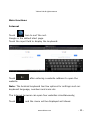
Internet
Icon to surf the net.
Touch
Google is the default start page.
Touch the input field to display the keyboard:
Touch
website.
after entering a website address to open the
Note: The Android keyboard has few options for settings such as:
keyboard language, numbers and icons etc.
The Internet browser can open four websites simultaneously;
Touch
and the menu will be displayed as follows:
www.visture.com
‐ 15 ‐ Visture Ltd all rights reserve
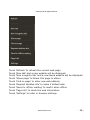
Touch
Touch
Touch
Touch
Touch
Touch
Touch
Touch
Touch
‘Refresh’ to refresh the current web page
‘New tab’ and a new website will be displayed.
‘New incognito tab’ and a new blank website will be displayed
‘Share page’ to Share this page to others
‘Find on page’ to enter new web address
‘Request desktop site’ to make it default web
‘Save for offline reading’ to read it when offline
‘Page info’ to check the web information
‘Settings’ to enter in browser settings
www.visture.com
‐ 16 ‐ Visture Ltd all rights reserve
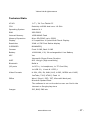
Technical Data
V5 HD
9.7" / 24.7cm Tablet-PC
CPU
Rockchip rk3066 dual-core 1.6 GHz
Operating System
Android 4.1
RAM
2GB DDR3
Internal Memory
16GB NAND Flash
Memory Expansion
Micro SD/SDHC up to 32GB
Display
4:3 capacitive 10-point Multi-Touch-Display
Resolution
2048 x 1536 Pixel Retina display
G-SENSOR
MMA8452Q
Camera
Front 2.0MP, Back 2.0MP
Battery
10000MAH, 12V, 2A rechargeable Li-ion Battery
MIC
Yes
Internet & Skype Phone-Function
WIFI
802.11b/g/n (high sensitivity)
Bluetooth
Build in
I/O ports
1x DC In, 1x headphone, 1x TF Card-Slot,
1x USB 2.0, 1 host & 1 OTG,1
Video-Formats
H.264, VP8, RV, WMV, AVS, H.263, MPEG4 etc 1080P,
YouTube, 720P, HTML5, Flash 11
Office
Word / Excel / PDF / PPT, Microsoft Word pad,
Microsoft Spread Excel
The software is not on the device user can find in the
internet or Google play store
Images
JPG, BMP, PNG etc.
www.visture.com
‐ 17 ‐ Visture Ltd all rights reserve
Trouble shooting
In seldom conditions, the device might not work properly due to the
misusage or firmware; VISTURE has below solution as reference and
will also release new firmware regularly to improve user experience:
Touch panel can not work accurately
Solution: When the battery gets low to 10% or less, the touch panel
might not work accurately, the device needs recharge.
Can not wake the V5 HD up from the sleep mode
Solution: Long press the power button 10 seconds to power off the
device forcibly and then restart
Device switches off accidentally or can not power on
Solution: Battery might be empty or getting close to empty,
recharge the device for 5~8 hours then power on.
Operation become slow and can not run the app efficiently
Solution: There might be too many apps run in the background
which occupy too much RAM. Click on the “Task manager” app and
stop the unnecessary apps.
Tablet can not boot completely and stay in the “Android” icon
Solution: Power off the device and reload the FW into the device.
About how to reload the FW please refer to the Web site Support.
Thanks for your purchasing of the Visture device, if there are issues
need support, you can Email: [email protected]
www.visture.com
‐ 18 ‐