1
Video Tuner
Choices: Enable, Disable
Default: Disabled
If you are not using a Radius capture board, keep
at the default (disabled) setting. Enable may
increase performance for Radius users.
Device Discovery
Choices: Node WWN, Port WWN
Default: Node WWN
Certain RAID controllers require discovery using
port WWN for proper operation.
Inhibit Driver Loading
Choices: Enable, Disable
Default: Disabled
Enable delays loading volumes until later in the
boot process to prevent memory problems
associated with a large quantity of volumes.
Full Duplex
Choices: Enable, Disable
Default: Enabled
Allows simultaneous transfer of data in both
directions (transmit and receive).
Reset Delay
Choices: 0-255
Default: 5
Sets the time delay between the reset and
scanning of the bus. Increase this value if some
devices are not recognized at startup.
Data Rate (ExpressPCI FC 3300/3305 only)
Choices: 1Gb/sec., 2GB/sec., Auto-Negotiate
Default: Auto-Negotiate
Selects between the 1-Gigabit and 2-Gigabit/sec.
data transfer rates available with the ExpressPCI
FC 3300 or 3305 host adapter.
Heartbeat (For EPCI FC64 only)
Enable only when using an ATTO ExpressPCI FC
host adapter connected to Seagate Barracuda
drives. Resolves issues where commands could
occasionally remain outstanding on the drives.
Disable if the host adapter is connected to a Vixel
Rapport 4000 switch also connected to Seagate
Barracuda drives. The performance loss to the
Barracuda drive is less severe than losing the
switch connection to the Vixel Rapport 4000.
Configuring ExpressPCI adapters
for a particular ID. LUNs label multiple storage
units that share the same ID. Disabling LUNs
affects all target IDs connected to the host adapter.
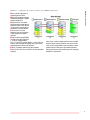
Connection mode options
Arbitrated Loop (AL): Connects to either an FCAL Arbitrated Loop or a Fabric Loop Port (FL_
Port) on a switch.
Point to Point (PTP): Connects to a direct Fabric
connection, such as an F port on a switch.
AL Preferred Loop: Allows the card to determine
what kind of connection to use, but tries to
connect in loop mode first, then point-to-point
mode.
PTP Preferred Point-to-Point: Allows the card to
determine what kind of connection to use, but
tries to connect in loop mode first, then point-topoint mode.
Class 2: Enables the card to communicate with
Class 2 devices.
Arbitration Loop Fairness: Should be enabled.
Arbitration loop fairness is an algorithm which
ensures that all NL_Ports on an arbitrated loop
will have equal access to the loop. Each L_Port
has an arbitration priority assigned to it based on
its AL_PA (arbitrated loop physical address).
The access fairness algorithm creates an access
window in which all L_Ports are given an
opportunity to win access to the loop, regardless
of assigned priority, to prevent a device with a
high priority to dominate the loop.
Some loops may require certain NL_Ports to have
more access to the loop than just one access per
window. You may need to disable Loop
Arbitration Fairness.
Some Fibre Channel devices cannot execute
arbitration fairness algorithms. Change this
setting if you have exhausted the obvious
configuration issues and drivers do not load or
performance is intermittent.
16