1
SPECIAL FUNCTIONS
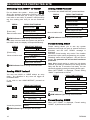
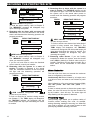
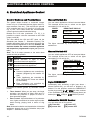
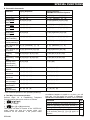
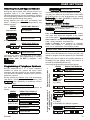
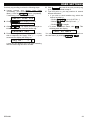
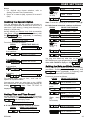
B. Executable Commands
Command
Keying Sequence
Keying Sequence –
PowerMax Pro Partition System
Disarming
Arming Home
[ ] [1] [#]
[ ] [2] [#]
[ ] [2] [1] [#]
[ ] [0] [partition] [1] [#]
[ ] [0] [partition] [2] [#]
[ ] [0] [partition] [2] [1] [#]
[ ] [3] [#]
[ ] [0] [partition] [3] [#]
[ ] [3] [1] [#]
[ ] [0] [partition] [3] [1] [#]
[ ] [4] [#]
[ ] [0] [partition] [4] [#]
Arming HomeInstant
Arming Away
Arming AwayInstant
Arming AwayLatchkey
[ ] [0] [partition] [4] [1] [#]
Arming Away[ ] [4] [1] [#]
Instant-Latchkey
Review status of
specific partition(*)
[ ] [0] [partition] [9] [#]
Elect. Devices (No. [ ] [5] [device No.] [1]
01-15) ON
[#]
[ ] [5] [device No.] [1]
[#]
Elect. Devices (No. [ ] [5] [device No.] [0]
01-15) OFF
[#]
[ ] [5] [device No.] [0]
[#]
Activating
output
PGM [ ] [5] [0]
[0] [1] [#]
[ ] [5] [0]
[0] [1] [#]
Deactivating
output
PGM [ ] [5] [0]
[0] [0] [#]
[ ] [5] [0]
[0] [0] [#]
Two-way voice
[ ] [7] [#]
communication
(see sub-par. C)
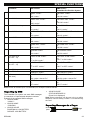
Recorded message [ ] [8] [1]
playback
[ ] [7] [#]
[#]
[ ] [8] [1]
[#]
Recorded message [ ] [8] [2]
start record
[#]
[ ] [8] [2]
[#]
Recorded message [ ] [8] [3]
stop record
[#]
[ ] [8] [3]
[#]
Recorded message [ ] [8] [4]
erase message
[#]
[ ] [8] [4]
[#]
Investigating
system status
[ ] [9] [#]
[ ] [9] [#]
Quit (end
communication)
[ ] [9] [9] [#]
[ ] [9] [9] [#]
* This command operates on ALL permitted partition(s).
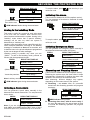
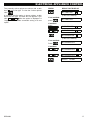
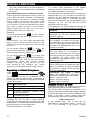
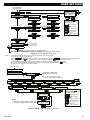
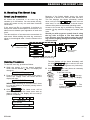
C. Two-Way Voice Communication
Perform steps 1-6 in Establishing Telephone
Communication above and continue as follows:
1.
[ ] [7] [#]
2. Wait for 2 beeps
[3] or [1] or [6] (see below)
3.
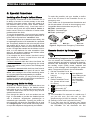
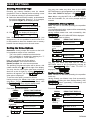
The system will start to function in the "LISTEN IN"
mode, letting you hear the sounds within your
residence for 50 seconds. If the person under
DE5468U
surveillance happens to speak or cry then, you will
hear this. You can switch the system to Listen-In,
Speak Out or Full Duplex, as shown in the next table.
Command
Key
Listen-in (listening to the person at home) (*)
Speak-out (speaking to the person at home) (*)
[3]
[1]
Full-duplex (listening & speaking) (*)
[6]
Note: To prolong the communication session
by 50 seconds, press [3], [1] or [6] again, as
required.
21