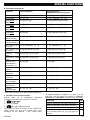
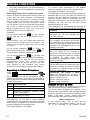
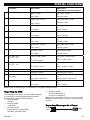
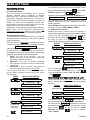
1
INTRODUCTION
1. Introduction
Overview
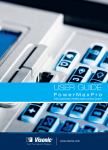
The PowerMax Pro is a wireless alarm control
system that provides protection against burglary, fire
and tampering. In addition, it can be used to control
lights and electrical appliances within your household
and/or to monitor the activity of disabled or elderly
people left at home. Status information is presented
visually and verbally, and in most cases a recorded
voice prompts you to take correct action.
The PowerMax Pro includes an optional partition
feature. Partitioning allows you to have up to four
independently controllable areas with different user
codes assigned to each partition. A partition can be
armed or disarmed regardless of the status of the
other partitions within the system. For example, you
can define the garage as partition 1, the basement
as partition 2, the house as partition 3 and a safe as
partition 4. Since each partition is independent of
other partitions, you can arm or disarm each partition
as desired without altering the states of the other
partitions. Therefore, while arming or disarming your
home this will not interfere with the safe that you
desire to arm most of the time.
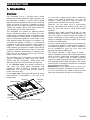
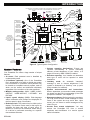
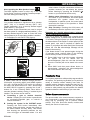
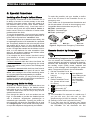
The PowerMax Pro is governed by a control panel
(Figure 1) designed to collect data from various
sensors that are strategically located within and
along the perimeter of the protected site (Figure 2).
In the disarmed state, the system provides you
with visual and verbal status information, and
initiates an alarm if smoke is detected or upon
disturbance in a 24-hour zone (a zone which is
active 24-hours a day).
In the armed state, the system will initiate an alarm
upon detection of disturbance in any one of the
armed zones.
DISPLAY
MICROPHONE
You will need a 4-digit security code to master the
system (code 0000 is disallowed), and you can
authorize 7 other persons to use the system by
providing them with their own security codes.
Moreover, you can obtain up to 8 multi-function
key-ring transmitters and proximity tags that will
allow you and other users to easily control major
functions.
Proximity tags enable authorized people to enter
restricted areas. Presenting a valid proximity tag
while the system is armed causes the system to
disarm. Presenting a valid proximity tag while the
system is disarmed causes the system to be armed
in AWAY or HOME modes.
If the user has changed the state of the system from
a high security mode to a lower security mode i.e.
from ARM to DISARM, or from ARM to HOME, he
will be prompted to enter the user code thus
bypassing the QUICK ARM option.
The system identifies a wide range of events alarms, attempts to tamper with sensors and several
types of trouble. Events are automatically reported
via PSTN or optional GSM to central monitoring
stations (in digital form) and to private telephones (in
plain language and/or SMS messages). The person
receiving such a message is expected to investigate
the event and act accordingly.
IMPORTANT! All you need to know to secure your
premises can be found in Chapter 2 of this manual.
If you are not familiar with some of the terms used
here, refer to Appendix A at the end of this guide.
CONTROL
KEYS
KEYPAD
COVER
(CLOSED)
Figure 1. Control Panel with Cover Closed
4
DE5468U