1
2b
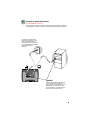
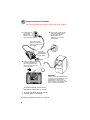
Connect to power & network
(Non-powered Ethernet network requires AC power adapter)
c
b
Connect the AC
power cable
between the
adapter and an
electrical socket.
Connect the second network
cable to the DATA IN port**
on the adapter and an
Ethernet jack in the
workspace (or on a data
switch/router).
Upper LED*** lights
green to indicate when
phone is connected and
using power.
Lower LED
lights green to
indicate adapter
has AC power.
a
Connect a network cable to
the DATA & POWER OUT
port * on the adapter. The
other end goes to the LAN
port on the phone.
optional
Share a single LAN wall jack between
your IP phone and computer by daisychaining the PC off the second
Ethernet port on your phone. (The
phone connects to the wall jack and
the PC connects to the phone.)
* ON SOME ADAPTERS, THIS PORT MAY
BE LABELED “DATA & PWR” OR “PHONE.”
**
ON SOME ADAPTERS, THIS PORT MAY BE
LABELED “DATA” OR “NETWORK.”
*** SOME ADAPTERS MAY HAVE ONLY ONE LED.
6