1
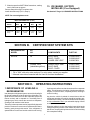
6. CLEARANCES
5. VENTILATION HEIGHTS
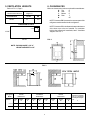
Minimum clearances in inches to combustible materials are:
G: Top
0"
K: Side
0"
L: Bottom
0"
M: Rear
1"
N:
65"
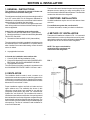
Refer to FIG 1., Page 2
Installation with roof
vent and lower side vent
Minimum Ventilation
heights in:
REFRIGERATOR
INCHES
MM
65
1651
RM7030
NOTE: Clearance "M" is between the rearmost part of the
refrigerator and the wall behind the refrigerator.
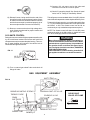
LOWER VENT CUTOUT
NOTE: Clearance "N" is the distance between the bottom
of the lower vent to the roof material. For ventilation
height, refer to Section A. Installation, Item 5. Ventilation
Heights. See FIG. 2.
3-1/2"
13-3/4"
3-1/2"
28-7/8"
FIG. 2
NOTE: RADIUS CAN BE +1/4"–0"
HEIGHT AND WIDTH ± 1/8"
FIG. 3
e
Refrigerator
Model
RM7030
Overall
Dimensions
Installation
Dimensions
Recess
Dimensions
Distance between
top of condenser
and top of refrigerator
e
Height
A
Width
B
Depth
C
Height
h
Width
w
Depth
d
Height
H
Width
W
Depth
D
(Inches) 58-3/4
33-1/2
23-5/8
57-1/8
32-3/8
22-5/8
57-3/8
32-7/8
23-5/8
1-1/8
850
600
1450
822
574
1258
544
612
29
(mm)
1492
3