1
Chapter 2 - Installation
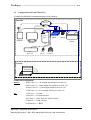
Configuring the SpaceLink Home Gateway
The home gateway can be configured to meet various usage scenarios.
Some of the factory default settings may suit your usage; however, others
may need changing. Prior to using the home gateway, you must check the
basic settings to guarantee it will work in your environment.
2. Installation
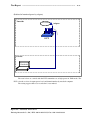
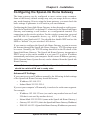
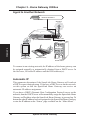
Configuring the SpaceLink Home Gateway is done through a web browser.
You need a Notebook PC or desktop PC connected to the SpaceLink Home
Gateway and running a web browser as a configuration terminal. The
connection can be wired or wireless. For the wireless connection, you need
an IEEE 802.11b compatible device, e.g. ASUS SpaceLink PC Card,
installed in your Notebook PC. You should also disable WEP and set the
SSID to “default” for your wireless LAN device.
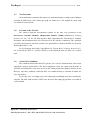
If you want to configure the SpaceLink Home Gateway or want to access
the Internet through the SpaceLink Home Gateway, TCP/IP settings must
be correct. Normally, the TCP/IP setting should be on the IP subnet of the
SpaceLink Home Gateway. The SpaceLink Home Gateway incorporates a
DHCP server so the easiest method is to set your PC to get its IP address
automatically and reboot your computer. So the correct IP address, gateway,
DNS (Domain Name System Server) can be obtained from the SpaceLink
Home Gateway.
Note: Before rebooting your PC, the SpaceLink Home Gateway
should be switched ON and in ready state.
Advanced IP Settings
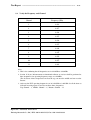
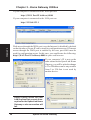
If you want to set your IP address manually, the following default settings
of the SpaceLink Home Gateway should be known:
• IP address 192.168.123.1
• Subnet Mask 255.255.255.0.
If you set your computer’s IP manually, it needs to be on the same segment.
For example:
•
•
•
•
IP address 192.168.123.xxx (xxx can be any number between 2 and
254 that is not used by another device)
Subnet Mask 255.255.255.0 (same as the SpaceLink Home Gateway )
Gateway 192.168.123.1 (this is the SpaceLink Home Gateway IP address)
DNS 192.168.123.1 (SpaceLink Home Gateway IP address or your own).
SpaceLink Home Gateway
25