1
Your WF-2530
After you set up your WF-2530 (see the Start Here sheet), turn to this Quick Guide and
your online User’s Guide for instructions on using your product.
Features
Where to find information
Copy, scan, and fax from the easy-to-use
control panel
See this Quick Guide for the basics.
See the online User’s Guide for details.
Wireless printing and scanning from mobile
devices with EPSON Connect™
See www.epson.com/connect.
Easy Wi-Fi networking
See the online User’s Guide.
Extra-high capacity ink cartridges
See this Quick Guide for installation
instructions.
Advanced paper handling with Automatic
Document Feeder
See this Quick Guide or the online
User’s Guide for paper loading instructions.
Using the Control Panel
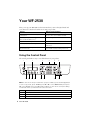
The control panel makes it easy to use all the features of your product.
1
2
7
8
9
3
10
11
4
12
5
6
13
14
Note: To turn off the “beep” heard when you press a button, press the r Copy button
to select copy mode, press x Menu, press u or d to select Maintenance, then press
OK. Select Sound, then select Off and press OK. If you turn off the sound, the dialing
sound made when you transmit a fax is also turned off.
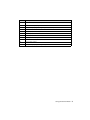
Number
Description
1
Turn the product on or off
2
View menus and status on the LCD Screen
3
Use the arrow keys and OK button to navigate menus
2 Your WF-2530