1
Hardware Installation
Hardware Installation
Installing the MVME5500 into a Chassis
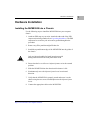
Use the following steps to install the MVME5500 into your computer
chassis.
1. Attach an ESD strap to your wrist. Attach the other end of the ESD
strap to an electrical ground (refer to Unpacking Guidelines). The ESD
strap must be secured to your wrist and to ground throughout the
procedure.
2. Remove any filler panel that might fill that slot.
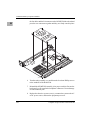
3. Install the top and bottom edge of the MVME5500 into the guides of
the chassis.
Warning
!
Only use injector handles for board insertion to avoid
damage/deformation to the front panel and/or PCB.
Warning
4. Ensure that the levers of the two injector/ejectors are in the outward
position.
5. Slide the MVME5500 into the chassis until resistance is felt.
6. Simultaneously move the injector/ejector levers in an inward
direction.
7. Verify that the MVME5500 is properly seated and secure it to the
chassis using the two screws located adjacent to the injector/ejector
levers.
8. Connect the appropriate cables to the MVME5500.
http://www.motorola.com/computer/literature
1-17
1