1
3 Enable the controller’s on-board transient protection. This may be
accomplished one of two ways:
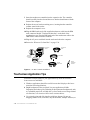
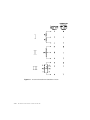
• If the controller can be mounted to a metal chassis, it can be grounded
through one of the plated-through mounting holes by using one of the No.
6 sheet metal screws and spacers provided in the kit. Use either of the
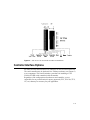
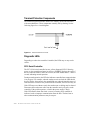
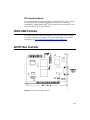
holes marked "PTH" in Figure B.2 on page B-83 .
• If the controller cannot be mounted to a metal chassis, use a ground wire
with a lug attached to connect one of the controller's plated-through
mounting holes to chassis ground.
When using the controller’s on-board transient protection, you must ensure that
the touchscreen is connected to the controller and the controller is grounded
when cycling power to the monitor.
1 Connect the power cable harness to the 1x2 male connector at P4 on the
controller. Connect the power source to the harness and then to AC. The
2210 controller power requirements are +55 mA at +5 Vdc ±10% standby,
160 mA average with touch, 240 mA peak.
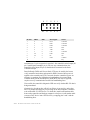
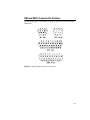
2 Connect the 2x5 female connector on the serial output cable to the 2x5 male
connector at P2 on the controller. Mount the DB9 female end of the cable as
described for the 899389-000 cable in the following section. The serial cable
connector shell must be grounded to satisfy safety agency approvals, as the
grounding protects the user in case a wiring fault develops in the monitor.
Attach the other ground wire supplied in the kit to one of the DB9's mounting
screws and the other end to chassis ground if the shell is not already
grounded.
Mechanically, there may be several options for mounting the bulkhead
connector on the monitor case:
• Mounting the cable to a chassis member that is exposed to the display
exterior. This requires a DB9 hole punch to mount the connector neatly, but
makes reassembly of the back of the case very easy, and is usually the best
functional and cosmetic solution.
• Mounting the cable to a concealed chassis member, with a hole in the exterior
of the case (usually plastic) to provide access to the connector. This
technique also requires a metal punch to mount the DB9 connector, but the
plastic case hole can often be routed, nibbled, or punched with simple tools,
and usually provides a neat appearance. This is also an excellent functional
solution as the back case is again very simple to reassemble.
4-50
Elo Entuitive Touchmonitor