1
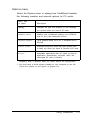
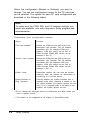
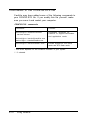
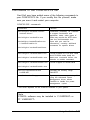
You can also use the switches described in the following table
to perform different functions.
CARDINFO command switches
Command switch
Function
cardinfo /c
Provides the information you see when you type
the command without switches; also shows
software release information, the number of slots
being managed, and vendor revision and
copyright information.
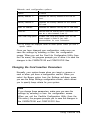
cardinfo /v*
Provides more extensive information about the
PCMCIA slots than you see when you type the
command with no switches. The information
includes memory addresses, software version
numbers, vendor information, revision date,
most recent error on the device, and assigned
l/Os and IRQs.
cardinfo /off
Turns off power to all PCMCIA slots.
cardinfo /off :n
Turns off power to the specified slot (n). For
e x a m p l e , t y p i n g cardinfo /off :1 t u r n s o f f
the power to slot 1.
cardinfo /on
Turns on power to all PCMCIA slots.
cardinfo /on :n
Turns on power to the specified slot (n). For
example, typing cardinfo /on :1 t u r n s o n
the power to slot 1.
cardinfo /?
Displays information about CARDINFO switches.
* Some of this information may scroll off the screen before you can read it,
so add the parameter more after this command.
Using CardLite 2 - 9