1
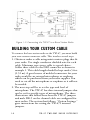
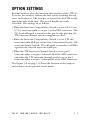
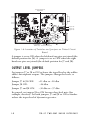
Figure 1-2: Connecting the TW-47 to a Base Station Radio
BUILDING YOUR CUSTOM CABLE
To connect the base-station radio to the TW-47, you must build
your own custom connector cable. This involves several steps.
1. Obtain or make a cable using mini or micro plugs that fit
your radio. Use single conductor shielded wire for each
cable. Miniature type stereo cable is a good choice.
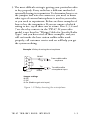
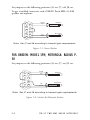
Solder these cables to the DB9 connector as shown in
example 1. This cable length should be kept under 5 feet
(1.52 m). A good source of molded connectors for your
radio would be an external microphone or earphone
which can be purchased from your radio supplier. You
need to cut off the microphone or earphone as it will not
be needed.
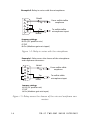
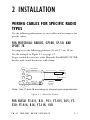
2. The next step will be to set the type and level of
microphone. The TW-47 has three internal jumpers that
can be set for specific types of microphones. The three
illustrations that follow show how the TW-47 jumpers
and male DB-9 on the channel cable are configured for
most radios. The section that follows, “Option Settings,”
gives instructions for setting the TW-47’s internal
jumpers.
1-4
TW-47 TWO-WAY RADIO INTERFACE