1
DAC960PG and DAC960PJ
PCI to Ultra SCSI
RAID Controller
Installation Guide
Part Number 775012-00
© Copyright 1998 Mylex Corporation.
All Rights Reserved.
All contents of this manual are copyrighted by Mylex
Corporation. The information contained herein is the
exclusive property of Mylex Corporation and shall not be
copied, transferred, photocopied, translated on paper, film,
electronic media, or computer-readable form; or otherwise
reproduced in any way, without the express written
permission of Mylex Corporation.
Greetings
Thank you for purchasing a Mylex DAC960 RAID controller. Requests for technical
information about this and other Mylex Corporation products should be made to your
Mylex authorized reseller or Mylex marketing representative.
Please Notice
Mylex and DAC960 are registered trademarks of Mylex Corporation. Global Array Manager and GAM are trademarks of Mylex Corporation.
MS-DOS, Windows 95,and Windows NT are trademarks of Microsoft Corporation. Intel
and i960 are registered trademarks of Intel Corporation. Novell and NetWare are registered trademarks of Novell, Inc. SCO, SCO UNIX, and UnixWare are registered trademarks of The Santa Cruz Operaion, Ltd. Other names that are trademarks may be used
herein for the purpose of identifying the products or services of their respective owners.
Unless otherwise noted, companies, names and data used in examples herein are fictitious.
Our Policy
Although reasonable efforts have been made to assure the accuracy of the information
contained herein, this publication could include technical inaccuracies or typographical
errors. Mylex Corporation expressly disclaims liability for any error in this information,
and for damages, whether direct, indirect, special, exemplary, consequential or otherwise,
that may result from such error, including but not limited to loss of profits resulting from
the use or misuse of the manual or information contained therein (even if Mylex Corporation has been advised of the possibility of such damages). Any questions or comments
regarding this document or its contents should be addressed to Mylex Corporation at the
address shown on the cover.
The following paragraph does not apply to the United Kingdom or any country where such
provisions are inconsistent with local law:
MYLEX CORPORATION PROVIDES THIS PUBLICATION “AS IS” WITHOUT
WARRANTY OF ANY KIND, EITHER EXPRESS OR IMPLIED, INCLUDING, BUT
NOT LIMITED TO, THE IMPLIED WARRANTIES OF MERCHANTABILITY OR
FITNESS FOR A PARTICULAR PURPOSE.
Some states do not allow disclaimer of express or implied warranties or the limitation or
exclusion of liability for indirect, special, exemplary, incidental or consequential damages
in certain transactions; therefore, this statement may not apply to you. Also, you may have
other rights which vary from jurisdiction to jurisdiction.
Information in this publication is subject to change without notice and does not represent a
commitment on the part of Mylex Corporation. Changes may be made periodically to the
information herein; these changes will be incorporated in new editions of the publication.
Mylex Corporation reserves the right to make improvements and/or changes at any time in
the product(s) and/or program(s) described in this publication.
It is possible that this publication may contain reference to, or information about, Mylex
Corporation products (machines and programs), programming or services that are not
announced in your country. Such references or information must not be construed to mean
that Mylex Corporation intends to announce, provide, or make available such Mylex products, programming, or services in your jurisdiction.
About This Manual
This installation guide covers hardware set-up and configuration procedures
necessary for the installation of Mylex DAC960PG and DAC960PJ PCI to
Ultra SCSI RAID controllers.
Chapter 1 describes the controllers, standard package contents, and usersupplied items necessary for installation.
Chapter 2 describes steps to be performed prior to controller installation.
Chapter 3 describes installation of the controller.
Chapter 4 describes controller start-up and the BIOS resident utilities.
Appendix A describes the Intelligent Battery Backup Unit option.
Appendix B provides the hardware and environmental specifications.
Appendix C describes error messages and how to identify problems.
Appendix D provides regulatory information and certifications.
Conventions
Throughout the manual, the following conventions are used to describe user
interaction with the product:
prompt
This style of type indicates screen display messages
Enter
Press the key labeled “Enter” (or “Delete”, etc.)
☛ Note
A Note is supplementary information that can have an
effect on system performance
m Caution
A Caution is a notification that a proscribed action has
the potential to adversely affect equipment operation,
system performance, or data integrity
, WARNING
A Warning is a notification that a proscribed
action will definitely result in equipment damage,
data loss, or personal injury
Contents
Chapter 1
Introduction
Product Description ...........................................................................
Controller Features and Functions .............................................
Operating System Support .........................................................
Standard Package Contents .............................................................
Hardware....................................................................................
Software .....................................................................................
User-supplied Items ..........................................................................
1-1
1-2
1-2
1-2
1-2
1-3
1-4
Chapter 2
Preinstallation Planning
SCSI Termination ..............................................................................
SCSI Cabling.....................................................................................
SCSI Drive Preparation .....................................................................
Mixing Narrow and Wide SCSI Devices ............................................
2-2
2-4
2-5
2-5
Chapter 3
Installation
Before You Begin ..............................................................................
Connectors and Jumpers ..................................................................
External SCSI Connectors .........................................................
Safety Considerations .......................................................................
Installing the Controller......................................................................
3-1
3-2
3-4
3-5
3-6
Chapter 4
Controller Start-up
Procedural Overview .........................................................................
Controller Start-up .............................................................................
BIOS Start-up Sequence............................................................
Other BIOS Options ...................................................................
Device Drivers ............................................................................
Global Array Manager (GAM).....................................................
In Case of Problems..........................................................................
Manual Number 775012
4-1
4-2
4-2
4-3
4-5
4-5
4-5
v
Appendix A
IBBU Option
Product Description ........................................................................... A-1
Features ..................................................................................... A-1
Installation ......................................................................................... A-2
Operation ........................................................................................... A-4
Battery Conditioning Prior to Use ............................................... A-4
Set-up – Enabling the Write-Back Cache ................................... A-4
Battery Backup Capacity ............................................................ A-4
Maintenance ...................................................................................... A-5
Removing the Battery Backup Module ....................................... A-5
Functional Description ....................................................................... A-6
General Operational Description ................................................ A-6
Status Indication......................................................................... A-6
Battery and Charge Circuit ......................................................... A-7
Recycling the Battery ................................................................. A-7
IBBU Specifications ........................................................................... A-8
On-board Battery ........................................................................ A-8
Battery Charge Life .................................................................... A-8
External Battery .......................................................................... A-8
Module Dimensions .................................................................... A-8
Environmental ............................................................................ A-8
Appendix B
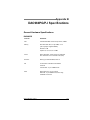
DAC960PG/PJ Specifications
General Hardware Specifications ...................................................... B-1
DAC960PG................................................................................. B-1
DAC960PJ.................................................................................. B-2
Physical and Environmental Specifications ....................................... B-3
Appendix C
Error Messages
Error Messages ................................................................................
Start-up Error Messages ...........................................................
Drive Check Error Messages.....................................................
Aborted Installation ...........................................................................
NVRAM Error ............................................................................
System Reboot or Power Down Messages ......................................
vi
C-1
C-1
C-1
C-2
C-3
C-3
DAC960PG/PJ Installation Guide
Appendix D
Regulatory Information
FCC Class B Compliance........................................................... D-1
FCC Declaration of Conformity .................................................. D-2
Community of Europe ................................................................ D-3
Underwriters Laboratories Listed ............................................... D-4
Glossary
Manual Number 775012
vii
viii
DAC960PG/PJ Installation Guide
Chapter 1
Introduction
This chapter covers:
• Product description
• Standard package contents
• User supplied items
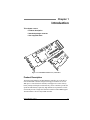
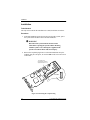
Figure 1-1. DAC960PG/PJ Disk Array Controllers
Product Description
The Mylex DAC960PG™ and DAC960PJ™ controllers are 32-bit PCI to
Ultra SCSI RAID controllers designed for high performance file servers.
With up to 3 Ultra SCSI drive channels, and support for a cache memory
battery backup (full-length card models only), these controllers provide the
speed and functionality required by high demand server platforms. A halfcard model provides a single drive-channel controller without BBU support.
The DAC960PJ is an I2O ready RAID controller.
Manual Number 775012
1-1
Standard Package Contents
Controller Features and Functions
Features of the DAC960PG and DAC960PJ controllers include:
• Ultra SCSI drive channels that support RAID levels 0, 1, 3, 5, 0+1, 10,
30, and 50
• Single-Ended Wide Ultra SCSI (Fast 20) drive support
• High performance RISC processor and EDO ECC DRAM cache (4MB
to 128MB) for high speed, fault tolerant I/O transfers
• 512KB, 8-bit flash EEPROM for BIOS and code supports future
enhancements through firmware upgrades
• Built-in configuration utilities in BIOS (with firmware 4.06 and above)
• An Intelligent Battery Backup (IBBU) option to protect data in cache
during power loss is available for full-length card models
Operating System Support
• Microsoft Windows NT 3.51 and NT 4.0
• Novell NetWare 3.12 or 4.xx
• SCO UNIX 3.2.4, ODT, and OSR 5.0
• SCO UnixWare v2.1
• MS-DOS 5.x, 6.x, and above
• Microsoft Windows NT or Windows 95 – for Global Array Manager
(GAM) client only
Standard Package Contents
The following items are suppled with the standard shipping package:
Hardware
• DAC960PG or DAC960PJ Disk Array Controller with documentation
• Intelligent Battery Backup (IBBU) port loopback terminator plug (on
full-length cards only), or...
• Optional Intelligent Battery Backup Unit (IBBU)
1-2
DAC960PG/PJ Installation Guide
Introduction
☛ Note
A loopback terminator plug must be installed on the
full-length version of the DAC960PG/PJ controller’s
IBBU connector if the optional IBBU is not present.
Software
• Disk Array Controller Configuration (DACCF) utility with
documentation
• Disk Array Controller Software Kit (OS, drivers, and GAM Server)
with documentation
• Optional Global Array Manager (GAM client) software utility with
documentation
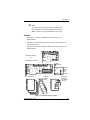
DAC960PG Half-card
Or
DAC960PG/PJ Controller
IBBU
Terminator
Intelligent
Battery
Backup
Unit
(optional)
User Manuals
Software
Utilities &
Drivers
GAM Client
Software &
User Manual
(optional)
Figure 1-2. Standard Package Contents
Manual Number 775012
1-3
User-supplied Items
User-supplied Items
The following user-supplied items are required to perform this installation:
• IBM-PC™ compatible host system with an available PCI slot
• Network operating system software (as required)
• SCSI cables to connect the controller and disk drives
• Static grounding strap or electrostatic discharge (ESD) safe work area
• Disk array enclosure (or equivalent) and SCSI disk drives*
*SCSI drive compatibility list is available from Mylex Technical support
1-4
DAC960PG/PJ Installation Guide
Chapter 2
Preinstallation Planning
This chapter covers:
• SCSI termination
• SCSI cabling
• SCSI drive preparation
• Limitations on mixing Narrow and Wide SCSI drives
Mylex Disk Array Controllers are designed to work in a variety of SCSI
RAID application environments. Certain configuration steps need to be
performed prior to installing the controller into a RAID environment.
Manual Number 775012
2-1
SCSI Termination
SCSI Termination
The DAC960PG and DAC960PJ are equipped with automatic SCSI
termination circuitry. If the controller is at the end of a SCSI bus, it
automatically enables on-board termination.
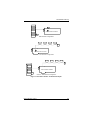
If all the SCSI devices on a channel are connected either to an internal
connector of a channel, or to an external connector of a channel, the end of
the SCSI bus farthest from the controller must have a terminator installed. In
this case, the controller automatically enables on-board termination. See
Figure 2-1 for examples of internal or external drive configurations.
If some SCSI devices are connected to the internal connector of a channel,
and some are connected to the external connector of the same channel, the
two ends of the SCSI bus farthest from the controller must each be
terminated. In this case, the controller automatically disables on-board
termination. See Figure 2-1 for an example of an internal – external drive
configuration.
☛ Note
For this discussion, assume that the illustrated internal
and external connectors are both on the same channel.
It is better to terminate the ends of the SCSI bus itself
than it is to terminate the end devices on the bus. This
allows hot swap devices to be added or removed from
the SCSI bus without affecting termination.
2-2
DAC960PG/PJ Installation Guide
Preinstallation Planning
T
Auto Termination Enabled
T
External Drive Configuration
T
T
Auto Termination Enabled
Internal Drive Configuration
T
Auto Termination Disabled
T
Internal – External Drive Configuration
Figure 2-1. DAC960 Controller Termination Examples
Manual Number 775012
2-3
SCSI Cabling
SCSI Cabling
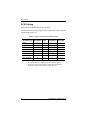
Each Ultra SCSI channel supports up to 15 drives.
The total allowable SCSI bus lengths will be limited to the single-ended bus
lengths shown in Table 2-1.
Table 2-1. Supported SCSI Formats and Bus Lengths
SCSI Drive Type*
Bus Speed, Bus Width, Bus Length, Drives** per
Max.(MB/Sec)
(Bits)
Max.(Meters) Channel, Max.
SCSI-1
5
8
6
Fast SCSI
Fast Wide SCSI
7
10
8
3
7
20
16
3
15
Ultra SCSI
20
8
1.5
7
Ultra SCSI
20
8
3
3
Wide Ultra SCSI
40
16
—
15†
Wide Ultra SCSI
40
16
1.5
7
Wide Ultra SCSI
40
16
3
3
* SCSI Trade Association terms
** The SCSI ID reserved for the RAID controller is not included in this total.
† The maximum number of devices allowed on a Wide Ultra SCSI channel is 8
including the controller, unless bus extender technology is used.
2-4
DAC960PG/PJ Installation Guide
Preinstallation Planning
SCSI Drive Preparation
Prepare the drives for installation as follows:
• Remove any terminators attached to the drive or set any drive
termination jumpers to the disabled position.
• Set the SCSI addresses on the drives.
☛ Note
Each drive on a channel must have a unique ID
chosen from 0 through 6 or 8 through 15. ID 7 cannot
be used as a drive ID because it is reserved for the
controller.
• Enable term power on the drives.
Refer to the drive manual for specific information about drive configuration
settings.
To get best performance from the controller, the SCSI drives should be
equally distributed across the SCSI channels, and the controller’s data
transfer rate should be set to the optimum rate for the drives being used.
Mixing Narrow and Wide SCSI Devices
Narrow and Wide SCSI devices must not be mixed on a single channel. If
mixing Narrow and Wide SCSI devices is desired, at least one channel must
be dedicated to Narrow SCSI, and at least one channel must be dedicated to
Wide SCSI.
Manual Number 775012
2-5
Mixing Narrow and Wide SCSI Devices
2-6
DAC960PG/PJ Installation Guide
Chapter 3
Installation
This chapter covers:
• Preparation
• Connectors and jumpers
• Safety considerations
• Controller installation procedures
Before You Begin
Installing a Mylex DAC960 PCI to Ultra SCSI RAID controller is no more
difficult than installing any PCI adapter card. Follow these steps and then
follow the installation procedures in this chapter.
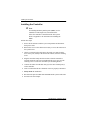
, WARNING
Disconnect the system from the electrical wall
outlet before opening the system cabinet. Working
with the system covers off and power applied to the
system can result in shock and serious injury.
1. Follow a safe anti-electrostatic discharge (ESD) procedure such as
using a grounding wrist strap connected to a known ground source.
2. Power off the system and disconnect the power cables before starting
the installation. Refer to the instructions provided in your system
documentation. Do not disconnect cables or power cords while system
power is on.
3. Read all of the instructions in this chapter completely before proceeding. Follow the Notes, Cautions, and Warnings described in this manual
and marked on the equipment.
4. Safety check the installation before powering on the system.
• Make sure that all of the cabling Pin 1 locations are correct and that
all cables are firmly seated in the connectors.
• Make sure all SCSI conventions (cable type, cable length,
termination, SCSI IDs, etc.) are followed.
Manual Number 775012
3-1
Connectors and Jumpers
Connectors and Jumpers
Up to three Ultra SCSI channels are supported on the DAC960PG/PJ. The
SCSI connector locations are shown in Figure 3-1.
Be sure that the Jumper JP6 has a jumper installed (see Figure 3-1 and Table
3-1).
☛ Note
The half-card has only one SCSI channel. Its jumpers
are numbered differently than on the full size cards.
See Figure 3-2 and Table 3-2 for half-card connector
and jumper references.
Internal
Channel 0
Connector
J1
Internal
Channel 1
Connector
J2
Internal
Channel 2
Connector
J3
JP4
JP5
0
JP6
1
J5
External Channel Connectors
Figure 3-1. Full-length Card Component Layout
Table 3-1. Full-length Card Jumper and Connector Descriptions
Component
Default Setting
Connector for optional front panel LED harness
–
JP5
Serial Port Connector
–
JP6
Reserved
J5
3-2
Description
JP4
Installed
Intelligent Battery Backup connector – If an IBBU
is not installed, a loopback plug must be installed
in this socket.
Installed at
factory
DAC960PG/PJ Installation Guide
Installation
Internal
Channel 0
Connector
JP1
JP4 JP5
J1
J2
JP10
External Channel 0 Connector
Figure 3-2. Half-card Component Layout
Table 3-2. Half-card Jumper and Connector Descriptions
Component
JP1
Description
Connector for optional front panel LED harness
Default Setting
–
JP4
Serial Port Connector
JP5
Not Used
Off
JP10
Not Used
Off
Manual Number 775012
–
3-3
Connectors and Jumpers
External SCSI Connectors
The external connectors on the controller are female, Dual In-line Micro
SCSI connectors. Figure 3-3 shows the configurations that are available on
both the DAC960PG and the DAC960PJ.
A
DAC960PG
1-Channel
B
DAC960PG
2-, 3-Channel
DAC960PJ
2-Channel
C
DAC960PJ
3-Channel
Figure 3-3. Configurations of 1, 2, and 3 External SCSI Connectors
The corresponding cable connector that fits the controller is available from
AMP and from Honda. Part numbers for the Honda connector and hood are:
Connector – HDRA–E68MA1
Hood – HDRA–E68LGKPE
The AMP part number for the connector assembly (with offset hood and jack
screws) is:
Connector assembly – 787801-1
The correct offset hood and connector assembly is critical if cables are to be
connected to simultaneously to external channels 0 and 2 on the threechannel version of the DAC960PJ. Proper alignment of the offset hood cable
assembly is shown in Figure 3-4.
3-4
DAC960PG/PJ Installation Guide
Installation
Figure 3-4. Offset Hood Cable Assembly Alignment,
3-Channel DAC960PJ
Safety Considerations
Be sure to observe the following precautions before beginning the controller
installation procedure:
m Caution
Anti-static handling procedures are required. Leave
the controller in its anti-static bag until it is time to
plug the controller into the PCI slot. The use of a
grounded wrist strap and other ESD protective
measures are highly recommended.
, WARNING
Disconnect the system from the electrical wall
outlet before opening the system cabinet. Working
with the system covers off and power applied to the
system can result in shock and serious injury.
Manual Number 775012
3-5
Installing the Controller
Installing the Controller
☛ Note
If an Intelligent Battery Backup Unit (IBBU) is to be
installed on a full-length card, it should be done
before the controller is installed into the host system.
Refer to Appendix A for information on installing the
IBBU.
Follow these steps:
1. Power-off all enclosures and the system components and disconnect
their power cords.
2. Remove the covers or the cabinet as necessary to access the I/O slots on
the system board.
3. Choose a vacant PCI slot and remove the metal cover plate from the
slot’s access port (usually at the back of the cabinet). Save the retaining
screw.
4. Plug the controller firmly into the PCI slot so that the controller’s
external connectors can be accessed through the access port. Use the
retaining screw to secure the controller by its mounting bracket.
5. Connect the cables from the disk array(s) to the drive channel port(s)
on the controller.
6. Look to confirm that all drive channels in use are properly terminated.
7. Safety check the installation.
8. Reconnect the power but DO NOT POWER ON the system at this time.
9. Proceed to the next chapter.
3-6
DAC960PG/PJ Installation Guide
Chapter 4
Controller Start-up
This chapter covers:
• Start-up procedures
• BIOS options
• Driver installation
• What to check in case of problems
This chapter describes the DAC960PG and DAC960PJ controller start-up
procedures and messages produced by the BIOS during start-up or re-boot,
and explains the BIOS options that are available for configuring controller
operation. This chapter also contains a brief introduction of necessary
software configuration with references to additional documentation.
Procedural Overview
The steps covered in this chapter include:
1. Setting BIOS options
2. BIOS configuration utility – refer to the Disk Array Controller
Configuration Utilities (DACCF) Installation Guide and User Manual
(P/N 771953)
3. Loading the operating system and operating system drivers – refer to
the Disk Array Controller Software Kit Installation Guide and User
Manual (P/N 771929)
4. Installing Global Array Manager – refer to the Global Array Manager
Client Software Installation Guide and User Manual (P/N 771961)
Manual Number 775012
4-1
Controller Start-up
Controller Start-up
The controller start-up procedure is the first step in confirming that the
controller is correctly installed and working properly. The start-up procedure
should be performed prior to any software configuration.
BIOS Start-up Sequence
After physically installing the controller and connecting the cabling, do the
following:
1. Power on the computer.
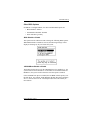
2. Watch the messages on the screen for the following prompt to be
displayed:
Press Alt-M for BIOS options
3. Press Alt–M to get into the BIOS Options menu.
4. The BIOS Options menu provides the following items to choose from:
5. To select any of the items in the menu, highlight the selection with the
Up Arrow or Down Arrow. Press Enter to toggle any of the first 3
items.
☛ Note
BIOS must be enabled to toggle the CD-ROM boot
parameters.
To run the Mylex Disk Array Controller Configuration Utility, select
Configure MDAC and press Enter.
The on board Mylex Disk Array Configuration Utility functions identically
to DACCF. For detailed information on how to configure MDAC, refer to the
Disk Array Controller Configuration Utilities (DACCF) Installation Guide
and User Manual (P/N 771953).
4-2
DAC960PG/PJ Installation Guide
Controller Start-up
Other BIOS Options
In addition to Configure MDAC, the other available BIOS options are:
• BIOS disabled / enabled
• CD-ROM boot disabled / disabled
• 2GB / 8GB drive geometry
BIOS Disable or Enable
This option must be enabled in order to change the following BIOS options.
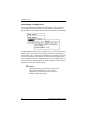
When BIOS Disable or Enable is selected, the following message will be
displayed. Pressing any key will restart the system.
CD-ROM Boot Disable or Enable
The default for this option is for the CD-ROM boot to be disabled (e.g., the
system will boot from a hard drive. If a bootable CD is installed in the CDROM drive, the system can boot from the CD if this option is enabled.
If the CD-ROM boot option is enabled, the CD-ROM will take priority over
the disk drives. For example, under MS-DOS, the disk drive that is normally
Drive C will become Drive D. All subsequent drive IDs will similarly be
moved down.
Manual Number 775012
4-3
Controller Start-up
Enable 8GByte or 2GByte Drives
This setting affects how the BIOS reads the disk drives. Drive geometries
can be toggled between 8 GB and 2 GB. The default is 2 GB. The drive
geometry must be set, and then the drive must be formatted (or reformatted).
The default BIOS geometry of the controller is set to 2 GB. This means that
the BIOS only sees the first 2 GB of any drive that has been configured on
the controller. This is adequate in most applications, since BIOS is only used
to boot the operating system. However, it does mean the operating system
must be installed in the first 2 GB of the capacity of the configured drive. If
this is not adequate, the BIOS geometry can be changed to 8 GB, allowing
the BIOS to see the first 8 GB of capacity.
m Caution
Changing this setting after data has been stored can
make the data unreadable. If you have already
configured your array and have stored data, you
should not change this setting.
4-4
DAC960PG/PJ Installation Guide
Controller Start-up
Device Drivers
Device drivers that make the controller compatible with the supported
operating systems can be found in the Mylex Disk Array Controller Software
Kit. For details on how to install and load drivers, refer to the Disk Array
Controller Software Kit Installation Guide and User Manual (P/N 771929).
Global Array Manager (GAM)
The controller can be configured using GAM. GAM can also be used from
the server or a system client to monitor status and verify data integrity of
disks connected to the controller while the system and disks are running.
For details on how to install and run GAM, refer to the Global Array
Manager Client Software v2.1x Installation Guide and User Manual
(P/N 771961). This manual can be obtained at no cost from the Mylex web
site (www.mylex.com).
In Case of Problems
If problems are encountered during start-up, check the following:
• Check SCSI cabling for loose connections, pin mismatches (make sure
pin 1 on the cable matches pin 1 on the connector), bent pins, and
damaged or crossed cables.
• Check termination.
• Check sure each drive on a SCSI channel has a unique SCSI ID other
than 7.
Manual Number 775012
4-5
In Case of Problems
4-6
DAC960PG/PJ Installation Guide
Appendix A
IBBU Option
Product Description
The Intelligent Battery Backup Unit (IBBU) option is an add-on module that
protects the data in the RAID controller’s cache memory in the event of a
power failure. This option is available only for full-length form factor
versions of the DAC960PG/PJ PCI to Ultra-SCSI RAID Controller.
The battery backup module monitors the write back cache on the
DAC960PG/PJ, and provides power to the cache if it contains data not yet
written to the drives when power is lost. The controller, with the IBBU
installed, together occupy only one PCI slot on the host backplane.
Features
Some of the new features of the IBBU include:
• Gas gauge circuit for battery charge monitoring
• Quick charge to replenish a drained battery
• Support for low-power EDO ECC RAM modules
Battery Pack
3.6v, 650mAH
J1
Standoffs
Figure A-1. IBBU Components
Manual Number 775012
A-1
Installation
Installation
Tools Needed
The only tool needed for the installation is a small, flat-blade screwdriver
Procedure
1. If the DAC960PG/PJ is not already removed from the system, power
the system down and then remove the DAC960PG/PJ.
, WARNING
Disconnect the system from the electrical wall
outlet before opening the system cabinet. Working
with the system covers off and power applied to the
system can result in shock and serious injury.
2. Remove the loopback plug from J5 on the DAC960PG/PJ. Keep the
loopback plug in a safe place, in case the IBBU needs to be removed at
a later time.
This mark on the
loopback plug must be
aligned with Pin1 on J5.
2
1
20
19
J5 Detail
Loopback Plug
J5
Figure A-2. Removing the Loopback Plug
A-2
DAC960PG/PJ Installation Guide
IBBU Option
3. Remove the protective pin cover and peel-off label from J1 on the
IBBU.
4. Leaving the 4 standoffs attached to the IBBU, remove a nylon screw
from the free end of each nylon standoff.
Nylon Screw
Standoffs
Figure A-3. Installing the IBBU
5. Install the IBBU so that J1 on the IBBU connects to J5 on the
DAC960PG/PJ. Pin 1 on the IBBU’s J1 must connect to hole 1 on the
DAC960PG/PJ’s J5. The mounting holes on the IBBU will line up with
the mounting holes on the DAC960PG/PJ if the connectors are plugged
in correctly.
6. Be sure the 4 standoffs line up with the 4 holes in the DAC960PG/PJ.
Place a nylon screw through a hole from the back of the DAC960PG/PJ
into a standoff, and turn the screw to the right until it is snug (not too
tight). Repeat this step with the remaining 3 standoff screws.
Manual Number 775012
A-3
Operation
Operation
Battery Conditioning Prior to Use
Battery conditioning is automatic. There are no manual procedures for
battery conditioning or preconditioning to be performed by the user.
Set-up – Enabling the Write-Back Cache
The write-back cache is enabled by toggling the write-back/write-through
mode switch. The write-back/write-through mode switch is accessed in the
Onboard Configuration Utility, DACCF, or in GAM. Refer to the DACCF
Utilities Installation Guide and User Manual or the Global Array Manager
Client Software Installation Guide and User Manual for instructions on how
to examine and change the mode switch.
Battery Backup Capacity
Battery backup capacity is defined as the maximum duration of a power
failure for which data in the cache can be maintained by the battery. The
IBBU’s backup capacity varies with the memory configuration installed on
the DAC960PG/PJ. Battery backup capacity can be reasonably expected
according to Table A-1
Table A-1. IBBU Capacity vs. Cache Memory Configuration
Capacity
A-4
Mem Type
Battery Backup Duration
Typical
Minimum
4 MB
EDO ECC RAM
72 hours
40 hours
8 MB
EDO ECC RAM
40 hours
20 hours
16 MB
EDO ECC RAM
68 hours
28 hours
32 MB
EDO ECC RAM
30 hours
14 hours
64 MB
EDO ECC RAM
35 hours
23 hours
128 MB
EDO ECC RAM
20 hours
12 hours
DAC960PG/PJ Installation Guide
IBBU Option
Maintenance
No end user maintenance is required on the IBBU. It is recommended,
however, that the battery charge level be periodically checked using the Gas
Gauge function in GAM (see the Global Array Manager Client Software
Installation Guide and User Manual).
Removing the Battery Backup Module
The battery backup module will need to be removed for one of the following
reasons:
1. The NiCd battery will no longer accept a charge properly (NiCd battery
life expectancy is approximately 5 years).
2. The cache memory needs to be removed from the DAC960PG/PJ for
replacement or upgrade.
When one of these conditions occur, observe the following precautions:
, WARNING
Replace the battery only with the same or
equivalent type of battery recommended by the
battery manufacturer. Dispose of used batteries
according to the manufacturer’s instructions.
, WARNING
Do not attempt to install, remove, or change a
cache SIMM on the DAC960PG/PJ with the IBBU
installed. Serious damage to the SIMM and/or the
battery backup unit will occur if this precaution is
not followed.
m Caution
If you plan to operate your DAC960PG/PJ without the
IBBU, be sure to reinstall the loopback plug (see the
“Mechanical Installation Procedure” section and
Figure A-2).
Manual Number 775012
A-5
Functional Description
Functional Description
General Operational Description
Whenever the system is running, the IBBU is standing by, monitoring the
voltage level of VCC. In the event of a power failure, the VCC voltage level
will begin to drop. When the IBBU detects this voltage drop, it checks the
status of the disk cache. If the cache is empty, the IBBU does nothing.
If the cache contains data during a power failure, the IBBU will maintain
cache data integrity until the power is restored. When power is restored and
the system finishes the bootstrap process, the cache contents will be written
to the disk array. The cache contents will then be flushed from the cache.
Status Indication
The status of the battery can be checked with the gas gauge feature that can
be accessed in GAM (version 2.1x or greater is needed). The gas gauge
appears on the screen as two meters— a battery power meter and a charge
level meter— each calibrated from 0 to 100.
The battery power meter indicates the battery capacity in hours. It will
indicate a charge duration of up to 100 hours. The firmware will detect the
Mylex supplied SIMM and assign a value based upon the charge level of the
battery and the power consumption rate of the SIMM.
m Caution
Do not use SIMMs which are not supplied by Mylex.
The charge level meter displays the charge state of the battery expressed in
percent (100% indicates a fully charged battery).
When the meter on the right indicates the battery is fully charged, the meter
on the left will indicate the maximum time in hours that the battery can be
expected to maintain cache data integrity. This value will vary depending
upon which Mylex supplied SIMM is being used (see Table A-1).
☛ Note
When the charge level is 100%, the current number of
hours and maximum number of hours (printed out
below the left dial) will be equal.
A-6
DAC960PG/PJ Installation Guide
IBBU Option
Battery and Charge Circuit
On-board Battery
The on-board battery is rated at 3.6 v with a capacity of 650 mAH. The
IBBU has a DC-DC converter that converts the 3.6 v from the battery to 5 v,
which is the nominal voltage needed to replace VCC if a power failure should
occur.
Battery Charger
Battery charging and conditioning are automatically handled by the IBBU.
No manual preconditioning needs to be performed by the user. If the battery
capacity falls below a predetermined level (which is likely to happen during
a power failure), the battery charger goes into a quick charge mode. If the
battery is fully charged, the charger goes into a trickle charge mode.
Recycling the Battery
The on-board battery that comes with the IBBU has the logo of the
Rechargeable Battery Recycling Corporation (RBRC) stamped on it. The
logo means that recycling fees have been prepaid on this battery pack.
m Caution
Do not dispose of a rechargeable battery with regular
trash in a landfill. Rechargeable batteries contain
toxic chemicals and metals that are harmful to the
environment. Improperly disposing of rechargeable
batteries is also illegal.
Figure A-4. RBRC Logo
The RBRC is a non-profit corporation that promotes the recycling of
rechargeable batteries, including nickel-cadmium batteries.
Information on the RBRC program and the locations of participating
recycling centers can be obtained by telephoning 1–800–8–BATTERY (in
the USA), and following the recorded instructions. The information obtained
from this telephone number is updated frequently, since the RBRC program
is growing, and new recycling locations are being added regularly.
Manual Number 775012
A-7
IBBU Specifications
IBBU Specifications
On-board Battery
Electrical Properties
• 3 NiCd 1.2 V, 650 mAH cells, connected in series for a total of 3.6V
at 650mAH
Physical Description
• Nominal pack size (in inches): 1.89(L) X 2.01(W) X 0.33 (H)
Battery Charge Life
Depends upon memory in use
External Battery
Not supported
Module Dimensions
Length:
3.75 inches
Width:
2.875 inches
Environmental
Temperature
Operating:
0ºC to +40ºC
(+32ºF to 104ºF)
-40ºC to +60ºC
(-40ºF to +140ºF)
Operating:
45% to 85%
relative humidity
45% to 85%
relative humidity
Storage:
Humidity
Non-operating:
A-8
DAC960PG/PJ Installation Guide
Appendix B
DAC960PG/PJ Specifications
General Hardware Specifications
DAC960PG
Controller
DAC960PG
CPU
Intel i960 RP® RISC 32-bit microprocessor, 33MHz
Memory
EDO ECC RAM, 60ns, 72-pin SIMM, n x 40
(Use only Mylex supplied SIMMS)
Minimum: 4 MB
Optional: 8, 16, 32, 64, or 128 MB
Cache
Write: Selectable – Write Through or Write Back
Error Protection: Error Correction Code (ECC)
Firmware
PCI
ROM Type, Flash EEPROM, 512K x 8
I/O Processor: Embedded Intel i960 RP
32-bit bus
Transfer Rate - Up to 133MB/second
SCSI
Mylex BA-81C15, one per channel
Data Rate - Up to 40MB/second, when using
Fast/Wide 16-bit mode
Manual Number 775012
B-1
General Hardware Specifications
DAC960PJ
Controller
DAC960PJ
CPU
Intel i960 RD® RISC 32-bit microprocessor, 66MHz
Memory
EDO ECC RAM, 60ns, 72-pin SIMM, n x 40
(Use only Mylex supplied SIMMS)
Minimum: 4 MB
Optional: 8, 16, 32, 64, or 128 MB
Cache
Write: Selectable – Write Through or Write Back
Error Protection: Error Correction Code (ECC)
Firmware
PCI
ROM Type, Flash EEPROM, 512K x 8
I/O Processor: Embedded Intel i960 RD
32-bit bus
Transfer Rate - Up to 133MB/second
SCSI
Mylex BA-81C15, one per channel
Data Rate - Up to 40 MB/second when using
Fast/Wide 16-bit mode
B-2
DAC960PG/PJ Installation Guide
DAC960PG/PJ Specifications
Physical and Environmental Specifications
Controller
DAC960PG/PJ
Form Factor:
Full-length card Length
Width
12.283 inches
4.2 inches
Component
0.105 inches – solder side
Height (max.) 0.590 inches – component side
Half-card
Board Width
(with IBBU)
Not to exceed the width of one PCI slot
Length
7.225 inches
Width
4.2 inches
Component 0.105 inches – solder side
Height (max.) 0.590 inches – component side
Temperature
Humidity
Altitude
Board Width
Not to exceed the width of one PCI slot
Operating
0°C to +55°C (+32°F to 131°F)
Storage
-20°C to +70°C (-4°F to +158°F)
Operating
10% to 90% relative humidity (non-condensing)
Storage
10% to 90% relative humidity (non-condensing)
Operating
Up to 3,048m (10,000 ft )
Storage
Up to 15,240m (50,000 ft)
Manual Number 775012
B-3
Physical and Environmental Specifications
B-4
DAC960PG/PJ Installation Guide
Appendix C
Error Messages
Error Messages
Start-up Error Messages
The BIOS looks for any initialization message posted by the firmware during
the start-up sequence. If a message is found, one of the following errors
displays onscreen and the installation process aborts.
DAC960Pn fatal error--memory test failed
DAC960Pn fatal error--command interface test failed
DAC960Pn hardware error--run diagnostics to pinpoint error
DAC960Pn firmware checksum error--reload firmware
Drive Check Error Messages
If the firmware finds a valid controller configuration, but it doesn't match the
SCSI drives currently installed, one or more of the following messages
display:
Unidentified device found at channel x....
Device identified for chn x, tgt y found at chn x', tgt y'
SCSI device at chn x, tgt y not responding
If any of the above messages are displayed, the firmware will not proceed
any further in the initialization process, except to find other mismatches.
Then, the BIOS prints out the following:
DAC960Pn Configuration Checksum error--run configuration
utility
If the firmware detects that during the last power cycle the system was turned
off abruptly leaving some incomplete write operations, the following
message appears:
Recovery from mirror race in progress
The following messages may also appear:
Adapter cannot recover from mirror race!
Some system drives are inconsistent!
Manual Number 775012
C-1
Aborted Installation
During the initialization, if the firmware fails to respond to the BIOS inquiry
within two minutes, the following message displays:
DAC960Pn not responding--no drives installed.
The BIOS then inquires the firmware for its version number and other
information, and prints out the following message:
DAC960Pn firmware version x.xx
One or more of the following messages will be displayed if the firmware
reports the following conditions:
Warning: X system drives are offline
Warning: X system drives are critical
Warning: The following SCSI devices are dead--chn
x, tgt y...
No system drives found: None installed
X system drives installed
The BIOS repeats the same process for additional RAID controllers present
in the system. Then it proceeds to boot, if possible, from the first system
drive on the first controller.
Aborted Installation
With Firmware 4.x, the installation aborted message is displayed when the
BIOS finds that the configuration of the disk drives, as stored in the
NVRAM and configuration on disk, is different from what it senses at boot
time. When this happens, (and a brand new installation is not being
attempted) the cause is often a faulty cable or drive, or a loose connection.
Check all of the connectors, cables, drives, and try to boot. If the error
persists, it most likely indicates a genuine failure and needs to be corrected.
To correct it, boot and run the on-board Mylex Disk Array Configuration
Utility (see Chapter 4). For more information, refer to the Disk Array
Controller Configuration Utilities (DACCF) Installation Guide and User
Manual (P/N 771953).
C-2
DAC960PG/PJ Installation Guide
Error Messages
NVRAM Error
With Firmware 4.x, if the BIOS displays a mismatch between the NVRAM
and the COD, no drives will be installed. Normally this error will not be
displayed. If it is, boot and run the on-board Mylex Disk Array
Configuration Utility (see Chapter 4). to recover from the error. For more
information, refer to the Disk Array Controller Configuration Utilities
(DACCF) Installation Guide and User Manual.
System Reboot or Power Down Messages
Status messages may also be available from LED indicators connected to the
DAC960PG/PJ. The Write Pending indicator is especially important when
preparing to power-down the system.
The DAC960PG/PJ is a caching controller with up to 128 MB of cache
memory, data may still be in the cache waiting to be written to the disk
drives, when the system reports that a write command was completed. It is
very important to make sure that all data is written to the disk before
rebooting or powering down the system, or you may lose data. It is always a
good idea to wait for 15 seconds before resetting or rebooting the system.
If using the 'Write Pending' LED indicator, wait 3 seconds after the LED has
gone off before resetting or rebooting the system (the optional cache battery
backup may also be used to prevent data loss).
Manual Number 775012
C-3
System Reboot or Power Down Messages
C-4
DAC960PG/PJ Installation Guide
Appendix D
Regulatory Information
Class B Compliance
THIS DEVICE COMPLIES WITH PART 15 OF THE FCC RULES. OPERATION
IS SUBJECT TO THE FOLLOWING TWO CONDITIONS:
3. THIS DEVICE MAY NOT CAUSE HARMFUL INTERFERENCE, AND
4. THIS DEVICE MUST ACCEPT ANY INTERFERENCE RECEIVED,
INCLUDING INTERFERENCE THAT MAY CAUSE UNDESIRED
OPERATION.
This equipment has been tested and found to comply with the limits for a Class B
digital device, pursuant to Part 15 of the FCC rules. These limits are designed to
provide reasonable protection against harmful interference in residential installations.
This equipment generates, uses, and can radiate radio frequency energy, and if not
installed and used in accordance with the instructions, may cause harmful interference
to radio communications. However, there is not guarantee that interference will not
occur in a particular installation.
If this equipment does cause interference to radio or television equipment reception,
which can be determined by turning the equipment off and on, the user is encouraged
to try to correct the interference by one or more of the following measures:
1. Reorient or relocate the receiving antenna
2. Move the equipment away from the receiver
3. Plug the equipment into an outlet on a circuit different from that to which the
receiver is powered.
If necessary, the user should consult the dealer or an experienced radio/television
technician for additional suggestions.
All external connections should be made using shielded cables.
m Caution
Only equipment certified to comply with Class B
(computer input/output devices, terminals, printers,
etc.) should be attached to this equipment.
Any changes or modifications to the equipment by the
user not expressly approved by the grantee or
manufacturer could void the user’s authority to
operate such equipment.
Manual Number 775012
D-1
Declaration of Conformity
Manufacturer’s Name:
Mylex Corporation
Manufacturer’s Address: 34551 Ardenwood Blvd.
Fremont, CA 94555-3607
USA
Declares that the product:
Product Name:
1, 2, and 3-Channel Ultra SCSI RAID
Controller
Model Numbers:
DAC960PG, DAC960PJ
Year of Manufacture:
1998
Conforms to the following Product Specification(s):
EMC:
EN 50081-1:1992/EN 55022:1992 Class B
EN 50082-1:1992 - Generic Immunity
EN 61000-4-2:1995,4kV CD, 8kV AD
EN 50140:1995, 3 V/m, 80 - 1000 MHz, 80%
EN 61000-4-4:1995, 0.5kV I/O, 1kV Power
Supplementary Information:
The product herewith complies with the requirements to the EMC Directive
89/336/EEC
Declaration that the equipment specified above conforms to the above
directive(s) and standard(s) is on file and available for inspection at the
manufacturer’s address cited above.
D-2
DAC960PG/PJ Installation Guide
Regulatory Information
Community of Europe
CE mark is rated for the DAC960PG and DAC960PJ as follows:
CISPR 22 Radiated Emission
EN55022, EN5082-1 Generic immunity standard for the following:
IEC 801-2 ESD, IEC 801-3 Radiated, and IEC 801-4 EFT/Burst
Warning!
This is a Class B product. In a residential environment this product may cause radio
interference, in which case the user may be required to take adequate measures.
Achtung!
Dieses ist ein Gerät der Funkstörgrenzwertklasse B. In Wohnbereichen können bei
Betrieb dieses Gerätes Rundfunkstörungen aufreten, in welchen Fällen der Benutzer
für entsprechende Gegenmaßnahmen verantwortlich ist.
Avertissement!
Cet appareil est un appareil de Classe B. Dans un environnement résidentiel cet
appareil peut provoquer des brouillages radioélectriques. Dans ce cas, il peut être
demandé à l’utilisateur de prendre des mésures appropriées.
Manual Number 775012
D-3
Underwriters Laboratories Listed
D-4
DAC960PG/PJ Installation Guide
Glossary
Battery Backup Unit
See “Intelligent Battery Backup Unit.”
Cache
Controller memory used to speed up data transfer to and from a disk.
Cache Flush
Refers to an operation where all unwritten blocks in a Write-Back Cache are
written to the target disk. This operation is necessary before powering down
the system.
Cache Line Size
See “Segment Size.”
Channel
Refers to one SCSI bus on a disk array controller. Each disk array controller
provides at least one channel.
Consistency Check
Refers to a process where the integrity of redundant data is verified. For
example, a consistency check of a mirrored drive will make sure that the data
on both drives of the mirrored pair is exactly the same. For RAID Level 5
redundancy, a consistency “connect” is a function that allows a target SCSI
device (typically a disk drive that received a request to perform a relatively
long I/O operation) to release the SCSI bus so that the controller can send
commands to other devices. When the operation is complete and the SCSI
bus is needed by the disconnected target again, it is “reconnected.”
Manual Number 775012
G-1
Disk Failure Detection
The controller automatically detects SCSI disk failures. A monitoring
process running on the controller checks, among other things, elapsed time
on all commands issued to disks. A time-out causes the disk to be “reset”
and the command to be retried. If the command times out again, the disk
could be “killed” (taken “offline”) by the controller (its state changed to
“dead”). DAC960 controllers also monitor SCSI bus parity errors and other
potential problems. Any disk with too many errors will also be ‘killed’.
Disk Media Error Management
DAC960 controllers transparently manage SCSI disk media errors. Disks are
programmed to report errors, even ECC-recoverable errors. If ECC EDO
RAM is installed, the controller will correct ECC errors.
When a disk reports a media error during a read, the controller reads the data
from the mirror (RAID 1 or 0+1), or computes the data from the other blocks
(RAID 3, RAID 5), and writes the data back to the disk that encountered the
error. If the write fails (media error on write), the controller issues a
“reassign” command to the disk, and then writes the data to a new location.
Since the problem has been resolved, no error is reported to the system.
When a disk reports a media error during a write, the controller issues a
“reassign” command to the disk, and writes the data out to a new location on
the disk.
Drive Groups (or Drive Packs)
A group of individual disk drives (preferably identical) that are logically tied
to each other and are addressed as a single unit. In some cases this may be
called a drive “pack” when referring to just the physical devices. Up to eight
(8) drives can be configured together as one drive group.
All the physical devices in a drive group should have the same size,
otherwise each of the disks in the group will effectively have the capacity of
the smallest member. The total size of the drive group will be the size of the
smallest disk in the group multiplied by the number of disks in the group.
For example, if you have 4 disks of 400MB each, and 1 disk of 200MB in a
pack, the effective capacity available for use is only 1000MB (4*200), not
1800MB.
G-2
DAC960PG/PJ Installation Guide
Glossary
Hot Replacement of Disks (Hot Swap)
The design of the DAC960 Series controllers allows for the replacement of
failed hard disk drives without interruption of system service. In the event of
a SCSI drive failure on a properly configured system (where the data
redundancy features of the controller are used), system service continues
without interruption. A message is generated by the system to alert the
system operator.
When a replacement drive becomes available, the system operator can
remove the failed disk drive, install a new disk drive, and instruct the
controller to “rebuild” the data on the new drive, all without interrupting
system operations.
Once the rebuild is complete, the controller will be brought back into a fault
tolerant state.
IBBU
See “Intelligent Battery Backup Unit.”
Intelligent Battery Backup Unit
The Intelligent Battery Backup Unit (IBBU) is an add-on module that
provides power to a DAC960PG/PJ PCI-to-Ultra SCSI RAID Controller
cache memory in the event of a power failure. The battery backup module
monitors the write back cache on the DAC960PG/PJ, and provides power to
the cache if it contains data not yet written to the drives when power is lost.
The DAC960PG/PJ controller, with the IBBU installed, together occupy
only one PCI slot on the host backplane.
Logical Drive States
The state of a logical (system) drive can be either ONLINE, CRITICAL, or
OFFLINE. Notice that the same term “online” is used for both physical and
logical drives.
Online: A Logical Drive is in an “online” state if...
All of its participating SCSI drives are “online.”
Manual Number 775012
G-3
Critical: A Logical Drive is in a “critical” state if...
It has been configured at RAID level 1, 3, 5, or 0+1; and
One (and only one) of its SCSI drives is not “online.”
A logical drive is considered “critical” because any failure of another of its
SCSI drives may result in a loss of data.
☛ Note
I/O operation can only be performed with system
drives that are online or critical.
Offline: A Logical Drive is in an “offline” state if...
No data can be read from it or written to it.
System commands issued to offline logical drives are returned with an error
status: no operations can be performed on offline logical drives. A logical
drive can be “offline” under one of two situations described below:
• It is configured with a redundant RAID level (1, 3, 5, or 0+1), and two
or more of its SCSI drives are not “online”; or
• It is configured at RAID level 0, JBOD, or in a spanned set, and one or
more of its SCSI drives are not “online.”
Logical Drives
See “System Drives.”
Mirroring
Refers to the 100 percent duplication of data on one disk drive to another
disk drive. Each disk will be the mirror image of the other.
Pack
See “Drive Groups (or Drive Packs).”
Parity
See “Rotated XOR Redundancy.”
G-4
DAC960PG/PJ Installation Guide
Glossary
RAID
RAID stands for Redundant Array of Independent Disks. The DAC960
controllers implement this technology to connect up to 15 SCSI devices per
channel. Several different forms of RAID implementation have been
defined. Each form is usually referred to as a “RAID level.” All the RAID
levels supported by DAC960 Series controllers are shown below.
The appropriate RAID level for a system is selected by the system manager
or integrator. This decision will be based on which of the following are to be
emphasized:
Disk Capacity
Data Availability (redundancy or fault tolerance)
Disk Performance
RAID Levels
The disk array controllers monitored by this utility support four RAID
Advisory Board-approved (RAID 0, RAID 1, RAID 3, RAID 5) and two
special RAID levels (RAID 0+1, and JBOD).
Level 0. Block “striping” across multiple drives is provided, yielding higher
performance than is possible with individual drives. This level does not
provide any redundancy.
Level 1. Drives are paired and mirrored. All data is 100 percent duplicated
on a drive of equivalent size.
Level 3. Data is “striped” across several physical drives. Maintains parity
information which can be used for data recovery.
Level 5. Data is “striped” across several physical drives. For data
redundancy, drives are encoded with rotated XOR redundancy.
Level 0+1. Combines RAID 0 striping and RAID 1 mirroring. This level
provides redundancy through mirroring. (Mylex RAID 6)
JBOD. Sometimes referred to as “Just a Bunch of Drives.” Each drive is
operated independently like a normal disk controller, or drives may be
spanned and seen as a single drive. This level does not provide data
redundancy. (Mylex RAID 7)
Manual Number 775012
G-5
Level 10. Combines RAID 0 striping and RAID 1 mirroring spanned across
multiple drive groups (super drive group). This level provides redundancy
through mirroring.
Level 30. Data is “striped” across multiple drive groups (super drive group).
Maintains parity information which can be used for data recovery.
Level 50. Data is “striped” across multiple drive groups (super drive group).
For data redundancy, drives are encoded with rotated XOR redundancy.
☛ Note
The host operating system drivers and software
utilities remain unchanged regardless of the level of
RAID installed. The controller makes the physical
configuration and RAID level implementation
Replacement Table
A replacement table contains information regarding which SCSI devices
have been replaced by others through standby replacement.
Rotated XOR Redundancy
This term (also known as “parity”) refers to a method of providing complete
data redundancy while requiring only a fraction of the storage capacity of
mirroring. In a system configured under RAID 3 or RAID 5 (which require
at least three SCSI drives), all data and parity blocks are divided between the
drives in such a way that if any single drive is removed (or fails), the data on
it can be reconstructed using the data on the remaining drives. (XOR refers
to the Boolean “Exclusive-OR” operator.) In any RAID 3 or RAID 5 array,
the capacity allocated to redundancy is the equivalent of one drive.
SCSI Drive
A disk drive equipped with a SCSI interface (sometimes referred to as a
SCSI Disk). Each disk drive will be assigned a SCSI address (or SCSI ID),
which is a number from 0 to 7 (0 to 15 under wide or Ultra SCSI). The SCSI
address uniquely identifies the drive on the SCSI bus or channel.
G-6
DAC960PG/PJ Installation Guide
Glossary
SCSI Drive States
Refers to a SCSI drive’s current operational status. At any given time, a SCSI
drive can be in one of five states: READY, ONLINE, STANDBY, DEAD, or
REBUILD.
The controller stores the state of the attached SCSI drives in its non-volatile
memory. This information is retained even after power-off. Hence, if a SCSI
disk is labeled DEAD in one session, it will stay in the DEAD state until a
change is made either by using a system level utility or after a rebuild. Each
of the states is described below:
Ready: A SCSI disk drive is in a “ready” state if it...
Is powered on; and
Is available to be configured during the current session but remains
unconfigured.
Online: A SCSI disk drive is in an “online” state if it...
Is powered on; and
Has been defined as a member of a drive group; and
Is operating properly.
Standby: A SCSI disk drive is in a “standby” state if it...
Is powered on; and
Is able to operate properly; and
Was NOT defined as part of any drive group.
Dead: A SCSI disk drive is in a “dead” state if it...
Is not present; or
If it is present but not powered on; or
If it failed to operate properly and was ‘killed’ by the controller.
When the controller detects a failure on a disk, it “kills” that disk by
changing its state to “dead.” A SCSI drive in a dead state does not participate
in any I/O activity. No commands are issued to dead drives.
Manual Number 775012
G-7
Rebuild: A SCSI disk drive is in a “rebuild” state...
While it is in the process of being rebuilt. During this process, data is
regenerated and written to the disk drive. This state is also referred to as
‘Write-Only’ (WRO).
Segment Size
The Segment Size function is set in conjunction with stripe size and
represents the size of the data “chunk” that will be read or written at one
time. Under DACCF, the segment size (also known as “cache line size”)
should be based on the stripe size you selected. The default segment size for
Mylex DAC960 controllers is 8K.
Session
Refers to the period of time between any two consecutive system shutdowns.
System shutdown may be either a power off/on, or a hardware reset.
Standard Disk Drive
This term refers to a hard disk drive with SCSI, IDE, or other interface, that
is attached to the host system through a standard disk controller.
Standby Replacement of Disks (“Hot Spare”)
The “Standby Replacement” (or “Hot Spare”) is one of the most important
features the controller provides to achieve automatic, non-stop service with a
high degree of fault-tolerance. The rebuild operation will be carried out by
the controller automatically when a SCSI disk drive fails and both of the
following conditions are true:
• A “standby” SCSI disk drive of identical size is found attached to the
same controller;
• All of the system drives that are dependent on the failed disk are
redundant system drives, e.g., RAID 1, RAID 3, RAID 5, RAID 0+1.
G-8
DAC960PG/PJ Installation Guide
Glossary
☛ Note
The standby rebuild will only happen on the SAME
DAC960 controller, never across DAC960 controllers.
A “Standby” disk can be created in one of two ways:
1. When a user runs DACCF utility, all disks attached to the controller
that are NOT configured into any drive group will be automatically
labeled as “standby” drives.
2. A disk may also be added (attached at a later time) to a running system
and labeled as standby by using the “DAC960 Software Kit” (see
appropriate chapters for DAC960 utilities for a particular operating
system).
During the automatic rebuild process, system activity continues as normal.
System performance may degrade slightly during the rebuild process.
To use the standby rebuild feature, you should always maintain a standby
SCSI disk in your system. When a disk fails, the standby disk will
automatically replace the failed drive and the data will be rebuilt. The system
administrator can disconnect and remove the bad disk and replace it with a
new disk. The administrator can then make this new disk a standby.
The standby replacement table has a limit of 8 automatic replacements in any
session (from power-on/reset to the next power-off/reset). When the limit of
8 is reached and a disk failure occurs, the standby replacement will occur but
will not be recorded in the replacement table.
To clear the ‘standby replacement’ table, reboot the system from a DOS
bootable floppy, run the configuration utility and select the option ‘view/
update configuration’ from the main menu. A red box labeled ‘Drive Remap
List’ will be displayed. Selecting the box will allow you to continue. You
should save the configuration without making any changes, and exit the
configuration utility. This will clear the replacement table. You may now
proceed to boot your system and continue normal operations.
In normal use, the replacement table limit of 8 should not cause any
problems. Assuming that a disk fails about once a year (drives we support
generally come with a 5-year warranty), the system would run continuously
for a minimum of 8 years before the table would need to be cleared.
Manual Number 775012
G-9
Stripe Order
The order in which SCSI disk drives appear within a drive group. This order
must be maintained, and is critical to the controller’s ability to ‘Rebuild’
failed drives.
Stripe Size
The stripe size is defined as the size, in kilobytes (1024 bytes) of a single I/O
operation. A stripe of data (data residing in actual physical disk sectors,
which are logically ordered first to last) is divided over all disks in the drive
group.
Stripe Width
The number of striped SCSI drives within a drive group.
Striping
Refers to the storing of a sequential block of incoming data across multiple
SCSI drives in a group. For example, if there are 3 SCSI drives in a group,
the data will be separated into blocks and block 1 of the data will be stored
on SCSI drive 1, block 2 on SCSI drive 2, block 3 on SCSI drive 3, block 4
on SCSI drive 1, block 5 on SCSI drive 2 and so on. This storage method
increases the disk system throughput by ensuring a balanced load among all
drives.
System Drives
A system drive is equivalent to a “logical” drive. System drives are presented
to the operating system as available disk drives, each with a capacity
specified by the DAC960 Series controller.
Target ID
A target ID is the SCSI ID of a device attached to a DAC960 controller. Each
SCSI channel can have up to 15 attached SCSI devices (target ID from 0 to
6, and 8 to 15).
G-10
DAC960PG/PJ Installation Guide
Glossary
Write-Back Cache
Refers to a caching strategy whereby write operations result in a completion
signal being sent to the host operating system as soon as the cache (not the
disk drive) receives the data to be written. The target SCSI drive will receive
the data at a more appropriate time, in order to increase controller
performance. An optional cache battery backup can be used to protect
against data loss as a result of a power failure or system crash.
Write Through Cache
Refers to a caching strategy whereby data is written to the SCSI drive before
a completion status is returned to the host operating system. This caching
strategy is considered more secure, since a power failure will be less likely to
cause loss of data. However, a write through cache results in a slightly lower
performance.
Manual Number 775012
G-11
G-12
DAC960PG/PJ Installation Guide
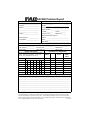
DAC960 Problem Report
Customer Identification
Name: ______________________
Company: ___________________
Address: ____________________
___________________________
___________________________
Country: ____________________
DAC960 Identification
Date: ___________ Purchase Date: ______
Model _______________________________
Invoice Number: _______________________
Serial Number: ________________________
# Chnls:_________ Cache: ________
Firmware Ver:____ BIOS Ver: _____
Make/Model/Size/Type of
Phone Number: ______________
Drives: ______________________________
Fax Number: ________________
Disk: ________________________________
Non-Disk: ____________________________
System Information
Motherboard: ____________
Video Adapter: ___________
Operating Sys: ___________
CPU Speed:________________
Network Card: _____________
Other Disk Ctrl: ____________
BIOS Ver: ____________
MB Memory: _________
Other Cards: __________
Pack Configuration
System Drive Configuration
System Size
RAID
Write
Drive
Level
Back/
Thru
0
Channel
SCSI ID
0 1 2 3 4 5 6
1
0
2
1
3
2
4
3
5
4
6
7
Problem Description
_____________________________________________________________________
_____________________________________________________________________
_____________________________________________________________________
_____________________________________________________________________
_____________________________________________________________________
_____________________________________________________________________
_____________________________________________________________________
_____________________________________________________________________
Indicate in matrix below 1, 2... for member of pack 1,
pack 2... respectively. Indicate S, T, C, or O for
Standby, Tape, CDROM and other drives.
This DPR form has been included with your Mylex product as a convenience to both you and our Technical
Services Department. If filled out completely, this will greatly assist Mylex personnel in quickly resolving
any technical problems or questions you may have. Use the Mylex fax number (510) 745-7715 to transmit
this form to the Technical Services Department, or mail to Mylex Corporation, Technical Services Department,
772014-DAC
34551 Ardenwood Blvd., Fremont, CA 94555-3607
Mylex Warranty - Customer Policy
Thank you for purchasing this Mylex product for your computer system. In addition to this high-quality product,
your purchase entitles you to the warranty coverage set forth herein. In order to provide this warranty coverage, and
to indicate your acceptance of this warranty, we must have the attached Warranty Registration Card completed and
returned to us within 15 days of your purchase. Also, in order for us to provide you the highest level of service, we
must know where you purchased your MYLEX product.
Three Year Limited Warranty
If at any time during the thirty six month period immediately following the date of original purchase of the MYLEX
product enclosed herewith (the “PRODUCT”) you discover one or more defects in the material or workmanship,
MYLEX will repair, or at MYLEX’s sole option, replace the PRODUCT. If the PRODUCT fails to operate at any
time within seven days after the date of its original purchase, it will be replaced by MYLEX. Such repair or replacement will be your sole remedy against MYLEX, and MYLEX’s only liability to you, for any failure or malfunction
of the PRODUCT. The warranty set forth in this paragraph will be void if:
1. The PRODUCT has been installed in an improper manner or in an improper operating environment.
2. The PRODUCT has been modified or repaired by any party other than MYLEX or a MYLEX factory authorized
service center.
3. The PRODUCT has been damaged.
Some MYLEX products will have a Warranty Expiration Date label affixed to the product itself. When present, the
warranty period will extend through the last day of the month indicated.
This warranty will not apply to, and MYLEX provides no warranty for, any BIOS, software, ROM-based firmware,
or any other PRODUCT developed or manufactured by any third party, whether included with this PRODUCT or
not. Such warranty or warranties as are provided by third parties, to the extent permitted thereby, shall be made
available, and are hereby assigned, by MYLEX to the purchaser of this PRODUCT.
If MYLEX issues a revision to the BIOS, firmware or software included with this PRODUCT within 30 days of
your purchase, MYLEX will replace such firmware at no charge except handling fees.
Out of Warranty Service
Mylex products which are ineligible for warranty service may be serviced by MYLEX according to our standard
price list, as modified from time to time. A current copy of the standard price list is available from the Technical
Support Department.
Limitation of MYLEX Liability
MYLEX’s liability arising from the sale, use and disposition of this PRODUCT shall in no event exceed the amount
paid to MYLEX for this PRODUCT. MYLEX assumes no liability for damages arising from the use or failure of
any MYLEX product. The WARRANY DESCRIBED ABOVE CONSTITUTES THE ONLY WARRANY MADE
BY MYLEX. MYLEX EXPRESSLY DISCLAIMS ANY AND ALL OTHER WARRANTIES OF ANY KIND
WHATSOEVER, WHETHER EXPRESSED OR IMPLIED, INCLUDING WARRANTIES OF MERCHANTABILITY AND FITNESS FOR A PARTICULAR PURPOSE, WHICH ARE HEREBY EXPRESSLY
EXCLUDED. IN NO EVENT WILL MYLEX BE LIABLE FOR INCIDENTAL, SPECIAL OR CONSEQUENTIAL DAMAGES (INCLUDING WITHOUT LIMITATION LOSS OF DATA, USE, OR INCOME), EVEN IF
ADVISED OF SUCH DAMAGES IN ADVANCE. Your sole remedies shall be as provided herein.
P/N: 772058-05
6-98
Printed in U.S.A.
Returned Merchandise Procedures
If you suspect that there is a defect in the material or workmanship of this PRODUCT, you should contact the person or company from which you purchased it. That person or company may be able to solve the problem and if not,
will be able to contact us for technical assistance or repair.
If it is determined that the PRODUCT must be returned to MYLEX for repair or replacement, contact MYLEX’s
Technical Support Department at 510-608-2400 before it is returned. Each returned item must have a separate
Return Merchandise Authorization (RMA) number, provided by MYLEX.
The following rules apply to all returned items:
1. The PRODUCT must be returned either in its original packaging or in other packaging which is appropriate for
the PRODUCT and the manner of shipment, and the RMA number must be displayed prominently on the outside of
each such package.
2. If a PRODUCT is determined to be ineligible for warranty service, the customer will be notified before any further action is taken with the PRODUCT.
3. MYLEX will not be responsible for any loss or damage to property shipped with the RMA PRODUCT not originally sold by MYLEX (e.g., coprocessor chips, peripheral boards, memory modules, enclosures, power supplies, or
any other accessories or attached items).
4. Any item returned to MYLEX without a valid RMA number will be returned to the shipper.
Products shipped to MYLEX must be shipped or mailed at the shipper’s risk, freight prepaid, to the address below.
Mylex Corporation
34551 Ardenwood Blvd.
Fremont, California U.S.A.
94555-3607
Mylex will pay for return freight via such carrier as MYLEX shall deem appropriate.
Technical Support
Technical support, to assist you in resolving problems with MYLEX products, is now available through MYLEX’s
Technical Support Department. In the U.S.A., the Technical Support Department can be reached by telephone at
(510) 608-2400, by FAX at (510) 745-7715, or by e-mail at [email protected]. Current hours of operation, which
are subject to change, are from 6:00 a.m. to 6:00 p.m. Pacific Time, Mondays through Fridays, excluding U.S.A.
national holidays. Many problems can also be solved using the Mylex Web site (http://www.mylex.com), which
has a support area available 24 hours a day for interactive technical support.
Included with the shipment of most MYLEX products is a System Problem Report (SPR) form. When contacting
the Technical Support Department for assistance with an installation or compatibility problem, we recommend that
this form be completed and sent by facsimile or mail to MYLEX. Completion of this form will allow our Technical
Support Department to solve most technical problems expeditiously.
Mylex will make reasonable efforts to address compatibility problems which may arise with respect to third party
products, but shall not be responsible for the compatibility of its products with the products of any third party. Customers are advised to verify each product’s compatibility with their installation before committing to any particular
procurement plan.
WARRANTY REGISTRATION CARD
❏
❏
Article Review
❏
❏
Friend
10. Have you ever purchased Mylex products in the past?
❏ Yes
❏ No
P/N: 772058-03
7-96
Printed in U.S.A.
❏ Monitor______________________________________
❏ Operating System __________________________________________________
7. What add-ons or peripherals are you most considering for future purchase? ______________________________________________________________________
8. What best describes your occupation?
❏ Management/Administration
❏ Sales/Service
❏ Technical-Scientific/Engineering
❏ MIS
❏ Other____________________
9. Do you have any comments or suggestions? _______________________________________________________________________________________________
❏ Data Retrieval
❏ Multi-User
❏ Multi-Tasking
❏ Database
5. Which factor most influenced your purchase?
❏ Company Reputation
❏ Price
❏ Features (List)_____________________________________ ❏ Performance
6. What does your computer system include? (Please specify brand and model)
❏ System Unit___________________________________
❏ Peripherals _______________________________________________________
❏ Retailer__________________________________________
Salesperson
Other
If yes, which products? _____________________
2. Where will this product be used?
11. Who purchased this product?
❏ Home
❏ Workplace
❏ Individual
❏ Company
3. What other brands, if any, did you consider? _______________________________________________________________________________________________
4. Please indicate the most common uses of your system:
❏ Personal
❏ Business
❏ Graphics (CAD/CAM or Business Graphics)
❏ Accounting
❏ Digital Video
1. How did you first learn about MYLEX products?
❏ Advertisement (Name of Pub)________________________
In order for Mylex to better serve your needs, please complete the following:
STATE: ___________________________________________________ ZIP CODE: __________________________ COUNTRY:__________________________
ADDRESS: ________________________________________________________________ CITY:______________________________________________________
PURCHASED FROM: __________________________________________________________________________________________________________________
DATE PURCHASED: ______________________________ MODEL NO: ______________________________ SERIAL NO: _____________________________
TELEPHONE: _____________________________________ FAX NO: ________________________________ E-MAIL: ________________________________
STATE: ___________________________________________________ ZIP CODE: __________________________ COUNTRY:__________________________
ADDRESS: ________________________________________________________________ CITY:______________________________________________________
NAME: ___________________________________________________________________ COMPANY: ________________________________________________
To validate your warranty and receive any future updates concerning your product, you must complete and return this Warranty Registration Card within 10 days of
purchase. (Please Print)
Mylex Corporation
Customer Service Dept.
34551 Ardenwood Blvd.
Fremont, CA 94555-3607
Place
Postage
Here