1
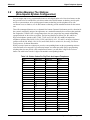
Digital Telephone System
System Manual
For The Impact DSU
This publication is applicable to the following equipment:
G0408, with software I0408, revision 18A and later
G0816, with software I0816, revision 18A and later
G1632, with software I1632, revision 18A and later
Supports Impact, Impression, DigiTech,
and Scout Telephones
R
Printed in U.S.A.
GCA47-157
Digital
Telephone
System
System Hardware And
Software Instructions
For the Impact DSU
This publication is applicable to the following equipment:
G0408, with software I0408, revision 18A and later
G0816, with software I0816, revision 18A and later
G1632, with software I1632, revision 18A and later
Supports Impact, Impression, DigiTech, and Scout
Telephones
R
Printed in U.S.A.
IMI66–107.04
10/96
C
E
R
T
I
F
I
E
D
9 0 0 1
R E D I
T
E
G
CER
TI FICATION
ANSI-RAB
I
S
T
A
R
Accredited by the Dutch Council
for Accreditation for certification
and registration activities.
R
D
A
E
C
C
I S O
R
Comdial's Quality Management System Is
Certified To The ISO 9001 Standard.
Comdial strives to design the features in our communications systems to
be fully interactive with one another. However, this is not always possible,
as the combinations of accessories and features are too varied and extensive
to insure total feature compatibility. Accordingly, some features identified
in this publication will not operate if some other feature is activated.
Comdial disclaims all liability relating to feature non-compatibility or
associated in any way with problems which may be encountered by
incompatible features. Notwithstanding anything contained in this
publication to the contrary, Comdial makes no representation herein as to
the compatibility of features.
2/12/97
IMI66–107
Digital Telephone System
1
Section
Introducing The
Digital Telephone System
Title............................................................................................ Page
1.1
Using This Manual ......................................................................................12
1.2
Using Related Publications.........................................................................13
1.2.1
1.3
Locating User Information ......................................................................13
Accessory Information................................................................................15
1.3.1
1.3.2
1.3.3
1.3.4
1.3.5
1.3.6
1.3.7
1.3.8
The Analog Terminal Interface .............................................................. 15
Headset Operation ...................................................................................15
Battery Back Up ......................................................................................16
DSS/BLF Console ...................................................................................16
Caller ID ..................................................................................................16
Tracker.....................................................................................................16
DVA.........................................................................................................16
DIU ..........................................................................................................16
1.4
Hardware Summary ...................................................................................17
1.5
Common Equipment Description ..............................................................18
1.6
Station Descriptions ..................................................................................110
1.6.1
1.6.2
1.6.3
1.6.4
1.7
General Specifications ..............................................................................119
1.7.1
1.7.2
1.8
DigiTech Telephone Descriptions .........................................................110
Impact Telephone Descriptions .............................................................112
Impression Telephone Descriptions ......................................................114
Station Controls and Indicators .............................................................116
Feature Codes ........................................................................................122
System Ringing Patterns........................................................................124
Seeking Repair Assistance........................................................................125
Introducing The DSU 1 – 1
Digital Telephone System
1.1
IMI66–107
Using This Manual
This publication contains a technical discussion of the digital telephone system; it provides
step-by-step instructions for installation and programming. If you are unfamiliar with the
equipment, read this manual at least once before you attempt to install and program the system.
The five chapters in this manual are as follows.
• Chapter One, Introducing The Digital Telephone System, is a general description of the
digital telephone system, the supporting documentation, and the equipment hardware.
• Chapter Two, Installing The Digital Telephone System, contains installation instructions
and connection details.
• Chapter Three, Programming The Digital Telephone System, gives you instructions for
setting the operating parameters of the system.
• Chapter Four, Recording The Programming Information, contains charts for recording
programming decisions.
• Appendix A, Describing The System Features, details features the digital telephone system
offers.
1 – 2 Introducing The DSU
IMI66–107
1.2
Digital Telephone System
Using Related Publications
The following publications contain information applicable to the digital telephone system.
Should you need copies of these publications, contact your Comdial inside sales representative.
Comdial
Inside Sales Department
P.O. Box 7266
Charlottesville VA 22906
Call: 1-800-347-1432
1.2.1
Locating User Information
Working With Electrostatically Sensitive Components
IMI 01-005
Handling of Electrostatically Sensitive Components
Operation With DigiTech Telephones and Consoles
These user guides are for DigiTech telephones with product codes 7700S, 7714X, and 7714S,
with revision A through H, and console DD32X.
• GCA70183 DigiTech Multiline Telephone System Users Guide
• GCA70182 DigiTech Attendants Guide
• GCA70184 DigiTech Station Users Guide
• GCA70232 DigiTech Single-Line Proprietary Telephone Users Guide
• GCA70187 DigiTech DSS/BLF Console Users Guide
These user guides are for DigiTech telephones with product codes 7700S, 7714X, and 7714S,
with revision I and later, and console DD32X.
• GCA70220 DigiTech LCD Speakerphone System Users Guide
• GCA70221 DigiTech Multiline Telephone System Users Guide
• GCA70228 DigiTech Attendants Supplement
• GCA70232 DigiTech Single-Line Proprietary Telephone Users Guide
• GCA70187 DigiTech DSS/BLF Console Users Guide
Introducing The DSU 1 – 3
Digital Telephone System
IMI66–107
Operation With Impact Telephones and Consoles
These user guides are for telephones with product codes 8024S, 8124S, 8012S, 8112N, 8101N,
and console IB64X.
• GCA70245 Impact LCD Speakerphone System Users Guide
• GCA70244 Impact Multiline Telephone System Users Guide
• GCA70247 Impact Attendants Supplement
• GCA70248 Impact Station Users Guide
• GCA70246 Impact Single-Line Proprietary Telephone Users Guide
• GCA70256 Impact DSS/BLF Console Users Guide
Operation With Impression Telephones
These user guides are for telephones with product codes 2022S, 2122S, 2122X, and 2101N.
• GCA70328 Impression LCD Speakerphone System Users Guide
• GCA70329 Impression non-LCD Speakerphone And Monitor Telephone System Users
Guide
• GCA70330 Impression Single Line Proprietary Telephone Users Guide
• GCA70332 Impression LCD Speakerphone Station Users Guide
• GCA70 333 Impression non-LCD Speakerphone And Monitor Telephone Station Users
Guide
Operation With Industry-Standard Telephones Through The ATI-D
• GCA70239 Users Guide For The Industry-Standard Telephone
• IMI89037 Installation Instructions For The Analog Terminal Interface (ATI-D).
1 – 4 Introducing The DSU
IMI66–107
1.3
Digital Telephone System
Accessory Information
The digital telephone system is capable of supporting several accessory software and hardware
devices. You can add voice mail, industry standard telephones, and headset capabilities to your
digital telephone system.
1.3.1
The Analog Terminal Interface
By employing the Analog Terminal Interface device (ATI-D), the digital telephone system can
support the operation of the following accessories:
• ExecuMail and Versatile Voice Processing,
• Industry-standard telephones and telephone devices.
For more information on the ATI-D, see section 2.19.2, Installing The Analog Terminal
Interface.
1.3.2
Headset Operation
The Comdial DigiTech speakerphones with product codes of 7700S, revision H and earlier,
include a built-in headset port. Speakerphones with a revision of I and later and Impact LCD
speakerphones with product code 8024S provide an auxiliary jack for headset interface.
Contact your Comdial Inside Sales Representative for a list of compatible headset
manufacturers.
NOTE: The system delivers subdued off-hook voice announce (SOHVA) messages to the headset
port. Because a telephone headset exhibits a coupling effect between the ear piece and
the microphone, it may allow the outside party to hear the SOHVA message.
Introducing The DSU 1 – 5
Digital Telephone System
1.3.3
IMI66–107
Battery Back Up
You can install an optional battery backup that provides power to the system in the event of a
power failure. For more information, see section 2.20.1, Installing The Battery Backup.
1.3.4
DSS/BLF Console
You can add a separate DSS/BLF console to provide additional DSS/BLF buttons to a particular
station (such as an attendant). These additional DSS/BLF buttons work just like the DSS/BLF
buttons on the telephone. For more information, see section 2.6, Installing The DSS/BLF
Console.
1.3.5
Caller ID
Using the Caller Identification Interface (product code CID08), the digital telephone system
provides caller ID information as part of the SMDR printout and as ASCII data input for use
with personal-computer-based application programs.
1.3.6
Tracker
With Tracker you can send messages to Tracker Pagers assigned to a station extension number.
When the pager is activated the user reads the message on the pagers LCD display. The system
delivers alpha/numeric or numeric-only messages depending on the Tracker Model being used.
1.3.7
DVA
Digital voice announcing uses a hardware peripheral device (product code DVA01) connected to
a digital station port to play recorded messages during an in-progress call. The DVA stores the
messages in its memory for recall when needed.
1.3.8
DIU
The Data Interface Unit (DIU) is a device connected to a digital station port of a DSU. The DIU
provides connections for a digital multiline telephone and another device such as a industry
standard telephone (IST), FAX, or modem. The DIU swithces the voice path from the DSU to
either the digital telephone or the IST by pressing a button on the digital telephone.
1 – 6 Introducing The DSU
IMI66–107
1.4
Digital Telephone System
Hardware Summary
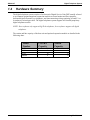
The digital telephone system consists of an electronic Digital Service Unit (DSU)usually referred
to as common equipmentoptional expansion modules to extend station and line capacities,
dedicated digital electronic key telephones, and interconnecting wiring consisting of small, 2- or
4-conductor, twisted-pair cable. The digital telephone system supports all Comdial proprietary
digital telephone models.
NOTE: Sxxxx software only supports DigiTech telephones; Ixxxx software supports all digital
telephones.
The station and line capacity of the base unit and optional expansion module are detailed in the
following chart.
Model
Number
G0408
G0816
G1632
GM408
CO/PBX
Capacity
4
8
16
4
Station
Capacity
8
16
32
8
Introducing The DSU 1 – 7
Digital Telephone System
1.5
IMI66–107
Common Equipment Description
The common equipment base unit is a fully electronic device. It is essentially a special purpose
computer system acting as a communications controller between central office (CO), private
branch exchange (PBX), or CENTREX supplied lines and the proprietary digital telephone
stations. The software design of the common equipment provides complete system support and
great flexibility of operation.
The system is fully digital with two usable time slots available for each station. Digital
information is computer-encoded voice transmission and control signals. After a computer
translates analog voice transmissions to digital information, the digital signals travel through
time division multiplexing (TDM) highways. The TDM highway can transmit several signals
over a single pair of wires at the same time. A system clock partitions TDM information into
time slots. A time slot is a portion of time assigned to a particular position of the system clock.
Each time a particular clock position is reached, the computer reads information associated with
that position. As the system clock goes through its cycle, the computer passes digital information
between pieces of equipment sharing time slots.
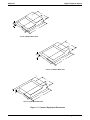
The common equipment consists of a base unit, which provides complete feature support, and
optional expansion modules for additional lines and stations. It is contained in a contemporary
metal housing designed to be inconspicuous in a modern office environment. It is engineered to
be wall or rack mounted.
1 – 8 Introducing The DSU
IMI66–107
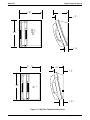
Digital Telephone System
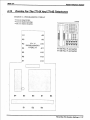
14.
3.7 "
2.13"
7.
16
.5
2
"
5
.
"
43"
"
3
21.
"
4-Line, 8-Station Base Unit
14.
3.7 "
2.13"
7.
16
"
43"
25"
.5
26.
5
27.
"
"
8-Line, 16-Station Base Unit
CAJS 74
14.
"
43"
"
2.
4.54"
7.
16
25"
.5
26.
"
5
27.
"
16-Line, 32-Station Base Unit
Figure 1–1: Common Equipment Dimensions
Introducing The DSU 1 – 9
Digital Telephone System
1.6
IMI66–107
Station Descriptions
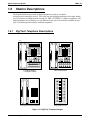
The digital telephones used with the digital telephone system are electronic,
microprocessor-controlled, devices. They allow not only multiline pickup but also single button
access to features available from the serving CO, PBX, CENTREX, or common equipment. The
digital telephones are available in several different styles with several models available in each
style. The following list details the available telephones.
1.6.1
DigiTech Telephone Descriptions
CAJS075
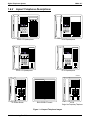
12X14LCD
DIGITECH
COMDIAL
DIGITECH
COMDIAL
TRANS
CONF
TAP
TRANS
CONF
TAP
SPKR
MUTE
SPKR
MUTE
HOLD
ITCM
7714X Monitor Telephone
7714S Speaker Telephone
ABC
2
3
JKL
MNO
4
5
6
PRS
TUV
WXY
7
8
0
HOLD
7700S LCD Speakerphone
DEF
1
GHI
OPER
HOLD
9
#
TAP
7701X Single Line Proprietary Telephone
DD32X DSS/BLF Console
Figure 1–2: DigiTech Telephone Images
1 – 10 Introducing The DSU
ITCM
IMI66–107
Digital Telephone System
7.65 "
4. 3"
4. 6 "
.625"
7714X
7714S
77
S
1.112"
6.451"
4. 7"
2. 7"
.625"
77 1X
CAJS 45
1.251"
Figure 1–3: DigiTech Telephone Dimensions
Introducing The DSU 1 – 11
Digital Telephone System
1.6.2
IMI66–107
Impact Telephone Descriptions
1 QZ
1 QZ
2 ABC 3 DEF
2 ABC 3 DEF
4 GHI 5 JKL 6 MNO
4 GHI 5 JKL 6 MNO
7 PRS 8 TUV 9 WXY
7 PRS 8 TUV 9 WXY
0 OPER #
0 OPER #
TRNS/CNF
TRNS/CNF
HOLD
INTERCOM
TAP
SPEAKER
SHIFT
HOLD
MUTE
2 ABC 3 DEF
1 QZ
4 GHI 5 JKL 6 MNO
7 PRS 8 TUV 9 WXY
0 OPER #
SHIFT
MUTE
8124S Speakerphone
8024S LCD Speakerphone
1 QZ
SPEAKER
INTERCOM
TAP
2 ABC 3 DEF
4 GHI 5 JKL 6 MNO
7 PRS 8 TUV 9 WXY
SHIFT
SHIFT
0 OPER #
MUTE
TRNS/CNF
MUTE
TRNS/CNF
SPEAKER
TAP
HOLD
SPEAKER
INTERCOM
HOLD
8012S LCD Speakerphone
TAP
INTERCOM
8112S Speakerphone
CAJS076
1
QZ
2
ABC
3 DEF
1
QZ
2
ABC
4
GHI
5
JKL
6 MNO
4
GHI
5
JKL
6 MNO
7
PRS
8
TUV
9
7
PRS
8
TUV
9
WXY
3 DEF
WXY
0 OPER #
0 OPER #
COMDIAL
COMDIAL
TRNS/CNF
TAP
HOLD
INTERCOM
8112N Non-Monitor
IB64X DSS/BLF Console
TAP
HOLD
INTERCOM
8101N
Single Line Proprietary Telephone
Figure 1–4: Impact Telephone Images
1 – 12 Introducing The DSU
TRNS/CNF
IMI66–107
Digital Telephone System
7.13
1 .75
S,
24
.
124
S
1 1N,
112N
.
CAJS 77
4.64
3.731
.
.
,12S 112S
1. 34
Figure 1–5: Impact Telephone Dimensions
Introducing The DSU 1 – 13
Digital Telephone System
1.6.3
IMI66–107
Impression Telephone Descriptions
1
ABC
2
DEF
3
1
ABC
2
DEF
GHI
4
JKL
5
MNO
6
GHI
4
JKL
5
MNO
6
PRS
7
TUV
8
WXY
9
PRS
7
TUV
8
WXY
9
OPER
SPKR
HOLD
0
#
T/C
OPER
MUTE
ITCM
TAP
0
3
#
SPKR
T/C
MUTE
HOLD
TAP
ITCM
unisyn01.cdr
unisyn05.cdr
2022S (22-Line LCD Speakerphone)
2122S (22-Line Speakerphone)
2122X (22-Line Monitor Telephone)
R
unisyn09.cdr
2101N (Single Line Proprietary Telephone)
DU32X (32-Button DSS/BLF Console)
unisyn11.cdr
Figure 1–6: Impression Telephone Images
1 – 14 Introducing The DSU
IMI66–107
Digital Telephone System
4.78"
9.08"
3.94"
8.90"
UNIS029
1.13"
7.130
2101N
8.900
cajs109
Figure 1–7: Impression Telephone Dimensions
Introducing The DSU 1 – 15
Digital Telephone System
1.6.4
IMI66–107
Station Controls And Indicators
Ringer Volume Control
Each station has a ringer volume control. Adjust the ringer volume of each station to suit your
needs.
Telephone Model
7114S, 7114X, 8024S,
8124S, 8012S, 8112S
7701X, 8101N, 8112N
Control Location
Rocker switch located on front face
plate. Adjust while ringing to set
volume.
Switch on bottom housing. Set for
fixed volume levels.
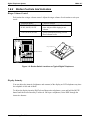
CAJS 75A
COMDIAL
DIGITECH
Ringer Volume Switch
TRANS
CONF
TAP
SPKR
MUTE
HOLD
CAJS096
Rocker Switch
ITCM
Figure 1–8: Rocker Switch Locations on Typical Digital Telephones
Display Intensity
You can adjust the intensity (brightness and contrast) of the display on LCD telephones any time
the telephone is idle and on-hook.
To adjust the display intensity DigiTech and Impression telephones, press and hold the MUTE
button until the desired intensity is achieved. On Impact telephones, select DISP through the
interactive buttons.
1 – 16 Introducing The DSU
IMI66–107
Digital Telephone System
Interactive Buttons
(NOT Programmable)
LCD Alphanumeric Display
Speaker
Progammable Buttons
Handset
Keypad
Transfer/
Conference
Button
Volume Control
1 QZ 2 ABC 3 DEF
Shift Button
4 GHI 5 JKL 6 MNO
Message
Waiting
Light
7 PRS 8 TUV 9 WXY
0 OPER #
SHIFT
Mute Button
MUTE
TRNS/CNF
Speaker Button
SPEAKER
HOLD
TAP
INTERCOM
Hold
Button
TAP
Button
Microphone
Opening
Intercom
Button
CAJS107
LCD Alphanumeric Display
Interactive Buttons
(NOT Programmable)
Auxiliary Jack
(On bottom)
TAP
Button
Transfer/
Conference
Button
DIGITECH
COMDIAL
Speaker
Mute
Button
Speaker
Button
TRANS
CONF
TAP
SPKR
MUTE
Programmable
Buttons
Volume
Control
HOLD
ITCM
Message
Waiting
Light
Hold
Button
Intercom
Button
Microphone
Opening
Figure 1–9: Station Controls And Indicators On Impact And DigiTech Telephones
Introducing The DSU 1 – 17
Digital Telephone System
IMI66–107
LCD Display
Interactive Buttons
Speaker
Mute Button
T/C Button
1
ABC
2
DEF
3
GHI
4
JKL
5
MNO
6
PRS
7
TUV
8
WXY
9
OPER
SPKR Button
Message
Waiting Light
0
Feature Buttons,
Line Buttons, and
DSS Buttons
#
SPKR
T/C
MUTE
HOLD
TAP
ITCM
Volume Control
cajs110
Hold Button
Microphone Opening
TAP Button
ITCM Button
Figure 1–10: Station Controls And Indicators On Impression Telephones
1 – 18 Introducing The DSU
IMI66–107
1.7
Digital Telephone System
General Specifications
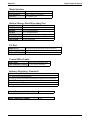
System Capacity
Lines
Stations
DSS/BLF Consoles
Intercom Paths
Maximum
Simultaneous
Intercom Conversations
Paging Ports
Park Orbits
System Speed Dials
Station Speed Dials
Autodials
Power Fail Circuits
G0408
4
8
Two Per Station
(One Per Station
Port)
Non-blocking
Non-blocking
G0816
8
16
Two Per Station
(One Per Station
Port)
Non-blocking
Non-blocking
G1632
16
32
Two Per Station
(One Per Station
Port)
Non-blocking
Non-blocking
GM408
4
8
Two Per Station
(One Per Station
Port)
Non-blocking
Non-blocking
1
9
99
10
Unused Buttons
1
1
9
99
10
Unused Buttons
1
1
9
99
10
Unused Buttons
1
Not Applicable
Not Applicable
Not Applicable
Not Applicable
Not Applicable
1
Common Equipment Dimensions
Width (inches)
Height (inches)
Depth (inches)
Weight (pounds)
G0408
16.5
21.3
3.8
17.5
G0816
16.5
27.1
3.8
26
G1632
16.5
27.6
4.5
30.5
GM408
16.5
9.25
1.75
4
Station Dimensions
DigiTech
Multiline
Footprint (inches)
8.625 X 7.658
Weight (pounds)
2.5
+
Single-Line Proprietary
6.5 X 8.5
1.9
Impact
12-line
Footprint (inches)
9.08 X 8.9
Weight (pounds)
2.3
24-line
10.75 X 8.9
2.6
+
Single-Line Proprietary
8.9 X 7.13
1.75
Introducing The DSU 1 – 19
Digital Telephone System
IMI66–107
Conferencing
G0408 and G0816
1 five-way plus 1 three-way
plus 2 SOHVA
2 four-way plus 2 SOHVA
1 four-way plus 3 three-way
5 three-way plus 1 SOHVA
Maximum Combinations
at Any One Time
G1632
4 five-way plus 1 three-way
plus 1 SOHVA
6 four-way plus 2 three-way
3 four-way plus 9 three-way
16 three-way
SMDA Storage Capacity
G0408
800
G0816
1600
G1632
1600
Station Cable Requirements
Type
Maximum Length
2-wire (1-pair) twisted, non-shielded cable
1000 feet with 24 gauge wire, 2000 feet with 22 gauge wire
Digital, time division multiplexing (TDM). Provides non-blocking
switching with stored program control.
Switching Principle
Operating Environment
Temperature
Humidity
32-122 degrees F (0-50 degrees C)
90 percent relative, non-condensing
Power Requirements
Voltage
Current
Power
Volt/Amps
G0408
G0816
90-129 VAC Single phase all models
0.6A
2.0 A
70W
135W
80VA
190VA
G1632
GM408
2.1A
150W
200VA
Not Applicable
Not Applicable
Not Applicable
Terminations
Station
Line
Standard 50-pin male connectors for connection to external distribution
field
Standard 6-conductor mini-jack (USOC 14C)
1 – 20 Introducing The DSU
IMI66–107
Digital Telephone System
Music Interface
Input Level
Input Impedance
Connector
3 Volts peak-to-peak maximum
Approximately 500 Ohms
RCA phono jack
Station Message Detail Recording Port
Format
Parity
Data Bits
Stop Bits
Baud Rate
Handshaking
Cable Length
Serial, pseudo RS-232C
None
7 or 8 (programmable)
1 or 2 (programmable)
Programmable in class of service
X on -X off
Hardware -CTS
500 feet maximum
PA Port
Output Level
Output Impedance
Connector
400 Millivolts peak-to-peak (typical speech)
Approximately 500 Ohms
RCA phono jack
Central Office Limits
Loop Limits
1900 Ohms maximum loop
Cable Insulation Leakage 15,000 Ohms minimum
Industry/Regulatory Standards
FCC Certified, part 15 (Class A)
FCC Registered (fully protected)
LISTED by OSHA-accredited, nationally recognized, test laboratory
EIA RS478
Bell publication 48002 guidance
Hearing aid compatible handset
Memory Retention After Power Loss
60 hours minimum
Ringer Equivalence Number
1.3B
Introducing The DSU 1 – 21
Digital Telephone System
1.7.1
IMI66–107
Feature Codes
Feature
All Call Page (Through Station Speakers)
Attendant Calling
Automatic Redialing
Background Music
On
Off
Automatic Call Back
Activate
Cancel
Station-to-Station
Activate
Messaging
Cancel
LCD Messaging
Set
Cancel
Call Forward
Personal
Cancel
All Calls
Cancel
Call Park
Park Orbits 19
Pick Up
Call Pick Up
Directed
Group
Call Waiting Tone
Send
Cancel
Do Not Disturb
Set
Cancel
Executive Override
External Page
Handsfree Answer Inhibit
Set
Cancel
Hold
Manual
Exclusive
Direct
Direct Hold Pick
Up
Line Answer From Any Station
Line Group Access
Group 1
Group 2
Group 3
Group 4
Line Queuing
Enable Line Group
Cancel
Meet Me Answer Paging
Message Waiting
Set
Cancel From Idle
1 – 22 Introducing The DSU
Dialing Code
INTERCOM, 87
INTERCOM, 0
Programmed Button
INTERCOM, ✳ 1
INTERCOM, # 1
INTERCOM, (ext no), ✳ 6
INTERCOM, # 6
INTERCOM, (ext no), ✳ 7
INTERCOM, # 7, (ext no)
INTERCOM, ✳ 02 (10)
INTERCOM, # 02
INTERCOM, ✳ 05, (ext no)
INTERCOM, # 05
INTERCOM, ✳ 5, (ext no)
INTERCOM, # 5
INTERCOM, ✳ (9199)
INTERCOM, # (9199)
INTERCOM, ✳ 4, (ext no)
INTERCOM, # 4
INTERCOM, (ext no), ✳ 01
Hang Up
Programmed Button
Programmed Button
INTERCOM, (ext no), ✳ 03
INTERCOM, 89
MUTE
MUTE
HOLD
HOLD, HOLD
INTERCOM, ✳ 90, (ext no)
INTERCOM, # 90
INTERCOM, 80
INTERCOM, 9
INTERCOM, 81
INTERCOM, 82
INTERCOM, 83
INTERCOM, (gp code), ✳ 8
INTERCOM, # 8
INTERCOM, 88
INTERCOM, ✳ 3, (ext no)
INTERCOM, # 3, (ext no)
IMI66–107
Night Transfer (Attendant)
Digital Telephone System
Cancel On Line
Retrieve Message
On
Off
Personal Ringing Tones
Pulse/Tone Switching
Redial Last Dialed Number
Save Number Redial
Service Observing
Speed Dial
TAP (on line)
Toll Restriction Override
Tracker Pager
Voice Announce Block
Zone Page
Set Tones 16
Use
Store
Station
System
Activate
Activate
Enable
Disable
Send Message
Block
Unblock
Zone 1
Zone 2
Zone 3
INTERCOM,
INTERCOM, HOLD
INTERCOM, S # 03,
Programmed Button
INTERCOM, ✳ # 03,
Programmed Button
INTERCOM, ✳ ✳ 4 (16)
#
#
HOLD, Programmed Button
Programmed Button
INTERCOM, # 03, (ext no)
09
✳ 0199
INTERCOM, #04
INTERCOM, ✳✳6 (extension
number, code)
INTERCOM, ✳06
INTERCOM, #06
INTERCOM, #01
INTERCOM, ✳ 2
INTERCOM, # 2
INTERCOM, 84
INTERCOM, 85
INTERCOM, 86
Introducing The DSU 1 – 23
Digital Telephone System
1.7.2
IMI66–107
System Ringing Patterns
Ring Type
CO/PBX Line Ring
Intercom Tone Signaling
Voice Signaling alert
Timed hold recall at station that put call on hold
Call back alert
Queue Enabled
Call forward alert
Transfer ringing
Tone Type
Dial Tone
Called station ring-back
Base level program entry
Error toneincorrect entry
All-call and zone paging notification tone
Busy tone
Override feature not allowed
Night transfer feature not allowed
Call waiting tone
Called station in do-not-disturb mode
Call-back busy feature on
System is awaiting memory dial number or key
mapping entry after location is specified
Override feature on warning tone
SOHVA tone
DISD ringback tone
DISD dial tone
DISD confirmation tone
DISD busy/error tone
1 – 24 Introducing The DSU
Ring Cadence
Host system ring cadence
Two 150 msec. tone bursts every four seconds
One 215 msec. tone burst
Three 150 msec. tone bursts at the end of each
timeout period
One 80 msec. tone burst followed by three 150
msec. tone bursts and one 80 msec. tone burst
^
One 80 msec. tone burst
Two 1.1 sec tone busts every four seconds
Tone Cadence
Continuous on
One sec. on and three sec. off
80 msec. tone burst sounded once
530 msec. tone burst sounded three times
80 msec. tone burst followed by 280 msec. tone
530 msec. tones sounded continuously
^
^
Three 80 msec. tone bursts sounded once
140 msec. tone burst sounded twice every 1.5
sec.
260 msec. tone burst sounded once
80 msec. tone burst sounded continuously
Six 100 msec. tone bursts sounded for 1.5 secs.
^
Dual 440/480 Hz tone sounded 1 sec. on/1 sec.
off
381 Hz tone sounded continuously
Two 125 sec. bursts of 381 Hz tone sounded
once
Three 500 msec. bursts of 381 Hz tone sounded
once
IMI66–107
1.8
Digital Telephone System
Seeking Repair Assistance
If your common equipment cabinet or individual stations need repair, you may return the
equipment to Comdial. Comdial will, at its option, either repair or replace it. There is a fixed
charge for this repair. For information on this charge, call or write to the address given below.
Comdial
P.O. Box 7266
Charlottesville VA 22906
Attn: Repair Department
Telephone: (804) 978-2400
1-800-877-4448
If you do return equipment for repair, pack it carefully to prevent damage. Any damages during
shipment are your responsibility. You should ship the equipment freight or postage prepaid.
Introducing The DSU 1 – 25
IMI66–107
2
Section
2.1
Digital Telephone System
Installing The
Digital Telephone System
Title ........................................................................................................... Page
Mounting Considerations ..........................................................................2–4
2.1.1
2.1.2
2.1.3
Tools And Hardware ..............................................................................2–5
The Underwriters Laboratories Installation Notice ................................2–5
Hybrid Installation ..................................................................................2–5
2.2
Mounting The Cabinet...............................................................................2–6
2.3
Making The AC Power Connection .........................................................2–8
2.3.1
2.3.2
2.4
Connecting The Lines ..............................................................................2–12
2.4.1
2.4.2
2.4.3
2.5
Identifying The Fuses .............................................................................2–8
Grounding The System .........................................................................2–10
Line Connection Details ...................................................................... 2–14
Reassigning The Line Ports ..................................................................2–14
Protecting The Lines.............................................................................2–14
Connecting The Stations..........................................................................2–16
2.5.1
2.5.2
2.5.3
2.5.4
2.5.5
2.5.6
2.5.7
Grounding The Stations........................................................................2–17
Relocating The Stations........................................................................2–17
Installing The Cable Clips ....................................................................2–17
Connecting Stations To The G0408 .................................................... 2–19
Connecting Stations To The G0816 .................................................... 2–20
Connecting Stations To The G1632 .................................................... 2–21
Wall Mounting The Telephone Stations...............................................2–23
Installing The DSU 2 – 1
Digital Telephone System
Section
IMI66–107
Title ........................................................................................................... Page
2.6
Installing DSS/BLF Consoles ..................................................................2–26
2.7
Connecting A Power Failure Station......................................................2–28
2.8
Using The Auxiliary Equipment Interface ............................................2–29
2.9
Common Audible And Auxiliary Ringing Interface.............................2–30
2.9.1
2.9.2
Connecting Outside Lines ....................................................................2–30
Connecting Selected Ports ....................................................................2–30
2.10 Using The External Paging Interface .....................................................2–32
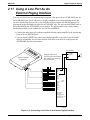
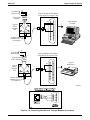
2.11 Using A Line Port As An External Paging Interface............................2–33
2.12 Connecting Data Devices .........................................................................2–34
2.12.1
2.12.2
2.12.3
Making Modular Jack Data Connections .............................................2–34
Making The Common Equipment Data Connections.......................... 2–36
Programming With A Video Display Terminal ...................................2–38
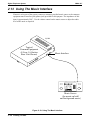
2.13 Using The Music Interface ......................................................................2–40
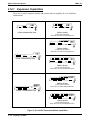
2.14 Using The Add-On Expansion Module ..................................................2–41
2.14.1
2.14.2
2.14.3
Expansion Capabilities ........................................................................ 2–42
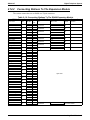
Connecting Stations To The Expansion Module ................................. 2–43
Installing The Add-On Expansion Module ......................................... 2–44
2.15 Upgrading The System Software ............................................................2–46
2.15.1
2.15.2
2.15.3
2.15.4
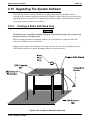
Creating A Static Safe Work Area .......................................................2–46
Saving The Call Cost Records..............................................................2–47
Replacing The Software Cartridge .......................................................2–48
Master Clearing The System ................................................................2–50
2 – 2 Installing The DSU
IMI66–107
Section
Digital Telephone System
Title ........................................................................................................... Page
2.16 Checking The System Installation ..........................................................2–51
2.16.1
2.16.2
2.16.3
Checking The Resistance......................................................................2–51
Checking The Voltage ..........................................................................2–51
Checking The General Operating Conditions ..................................... 2–52
2.17 Isolating Failures......................................................................................2–53
2.17.1
2.17.2
Checking The System Status Indicator.................................................2–53
Testing The Stations .............................................................................2–53
2.18 Installing The System Options And Accessories .................................. 2–54
2.18.1
2.18.2
2.18.3
Installing The Battery Back Up Assembly .......................................... 2–54
Installing the Analog Terminal Interface............................................. 2–58
Installing the Data Interface Unit .........................................................2–68
2.19 Supporting Caller Identification Service ...............................................2–72
2.19.1
Setting The Caller ID Parameter Switches ...........................................2–74
2.20 Supporting The Tracker Paging System................................................2–76
2.21 Supporting DVA Operation ....................................................................2–78
2.22 FCC Rules And Regulations .................................................................. 2–80
Installing The DSU 2 – 3
Digital Telephone System
2.1
IMI66–107
Mounting Considerations
The following requirements will help you to install the digital telephone system.
• Locate the equipment cabinet within four feet of an AC electrical outlet dedicated
exclusively to the use of this equipment. The outlet must be a 117 VAC 15 AMP circuit
with a third-wire ground supplied to a standard electrical outlet (NEMA 5–15R).
• Mount the common equipment within 25 feet of the TELCO/PBX jacks. The recommended
nominal distance is 7 feet.
• Choose a secure and dry mounting location that has adequate ventilation. The temperature
range of the location must be within 32-122 degrees F (0-50 degrees C) and that the relative
humidity is less than 90 percent, non-condensing.
• If the mounting surface is damp or if it is made of concrete or masonry material, you must
attach a backboard to the mounting surface for mounting the common equipment. Suitable
mounting backboards are available commercially or you can construct one from 3/4-inch
plywood by cutting it to size.
2 – 4 Installing The DSU
IMI66–107
2.1.1
Digital Telephone System
Tools And Hardware
You will need the following tools and materials to install the common equipment.
• Fasteners—wood screws (1/4 x 1-inch round head), toggle bolts, or wall anchors,
• Screwdriver—to match fasteners,
• Electric drill—if prepared holes are required,
• Connecting tool—for fastening wires to a type-66 connector block,
• Crimping tool—for 623-type modular plugs,
• Volt/Ohm Meter.
2.1.2
The Underwriters Laboratories Installation Notice
Per The Underwriters Laboratories standard 1459, 2nd edition, be aware of the following
precautions when installing telephone equipment that is to be directly connected to the telephone
company network:
• Never install telephone wiring during a lightning storm,
• Never install telephone jacks in wet locations unless the jack is specifically designed for
wet locations,
• Never touch uninsulated telephone wires or terminals unless the telephone line has been
disconnected at the network interface,
• Use caution when installing or modifying telephone lines.
2.1.3
Hybrid Installation
Whenever a programmer assigns lines to line groups, the digital telephone system automatically
assumes the hybrid mode. Your local telephone company may charge a higher monthly fee for
operation of a hybrid system; therefore, the FCC requires that you report the equipment-type
category designation number (KF for key system, MF for hybrid system) to the telephone
company at the time of installation.
FCC Registration Numbers
Key System
Hybrid System
CVWUSA-61535-KF-E
CVWUSA-61536-MF-E
Installing The DSU 2 – 5
Digital Telephone System
2.2
IMI66–107
Mounting The Cabinet
After thoroughly reviewing Section 2.1 and fully understanding its subject matter, use the
following procedure to mount the common equipment cabinet
1. Unpack and carefully inspect all equipment for shipping damage. Notify the shipper
immediately of any damages that you find. Verify that the packages contain all parts and
accessories needed for proper installation and operation.
2. If the mounting location requires a backboard, attach it securely to provide a stable mounting
surface for the equipment.
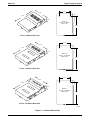
3. Refer to Figure 2-1 or to the PP032-001 mounting template included in the literature that
accompanies the common equipment cabinet for the locating dimensions required for the
three mounting screws, and mark their locations on the mounting surface.
4. Drill holes in the mounting surface of a proper size to accommodate the hardware being
used. If necessary, prepare these holes with inserts, anchors or other attachment devices as
dictated by the type of mounting surface.
5. Insert the two top screws into the mounting surface and tighten them to within approximately
1/8-inch of the surface.
6. Hang the cabinet on the top screws using the mounting holes located on the rear of the
cabinet. Note that these holes are elongated with an enlargement at one end. This feature
allows the cabinet to snap down on the screws to secure the mounting when the cabinet is
hung on them.
7. Insert a third screw through the mounting tab located on the lower edge of the cabinet and
into the mounting surface, and tighten it into place.
8. Place the individual telephone stations as desired and in keeping with accepted industry and
office standards. You can wall mount a telephone station if necessary (see Section 2.5.7 for
details).
2 – 6 Installing The DSU
IMI66–107
Digital Telephone System
0.87"
16.50"
21.30"
3.78"
Back of
4-Line, 8-Station
Base Unit
20.50"
4-Line, 8-Station Base Unit
0.88"
16.50"
27.58"
3.78"
Back of
8-Line, 16-Station
Base Unit
26.25"
8-Line, 16-Station Base Unit
0.88"
16.50"
27.58"
4.54"
Back of
16-Line, 32-Station
Base Unit
26.65"
16-Line, 32-Station Base Unit
CAJS044A
Figure 2–1: Cabinet Dimensions
Installing The DSU 2 – 7
Digital Telephone System
2.3
IMI66–107
Making The AC Power Connection
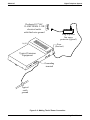
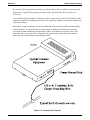
You must employ a dedicated 117VAC 15 AMP circuit, with a third-wire ground, supplied to a
standard electrical outlet (NEMA 5-15R) for the AC power connection.
• For added equipment protection, connect a plug-in power line surge protector between the
power cord and the AC outlet.
• Thoroughly check out the installation before connecting the power cord to an electrical
outlet to apply AC power to the system.
2.3.1
Identifying The Fuses
The system is protected against short circuit damage by a fuse located on the right side of the
common equipment cabinet. Always replace the fuse with one of the same value and type;
otherwise, equipment damage could result.
Table 2–1: Cabinets And Their Fuse Types
Cabinet
G0408
G0816
G1632
2 – 8 Installing The DSU
Fuse Value
1A 250V slow-blow type
3A 250V slow-blow type
3A 250V slow-blow type
IMI66–107
Digital Telephone System
Dedicated 117VAC
15 AMP NEMA 5-15R
electrical outlet
with third-wire ground
Plug-in power
line surge
protector (typical)
CAJS079
Fuse
(See text)
Typical Common
Equipment
Grounding
terminal
Typical
earth
ground
Figure 2–2: Making The AC Power Connection
Installing The DSU 2 – 9
Digital Telephone System
2.3.2
IMI66–107
Grounding The System
If spare conductors exist in the cables between the station and the 66M-xx connector blocks, it is
good practice to connect them to an earth ground. Doing this may help prevent them from
inducing radio frequency and/or AC interference into the system. It is also good practice to
disconnect any unused station jacks from the connector block and ground that wiring to an earth
ground as well.
Transient voltage spikes, if induced onto CO or CENTREX lines, can travel through the cable
and into the common equipment. The telephone company offers basic protection against this
condition but it is usually designed to protect the central office circuits. While it will also
provide some protection to the common equipment, you should not rely upon it for total
protection. To help ensure that external over-voltage surges do not damage the system, you
should install and properly ground primary protection devices, such as gas discharge tubes or
similar devices, on all lines. While the line boards have internal secondary surge protection on
all line ports, in order for this protection to be effective, you MUST connect the common
equipment cabinet to a reliable, effective earth ground.
Proper DSU grounding is necessary for trouble-free operation and personnel safety. The DSU
has the following three types of grounds:
• Service Ground—a neutral power line wire that is connected to the ground bus in the
premises’ AC power panel,
• System Ground—a non-current carrying power line wire that is connected to the ground bus
in the premises’ AC power panel,
• Frame Ground—a low impedance conductor that places the common equipment cabinet at
reference ground potential. The frame ground provides the greatest safety by limiting
electrical potential between non-current carrying parts of the system. The common
equipment cabinet provides a ground stud on its cabinet for access to its frame ground.
Effective grounding requires that you connect the frame ground to a good earth ground. A good
earth ground is one such as the ground bus in the premises’ AC power panel or a public metallic
cold water pipe at a point immediately at its entrance to the premises and ahead of any meters,
pumps, or insulating sections that have been added for vibration reduction. Avoid using the
premises’ structural steel frame as it may not be at earth ground potential. Make the ground
connection with #10 or #12 insulated, solid copper grounding wire. Keep the ground wire
separate from the three-wire AC line cord ground, do not splice it, and keep it as short as
possible.
The impedance of the wiring between the common equipment cabinet and the earth ground must
not exceed 0.25 ohms and the impedance between the earth ground and the power company’s
reference standard ground must not exceed 4 ohms. Use an acceptable low impedance measuring
device to measure the impedance of these paths. The #10 or #12 wire size will minimize the
wiring impedance; however, if the impedance between earth ground and the power company’s
standard reference ground exceeds 5 ohms, contact the local power company. The ground path
must always be of sufficient current-carrying capacity to prevent a build up of voltages that may
result in circuit noise, hazard to personnel, or equipment damage.
2 – 10 Installing The DSU
IMI66–107
Digital Telephone System
Be sure that all of the ground connections are without splices and are visible for inspection and
maintenance. Tag all of the ground connections with a sign that reads: Do Not Remove Or
Disconnect.
If you install expansion modules on the base cabinet, attach at least a #10 or #12 insulated, solid
copper wire between the frame ground stud on the expansion module(s) to the frame ground stud
on the base cabinet.
Remember, if spare conductors exist in the cables that run between the stations and the 66M-xx
connector blocks, it is good practice to connect them to earth ground. Doing this may help
prevent them from introducing radio frequency and/or AC interference into the system. Also
remember that it is good practice to disconnect any unused station jacks from the connector
block and ground that wiring to earth ground as well.
Figure 2–3: Grounding The System
Installing The DSU 2 – 11
Digital Telephone System
2.4
IMI66–107
Connecting The Lines
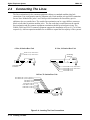
The line terminations for the common equipment cabinet are standard modular plug/jack
connections. Line configuration must be loopstart only. Each modular jack provides termination
for two lines. Modular line jacks 1 and 2 also provide termination for an auxiliary pair in
addition to the two outside lines. The outside line termination can be a type 66M-xx connector
block or individual 6-position modular jacks. The line cord that is routed between the outside
line termination and the common equipment termination should be twisted-pair wiring. The
G0408, G0816 and G1632 common equipment supports the installation of up to 4, 8, or 16 lines,
respectively. Add-on expansion modules are available to expand the line capacity of the systems.
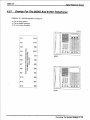
8-Line, 16-Station Base Unit
4-Line, 8-Station Base Unit
Lines 3 & 4, Aux. Line 4
Lines 1 & 2, Aux. Line 2
Grounding
Terminal
Grounding
Terminal
Line Jacks 1 & 2, Aux. Line 2
Line Jacks 3 & 4, Aux. Line 4
Line Jacks 5 & 6
Line Jacks 7 & 8
16-Line, 32-Station Base Unit
Line Jacks 1 & 2, Aux 1 (Line 2)
Line Jacks 3 & 4, Aux 2 (Line 4)
Line Jacks 5 & 6
Line Jacks 7 & 8
Line Jacks 9 & 10
Line Jacks 11 & 12
Line Jacks 13 & 14
Line Jacks 15 & 16
CAJS082
Grounding
Terminal
Figure 2–4: Locating The Line Connections
2 – 12 Installing The DSU
IMI66–107
Digital Telephone System
(Typical 8-Line, 16-Station
Base Unit Shown)
6-Wire Twisted
Pair Cable
{
{
{
{
RING 2
RING 1
TIP 1
TIP 2
RING 4
RING 3
TIP 3
TIP 4
CO/PBX
LINES
RING 6
RING 5
TIP 5
TIP 6
RING 8
RING 7
TIP 7
TIP 8
Line Terminations
Type 66M-XX
Connector Block
or
Individual 6-Position
Modular jacks
Aux. Ring
6
Ring 2
5
Ring 1
4
3
Tip 1
2
Tip 2
1
Aux. Tip
Pin designation for
Line Jacks 1 and 2
CAJS083
No Conn.
Ring 2
6
5
Ring 1
4
3
Tip 1
2
Tip 2
1
No. Conn.
Pin designation for
Line Jacks 5 and 6
Figure 2–5: Detailing The CO Line Interface
Installing The DSU 2 – 13
Digital Telephone System
2.4.1
IMI66–107
Line Connection Details
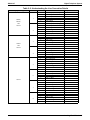
The table on the next page shows the line connection details for all three of the common
equipment base units. Jacks one and two are the same for all three cabinets, jacks three and four
are the same for both the G0816 and G1632 cabinets, and jacks five through eight are only
available on the G1632 cabinet.
2.4.2
Reassigning The Line Ports
After you have initially connected a line to a particular line port and programmed its attributes
(or left it with the system defaulted values), you can reassign the line and its attributes to a
different port by programming action if you wish. This feature allows you to make adds, moves,
and changes without relocating the line wiring. Refer to Chapter 3 for the line to line port
reassignment programming details.
2.4.3
Protecting The Lines
Transient voltage spikes, if induced onto CO or CENTREX lines, can travel through the cable
and into the common equipment. The telephone company offers basic protection against this
condition but it is usually designed to protect the central office circuits. While it will also
provide some protection to the common equipment, it should not be relied upon for total
protection. To help ensure that external over-voltage surges do not damage the system, the
manufacturer recommends that gas discharge tubes, or similar primary protection devices, be
installed and properly grounded on all lines (a selection of solid-state protection devices that are
useful for this purpose is available from ITW Linx, Elk Grove Village, Illinois 60007).
2 – 14 Installing The DSU
IMI66–107
Digital Telephone System
Table 2–2: Understanding the Line Connection Details
Common Equipment Type
G0408,
G0816,
and
G1632
Line Jack
1
2
3
G0816
and
G1632
4
5
6
G1632
7
8
Pin No.
1
2
3
4
5
6
1
2
3
4
5
6
1
2
3
4
5
6
1
2
3
4
5
6
1
2
3
4
5
6
1
2
3
4
5
6
1
2
3
4
5
6
1
2
3
4
5
6
Connection
Auxiliary 1 (Line 2) Tip
Line 2 Tip
Line 1 Tip
Line 1 Ring
Line 2 Ring
Auxiliary 1 (Line 2) Ring
Auxiliary 2 (Line 4) Tip
Line 4 Tip
Line 3 Tip
Line 3 Ring
Line 4 Ring
Auxiliary 2 (Line 4) Ring
No Connection
Line 6 Tip
Line 5 Tip
Line 5 Ring
Line 6 Ring
No Connection
No Connection
Line 8 Tip
Line 7 Tip
Line 7 Ring
Line 8 Ring
No Connection
No Connection
Line 10 Tip
Line 9 Tip
Line 9 Ring
Line 10 Ring
No Connection
No Connection
Line 12 Tip
Line 11 Tip
Line 11 Ring
Line 12 Ring
No Connection
No Connection
Line 14 Tip
Line 13 Tip
Line 13 Ring
Line 14 Ring
No Connection
No Connection
Line 16 Tip
Line 15 Tip
Line 15 Ring
Line 16 Ring
No Connection
Telephone Number
Installing The DSU 2 – 15
Digital Telephone System
2.5
IMI66–107
Connecting The Stations
The digital telephone system supports the operation of proprietary Comdial telephones.
The G0408, G0816 and G1632 common equipment supports the installation of up to eight, 16,
or 32 telephones, respectively. Add-on expansion modules are available to expand the station
capacity of the systems. One 4-line 8-station expansion module can be added to the G0408. The
G0816 and G1632 can each take two expansion modules.
Connections between the common equipment and the stations are typically via type 66M-xx
connector blocks which are cable connected to the common equipment’s 50–pin male connector.
The connector block is, in turn, wired to modular jacks that accept the modular line cord
connected between it and the telephones.
The maximum distance allowed from the common equipment to the stations is per the following
list:
• Multiline Telephones—1000 feet using #24 gauge, twisted-pair cable or 2000 feet using
#22 gauge cable
When installing the system telephones keep in mind that each station port supports only one
proprietary telephone and the system does not allow you to bridge two stations to a single
modular jack.
Always route station wiring a minimum of 12 inches from any other parallel wires or electrical
devices. If electrical noise or RF energy is at a high level, this may require the use of shielded
cable with the shield connected to the cabinet ground lug.
2 – 16 Installing The DSU
IMI66–107
2.5.1
Digital Telephone System
Grounding The Stations
Remember, if spare conductors exist in the cables that run between the stations and the 66M-xx
connector blocks, it is good practice to connect them to earth ground. Doing this may help
prevent them from introducing radio frequency and/or AC interference into the system. Also
remember that it is good practice to disconnect any unused station jacks from the connector
block and ground that wiring to earth ground as well.
Remove insulation and twist together all spare wires at the wall outlet. Ground the wires at the
66M-xx to the common equipment cabinet ground lug.
2.5.2
Relocating The Stations
The Comdial proprietary telephones identify themselves to the system when you install them.
The system assigns an extension number and all other programmable attributes to station ports as
a default that you can reprogram as needed. Plus, you can use programming action to reassign
attributes of one station port to a different station port if you wish. This station relocation feature
allows you to do adds, moves, and changes without relocating the station wiring. Refer to the
automatic station relocation programming procedure and the station-to-station programming
procedure found in Chapter 3.
NOTE: The system will not allow you to relocate the station 10 to station port 10 assignment.
2.5.3
Installing The Cable Clips
Each cabinet-mounted 50-pin male connector is equipped with a retaining clip. This clip is
designed to secure the mated connection once it is made. The clip does this by snapping into a
slot on the cable-mounted connector when it is pressed together with the cabinet-mounted
connector. This retaining clip must be pulled back slightly to unsnap it before the connectors can
be separated.
Installing The DSU 2 – 17
Digital Telephone System
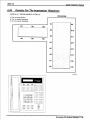
4-Line, 8-Station Base Unit
IMI66–107
8-Line, 16-Station Base Unit
Station 10-17,
Power Fail Station
Grounding
Terminal
Grounding
Terminal
Station 10-25
Power Fail Station
16-Line, 32-Station Base Unit
Stations 10-25
Stations 26-41
Power Fail Station
CAJS084
Grounding
Terminal
Figure 2–6: Station Connections
2 – 18 Installing The DSU
IMI66–107
2.5.4
Digital Telephone System
Connecting Stations To The G0408
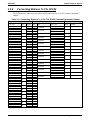
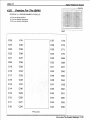
This table shows the color-coded connections for a G0408 common equipment cabinet.
Table 2–3: Connecting Stations To The G0408 Common Equipment Cabinet
25-Pair Connections
Two-Wire Connections
Station Connections
Wire Color
Pair
Pin No.
White-Blue
Blue-White
White-Orange
Orange-White
White-Green
Green-White
White-Brown
Brown-White
White-Slate
Slate-White
Red-Blue
Blue-Red
Red-Orange
Orange-Red
Red-Green
Green-Red
Red-Brown
Brown-Red
Red-Slate
Slate-Red
Black-Blue
Blue-Black
Black-Orange
Orange-Black
Black-Green
Green-Black
Black-Brown
Brown-Black
Black-Slate
Slate-Black
Yellow-Blue
Blue-Yellow
Yellow-Orange
Orange-Yellow
Yellow-Green
Green-Yellow
Yellow-Brown
Brown-Yellow
Yellow-Slate
Slate-Yellow
Violet-Blue
Blue-Violet
Violet-Orange
Orange-Violet
Violet-Green
Green-Violet
Violet-Brown
Brown-Violet
Violet-Slate
Slate-Violet
1
26
1
27
2
28
3
29
4
30
5
31
6
32
7
33
8
34
9
35
10
36
11
37
12
38
13
39
14
40
15
41
16
42
17
43
18
44
19
45
20
46
21
47
22
48
23
49
24
50
25
2
3
4
5
6
7
8
9
10
11
12
13
14
15
16
17
18
19
20
21
22
23
24
25
Clip
Term.
1
2
3
4
5
6
7
8
9
10
11
12
13
14
15
16
17
18
19
20
21
22
23
24
25
26
27
28
29
30
31
32
33
34
35
36
37
38
39
40
41
42
43
44
45
46
47
48
49
50
Pair
Wire Color
Station
Signal Path
Green
Red
Green
Red
Green
Red
Green
Red
Green
Red
Green
Red
Green
Red
Green
Red
10
Signal Path
Signal Path
Signal Path
Signal Path
Signal Path
Signal Path
Signal Path
Location
11
12
13
14
15
16
17
Spare Pairs
RS232
Data Port
A
RS232
Data Port
B
TD
RD
CTS
SG
TD
RD
CTS
SG
Common Audible
Station 17 Audible
Power Fail Station
Installing The DSU 2 – 19
Digital Telephone System
2.5.5
IMI66–107
Connecting Stations To The G0816
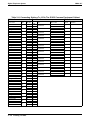
This table shows the color-coded connections for a G0816 common equipment cabinet.
Table 2–4: Connecting Stations To The G0816 Common Equipment Cabinet
25-Pair Connections
Two-Wire Connections
Station Connections
Wire Color
Pair
Pin No.
White-Blue
Blue-White
White-Orange
Orange-White
White-Green
Green-White
White-Brown
Brown-White
White-Slate
Slate-White
Red-Blue
Blue-Red
Red-Orange
Orange-Red
Red-Green
Green-Red
Red-Brown
Brown-Red
Red-Slate
Slate-Red
Black-Blue
Blue-Black
Black-Orange
Orange-Black
Black-Green
Green-Black
Black-Brown
Brown-Black
Black-Slate
Slate-Black
Yellow-Blue
Blue-Yellow
Yellow-Orange
Orange-Yellow
Yellow-Green
Green-Yellow
Yellow-Brown
Brown-Yellow
Yellow-Slate
Slate-Yellow
Violet-Blue
Blue-Violet
Violet-Orange
Orange-Violet
Violet-Green
Green-Violet
Violet-Brown
Brown-Violet
Violet-Slate
Slate-Violet
1
26
1
27
2
28
3
29
4
30
5
31
6
32
7
33
8
34
9
35
10
36
11
37
12
38
13
39
14
40
15
41
16
42
17
43
18
44
19
45
20
46
21
47
22
48
23
49
24
50
25
2
3
4
5
6
7
8
9
10
11
12
13
14
15
16
17
18
19
20
21
22
23
24
25
2 – 20 Installing The DSU
Clip
Term.
1
2
3
4
5
6
7
8
9
10
11
12
13
14
15
16
17
18
19
20
21
22
23
24
25
26
27
28
29
30
31
32
33
34
35
36
37
38
39
40
41
42
43
44
45
46
47
48
49
50
Pair
Wire Color
Station
Signal Path
Green
Red
Green
Red
Green
Red
Green
Red
Green
Red
Green
Red
Green
Red
Green
Red
Green
Red
Green
Red
Green
Red
Green
Red
Green
Red
Green
Red
Green
Red
Green
Red
10
Signal Path
Signal Path
Signal Path
Signal Path
Signal Path
Signal Path
Signal Path
Signal Path
Signal Path
Signal Path
Signal Path
Signal Path
Signal Path
Signal Path
Signal Path
Location
11
12
13
14
15
16
17
18
19
20
21
22
23
24
25
TD
RD
CTS
SG
TD
RS232
RD
Data
CTS
Port B
SG
RS232
Data
Port A
Common Audible
Station 17 Audible
Power Fail Station
IMI66–107
2.5.6
Digital Telephone System
Connecting Stations To The G1632
The following two tables show the color-coded connections for a G1632 common equipment
cabinet.
Table 2–5: Connecting Stations To J1 On The G1632 Common Equipment Cabinet
25-Pair Connections
Two-Wire Connections
Station Connections
Wire Color
Pair
Pin No.
White-Blue
Blue-White
White-Orange
Orange-White
White-Green
Green-White
White-Brown
Brown-White
White-Slate
Slate-White
Red-Blue
Blue-Red
Red-Orange
Orange-Red
Red-Green
Green-Red
Red-Brown
Brown-Red
Red-Slate
Slate-Red
Black-Blue
Blue-Black
Black-Orange
Orange-Black
Black-Green
Green-Black
Black-Brown
Brown-Black
Black-Slate
Slate-Black
Yellow-Blue
Blue-Yellow
Yellow-Orange
Orange-Yellow
Yellow-Green
Green-Yellow
Yellow-Brown
Brown-Yellow
Yellow-Slate
Slate-Yellow
Violet-Blue
Blue-Violet
Violet-Orange
Orange-Violet
Violet-Green
Green-Violet
Violet-Brown
Brown-Violet
Violet-Slate
Slate-Violet
1
26
1
27
2
28
3
29
4
30
5
31
6
32
7
33
8
34
9
35
10
36
11
37
12
38
13
39
14
40
15
41
16
42
17
43
18
44
19
45
20
46
21
47
22
48
23
49
24
50
25
2
3
4
5
6
7
8
9
10
11
12
13
14
15
16
17
18
19
20
21
22
23
24
25
Clip
Term.
1
2
3
4
5
6
7
8
9
10
11
12
13
14
15
16
17
18
19
20
21
22
23
24
25
26
27
28
29
30
31
32
33
34
35
36
37
38
39
40
41
42
43
44
45
46
47
48
49
50
Pair
Wire Color
Station
Signal Path
Green
Red
Green
Red
Green
Red
Green
Red
Green
Red
Green
Red
Green
Red
Green
Red
Green
Red
Green
Red
Green
Red
Green
Red
Green
Red
Green
Red
Green
Red
Green
Red
10
Signal Path
Signal Path
Signal Path
Signal Path
Signal Path
Signal Path
Signal Path
Signal Path
Signal Path
Signal Path
Signal Path
Signal Path
Signal Path
Signal Path
Signal Path
Location
11
12
13
14
15
16
17
18
19
20
21
22
23
24
25
Installing The DSU 2 – 21
Digital Telephone System
IMI66–107
Table 2–6: Connecting Stations To J2 On The G1632 Common Equipment Cabinet
25-Pair Connections
Two-Wire Connections
Station Connections
Wire Color
White-Blue
Blue-White
White-Orange
Orange-White
White-Green
Green-White
White-Brown
Brown-White
White-Slate
Slate-White
Red-Blue
Blue-Red
Red-Orange
Orange-Red
Red-Green
Green-Red
Red-Brown
Brown-Red
Red-Slate
Slate-Red
Black-Blue
Blue-Black
Black-Orange
Orange-Black
Black-Green
Green-Black
Black-Brown
Brown-Black
Black-Slate
Slate-Black
Yellow-Blue
Blue-Yellow
Yellow-Orange
Orange-Yellow
Yellow-Green
Green-Yellow
Yellow-Brown
Brown-Yellow
Yellow-Slate
Slate-Yellow
Violet-Blue
Blue-Violet
Violet-Orange
Orange-Violet
Violet-Green
Green-Violet
Violet-Brown
Brown-Violet
Violet-Slate
Slate-Violet
Pair
1
2
3
4
5
6
7
8
9
10
11
12
13
14
15
16
17
18
19
20
21
22
23
24
25
2 – 22 Installing The DSU
Pin No.
26
1
27
2
28
3
29
4
30
5
31
6
32
7
33
8
34
9
35
10
36
11
37
12
38
13
39
14
40
15
41
16
42
17
43
18
44
19
45
20
46
21
47
22
48
23
49
24
50
25
Clip
Term.
1
2
3
4
5
6
7
8
9
10
11
12
13
14
15
16
17
18
19
20
21
22
23
24
25
26
27
28
29
30
31
32
33
34
35
36
37
38
39
40
41
42
43
44
45
46
47
48
49
50
Pair
Signal Path
Signal Path
Signal Path
Signal Path
Signal Path
Signal Path
Signal Path
Signal Path
Signal Path
Signal Path
Signal Path
Signal Path
Signal Path
Signal Path
Signal Path
Signal Path
Wire Color
Green
Red
Green
Red
Green
Red
Green
Red
Green
Red
Green
Red
Green
Red
Green
Red
Green
Red
Green
Red
Green
Red
Green
Red
Green
Red
Green
Red
Green
Red
Green
Red
Station
26
27
28
29
30
31
32
33
34
35
36
37
38
39
40
41
Location
IMI66–107
2.5.7
Digital Telephone System
Wall Mounting The Telephone Stations
The DigiTech (product code 77nnn), Impact (product code 8nnnn), and Impression (product
code 2nnnn) telephones are shipped from the factory configured for desk use. To convert them
for wall-mounting, follow the procedures outlined below.
To convert the DigiTech model 77nnn telephones for wall-mounting,
1. Disconnect line cord and handset cord from telephone.
2. Turn telephone over to expose lower housing.
CAUTION
The telephone circuitry is sensitive to static electricity discharge. Be sure that your body and
the workplace are properly grounded to avoid any static electricity discharge while you
perform step 3.
3. Remove screws that attach lower housing to
upper housing. Carefully serparate lower and
upper housings making sure not to disconnect
wiring between them.
4. Rotate lower housing 180 degrees. Do not
disturb any internal wiring.
5. Refasten lower housing to upper housing.
Make sure no wires are caught between upper
and lower housings. Do not over-tighten
screws wile refastening the housings.
6. Route line cord through appropriate channel
on lower housing, and reconnect it to
telephone. You may substitute a shorter line
cord if you wish.
7. Reconnect the handset cord.
Figure 2–7: Rotating The Lower
Housing On Model 77nnn
Telephones
Installing The DSU 2 – 23
Digital Telephone System
IMI66–107
To convert the model Impact (models 80nnn and 81nnn) and Impression (models
20nn and 21nnn) telephones for wall-mounting,
1. Turn telephone over and disconnect line cord and handset cord from telephone. Do not
damage line cord on plastic dressing tabs.
2. Remove screws from pedestal and unlatch it from telephone housing, rotate it 180 degrees,
relatch its tabs in the slots in the lower housing of the telephone, and replace screws.
3. Route line cord as appropriate, and reconnect it to telephone. Substitute shorter line cord if
desired.
4. This telephone has a reversible handset retaining hook. When wall mounting, pull up this
hook and rotate it 180 degrees (see Figure 2–8).
5. Reconnect the handset cord.
There are wall-mounting enhancement kits available through your normal distribution channels.
These kits include a handset cradle cup that you can screw-mount to the telephone’s upper
housing. The product codes for these enhancement kits are: HCCI for the Impact telephones
(models 80nnn and 81nnn) and Impression telephones (models 20nnn and 21nnn), and HCCX
for the DigiTech telephones (model 77nnn).
Figure 2–8: Reversing The Pedestal And Handset Hook
On Impact (models 80nnn and 81nnn) and Impression
(models 20nnn and 21nnn) Telephones
2 – 24 Installing The DSU
IMI66–107
Digital Telephone System
To wall-mount the telephones,
After configuring a telephone for wall mounting, either mount it directly on the wall using two
#10 panhead screws (obtained locally), or mount it on a wall jack cover plate. If using a wall
jack cover plate, use an AT&T type 630B wall plate for best results.
1. If #10 screws are used, thread them into the wall within 1/8-inch of the surface. Refer to
Figure 2–9 for the spacing dimensions.
2. Position the keyhole-shaped holes in the bottom of the telephone over the #10 screws or the
cover plate studs. Slide the telephone down until a slight click is felt.
3. To remove the telephone, lift to unsnap both screws or studs from the bottom housing, and
then lift away from the wall.
Figure 2–9: Station Wall Mounting
Details
Installing The DSU 2 – 25
Digital Telephone System
2.6
IMI66–107
Installing DSS/BLF Consoles
The digital telephone system supports the installation and use of a DigiTech DD32X or Impact
IB64X consoles at any available station port. The number of installed consoles is limited only by
port availability; however, since a console complements a companion telephone located in an
adjacent station port, you can use up to one-half of the available station ports for consoles. In
addition, with the dual console feature (discussed later), a full two-thirds of the total station port
capacity is available for console use.
You can assign two consoles to one telephone, each taking its own station port. This feature is
especially useful with DigiTech DD32X consoles and a G1632 system that has one or two
GM408 expansion modules included with it. This dual console feature allows a station user to
monitor up to 48 stations from one station location using 32-button consoles.
Install the first console at the station port that is logic-paired with the station that you wish to
complement. Install the second console at any station port except 10 or 11 and, using class of
service programming, assign it to the same station port that is logic-paired with the first console.
Table 2–7: Pairing Of Digital Station Ports
10–11
12–13
14–15
16–17
18–19
20–21
22–23
24–25
26–27
28–29
30–31
32–33
34–35
36–37
38–39
40–41
42–43
44–45
46–47
48–49
50–51
52–53
54–55
56–57
You can install the DSS/BLF console at any station port and assign it to a station without first
installing a console at the station’s logic-paired port if you wish. This configuration is
convenient for adding a console to an existing telephone installation that already has its
logic-paired port occupied; however, do not use this configuration for assigning a console to
station ports 10 and 12 because the console buttons will not be usable for programming. As
discussed above, this feature is also useful for adding a second console to a station that already
has a paired console installed with it.
The digital telephone system automatically recognizes a console when you connect it to a station
port and automatically assigns the station intercom numbers to the console buttons for direct
station selection (DSS) purposes with associated busy lamp field (BLF) status lights. However,
the console buttons are fully programmable and the station user can customize them as he or she
sees fit by programming them as DSS buttons or as automatic dialing (autodial) buttons. When
the user programs the buttons for DSS use, autodial capability is also available at a secondary
level at each DSS button.
2 – 26 Installing The DSU
IMI66–107
Digital Telephone System
While the first console (the one installed at the logic-paired port) extends the autodial buttons of
the paired telephone by 48 and provides DSS/BLF coverage for station ports 10 through 57, the
second console (the one installed at the programmed station port) provides DSS/BLF coverage
as follows:
• On a 32-station system with two 8-station expansion modules, the first 16 buttons are
automatically assigned (defaulted) to station ports 42 through 57 for DSS purposes.
• On a 32-station system with one 8-station expansion module, the first 8 buttons are
automatically assigned (defaulted) to station ports 42 through 49 for DSS purposes.
• On any other smaller station capacity system, all buttons are unassigned.
When you install a console and program it to complement a telephone without first having a
console installed at a port that is logic-paired to that telephone, its button assignment is
automatically defaulted, as described above, but the user can reprogram it as required. It is
important to remember that when you program for a second console, the system sets the console
button mapping to that which is described above. When you clear the assignment, the system
resets the button mapping to match a logic-paired console. This means that when you clear the
second console feature, the console installed at that port complements the telephone that is
installed at its logic-paired port instead of the telephone that is located at the program-designated
port, and its buttons are automatically reassigned to station ports 10 through 57.
{
{
{
DIGITECH
1
2
3
4
5
6
7
8
9
10
11
12
13
14
15
16
17
18
19
20
21
22
23
24
25
26
27
28
29
30
31
32
33
34
35
36
37
38
39
40
41
42
43
44
45
46
47
48
49
50
50
26
25
1
CLIP TERMIINALS
CAJS008
Typical
Telephone
Paired-Port
DSS/BLF
Console
Second
DSS/BLF
Console
Figure 2–10: Typical DSS/BLF Console Connections
Installing The DSU 2 – 27
Digital Telephone System
2.7
IMI66–107
Connecting A Power Failure Station
The system provides a tip and ring pair connected to line 1 as an emergency power failure
circuit. This circuit is active during a commercial AC power failure if an external battery
assembly is not installed to provide battery back-up power to the system. Connect an industry
standard, single-line telephone, such as a model 2500, to a power failure pair and use it to
provide communications capability until the AC power to the system is restored.
NOTE: The system also provides one power failure connection with each add-on expansion
module.
Power Failure Terminals on
Station Connection Block
(4-Line, 8-Station and 8-Line, 16-Station Base Units)
Typical Industry Standard
Non-electronic Telephone
(Power Failure Interface)
{
37
38
39
40
41
42
43
44
45
46
47
48
49
50
Power Failure Jack
(16-Line, 32-Station Base Unit)
CAJS085
Typical Industry Standard
Non-electronic Telephone
(Power Failure Interface)
Figure 2–11: Making A Power Failure Connection
2 – 28 Installing The DSU
IMI66–107
2.8
Digital Telephone System
Using The Auxiliary Equipment Interface
You can connect an industry-standard telephone or a data device such as a modem or a FAX
machine on a line ahead of the common equipment if you wish. If you do so, the system can
detect an off-hook condition in the connected device and turn on the line status light at the
system telephones to indicate that the line is busy.
Connection is across tip and ring of lines 2 and 4. The system provides the auxiliary interface
connections at terminals 1 and 6 of common equipment line jacks 1 and 2.
NOTE: When you are employing this auxiliary interface feature, the line-to-line port
reassignment feature (Section 2.4.2 ) works as described except in regard to line 2
and line 4. You can only reassign Line 2 to line port 4 and line 4 to line port 2.
Typical
Common
Equipment
Line
Jack
1
Line
Jack
2
TIP 2
{
{
1
2
3
4
5
6
Auxiliary
Interface
for Line 2
RING 2
Auxiliary
Interface
for Line 4
TIP 4
1
2
3
4
5
6
RING 4
Optional non-key
system telephone
device or data
device. (No A-lead
control required)
CAJS086
Figure 2–12: Making The Auxiliary Interface Connections
Installing The DSU 2 – 29
Digital Telephone System
2.9
IMI66–107
Common Audible And Auxiliary Ringing Interface
You can use the relay closure dry-contact points for controlling external audible equipment.
These contact closures track the pattern of the ringing for incoming calls. The contacts are closed
during the ringing period and are open during the silent period.
CAUTION
Do not exceed a 1 amp at 24 volts (0.5 amp at 48 volts) load on these control terminals. If the
load requirements exceed this limit, connect the load through an external slave relay. DO
NOT CONNECT THESE CONTROL TERMINALS DIRECTLY TO THE 117VAC LINE.
2.9.1
Connecting Outside Lines
Common audible terminals provide a dry-contact closure whenever any of the outside lines that
you have connected to the common equipment ring with an incoming call.
2.9.2
Connecting Selected Ports
Station 17 audible terminals provide a dry-contact relay closure whenever ringing is sent to
station 17 or to a programmable destination. Use class of service programming to choose either
the station 17 or the programmable paging port as the ringing destination. Refer to Chapter 3 for
programming details.
When you have programmed for station port 17 ringing, it is a common practice to use a
customer-supplied external device to provide loud ringing and connected in a manner similar to
the common audible arrangement shown in the illustration on the next page.
CAUTION
Do not connect an external paging device or any external ringing device to station port 17
connections.
When you have programmed for paging port ringing, it is a common practice to use a
customer-supplied external paging amplifier connected to the paging port to amplify and
broadcast the ringing tones sent to the paging port by the system. You can employ the relay
closures that appear at the ringing terminals to energize the external paging amplifier during the
periods when the ringing tones are being sent if necessary.
NOTE: Refer to Section 2.10 for a discussion of external paging amplifier connections and
information for using the paging port ringing terminals in an alternate paging enable
function.
2 – 30 Installing The DSU
IMI66–107
Digital Telephone System
Figure 2–13: Connecting Typical Common Audible Interface Wiring
Installing The DSU 2 – 31
Digital Telephone System
IMI66–107
2.10 Using The External Paging Interface
The system provides a special transformer-isolated paging port that you can use to couple the
system to a customer-supplied external paging amplifier. This external paging port does not
provide a talk-back path nor will it recognize DTMF dial tones.
You can use the relay closure dry-contact points that the system makes available at the ringing
port terminal for controlling the external paging amplifier during a paging operation. These
contacts close and stay closed during the time that a paging operation is active to provide a
constant enable signal path for the paging amplifier.
NOTE: This paging enable constant closure function overrides the ring pattern closure
provided when ringing is sent to the paging port.
• Connect the audio input of a customer-supplied external paging amplifier to the paging port.
• If the paging amplifier requires an enable signal, connect the enable leads to the station 17
audible terminals.
J1 Connector Block
(G0408 and G0816 Systems)
Paging
Port
Typical Common
Equipment
PA System
Audio Input
Connect Enable
Input To Station 17
Audible Terminals
If Enable Is Required.
Barrier Strip
(G1632 System)
Enable Input
1
2
3
4
5
6
7
8
9
10
11
12
13
14
15
16
17
18
19
20
21
22
23
24
25
26
27
28
29
30
31
32
33
34
35
36
37
38
39
40
41
42
43
44
45
46
47
48
49
50
26
25
1
CLIP TERMIINALS
Figure 2–14: Connecting A Typical External Paging Interface
2 – 32 Installing The DSU
50
CAJS042A
IMI66–107
Digital Telephone System
2.11 Using A Line Port As An
External Paging Interface
You can use class of service programming to program a line port to be an AUXILIARY port. As
an AUXILIARY port, a user can use it to couple a telephone to an external paging device that
you have wired to the line port. He or she does this from any station with that line presence by
pressing the proper line button to select the AUXILIARY port. The user can dial DTMF tones or
dial pulses through the AUXILIARY port as needed. The paging enable relay closure feature
discussed previously is not available for use with this installation.
• Connect the audio input of a customer-supplied external paging amplifier to the tip and ring
leads of the AUXILIARY port.
• You can install a DTMF tone select, zone-paging amplifier if you wish. If you do install
this type of amplifier, the user must dial the zone-select code after he or she presses the
AUXILIARY port line select button.
PA System
Audio
Input
Program line port as
auxiliary port and connect
PA system to tip and ring
pair of that port.
Typical Common
Equipment
{
{
{
{
RING 2
RING 1
TIP 1
TIP 2
RING 4
RING 3
TIP 3
TIP 4
RING 6
RING 5
TIP 5
TIP 6
RING 8
RING 7
TIP 7
TIP 8
CO/PBX
LINES
LINE TERMINATION
TYPE 66M-XX
CONNECTOR BLOCK
OR
INDIVIDUAL 6-POSITION
MODULAR JACKS
.
.
CAJS011A
Figure 2–15: Connecting A Line Port As An External Paging Interface
Installing The DSU 2 – 33
Digital Telephone System
IMI66–107
2.12 Connecting Data Devices
This section contains information on two stages of wiring connections for data devices.
Section 2.12.1 explains connections from stations to modular jacks. Section 2.12.2 details wiring
from the modular jack to the DSU by way of the punch-down-block.
2.12.1
Making Modular Jack Data Connections
Modular jack connections are wiring connections from a station to a modular (wall) jack.
The system provides two RS232 Data Ports for use.
• When you use a video display terminal (VDT) to perform class of service programming,
connect it to RS232 Data Port A.
• When you use a serial data printer for SMDR, SMDA, COS printout, or Caller ID, connect
it to the RS232 Data Port B.
NOTE: The distance between a data device and the common equipment can be up to 500 feet
in a quiet electrical environment. Some sites may require shielded cable for long
runs. For longer distances, you must install limited distance modems to relay the data
communications between the common equipment and a data device.
When preparing a cable for connection to a data device, refer to the manufacturer’s manual for
the equipment being interfaced and make the following wiring connections:
• Wire the common equipment RD (data from device to common equipment) connection to
the device TD (transmit data) connection.
• Wire the common equipment TD (data to device from common equipment) connection to
the device RD (receive data) connection.
• Wire the common equipment SG (signal ground) connection to the device SG (signal
ground) connection.
• If required for proper operation, wire the common equipment CTS (clear-to-send status
from device to common equipment) connection to the device RTS (request-to-send)
connection.
NOTE: The common equipment requires a positive voltage, with respect to signal ground, in
order to send data.
2 – 34 Installing The DSU
IMI66–107
Digital Telephone System
TD
RD
SG
}
From RS232
Data Port A
Typical modular to EIA adapter
wiring shown for reference only.
Typical VDT
Interface
TD
RD
Typical
625A2
Modular
Jack
1
14
3
16
4
3
5
2
654321
Front
View of
Jack
SG
7
8
21
Front View
of Jack
22
24
25
IBM
6
19
20
Industry Standard
Modular Line Cord
(4-conductor)
}
5
18
23
From RS232
Data Port B
4
17
1
2
3
4
5
6
Video Display
Terminal
2
15
9
10
IBM
11
12
IBM
13
TD
Typical modular to EIA adapter
wiring shown for reference only.
SG
Typical Data
Printer Interface
14
RD
Typical
625A2
Modular
Jack
15
16
4
3
17
1
2
3
4
5
6
5
2
654321
Front View
of Jack
Front
View of
Jack
18
SG
19
20
21
22
23
Industry Standard
Modular Line Cord
(4-conductor)
24
25
1
2
3
Typical
Data Printer
4
5
6
7
8
9
10
11
12
13
CAJS043C
Figure 2–16: Connecting Data Devices Through Modular Connections
Installing The DSU 2 – 35
Digital Telephone System
2.12.2
IMI66–107
Making The Common Equipment Data Connections
You must make wiring connections from the modular jack (wall jack) to the G0408 and G0816
common equipment cabinets by way of the punch-down-block, while the G1632 cabinet
provides modular jacks for the data connections.
The default data communications format is as follows:
• 7-bit data with 2 stop bits and no parity
• Baud rate of 300 baud.
Configure a data device to match this format for initial operation or reprogram the system’s data
format to match those of a data device. The tables below list the system’s data ports.
NOTE: The distance between a data device and the common equipment can be up to 500 feet
in a quiet electrical environment. Some sites may require shielded cable for long
runs. For longer distances, you must install limited distance modems to relay the data
communications between the common equipment and a data device.
For G0408 and G0816 cabinets, make data connections at the station connector block as follows:
Clip terminals 37-40 (data port A) and clip terminals 41-44 (data port B).
Table 2–8: Data Connections
Signal
TD =
RD =
CTS =
SG =
Port A
Terminal 37
Terminal 38
Terminal 39
Terminal 40
Port B
Terminal 41
Terminal 42
Terminal 43
Terminal 44
For G1632 cabinets, make data connections at special modular jacks.
2 – 36 Installing The DSU
IMI66–107
Digital Telephone System
Station Connector Block Data Ports
(4-line, 8-station base unit and
8-line, 16-station base unit)
NOTES:
1. Maximum distance between
common equipment cabinet
and printer or VDT typically
limited to 500 feet.
Longer distances require
limited distance modems
at either end of run.
2. Some data devices require
CTS signal for proper
operation. Route to device
as needed.
RS232
Data
Port A
RS232
Data
Port B
{
{
TD
RD
CTS
SG
TD
RD
CTS
SG
1
2
3
4
5
6
7
8
9
10
11
12
13
14
15
16
17
18
19
20
21
22
23
24
25
26
27
28
29
30
31
32
33
34
35
36
37
38
39
40
41
42
43
44
45
46
47
48
49
50
Modular Jack Data Ports
(16-line, 32-station base unit)
RS232
Data Port B
RS232
Data Port A
654321
654321
(Front View of Jacks)
50
26
1 = No connection
2 = CTS
3 = RD
4 = TD
5 = SG
6 = No connection
25
1
CLIP TERMIINALS
CAJS043D
Figure 2–17: Making Data Connections To The System
Installing The DSU 2 – 37
Digital Telephone System
2.12.3
IMI66–107
Programming With A Video Display Terminal
You can program the digital telephone system using a telephone or a Video Display Terminal
(VDT). You can connect the VDT directly to the DSU, or you can program the system remotely
using the following equipment:
• VDT or a PC and appropriate software program,
• Pair of data modems.
The data modems must be: “Hayes-compatible,” capable of 300-, 1200-, 2400-, or 9600-baud
data speeds, and have auto-answer capability. Be sure to verify the auto-answer capability before
purchasing the units. You are assured of best results if you employ modems of the same make
and model at both the installation site and the remote programming site.
The equipment connections for the customer location are shown in Figure.
1. Determine the signal needs of the modem from the user’s manual for it. (The digital
telephone system only requires TD, RD, and SG but the modems may require more signals.
Check with the modem manufacturer for special requirements).
2. Wire the proper connector (to match the data jack) on one end of a length of multiline cable.
3. Punch down the appropriate leads on the connector block.
4. Connect the network jack of the data modem to an outside telephone line. (If a line is not
reserved for remote programming, have a line switch installed so that on site personnel can
switch the outside telephone line between the data modem and the digital telephone system
cabinet when you are going to perform remote programming.)
5. Refer to the user’s manual for the modem, and program the modem to automatically answer
after the first ring.
6. Interface the VDT or PC with the modem at the programming site per the user’s manuals for
the equipment be used.
7. Establish a communications link for programming the system from a remote site.
• If you have had a line switch installed at the customer site, call someone there and ask them
to set it for modem operation.
• After the outside line is connected to the modem, make the data link between the
originating and the remote modems, and perform programming from your remote site just
as if the VDT or PC was connected directly to the system.
2 – 38 Installing The DSU
IMI66–107
Digital Telephone System
If you experience difficulty in establishing a communications path between your VDT, modems,
and the digital telephone system, note the following suggestions:
• make sure that you have enabled the modem auto-answer feature,
• confirm that the modems are wired correctly. Reverse connections at pins 2 and 3 if
necessary,
• check the modem’s instruction manual. You may have to make additional wiring
connections,
• sometimes you must strap pin 4 to 5, or pin 6 to 7, or pin 6 to 8 to 20 in the modem wiring.
Check the modem’s installation manual for this requirement,
• use a breakout box data tester to troubleshoot the data communications lines.
Typical Common
Equipment Cabinet
Data
Port
Video Display Terminal Or
Personal Computer
Line
Port
Data
Jack
Data
Modem
Telco Network
Network
Jack
Line
Switch
Data Jack
Data
Modem
Station Connector Block Data Ports
(4-Line, 8-Station Base Unit and
8-Line, 16-Station Base Unit)
RS232
DATA
PORT A
RS232
DATA
PORT B
{
TD
RD
CTS
SG
{
TD
RD
CTS
SG
50
37
38
39
40
41
42
43
44
45
46
47
48
49
50
Network Jack
Modular Jack Data Ports
(16-Line, 32-Station Base Unit)
RS232
DATA PORTS
25
26
CLIP TERMIINALS
1
DATA CONNECTIONS
MODEM
SYSTEM
DATA JACK
DATA PORT
-CTS
TD
RD
RD
TD
SG
SG
System requires that the CTS
pin be at a high logic level
before it will send data. It will
force the pin high if no modem
connection is supplied.
654321
(Front View of Jack)
1 = -2 = CTS
3 = RD
4 = TD
5 = SG
6 = -CAJS013
Figure 2–18: Installing a Video Display Terminal
Installing The DSU 2 – 39
Digital Telephone System
IMI66–107
2.13 Using The Music Interface
If music is to be part of the system, connect a customer-provided music source to the common
equipment music interface jack (phono jack) provided for this purpose. The impedance of this
input is approximately 500Ω. Use the volume control on the music source to adjust the audio
level of the music as required.
CAJS088
Typical
Common Equipment
(8-Line, 16-Station
Base Unit Shown)
Music Interface
Music Source
(for music on hold
and background music)
Figure 2–19: Using The Music Interface
2 – 40 Installing The DSU
IMI66–107
Digital Telephone System
2.14 Using The Add-On Expansion Module
You can install one or two optional add-on expansion modules on the common equipment base
unit to increase the line and station capacity of an installed system.
The default numbering of the expanded lines and stations begin with the next higher line or
station port number from that provided by the host base unit. The numbering continues
sequentially from top module to bottom module if two modules are installed. For example: The
defaulted 8-line, 16-station base unit provides station ports 10 through 25 and lines 1 through 8.
When installed, a 408 Expansion module will provide station ports 26 through 33 and lines 9
through 12 thus creating a 12 line by 24 station system.
Each expansion module provides a tip and ring pair as an emergency power failure circuit. This
circuit is connected to the first module-provided line.
The line connections of the expansion module are available at two modular jacks. When facing
the jack openings, lines 1 and 2 are provided by the jack on the right and lines 3 and 4 are
provided by the jack on the left.
Table 2–9: Connecting Lines To The G0408 Expansion Module
Line
Jack
1
2
Pin
Number
1
2
3
4
5
6
1
2
3
4
5
6
Connection
Telephone
Number
No Connection
Line 2M Tip
Line 1M Tip
Line 1MRing
Line 2M Ring
No Connection
No Connection
Line 4M Tip
Line 3M Tip
Line 3M Ring
Line 4M Ring
No Connection
Installing The DSU 2 – 41
Digital Telephone System
2.14.1
IMI66–107
Expansion Capabilities
The 4-line 8-station expansion module adds station and line capability in several different
combinations.
4-Line, 8-Station Base Unit
24-Port System
8-LINES AND 16-STATIONS
(BASE UNIT PLUS ONE EXPANSION MODULE)
36-Port System
12-LINES AND 24-STATIONS
(BASE UNIT PLUS ONE EXPANSION MODULE)
8-Line, 16-Station Base Unit
48-Port System
16-LINES AND 32-STATIONS
(BASE UNIT PLUS TWO EXPANSION MODULES)
60-Port System
20-LINES AND 40-STATIONS
(BASE UNIT PLUS ONE EXPANSION MODULE)
16-Line, 32-Station Base Unit
72-Port System
24-LINES AND 48-STATIONS
(BASE UNIT PLUS TWO EXPANSION MODULES)
CAJS089
Figure 2–20: Add-On Expansion Module Capabilities
2 – 42 Installing The DSU
IMI66–107
2.14.2
Digital Telephone System
Connecting Stations To The Expansion Module
The station connections are available at a 50-pin connector.
Table 2–10: Connecting Stations To The G0408 Expansion Module
25-Pair Connections
Wire Color
Pair
White-Blue
Blue-White
White-Orange
Orange-White
White-Green
Green-White
White-Brown
Brown-White
White-Slate
Slate-White
Red-Blue
Blue-Red
Red-Orange
Orange-Red
Red-Green
Green-Red
Red-Brown
Brown-Red
Red-Slate
Slate-Red
Black-Blue
Blue-Black
Black-Orange
Orange-Black
Black-Green
Green-Black
Black-Brown
Brown-Black
Black-Slate
Slate-Black
Yellow-Blue
Blue-Yellow
Yellow-Orange
Orange-Yellow
Yellow-Green
Green-Yellow
Yellow-Brown
Brown-Yellow
Yellow-Slate
Slate-Yellow
Violet-Blue
Blue-Violet
Violet-Orange
Orange-Violet
Violet-Green
Green-Violet
Violet-Brown
Brown-Violet
Violet-Slate
Slate-Violet
1
2
3
4
5
6
7
8
9
10
11
12
13
14
15
16
17
18
19
20
21
22
23
24
25
Clip
Pin No.
Term.
26
1
1
2
27
3
2
4
28
5
3
6
29
7
4
8
30
9
5
10
31
11
6
12
32
13
7
14
33
15
8
16
34
17
9
18
35
19
10
20
36
21
11
22
37
23
12
24
38
25
13
26
39
27
14
28
40
29
15
30
41
31
16
32
42
33
17
34
43
35
18
36
44
37
19
38
45
39
20
40
46
41
21
42
47
43
22
44
48
45
23
46
49
47
24
48
50
49
25
50
Two-Wire Connections
Station Connections
Pair
Wire Color
Station
Signal Path
Green
Red
Green
Red
Green
Red
Green
Red
Green
Red
Green
Red
Green
Red
Green
Red
1M
Signal Path
Signal Path
Signal Path
Signal Path
Signal Path
Signal Path
Signal Path
Location
2M
3M
4M
5M
6M
7M
8M
Spare Pair
Signal Path
Tip
Ring
Power Fail Station
Installing The DSU 2 – 43
Digital Telephone System
2.14.3
IMI66–107
Installing The Add-On Expansion Module
Each add-on expansion module measures 15.5" wide x 9.4" high x 1.6" wide and weighs
approximately 4 pounds. The modules are designed so that you can attach them to the base unit
and connect them to it via cabling.
NOTE: If you plan to upgrade the system software at the same time that you add expansion
modules, be sure to add the expansion modules first by following steps 1 through 11.
After you have installed the expansion modules and programmed for the new stations
and line ports, you can then upgrade the software as described in the discussion
titled, Upgrading The System Software.
To install an expansion module to a base unit, follow the procedure detailed in steps 1–11.
CAUTION
You must always connect the first module to the top location on the base unit.
1. Disconnect both AC power and external battery back-up power from the system.
2. Remove and set aside nameplate from base unit. This action exposes internal cable connector
on base unit circuit board.
3. Reach through opening in base unit and mate module cable plug with base unit circuit board
connectors.
4. Push excess cable inside base unit housing through connector opening.
5. Install expansion module in place on all four mounting holes. Be sure excess cable is not
pinched between add-on module and base unit.
6. Pull module down to latch in place.
7. Use flat-blade screw driver to tighten module securing screw into base unit threaded fastener.
8. Snap nameplate into slots on top of module housing.
9. Attach #10 or #12 insulated, solid copper wire between the frame ground stud on the
expansion module and the frame ground stud on the common equipment cabinet.
10. Reconnect the power to the system.
11. Refer to Chapter 3, and perform configuration programming for new station and line ports.
2 – 44 Installing The DSU
IMI66–107
Digital Telephone System
Typical Base Unit
(8-Line, 16-Station Base Unit)
Nameplate
(Remove to expose base
unit connectors)
Top
Location
Upper Mounting Holes
(2 Places)
Lower Mounting Holes
(2 Places)
Bottom
Location
AM012
Connecting Cable
and Plug
Securing
Screw
Ground
Modules
to Base
Unit
Snap Slots for
Nameplate
Typical Add-On Module
Figure 2–21: Installing The Add-On Expansion Module
Installing The DSU 2 – 45
Digital Telephone System
IMI66–107
2.15 Upgrading The System Software
The following sections contain information on safety precautions you should take before
working on the common equipment, procedures for making a copy of the call cost records before
upgrading software, instructions for replacing the software cartridge, and instructions for master
clearing the system to load the new software.
2.15.1
Creating A Static Safe Work Area
CAUTION
Circuit boards are susceptible to damage caused by electrostatic discharge, and you must keep
this fact in mind as you handle them.
When servicing the common equipment cabinet, it is a good practice to prepare a static-safe
work area on which to service the cabinet.
Supply yourself with a static discharge wrist strap, and wear it every time you handle electronic
circuit boards either at the cabinet mounting location or at your work area.
Figure 2–22: Creating A Static Safe Work Area
2 – 46 Installing The DSU
IMI66–107
2.15.2
Digital Telephone System
Saving The Call Cost Records
To save the call cost records,
1. Make a copy of the call cost records and then delete them from the system memory per the
following procedure:
To print records: press INTERCOM, dial ✳ # 076#, and press SPEAKER.
To delete records: press INTERCOM, dial ✳ # 077#, and press SPEAKER.
2. Use the VDT programming procedure to save the current system data base on a PC.
Installing The DSU 2 – 47
Digital Telephone System
2.15.3
IMI66–107
Replacing The Software Cartridge
Upgrading software in the digital telephone system consists of removing the current software
cartridge and exchanging it with a board containing updated software.
CAUTION
To avoid any chance of electrostatic discharge damage to the softtware cartridge, avoid
touching the connector with your fingers while handling it. Be sure to disconnect the AC
power and battery back up to the base unit before installing or removing a software cartridge.
To remove a cartridge,
1. Place the end of a flat-blade screwdriver into the removal notch. Lift up on the cartridge with
the screwdriver to un-mate the connections.
2. Slide the cartridge out of the base unit.
NOTE: Only replacement software designed for a particular cabinet may be put in that
cabinet. Example: Only 408 software will work in the 408 cabinet.
To install a cartridge,
1. Orient the cartridge so that the connector end is toward the base unit opening. The removal
notch, located at the top rear of the cartridge, should point to the front of the base unit.
2. Gently insert the cartridge into the base unit cabinet until it seats into place. Press down on
the cartridge to secure the connection.
2 – 48 Installing The DSU
IMI66–107
Digital Telephone System
CAJS091A
Typical
Common Equipment
Base Unit
Software
Cartridge
(Lift out to remove)
Figure 2–23: Removing The Software Cartridge
CAJS091
Typical
Common Equipment
Base Unit
Software
Cartridge
(Push in to install)
Figure 2–24: Installing The Software Cartridge
Installing The DSU 2 – 49
Digital Telephone System
2.15.4
IMI66–107
Master Clearing The System
To reboot the system and load the new software,
1. Restore power to the system.
2. Perform the master clear procedure from the VDT or at the programming station as follows:
• press INTERCOM,
• dial ✳ # 746 ✳,
• dial 90,
• dial 51684,
• press SPEAKER.
3. Use the VDT programming procedure to re-load the system data base into the system
memory.
2 – 50 Installing The DSU
IMI66–107
Digital Telephone System
2.16 Checking The System Installation
The system operating features are set to default conditions at initial power-up. These conditions
provide a basic operating system with a known set of parameters, and you should check out the
system with the default conditions in place. At any time while the system is operating, you can
reset default conditions from station port 10 or 12 following the instructions provided in chapter
3, Programming.
2.16.1
Checking The Resistance
Measure the resistance at the station connector blocks under the following conditions.
• AC power cord disconnected from electrical outlet.
• Common equipment connected to station connector blocks.
• Stations wired and wiring punched down on blocks.
• Bridging clips removed from blocks to isolate stations from common equipment.
Measure the resistance of each installed station and wiring from the station side of the connector
blocks. Resistance values will vary with cable length and station type but should be within the
following limits:
• Greater than 700 KΩ
2.16.2
Checking The Voltage
Make the following voltage measurements at the station connector blocks under the following
conditions:
• Bridging clips installed
• AC power connected to the common equipment
Measure the voltage across the signal pair. The measured voltage must be within the following
limits:
• 28–36 VDC
Installing The DSU 2 – 51
Digital Telephone System
2.16.3
IMI66–107
Checking The General Operating Conditions
1. Check the red light emitting diode (LED) system status indicator. Be sure that it is on steady.
If it is off or flashing, refer to the paragraph titled Checking the System Status Indicator.
2. Refer to the user’s guide for operating information and perform a general operational test of
the system by exercising the features from station port 10 or 11. Operational parameters are
per the system default conditions as detailed in Chapter 4 until class of service programming
is performed.
3. Once the basic system is verified as operational, perform the class of service programming as
described in Chapter 3.
2 – 52 Installing The DSU
IMI66–107
Digital Telephone System
2.17 Isolating Failures
Section 2.17 will help you to find and identify problems that might occur in the digital telephone
system.
2.17.1
Checking The System Status Indicator
A red LED located on the common equipment cabinet near the music port is the system status
indicator. This indicator light comes on when power is supplied to the system. If the indicator
flashes after power up, it signals that the processor has failed or that the software cartridge is not
installed. Unplug and reconnect the AC power to the power supply and observe the LED
indication. If it still shows a flashing indication, equipment replacement may be necessary.
2.17.2
Testing The Stations
To test the multiline stations for proper operation:
1. Disconnect line cord at station base.
2. On DigiTech telephones, press and hold the MUTE button.
On Impact and Impression telephones, press and hold 1 on the keypad.
Station will automatically perform self test routine.
3. Release test button as soon as test begins. Sequence of test is as follows:
a. indicators will light in sequence,
b. ringer will sound—be sure volume is set to low or high,
c. indicators and ringer will then turn off at the same time.
4. Replace any station that does not pass the self test.
Installing The DSU 2 – 53
Digital Telephone System
IMI66–107
2.18 Installing The System Options And Accessories
This section contains information on installing the battery back up, the analog terminal interface,
and the data interface unit.
2.18.1
Installing The Battery Back Up Assembly
Preparing The Battery Back Up Assembly For Use
The factory ships the battery back up assembly with the harness installed in the enclosure. To
complete the assembly, perform the following operations:
• remove the lid from the metal enclosure and save the retaining hardware,
• install the batteries in the metal enclosure and connect the wiring per the schematic shown
below,
• replace the lid.
You can wall mount the battery back up enclosure if you wish. If you do, follow the same
guidelines and instructions for mounting the common equipment cabinet as set forth at the
beginning of this chapter.
batt3.cdr
Figure 2–25: Wiring The Batteries
2 – 54 Installing The DSU
IMI66–107
Digital Telephone System
batt1.cdr
Figure 2–26: Installing The Batteries
Installing The DSU 2 – 55
Digital Telephone System
IMI66–107
Connecting The Battery Back Up Assembly
The common equipment provides an interface connector for the connection of an optional
external battery assembly.
CAUTION
Be sure that the AC power cord is connected to the electrical outlet before connecting an
external battery assembly to the common equipment interface connector. This ensures that
internal protection circuitry is operating to prevent damage that could result from improper
connection.
The external battery assembly provides a minimum of one hour of operation should the AC
power to the system be interrupted. The assembly has a 15 ampere-hour current rating and is
fused with the following vaue: 4A 250V 3AG type.
The external battery assembly may include batteries from either of the following suppliers:
• Model PS-12150 from Power-Sonic Corporation, Redwood City CA, 94032
• Model PE12V15 from GS PORTALAC, City Of Industry CA, 91748
The minimum battery backup time for a fully configured system can be calculated using the
formula:
K(15)
1 + [(0.1) (N)]
Back Up Time (in hours) =
K (Constant) =
0.9 for G0408 with or without a GM408 module
0.8 for G0816 with or without GM408 modules
0.8 for G1632 with or without GM408 modules
15 = ampere-hours
N = total number of stations
Example:
Assume that a G1632 system plus two GM408 modules are installed along with the optional
battery assembly to provide back-up power.
Back up time =
(0.8) (15)
1+[(0.1) (48)]
2 – 56 Installing The DSU
=
12
5.8
= 2.1 Hours
IMI66–107
Digital Telephone System
During AC operation, the common equipment provides recharging current to maintain the
voltage potential of the external battery assembly at an operational level. The charging circuit
may not provide an adequate charge if an installed battery assembly has a current rating of
greater than 40 ampere-hours. You should measure the battery assembly voltage every three
months.
For proper backup capabilities, make sure the batteries meet the following specifications:
• With a fully-charged battery assembly disconnected from the common equipment, the
measured voltage must be greater than 12 VDC but should not exceed 13.5 VDC.
• With a fully-charged battery assembly connected to the common equipment, the measured
voltage should be less than 13.8 VDC. If the voltage measures higher than this limit,
contact your Comdial Technical Services representative.
• The open output of the common equipment battery charger connection measures 13.6–13.8
VDC. If the charging voltage measures higher or lower than this range, contact you
Comdial Technical Services representative
• An optional external battery assembly requires approximately 10 hours to completely
re-charge to full potential after it has been completely discharged and, in some cases, when
initially installed.
Figure 2–27: Connecting The Battery Back Up Assembly
Installing The DSU 2 – 57
Digital Telephone System
2.18.2
IMI66–107
Installing The Analog Terminal Interface
Introducing The Analog Terminal Interface
The ATI-D is a multipurpose, on-premise accessory for the digital telephone system. It has dual
circuits that provide the following features:
• INDUSTRY-STANDARD TELEPHONE (IST) INTERFACE—This feature adapts most
industry-standard telephone (IST) devices to the digital telephone system. The ATI-D will
accept both tone (DTMF) and pulse (rotary) dialing from these devices.
• SYSTEM INTERCONNECTION—This feature allows an installer to connect two digital
telephone systems to each other using two ATI-Ds and on-premise wiring. When
interconnected, either telephone system treats the other telephone system as an IST device.
The two telephone systems are not integrated together and do not share features.
• MODEM ADAPTER—This feature allows the flow of switched data between a data source
and a data receiver through the digital telephone system.
• VOICE MAIL/ANSWERING MACHINE INTERFACE—This feature allows an installer
to connect voice mail systems and automated answering devices to the digital telephone
system.
CAUTION
The ATI-D by itself does not support any off-premise service. Never connect the ATI-D to a
telephone company-supplied line unless you have first installed an acceptable OPX long loop
adapter.
The ATI-D is housed in a self-contained metal enclosure that can be wall mounted if desired.
The ATI-D is powered by the digital telephone system through the station port connections and
employs an internal ringing generator to generate a ringing signal for an IST. Dual, high-quality,
low-loss, balanced, telephone transmission circuitry supports two IST inputs.
One 2-pair cable (four-wire) connects the ATI-D to two common equipment station ports. A
single pair of wires connects the external analog IST equipment to the ATI-D. Modular
connectors are provided to allow quick connections.
Each ATI-D circuit drives a load with a maximum ringer equivalence number (REN) of 2.0, thus
allowing more than one IST connection at each interface input. Check the REN number of the
connected IST equipment so as not to exceed the capacity of the ATI-D. Improper operation
may result if the REN maximum of the ATI-D is exceeded.
The ATI-D supports a wide variety of IST equipment such as 500 and 2500-type telephones,
cordless telephones, voice mail systems, answering machines, FAX machines, and data modems.
2 – 58 Installing The DSU
IMI66–107
Digital Telephone System
Detailing The The Analog Terminal Interface Specifications
Power requirements:
Supplied by the common equipment
Ringing voltage:
55 VAC Nominal @ 20 Hz
(45 VAC minimum)
Power rated to maximum
REN = 2.0
Battery feed voltage:
24 VDC nominal
Loop current limits between ATI-D
and IST interface:
DC loop limits from ATI-D to
industry standard interface per port:
20 ma min. at 620 ohms
70 ma max. at 0 ohms
620 ohms maximum including interfaced telephony device.
(Approximately 4000 feet with #26 AWG twisted-pair cable
and 300 ohm device load.)
(Approximately 500 feet if two IST devices are connected in
parallel on same tip and ring pair.)
DC loop limits from ATI-D to voice
mail system:
Approximately 1000 feet with #26 AWG twisted-pair cable.
Cable insulation resistance:
30,000 ohms minimum
Cable requirement ATI-D to system
2-pair twisted cable; 25 feet maximum length. (Both common
equipment station ports must always be connected to the
ATI-D for every installation, and they must be paired in
sequence — 12 & 13, 14 & 15, etc.)
Cable terminations:
623-type, 4-conductor mini jacks
Dialing:
Industry-standard DTMF or Dial pulse (rotary) with nominal
make/break ratio of 40/60 @ 10 PPS
Ringing cadence:
Outside calls = 2 second on 4 seconds off
Intercom calls = Two bursts:
1 second on - .5 second off,
1 second on - 3.5 seconds off
Operating temperature:
32-122 F (0-50 C)
Humidity:
90 % relative, non-condensing
Height:
2.375 inches
Width:
8.062 inches
Length:
11.125 inches
Weight:
4 lbs. (plus 2 lbs.
for packing material)
FCC registered and listed for safety compliance as part of digital telephone system
FCC certified, Part 15 (class A)
Installing The DSU 2 – 59
Digital Telephone System
IMI66–107
Mounting The Analog Terminal Interface
Refer to Section 2.1 at the beginning of this chapter for system mounting considerations that are
also applicable to the analog terminal interface.
Mounting Procedure
1. Unpack and carefully inspect the ATI-D for shipping damage. Notify the shipper
immediately of any damage found. Verify that the package contains all parts and accessories
needed for proper installation and operation.
2. If a backboard is required at the mounting location, attach it securely to provide a stable
mounting surface.
3. Use the base of the ATI-D as a template or measure for mounting hole locations per the
dimension details shown in the illustration on the next page.
4. Drill holes of a proper size to accommodate the hardware being used into the mounting
surface. If necessary, prepare these holes with inserts, anchors or other attachment devices as
dictated by the type of mounting surface.
5. Insert the two top screws into the mounting surface and tighten them to within approximately
1/8-inch of the surface.
6. Hang the ATI-D on the top screws using the mounting holes located on the rear of the
cabinet. Note that these holes are elongated with an enlargement at one end. This feature
allows the cabinet to snap down on the screws to secure the mounting when the cabinet is
hung on them.
7. Insert a third screw through the mounting tab located on the lower edge of the cabinet and
into the mounting surface; tighten it into place.
2 – 60 Installing The DSU
IMI66–107
Digital Telephone System
Figure 2–28: Detailing The ATI-D Dimensions
Installing The DSU 2 – 61
Digital Telephone System
IMI66–107
Connecting The Analog Terminal Interface
Connect the ATI-D per the diagram detailed on the following page. A grounding wire is not
required for operation; however, one is desirable for decreasing radio frequency interference and
electrostatic discharge susceptibility. The ATI-D housing provides a frame ground stud for this
purpose. Connect a #10 or #12, insulated, solid copper wire between this ground stud and a
reliable earth ground.
NOTE: You must connect both station ports to the ATI-D, even if you plan to use only one
IST device. Connect the first ATI-D port to an even station port. All ATI-D ports must
be paired.
CAUTION
Be careful when connecting the wiring between the common equipment and the ATI-D. Be
sure to connect the common equipment station ports to the COMMON EQUIPMENT (KSU)
jack on the ATI-D. Damage to the ATI-D could occur if this wiring is mistakenly connected to
the IST jack.
Use a voltmeter to check for the presence of voltage on the ATI-D IST jack.
1. Be sure that you have installed all the wiring between the ATI-D and the common equipment
station ports.
2. Measure for DC voltage on IST jack:
—Measure between TIP leads and common equipment grounding stud.
—Measure between RING leads and common equipment grounding stud.
—Measure between TIP leads and RING leads.
The measured voltage must be within following limits:
MEASUREMENT
VOLTAGE
Tip to Ground
+3 to +11 VDC
Ring to Ground
-13 to -21 VDC
Tip to Ring
+23 to +25 VDC
(The TIP lead is positive with respect to the RING lead.)
Installing A Voice Mail Interface
You can use the ATI-D to provide interfacing for a customer-supplied voice processing system.
The ATI-D, using paired station ports (such as 12 and 13 or 14 and 15), will support two voice
mail ports.
To complete the installation, connect the voice mail ports to the IST jacks on the ATI-D.
2 – 62 Installing The DSU
IMI66–107
Digital Telephone System
Typical Station
Connector Block
1
2
3
4
5
6
7
8
9
10
11
12
13
14
15
16
17
18
19
20
21
22
23
24
25
26
27
28
29
30
31
32
33
34
35
36
37
38
39
40
41
42
43
44
45
46
47
48
49
50
Connect to Station Connector Jack
50
26
25
1
CLIP TERMINALS
Common
Equipment
Jack
Line Jack
Line Jack
PIN 1 No Connection
PIN 2 IST 2 (Tip)
PIN 3 IST 1 (Tip)
PIN 4 IST 1 (Ring)
PIN 5 IST 2 (Ring)
PIN 6 No Connection
ATI-D
Common Equipment Jack
PIN 1 No Connection
PIN 2 Odd Station (Tip)
PIN 3 Even Station (Tip)
PIN 4 Even Station (Ring)
PIN 5 Odd Station (Ring)
PIN 6 No Connection
Earth
Ground
(Optional)
6
ATI3
PIN Locations On
Jacks - Front View
2
5
4
1
3
On-Permise IST Jacks 1 and 2
Figure 2–29: Interconnecting The ATI-D
Installing The DSU 2 – 63
Digital Telephone System
IMI66–107
Installing An OPX Long Loop Adapter For Off-Premise Service
As stated previously, the analog terminal interface is an on-premise device. You must use an
OPX long loop adapter if you wish to adapt the ATI-D to support an off-premise application. An
OPX long loop adapter connects to a single telephone line and can greatly extend the line’s loop
length (the Proctor Model 46222 adapter*, for example, can extend line length to 30,000 feet).
*Proctor & Associates Company, Redmond WA
CAUTION
When you connect an adapter to an off-premise extension (OPX), you must install primary
protectors in series with the tip/ring pair of the telephone line that is routed to the OPX. This
action is necessary to protect both the user and the equipment from transient voltage spikes
that can travel through the cable. The telephone company offers basic protection against this
condition; however, that protection is usually designed to safeguard the central office circuits
and you cannot rely upon it to protect common equipment. To help insure that external
overvoltage surges do not damage the system, installation specialists recommend that you
install and properly ground gas discharge tubes or similar primary protection devices on the
telephone line that routes between the adapter and the OPX.
To install the OPX long loop adapter:
• Follow manufacturer’s instructions for unpacking, inspecting, mounting and wiring the
adapter unit.
• Plug a modular cable into the system jack on the adapter and connect the opposite end of
the cable to the IST jack on the ATI-D.
• Plug a modular cord into the telephone jack on the adapter and connect the opposite end of
the cord to the OPX line (see Figure 4).
• Plug the adapter power cord into a standard 117 VAC, 3-wire electrical outlet.
2 – 64 Installing The DSU
IMI66–107
Digital Telephone System
Typical Station
Connector Block
1
2
3
4
5
6
7
8
9
10
11
12
13
14
15
16
17
18
19
20
21
22
23
24
25
26
27
28
29
30
31
32
33
34
35
36
37
38
39
40
41
42
43
44
45
46
47
48
49
50
Connect to station connector
jack on common equipment.
50
26
25
1
CLIP TERMINALS
Common
Equipment
Jack
IST Jack
ATI-D
Earth
Ground
(Optional)
4
3
2
5
OPX
Long Loop
Adapter
CAJS106
4
3
2
5
On-Premise IST Jack
117 VAC
Off-Premise IST Jack
Figure 2–30: Installing The Long Loop Adapter
Installing The DSU 2 – 65
Digital Telephone System
IMI66–107
Understanding The Programming Requirements
The ATI-D provides the interfacing capability required to connect most IST equipment to a
station port of an digital telephone system.
The IST provides basic intercom service coupled with the ability to access outside lines.
Through programming, the IST acts as either as an intercom-only telephone or as a full-featured
business telephone. You can program the station port through which the IST is being interfaced
either for prime intercom or for prime line automatic and idle line preference. Default is for
prime intercom. You can also program the station port for outside line ringing and to match the
type of dialing method employed by the IST.
Prime Intercom
On key configured systems, telephone users can extend line access to the IST for call
origination through the use of the call transfer feature. Through programming, you can assign
outside line ringing to the IST even though it is programmed for prime intercom access. To do
this, program the station port for the ringing line preference feature and enable ringing for all
desired lines.
On hybrid configured systems, the system gives the IST access to outside lines through line
group access. With line group access, IST users dial the group access code over the intercom line
to access an outside line for use. The common equipment then selects one of the grouped idle
lines for use in the order from the highest numbered line to the lowest numbered line.
Prime Line Automatic Or Idle Line Preference
Program an outside line as a prime line at the station port through which the IST is being
interfaced, or program the station port for idle line preference and then program one of the
assigned idle lines as a prime line.
With both prime line automatic and idle line preference features, the IST has outside line dial
tone when the user lifts the handset. Through programming, you can assign outside line ringing
to the IST station port that you have programmed for prime line automatic or for idle line
preference. Alternately, you can enable the ringing line preference feature for the station port.
The intercom line is available to an IST even though you have arranged it to have outside line
access. After going off-hook, the IST user obtains intercom dial tone by performing a hookflash.
To perform a hookflash, he or she must press and release the hookswitch. This action either
drops the outside line (if no digits are dialed after lifting the handset) or places it on hold (if
digits were dialed) and provides intercom dial tone.
2 – 66 Installing The DSU
IMI66–107
Digital Telephone System
ATI-D Distinctive Ringing
Intercom calls that ring at equipment connected through an ATI-D have a different cadence than
outside calls. Intercom ring cadence is: 1 sec. on, .5 sec. off, 1 sec. on, 3.5 sec. off. Outside call
ring cadence is: 2 sec. on, 4 sec. off. You can program disable this distinctive ringing feature to
make the intercom ring cadence the same as that for outside calls.
Through Dialing
You can program the station port that interfaces the IST for through-dialing if you wish or you
can disable this feature. The system automatically enables this feature when you connect the
ATI-D to the station port. If the IST is a dual-tone multi-frequency (DTMF) tone dial device,
dialing tones generated by it pass through the ATI-D, the common equipment and onto a tone
dial compatible telephone line. In this case, the station port must have through-dialing enabled.
However, if you use a rotary telephone as an IST device, you must disable through-dialing.
Installing The DSU 2 – 67
Digital Telephone System
2.18.3
IMI66–107
Installing The Data Interface Unit
Unpack the Data Interface Unit (DIU) and check for the following parts:
• Telephone line cord
• Power cable with attached transformer.
Verify that the Digital Service Unit (DSU) contains software revision 17A or later. If you need
to upgrade the DSU software, see the section entitled “Software Cartridge.”
Installing The Mechanical Components
You can install the DIU in either a free-standing manner or you can mount it on a wall.
When mounting the DIU on a wall:
1. Select a location that is close to a standard 115 VAC electrical wall outlet. The location you
select should also be convenient to the digital telephone and the Industry Standard Telephone
(IST), FAX, or modem—whichever one you will be connecting to the DIU.
2. Once you have selected the location for mounting the DIU, mark two locations for the
mounting screws as follows:
a. make the first mark,
b. measure 3 13/16 inches horizontally from the first mark and make the second mark.
Figure 2–31: Mounting Dimensions
2 – 68 Installing The DSU
IMI66–107
Digital Telephone System
3. Install two #8 X 3/4-inch screws in the wall at the locations you marked in step 2. Tighten
the screws until the screw heads are 1/4-inch from the surface of the wall.
4. Place the DIU on the wall with the screw heads inserted into the slots provided on the bottom
surface of the DIU. Slide the DIU onto the screw heads until it is firmly attached to the
screws.
Figure 2–32: Installing The Mounting Screws
Installing The DSU 2 – 69
Digital Telephone System
IMI66–107
Making The Cable Connections
Four cable connections are required to the DIU—station line cord, digital telephone line cord,
IST/FAX/MODEM line cord, and power cable.
1. Disconnect the line cord on the digital telephone from the digital station port connector and
plug it into the connector labeled PHONE on the DIU.
2. Plug the line cord from the IST device you are installing with the DIU (such as a FAX
machine, or modem) into the DIU connector labeled FAX/MODEM.
3. Plug the transformer attached to one end of the power cable into a 115 VAC electrical wall
outlet. Connect the other end of the power cable into the DIU connector labeled POWER.
The green LED on the DIU will be on to indicate power is being supplied to the DIU.
4. Plug one end of a standard line cord into the connector labeled LINE on the DIU. Plug the
other end of the line cord into the digital station port connector.
NOTE: DIU power loss will create the same symptoms as the disconnection of the DIU from
the digital telephone system. If this occurs, plug the multiline digital telephone
directly into a digital station port connector.
Preparing The DSU For DIU Operation
Once you have verified that the system contains the correct software, you must program the
system for DIU operation. See Chapter 4, “System Programming” for programming details.
2 – 70 Installing The DSU
IMI66–107
Digital Telephone System
To KSU
Station Port
Typical Multiline
Digital Telephone
(Impact Model
8012S Illustrated)
FFigure 2–33: Making The Cable Connections
Installing The DSU 2 – 71
Digital Telephone System
IMI66–107
2.19 Supporting Caller Identification Service
You can provide Caller ID information through the RS232 data port B using the Caller ID
Interface (product code CID08) and a special equipment-supplied cable. Caller ID information
for incoming calls shows on the displays of the system’s LCD speakerphones.
Make the connections that are detailed in the following statements.
• Connect the CO lines providing Caller ID data to both the common equipment and the
CID08 line jacks in the same numerical order.
• Connect the CID08-supplied cable between the CID08 and the common equipment. If you
connect it to a G1632, connect its modular plug to RS232 Data Port B on the cabinet. If you
connect it to a G0816 or a G0408, you must remove the cable’s modular plug to provide
individual RD and SG leads that you can punch down at terminals 42 and 44 of the J1
station connector block.
• With the Caller ID Interface installed, you can also add two leads to provide the TD and SG
signals to a data printer or personal computer (PC). These leads are useful for adding caller
ID enhancement to the SMDA/SMDR printout or for providing messages in the ASCII
format suitable for use with PC-based applications programs.
DXP012
Common
Equipment
Cabinet
Lines to Common
Equipment
Modular Jacks
To Central Office Line Connections
7, 8
5, 6 Modular
Line
3, 4
Ports
Cross
Connection
Block
1, 2
CustomerSupplied
Cable
Lines to CID08
Caller ID
Interface
To AC Outlet
8 7 6 5 4 3 2 1
Ports
PWR
OUT
IN
RS-232 RS-232
CID08 Caller ID Interface
2–34: Connecting The Caller ID Interface
2 – 72 Installing The DSU
RS232 B Serial
Data Port
IMI66–107
Digital Telephone System
Lines 1-8
CID08
Unit #1
P
O
R
T
S
RS-232 In
RS-232 Out
Lines 9-16
CID08
Unit #2
P
O
R
T
S
To
RS-232 B
Serial
Data Port
RS-232 In
RS-232 Out
Lines 17-24
CID08
Unit #3
P
O
R
T
S
RS-232 In
RS-232 Out
DXP002
To RS-232 B
Serial Data Port
or Next CID08
Unit
Figure 2–35: Combining Multiple
CID08 Units
CTS (Pin 2)
RD (Pin 3)
(Pin 5) SG
(Pin 4) TD
DXP001
SG
From
Caller ID
Unit
5
9
4
8
3
7
2
6
RS-232 OUT
Male
9-Pin, "D"-sub
1
TD
Solder Cup Side
RD
SG
DXP001
}
To Serial
Data Printer
VDT or PC
Figure 2–36: Adding Twin Leads
Installing The DSU 2 – 73
Digital Telephone System
2.19.1
IMI66–107
Setting The Caller ID Parameter Switches
The Caller ID device has two banks of parameter switches located on its front panel. You must
set the switches of the S2 switch band in a certain manner to enable Caller ID operation.
Switches S2–1 through S2–5 set the baud rate, data bits, and parity, while switches S2–6, S2–7,
and S2–8 set the unit address for each device.
SWITCH S2–1
SWITCH S2–2
OFF
OFF
ON
OFF
OFF
ON
ON
ON
* Set ON, ON (9600 baud) for DSU operation.
BAUD RATE
1200
2400
4800
9600*
SWITCH S2–3
DATA BITS
OFF
7
ON
8*
*Set ON (8 data bits) for DSU operation.
SWITCH S2–4 SWITCH S2–5
PARITY
OFF
OFF
NO PARITY*
ON
OFF
ODD
OFF
ON
EVEN
ON
ON
EVEN
* Set OFF, OFF (no parity) for DSU operation.
NOTE: If you are combining units (more than 8 lines are used), turn all switches in Dip
Switch S1 OFF except for switch 7. S1 switch 7 must be ON when combining units.
SWITCH S2–6
OFF
ON
OFF
2 – 74 Installing The DSU
SWITCH S2–7
OFF
OFF
ON
SWITCH S2–8
OFF
OFF
OFF
DEVICE
1
2
3
IMI66–107
Digital Telephone System
Power LED
Data LED
PWR DATA
S1
S2
Caller ID
CAJS092
Dip Switch 2 (Switches 1-8)
Dip Switch 1 (Switches 1-8)
Figure 2–37: Dip Switch Locations On The Caller ID Unit
Installing The DSU 2 – 75
Digital Telephone System
IMI66–107
2.20 Supporting The Tracker Paging System
The optional Tracker paging system allows you to send alpha/numeric or numeric-only messages
to the Tracker Pagers assigned to a station extension number. The type of message that the
system delivers is dependent on the Tracker Pager model being used. Tracker’s paging option
requires only one connection to the digital telephone system; however, you will need to take
several programming steps to make it operational.
• If you use station 10 programming to configure the system, install the Tracker base station
to the common equipment cabinet’s RS232 data port A. Then, after you have completed the
installation, take the programming action detailed in section 3.17.
• If you use a video display terminal (VDT) to configure the system, it is connected to the
RS232 data port A and you must take programming action before you install Pager. Refer
to IMI66-094, DSU Video Display Terminal Programming Manual if you need more detail,
and follow the installation/programming sequence detailed below.
1. Use the VDT to do the following:
A. If this is a new installation, master clear the system:
1. From the main menu, select System C.O.S. and press Enter.
2. From the System C.O.S. menu select System Defaults and press Enter.
3. From the System Defaults menu, select Master Clear, press Enter, type Y to accept
master clear, and press ENTER to return to System C.O.S. menu.
—OR—
If this is a software upgrade installation, default all system data.
1. From the main menu, select System C.O.S. and press ENTER.
2. From the System C.O.S. menu select System Defaults and press ENTER.
3. From the System Defaults menu, select Default System Data, press ENTER, type Y
to accept default, and press ENTER to return to system C.O.S. menu.
B. From the System C.O.S. Programming menu, select System Operations
C. From the System Options menu, select Tracker and then select the enable option.
D. Return to the main programming menu and select Station C.O.S.
E. From the Station C.O.S. Programming menu, select Miscellaneous Features
Programming.
F. From the Miscellaneous Features menu, select Display Pager and then enable the Tracker
Pagers for the stations.
2 – 76 Installing The DSU
IMI66–107
Digital Telephone System
G. Press CONTROL C for main menu, and logout from the programming mode.
2. Disconnect the VDT from data port A.
—At this time, the system begins polling data port A every two seconds and waiting for a
response from the Tracker base station.
3. Connect the Tracker base station to the common equipment’s RS232 data port A.
—As soon as you do this, the system recognizes its presence and makes the Tracker’s Pager
option available to the system users.
NOTE: While the Tracker base station remains connected, the system continues to poll the
port every 10 seconds to verify its presence. This means that if you disconnect the
Tracker base station to reconnect the VDT, you may have to wait as long as 10
seconds for the system to notice that you have replaced the Tracker base station with
a VDT.
Figure 2–38: Connecting The Tracker Base Station
Installing The DSU 2 – 77
Digital Telephone System
IMI66–107
2.21 Supporting DVA Operation
Digital voice announcing uses a hardware peripheral device (product code DVA01) connected to
a digital station port to play pre-recorded announcements and messages during an in-progress
call. The DVA stores the pre-recorded messages in its memory for recall when needed.
The DVA derives its operating power from the common equipment cabinet’s digital station port;
however, the DVA also provides internal connections for a battery. When installed, this battery
powers memory that holds the stored messages should someone disconnect the DVA for some
reason. Should you need to replace this battery, use one that meets the following specifications:
• Output—8.4 volts, 100 mAh
• Type—Sealed, rechargeable Ni-Cad battery
• Model—Varta V7/8R or equivalent (Varta Batteries Inc., 300 Executive Blvd., Elmsford
NY 10523)
To install the DVA device,
1. Position the DVA01 in a convenient location.
2. Connect the DVA01 to a digital station port using an RJ14C-configured standard two-wire
line cord.
3. If you need to input pre-recorded messages during programming, use a customer-supplied
audio cable terminated with 3.5mm (1/8 inch) phone plug on one end and and appropriate
tape recorder mating connector on the other end.
4. Refer to Chapter 4 for details, and program the system for DVA operation.
2 – 78 Installing The DSU
IMI66–107
Digital Telephone System
DVA003
6
5
4
3
2
1
Station Jack Pin-Out
Pin 1 No Connection
Pin 2 No Connection
Pin 3 Tip 1
Pin 4 Ring 1
Pin 5 No Connection
Pin 6 No Connection
Typical Station
Connector Block
STATION
TAPE IN
DVA01
PWR IN USE
RESET
{
Audio Tape Recorder
For DSU installations,
connect to DVA01's
tape in jack.
Typical Station
Wall Jack Wiring
STATION
SITE
GREEN
RED
TI
RI
T2
1
2
3
4
5
6
7
8
9
10
11
12
13
14
15
16
17
18
19
20
21
22
23
24
25
26
27
28
29
30
31
32
33
34
35
36
37
38
39
40
41
42
43
44
45
46
47
48
49
50
25-Pair
Male To
Female
Cable
(Typical)
To Common
Equipment
Cabinet
50
26
25
1
CLIP TERMINALS
R2
FRONT
VIEW
OF JACK
654321
1
2
3
4
5
6
NO CONNECTION
NO CONNECTION
RI-RED-VOICE
TI-GREEN-VOICE
NO CONNECTION
NO CONNECTION
Figure 2–39: Interconnecting The DVA Device
Installing The DSU 2 – 79
Digital Telephone System
IMI66–107
2.22 FCC Rules And Regulations
This electronic key system complies with Federal Communications Commission (FCC) Rules, Part 68. The FCC
registration label on the common equipment cabinet contains the FCC registration number, the ringer equivalence
number, the model number, and the serial number or production date of the system.
Notifying The Telephone Company
Unless a telephone operating company provides and installs the system, the telephone operating company which
provides the lines must be notified before a connection is made to them. The lines (telephone numbers) involved,
the FCC registration number, and the ringer equivalence number must be provided to the telephone company. The
FCC registration number and the ringer equivalence number of this equipment are provided on the label attached to
the common equipment. The user/installer is required to notify the telephone company when final disconnection of
this equipment from the telephone company line occurs.
Understanding Telephone Network Compatibility
When necessary, the telephone operating company provides information on the maximum number of telephones or
ringers that can be connected to one line, as well as any other applicable technical information. The telephone
operating company can temporarily discontinue service and make changes which could affect the operation of this
equipment. They must, however, provide adequate notice, in writing, of any future equipment changes that would
make the system incompatible.
Understanding Installation Requirements
Connection of the electronic key system to the telephone lines must be through a universal service order code
(USOC) outlet jack supplied by the telephone operating company. If the installation site does not have the proper
outlet, ask the telephone company business office to install one. The correct outlet jack for this system is either a
type RJ21X or type RJ14C.
Understanding Party Line And Coin Line Limitations
Local telephone company regulations may not permit connections to party lines and coin lines by anyone except the
telephone operating company.
Troubleshooting The Service Problem
If a service problem occurs, first try to determine if the trouble is in the on-site system or in the telephone company
equipment. Disconnect all equipment not owned by the telephone company.
If this corrects the problem, the faulty equipment must not be reconnected to the telephone line until the problem has
been corrected. Any trouble that causes improper operation of the telephone network may require the telephone
company to discontinue service to the trouble site after they notify the user of the reason.
Authorizing Repairs
FCC regulations do not permit repair of customer owned equipment by anyone except the manufacturer, their
authorized agent, or others who might be authorized by the FCC. However, routine repairs can be made according to
the maintenance instructions in this publication, provided that all FCC restrictions are obeyed.
2 – 80 Installing The DSU
IMI66–107
Digital Telephone System
Recognizing Radio Frequency Interference
The electronic key system contains incidental radio frequency generating circuitry and, if not installed and used
properly, may cause interference to radio and television reception. This equipment has been tested and found to
comply with the limits for a Class A computing device pursuant to Subpart J of Part 15 of FCC Rules. These limits
are designed to provide reasonable protection against such interference when operated in a commercial environment.
Operation of this equipment in a residential area may cause interference to radio and television reception; in which
case the user is encouraged to take whatever measures may be required to correct the interference. If this equipment
does cause interference to radio or television reception, which can be determined by turning the equipment off and
on, the user is encouraged to try to correct the interference by one or more of the following measures: Reorient the
television or radio’s receiving antenna, and/or relocate the DSU, the individual telephone stations, and the radio or
TV with respect to each other. If necessary, the user should consult the manufacturer or an experienced
radio/television technician for additional suggestions. The user may find the following booklet prepared by the
Federal Communications Commission helpful: “How to Identify and Resolve Radio-TV Interference Problems.”
This booklet is available from the Government Printing Office, Washington D.C. 20402. Stock No.
004-000-00345-4.
This equipment has been tested and found to comply with the limits of a Class A digital device, pursuant to Part 15
of the FCC Rules. These limits are designed to provide reasonable protection against harmful interference when the
equipment is operated in a commercial environment. This equipment generates, uses, and can radiate radio
frequency energy and, if not installed and used in accordance with the instruction manual, may cause harmful
interference to radio communications. Operation of this equipment in a residential area is likely to cause harmful
interference in which case the user will be required to correct the interference at his own expense.
This digital apparatus does not exceed the (Class A) limits for radio noise emissions from digital apparatus set out in
the Radio Interference Regulations of the Canadian Department of Communications.
Le pre’sent appareil nume’rique n’emet pes de bruits radioe’lectriques de’passant les limites applicables aux
appareils nume’riques (de la class A) prescrites dans le Re’glement sur le brouillage radioe’lectrique e’dicte’ par le
ministe’re des Communications du Canada.
CAUTION
Changes or modifications to this unit not expressly approved by the party
responsible for compliance could void the user’s authority to operate the equipment.
Determining The Ringer Equivalence Number
The REN of each line is 1.3B. The FCC requires the installer to determine the total REN for each line, and record it
at the equipment.
Installing The DSU 2 – 81
IMI66–107
3
Section
Digital Telephone System
Programming The System
Title .......................................................................................................... Page
3.1
Using Chapter Three .................................................................................3–7
3.2
Understanding System Programming......................................................3–7
3.2.1
3.2.2
3.2.3
3.2.4
3.2.5
3.2.6
3.2.7
3.3
Master Clearing and Defaulting The System ........................................3–13
3.3.1
3.3.2
3.3.3
3.3.4
3.3.5
3.3.6
3.3.7
3.4
Using A Telephone To Program The System.........................................3–7
Supporting DigiTech Telephones (Revision I And Later) .................... 3–8
Converting Button Designations ............................................................3–9
Using A VDT To Program The System ...............................................3–11
Using Block Programming ...................................................................3–11
Master Clearing The System ................................................................3–12
Using Programming Overlays ..............................................................3–12
Master Clearing The System ................................................................3–13
Defaulting The System .........................................................................3–13
Defaulting The Lines ............................................................................3–13
Defaulting The Stations ........................................................................3–14
Defaulting The Button Assignments ....................................................3–14
Defaulting The Toll Restriction Tables ................................................3–14
Programming Password Protection ......................................................3–15
System Features........................................................................................3–17
3.4.1
3.4.2
3.4.3
3.4.4
3.4.5
3.4.6
3.4.7
3.4.8
3.4.9
3.4.10
3.4.11
3.4.12
Automatic Station Relocation...............................................................3–17
Data Baud Rate .....................................................................................3–18
Do Not Disturb (DND) .........................................................................3–19
Exclusive Hold .....................................................................................3–20
Music On Hold .....................................................................................3–20
LCD Messaging ....................................................................................3–21
PA Port Options....................................................................................3–23
Station Monitoring................................................................................3–25
System Alarm Reporting ......................................................................3–26
System Clock ........................................................................................3–27
System Speed Dial ...............................................................................3–28
Tandem Attendant ................................................................................3–30
System Programming 3 – 1
Digital Telephone System
Section
3.4.13
3.4.14
3.5
Tone or Voice Signaling.......................................................................3–30
Inhibiting System Features ...................................................................3–31
Call Park Recall Time...........................................................................3–32
Extended DTMF Tones For Automatic Dialing...................................3–33
Pause Time ...........................................................................................3–34
Recall/Flash ..........................................................................................3–34
Timed Hold Recall................................................................................3–35
Unanswered Call Transfer Recall Time ...............................................3–36
Line Programming...................................................................................3–37
3.6.1
3.6.2
3.6.3
3.6.4
3.6.5
3.6.6
3.6.7
3.6.8
3.6.9
3.6.10
3.7
Title .....................................................................................Page
System Timing ..........................................................................................3–32
3.5.1
3.5.2
3.5.3
3.5.4
3.5.5
3.5.6
3.6
IMI66–107
Abandoned Hold Release .....................................................................3–37
Automatic Privacy ................................................................................3–38
Line Disable..........................................................................................3–39
Line Groups ..........................................................................................3–39
Line Names...........................................................................................3–40
Line Port Functions ..............................................................................3–42
Line To Line Port Re-Assignment........................................................3–43
Pulse/Tone Switchable .........................................................................3–44
Block Programming..............................................................................3–45
Positive Disconnect Supervision ..........................................................3–46
Station Features........................................................................................3–47
3.7.1
3.7.2
3.7.3
3.7.4
3.7.5
3.7.6
3.7.7
3.7.8
3.7.9
3.7.10
3.7.11
3.7.12
3.7.13
Access Denied ......................................................................................3–48
All-Call and Zone Paging .....................................................................3–49
Audible Monitoring ..............................................................................3–51
Automatic Hold ....................................................................................3–52
Automatic Privacy ................................................................................3–53
Call Forward On Busy/Ring–No Answer.............................................3–54
Call Origination Denied........................................................................3–56
Central Message Desk ..........................................................................3–56
Data Security Port.................................................................................3–57
Dual Console Feature ...........................................................................3–57
Executive Override ...............................................................................3–58
Flexible Ringing Assignments..............................................................3–59
Flexible Station Numbering..................................................................3–62
3 – 2 System Programming
IMI66–107
Section
3.7.14
3.7.15
3.7.16
3.7.17
3.7.18
3.7.19
3.7.20
3.7.21
3.7.22
3.7.23
3.7.24
3.7.25
3.7.26
3.7.27
3.7.28
3.7.29
3.7.30
3.8
Digital Telephone System
Title .......................................................................................................... Page
Group Call Pickup ................................................................................3–62
Handset Volume Control On Impact Telephones................................ 3–63
Headset Interface ..................................................................................3–64
Interactive Buttons............................................................................... 3–65
Idle Line Preference..............................................................................3–66
Personal Ringing Tones........................................................................3–67
Prime Line, Prime Group, And Prime Intercom...................................3–68
Message Wait Originate .......................................................................3–68
Ringing Line Preference .......................................................................3–69
Subdued Off-Hook Voice Announce (SOHVA) Features .................. 3–69
Service Observing.................................................................................3–73
Station Disable......................................................................................3–74
Station Name ........................................................................................3–74
Station To Station Port Reassignment ..................................................3–76
System Alarm Report Stations .............................................................3–77
Voice Announce Blocking....................................................................3–78
Block Programming..............................................................................3–78
Button Mapping The Stations (Non-Square Configuration) .............. 3–79
3.8.1
3.8.2
3.8.3
3.8.4
3.8.5
3.8.6
3.8.7
3.8.8
3.8.9
3.8.10
3.8.11
3.8.12
3.8.13
3.8.14
3.8.15
Account Code Button ...........................................................................3–80
Automatic Call-Back Button ................................................................3–81
Blank Buttons .......................................................................................3–81
Call Forward Button .............................................................................3–82
Call Park Orbit Button ..........................................................................3–82
Do Not Disturb (DND) Button .............................................................3–83
DSS/BLF Button...................................................................................3–83
Line Button ...........................................................................................3–84
Line Group Button................................................................................3–84
Line Group Queue Button ....................................................................3–85
Multiple Intercom Button .....................................................................3–85
Privacy Button ......................................................................................3–86
Save Button...........................................................................................3–86
Voice Announce Block Button.............................................................3–87
Zone Page/All-Call Button ...................................................................3–87
System Programming 3 – 3
Digital Telephone System
Section
3.9
IMI66–107
Title .......................................................................................................... Page
Account Codes ..........................................................................................3–88
3.9.1
3.9.2
3.9.3
3.9.4
3.9.5
3.9.6
Account Code Length ...........................................................................3–88
Account Code List ................................................................................3–89
Enabled or Disabled Account Codes ....................................................3–90
Forced or Optional Entry Account Codes ............................................3–90
Message Display Time For Account Codes .........................................3–92
Verified Account Code Entry ...............................................................3–93
3.10 The Analog Terminal Interface ..............................................................3–94
3.10.1
3.10.2
ATI Distinctive Ringing .......................................................................3–95
ATI Through Dialing............................................................................3–95
3.11 Direct Department Calling......................................................................3–96
3.11.1
3.11.2
3.11.3
3.11.4
3.11.5
Access Codes For Direct Department Calling......................................3–97
Line Ports For Direct Department Calling ...........................................3–97
Station Ports For Direct Department Calling .......................................3–98
Unanswered Call Transfer Recall Time
For Direct Department Calling .............................................................3–99
Call Forward On Busy/Ring—No Answer.........................................3–100
3.12 Direct Inward Station Dialing...............................................................3–101
3.12.1
3.12.2
3.12.3
3.12.4
3.12.5
Dial Time Limit ..................................................................................3–102
Inhibiting DISD Digit Dialing ............................................................3–102
DISD Assist Station............................................................................3–103
DISD Incoming Rings ........................................................................3–104
Enable/Disable Call Waiting Tone .....................................................3–104
3.13 Data Printer Service...............................................................................3–105
3.13.1
Enable Data Printer Operation............................................................3–105
3.14 Voice Mail Interface...............................................................................3–106
3.14.1
3.14.2
3.14.3
3.14.4
3.14.5
3.14.6
3.14.7
Voice Mail Port ..................................................................................3–107
Automatic Transfer of Voice Mail .....................................................3–110
Voice Mail Line ID.............................................................................3–110
Voice Mail Transfer on Busy .............................................................3–111
Transferring Callers To Voice Mail ...................................................3–111
Positive Disconnect Supervision ........................................................3–112
Voice Mail Pause................................................................................3–112
3 – 4 System Programming
IMI66–107
Section
Digital Telephone System
Title .......................................................................................................... Page
3.15 Versatile Voice Processing.....................................................................3–113
3.15.1
3.15.2
3.15.3
3.15.4
3.15.5
Using Tracker Paging System With Versatile Voice Processing ...... 3–113
Using Tracker For Message Notification ...........................................3–114
Transferring Callers To Voice Mail ...................................................3–114
Auto Station Logon ............................................................................3–114
Visual Voice Mail Support .................................................................3–115
3.16 Integrated Call Costing .........................................................................3–116
3.16.1
3.16.2
3.16.3
3.16.4
3.16.5
3.16.6
3.16.7
3.16.8
3.16.9
Call Costing Flow Diagram Examples ...............................................3–117
Exception Tables (Local Calls And Long Distance Calls)................ 3–123
Office Code Band Tables (Local Calls) .............................................3–124
Zone Call Band Tables (Long Distance Calls) ...................................3–125
Area Code Band Tables (Long Distance Calls)..................................3–126
Call Rate Tables (Local And Long Distance Calls) ...........................3–127
Discard Digits .....................................................................................3–129
Dialing Time And Answer Time ........................................................3–130
LCD Speakerphone Display Of Costed Calls.....................................3–131
3.17 Specialized Route Access .......................................................................3–132
3.17.1
3.17.2
3.17.3
3.17.4
3.17.5
3.17.6
3.17.7
Enable The SRA Feature ....................................................................3–132
Enable SRA Office And Area Code Tables .......................................3–133
Enable Special SRA Area Code Tables..............................................3–135
Insert Digits For SRA .........................................................................3–137
SRA Overflow Line Group.................................................................3–138
SRA Wait Time ..................................................................................3–139
Feature Inhibit Programming..............................................................3–140
3.18 Station Message Detail
Accounting/Reporting (SMDA/SMDR) ..............................................3–141
3.18.1
3.18.2
3.18.3
3.18.4
3.18.5
SMDA Department Numbers .............................................................3–142
SMDA Station Assignment ................................................................3–142
SMDA Printout...................................................................................3–143
SMDR Printout ...................................................................................3–145
SMDA Records Deleted By The Attendant .......................................3–146
System Programming 3 – 5
Digital Telephone System
Section
IMI66–107
Title .......................................................................................................... Page
3.19 Toll Restriction Tables...........................................................................3–147
3.19.1
3.19.2
3.19.3
3.19.4
3.19.5
3.19.6
3.19.7
3.19.8
Assign Entries To Toll Restriction Tables .........................................3–148
Programming Toll Restriction Table Entries......................................3–149
Assign Toll Restriction Tables To Lines ............................................3–150
Assign Toll Restriction Tables To Stations ........................................3–150
Assign Toll Restriction Tables To Stations
For Night Transfer (of ringing) ..........................................................3–151
Assign Toll Restriction Tables To System Speed Dial Calls ............ 3–151
Assign Toll Restriction Override (TRO) Code...................................3–152
Positive Disconnect Supervision ........................................................3–153
3.20 The Tracker Paging System ..................................................................3–154
3.20.1
3.20.2
3.20.3
3.20.4
Preparing The System.........................................................................3–155
Enabling The Tracker Paging System ................................................3–155
Enabling The Tracker Pagers For Stations .........................................3–155
Setting The Data Parameters ..............................................................3–156
3.21 Digital Voice Announcing (DVA) .........................................................3–157
3.21.1
3.21.2
3.21.3
3.21.4
3.21.5
Programming For DCD Operation .....................................................3–158
DCD Department Transfers Before Disconnect .................................3–158
Programming For DISD Operation ....................................................3–159
Enabling/Disabling Digital Voice Announcing (DVA) .................... 3–160
Programming The DVA Messages.....................................................3–161
3.22 The Data Interface Unit.........................................................................3–163
3.22.1
3.22.2
3.22.3
Programming Data Buttons ................................................................3–163
Remote Data Station ...........................................................................3–164
Creating Data Security Groups...........................................................3–164
3.23 Caller ID Service Support .....................................................................3–165
3.23.1
3.23.2
3.23.3
3.23.4
3.23.5
3.23.6
Assigning Caller ID Lines (required programming) ..........................3–168
Assigning Caller ID Stations (required programming) ..................... 3–168
Configuring RS232 Data Port B (required programming) ................ 3–169
Setting The Audible First Ring Feature (optional programming) ......3–169
Setting The Caller ID Distribution (optional programming)............. 3–170
Assigning A “SAVE” button (optional programming) ..................... 3–170
3 – 6 System Programming
IMI66–107
3.1
Digital Telephone System
Using Chapter Three
Since Chapter 3 deals only with the programming of the system, each programming step
includes only a brief explanation of that feature. Therefore, before you begin programming the
system, familiarize yourself with all of the system’s features that are discussed in Appendix A.
By doing so, you can be certain that you are programming what the customer wants.
NOTE: Prior to taking any programming action, determine all desired parameters and
requirements. Record this data on the programming reference tables provided in
Chapter 4.
3.2
Understanding System Programming
While the Digital Telephone System offers many functional possibilities, it is your programming
that determines the system’s operation. You can program the system in two ways: using a
telephone, or using a Video Display Terminal (VDT).
3.2.1
Using A Telephone To Program The System
Perform Class of Service configuration programming from station port 10 or station port 12. The
system will not accept programming commands from any other station port in the system. For
best programming results, use an LCD speakerphone and a DSS/BLF console at station port 11
or 13 to see which features are assigned to individual stations. While you can install any
non-LCD digital telephone and use it for programming, visual feedback of the programming
operations will not be available. You must always keep the handset of the LCD speakerphone
on-hook while you use this telephone to program the system.
NOTE: Be sure the system is not in the night transfer (of ringing) mode of operation when
you perform the programming steps.
System Programming 3 – 7
Digital Telephone System
3.2.2
IMI66–107
Supporting DigiTech Telephones (Revision I And Later)
There are several items that you need to consider when connecting revision I and later DigiTech
telephones to the digital telephone system:
• While the system software cartridge (product code Snnnn) with software release 11A and
later supports the use of all DigiTech telephones regardless of their revision letter, any
systems with a software release of 9 or earlier will not support the revision I and later
telephones. In other words, whenever a system includes revision I or later telephones, be
sure that the system software cartridge has a software release revision of 11A or later.
• Always program station ports to provide ringing line preference to revision I and later
DigiTech telephones (and to all Impact telephones) that are connected there. This action is
necessary before the orange LED feature can become active. The orange status light
indicates a ringing line to distinguish it from lines that are in use or on hold.
3 – 8 System Programming
IMI66–107
3.2.3
Digital Telephone System
Converting Button Designations
When you first power a new system with no telephones connected, it defaults its station ports as
follows:
Software Type
Snnnn
Innnn
Telephone Type
DigiTech 24-line telephones
Impact 24-line speakerphones
When you connect a telephone to a powered-up system or when you turn on the AC power to a
system after you have connected a telephone to it, the system automatically button maps the
telephone according to the type of software cartridge the system has. To change the button
mapping default, install a different software cartridge and master clear the system.
The buttons on Impact telephones are designated as L buttons; the buttons on DigiTech and
Impression telephones are designated as A and B buttons. Table 3–1 lists each A and B button
and its equivalent on an Impact telephone. The programming steps in this manual use A and B
button designations; if you are programming from an Impact telephone, you must use the proper
telephone programming overlay with the A and B designations. Telephone overlays are included
with the literature package for the digital telephone system. You can also find sample overlays at
the end of Chapter 4, Records.
Table 3–1: DigiTech And Impact Programming Buttons
Impression
A1
A2
A3
A4
A5
A6
A7
A8
A9
A10
A11
A12
A13
A14
A15
A16
B1
B2
B3
B4
B5
B6
DigiTech
A1
A2
A3
A4
A5
A6
A7
A8
A9
A10
A11
A12
A13
A14
B9
B10
B1
B2
B3
B4
B5
B6
B7
B8
Impact
L01
L02
L03
L04
L05
L06
L07
L08
L09
L10
L11
L12
L13
L14
L15
L16
L17
L18
L19
L20
L21
L22
L23
L24
System Programming 3 – 9
Digital Telephone System
IMI66–107
When you perform class of service programming from stations 10 or 12 and you have placed an
Impact telephone at the programming port, you should place the programming overlay on it.
This makes the button designations match the A and B designations called for in this system
programming manual.
When button mapping using a telephone different from the telephones being programmed
(cross-model button mapping), you may need either a programming overlay or Table 3–1
depending on the type of telephone installed at the programming port.
If all system telephones are the same type, when you press a button at the programming station,
you select the same button on the telephone that you are mapping. No overlay or conversion
chart is needed.
When you mix telephones on the same system and you are cross-model button mapping, you
will need either an overlay or the conversion chart. The overlay works best when you are using
an Impact telephone to button map a DigiTech or Impression telephone. The chart is more
convenient when you are using a DigiTech or Impression telephone to button map an Impact
telephone. In either case, when you map a line to a selected button, it is best if you choose the
line by dialing its code rather than by pressing a button on the programming station to represent
it. To choose lines 1 through 24, you must dial 01 through 024.
The following examples explain when you need to use conversions.
• To select button L21 for reprogramming on an Impact telephone using another Impact
telephone at station 10 for programming, press button L21 on the station 10 telephone. (No
conversion is required in this example.)
• To select button B5 for reprogramming on a DigiTech telephone while using an Impact
telephone for programming, press the button designated as B5 by the programming overlay
on the Impact telephone at station 10 (this is actually L21 but the overlay did the conversion
for you).
• To select button L21 for reprogramming on an Impact telephone while using a DigiTech
telephone for programming, press button B5 on DigiTech telephone at station 10. (You use
the conversion chart to convert the B5 button to an L21 button.)
3 – 10 System Programming
IMI66–107
3.2.4
Digital Telephone System
Using A VDT To Program The System
You can perform programming using a customer-provided Video Display Terminal (VDT) with
an RS-232 compatible, serial interface. VDT programming is completely menu driven and easy
to follow. It is arranged somewhat differently from station port programming categories to
facilitate menu usage.
3.2.5
Using Block Programming
You can program a group of lines or stations to have the same configuration as one that you have
already programmed. This block programming feature eliminates the need to individually
program every line or station that requires the same configuration.
System Programming 3 – 11
Digital Telephone System
3.2.6
IMI66–107
Master Clearing The System
After you have completely installed a telephone system for the first time or if a system that you
previously installed has been turned off and placed out of service for a period of time (several
weeks, for example), perform a master clear programming procedure before placing it into
service. If you plan to perform a master clear procedure, perform it first before performing any
other programming procedure. The master clear procedure clears all memory locations of any
unwanted data that may be stored there. Master clearing also clears any previously programmed
data, such as autodial numbers and defaults all class-of- service conditions. Therefore, never
perform a master clear procedure on an existing installed system unless data loss and COS
default are acceptable. Refer to the information provided in the procedure titled Master Clear for
programming details.
3.2.7
Using Programming Overlays
The literature package with the system includes a programming overlay for use in identifying the
buttons required for programming. The overlay fits over the buttons of the programming station.
A full size copy of available programming overlays is also included at the end of Chapter 4. The
overlays correspond to the programming steps listed for each feature, so when you are directed
to press B1, for example, the overlay details which button is B1 for your telephone.
If you are programming the system from a VDT, it is best to allow the telephones to identify
themselves to the system before you button map them. When you do this, the VDT presents the
proper button designations in its prompt and you will not need an overlay or conversion chart.
The system queries you to designate the telephone type for unoccupied station ports. Upon your
response, the system presents the proper button designations in the prompts for these ports.
3 – 12 System Programming
IMI66–107
3.3
Digital Telephone System
Master Clearing and Defaulting The System
You can return the entire programming configuration to the factory settings using the master clear
procedure. You can also return the individual system, line, and station class of service configurations to
their factory settings using the system, line, and station default procedures. The operating parameters and
class of service values provided by the factory settings will provide satisfactory performance in a broad
range of site applications.
CAUTION
Not only does the master clear procedure return ALL programmed variables to a
known state of operation it also clears all currently stored autodial and speed dial
numbers.
3.3.1
Master Clearing The System
Description:
Returns entire system configuration to factory settings and clears all stored auto and
speed dial numbers.
To Program: 1. Press INTERCOM, dial ✳ # 7 4 6 ✳.
2. Dial 90.
“CONFIG. MODE”
“MASTER CLEAR”
3. Dial 5 1 6 8 4 to clear the entire system.
System returns to normal operation mode automatically.
3.3.2
Defaulting The System
Description:
Returns the system configuration features to factory settings.
To Program: 1. Press INTERCOM, dial ✳ # 7 4 6 ✳.
2. Dial 10.
“CONFIG. MODE”
“SYSTEM DEFAULT”
3. Press # to default system features.
System returns to configuration mode automatically.
3.3.3
Defaulting The Lines
Description
Returns the line configuration features to factory settings.
To Program: 1. Press INTERCOM, dial ✳ # 7 4 6 ✳.
2. Dial 30.
“CONFIG. MODE”
“LINE DEFAULT”
3. Press # to default line features.
System returns to configuration mode automatically.
System Programming 3 – 13
Digital Telephone System
3.3.4
IMI66–107
Defaulting The Stations
Description:
Returns the station configuration features to factory settings.
To Program: 1. Press INTERCOM, dial ✳ # 7 4 6 ✳.
2. Dial 50.
“CONFIG. MODE”
“STATION DEFAULT”
3. Dial 00 to default station ports system-wide
—OR—
select individual station port to be defaulted:
— Station 10–57 = Dial 10–57.
4. Dial ✳ for next station to default
—OR—
dial ✳ ✳ for configuration mode or SPEAKER to quit.
3.3.5
Defaulting The Button Assignments
Description:
Returns the button mapping of individual stations to its factory setting.
To Program: 1. Press INTERCOM, dial ✳ # 7 4 6 ✳.
“CONFIG. MODE”
2. Dial 56.
“BUTTON MAPPING”
3. Dial 01.
“BUTTON DEFAULT”
4. Select station ports to be defaulted
—Station 10–57 = Dial 10–57.
5. Dial ✳ for next button mapping feature
—OR—
dial ✳ ✳ for configuration mode or SPEAKER to quit.
3.3.6
Defaulting The Toll Restriction Tables
Description:
The system defaults two toll restriction tables with preprogrammed values and assigns
them to the lines. You need only to assign them the stations to put them into effect. The
preprogrammed values are as follows:
Table 1 (deny)
Table 2 (allow)
Entry 1 = 1
Entry 1= 1800
Entry 2 = 976
Entry 2 = 911
Entry 3 = 411
Entry 4 = 0
These values will provide satisfactory system performance in a broad range of site
applications; however, they can be changed as needed to meet different toll restriction
needs.
To Program: 1. Dial 70
“DEFAULT TOLL”
2. Press # to default toll tables
3. Dial ✳ for configuration mode or SPEAKER to quit.
3 – 14 System Programming
IMI66–107
3.3.7
Digital Telephone System
Programming Password Protection
Description:
The system provides two different entry levels for programming and allows for a
different password for each entry. You must use the VDT programming method to
change them as needed to provide security against unauthorized program entries. The two
programming entry levels are the installer level and the administrator level. You enter the
installer level, using the installer password, to perform all programming functions
including major changes such as master clearing or line type programming.
Administrators enter the administrator level, using the administrator password, to
perform most programming functions except those major changes just mentioned. You
can make the two passwords different to limit access to either programming level to only
certain special or authorized people. Additionally, you can construct a password that will
prevent all COS programming entry from station 10.
Default Passwords
The default passwords are detailed in the following list:
VDT Installer
I✳nnn✳ (nnn = 746)
VDT Administrator
I✳nnn✳ (nnn = 236)
Station 10 Installer
INTERCOM ✳#nnn✳ (nnn = 746)
Station 10 Administrator
INTERCOM ✳#nnn✳ (nnn = 236)
Customized Passwords
Customized passwords can be alpha-numeric or numeric only (no spaces allowed) and must contain six
characters. To retain the ability to enter programming from station 10, you must maintain the I✳nnn✳
format in the VDT password and you must enter only numbers in the nnn entry; however, you must not
enter a zero for the leading n.
Once you customize a password, it remains customized and you must use the new password to gain entry
into the system for future programming tasks. Neither default nor master clear will erase the customized
password. It is very important that you keep a hard copy of the customized password since it provides the
only entry to system COS programming through either the VDT or station 10. If no one can remember the
customized password, the manufacturer can provide emergency entry but it charges a fee for this
service.* Otherwise, you must disconnect all AC power and any battery back-up equipment, wait an
extended period of time (up to several weeks) for the internal memory protection to completely discharge,
and reprogram the system using the default password to gain entry.
NOTE: Password protection programming is a Video Display Terminal feature only. You can not
customize a password using station 10 programming entry.
*Please contact Comdial Technical Service for details.
System Programming 3 – 15
Digital Telephone System
IMI66–107
To Program: 1. From keyboard, type I✳746✳ for the programming mode.
2. From main COS programming menu,
—type 6 to change installer password
—OR—
—type 7 to change administrator password and press RETURN.
3. At menu prompt, type customized password using any six alpha-numeric or numeric
only characters.
NOTE: To retain the ability to enter programming from station 10, you must
maintain the I✳nnn✳ format in the VDT password and you must enter only
numbers in the nnn entry; however, you must not enter a zero for the
leading n.
4. As directed by next menu prompt, repeat step 3 to ensure that you entered correct
code.
5. When finished, return to main menu and log out of programming.
3 – 16 System Programming
IMI66–107
3.4
Digital Telephone System
System Features
Configuring the system means that you are setting the parameters that will be true system-wide. You
should make a record in Chapter 4 of all programming decisions that you make—it will help you keep
track of what you have done and will help you troubleshoot any problem that might arise later.
NOTE: A lighted LED next to the programming button for the selection indicates the current
configuration. When a single button provides a toggle (on/off) action, the lighted LED
indicates the active feature.
The first step in any programming sequence is to enter the base level. Once in this mode, you can dial the
feature code for any desired configuration. Enter the base level with the following procedure:
press INTERCOM then dial ✳# 7 4 6✳. When you want to end the programming, press the SPEAKER
button to end the programming procedure and return the system to normal operation.
3.4.1
Automatic Station Relocation
Description:
With this feature, the system will automatically recognize a particular station should that
station be re-located to a different station port. The system will supply the same COS
parameters at this new port as was programmed for the station at the original port. This
feature allows users to relocate their telephone from one station port location to another
yet retain their original telephone features.
NOTE: If you turn this feature on, be sure to make the station users understand that
their telephone parameters could change if they trade telephones from port to
port. If you want automatic relocation to take place, do nothing and wait for
the light to turn off on its own, or press the HOLD button to immediately
accept the relocation. If you do not want automatic relocation to take place,
press the # button while the message waiting light is flashing.
To Program: 1. Dial 27.
“AUTO STA RELOCAT”
2. Press A1 to toggle between enable and disable (LED On = Enable)
—OR—
dial 1 to Enable (A1 LED On)
dial 2 to Disable.
3. Dial ✳ for configuration mode.
To change setting, repeat procedure and make opposite selection.
System Programming 3 – 17
Digital Telephone System
3.4.2
IMI66–107
Data Baud Rate
Description:
The speed or baud rate of the data bit stream, which carries the SMDR and configuration
data between the system and an external data device, must be programmed to match the
requirements of the data device.
NOTE: If you use XMODEM protocol for data transfer between a PC and the
common equipment, you must use 8-bit data.
To Program: 1. Dial 15.
“BAUD RATE”
2. Dial 1 for data port A
—OR—
dial 2 for data port B.
3. Choose baud rate
—Dial 01 or Press A1
—Dial 02 or Press A2
—Dial 03 or Press A3
—Dial 04 or Press A4
—Dial 05 or Press A5
—Dial 06 or Press A8
—Dial 07 or Press A9
—Dial 08 or Press A10
—Dial 09 or Press A11
—Dial 10 or Press A7 for 7 data bits
and 2 stop bits
—Dial 11 or Press A14 for 8 data bits
and 1 stop bit.
“W nD nS 110”
“W nD nS 150”
“W nD nS 300 ”
“W nD nS 600”
“W nD nS 1200”
“W nD nS 2400”
“W nD nS 4800”
“W nD nS 9600”
“W nD nS 19200”
“W 7D 2S ZZZZZ”
“W 8D 1S ZZZZZ”
4. Dial ✳ for next data port.
5. Dial ✳ ✳ for configuration mode.
To change setting, repeat procedure and make opposite selection.
3 – 18 System Programming
IMI66–107
3.4.3
Digital Telephone System
Do Not Disturb (DND)
All of the following features are part of the Do Not Disturb (DND) application.
Do Not Disturb Button
Description:
A telephone user can press a button (either one that you have mapped on that station or
one that is provided by an interactive button on an LCD speakerphone) to set the station
to a DND condition.
To program:
1. Dial 56.
“BUTTON MAPPING ”
2. Dial 07.
“ASSIGN DND CODE ”
3. Select button to be programmed
—Press A1–A14, B1–B10.
4. Select station ports to be programmed with a DND button:
—Station 10–57 = Dial 10––57, or press C10–C57.
5. Dial ✳ for further DND button assignment
—OR—
dial ✳ ✳ for next button mapping feature
—OR—
dial ✳ ✳ ✳ for configuration mode.
To clear, dial 5604, press button, dial # and repeat steps 4 and 5.
Do Not Disturb Inhibit
Description:
You can inhibit the ability to set DND on a system-wide basis.
To Program: 1. Dial 19.
“DND XXXXXXXX ”
2. Press A1 to toggle between Enable and Disable (LED On = Enable)
—OR—
dial 1 to Enable (A1 LED On)
“DND ENABLED ”
dial 2 to Disable.
“DND DISABLED”
3. Dial ✳ for configuration mode.
To change setting, repeat procedure and make opposite selection.
System Programming 3 – 19
Digital Telephone System
IMI66–107
Do Not Disturb Override Capability
Description:
A caller to a DND station can override a DND condition when you program the calling
station to have the DND override feature.
To Program: 1. Dial 53.
2. Dial 03.
“STATION FEATURES”
“DND OVERRIDE”
3. Select station ports to be programmed
—Station 10–57 = Dial 10–57, or press C10–C57.
4. Dial ✳ for next station feature
—OR—
dial ✳ ✳ for configuration mode.
To change setting, repeat procedure and make different selection.
3.4.4
Exclusive Hold
Description:
This feature prevents a telephone user at one station from picking up a call that a user
placed on hold at another station. You can enable or disable it system-wide using this
procedure.
To Program: 1. Dial 23.
“XXXXXXX EXC HOLD”
2. Press A1 to toggle between enable and disable (LED On = Enable)
—OR—
dial 1 to Enable (A1 LED On)
“ENABLE EXC HOLD ”
dial 2 to Disable.
“DISABLE EXC HOLD”
3. Dial ✳ for configuration mode.
To change setting, repeat procedure and make opposite selection.
3.4.5
Music On Hold
Description:
When you connect an external music source to the system, it will provide music to
outside lines that are placed on hold. You can disable the music using this programming
procedure. System attendants also have access to this feature
To Program
1. Press 04.
“MOH XXXXXXXX”
2. Press A1 to toggle between enable and disable (LED On = Enabled)
—OR—
dial 1 to Enable (A1 LED on)
“MOH ENABLED”
dial 2 to Disable.
“MOH DISABLED”
3. Dial ✳ for configuration mode.
To change setting, repeat procedure and make opposite selection.
3 – 20 System Programming
IMI66–107
3.4.6
Digital Telephone System
LCD Messaging
Description:
You can create messages that telephone users can set at their stations to be displayed by
any LCD speakerphone that calls them on the intercom line. The system provides two
standard messages but you can use this programming procedure to create up to 10 custom
messages. System attendants also have access to this feature, but they must use station 10
or 12 to program messages.
To Program: 1. Dial 05.
2. Dial 1–0 for message number.
“LCD MESSAGES ”
“XXXX... ”
3. Dial # to clear current message.
4. Refer to Table 3–1 and compose message (maximum 16 characters).
5. Dial two-digit codes to create message.
—OR—
dial 10 for pre-programmed message
—OR—
dial 20 for pre-programmed message.
“YYYYYYY... ”
“BACK AT ”
“CALL”
6. Dial ✳ for next message location and repeat steps 2–5.
7. Dial ✳ ✳ for configuration mode.
System Programming 3 – 21
Digital Telephone System
IMI66–107
Table 3–2: Character Code Table
Character
Code
Character
a
24
Space
b
25
-
Character
A
B
Code
21
22
C
23
c
26
D
31
d
34
E
32
e
35
F
33
f
36
G
41
g
44
H
42
h
45
I
J
K
L
M
N
O
P
Q
R
S
T
U
V
W
X
Y
Z
43
51
52
53
61
62
63
71
11
72
73
81
82
83
91
92
93
13
i
j
k
l
m
n
o
p
q
r
s
t
u
v
w
x
y
z
46
54
55
56
64
65
66
74
14
75
76
84
85
86
94
95
96
16
3 – 22 System Programming
Code
12
15
;
/
“
.
,
:
17
1
2
3
4
5
6
7
8
9
0
01
02
03
04
05
06
07
08
09
00
18
19
27
28
29
IMI66–107
3.4.7
Digital Telephone System
PA Port Options
The common equipment includes a special paging port that you can use to couple the system to a
customer-supplied external paging amplifier. The following section details the programming features for
the paging port.
Ringing Type
Description:
You can assign lines to the PA port for direct ring, delayed ring, or night transfer (of
ringing).
To Program: 1. Dial 60.
2. Choose ringing assignment
—Dial 1 for direct ring
—Dial 2 for delay ring
—Dial 3 for night ring.
“P.A. OPTIONS ”
“DIRECT RING”
“DELAY RING”
“NIGHT RING”
3. Select line ports
—Line port 1–14 = Dial 01–14 or press A1–A14
—Line port 15, 16 = Dial 15, 16 or press B1, B2
—Line port 17–24 = Dial 17–24 or press HOLD then press A1–A8.
NOTE: LEDs turn on when the line is assigned.
4. Dial ✳ for next PA option
—OR—
dial ✳ ✳ for configuration mode.
To change setting, repeat procedure and make opposite selection.
Zone Paging
Description:
You can also assign zone or all-call paging to the PA port.
To Program: 1. Dial 60.
2. Dial 4 to assign zone paging.
“P.A. OPTIONS ”
“P.A. ZONES ”
3. Choose zone.
—Press A1 or dial 1 for zone 1
—Press A2 or dial 2 for zone 2
—Press A3 or dial 3 for zone 3
—Press A4 or dial 4 for all-call.
NOTE: A1, A2, A3, or A4 LED turns on when a zone is assigned.
4. Dial ✳ for next PA option
—OR—
dial ✳ ✳ for configuration mode.
To change setting, repeat procedure and make different selection.
System Programming 3 – 23
Digital Telephone System
IMI66–107
Ringing Relay Tracking
Description:
You can select the tracking source for the ringing relay to be either station 17 ringing or
the ringing that you have assigned to the paging port. Making it track the ringing that
you have assigned to the PA port provides relay control for the customer-supplied PA
amplifier if needed.
To Program: 1. Dial 60.
2. Dial 5.
“P.A. PORT
”
“RELAY XXXXXXX”
3. Choose relay tracking assignment
—Press A1 to toggle between paging port and station port 17 (LED On = paging port)
—OR—
—dial 1 for station port 17
“RELAY STA. 17”
—dial 2 for paging port.
“RELAY P.A. PORT”
4. Dial ✳ for next PA option
—OR—
dial ✳ ✳ for configuration mode.
To change setting, repeat procedure and make different selection.
Ringing Tones
Description:
You can choose between the intercom tone and the DTMF tone for these PA port ringing
tones. The intercom tone provides a soft tone and the DTMF provides a loud tone.
To Program: 1. Dial 60.
2. Dial 6.
“P.A. PORT ”
“P.A. XXXX TONE ”
3. Choose tone assignment
—Press A1 to toggle between intercom and DTMF tone (LED On = Intercom Tone)
—OR—
—Dial 1 for Intercom tone
“P.A. ITCM TONE ”
—Dial 2 for DTMF tone.
“P.A. DTMF TONE ”
4. Dial ✳ for next PA option
—OR—
Dial ✳ ✳ for configuration mode.
To change setting, repeat procedure and make different selection.
3 – 24 System Programming
IMI66–107
3.4.8
Digital Telephone System
Station Monitoring
You can enable two types of station monitoring: visual ring indication and audible monitoring.
Visual Ring Indication
Description:
The DSS/BLF at a station provides idle, busy, and ringing status of all of the monitored
stations. If users deem the flashing BLF lights associated with visual ring indication
distracting, you can disable this visual indication system-wide using this procedure.
To Program: 1. Dial 20.
“MONITOR XXXXXXX”
2. Press A1 to toggle between enable and disable (LED On = Enable)
—OR—
—dial 1 to Enable (A1 LED = On)
“MONITOR ENABLED”
—dial 2 to Disable.
“MONITOR DISABLED”
3. Dial ✳ for configuration mode.
To change setting, repeat procedure and make opposite selection.
Audible Monitoring (Station Monitoring)
Description:
If you enable this visual ring indication, you can also enable audible indication of both
direct and delayed ringing on a per-station basis if you wish.
To Program: 1. Dial 53.
“STATION FEATURES”
2. Dial 20.
“AUDIBLE MONITOR ”
3. Dial 1 for no audible monitoring.
Dial 2 for direct ring monitoring
Dial 3 for delayed ring monitoring.
“NONE”
“DIRECT RING”
“DELAYED RING”
4. Select stations for programming:
—Station 10–57 = Dial 10–57, or press C10–C57.
5. Dial ✳ next monitoring condition
—OR—
dial ✳ ✳ for next station feature
—OR—
Dial ✳ ✳ ✳ for configuration mode.
To change setting, repeat procedure and make different selection.
System Programming 3 – 25
Digital Telephone System
3.4.9
IMI66–107
System Alarm Reporting
The system can send special codes that convey certain system alarm conditions to selected stations where
they will show on their LCD displays.
System Alarm Report Enabling
Description:
Enable the system alarm reporting on a system-wide basis using this feature.
To Program: 1. Dial 28.
“ALARM REPORTS”
2. Press A1 to toggle between enable and disable (LED On = Enable).
—OR—
dial 1 to enable
“MONITOR ENABLED”
dial 2 to disable.
“MONITOR DISABLED”
3. Dial ✳ for configuration mode.
To change setting, repeat procedure and make different selection.
System Alarm Report Stations
Description:
Enable the system alarm reporting on the desired stations using this feature.
To Program: 1. Dial 53.
2. Dial 28.
“STATION FEATURES”
“ALARM RECEIVE”
3. Select station ports for programming
—Station 10–57 = Dial 10–57, or press C10–C57.
4. Dial ✳ for next station feature
—OR—
dial ✳ ✳ for configuration mode.
To change setting, repeat procedure and make different selection.
3 – 26 System Programming
IMI66–107
3.4.10
Digital Telephone System
System Clock
Description:
The system clock maintains current date and time information. The system provides this
information to LCD speakerphones for display. Set the system time with this feature.
The system attendant also has access to this feature.
To Program: 1. Dial 01.
Long Form
—Dial 00–99 for yr.
—Dial 01–12 for mo.
—Dial 01–31 for day
—Dial 00–23 for hr.
—Dial 00–59 for min.
“SET CLOCK ”
Short Form
—Dial 00–23 for hr.
—Dial 00–59 for min.
—Dial # to assign hours and minutes
2. Dial ✳ for configuration mode.
To change setting, repeat procedure and make different selection.
System Programming 3 – 27
Digital Telephone System
3.4.11
IMI66–107
System Speed Dial
Description:
The system speed dial is a system-wide list of numbers that all users can access for
automatic dialing. Those users with two-line display LCD speakerphones can scroll
through the list of names that you assign to the system speed dial numbers using their
speakerphone’s display. After scrolling through the list, they can pick the name they wish
to call, and automatically dial the number assigned to the name. The system scrolls this
index of names in the sequence that you or the attendant sotred the entries; therefore, be
sure to arrange the entries in a sequence that best meets the system user’s needs.
To Program: 1. Dial 02.
“SYS SPEED DIAL”
2. Dial 01–99 for storage location.
“XXXXXXXX...”
3. Dial # to clear current entry.
“LINE:
”
4. Choose line, line group, or intercom
to be used with speed dial number.
“LINE XX ”
—Line port 1–14 = Dial 01–14 or press A1–A14.
—Line port 15, 16 = Dial 15, 16 or press B1, B2.
—Line port 17–24 = Dial 17–24 or press HOLD, A1–A8.
—Dial 90 for last line used or prime line.
“PRIME LINE”
—Dial 91–94 for line group 1–4.
“LINE GROUP 1”
—Press ITCM button for intercom line.
“XXXXX...”
5. Dial number for storage (32 digits max).
—If required, press HOLD button to store a pause.
—If required, press TAP button to store a hookflash.
6. Press T/C button to program name.
7. Enter digits from character chart on the next page to spell name (up to 16 characters).
—OR—
Press T/C button to leave name blank.
8. Press T/C button to save the number and name.
9. Repeat steps 2–9 for all speed dial numbers.
—OR—
Press ✳ for configuration mode.
3 – 28 System Programming
IMI66–107
Digital Telephone System
Lower Case Character Chart
Character
Code
a
24
b
25
c
26
d
34
e
35
f
36
g
44
h
45
i
46
j
54
k
55
l
56
m
64
n
65
o
66
p
74
q
14
r
75
s
76
t
84
u
85
v
86
w
94
x
95
y
96
z
16
Upper Case Character Chart
Character
Code
A
21
B
22
C
23
D
31
E
32
F
33
G
41
H
42
I
43
J
51
K
52
L
53
M
61
N
62
O
63
P
71
Q
11
R
72
S
73
T
81
U
82
V
83
W
91
X
92
Y
93
Z
13
Symbol And Number
Character Chart
Character
Code
SPACE
12
;
17
/
18
“
19
.
27
,
28
:
29
1
01
2
02
3
03
4
04
5
05
6
06
7
07
8
08
9
09
System Programming 3 – 29
Digital Telephone System
3.4.12
IMI66–107
Tandem Attendant
Description:
When you enable this feature, a recall from an unanswered call transfer or timed hold
recall will ring at both attendant stations. When you disable it, only the attendant station
that transferred the call will ring.
To Program: 1. Dial 24.
“TANDEM ATTN XXX ”
2. Press A1 to toggle between enable and disable (LED On = Enable)
—OR—
dial 1 to Enable (A1 LED is on)
“TANDEM ATTN ON”
dial 2 to Disable.
“TANDEM ATTN OFF ”
3. Dial ✳ for configuration mode.
To change setting, repeat procedure and make different selection.
3.4.13
Tone or Voice Signaling
Description:
Intercom calls can be tone signaled or voice signaled. Use this programming feature to
select the system’s signaling choice. With either method set as the system’s first choice,
the user can choose the other method as needed.
To Program: 1. Dial 16.
“XXXXX ANN. FIRST”
2. Press A1 to toggle between Voice To Tone (LED On = voice signaling)
—OR—
dial 1 for Voice First
“VOICE ANN. FIRST”
dial 2 for Tone First.
“TONE ANN. FIRST”
3. Dial ✳ for configuration mode.
To change setting, repeat procedure and make different selection.
3 – 30 System Programming
IMI66–107
3.4.14
Digital Telephone System
Inhibiting System Features
Description:
You can disable certain features system-wide to prevent unauthorized users from
tampering with the system. You can performing the system default procedure to re-enable
features that you disable with this feature inhibit procedure.
To Program: 1. Dial 29.
“FEATURE INHIBIT”
2. Select feature.
—Dial 01 to disable Line Group 1
—Dial 02 to disable Line Group 2
—Dial 03 to disable Line Group 3
—Dial 04 to disable Line Group 4
—Dial 05 to disable Zone 1 Paging
—Dial 06 to disable Zone 2 Paging
—Dial 07 to disable Zone 3 Paging
—Dial 08 to disable All Call
—Dial 09 to disable Meet Me Page
—Dial 10 to disable Night Transfer
—Dial 11 to disable Background Music
—Dial 12 to disable Voice Announce Block
—Dial 13 to disable Message Waiting
—Dial 14 to disable Call Pickup
—Dial 15 to disable Call Forward
—Dial 16 to disable Automatic Call Back
—Dial 17 to disable Station-to-Station Messaging
—Dial 18 to disable Line Group Queue
—Dial 19 to disable Directed Station Hold
—Dial 20 to disable Call Park orbit 1
—Dial 21 to disable Call Park orbit 2
—Dial 22 to disable Call Park orbit 3
—Dial 23 to disable Call Park orbit 4
—Dial 24 to disable Call Park orbit 5
—Dial 25 to disable Call Park orbit 6
—Dial 26 to disable Call Park orbit 7
—Dial 27 to disable Call Park orbit 8
—Dial 28 to disable Call Park orbit 9
—Dial 29 to disable Call Waiting
—Dial 30 to disable LCD Messaging
—Dial 31 to disable Executive Override/Service Observing
—Dial 32 to disable Account Code
—Dial 33 to disable Personal Call Forward
—Dial 34 to enable all features
—Dial ✳ for next item
—Dial ✳ ✳ for configuration mode.
System Programming 3 – 31
Digital Telephone System
3.5
IMI66–107
System Timing
The digital telephone system has several attributes that control timing dimensions of system operation.
The following features set these various timing attributes.
3.5.1
Call Park Recall Time
Description:
A call that remains in a parking orbit for a programmed length of time automatically
returns to a timed hold recall condition at the parking station. Set the call park recall time
with this programming feature.
To Program: 1. Dial 22.
“C.P. RECALL X"
2. Select recall time (program button LED On = Selected Time)
— Dial 1 or press A1 = 1 min
“C.P. RECALL 1”
— Dial 2 or press A2 = 2 min
“C.P. RECALL 2”
— Dial 3 or press A3 = 3 min
“C.P. RECALL 3”
— Dial 4 or press A4 = 4 min
“C.P. RECALL 4”
— Dial 5 or press A5 = 5 min
“C.P. RECALL 5”
— Dial 6 or press A8 = 6 min
“C.P. RECALL 6”
— Dial 7 or press A9 = Never Recall.
“NEVER RECALL”
3. Dial ✳ for configuration mode.
To change setting, repeat procedure and make different selection.
3 – 32 System Programming
IMI66–107
3.5.2
Digital Telephone System
Extended DTMF Tones For Automatic Dialing
Description:
When a telephone user dials a number automatically (autodial, saved number redial, etc),
the duration of the generated DTMF tones are as you set them with this programming
option. This feature is useful when automatically dialed numbers access answering
machines, banking computers, or voice mail, for example, that require DTMF tones that
are longer than standard tones.
To Program: 1.
Dial 26.
2. Choose DTMF tone length
—Dial 01 or press A1 = 60 msec
—Dial 02 or press A2 = 80 msec
—Dial 03 or press A3 = 100 msec
—Dial 04 or press A4 = 120 msec
—Dial 05 or press A5 = 160 msec
—Dial 06 or press A6 = 240 msec
—Dial 07 or press A7 = 320 msec
—Dial 08 or press A8 = 400 msec
—Dial 09 or press A9 = 480 msec
—Dial 10 or press A10 = 560 msec
—Dial 11 or press A11 = 720 msec
—Dial 12 or press A12 = 880 msec
—Dial 13 or press A13 = 1040 msec
“DTMF DIALNG XXXX”
“DTMF DIALNG 60”
“DTMF DIALNG 80”
“DTMF DIALNG 100”
“DTMF DIALNG 120”
“DTMF DIALNG 160”
“DTMF DIALNG 240”
“DTMF DIALNG 320”
“DTMF DIALNG 400”
“DTMF DIALNG 480”
“DTMF DIALNG 560”
“DTMF DIALNG 720”
“DTMF DIALNG 880”
“DTMF DIALNG 1040”
3. Dial ✳ for configuration mode.
To change setting, repeat procedure and make different selection.
System Programming 3 – 33
Digital Telephone System
3.5.3
IMI66–107
Pause Time
Description:
During auto dials and speed dials, it is sometimes necessary to delay the sending of digits
to give switching equipment time to prepare for receiving them. A pause is stored for this
purpose whenever the user presses the HOLD button. You can set the length of the pause
with this programming feature.
To Program: 1. Dial 13.
2. Select time.
—Dial 1 or Press A1
—Dial 2 or Press A2
—Dial 3 or Press A3
—Dial 4 or Press A4
—Dial 5 or Press A5
—Dial 6 or Press A8
—Dial 7 or Press A9
—Dial 8 or Press A10
—Dial 9 or Press A11
—Dial 0 or Press A12.
3.
“PAUSE TIME XXX”
“PAUSE TIME 0.50”
“PAUSE TIME 1”
“PAUSE TIME 1.50”
“PAUSE TIME 2”
“PAUSE TIME 3”
“PAUSE TIME 5”
“PAUSE TIME 7.50”
“PAUSE TIME 10”
“PAUSE TIME 15”
“PAUSE TIME 20”
Dial ✳ for configuration mode.
To change setting, repeat procedure and make different selection.
3.5.4
Recall/Flash
Description:
The system can generate either a line disconnect (recall) or a host system feature access
signal (flash) depending upon the programmed time.
To Program: 1. Dial 12.
2. Select time.
—Dial 1 or Press A1
—Dial 2 or Press A2
—Dial 3 or Press A3
—Dial 4 or Press A4
—Dial 5 or Press A5
—Dial 6 or Press A8
—Dial 7 or Press A9
—Dial 8 or Press A10
—Dial 9 or Press A11
—Dial 0 or Press A12.
“RECALL/FLSH XXXX”
“RECALL/FLSH 0.08”
“RECALL/FLSH 0.30”
“RECALL/FLSH 0.50”
“RECALL/FLSH 0.60”
“RECALL/FLSH 0.75”
“RECALL/FLSH 0.88”
“RECALL/FLSH 1”
“RECALL/FLSH 1.50”
“RECALL/FLSH 2”
“RECALL/FLSH 3”
3. Dial ✳ for configuration mode.
To change setting, repeat procedure and make different selection.
3 – 34 System Programming
IMI66–107
3.5.5
Digital Telephone System
Timed Hold Recall
Description:
After a call has been on hold for a programmed length of time, the system will recall the
station that placed the call on hold. Set the hold recall time with this programming
procedure.
To Program: 1. Dial 14.
2. Select time
—Dial 1 or Press A1
—Dial 2 or Press A2
—Dial 3 or Press A3
—Dial 4 or Press A4
—Dial 5 or Press A5
—Dial 6 or Press A8
—Dial 7 or Press A9
—Dial 8 or Press A10
—Dial 9 or Press A11
—Dial 0 or Press A12.
“HOLD RECALL XXX”
“HOLD RECALL 30”
“HOLD RECALL 60”
“HOLD RECALL 90”
“HOLD RECALL 120”
“HOLD RECALL 180”
“HOLD RECALL 240”
“HOLD RECALL 300”
“HOLD RECALL 360”
“HOLD RECALL 420”
“HOLD RECALL 0”
3. Dial ✳ for configuration mode.
To change setting, repeat procedure and make different selection.
System Programming 3 – 35
Digital Telephone System
3.5.6
IMI66–107
Unanswered Call Transfer Recall Time
Description:
A transferred call that remains unanswered after a programmed length of time will return
to the transferring station for answering. Set the transfer recall time with this
programming procedure.
To Program: 1. Dial 11.
2. Dial 1 (station transfer recall)
—OR—
dial 2 (department transfer recall).
3. Choose transfer time.
—Dial 1 or Press A1
—Dial 2 or Press A2
—Dial 3 or Press A3
—Dial 4 or Press A4
—Dial 5 or Press A5
—Dial 6 or Press A8
—Dial 7 or Press A9
—Dial 8 or Press A10
—Dial 9 or Press A11
—Dial 0 or Press A12.
“TRANSFER RECALL ”
“STA XFR RCL XXX ”
“DEPT XFR RCL XXX”
“STA XFR RCL 10”
“STA XFR RCL 20”
“STA XFR RCL 25”
“STA XFR RCL 30”
“STA XFR RCL 45”
“STA XFR RCL 60”
“STA XFR RCL 90”
“STA XFR RCL 120”
“STA XFR RCL 180”
“STA XFR RCL 400”
4. Press ✳ for next transfer recall feature.
5. Press ✳ ✳ for configuration mode.
To change setting, repeat procedure and make different selection.
3 – 36 System Programming
IMI66–107
3.6
Digital Telephone System
Line Programming
By using line configuration, you can program the parameters for individual lines. The programming
decisions you make for a particular line will only be true for that line and not for the entire telephone
system. You should make a record in Chapter 4 of all programming decisions that you make—it will help
you keep track of what you have done and will help you troubleshoot any problem that might arise later.
NOTE: A lighted LED next to the programming button for the selection indicates the current
configuration. When a single button provides a toggle (on/off) action, the lighted LED
indicates the active feature.
The first step in any programming sequence is to enter the base level. Once in this mode, you can dial the
feature code for any desired configuration. Enter the base level with the following procedure: press
INTERCOM then dial ✳# 7 4 6 ✳. The last step is to press the SPEAKER button to end the
programming procedure and return the system to normal operation.
To make a line port selection, press a programming button or dial a selection number on the keypad as
detailed in the following chart.
Table 3–3: Line Port Codes
LINE
1–14
15, 16
17–24
3.6.1
PROG. BUTTONS
A1–A14
B1, B2
HOLD plus A1–A8
KEYPAD BUTTONS
01–14
15, 16
17–24
Abandoned Hold Release
Description:
When a distant party abandons a hold condition and disconnects from a line (hangs up),
the central office will send a forward disconnect signal to the digital telephone system.
This signal can be either 50 ms. or 350 ms. in length. Find out from the telephone
company what the signal length is, and program the all of the central office line ports to
match it using this programming procedure.
To Program: 1. Dial 38.
“HOLD RELEASE 50 ”
2. Select hold release time for line ports (LED On = 50 msec).
—Line port 1–14 = Dial 01–14 or press A1–A14
—Line port 15, 16 = Dial 15, 16 or press B1, B2
—Line port 17–24 = Dial 17– 24 or press HOLD then press A1–A8.
3. Dial ✳ for configuration mode.
To change setting, repeat procedure and make different selection.
System Programming 3 – 37
Digital Telephone System
3.6.2
IMI66–107
Automatic Privacy
You can make a line private or non-private. In the private mode, a station has exclusive use of a line
during a call. Lines are private unless you re-program them and make them non-private.
Private Or Non-Private Lines
Description:
Use this programming feature to set which lines are private or non-private.
To Program: 1. Dial 40.
“PRIVACY RELEASE”
2. Select line ports to be non-private (LED On = Non Private)
—Line port 1–14 = Dial 01–14 or Press A1–A14
—Line port 15, 16 = Dial 15, 16 or press B1, B2
—Line port 17–24 = Dial 17– 24 or press HOLD then press A1–A8.
3. Dial ✳ for configuration mode.
To change setting, repeat procedure and make different selection.
Automatic Privacy Release
Description:
You can arrange for individual station to automatically release privacy while on certain
lines. With this arrangement, other stations can join that particular station whenever it is
on the privacy release line.
To Program: 1. Dial 54.
2. Dial 4.
“STA/LINE CONFIG.”
“PRIVACY RELEASE”
3. Select line ports:
—Line port 1–14 = Dial 01–14 or Press A1– A14.
—Line port 15, 16 = Dial 15, 16 or press B1, B2.
—Line port 17–24 = Dial 17– 24 or press HOLD then press A1–A8.
4. Dial # when all line ports are selected.
5. Select station ports to be programmed
—Station 10–57 = Dial 10–57, or press C10–C57.
6. Dial ✳ when all station ports are selected
—OR—
dial ✳ ✳ for next station/line feature
—OR—
dial ✳ ✳ ✳ for configuration mode.
To change setting, repeat procedure and make different selection.
3 – 38 System Programming
IMI66–107
3.6.3
Digital Telephone System
Line Disable
Description:
You can take a line port out of service when necessary (because of defect or some other
reason) using this programming procedure.
To Program: 1. Dial 31.
“DISABLE LINES”
2. Select line ports to be disabled.
—Line port 1–14 = Dial 01–14 or Press A1–A14
—Line port 15, 16 = Dial 15, 16 or press B1, B2
—Line port 17–24 = Dial 17– 24 or press HOLD then press A1–A8.
3. Dial ✳ for configuration mode.
To enable a disabled line, use the procedure described in section 3.6.6, Line Port
Functions, and program it as a central office line.
3.6.4
Line Groups
Description:
Group outside lines of the same type together for dial-up outgoing access. Access codes
for the line groups are as follows:
—Group 1 = Dial 9
—Group 2 = Dial 81
—Group 3 = Dial 82
—Group 4 = Dial 83.
NOTE: When you perform this procedure, the system automatically arranges itself
for hybrid operation. Remember, hybrid operation may incur a higher
monthly tariff than what the key system operation incurs. Ask the local
telephone company for details.
To Program: 1. Dial 35.
2. Dial 0 for no groups assigned
—OR—
—Dial 1 for Line Group 1
—Dial 2 for Line Group 2
—Dial 3 for Line Group 3
—Dial 4 for Line Group 4.
“ASSIGN LINE GRPS”
“NO LINE GROUP”
“LINE GROUP 1”
“LINE GROUP 2”
“LINE GROUP 3”
“LINE GROUP 4”
3. Select line ports to be assigned (LED On = Lines Assigned).
—Line port 1–14 = Dial 01–14 or press A1–A14
—Line port 15–16 = Dial 15–16 or press B1–B2
—Line port 17–24 = Dial 17–24 or press HOLD then press A1–A8.
4. Dial ✳ for next group
—OR—
dial ✳✳ for next feature
—OR—
dial ✳ ✳ for configuration mode.
To change the settings, repeat procedure and make different selections.
System Programming 3 – 39
Digital Telephone System
3.6.5
IMI66–107
Line Names
Description:
You can name lines as to their function to identify them for use. Names such as WATTS,
CO, etc., when appearing on the LCD speakerphone displays, make locating a desired
line easier for the station user to do. A line name can contain up to five characters. See
the chart on the following page for the line-name characters.
To Program: 1. Dial 34.
“LINE NAME”
2. Select line ports to be assigned
—Line port 1–14 = Dial 01–14 or press A1–A14
—Line port 15, 16 = Dial 15, 16 or press B1, B2
—Line port 17–24 = Dial 17– 24 or press HOLD then press A1–A8.
3. Press # to clear current name.
4. Dial line name character codes (5 characters maximum for each line port from chart
shown below—each character is represented by two digits).
Examples: —WATTS = Dial 91 21 81 81 73
—0156 = Dial 00, 01, 05, 06
5. Dial ✳ and repeat last three steps for next line
—OR—
dial ✳ ✳ for configuration mode.
To change setting, repeat procedure and make different selection.
3 – 40 System Programming
IMI66–107
Digital Telephone System
Table 3–4: Character Code Table
Character
Code
Character
a
24
Space
b
25
-
Character
A
B
Code
21
22
C
23
c
26
D
31
d
34
E
32
e
35
F
33
f
36
G
41
g
44
H
42
h
45
I
J
K
L
M
N
O
P
Q
R
S
T
U
V
W
X
Y
Z
43
51
52
53
61
62
63
71
11
72
73
81
82
83
91
92
93
13
i
j
k
l
m
n
o
p
q
r
s
t
u
v
w
x
y
z
46
54
55
56
64
65
66
74
14
75
76
84
85
86
94
95
96
16
Code
12
15
;
/
“
.
,
:
17
1
2
3
4
5
6
7
8
9
0
01
02
03
04
05
06
07
08
09
00
18
19
27
28
29
System Programming 3 – 41
Digital Telephone System
3.6.6
IMI66–107
Line Port Functions
You can set individual line ports to function as auxiliary line ports, for a paging amplifier, for example, or
to function with standard CO lines.
Auxiliary Lines
Description:
You can condition a line port to serve as a port for an external paging amplifier.
To program:
1. Dial 32.
“AUXILIARY LINES”
2. Select line ports to be assigned (LED On = Assigned).
—Line port 1–14 = Dial 01–14 or Press A1–A14.
—Line port 15, 16 = Dial 15, 16 or press B1, B2.
—Line port 17–24 = Dial 17– 24 or press HOLD then press A1–A8.
3. Dial ✳ for configuration mode.
To change setting, repeat procedure and make different selection.
Central Office Lines
Description:
You can condition line ports to serve as a ports for standard telephone company supplied
central office lines.
To program:
1. Dial 33.
“C.O. LINES”
2. Select line ports to be assigned
—Line port 1–14 = Dial 01–14 or Press A1–A14.
—Line port 15, 16 = Dial 15, 16 or press B1, B2.
—Line port 17–24 = Dial 17– 24 or press HOLD then press A1–A8.
3. Dial ✳ for configuration mode.
To change setting, repeat procedure and make different selection.
3 – 42 System Programming
IMI66–107
3.6.7
Digital Telephone System
Line To Line Port Re-Assignment
Description:
You can reassign the programming attributes for a line that the installer has connected to
a particular line port to a different line port with this programming action. This feature
allows you to automatically exchange all software attributes for one line with those
assigned to another at a different line port without physically re-locating the lines or
reprogramming any of the attributes.
To Program: 1. Dial 41.
“ASSIGN LOGICAL/PHYS ”
2. Select currently assigned line port number.
“PHYS LATCH XX”
—Line port 1–14 = Dial 01–14 or Press A1–A14.
—Line port 15, 16 = Dial 15, 16 or press B1, B2.
—Line port 17–24 = Dial 17– 24 or press HOLD then press A1–A8.
3. Dial new line port number (01–24 = line 1–24). “LOGICAL LINE XX”
4. Dial # to make assignment.
5. Repeat steps 2–4 for another assignment
—OR—
dial ✳ for configuration mode.
To change setting, repeat procedure and make different selection or make same port
selections in both steps 2 and 3 to match logical to physical assignment.
System Programming 3 – 43
Digital Telephone System
3.6.8
IMI66–107
Pulse/Tone Switchable
You can configure individual lines to have tone dialing or pulse dialing at default.
Pulse Dialing
Description:
If the installer has connected rotary dial lines to the system, you must condition those line
ports as pulse dial ports.
NOTE: The user can switch from pulse dialing (rotary dial signaling) to tone dialing
(dual tone multiple frequency—DTMF) for accessing special circuits
requiring DTMF tones, such as banking machines, when they need to do so
from a rotary dial line.
To Program: 1. Dial 36.
“PULSE DIAL”
2. Select pulse dial line ports (LED On = Pulse):
—Line port 1–14 = Dial 01–14 or Press A1–A14.
—Line port 15, 16 = Dial 15, 16 or press B1, B2.
—Line port 17–24 = Dial 17– 24 or press HOLD then press A1–A8
—OR—
dial 00 to default all lines to pulse dial.
3. Dial ✳ for configuration mode.
To change setting, repeat procedure and make different selection.
Tone Dialing
Description:
If the installer has connected tone dial lines to the system, you must condition those line
ports as tone dial ports.
To Program: 1. Dial 37.
“TONE DIAL”
2. Select pulse dial line ports (LED On = Pulse):
—Line port 1–14 = Dial 01–14 or Press A1–A14.
—Line port 15, 16 = Dial 15, 16 or press B1, B2.
—Line port 17–24 = Dial 17– 24 or press HOLD then press A1–A8
—OR—
dial 00 to default all lines to tone dial.
3. Dial ✳ for configuration mode.
To change setting, repeat procedure and make different selection.
3 – 44 System Programming
IMI66–107
3.6.9
Digital Telephone System
Block Programming
Description:
You can use this configuration procedure to assign those features that you have assigned
to any one line (using the procedures detailed on the previous pages) to any other line or
to an entire block of lines.
To Program: Line Button Method
1. Dial 42.
“BLK PROGRAMMING”
2. Select model line port.
“MODEL LINE XX”
Line port 1–14 = Press A1–A14
Line port 15, 16 = Press B1, B2
Line port 17–24 = Press HOLD then press A1–A8.
3. Select lines to match model line (as detailed above).
4. Dial ✳ and repeat steps 2 and 3 for next model line.
—OR—
Dial ✳✳ for configuration mode.
Keypad Method
1. Dial 42.
“BLK PROGRAMMING”
2. Select model line port
Line port 1–24 = Dial 01–24.
“MODEL LINE XX”
3. Dial first line port in block (dial 01–24).
4. Dial #.
5. Dial last line port in block (dial 01–24).
6. Dial #.
7. Dial ✳ for next model line.
—OR—
Dial ✳✳ for configuration mode.
NOTE: The first, last, and all line ports in between will be block programmed like the model line port.
To block program an individual line port, select the first line port and last line port to be the
same number. For example: 01, 02#, 02# programs line 02 the same as line port 01 is
prgrammed.
System Programming 3 – 45
Digital Telephone System
3.6.10
IMI66–107
Positive Disconnect Supervision
Description:
When a station is on line with an outside caller and the caller hangs up, the CO may send
a positive disconnect signal to the DSU. You can enable the positive disconnect
supervision feature on a per-line basis. If you enable positive disconnect supervision,
when the system receives the CO’s positive disconnect signal the system resets the toll
restriction, releases the curent call record, and creates a new call record in its place.
To Program: 1. Dial 48.
“DIS. SUPERVISION”
2. Select line ports for disconnect supervision (LED On = lines selected to receive
tables).
—Line port 1–14 = Dial 01–04 or press A1–A14.
—Line port 15, 16 = Dial 15, 16 or press B1, B2.
—Line port 17–24 = Dial 17–24 or press HOLD then press A1–A8.
3. Dial ✳ for configuration mode.
3 – 46 System Programming
IMI66–107
3.7
Digital Telephone System
Station Features
Station programming means that you are programming the functions for one particular station, or port.
While it isn’t necessary, it is a good idea to do station programming after you have done system and line
programming. You should make a record in Chapter 4 of all programming decisions that you make—it
will help you keep track of what you have done and will help you troubleshoot any problem that might
arise later.
NOTE: A lighted LED next to the programming button for the selection indicates the current
configuration. When a single button provides a toggle (on/off) action, the lighted LED
indicates the active feature.
The first step in any programming sequence is to enter the base level. Once in this mode, you can dial the
feature code for any desired configuration. Enter the base level with the following procedure:
press INTERCOM then dial ✳# 7 4 6 ✳. The last step is to press the SPEAKER button to end the
programming procedure and return the system to normal operation.
Make station port selection by dialing a selection number on the keypad or pressing the console button
according the following reference table.
Table 3–5: Station Port Codes
Station Ports
10–57
Keypad Buttons
10–57
Console Buttons
C10–57
System Programming 3 – 47
Digital Telephone System
3.7.1
IMI66–107
Access Denied
Description:
You can deny access to certain lines at certain stations. When you do this, a station user
cannot select a denied line.
To Program: 1. Dial 54.
2. Dial 5.
“STA/LINE CONFIG.”
“ACCESS DENY”
3. Select line ports (LED On = Access Denied)
—Line port 1–14 = Dial 01–14 or press A1–A14
—Line port 15, 16 = Dial 15, 16 or press B1, B2
—Line port 17–24 = Dial 17–24 or press HOLD then press A1–A8.
4. Dial # when all line ports are selected.
5. Select station ports (LED On = Feature Assigned)
—Station 10–57 = Dial 10–57 or press C10–C57.
6. Dial ✳ when all station ports are selected
—OR—
dial ✳ ✳ for next station/line feature
—OR—
dial ✳ ✳ ✳ for configuration mode.
To change setting, repeat procedure and make different selection.
To clear current setting, repeat procedure.
3 – 48 System Programming
IMI66–107
3.7.2
Digital Telephone System
All-Call and Zone Paging
You can program the system so that the users can make announcements to stations located in certain areas
of the site or to all of the stations. Similarly, you can program a station with one-button access to the
paging feature.
Assign All-Call Or Zone Paging Feature
Description:
Telephone users can receive voice announcements through their telephone loudspeakers,
or through an external paging amplifier and speaker connected to a PA port. They can
transmit these voice announcements with their telephone handsets. You can arrange the
programming so that the users can make announcements to stations located in certain
areas of the site or to all of the stations. By default, All-Call Originate and Receive is
available to all stations.
To Program: 1. Dial 55.
2. Choose paging assignment
—Dial 1 for zone 1 originate
—Dial 2 for zone 2 originate
—Dial 3 for zone 3 originate
—Dial 4 for all-call originate
—Dial 5 for zone 1 receive
—Dial 6 for zone 2 receive
—Dial 7 for zone 3 receive
—Dial 8 for all-call receive
—Dial 9 to clear all assignments.
“PAGING”
“ORIGINATE ZONE 1”
“ORIGINATE ZONE 2”
“ORIGINATE ZONE 3”
“ALL-CALL ORIG.”
“RECEIVE ZONE 1”
“RECEIVE ZONE 2”
“RECEIVE ZONE 3”
“ALL-CALL RECEIVE”
“CLEAR PAGING”
3. Select station ports (LED On = Feature Active).
—Station 10–57 = Dial 10–57 or press C10–C57.
4. Dial ✳ to assign other paging
—OR—
dial ✳ ✳ for configuration mode.
To change setting, repeat procedure and make different selection.
System Programming 3 – 49
Digital Telephone System
IMI66–107
Assign All-Call and Zone Paging Button
Description:
If you wish, you can assign a paging button to provide a station with one-button access to
the all-call and zone paging feature.
To Program: 1. Dial 56.
2. Dial 09.
“BUTTON MAPPING ”
“ASSIGN ZONE”
3. Select button to be programmed (LED On = Paging Button).
—Press A1–A14, B1–B8.
4. Dial 1–3 for zone 1–3
—OR—
dial 4 for all-call.
“ASSIGN ZONE X ”
“ASSIGN ALL CALL ”
5. Select station ports (LED On = Button Assigned To Port)
—Station 10–57: Dial 10–57 or press C10–C57.
6. Dial ✳ for further paging button assignment
—OR—
dial ✳ ✳ for next button mapping feature
—OR—
dial ✳ ✳ ✳ for configuration mode.
To clear a paging button, dial 5604, press paging button, dial #, and repeat steps 5 and 6.
3 – 50 System Programming
IMI66–107
3.7.3
Digital Telephone System
Audible Monitoring
The DSS/BLF at a multiline station provides a visual indication of idle, busy, and ringing status of the
monitored stations. You can also provide audible indication of direct and delayed ringing for selected
stations; however, you must first enable the station monitoring feature on a system-wide basis.
Enable Audible Monitoring
Description:
Enable audible monitoring on a system-wide basis using this feature.
To Program
1. Dial 20.
“MONITOR XXXXXXX”
2. Press A1 to switch between enable and disable (LED On = Enable)
—OR—
dial 1 to Enable
“MONITOR ENABLED”
dial 2 to Disable.
“MONITOR DISABLED”
3. Dial ✳ for configuration mode.
To change setting, repeat procedure and make opposite selection.
Assign Audible Monitoring To Stations
Description:
Once you have enabled audible monitoring system wide, you must select each station and
the type of audible monitoring that you want to program.
To Program: 1. Dial 53.
“STATION FEATURES”
2. Dial 20.
“AUDIBLE MONITOR ”
3. Select monitoring type.
—Dial 1 for no audible monitoring
—Dial 2 for direct ring monitoring
—Dial 3 for delayed ring monitoring.
“NONE”
“DIRECT RING”
“DELAYED RING ”
4. Select stations ports (LED On = Feature Assigned)
—Station 10–57: Dial 10–57 or press C10–C57.
5. Dial ✳ next monitoring condition
—OR—
dial ✳ ✳ for next station feature
—OR—
dial ✳ ✳ ✳ for configuration mode.
To change setting, repeat procedure and make different selection.
System Programming 3 – 51
Digital Telephone System
3.7.4
IMI66–107
Automatic Hold
You can give station users the ability to place an existing line or intercom call on hold when she or he
presses another line button.
Automatic Hold With Line Calls
Description:
When you enable this feature, the telephone user can automatically place an existing line
call on hold when she or he presses another line button to answer a second call.
To Program: 1. Dial 53.
2. Dial 11.
“STATION FEATURES”
“AUTO HOLD ”
3. Select station ports (LED On = Feature Assigned).
—Station 10–57: Dial 10–57 or press C10–C57.
4. Dial ✳ for next station feature
—OR—
dial ✳ ✳ for configuration mode.
To clear current setting, repeat procedure.
Automatic Hold With Intercom Calls
Description:
If you want the telephone user to also have the automatic hold feature while he or she is
on an existing intercom call and presses another intercom button or a line button, take
this additional programming action.
To Program: 1. Dial 53.
2. Dial 12.
“STATION FEATURES”
“ITCM AUTO HOLD”
3. Select station ports (LED On = Feature Assigned)
—Station 10–57: Dial 10–57 or press C10–C57.
4. Dial ✳ for next station feature
—OR—
dial ✳ ✳ for configuration mode.
To clear current setting, repeat procedure.
3 – 52 System Programming
IMI66–107
3.7.5
Digital Telephone System
Automatic Privacy
You can make a line private or non-private. In the private mode, a station has exclusive use of a line
during a call. You can arrange for individual stations to automatically release privacy while on private
lines.
Make A Line Private Or Non-Private
Description:
Use this feature to make a particular line private or non-private.
To Program: 1. Dial 40.
“PRIVACY RELEASE ”
2. Select line ports to be non-private (LED On = Non Private Port)
—Line port 1–14 = Dial 01–14 or Press A1–A14
—Line port 15, 16 = Dial 15, 16 or press B1, B2
—Line port 17–24 = Dial 17–24 or press HOLD then press A1–A8.
3. Dial ✳ for configuration mode.
To clear current setting, repeat procedure.
Arrange Station To Automatically Release Privacy On Private Line
Description:
You can arrange for individual stations to automatically release privacy while on private
lines. With this arrangement, other stations can join the programmed station whenever it
is on the line that you have assigned as a privacy release line.
To Program: 1. Dial 54.
2. Dial 4.
“STA/LINE CONFIG.”
“PRIVACY RELEASE”
3. Select privacy release line ports (LED On = Selected Ports).
—Line port 1–14 = Dial 01–14 or press A1–A14
—Line port 15, 16 = Dial 15, 16 or press B1, B2
—Line port 17–24 = Dial 17–24 or press HOLD then press A1–A8.
4. Dial # when all line ports are selected.
5. Select station ports (LED On = Feature Assigned)
—Station 10–57: Dial 10–57 or press C10–C57.
6. Dial ✳ when all station ports are selected
—OR—
dial ✳ ✳ for next station/line feature
—OR—
dial ✳ ✳ ✳ for configuration mode.
To clear current setting, repeat procedure.
System Programming 3 – 53
Digital Telephone System
3.7.6
IMI66–107
Call Forward On Busy/Ring–No Answer
The system can automatically forward busy and ring-no answer calls to a new station. The system sends
these calls to any idle station associated either by intercom hunt group or by department with the called
station. Use this feature to arrange for calls to cycle rapidly through such associated stations by testing
each one in turn with several rings.
Enable Call Forwarding
Description:
Enable call forwarding for individual stations using this feature.
NOTE: If you enable this feature, also program the system intercom signaling as
tone for the first choice.
To Program: 1. Dial 53.
“STATION FEATURES”
2. Dial 21.
“CALL FWD RNA ”
3. Dial 0–9 for 0–9 rings before forwarding.
“RING S= X”
4. Select station ports (LED On = Feature Assigned)
—Station 10–57: Dial 10–57 or press C10–C57.
5. Dial ✳ for additional station ring assignments
—OR—
dial ✳ ✳ for next station feature
—OR—
dial ✳ ✳ ✳ for configuration mode.
To remove call forwarding from a station, assign 0 rings.
Set Tone First Intercom Signaling
Description:
You must set the first choice intercom signaling method to tone first to ensure forwarding
of calls that encounter a busy signal or ring with no answer.
To Program: 1. Dial 16.
“XXXXX ANN. FIRST”
2. Press A1 to toggle from Voice To Tone (LED Off = Tone)
—OR—
dial 2 for Tone First.
“TONE ANN. FIRST”
3. Dial ✳ for configuration mode.
To change setting, repeat procedure and make opposite selection.
3 – 54 System Programming
IMI66–107
Digital Telephone System
Intercom Hunt Group
Description:
You can link stations together to form intercom hunt groups. Calls to a busy station in a
hunt group will search the group for an idle station to ring.
To Program: 1. Dial 53.
2. Dial 18.
“STATION FEATURES”
“HUNT LINK”
3. Select first linking station
— Station 10–57 = Dial 10–57 or press C10–C57.
4. Select second linking station
—Station 10–57 = Dial 10–57 or press C10–C57.
5. Dial ✳ for another link
(Example A: 17 to 16, 18 to 16 and 19 to 16)
(Example B: 16 to 17, 17 to 18, and 18 to 16)
—OR—
dial ✳ ✳ for next station feature
—OR—
dial ✳ ✳ ✳ for configuration mode.
To clear current setting, hunt link station to itself.
System Programming 3 – 55
Digital Telephone System
3.7.7
IMI66–107
Call Origination Denied
Description:
You can deny users of selected stations the ability to originate calls on specified lines.
This feature does not prevent the user from answering incoming calls on these lines.
To Program: 1. Dial 54.
2. Dial 6.
“STA/LINE CONFIG.”
“ORIGINATION DENY”
3. Select line ports (LED On = Selected Ports).
—Line port 1–14 = Dial 01–14 or press A1–A14
—Line port 15, 16 = Dial 15, 16 or press B1, B2
—Line port 17–24 = Dial 17–24 or press HOLD then press A1–A8.
4. Dial # when all line ports are selected.
5. Select station ports (LED On = Feature Assigned)
—Station 10–57: Dial 10–57 or press C10–C57.
6. Dial ✳ when all station ports are selected
—OR—
dial ✳ ✳ for next station/line feature
—OR—
dial ✳ ✳ ✳ for configuration mode.
To clear current setting, repeat procedure.
3.7.8
Central Message Desk
Description:
Use this feature to designate one station in the system as the central message desk. When
you do this, the system automatically arranges for the central message desk station to
have message wait originate capability so that it can control message waiting lights at
other stations.
To Program: 1. Dial 53.
2. Dial 08.
“STATION FEATURES”
“MSG DESK”
3. Select station ports (LED On = Feature Assigned)
—Station 10–57: Dial 10–57 or press C10–C57.
4. Dial ✳ for next station feature
—OR—
dial ✳ ✳ for configuration mode.
To clear current setting, repeat procedure.
3 – 56 System Programming
IMI66–107
3.7.9
Digital Telephone System
Data Security Port
Description:
While port is active on a call, this feature prevents any incoming tones associated with
other system features from interrupting the call.
To Program: 1. Dial 53.
“STATION FEATURES”
2. Dial 26.
“DATA SECURE PORT”
3. Select station port (LED On = Feature Assigned)
—Station 10–57: Dial 10–57 or press C10–C57.
4. Dial ✳ for next station feature
—OR—
dial ✳ ✳ for configuration mode.
To clear current setting, repeat procedure.
3.7.10
Dual Console Feature
Description:
The dual console feature allow users to have two DSS/BLF consoles to complement one
telephone.
To program:
1. Dial 53 for station features.
“STATION FEATURES”
2. Dial 34 to enable second console.
“SECOND CONSOLE ”
3. Select console port
—Station 10–57: Dial 10–57 or press C10–C57.
4. Select station port that console is to complement
—Station 10–57: Dial 10–57 or press C10–C57.
5. Dial ✳ for next station feature
—OR—
dial ✳ ✳ for configuration mode.
To clear second-console assignment, perform the following steps:
(a) Repeat steps 1 through 3 above
(b) Type console port number twice
(c) Dial ✳ ✳ for configuration mode.
System Programming 3 – 57
Digital Telephone System
3.7.11
IMI66–107
Executive Override
Description:
You can provide selected stations with busy override. This feature allows the station to
override a busy condition at a station, sound a warning tone, and gain access to the
existing conversation.
To Program: 1. Dial 53.
2. Dial 02.
“STATION FEATURES”
“EXEC. OVERRIDE ”
3. Select station ports (LED On = Feature Assigned)
—Station 10–57: Dial 10–57 or press C10–C57.
4. Dial ✳ for next station feature
—OR—
Dial ✳ ✳ for configuration mode.
To clear current setting, repeat procedure.
3 – 58 System Programming
IMI66–107
3.7.12
Digital Telephone System
Flexible Ringing Assignments
You can enable different ringing assignments for individual lines and stations.
Direct/Delayed Ringing
Description:
You must program ringing assignments on a per station/per line basis. You can control
ringing for every line that has appearance at a station assigning immediate, or direct,
ringing to some lines and delayed ringing to others.
NOTE: Do not program direct ringing for lines that you assign to the direct
department calling feature.
To Program: 1. Dial 54.
2. Dial 1
—OR—
Dial 2.
“STA/LINE CONFIG.”
“DIRECT RING”
“DELAY RING”
NOTE: For no station ringing, skip step 3 and make no line selection.
3. Select line ports for ringing (LED On = Selected Ports).
—Line port 1–14 = Dial 01–14 or press A1–A14
—Line port 15, 16 = Dial 15, 16 or press B1, B2
—Line port 17–24 = Dial 17–24 or press HOLD then press A1–A8.
4. Dial # when all line ports are selected.
5. Select station ports (LED On = Feature Assigned)
—Station 10–57: Dial 10–57 or press C10–C57.
6. Dial ✳ when all station ports are selected
—OR—
dial ✳ ✳ for next station/line ringing assignment
—OR—
dial ✳ ✳ ✳ for configuration mode.
To clear current setting, repeat procedure.
System Programming 3 – 59
Digital Telephone System
IMI66–107
Night Transfer (Of Ringing)—Line/Station Assignments
Description:
You or the system attendant can place the system into the night transfer (of ringing) mode
of operation. While in this mode of operation, the system will activate special line/station
ringing assignments. Use this procedure to program these assignments.
To Program: 1. Dial 54.
2. Dial 3.
“STA/LINE CONFIG”
“NIGHT RING”
3. Select line ports for night ringing (LED On = Selected Ports)
—Line port 1–14 = Dial 01–14 or press A1–A14
—Line port 15, 16 = Dial 15, 16 or press B1, B2
—Line port 17–24 = Dial 17–24 or press HOLD then press A1–A8.
4. Dial # when all line ports are selected.
5. Select station ports (LED On = Feature Assigned)
—Station 10–57 = Dial 10 - 57 or press C10–C57.
6. Dial ✳ when all station ports are selected
—OR—
dial ✳ ✳ for next station/line feature
—OR—
dial ✳ ✳ ✳ for configuration mode.
To clear current setting, repeat procedure.
Night Transfer (Of Ringing)—Operation
Description:
After you have assigned Night Transfer (Of Ringing) to all desired the stations and lines,
you must enable the feature operation with this procedure.
To Program: 1. Dial 03.
“NIGHT XFER XXX ”
2. Press A1 to toggle between enable and disable (LED On = Enabled)
—OR—
dial 1 to Enable (A1 LED on)
“NIGHT XFER ON ”
dial 2 to Disable.
“NIGHT XFER OFF”
3. Dial ✳ for configuration mode.
To change setting, repeat procedure and make opposite selection.
3 – 60 System Programming
IMI66–107
Digital Telephone System
Delayed Ringing Times
Description:
You assign delayed ringing to stations for specific lines, you can also set the time length
of the delay.
To Program: 1. Dial 17.
“SYSTEM FEATURES ”
2. Dial 05.
“DELAY RING XX”
3. Select delay time (LED On = Selected Time)
—Dial 1 or press A1 = 6 seconds
—Dial 2 or press A2 = 12 seconds
—Dial 3 or press A3 = 18 seconds
—Dial 4 or press A4 = 24 seconds
—Dial 5 or press A5 = 30 seconds
—Dial 6 or press A8 = 36 seconds
—Dial 7 or press A9 = 42 seconds
—Dial 8 or press A10 = 48 seconds
—Dial 9 or press A11 = 54 seconds
—Dial 0 or press A12 = 60 seconds
“DELAY RING 6”
“DELAY RING 12”
“DELAY RING 18”
“DELAY RING 24”
“DELAY RING 30”
“DELAY RING 36”
“DELAY RING 42”
“DELAY RING 48”
“DELAY RING 54”
“DELAY RING 60”
4. Dial ✳✳ for configuration mode.
5. Press SPEAKER to end.
To clear current setting, repeat procedure and make different selection.
Allow Ringer Off
Description:
With the operating system parameters set to default, the rocker switch volume control on
DigiTech and Impact multiline telephones sets the ringer volume level between off and a
maximum level. You can disable the allow ringer off on a system-wide basis. When you
do this, users can set the ringer volume of their telephones between a minimum and a
maximum level, but can not completely silence it.
To Program: 1. Dial 17.
2. Dial 04.
“SYSTEM FEATURES ”
“RING OFF XXXXXX”
3. Press A1 to toggle between ringer off allow and not allow.
(LED On = Ringer Off allowed)
—OR—
Dial 1 to allow ringer off.
“RING OFF ENABLE”
Dial 2 to not allow ringer off.
“RING OFF DISABLE”
4. Dial ✳✳ for configuration mode.
5. Press SPEAKER to end.
System Programming 3 – 61
Digital Telephone System
3.7.13
IMI66–107
Flexible Station Numbering
Description:
The system supports a flexible station numbering plan for calling individual stations and
departments. You can program each station port to respond to the dialing of any available
number between 10 and 7999; however, the system will not allow you to assign the same
dialing code as both a station extension number and a department access code, nor will
the system allow you to assign an extension number or access code conflict such as 15
and 1500.
To Program: 1. Dial 52.
2. Dial 1 to assign extension number.
“ACCESS CODE”
“ASSIGN EXT. NUM”
3. Select station port
“EXT. XXXX ”
—Station 10–57 = Dial 10–57 or press C10–C57.
4. Dial new extension number.
“EXT. XXXX YYYY ”
NOTE: Extension number can be max. of four digits. If less than four digits, leading
zeros must be dialed before number. (Example: For ext. no. 15, dial 0015).
5. Select next station number and assign extension number
—OR—
dial ✳ for configuration mode.
To change setting, repeat procedure and make a different selection.
3.7.14
Group Call Pickup
Description:
If a call rings to any station in a prearranged group, a user at another station in that group
can dial a group pickup code and answer the call. Assign the stations to call pickup
groups using this procedure.
To Program: 1. Dial 53.
“STATION FEATURES”
2. Dial 16.
“GRP. CALL PICKUP”
3. Dial 0 for no group
—OR—
dial 1–4 for group 1–4.
“GROUP X ”
4. Select station ports (LED On = Feature Assigned)
—Station 10–57 = Dial 10–57 or press C10–C57.
5. Dial ✳ for next group
—OR—
dial ✳ ✳ for next station feature
—OR—
dial ✳ ✳ ✳ for configuration mode.
To remove station from call pickup group, assign it to group 0.
3 – 62 System Programming
IMI66–107
3.7.15
Digital Telephone System
Handset Volume Control On Impact Telephones
Description:
Impact telephones have 8 handset volume settings at default. You may increase the
number of volume settings to 13 on an individual station basis.
To Program: 1. Dial 53.
2. Dial 38.
“STATION FEATURES”
“HANDSET VOLUME”
3. Select station ports (LED on = Feature Assigned):
—Station 10–57: Dial 10–57 or press C10–C57.
4. Dial ✳ for next station feature
—OR—
dial ✳ ✳ for configuration mode.
To change setting, repeat procedure and make different selection.
System Programming 3 – 63
Digital Telephone System
3.7.16
IMI66–107
Headset Interface
You can program LCD speakerphones equipped with the optional headset jack to use a headset as well as
the handset or speakerphone.
NOTE: The system delivers subdued off-hook voice announcements (SOHVA) to the headset.
Because a headset exhibits a coupling effect between the earpiece and microphone, it may
allow the outside party to hear a SOHVA message. You should inform the user of this
possibility.
Headset Operation As A Class Of service
Description:
When employing DigiTech speakerphones (models 7700S, rev. H and earlier, and 7016S
only), you must use this programming procedure to arrange for a station port to allow
headset operation.
To Program: 1. Dial 53.
2. Dial 13.
“STATION FEATURES”
“HEADSET MODE”
3. Select station ports (LED On = Feature Assigned)
—Station 10–57: Dial 10–57 or press C10–C57.
4. Dial ✳ for next station feature
—OR—
dial ✳ ✳ for configuration mode.
To change setting, repeat procedure and make opposite selection.
Headset Operation As A User Function
Description:
To arrange for headset operation at a user’s telephone ( DigiTech models 7700S, rev. I
and later, Impact model 8024S, and Impression models 20nnn and 21nnn) you must
program a headset button at the LCD speakerphone to activate the headset option.
To Program: 1. Press INTERCOM at the user’s telephone.
2. Dial ✳ ✳ 1.
3. Select button to be programmed.
—Press A1–A14, B1–B10.
4. Dial 94.
5. Press SPEAKER to end.
NOTE: On Impression telephones (models 20nnn and 21nnn) you must disconnect
the handset and plug the headset cord in its place.
3 – 64 System Programming
IMI66–107
3.7.17
Digital Telephone System
Interactive Buttons
Description:
The digital telephone system supports the operation of interactive buttons on all currently
produced Comdial proprietary LCD speakerphones. Interactive buttons provide users
with quick, easy access to system features and an expanded display that prompts them on
feature operation and progress. DigiTech and Impact LCD speakerphones provide
interactive buttons to the user at all times; however, the DigiTech LCD speakerphones
(revision H and earlier) do not provide interactive buttons at default and you must take
this programming action to enable them.
To Program: 1. Dial 53.
2. Dial 17.
“STATION FEATURES”
“SOFT KEYS”
3. Select station ports (LED on = Feature Assigned):
—Station 10–57: Dial 10–57 or press C10–C57.
4. Dial ✳ for next station/line feature.
—OR—
Dial ✳✳ for configuration mode.
5. Press SPEAKER to end.
System Programming 3 – 65
Digital Telephone System
3.7.18
IMI66–107
Idle Line Preference
Description:
When you enable idle line preference, a station will automatically connect to any
assigned and idle line that you have programmed for this purpose when the user takes the
station off hook.
To Program: 1. Dial 54.
2. Dial 7.
“STA/LINE CONFIG.”
“IDLE LINE PREF.”
3. Select line ports (LED On = Selected Port)
—Line port 1–14 = Dial 01–14 or press A1–A14
—Line port 15, 16 = Dial 15, 16 or press B1, B2
—Line port 17–24 = Dial 17–24 or press HOLD then press A1–A8.
4. Dial # when all line ports are selected.
5. Select station ports (LED On = Feature Assigned)
—Station 10–57: Dial 10–57 or press C10–C57.
6. Dial ✳ when all station ports are selected
—OR—
dial ✳ ✳ for next station/line feature
—OR—
dial ✳ ✳ ✳ for configuration mode.
To clear current setting, repeat procedure.
3 – 66 System Programming
IMI66–107
3.7.19
Digital Telephone System
Personal Ringing Tones
Description:
You can program stations to ring in one of six distinctive tones:
1. 666/571 Hz @ 16 Hz warble
2. 1000/800 Hz @ 16 Hz warble
3. 666/571 Hz @ 23 Hz warble
4. 1000/800 Hz @ 23 Hz warble
5. 500/444 Hz @ 16 Hz warble
6. 500/444 Hz @ 23 Hz warble
To Program: 1. Dial 53.
“STATION FEATURES”
2. Dial 14.
“RINGING TONE”
3. Select ringing tone
—Dial 1 for tone 1
—Dial 2 for tone 2
—Dial 3 for tone 3
—Dial 4 for tone 4
—Dial 5 for tone 5.
—Dial 6 for tone 6.
“RINGING TONE 1”
“RINGING TONE 2”
“RINGING TONE 3”
“RINGING TONE 4”
“RINGING TONE 5”
“RINGING TONE 6”
4. Select station ports (LED On = Feature Assigned)
—Station 10–57 = Dial 10–57 or press C10–C57.
5. Dial ✳ for next ringing tone assignment
—OR—
press ✳ ✳ for next station feature
—OR—
Press ✳ ✳ ✳ for configuration mode.
To change setting, repeat procedure and make different selection.
System Programming 3 – 67
Digital Telephone System
3.7.20
IMI66–107
Prime Line, Prime Group, And Prime Intercom
Description:
If you assign a group of lines, an intercom line, or one individual line to a particular
station for use as its prime line, the station automatically selects it for use when the user
takes it off-hook.
To Program: 1. Dial 53.
2. Dial 15.
“STATION FEATURES”
“PRIME LINE ”
3a. Assign prime line
“PRIME LINE XX”
—Line port 1–14 = Dial 01–14 or press A1–A14
—Line port 15, 16 = Dial 15, 16 or press B1, B2
—Line port 17–24 = Dial 17–24 or press HOLD then press A1–A8.
3b. Assign prime group, dial 51–54 for groups 1–4. “PRIME LINE GRP X”
3c. Assign prime intercom, Dial 50 for intercom line.“PRIME INTERCOM”
4. Select station ports (LED On = Feature Assigned)
—Station 10–57 = Dial 10–57 or press C10–C57.
5. Dial ✳ for next prime line, group, or intercom assignment
—OR—
press ✳ ✳ for next station feature
—OR—
press ✳ ✳ ✳ for configuration mode.
To clear current setting, repeat procedure.
3.7.21
Message Wait Originate
Description:
Any station that you program with this feature can control the message waiting light at
other stations in the system. When a station user observes the message waiting light turn
on, he or she can press INTERCOM and then HOLD to call the station that controlled
the light.
To Program: 1. Dial 53.
2. Dial 06.
“STATION FEATURES”
“MSG. WAIT ORIG.”
3. Select station ports (LED On = Feature Selected).
—Station 10–57: Dial 10–57 or press C10–C57.
4. Dial ✳ for next station feature
—OR—
dial ✳ ✳ for configuration mode.
To clear current setting, repeat procedure.
3 – 68 System Programming
IMI66–107
3.7.22
Digital Telephone System
Ringing Line Preference
Description:
When you assign this feature to a station, it will automatically answer a ringing line when
its user takes it off-hook.
To Program: 1. Dial 53.
2. Dial 09.
“STATION FEATURES”
“RING LINE PREF.”
3. Select station ports (LED On = Feature Selected)
—Station 10–57: Dial 10–57 or press C10–C57.
4. Dial ✳ for next station feature
—OR—
dial ✳ ✳ for configuration mode.
To clear current setting, repeat procedure.
3.7.23
Subdued Off-Hook Voice Announce (SOHVA) Features
With the subdued off-hook voice announce feature, a user can make an announcement to another station
that is busy with a call. The station receiving the SOHVA can hear the message, while the distant party
cannot. A station using the speakerphone cannot receive a SOHVA.
SOHVA Disable
Description:
The SOHVA feature is standard for every station; however, you can disable it for
selected stations with this programming selection.
To Program: 1. Dial 53.
2. Dial 24 .
“STATION FEATURES”
“SOHVA”
3. Select station port (LED On = Feature Assigned)
—Station 10–57 = Dial 10–57 or press C10–C57.
4. Dial ✳ for next station feature
—OR—
dial ✳ ✳ for configuration mode.
To clear current setting, repeat procedure.
System Programming 3 – 69
Digital Telephone System
IMI66–107
SOHVA Groups
Description:
Use this procedure to arrange station ports to originate and/or receive SOHVA calls by
assigning SOHVA calling groups to them. Also provide selective SOHVA calling to the
system by arranging certain station ports together into groups for SOHVA calling
between one another while excluding other station ports in the system. The system
provides eight different fixed-configuration SOHVA groups.
To Program: 1. Dial 53.
“STATION FEATURES”
2. Dial 30.
“SOHVA GROUP”
3. Dial 1–8 for group 1–8.
“SOHVA GROUP X ”
4. Select all station ports to receive SOHVA group (LED On = Feature Assigned)
—Station 10–57: Dial 10–57 or press C10–C57.
5. Dial ✳ and repeat steps 4 and 5 for additional SOHVA group/station assignments
—OR—
dial ✳ ✳ for next station feature
—OR—
dial ✳ ✳ ✳ for configuration mode.
To remove station from SOHVA group, assign it to group 0.
3 – 70 System Programming
IMI66–107
Digital Telephone System
Table 3–6: Fixed SOHVA Groups
SHOVA Group
Group 1
Receive From
X
Originate To
X
X
X
X
Group 2
1
2
3
4
Receive From
X
X
X
X
X
4
1
Originate To
Group Configurations
2
3
Group 3
1
2
3
Receive From
X
X
X
Originate To
+
4
5
6
7
8
5
6
7
8
5
6
7
8
X
X
4
5
6
7
8
4
5
6
7
8
6
7
8
7
8
Group 4
1
2
3
Receive From
X
X
X
1
2
3
Originate To
Group 5
Receive From
X
Originate To
X
Group 6
1
2
3
4
5
Receive From
X
Originate To
X
Group 7
1
2
3
4
5
6
Receive From
X
Originate To
X
Group 8
1
2
3
4
5
6
7
8
Receive From
X
Originate To
X
System Programming 3 – 71
Digital Telephone System
IMI66–107
SOHVA Tone Burst Quantities
Description:
Use this procedure to set the number of SOHVA tone bursts that sounds at the system
stations. You can choose from one to six tone bursts, and the choice that you make here
affects all stations that receive SOHVA calls.
To Program: 1. Dial 17.
2. Dial 03.
3.
“SYSTEM FEATURES ”
“SOHVA TONES n ”
Select the quantity of tone bursts.
—Dial 1–6 or press A1–A5, A8 (LED On = enabled)
4. Dial ✳ for configuration mode.
5. Press SPEAKER to end.
To change setting, repeat procedure and make a different selection.
3 – 72 System Programming
IMI66–107
3.7.24
Digital Telephone System
Service Observing
You can give selected stations the capability to monitor, in an un-announced manner, an active call at
another station.
Assign Service Observing
Description:
Select stations to have the service observe feature using this programming.
NOTE: Since this feature requires the executive override feature to function, the
system automatically enables that feature for the station when you enable
servicing observing. You can also arrange selected stations so that they
cannot be serviced observed.
To Program: 1. Dial 53.
2. Dial 10.
“STATION FEATURES”
“SERVICE OBSERVE ”
3. Select station ports (LED On = Feature Assigned).
—Station 10–57: Dial 10–57 or press C10–C57.
4. Dial ✳ for next station feature
—OR—
dial ✳ ✳ for configuration mode.
To clear current setting, repeat procedure.
Block Service Observing
Description:
You can block a user’s capability to use service observing.
To Program: 1. Dial 53.
2. Dial 29.
“STATION FEATURES”
“UNOBSERVABLE ”
3. Select station ports (LED On = Feature Assigned)
—Station 10–57 = Dial 10–57 or press C10–C57.
4. Dial ✳ for next station feature
—OR—
dial ✳ ✳ for configuration.
To clear current setting, repeat procedure.
System Programming 3 – 73
Digital Telephone System
3.7.25
IMI66–107
Station Disable
Description:
You can disable station ports on a per station basis.
To Program: 1. Dial 59.
“DISABLE STATIONS”
2. Select station ports to be disabled (LED On = Disabled)
—Station 10–57: Dial 10–57 or press C10–C57.
3. Dial ✳ for configuration mode.
To enable station, repeat procedure and make opposite selection.
3.7.26
Station Name
Description:
You can assign individual names or category names to stations. These names will then be
displayed by LCD speakerphones when they are called by the named stations. Typical
names could be TEC SER, MKT 1, J Smith. System attendants also have access to this
station naming feature.
To Program: 1. Dial 06.
“STATION NAMES ”
2. Select station port (LED On = Selected).
“XXXXXX
—Station 10–57: Dial 10–57 or press C10–C57.
”
3. Dial # to clear current station name.
4. Refer to table below and compose station name (7 digits maximum).
5. Dial two-digit codes to form station name.
“XXXXXXX YYYYYYY”
6. Dial ✳ for next station and repeat steps 2–5
—OR—
dial ✳ ✳ for configuration mode.
To change setting, repeat procedure and make different selection.
3 – 74 System Programming
IMI66–107
Digital Telephone System
Table 3–7: Character Code Table
Character
Code
Character
a
24
Space
b
25
-
Character
A
B
Code
21
22
C
23
c
26
D
31
d
34
E
32
e
35
F
33
f
36
G
41
g
44
H
42
h
45
I
J
K
L
M
N
O
P
Q
R
S
T
U
V
W
X
Y
Z
43
51
52
53
61
62
63
71
11
72
73
81
82
83
91
92
93
13
i
j
k
l
m
n
o
p
q
r
s
t
u
v
w
x
y
z
46
54
55
56
64
65
66
74
14
75
76
84
85
86
94
95
96
16
Code
12
15
;
/
“
.
,
:
17
1
2
3
4
5
6
7
8
9
0
01
02
03
04
05
06
07
08
09
00
18
19
27
28
29
System Programming 3 – 75
Digital Telephone System
3.7.27
IMI66–107
Station To Station Port Reassignment
Description:
Use this procedure to reassign the programming attributes for a station connected to a
particular station port to a different station port (logical to physical reassignment). This
feature allows you to automatically exchange all software attributes for a station (logical
assignment) connected at one station port with those attributes assigned to another station
at a different station port without physically relocating the stations (physical assignment)
or reprogramming any of the attributes.
You can use this programming action to reassign the extension number and all other
programmable attributes that you have assigned to one station port to a different port.
This feature allows you to make adds, moves, and changes without relocating the station
wiring.
NOTE: Do not confuse this feature with the automatic station relocation feature
discussed in the system configuration portion of these programming
procedures. Also note that the system will not allow you to reassign the
station 10/station port 10 assignment.
To Program: 1. Dial 57 to re-assign station to port.
“ASSIGN STA/PORT ”
2. Dial station extension number, 0010–7999.
“PHYS POR T XX”
3. Dial physical port number 10–57.
“LOGICAL STA XX ”
4. Dial # to make assignment.
5. Dial ✳ for configuration mode.
To change setting, repeat procedure and make different selection.
3 – 76 System Programming
IMI66–107
3.7.28
Digital Telephone System
System Alarm Report Stations
You can program the system to report any system alarms to designated stations.
Enable Alarm Reporting
Description:
If you arrange the system to report alarms, also use this programming feature to enable
stations to display alarm reports after the station user takes appropriate action.
To Program: 1. Dial 28.
“ALARM REPORTS ”
2. Press A1 to toggle between enable and disable (LED On = Enable)
—OR—
dial 1 to enable
dial 2 to disable.
3. Dial ✳ for configuration mode.
To change setting, repeat procedure and make different selection.
Select Alarm Reporting Stations
Description:
After you turn on the alarm reporting feature, use this procedure to select the alarm
reporting station.
To Program: 1. Dial 53.
2. Dial 28.
“STATION FEATURES”
“ALARM RECEIVE ”
3. Select station ports (LED On = Selected)
—Station 10–57: Dial 10–57 or press C10-C57.
4. Dial ✳ for next station feature
—OR—
dial ✳ ✳ for configuration mode.
To clear current setting, repeat procedure.
System Programming 3 – 77
Digital Telephone System
3.7.29
IMI66–107
Voice Announce Blocking
Description:
This feature allows a station user to block voice-signaled intercom calls.
To Program: 1. Dial 53.
2. Dial 04.
“STATION FEATURES”
“VOICE BLOCK”
3. Select station ports (LED On = Selected).
—Station 10–57 = Dial 10–57 or press C10-C57.
4. Dial ✳ for next station feature
—OR—
dial ✳ ✳ for configuration mode.
To clear current setting, repeat procedure.
3.7.30
Block Programming
Description:
You can use this station configuration procedure to assign those features that you have
assigned to any one station to any other station or to an entire block of stations. Block
programming includes any mapped button attributes (see section 3.8, Button Mapping
The Stations) that you have assigned to the model station port.
To Program: 1. Dial 58.
“BLK PROGRAMMING ”
2. Select model station port (LED On = Selected)
— Station 10–57 = dial 10–57 or press C10–C57. “MODEL STA XX”
3. Dial first station port in block (dial code as above).
4. Dial #.
5. Dial last station port in block (dial code as above).
6. Dial #.
7. Dial ✳ for further block programming
—OR—
dial ✳ ✳ for configuration mode.
NOTE: The first, last and all station ports in between will be block programmed like
the model station port. To block program an individual station port, select the
first and last port to be the same number. (For example: 25, 26# 26#
programs station 26 exactly as 25 .)
3 – 78 System Programming
IMI66–107
3.8
Digital Telephone System
Button Mapping The Stations
(Non-Square System Configuration)
You can assign (map) every programmable button at each digital station to be line-select buttons so that
they provide access to outside lines; to be direct station select (DSS) buttons so that they provide quick
access to system stations; to be special purpose buttons so that they provide telephone users with
one-button access to features; or to be idle buttons so that they provide autodial locations for the station
user.
Three idle (unmapped) buttons serve as dynamic line buttons. Dynamic line buttons provide a location for
the system to temporarily assign a line appearance to a station that normally does not have that particular
line assigned to it. While a line is in appearance there, the user can perform any normal call handling
operations that he or she wishes to perform. The lines are identified as follows: B1, B2, and B3 on
DigiTech telephones (product codes 7700S, 7714X, and 7114S), B1, B2, and B3 on Impression
telephones (product codes 2022S, 2122S, 2122X, and 2101N), or L1, L2, and L3 on Impact telephones
(product codes 8012S, 8024S, 811N, 8112S, and 8124S). Refer to section 4.4, Recording The Station
Configurations, for button illustrations.
When you map a button at a station port, press the corresponding button on the programming station to
select the button to be mapped. If you must map buttons at a station port while using a programming
telephone that does not provide a full complement of buttons, you can dial a 3-digit code to select a
button. The table below lists the 3-digit codes and their corresponding buttons.
Table 3–8: Button Codes For DigiTech And Impact Telephones
Code
Impression
DigiTech
Impact
120
A1
A1
L01
118
A2
A2
L02
116
A3
A3
L03
114
A4
A4
L04
112
A5
A5
L05
110
A6
A6
L06
108
A7
A7
L07
121
A8
A8
L08
119
A9
A9
L09
117
A10
A10
L10
115
A11
A11
L11
113
A12
A12
L12
111
A13
A13
L13
109
A14
A14
L14
122
A15
B9
L15
123
A16
B10
L16
100
B1
B1
L17
101
B2
B2
L18
102
B3
B3
L19
103
B4
B4
L20
104
B5
B5
L21
105
B6
B6
L22
106
B7
L23
107
B8
L24
System Programming 3 – 79
Digital Telephone System
3 – 80 System Programming
IMI66–107
IMI66–107
3.8.1
Digital Telephone System
Account Code Button
Description:
Press the account code button and then dial an account code to record a call into a
particular category without interrupting the call.
To Program: 1. Dial 56.
“BUTTON MAPPING”
2. Dial 17.
“ASSIGN ACCT KEY ”
3. Select button to be programmed
—Press A1–A14, B1–B10.
4. Select station ports (LED On = Selected)
—Station 10–57 = Dial 10–57 or dial C10–C57.
5. Dial ✳ for further ACCOUNT CODE button assignment
—OR—
dial ✳ ✳ for next button mapping feature
—OR—
dial ✳ ✳ ✳ for next configuration mode.
To clear assignment , dial 5604, press button, dial # select station, and dial ✳✳✳.
System Programming 3 – 81
Digital Telephone System
3.8.2
IMI66–107
Automatic Call-Back Button
Description:
When a user presses this button after they encounter a busy tone, the system will
automatically ring both the called station and the user’s station when the called station
becomes idle.
To Program: 1. Dial 56.
2. Dial 10.
“BUTTON MAPPING”
“ASSIGN CALL BACK”
3. Select button to be programmed
—Press A1–A14, B1–B10.
4. Select station ports (LED On = Selected)
—Station 10–57: Dial 10–57 or press C10–C57.
5. Dial ✳ for next AUTO CALL-BACK button assignment
—OR—
dial ✳ ✳ for next button mapping feature
—OR—
dial ✳ ✳ ✳ for configuration mode.
To clear assignment , dial 5604, press button, dial # select station, and dial ✳✳✳.
3.8.3
Blank Buttons
Description:
Blank those buttons that you want to be dynamic line buttons or autodial buttons.
NOTE: When blanking buttons, be sure a previously assigned button is idle (feature
not selected by user) before you blank it.
To Program: 1. Dial 56.
“BUTTON MAPPING”
2. Dial 04.
“BLANK/AUTODIAL”
3. Select all buttons to be programmed
—Press A1–A14, B1–B10.
4. Dial #.
5. Select station ports (LED On = Selected).
—Station 10–57 = Dial 10–57 or press C10-C57.
6. Dial ✳ for further button blanking
—OR—
dial ✳ ✳ for next button mapping feature
—OR—
dial ✳ ✳ ✳ for configuration mode.
3 – 82 System Programming
IMI66–107
3.8.4
Digital Telephone System
Call Forward Button
Description:
This button provides one-button forwarding of all calls to another extension.
To Program: 1. Dial 56.
“BUTTON MAPPING”
2. Dial 11.
“ASSIGN CALL FWD ”
3. Select button to be programmed
—Press A1–A14, B1–B10.
4. Select station ports (LED On = Selected).
—Station 10–57 = Dial 10– 57 or press C10–C57.
5. Dial ✳ for next CALL FORWARD button assignment
—OR—
dial ✳ ✳ for next button mapping feature
—OR—
dial ✳ ✳ ✳ for configuration mode.
To clear assignment , dial 5604, press button, dial # select station, and dial ✳✳✳.
3.8.5
Call Park Orbit Button
Description:
The call park orbit button will automatically park an active call in orbit when the user
presses it.
To Program: 1. Dial 56.
2. Dial 12.
“BUTTON MAPPING ”
“ASSIGN CALL PK”
3. Select button to be programmed
—Press A1–A14, B1–B10.
4. Dial 1–9 for parking orbit 1–9.
“ASSIGN CALL PK X”
5. Select station ports (LED On = Selected).
—Station 10–57: Dial 10–57 or press C10–57.
6. Dial ✳ for next CALL PARK ORBIT button assignment
—OR—
dial ✳ ✳ for next button mapping feature
—OR—
dial ✳ ✳ ✳ for configuration mode.
To clear assignment, dial 5604, press button, dial # select station, and dial ✳✳✳.
System Programming 3 – 83
Digital Telephone System
3.8.6
IMI66–107
Do Not Disturb (DND) Button
Description:
Pressing the DND button prevents other stations from calling the DND station.
To Program: 1. Dial 56.
“BUTTON MAPPING”
2. Dial 07.
“ASSIGN DND CODE”
3. Select button to be programmed
—Press A1–A14, B1–B10.
4. Select station ports (LED On = Selected)
—Station 10–57 = Dial 10–57 or press C10–C57.
5. Dial ✳ for further DND button assignment
—OR—
dial ✳ ✳ for next button mapping feature
—OR—
dial ✳ ✳ ✳ for configuration mode.
To clear assignment , dial 5604, press button, dial # select station, and dial ✳✳✳.
3.8.7
DSS/BLF Button
Description:
DSS buttons provide quick access to system stations and their lights and show the busy
status of the monitored stations.
To Program: 1. Dial 56.
2. Dial 03.
“BUTTON MAPPING”
“ASSIGN DSS/BLF”
3. Select button to be programmed
—Press A1–A14, B1–B10.
4. Select station port (LED On = Selected).
—Station 10–57 = Dial 10–57 or press C10–C57.
5. Repeat steps 3 and 4 until all ports are assigned.
6. Dial #.
7. Select station ports (LED On = Selected)
—Station 10–57 = Dial 10–57 or press C10–C57.
8. Dial ✳ for further DSS/BLF button assignment
—OR—
dial ✳ ✳ for next button mapping feature
—OR—
dial ✳ ✳ ✳ for configuration mode.
To clear assignment , dial 5604, press button, dial # select station, and dial ✳✳✳.
3 – 84 System Programming
IMI66–107
3.8.8
Digital Telephone System
Line Button
Description:
Line select buttons provide access to outside lines.
To Program: 1. Dial 56.
2. Dial 02.
“BUTTON MAPPING”
“ASSIGN LINE”
3. Select button to be programmed:
—Press A1–A14, B1–B10.
4. Select line ports to be assigned.
—Line port 1–14 = Dial 01–14 or Press A1–A14
—Line port 15, 16 = Dial 15–16 or Press B1, B2
—Line port 17–24 = Dial 17–24 or press HOLD then press A1–A8.
5. Repeat steps 3 and 4 until all lines are assigned.
6. Dial # to finish button mapping.
7. Select station port (LED On = Selected)
—Station 10–57: Dial 10–57 or press C10–C57.
8. Dial ✳ for further LINE/BUTTON assignment
—OR—
dial ✳ ✳ for next button mapping feature
—OR—
dial ✳ ✳ ✳ for configuration mode.
To clear assignment , dial 5604, press button, dial # select station, and dial ✳✳✳.
3.8.9
Line Group Button
Description:
This button provides one-button access to a line group.
To Program: 1. Dial 56.
2. Dial 13.
“BUTTON MAPPING ”
“ASSIGN LINE GRP”
3. Select button to be programmed
—Press A1–A14, B1–B10.
4. Dial 1–4 for line group 1–4.
“ASSIGN LINE GRP X”
5. Select station ports (LED On = Selected)
—Station 10–57 = Dial 10–57 or press C10–C57.
6. Dial ✳ for next LINE GROUP button assignment
—OR—
dial ✳ ✳ for next button mapping feature
—OR—
dial ✳ ✳ ✳ for configuration mode.
To clear assignment, dial 5604, press button, dial # select station, and dial ✳✳✳.
System Programming 3 – 85
Digital Telephone System
3.8.10
IMI66–107
Line Group Queue Button
Description:
A station user can queue for a busy line by pressing a line group queue button.
To Program: 1. Dial 56.
“BUTTON MAPPING ”
2. Dial 15.
“ASSIGN LINE GRP Q”
3. Select button to be programmed
—Press A1–A14, B1–B10.
4. Select station ports (LED On = Selected).
—Station 10–57 = Dial 10–57 or press C10–C57.
5. Dial ✳ for next LINE GROUP QUEUE button assignment
—OR—
dial ✳ ✳ for next button mapping feature
—OR—
dial ✳ ✳ ✳ for configuration mode.
To clear assignment, dial 5604, press button, dial # select station, and dial ✳✳✳.
3.8.11
Multiple Intercom Button
Description:
You can assign a second intercom button to stations that may make many intercom calls.
To Program: 1. Dial 56.
2. Dial 05.
“BUTTON MAPPING ”
“ASSIGN 2ND INTERCOM ”
3. Select button to be programmed:
—Press A1–A14, B1–B10.
4. Select station ports (LED On = Selected)
—Station 10–57: Dial 10–57 or press C10–C57.
5. Dial ✳ for further MULTIPLE INTERCOM button assignment
—OR—
dial ✳ ✳ for next button mapping feature
—OR—
dial ✳ ✳ ✳ for configuration mode.
To clear assignment, dial 5604, press button, dial # select station, and dial ✳✳✳.
3 – 86 System Programming
IMI66–107
3.8.12
Digital Telephone System
Privacy Button
Description:
A user engaged in a private call can press the privacy button to change a current call into
a non-private one.
To Program: 1. Dial 56.
2. Dial 06.
“BUTTON MAPPING ”
“ASSIGN PRIVACY ”
3. Select button to be programmed
—Press A1–A14, B1–B10.
4. Select station ports (LED On = Selected)
—Station 10–57: Dial 10–57 or press C10–C57.
5. Dial ✳ for further PRIVACY button assignment
—OR—
dial ✳ ✳ for next button mapping feature
—OR—
dial ✳ ✳ ✳ for configuration mode.
To clear assignment , dial 5604, press button, dial # select station, and dial ✳✳✳.
3.8.13
Save Button
Description:
A telephone user can press the SAVE button to store the last dialed number for later
redial.
To Program: 1. Dial 56.
2. Dial 08.
“BUTTON MAPPING”
“ASSIGN SAVE”
3. Select button to be programmed
—Press A1–A14, B1–B10.
4. Select station ports (LED On = Selected)
—Station 10–57 = Dial 10–57 or press C10–C57.
5. Dial ✳ for further SAVE button assignment
—OR—
dial ✳ ✳ for next button mapping feature
—OR—
dial ✳ ✳ ✳ for configuration mode.
To clear assignment, dial 5604, press button, dial # select station, and dial ✳✳✳.
System Programming 3 – 87
Digital Telephone System
3.8.14
IMI66–107
Voice Announce Block Button
Description:
Telephone users can block voice announced intercom calls and station paging by pressing
this button.
To Program: 1. Dial 56.
2. Dial 14.
“BUTTON MAPPING ”
“ASSIGN V. A. B.”
3. Select button to be programmed
—Press A1–A14, B1–B10.
4. Select station ports (LED On = Selected)
—Station 10–57 = Dial 10–57 or press C10–C57.
5. Dial ✳ for next VOICE ANNOUNCE BLOCK button assignment
—OR—
dial ✳ ✳ for next button mapping feature
—OR—
dial ✳ ✳ ✳ for configuration mode.
To clear assignment , dial 5604, press button, dial # select station, and dial ✳✳✳.
3.8.15
Zone Page/All-Call Button
Description:
This button will provide a station with one-button access to all-call and zone paging.
To Program: 1. Dial 56.
2. Dial 09.
“BUTTON MAPPING ”
“ASSIGN ZONE”
3. Select button to be programmed
—Press A1–A14, B1–B10.
4. Dial 1–3 for zone 1–3
—OR—
dial 4 for all-call.
“ASSIGN ZONE X”
“ASSIGN ALL CALL ”
5. Select station ports (LED On = Selected)
Station 10–57 = Dial 10–57 or press C10–C57.
6. Dial ✳ for further paging button assignment
—OR—
dial ✳ ✳ for next button mapping feature
—OR—
dial ✳ ✳ ✳ for configuration mode.
To clear assignment, dial 5604, press button, dial #, select station, and dial ✳✳✳.
3 – 88 System Programming
IMI66–107
Digital Telephone System
Length For Entered Account Codes
Description:
This feature defines the number of account code digits that a user must enter before the
system will accept the code. Account code length can range from 3 to 16 digits;
however, its length must always be equal to or greater than the current verified account
code length.
To Program: To specify the number of entered account code digits,
1. Dial 75.
“SMDA PROGRAMMING”
2. Dial 09.
“MAX ACCT CODE X ”
3. Dial number of digits (3—16) for account code length.
NOTE: The entered digits must be equal to or greater than the verifiable digits
specified in Section 3.9.1 but can not be greater than 16.
4. Dial ✳ ✳ for configuration mode.
To change setting, repeat procedure and make different selection.
3.9.2
Account Code List
Description:
Use this programming feature to create the list of account codes for use.
To Program: 1. Dial 75.
2. Dial 05.
“SMDA PROGRAMMING”
“SET ACCT. CODE ”
3. Dial account code digits. Maximum number of digits must be equal to number of
account code digits specified in Section 3.9.1.
4. To enter another account code, dial #, then dial its number.
5. Dial ✳✳ for configuration mode.
To remove account codes from list,
1. Dial 75.
“SMDA PROGRAMMING”
2. Dial 06.
“CLEAR ACCT. CODE”
3. Dial account code to be removed.
4. To remove another account code, dial #, then dial its number.
5. Dial ✳ ✳ for configuration mode.
System Programming 3 – 89
Digital Telephone System
3.9.3
IMI66–107
Enabled or Disabled Account Codes
Description:
Use this procedure to enable or disable the account code feature for the system.
To Program: 1. Dial 75.
2. Dial 07.
“SMDA PROGRAMMING”
“XXXXXXXX ACCOUNT”
3. Press A1 to toggle the feature on or off (LED On = Enabled).
—OR—
Dial 1 to enable account codes.
“ENABLE ACCOUNT”
Dial 2 to disable account codes.
“DISABLE ACCOUNT”
4. Dial ✳ ✳ for configuration mode.
To change setting, repeat procedure and make opposite selection.
3.9.4
Forced or Optional Entry Account Codes
Description:
Use this programming procedure to arrange for the system to either force the user’s to
enter account codes before they can make calls or to make the enter of account codes an
optional condition.
To Program: 1. Dial 53.
2. Dial 35.
“STATION FEATURES”
“FORCE ACCT. CODE ”
3. Press A1 for forced account codes on all stations
—OR—
press A2 for optional account codes on all stations.
4. Select station ports to be exempted (LED On = Forced, Off = Optional)
—Dial 10–57 or press C10–C57.
5. Dial ✳ ✳ for configuration mode.
6. To change setting, repeat procedure and make opposite selection.
3 – 90 System Programming
IMI66–107
Digital Telephone System
Forced Account Code Emergency Numbers
Description:
Even if you arrange for the system to force account code entries, users can always dial
emergency numbers without first entering an account code. Use this programming feature
to enter up to 10 emergency numbers. Each number can be a minimum of 1 digit and a
maximum of 12 digits.
To Program: 1. Dial 75.
2. Dial 16.
“SMDA PROGRAMMING”
“SET EMER. NUMBER”
3. Dial emergency number (up to 12 digits).
4. To enter another emergency number, dial #, then dial number.
5. Dial ✳✳ for configuration mode.
To clear emergency numbers
1. Dial 53.
“STATION FEATURES”
2. Dial 17.
“CLR EMER. NUMBER”
3. Dial emergency number to be cleared (up to 12 digits).
4. To clear another number, dial #, then dial number.
5. Dial ✳ ✳ for configuration mode.
System Programming 3 – 91
Digital Telephone System
3.9.5
IMI66–107
Message Display Time For Account Codes
Description:
When you enable the account code feature, LCD speakerphones prompt users to enter an
account code with a displayed message that the system clears at the end of a
programmable display time. Use this procedure to set the length of time for the display
within the range of 1 to 20 seconds. (The default setting is 5 seconds.) If account codes
are forced, the system drops the line if the user fails to enter a valid account code during
the display period. You also can make this prompting message appear in the telephone
display when the user answers an incoming call. This prompting feature will remind
users to enter account codes for answered calls.
To Program: 1. Dial 75.
2. Dial 10.
“SMDA PROGRAMMING”
“DISPLAY TIME X ”
3. Dial 1–20 to select new display time (in seconds).
4. Dial ✳ ✳ for configuration mode.
To change setting, repeat procedure and make different selection.
Incoming And Outgoing Call Prompt For Account Code Entries
Description:
You must enable or disable the account code message display time for both incoming and
outgoing calls.
To Program: 1. Dial 75.
2. Dial 11 for Incoming Calls
—OR—
dial 12 for Outgoing Calls.
“SMDA PROGRAMMING”
“XXXXXXX INCOMING”
“XXXXXXX OUTGOING”
3. Press A1 to toggle feature on or off LED On = Enabled)
—OR—
dial 1 to enable
“ENABLE INCOMING”
dial 2 to disable.
“DISABLE INCOMING”
4. dials for configuration mode.
To change setting, repeat procedure and make opposite selection.
3 – 92 System Programming
IMI66–107
3.9.6
Digital Telephone System
Verified Account Code Entry
Description:
Use this programming procedure to arrange for the system to either verify or not verify
the account codes that users enter.
To Program: 1. Dial 75.
2. Dial 08.
“SMDA PROGRAMMING”.
“VERIFICATION XXX.
3. Press A1 to toggle the feature on or off (LED On = Verified)
—OR—
dial 1 to enable verification
“VERIFICATION ON ”
dial 2 to disable verification.
“VERIFICATION OFF”
5. Dial ✳ ✳ for configuration mode.
To change setting, repeat procedure and make opposite selection.
System Programming 3 – 93
Digital Telephone System
3.10
IMI66–107
The Analog Terminal Interface
The Analog Terminal Interface device (ATI-D) is a multipurpose on-premise accessory for the digital
telephone system. It has dual circuits that allow external analog telephony equipment, such as a voice
mail system, an industry-standard model 2500 tone dial telephone, a model 500 rotary dial telephone, etc.,
to interface with two digital station ports.
NOTE: Connect the first ATI-D port to an even station port. All ATI-D ports must be paired.
You should make a record in Chapter 4 of all programming decisions that you make—it will help you
keep track of what you have done and will help you troubleshoot any problem that might arise later.
NOTE: A lighted LED next to the programming button for the selection indicates the current
configuration. When a single button provides a toggle (on/off) action, the lighted LED
indicates the active feature.
The first step in any programming sequence is to enter the base level. Once in this mode, you can dial the
feature code for any desired configuration. Enter the base level by pressing INTERCOM, then dialing
✳# 7 4 6 ✳. Press the SPEAKER button to end the programming procedure and return the system to
normal operation.
3 – 94 System Programming
IMI66–107
3.10.1
Digital Telephone System
ATI Distinctive Ringing
Description:
Intercom calls that ring at equipment connected through an ATI-D have a different
cadence than outside calls have. Intercom ring cadence is: 1 sec. on, 0.5 sec. off, 1 sec.
on, 3.5 sec. off. Outside call ring cadence is: 2 sec. on, 4 sec. off. If needed, you can
disable this distinctive ringing feature to make the intercom ring cadence the same as that
for outside calls.
To Program: 1. Dial 53.
2. Dial 33.
“STATION FEATURES”
“DIST. RING XX ”
3. Press A1 to toggle between enable and disable (LED On = Enable)
—OR—
dial 1 to Enable (A1 LED = Enable)
“DIST. RING ON”
dial 2 to Disable.
“DIST. RING OFF ”
4. Dial ✳ for next feature
—OR—
dial ✳ ✳ for configuration mode.
To change setting, repeat procedure and make opposite selection.
3.10.2
ATI Through Dialing
Description:
With this programming feature enabled, any DTMF signaling tones that are generated by
the external analog equipment pass through the ATI-D, the common equipment, and any
line connection into the switched network. The system automatically enables this feature
when you connect the ATI-D to the digital station port. Equipment such as the
proprietary voice mail systems and the 2500 tone dial telephone require thru dialing;
however, you should disable this feature for equipment such as model 500 rotary-dial
telephones.
To Program: 1. Dial 53.
2. Dial 07.
“STATION FEATURES”
“ATI THRU DIALING”
3. Select station ports (LED On = Selected)
—Station 10–57 = Dial 10–57 or press C10–C57.
4. Dial ✳ for next feature
—OR—
dial ✳ ✳ for configuration mode.
To clear current setting, repeat procedure.
System Programming 3 – 95
Digital Telephone System
3.11
IMI66–107
Direct Department Calling
Direct department calling allows the system to assign lines to one of four different departments. Calls
received on department lines and calls that are transferred to a department from within the system search
for an idle station in that department.
The system distributes department calls evenly throughout the department stations. It does this by placing
newly received calls, transferred calls, and held calls in a queue for servicing, assigning these calls a time
stamp to ensure that they are serviced in the order of their arrival, and routing them to the department
stations in an orderly manner.
The system allows you to create a maximum of four departments with a maximum of 16 stations and a
minimum of 3 stations (plus one overflow station) in each department. Since you can assign a station to
more than one department, you can add the attendant station to serve as the overflow station in every
department. You can also assign separate access codes (extension numbers) to each department. The users
can use these access codes for making intercom calls or doing call transfers to the department.
You must assign lines and stations to a department but you do not need to assign department lines to
appear at line buttons on department stations. If a site requires that a particular department line appear at
a particular department station, you can assign it; however, you must disable both direct and delayed
ringing for that line at that station.
Always program the department stations to have a short RNA time to allow a call to search rapidly
through a department for an answer. Further, map a Do Not Disturb (DND) button for each department
station so that users can press it to place their stations in an off-duty condition.
Understand, that the departments that you form for use with this direct department calling feature are not
the same departments that you form for SMDA reporting.
You should make a record in Chapter 4 of all programming decisions that you make—it will help you
keep track of what you have done and will help you troubleshoot any problem that might arise later.
NOTE: A lighted LED next to the programming button for the selection indicates the current
configuration. When a single button provides a toggle (on/off) action, the lighted LED
indicates the active feature.
The first step in any programming sequence is to enter the base level. Once in this mode, you can dial the
feature code for any desired configuration. Enter the base level with the following procedure:
press INTERCOM then dial ✳# 7 4 6 ✳. When you want to end the programming, press the SPEAKER
button to end the programming procedure and return the system to normal operation.
3 – 96 System Programming
IMI66–107
3.11.1
Digital Telephone System
Access Codes For Direct Department Calling
Description:
You can program department access codes to be any number between 10 and 7999;
however, the system will not allow you to assign the same dialing code as both a station
extension number and a department access code; nor will the system allow an extension
number conflict such as 15 and 1500. Further, with system defaulted extension numbers,
the assigned department access codes must start at 0058 or larger.
To Program: 1. Dial 52.
“ACCESS CODE”
2. Dial 2 to assign access codes to departments.
“DEPT. CALLING ”
3. Dial 1–4 for department 1–4.
“DEPT X YYYY ”
4. Dial new access code.
“DEPT X YYYY ZZZZ”
NOTE: New code can be maximum of four digits. If less than four digits, leading
zeros must be dialed before number. Code cannot conflict with station
extension numbers.
5. Dial next department number and program access code
—OR—
dial ✳ for next access code feature
—OR—
dial ✳✳ for configuration mode.
3.11.2
Line Ports For Direct Departmental Calling
Description:
You can assign outside lines to one of four different departments if you wish. If you do
this, calls received on a line that you have assigned to a department will hunt for any idle
station in that department to ring.
To Program: 1. Dial 39.
2. Select department
—Dial 0 for none
—Dial 1 for department 1
—Dial 2 for department 2
—Dial 3 for department 3
—Dial 4 for department 4.
“DEPT. CALLING ”
“NO DEPARTMENT ”
“DEPARTMENT 1"
”DEPARTMENT 2"
“DEPARTMENT 3"
”DEPARTMENT 4"
3. Select line ports to be assigned (LED On = Assigned)
—Line port 1–14 = Dial 01–14 or Press A1–A14
—Line port 15, 16 = Dial 15, 16 or press B1, B2
—Line port 17–24 = Dial 17–24 or press HOLD then press A1–A8.
4. Dial ✳ for next department
—OR—
dial ✳ ✳ for configuration mode.
System Programming 3 – 97
Digital Telephone System
3.11.3
IMI66–107
Station Ports For Direct Department Calling
Description:
You can group stations by department to allow a call to search for an idle station within a
department. This search occurs when a busy or RNA is encountered at a called
department station. The system allows up to four departments with up to 16 stations and a
minimum of 3 stations in each one. You can place one additional station in each
department to serve as a termination station. Calls that roll to a termination station will
follow a call forward if it is set at that station.
To Program: 1. Dial 53.
“STATION FEATURES”
2. Dial 19.
“DEPT. CALLING ”
3. Dial 1–4 for department. 1–4.
“DEPARTMENT X
4. Select department stations
—Station 10–57 = Dial 10–57.
5. Dial ✳ to program next department.
6. Dial 5–8 for termination station in department 1–4.
“DEPARTMENT X ”
7. Select termination station
—Station 10–57 = Dial 10– 57.
8. Dial ✳ to program next department termination station
—OR—
dial ✳ ✳ for next station feature
—OR—
dial ✳ ✳ ✳ for configuration mode.
3 – 98 System Programming
IMI66–107
3.11.4
Digital Telephone System
Unanswered Call Transfer Recall Time
For Direct Department Calling
Description:
A transferred call that remains unanswered in a department after a programmed length of
time will return to the transferring station for answering. Set the department transfer
recall time with this programming procedure.
To Program: 1. Dial 11.
“TRANSFER RECALL”
2. Dial 2 (department transfer recall).
“DEPT XFR RCL XXX”
3. Choose transfer time.
—Dial 1 or Press A1
—Dial 2 or Press A2
—Dial 3 or Press A3
—Dial 4 or Press A4
—Dial 5 or Press A5
—Dial 6 or Press A8
—Dial 7 or Press A9
—Dial 8 or Press A10
—Dial 9 or Press A11
—Dial 0 or Press A12.
“STA XFR RCL 10”
“STA XFR RCL 20”
“STA XFR RCL 25”
“STA XFR RCL 30”
“STA XFR RCL 45”
“STA XFR RCL 60”
“STA XFR RCL 90”
“STA XFR RCL 120”
“STA XFR RCL 180”
“STA XFR RCL 400”
4. Press ✳ for next transfer recall feature.
5. Press ✳ ✳ for configuration mode.
To change setting, repeat procedure and make different selection.
System Programming 3 – 99
Digital Telephone System
3.11.5
IMI66–107
Call Forward on Busy/Ring—No Answer
The system can automatically forward busy and ring-no answer calls to a new station. The system sends
these calls to any idle station associated either by intercom hunt group or by department with the called
station. Use this feature to arrange for calls to cycle rapidly through such associated stations by testing
each one in turn with several rings.
Enable Call Forwarding
Description:
Enable call forwarding for individual stations using this feature.
NOTE: If you enable this feature, also program the system intercom signaling as
tone for the first choice.
To Program: 1. Dial 53.
“STATION FEATURES”
2. Dial 21.
“CALL FWD RNA ”
3. Dial 0–9 for 0–9 rings before forwarding.
“RING S= X”
4. Select station ports (LED On = Feature Assigned)
—Station 10–57 = Dial 10–57 or press C10–C57.
5. Dial ✳ for additional station ring assignments
—OR—
dial ✳ ✳ for next station feature
—OR—
dial ✳ ✳ ✳ for configuration mode.
To remove call forward from station, assign 0 rings.
Set Tone First Intercom Signaling
Description:
You must set the first choice intercom signaling method to tone first to ensure forwarding
of calls that encounter a busy signal or ring with no answer.
To Program: 1. Dial 16.
“XXXXX ANN. FIRST”
2. Press A1 to toggle from Voice To Tone (LED Off = Tone)
—OR—
dial 2 for Tone First.
“TONE ANN. FIRST”
3. Dial ✳ for configuration mode.
To change setting, repeat procedure and make opposite selection.
3 – 100 System Programming
IMI66–107
3.12
Digital Telephone System
Direct Inward Station Dialing (DISD)
The DISD feature allows an external party to call an intercom station directly without assistance by the
attendant. The system must receive the DISD call on a line that you have programmed to allow this
feature. You can program any line to be a DISD line for both the normal mode of operation and the night
transfer (of ringing) mode of operation.
You can program the number of rings that the system allows on a DISD line. If you set a large number of
rings, stations that have a line appearance for the DISD line have time to handle the call in a regular
manner before the system takes control of the call. If you wish to dedicate a line for DISD use, it is a good
practice to set it for one ring so that the system can quickly take control of the call. By setting the number
of rings to 0, you can disable the line for DISD use.
You can program the amount of time the system allows for a DISD caller to dial an extension number.
You can also program the DISD assist station that will answer calls not completed during the dial time
limit.
It is a good practice for you to connect a music source to the system to let callers know they have not been
disconnected during a camp-on situation when the DISD feature is controlling the call.
You should make a record in Chapter 4 of all programming decisions that you make—it will help you
keep track of what you have done and will help you troubleshoot any problem that might arise later.
NOTE: A lighted LED next to the programming button for the selection indicates the current
configuration. When a single button provides a toggle (on/off) action, the lighted LED
indicates the active feature.
The first step in any programming sequence is to enter the base level. Once in this mode, you can dial the
feature code for any desired configuration. Enter the base level with the following procedure:
press INTERCOM then dial ✳# 7 4 6 ✳. When you want to end the programming, press the SPEAKER
button to end the programming procedure and return the system to normal operation.
System Programming 3 – 101
Digital Telephone System
3.12.1
IMI66–107
Dial Time Limit
Description:
When a caller does not complete extension number dialing within the programmed dial
time limit, the system routes a DISD call to the assist station if you have programmed
one; otherwise, it drops the line.
To Program: 1. Dial 44.
“DISD DIALTIME X ”
2. Press program button to select dial time limit: (LED On = Enabled)
—Dial 1 or press A1 = 6 seconds
“DISD DIALTIME 6”
—Dial 2 or press A2 = 9 seconds
“DISD DIALTIME 9”
—Dial 3 or press A3 = 12 seconds
“DISD DIALTIME 12”
—Dial 4 or press A4 = 15 seconds
“DISD DIALTIME 15”
—Dial 5 or press A5 = 20 seconds
“DISD DIALTIME 20”
—Dial 6 or press A8 = 30 seconds
“DISD DIALTIME 30”
—Dial 7 or press A9 = 40 seconds
“DISD DIALTIME 40”
—Dial 8 or press A10 = 60 seconds
“DISD DIALTIME 60”
—Dial 9 or press A11 = 90 seconds
“DISD DIALTIME 90”
—Dial 0 or press A12 = 0 seconds.
“DISD DIALTIME 0”
3. Press ✳ for configuration mode.
To change setting, repeat procedure and make different selection.
3.12.2
Inhibiting DISD Digit Dialing
Description:
You can prevent callers from dialing on the DISD line when the system is in the night
transfer (of ringing) mode of operation.
To Program: 1. Dial 17.
2. Dial 09.
“SYSTEM FEATURES”
“DISD DIALING XX”
3. Press A1 to toggle between enable and disable (LED On = Enable).
—OR—
Dial 1 to Enable (A1 LED is on)
“DISD DIALING ON”
Dial 2 to Disable.
“DISD DIALING OFF”
4. Press ✳✳ for configuration mode.
To change setting, repeat procedure and make different selection.
3 – 102 System Programming
IMI66–107
3.12.3
Digital Telephone System
DISD Assist Station
Description:
When a caller does not complete extension number dialing within the programmed dial
time limit, the system routes the call to the DISD assist station.
To Program: 1. Dial 46.
“DISD ASSIST”
2. Choose operating mode to be programmed
—Dial 1 or press A1 = normal mode
“DISD ASSIST DAY X ”
—Dial 2 or press A2 = night transfer (of ringing) mode. “DISD ASSIST NITE”
3. Select assist station.
—Dial 00 for no DISD assist station (line drops after timeout)
—Dial 10–57 or press C10–C57 (LED On = Selected).
4. Dial # .
5. Assign line ports to DISD assist station (LED On = Assigned)
—Line port 1–14 = Dial 01–14 or Press A1–A14
—Line port 15, 16 = Dial 15, 16 or Press B1, B2
—Line port 17–24 = Dial 17-24 or press HOLD then press A1–A8.
6. Press ✳ and repeat steps 2 and 3 for further assist station programming
—OR—
press ✳ ✳ for configuration mode.
To change setting, repeat procedure and make different selection.
System Programming 3 – 103
Digital Telephone System
3.12.4
IMI66–107
DISD Incoming Rings
Description:
The number of rings that occur on a DISD line before it is answered is programmable.
Setting a large number of rings allows time for a call to be serviced in a regular manner
by stations that have line appearance for the DISD line if such action is desired.
To Program: 1. Dial 45.
“DISD RINGS”
2. Press program button to choose operating mode
—Dial 1 or press A1 = normal mode
“DISD RINGS DAY X”
—Dial 2 or press A2 = night transfer (of ringing) mode. “DISD RINGS NITE X”
3. Select rings to occur before line is answered
—Dial 0 for no rings (disables DISD for the line)
—Dial 1–9 = rings 1–9.
4. Dial #.
5. Assign line ports to have designated ring (LED On = Assigned)
—Line port 1–14 = Dial 01–14 or Press A1–A14
—Line port 15, 16 = Dial 15, 16 or Press B1, B2
—Line port 17-24 = Dial 17-24 or press HOLD then press A1–A8.
6. Press ✳ and repeat steps 2 and 3 for further DISD ring assignment
—OR—
press ✳ ✳ for configuration mode.
To change setting, repeat procedure and make different selection.
3.12.5
Enable/Disable Call Waiting Tone
Description:
The call waiting tone sent to the called party can be enabled or disabled.
To Program: 1. Dial 17 for system features.
2. Dial 11 for DISD call waiting tone.
3. Press A1 to toggle between enable and disable
—OR—
Dial 1 to enable call waiting tones.
Dial 2 to disable call waiting tones.
6. Press ✳ for further system features
—OR—
press ✳✳ for configuration mode.
3 – 104 System Programming
“SYSTEM FEATURES”
“DISD CALL WAIT”
IMI66–107
3.13
Digital Telephone System
Data Printer Service
When you connect a data printer to the system, the system automatically prints the station message detail
record (SMDR) for the entire system without any programming or user intervention.
You call also command the data printer to print partial or complete printouts of the configuration data for
the system. While you are using the printer to print the configuration data or SMDA information, the
system temporarily halts the SMDR printout although it continues to collect the SMDR data. You should
note, however, that if it logs more than two calls for any one line, call records may be lost.
NOTE: A lighted LED next to the programming button for the selection indicates the current
configuration. When a single button provides a toggle (on/off) action, the lighted LED
indicates the active feature.
The first step in any programming sequence is to enter the base level. Once in this mode, you can dial the
feature code for any desired configuration. Enter the base level with the following procedure:
press INTERCOM then dial ✳# 7 4 6 ✳. When you want to end the programming, press the SPEAKER
button to end the programming procedure and return the system to normal operation.
3.13.1
Enable Data Printer Operation
To Program: 1. Dial 91.
2. Choose configuration
—Dial 1 to print all configuration data
—Dial 2 to print system data
—Dial 3 to print line data
—Dial 4 to print data for all stations
—Dial 5 to print data for selected station
—Select station to be printed
—Dial 10–57 for stations 10–57
Dial 6 to print toll restriction assignment
Dial 7 to abort printing.
“PRINT CONFIG.”
“PRINT ALL”
“PRINT SYSTEM ”
“PRINT LINES”
“PRINT STATIONS”
“PRINT STA.”
“PRINT STA. XXX”
“PRINT TOLL”
“ABORT PRINT”
3. Dial ✳ for configuration mode.
System Programming 3 – 105
Digital Telephone System
3.14
IMI66–107
Voice Mail Interface
The digital telephone system supports the use of a voice mail system connected to the common
equipment’s station ports through the ATI-D analog terminal interface device. The ATI-D is a
multipurpose on-premise accessory that has dual circuits to allow a 2-port system to interface to two
digital station ports. Two ATI-D devices are needed to interface 4-port systems.
In addition to the required programming task of identifying the station ports as voice mail ports, there are
several other programming considerations associated with voice mail operation that are optional for use
as needed.
You should make a record in Chapter 4 of all programming decisions that you make—it will help you
keep track of what you have done and will help you troubleshoot any problem that might arise later.
NOTE: A lighted LED next to the programming button for the selection indicates the current
configuration. When a single button provides a toggle (on/off) action, the lighted LED
indicates the active feature.
The first step in any programming sequence is to enter the base level. Once in this mode, you can dial the
feature code for any desired configuration. Enter the base level with the following procedure:
press INTERCOM then dial ✳# 7 4 6 ✳. When you want to end the programming, press the SPEAKER
button to end the programming procedure and return the system to normal operation.
NOTE: Some features only apply to specific Comdial voice mail systems (e.g. Execumail, V.V.P.). If
you are using a different voicemail system, you may have to perform additional programming
steps to make these features operational.
3 – 106 System Programming
IMI66–107
3.14.1
Digital Telephone System
Voice Mail Port
Assign The Voice Mail Port
Description:
When you connect the voice mail equipment to a common equipment station port either
through the ATI-D or directly to the port (depending upon the type of voice mail
equipment you are using), you must use the assign voice mail port feature to enable the
station port as a voice mail port. The assign voice mail port programming procedure only
applies to voice mail systems supported by Comdial’s proprietary DTMF integration.
Once you perform this step, the station port will only emit DTMF tones (it will not emit
INTERCOM tones or ring-back tones).
NOTE: When you are interfacing voice mail equipment through an ATI-D device
and you later replace the ATI-D with a proprietary digital multiline
telephone, the system automatically disables the port as a voice mail port;
however, if you disconnect the voice mail equipment from the ATI-D and
replace it with a model 2500 telephone, you must reprogram the station port
so that it is no longer programmed as a voice mail port.
To Program: 1. Dial 53.
2. Dial 32.
“STATION FEATURES”
“VOICE MAIL PORT ”
3. Select station ports to be programmed (LED On = Selected)
—Station 10–57 = Dial 10–57 or press C10–C57.
4. Dial ✳ for next feature
—OR—
dial ✳ ✳ for configuration mode.
System Programming 3 – 107
Digital Telephone System
IMI66–107
Assign Ringing For Automatic Attendant Operation
Description:
With its automatic attendant feature, the voice mail system automatically answers any
line that is ringing at a voice mail port. As a default, the system automatically enables
ringing line preference for any port that you have identified as a voice mail port. You
must choose a ringing assignment for the lines that you have assigned to the voice mail
ports before the voice mail system can provide the automatic attendant feature.
To Program: 1. Dial 54.
2. Dial 1 for direct ringing
—OR—
dial 2 for delayed ringing
—OR—
dial 3 for night transfer (of ringing).
“STA/LINE CONFIG”
“DIRECT RING”
“DELAY RING”
“NIGHT RING”
3. Select line ports for direct ringing
—Line port 1–14 = Dial 01–14 or press A1–A14
—Line port 15, 16 = Dial 15, 16 or press B1, B2
—Line port 17–24 = Dial 17–24 or press HOLD then press A1–A8.
4. Dial # when all line ports are selected.
5. Select station ports to be programmed (LED On = Selected)
—Station 10–57 = dial 10–57 or press C10–C57.
6. Dial ✳ when all station ports are selected.
7. Dial ✳ ✳ ✳ for configuration mode.
To change setting, repeat procedure and make different selection.
To clear current setting, repeat procedure.
3 – 108 System Programming
IMI66–107
Digital Telephone System
Assign The Voice Mail Stations To Hunt Group
Description:
You must assign all voice mail ports to a circular hunt group to take advantage of that
feature’s multiple-port interface capability. Make a circular hunt group by linking all
voice mail ports to one another and then linking the last voice mail port in the hunt group
with the first voice mail port in the hunt group. For example, with the voice mail system
properly connected to station ports 014, 015, 016, and 017, place port 014 in a hunt group
and link 015 to it, then place 015 in a hunt group and link 016 to it, then place 016 in a
hunt group and link 017 to it, and finally place 017 in a hunt group and link 014 to it to
complete the circle. With this arrangement, a call will first try to ring at port 014, then try
port 015 and so forth until it tries all four voice mail ports.
To Program: 1. Dial 53.
2. Dial 18.
“STATION FEATURES”
“HUNT LINK”
3. Select first voice mail port
—Station 12–57 = Dial 12–57 or press C12–C57.
4. Select second voice mail port
—Station 12–57 = Dial 12–57 or press C12–C57.
5. Dial ✳ for another link
(Example: 16 to 17, 17 to 18, and 18 to 16)
—OR—
dial ✳✳ for next station feature
—OR—
dial ✳✳✳ for configuration mode.
Disable link by repeating procedure and linking station to itself.
System Programming 3 – 109
Digital Telephone System
3.14.2
IMI66–107
Automatic Transfer of Voice Mail
Description:
Use this programming feature to arrange for an immediate connection of a transferred
line from voice mail to a digital station port.
To Program: 1. Dial 25.
“V MAIL AUTO XFER”
2. Press A1 to toggle between enable and disable (LED On = Enable)
—OR—
dial 1 to enable (A1 LED is on)
dial 2 to disable.
3. Dial ✳ for configuration mode.
To change setting, repeat procedure and make different selection.
NOTE: Do not turn on this feature if you turn on the screen and/or confirm options
provided by the voice mail system. These two options provide an immediate
transfer that will prevent the voice mail system from providing any screen or
confirm action.
3.14.3
Voice Mail Line ID
Description:
You can assign voice mail identification (ID) numbers to the voice mail lines. A voice
mail ID number can contain a maximum of six digits. A voice mail ID number allows the
voice mail equipment to identify which line it is answering and play the appropriate
greeting. The ID numbers that you assign here must match the ID numbers that you
assign when you program the voice mail equipment.
To Program: 1. Dial 43.
“VOICE MAIL LN ID”
2. Select line port (LED On = Line assigned)
—Line port 1–14 = Dial 01–14 or press A1–A14
—Line port 15, 16 = Dial 15, 16 or press B1, B2
—Line port 17–24 = Dial 17–24 or press HOLD then press A1–A8.
3. Dial # to clear current ID.
4. Dial ID number (6 digit maximum).
5. Dial ✳ for further ID assignment
—OR—
dial ✳ ✳ for configuration mode.
3 – 110 System Programming
IMI66–107
3.14.4
Digital Telephone System
Voice Mail Transfer on Busy
Description:
Normally, the auto-attendant routes calls from a busy station to that station’s voice mail
box. Alternately, you can arrange for the system to alert the busy station when the voice
mail system is attempting to transfer a call. You may need to program the attendant
station to have this option.
To Program: 1. Dial 53.
2. Dial 31.
“STATION FEATURES”.
“VMAIL XFR ON BSY”.
3. Select station ports to be programmed (LED On = Selected).
—Station ports 10–57: Dial 10– 57 or press C10–C57
4. Dial ✳ for next feature
—OR—
dial ✳ ✳ for configuration mode.
To clear current setting, repeat procedure.
3.14.5
Transferring Callers To Voice Mail
Description:
You can program a “Transfer To Voice Mail” button to automate the process of
transferring a caller to a mail box. Use this button in conjuction with a DSS or a mail box
extension number followed by a “2.”
To Program: 1. Press INTERCOM ✳✳ 1.
2. Press the button to which you wish to assign this feature.
3. Press 6 followed by the first voice mail port station number.
4. Press SPEAKER to exit.
System Programming 3 – 111
Digital Telephone System
3.14.6
IMI66–107
Positive Disconnect Supervision
Description:
When a station is on line with an outside caller and the caller hangs up, the CO may send
a positive disconnect signal to the DSU. You can enable the positive disconnect
supervision feature on a per-line basis. If you enable positive disconnect supervision,
when the system receives the CO’s positive disconnect signal the system tells the voice
mail equipment to hang up.
To Program: 1. Dial 48.
“DIS. SUPERVISION”
2. Select line ports for disconnect supervision (LED On = lines selected to receive
tables).
—Line port 1–14 = Dial 01–04 or press A1–A14.
—Line port 15, 16 = Dial 15, 16 or press B1, B2.
—Line port 17–24 = Dial 17–24 or press HOLD then press A1–A8.
3. Dial ✳ for configuration mode.
3.14.7
Voice Mail Pause
Description:
Some voice mail systems allow you to program a pause before they dial an extension
number. You can program the digital telephone system to pause before receiving digits
from a voice mail system. This capability allows the digital telephone system to match
the voice mail system’s pause. If the voice mail system does not pause before dialing an
extension number, you must disable the fixed one second pause in the digital telephone
system.
To Program: 1. Press ITCM ✳#746✳.
“CONFIG. MODE”
2. Dial 17.
“SYSTEM FEATURES”
3. Dial 13.
“VM PAUSE XXX”
4. Press A1 to toggle between VM pause on
and VM pause off (LED on = pause on).
5. Dial 1 for VM pause on.
“VM PAUSE ON”
6. Dial 2 for VM pause off.
“VM PAUSE OFF”
3 – 112 System Programming
IMI66–107
3.15
Digital Telephone System
Versatile Voice Processing
The digital telephone system supports the Versatile Voice Processing voice mail system. The following
sections detail procedures for programming voice mail features.
3.15.1
Using The Tracker Paging System With Versatile Voice Processing
Description:
The Tracker is available for use with the Comdial DSU. To make effective use of a
Tracker paging system used in conjuction with the Versatile Voice Processing, program
two mail boxes for each person using a Tracker. The second mail box will be used to
park the caller and track the called person. When a caller selects to “Press 3 for other
options,” V.V.P. will place the call in a Park Orbit while paging the called party.
Standard Mail Box
To Program: 1. Leave the Pager Number field blank.
2. Set the Pager Type to Name
3. In the “If caller chooses other options” field, select “Go to box.”
4. In the Box field enter a box number which will be defined as the paging box.
Paging Mail Box
To Program: Set the following parameters for the paging mail box.
1. This box number should be defined in a way that it can be linked to the person’s
regular mail box and should not be a number that is another extension or mail box.
For example, preceed the mail box number with a “7” for all pager boxes.
2. Select “Blind” Transfer Type.
3. Enter the following for Transfer “To:”
,*01, actual mail box number.
4. Record a name for this box such as, “Tracker for Joe Smith” or “Paging Joe Smith.”
System Programming 3 – 113
Digital Telephone System
3.15.2
IMI66–107
Using Tracker For Message Notification
Description:
You can program the Tracker to notify mail box users when they have new messages.
To Program: In the Message Delivery field for all mail box owners with a Tracker, enter the following:
,*01,X
3.15.3
Transferring Callers To Voice Mail
Description:
You can program a “Transfer To Voice Mail” button to automate the process of
transferring a caller to a mail box. Use this button in conjuction with a DSS or a mail box
extension number followed by a “2.”
To Program: 1. Press INTERCOM ✳✳ 1.
2. Press the button to which you wish to assign this feature.
3. Press 6 followed by the first voice mail port station number.
4. Press SPEAKER to exit.
3.15.4
Auto Station Logon
Description:
You can program a button to automatically connect a mail box owner to his or her mail
box.
To Program: 1. Press INTERCOM ✳✳ 1.
2. Press the button to which you wish to assign this feature.
3. Press INTERCOM.
4. Press #.
5. Enter the mail box number.
6. Press SPEAKER to exit.
The Auto Station Logon button will take the mail box owner to the mail box password prompt. The
following entries must be added to the TRANS.TXT file for this feature to work properly:
9#XX=#,,,,,XX
#XX=#,,,,,XX
3 – 114 System Programming
IMI66–107
3.15.5
Digital Telephone System
Visual Voice Mail Support
Description:
Visual Voice mail (VVM) support provides proprietarty, two-line display LCD
speakerphone stations with visual messages and interactive buttons. This message and
button functionality enhances the station’s use with Comdial Versatile Voice Processing
(VVP) voice mail equipment.
To Program: 1. Press ITCM ✳ #746✳
“CONFIG. MODE”
2. Dial 17.
“SYSTEM FEATURES”
3. Dial 12.
“VMM XXXXXXX”
4. Dial code to enable or disable:
—Dial 1 to enable.
—Dial 2 to disable.
“VMM ENABLED”
“VMM DISABLED”
—OR—
5. Press A1 to toggle between enable and disable.
6. Press ✳ for system features.
7. Press ✳✳ for configuration mode.
8. Press SPKR to end.
System Programming 3 – 115
Digital Telephone System
3.16
IMI66–107
Integrated Call Costing
Call costing provides a means of establishing costing that the system can apply to outside calls made from
system telephones. Call costing computes charges for a call after it is completed. It does not restrict
dialing as toll restriction does. The system provides several ways of establishing call costing that are as
follows:
• exception tables for local and long distance calls,
• office code band tables for local calls,
• zone call band tables for long distance calls,
• area code band tables for long distance calls,
• call rate tables for local and long distance calls.
With this range of costing methods, it is possible to apply reasonable rates for the entire country. The
system applies call costing to a dialed number as described below. Refer to Section 3.16.1 for an
illustration of the call costing process.
You should make a record in Chapter 4 of all programming decisions that you make—it will help you
keep track of what you have done and will help you troubleshoot any problem that might arise later.
NOTE: A lighted LED next to the programming button for the selection indicates the current
configuration. When a single button provides a toggle (on/off) action, the lighted LED
indicates the active feature.
The first step in any programming sequence is to enter the base level. Once in this mode, you can dial the
feature code for any desired configuration. Enter the base level with the following procedure:
press INTERCOM then dial ✳# 7 4 6 ✳. When you want to end the programming, press the SPEAKER
button to end the programming procedure and return the system to normal operation.
3 – 116 System Programming
IMI66–107
3.16.1
Digital Telephone System
Call Costing Flow Diagram Examples
Call Costing Flow Diagram
System Programming 3 – 117
Digital Telephone System
IMI66–107
Example A For Local Dialing Sequence (201-nnnn)
For this example, assume that you have installed the digital telephone system in a location where callers
have an opportunity to dial number combinations that contain a common sequence in both the area and
office code.
The illustrated sequence is a local call (less than 10 digits) and 201 is the office code. Program call rate 18
to cost calls of this sequence. Also program the office code band table by assigning office code 201 into
band one. Note that the band tables accept unlimited entries.
3 – 118 System Programming
IMI66–107
Digital Telephone System
Example B For Long Distance With Office Code Dialing Sequence (1-201-201-nnnn)
The illustrated sequence is a long distance call (more than 10 digits) with 201 as both the area code and
the office code. Program call rate table 25 to cost calls of this sequence. Also, program the zone call band
table by adding office code 201 to area code 201 in band one. Add any other office codes (for example
478) to area code 201 in band one as required.
System Programming 3 – 119
Digital Telephone System
IMI66–107
Example C For Long Distance Dialing Sequence (1-201-nnn-nnnn)
This illustrated sequence is a long distance call (more than 10 digits) with 201 as the area code. Program
call rate table 11 to cost calls in this sequence. Also, program the area code band table by adding area
code 201 to band one.
3 – 120 System Programming
IMI66–107
Digital Telephone System
Example D For Exception Dialing Sequence (nnn-nnnn, 1-nnn-nnnn)
Program call rate table one to cost calls that do not match any other programmed call rate table.
System Programming 3 – 121
Digital Telephone System
IMI66–107
Typical SMDR Call Report For The Call Costing Examples
10
1
12/28/90 16:05
0.9
2014567
$0.50 (see note 1)
10
1
12/28/90 16:06
1.8
12017894567
$1.35 (see note 3)
10
10
10
10
1
1
2
1
12/28/90
12/28/90
12/28/90
12/28/90
1.5
1.5
0.5
1.1
12014785693
2012014563
5551212
2012013
$1.12
$2.50
$1.00
$0.50
Note
Note
Note
Note
1:
2:
3:
4:
Costed
Costed
Costed
Costed
by
by
by
by
16:08
16:11
16:12
16:13
rate
rate
rate
rate
table
table
table
table
(see
(see
(see
(see
note
note
note
note
3)
2)
4)
1)
18
25
11
1
Typical SMDA Call Report For The Call Costing Examples
Station Report for Extension -10
Date : 12/28/90
DATE
12/28
12/28
12/28
12/28
12/28
12/28
TIME
16:05
16:06
16:08
16:11
16:12
16:13
TOTALS:
AVERAGES:
3 – 122 System Programming
STATION
10
10
10
10
10
10
Time : 16:15
ACCOUNT
5.8
0.9
LENGTH
0.9
1.8
1.5
1.5
0.5
1.1
$6.97
$1.16
COST
$0.50
$1.35
$1.12
$2.50
$1.00
$0.50
I/O
0
0
0
0
0
0
RING
LINE
1
1
1
1
2
1
NUMBER
2014567
12017894567
12014785693
2012014563
5551212
2012013
INCOMING
OUTGOING
TOTAL CALLS
0
6
6
IMI66–107
3.16.2
Digital Telephone System
Exception Tables (Local Calls And Long Distance Calls)
Description:
The system compares all calls to entries in four exception tables (one entry per table).
These tables provide the first priority level of costing. The system searches these tables
on a first match basis. This means that the first programmed entry that matches the call is
the one that the system uses. It does not make a search for the best possible match. The
system costs the matched calls using the rates that you program into the call rate tables
that you assign to the exception tables. You can provide very specific exceptions to a
bracket of calls similar to the following example.
Example: With all calls to area code 804 costed at a particular rate, make an exception
for 804-555-1212 by programming exception table 1 with that number. Since exception
table entries are the highest priority, the values in the call rate table assigned to exception
table 1 are applied to all calls made to the 804-555-1212 number.
To Program:
1. Dial 78.
“EXCEPTION TBL”
2. Dial 1–4 for entry 1–4.
“ENTRY X”
3. Dial 1 to assign the call rate table.
“CALL COST TBL XX”
4. Dial 01–33 for call rate table number.
5. Dial ✳.
6. Dial 2 to assign matching digits.
“XXXXXXXXXXXXXXXX”
7. Dial # to clear current entry.
8. Dial matching digits
(16 digits maximum, # = match anything).
“XXXXXXXXXXXXXXXX”
9. Dial ✳ ✳ for next entry, and repeat steps 2–9 until you have made all entries.
10. Dial ✳ ✳ ✳ for configuration mode.
To change setting, repeat procedure and make different selection.
System Programming 3 – 123
Digital Telephone System
3.16.3
IMI66–107
Office Code Band Tables (Local Calls)
Description:
The system measures the number of dialed digits in calls that do not match exception
tables. It compares calls with numbers that have less than 10 digits (local calls) to entries
that you have made in office code banding tables. Office code band tables are the second
priority level of costing for local calls. They provide a means for you to assign local
office codes into different bands and apply a separate call costing rate table to each band.
Bands 1–7 are associated with call rate tables 18–24 respectively. Use office code band
tables to cost calls made within a specific area code but to sites located at different
geographic distances from the calling location.
Example: A telephone company exchange consists of office codes 976, 977, and 978.
Office code 976 is assigned to an outlying area while office codes 977 and 978 are
assigned to the heart of the city. Assign 977 and 978 to one office code band table and
976 to another one. Program a special call costing rate for each banding table. Then, the
system costs the calls that users make to 976-nnnn at a different rate than it costs the calls
that users make to 977-nnnn or 978-nnnn.
To Program: 1. Dial 75.
“SMDA PROGRAMMING”
2. Dial 01 to program costing bands.
“COSTING BANDS”
3. Dial 1 to program office code bands.
“OFFICE CODE BANDS”
4. Dial 0 to assign no band
—OR—
dial 1–7 for bands 1–7.
“NO BAND”
“BAND X”
5. Dial 200–999 to assign office code.
6. Dial # and repeat step 5 for additional code.
7. Dial ✳ and repeat steps 4-6 to program next band.
8. Dial ✳ ✳ for next SMDA feature
—OR—
dial ✳ ✳ ✳ for configuration mode.
To change setting, repeat procedure and make different selection.
3 – 124 System Programming
IMI66–107
3.16.4
Digital Telephone System
Zone Call Band Tables (Long Distance Calls)
Description:
In certain heavily populated geographic areas, different area codes exist within the same
geographic distance (zone) from the calling location. In these cases, use zone call band
tables to cost calls based upon the zone, or geographic distance, from the calling location.
The system measures all calls that do not match exception tables for the number of digits
that the user dials. It then compares those calls with numbers that have 10 digits or more
(long distance calls) to entries that you make in the zone call band tables. Zone call band
tables are the second priority level of costing for long distance calls. They assign office
codes and corresponding area code into different zones and apply a separate call costing
rate table to each zone. Zone call band tables 1–4 are associated with call rate tables
25–28. A call must match both the office code and area code of an entry before the
system costs it by a zone call band table.
Example: Zone 1 contains area code 203 with office codes 445 and 456. It also contains
area code 412 with office code 508. Zone 2 contains area code 203 with office code 545.
Zone 2 also contains area code 412 with office code 654. Zone 1 is costed at one rate and
zone 2 is costed at another rate. A call made to 1-203-445-nnnn, 1-203-456-nnnn, or
1-412-508-nnnn is costed at a different rate than a call made to 1-203-545-nnnn or
1-412-654-nnnn.
To Program:
1. Dial 75.
“SMDA PROGRAMMING”
2. Dial 01 to program costing bands.
“COSTING BANDS ”
3. Dial 3 to program zone call bands.
“ZONE BANDS”
4. Dial 0 if no zone is to be assigned.
—OR—
dial 1–4 for zones 1–4.
“NO ZONE”
“ZONE X”
5. Dial 200–999 to assign an area code.
6. Dial #.
7. Dial 200–999 to assign an office code.
8. Dial # and repeat step 7 for another office code.
9. Dial ✳ and repeat steps 3–9 to add another area code to same zone or to program next
zone.
10. Dial ✳ ✳ for next SMDA feature
—OR—
dial ✳ ✳ ✳ for configuration mode.
To change setting, repeat procedure and make different selection.
System Programming 3 – 125
Digital Telephone System
3.16.5
IMI66–107
Area Code Band Table (Long Distance Calls)
Description:
The system compares the long distance calls that do not match entries in zone call band
tables to entries that you have made in area code band tables. Area code band tables are
the third priority level of costing for long distance calls. Area code band tables 1–7 are
associated with call rate costing tables 11–17. Use area code band tables to cost calls
based upon the area code of the called number. Assign any or all area codes nnn
(200–999) to one of seven different bands. Group area codes into bands based on
frequently called areas, distance from the caller, or any other desired category.
Example: Assign area codes 703 and 804 to area code band table 1. Assign area code
415 to area code band table 7. Calls made to numbers such as 1-703-nnn-nnnn and
1-804-nnn-nnnn are costed with values assigned to call rate table 11. Calls made to
numbers such as 1-415-nnn-nnnn are costed with values assigned to call rate table 17.
To Program: 1. Dial 75.
“SMDA PROGRAMMING”
2. Dial 01 to program costing bands.
“COSTING BANDS ”
3. Dial 2 to program area code bands.
“AREA CODE BANDS”
4. Dial 0 if no band is to be assigned.
—OR—
dial 1–7 for bands 1–7.
“NO BAND
“BAND X
5. Dial 200–999 to assign area code.
6. Dial # and repeat step 6 for additional code.
7. Dial ✳ and repeat steps 3-6 to program next band.
8. Dial ✳ ✳ for next SMDA feature
—OR—
dial ✳ ✳ ✳ for configuration mode.
To change setting, repeat procedure and make different selection.
3 – 126 System Programming
”
”
IMI66–107
3.16.6
Digital Telephone System
Call Rate Tables (Local And Long Distance Calls)
Description:
The system compares local calls and long distance calls that do not match entries in any
exception table, office code band table, zone call band table or area code band table with
the entries that you have made in call rate tables 2–10 and 29–33. It then costs those calls
with the rates assigned to the call rate tables with the entries that matches the dialed
numbers.
Costing by call rate table is the third priority level of costing for local calls and the fourth
priority level of costing for long distance calls. You can use the call rate tables to cost
any calls that require special or extraordinary rates such as 1-800-555-1212 or
1-900-976-nnnn.
When you make entries in the call rate tables, enter digits that match digits in the
numbers that users dial from their stations. You can program a maximum of 16 digits into
each call rate table. Since a dialed number must match all of the digits that you have
entered into a table before the system recognizes a match, you can program # characters
into a table in place of a specific digits to serve as “match anything” digits. This feature
eliminates the need for entering every number is a series of numbers that you wish to cost
at a special rate (for instance, 1900#######).
If the system can not match a dialed number with entries that you have made in the call
rate tables, it costs that call with the rate that you have assigned to call rate table 1 (the
table of last resort for costing all calls).
Office code band tables = call rate tables 18–24
Zone call band tables = call rate tables 25–28
Area code band tables = call rate tables 11–17
Table 3–9: Call Rate Table Programming Example
Program step 2 from Section
3.16.6
Program step 5 from Section
3.16.6
Program step 7 from Section
3.16.6
Program step 9 from Section
3.16.6
Program step 11 from Section
3.16.6
Program step 13 from Section
3.16.6
Call rate table = 33
Entry number = 19009762525
Tier 1 time = 30 (30 minutes)
Tier 1 rate = 120 ($1.20)
Tier 2 rate = 75 ($.75)
Surcharge = 50 ($.50)
System Programming 3 – 127
Digital Telephone System
To Program:
IMI66–107
1. Dial 76.
“CALL COST TBL ”
2. Dial table number (01–33).
“CALL COST TBL XX”
3. Dial 1 to enter matching digits.
“XXXXXXXX
”
“XXXXXXXX
”
NOTE:
Call Cost Table 1 will not accept matching digits.
4. Dial # to clear previous digits.
5. Dial matching digits for costed number
(16 max. # = match anything digit).
6. Dial ✳ to end matching digits.
NOTE :
Dialing a 00 or a 000 as an entry in steps 7, 9, 11, and 13 will clear the
current entry for those steps.
7. Dial 2 then dial 01–99 for Tier 1 time in tenths of minutes.
“TIER 1 TIME XX ”
8. Dial ✳.
9. Dial 3 then dial 001–999 for Tier 1 rate in cents.
“TIER 1 RATE XXX ”
10. Dial ✳.
11. Dial 4 then dial 001–999 for Tier 2 rate in cents.
“TIER 2 RATE XXX ”
12. Dial ✳.
13. Dial 5 then dial 001–999 for surcharge rate in cents.
“SURCHARGE XXX ”
14. Dial ✳ ✳ to program next call cost table and repeat steps 2-14 until all tables are
entered.
15. Dial ✳ ✳ ✳ for configuration mode.
To change setting, repeat procedure and make different selection.
3 – 128 System Programming
IMI66–107
3.16.7
Digital Telephone System
Discard Digits
Description:
When the digital telephone system is installed behind a host system such as a PBX or
CENTREX, users must dial access codes before obtaining an outside line dial tone. To
ensure that the system costs a call on just the actual telephone number that the user dials,
you should arrange for the system to ignore these access codes. You can program up to
six different access codes entries with up to eight digits per entry.
Example: If the system is installed behind a PBX using a 9 as an outside line access
code, program a 9 as the discard digit. When a number such as 9-555-1212 is dialed,
the 9 is discarded and the call is costed based on 555-1212.
To Program: 1. Dial 75.
“SMDA PROGRAMMING”
2. Dial 01 to program costing bands.
“COSTING BANDS”
3. Dial 4 to program discard digits.
“DISCARD DIGITS”
4. Dial 1–6 to select entry 1–6.
“ENTRY X”
5. Dial # for no discard digits
—OR—
dial up to eight discard digits and then dial #.
“XXXXXXXX”
6. Dial ✳ and repeat steps 4–5 to program next discard digit entry.
7. Dial ✳ ✳ for next SMDA feature
—OR—
dial ✳ ✳ ✳ for configuration mode.
To change setting, repeat procedure and make different selection.
System Programming 3 – 129
Digital Telephone System
3.16.8
IMI66–107
Dialing Time And Answer Time
Dial Time Limit
Description:
The system does not include dialing time when it records the time of a call for costing.
You can program the amount of time that the system ignores for dialing purposes.
To Program: 1. Dial 75.
“SMDA PROGRAMMING”
2. Dial 02 to program dial time limit.
“DIAL TIME XXX”
3. Dial time in tenths of a minute
(001–999 or dial 000 to clear).
“XXXX”
4. Dial ✳ for next SMDA feature
—OR—
dial ✳ ✳ for configuration mode.
To change setting, repeat procedure and make different selection.
Answer Time Limit
Description:
You can program the system to wait for a period of time before beginning to record costs
for a call. This answer time allows a call to ring and be answered by the called party
before the system costs it.
To Program: 1. Dial 75.
“SMDA PROGRAMMING”
2. Dial 03 to program answer time limit.
“ANSWER TIME XXX ”
3. Dial time in tenths of a minute
(001–999 or dial 000 to clear).
“XXX
4. Dial ✳ for next SMDA feature
—OR—
dial ✳ ✳ for configuration mode.
To change setting, repeat procedure and make different selection.
3 – 130 System Programming
”
IMI66–107
3.16.9
Digital Telephone System
LCD Speakerphone Display of Costed Calls
Description:
When you arrange the digital telephone system to cost the calls, you should also arrange
for the LCD speakerphones being employed with the system to display the cost of each
call the user make from that station.
To Program: 1. Dial 53.
“STATION FEATURES”
2. Dial 27.
“LCD CALL COST”
3. Select station ports for programming
—Station 10–57 = Dial 10–57 or press C10–C57.
4. Dial ✳ for next station feature
—OR—
dial ✳ ✳ for configuration mode.
To clear current setting, repeat procedure.
System Programming 3 – 131
Digital Telephone System
3.17
IMI66–107
Specialized Route Access (SRA)
The SRA feature allows the system to select a line group based on the digits the user has dialed. By doing
this, it matches calls with their ideal routes. The feature provides a table-driven routing scheme where the
numbers the users dial cause the system to chose a line group after comparing the dialed number with
entries in an office code table, and area code table or, four special area code tables.
You should make a record in Chapter 4 of all programming decisions that you make—it will help you
keep track of what you have done and will help you troubleshoot any problem that might arise later.
CAUTION
You can only program the SRA feature from the VDT and not from station 10.
Use your VDT to program for the specialized route access (SRA) feature.
Line group dialing codes 81, 82, and 83 do not provide access to the SRA feature, but they could provide
a means of bypassing SRA, allowing users access to line groups outside of the specialized routing
process. To ensure that the system routes all calls through SRA, use the feature inhibit programming
procedure described in section 3.17.7 to inhibit dialing codes 81, 82, 83.
The first step in the VDT programming sequence is to enter password. Do this by typing I✳746✳. Once
in the programming mode, type a selection number from the main menu and follow the screen prompts to
complete your programming requirements.
3.17.1
Enable The SRA Feature
Description:
When you enable the SRA feature, you must first clear all assigned prime line, idle line
preference, and direct line appearance to inhibit all direct line access for the system
stations, and you must assign lines to the line groups the system will use.
To Program: 1. Type I ✳ 7 4 6 ✳ and press RETURN.
2. From the main menu, type 1 and press RETURN for system COS menu.
3. From the system COS menu, type 16 for specialized route access menu
and press RETURN.
4. From specialized route access menu, type 1 for SRA feature
and press RETURN.
5. Type 1 to enable or type 0 to disable SRA feature and press RETURN.
6. To return to the main menu, press and hold CTRL and type C.
3 – 132 System Programming
IMI66–107
3.17.2
Digital Telephone System
Enable SRA Office Code And Area Code Tables
Description:
The office code table matches a dialed office code with one of the office codes that you
have entered in the table, and routes the call over the line group that you have entered for
that office code. The area code table matches a dialed area code with one of the area
codes that you have entered in the table, and routes the call over the line group that you
have entered for that area code.
NOTE: When programming the tables, note that all table entries are defaulted to line
group 1; therefore, to minimize programming effort, assign area/office codes
with the fewest entries to line groups 2 through 4. For example: if you are
entering area codes 200 through 299 and codes 200 through 209 requires one
line group while codes 210 through 299 requires another line group, leave
line group 1 assigned to the larger quantity of entries that require the most
programming effort (210-299) and reprogram the line group for the smaller
quantity of entries.
Office Code Table
To Program: 1. Type I ✳ 7 4 6 ✳ and press RETURN.
2. From the main menu, type 1 and press RETURN for system COS menu.
3. From the system COS menu, type 16 for specialized route access menu
and press RETURN.
4. From specialized route access menu, type 2 for office code table menu
and press RETURN.
5. Type 1–4 for line group to match office codes and press RETURN.
6. Type office code(s) for routing over programmed group number
and press RETURN.
(type nnn or nnn,nnn,nnn,nnn for one code or several codes) or type ALL to assign
every office code from 000 through 999).
7. To return to the main menu, press and hold CTRL and type C.
System Programming 3 – 133
Digital Telephone System
IMI66–107
Area Code Table
To program:
1. Type I ✳ 7 4 6 ✳ and press RETURN.
2. From the main menu, type 1 and press RETURN for system COS menu.
3. From the system COS menu, type 16 for specialized route access menu
and press RETURN.
4. From specialized route access menu, type 3 for area code table menu
and press RETURN.
5. Type 1–4 for line group to match area codes and press RETURN.
6. Type area code(s) for routing over programmed group number and press RETURN.
(type nnn or nnn,nnn,nnn,nnn for one code or several codes or type ALL to assign
every area code from 000 through 999).
7. To return to the main menu, press and hold CTRL and type C.
3 – 134 System Programming
IMI66–107
3.17.3
Digital Telephone System
Enable Special SRA Area Code Tables
Description:
The four special area code tables must first match a dialed area code and then match the
dialed office code with office code entries in the matched table. With a complete match
found, the system routes the call over the line group that you have assigned to the
matched office code in the matched special area code table.
NOTE: When programming the special area code tables, note that all office code
entries are defaulted to line group 1; therefore, to minimize programming
effort, assign those codes with the fewest entries to line groups 2 through 4.
For example: if you are programming for code entries 200 through 299, and
codes 000 through 209 requires one line group while codes 210 through 299
requires another line group, leave line group 1 assigned to the larger quantity
of entries that require the most programming effort (210-299)and reprogram
the line group for the smaller quantity of entries.
Assigning the Special Area Codes
To Program: To assign the special area codes to the four tables,
1. Type I ✳ 7 4 6 ✳ and press RETURN.
2. From the main menu, type 1 and press RETURN for system COS menu.
3. From the system COS menu, type 16 for specialized route access menu
and press RETURN.
4. From specialized route access menu, type 6 to assign area code to special table
and press RETURN.
5. Type 1–4 to choose special table 1–4 and press RETURN.
6. Type specific area code for table and press RETURN.
7. Repeat steps 4 through 5 for each remaining special table and press RETURN.
8. To clear the special area code tables if needed
—type 7 and press RETURN
—type 1–4 for table 1–4
—press RETURN, and repeat as necessary.
9. Return to the system COS menu.
System Programming 3 – 135
Digital Telephone System
IMI66–107
Assigning line groups to the special office code entries,
To Program: 1. From the system COS menu, type 16 for specialized route access menu and press
RETURN.
2. From specialized route access menu, type 4 for special area code table menu
and press RETURN.
3. Type 1–4 for special table 1–4 and press RETURN.
4. Type 1–4 to choose line group 1–4 and press RETURN.
5. Type all office code(s) that require call routing over the line group that you set in step
4, and press RETURN (type nnn or nnn,nnn,nnn,nnn for one code or several codes
or type ALL to assign every office code from 000 through 999).
6. Type 4 and repeat steps 3 through 5 to add additional line groups to office codes in
the same table or to program the next special area code table.
7. To return to the main menu, press and hold CTRL and type C.
3 – 136 System Programming
IMI66–107
3.17.4
Digital Telephone System
Insert Digits For SRA
Description:
You may program the system, on a per line group basis, to insert up to 8 digits before a
dialed number. This feature is useful if the dialed number must match a specific format
for the group being used. You may insert numbers 0–9, ✳, #, or P for pause.
To Program: 1. Type I ✳ 7 4 6 ✳ and press RETURN.
2. From the main menu, type 1 and press RETURN for system COS menu.
3. From the system COS menu, type 16 for specialized route access menu
and press RETURN.
4. Type 8 for assign insert digit menu and press RETURN.
5. Type 1–4 for line group number and press RETURN.
6. Type SRA insert digits. (You may use a maximum of 8 digits. Digits may include
0–9, ✳, #, and P for pause.)
Press RETURN.
7. Repeat steps 4–6 to assign insert digits for each line group.
8. To clear the insert digits if needed
—type 9 and press RETURN
—type 1–4 for line group number and press RETURN and repeat as necessary.
9. To return to the main menu, press and hold CTRL and type C.
System Programming 3 – 137
Digital Telephone System
3.17.5
IMI66–107
SRA Overflow Line Group
Description:
You can assign an overflow line group that the system can route calls over when no lines
are free in the line group assigned to the matching entry; otherwise, the system will return
busy tone to the caller when this condition exists.
NOTE: If you arrange for the system to insert digits on a particular line group, an
overflow group will take on the characteristics of the line group that is rolling
over to it including the insert digits.
To Program: 1. Type I ✳ 7 4 6 ✳ and press RETURN.
2. From the main menu, type 1 and press RETURN for system COS menu.
3. From the system COS menu, type 16 for specialized route access menu and press
RETURN.
4. From specialized route access menu, type 5 for overflow line group and press
RETURN.
5. Type 1–4 for line group 1–4 or 0 for no line group. Press RETURN.
6. To return to the main menu, press and hold CTRL and type C.
3 – 138 System Programming
IMI66–107
3.17.6
Digital Telephone System
SRA Wait Time
Description:
Once a caller begins to dial digits, he or she has a certain period of time in which to dial
each new digit. After the caller has stopped dialing digits and the end of the time-out
period has occurred, the system analyzes the dialed digits and routes the call by following
the table-driven routing scheme. Use this procedure to select the SRA wait time.
To Program: 1. Type I ✳ 7 4 6 ✳ and press RETURN.
2. From the main menu, type 1 and press RETURN for system COS menu.
3. From the system COS menu, type 16 for specialized route access menu and press
RETURN.
4. Type 10 for assign SRA wait time menu and press RETURN.
5. Type 2, 3, or 4 for 2, 3, or 4 seconds and press RETURN.
6. To return to the main menu, press and hold CTRL and type C.
System Programming 3 – 139
Digital Telephone System
3.17.7
IMI66–107
Feature Inhibit Programming
Description:
You can disable certain features system-wide to provide a basic telephone system for use
in installations where unauthorized users have access to the stations and may tamper with
them.
You can re-enable disabled features by dialing 34 while you have the feature inhibit
programming feature active or by performing the system default procedure.
To Program: 1. Dial 29.
“FEATURE INHIBIT”
2. Select feature:
—Dial 01 to disable Line Group 1.
—Dial 02 to disable Line Group 2.
—Dial 03 to disable Line Group 3.
—Dial 04 to disable Line Group 4.
—Dial 05 to disable Zone 1 Paging.
—Dial 06 to disable Zone 2 Paging.
—Dial 07 to disable Zone 3 Paging.
—Dial 08 to disable All Call.
—Dial 09 to disable Meet Me Page.
—Dial 10 to disable Night Transfer.
—Dial 11 to disable Background Music.
—Dial 12 to disable Voice Announce Block.
—Dial 13 to disable Message Waiting.
—Dial 14 to disable Call Pickup.
—Dial 15 to disable Call Forward.
—Dial 16 to disable Automatic Call Back.
—Dial 17 to disable Station-to-Station Messaging.
—Dial 18 to disable Line Group Queue.
—Dial 19 to disable Directed Station Hold.
—Dial 20 to disable Call Park Orbit 1.
—Dial 21 to disable Call Park Orbit 2.
—Dial 22 to disable Call Park Orbit 3.
—Dial 23 to disable Call Park Orbit 4.
—Dial 24 to disable Call Park Orbit 5.
—Dial 25 to disable Call Park Orbit 6.
—Dial 26 to disable Call Park Orbit 7.
—Dial 27 to disable Call Park Orbit 8.
—Dial 28 to disable Call Park Orbit 9.
—Dial 29 to disable Call Waiting.
—Dial 30 to disable LCD Messaging
—Dial 31 to disable Executive Override/Service Observing
—Dial 32 to disable Account Code.
—Dial 33 to disable Personal Call Forward.
—Dial 34 to enable all features.
3. Dial ✳ for next item.
—OR—
Dial ✳✳ for configuration mode.
3 – 140 System Programming
Digital Telephone System
3.18
IMI66–107
Station Message Detail
Accounting/Reporting (SMDA/SMDR)
The system produces five different call cost reports for printing:
1. Detailed report of all stations.
2. Detailed report of all accounts.
3. Trunk summary report.
4. Department summary report.
5. All records.
The system generates reports automatically for printing whenever it detects that its records storage area is
95 percent full. You can use class of service programming to choose the reports that you want the system
to generate. It generates the reports for printing in the order that you selected and at a certain time each
day. You can also take programming action that causes the system to delete all printed records except for
those it collects during the printing operation. It stores these records for later printing.
You should make a record in Chapter 4 of all programming decisions that you make—it will help you
keep track of what you have done and will help you troubleshoot any problem that might arise later.
NOTE: A lighted LED next to the programming button for the selection indicates the current
configuration. When a single button provides a toggle (on/off) action, the lighted LED
indicates the active feature.
The first step in any programming sequence is to enter the base level. Once in this mode, you can dial the
feature code for any desired configuration. Enter the base level with the following procedure:
press INTERCOM then dial ✳# 7 4 6 ✳. When you want to end the programming, press the
SPEAKER button to end the programming procedure and return the system to normal operation.
3 – 141 System Programming
IMI66–107
3.18.1
Digital Telephone System
SMDA Department Numbers
Description:
Use this programming feature to define different SMDA department numbers
To Program: 1. Dial 75.
“SMDA PROGRAMMING”
2. Dial 04 to define department numbers.
“SMDA DEPARTMENTS”
3. Dial 1–8 for department 1–8.
“DEPT X”
4. Dial 0000–9999 for department number.
“DEPT X YYYY”
5. Dial ✳ for next department, and repeat steps 3–7 until all departments are numbered.
6. Dial ✳ ✳ for next SMDA feature.
7. Dial ✳ ✳ ✳ for configuration mode.
To change setting, repeat procedure and make different selection.
3.18.2
SMDA Station Assignment
Description:
Assign stations to the departments so that SMDA call cost reports will only include
information concerning that specific station arrangement.
To Program: 1. Dial 53.
“STATION FEATURES”
2. Dial 22.
“SMDA DEPARTMENTS”
3. Dial 0 for no SMDA department
—OR—
dial 1–8 for dept 1–8.
“DEPARTMENT 0”
“DEPARTMENT X”
4. Select stations for SMDA department (LED On = Selected)
—Station 10–57 = Dial 10–57 or press C10–C57.
5. Dial ✳ for additional department/station assignments
—OR—
dial ✳ ✳ for next station feature
—OR—
dial ✳ ✳ ✳ for configuration mode.
To change setting, repeat procedure and make different selection.
System Programming 3 – 142
Digital Telephone System
3.18.3
IMI66–107
SMDA Printout
Automatic SMDA Reports
Description:
Call cost reports, produced by the system for printing, are generated automatically
whenever the system detects that the records storage area is ninety-five percent full.
Program the system to automatically generate these reports for printing at a certain time
each day if desired.
To Program: 1. Dial 75.
“SMDA PROGRAMMING”
2. Dial 13 for auto report time
“AUTO TIME XXXX”
—Dial new time in hours and minutes (HH MM in 24 hour time) or dial ✳ to accept
current time. To clear the time dial 0000.
3. Dial 14 for report definition.
“AUTO REPORT ”
4. Choose reports for printing.
—Dial 1 for station report
—Dial 2 account report
—Dial 3 line report
—Dial 4 department report
—Dial 5 print all
—Dial 6 delete records
—Dial 7 for DCD report.
“STATION REPORT”
“ACCOUNT REPORT”
“LINE REPORT”
“DEPT. REPORT”
“PRINT RECORDS”
“DELETE RECORDS”
“DCD REPORT”
5. Dial ✳ for next SMDA feature
—OR—
dial ✳ ✳ for configuration mode.
To change setting, repeat procedure and make different selection.
3 – 143 System Programming
IMI66–107
Digital Telephone System
SMDA Report Printout
Description:
You can command the system to print several different types of SMDA reports and to
delete all stored SMDA records.
NOTE: The departmental call distribution report reflects statistics based on current
departmental station assignments. Before you use the previous programming
feature to reassign stations to different departments, it is a good practice to:
(1) print the departmental call report and any other desired SMDA reports,
(2) make any desired reassignments, (3) delete all SMDA records.
To Program: 1. Dial 07.
2. Choose report for printout
—Dial 1 # for all stations
—Dial 1, 10–57, # for one station
—Dial 2 # for all lines
—Dial 3 # for SMDA department
—Dial 4 # for account code
—Dial 5 # for auto report.
—Dial 6 # for all records
—Dial 7 # to delete records
—Dial 0 # for DCD report
—Dial 8 to obtain the number of free records
remaining in system
—Dial 9 to abort printout.
“SMDA REPORTS”
“STATION REPORT”
“STATION REPORT”
“TRUNK REPORT”
“DEPT. REPORT”
“ACCOUNT REPORT”
“AUTO REPORT”
“PRINT RECORDS”
“DELETE RECORDS”
“DCD REPORT”
“FREE RECS XXXXX”
“ABORT PRINT”
3. Dial ✳ for configuration mode.
System Programming 3 – 144
Digital Telephone System
3.18.4
IMI66–107
SMDR Printout
SMDR Printout As System Collected
Description:
With this programming step, SMDR provides continuous printout of system-wide station
call activity as it is collected by the system.
To Program: 1. Dial 77.
2. Dial 2.
“SMDR PRINT XXX”
3. Press A1 to toggle between enable and disable (A1 LED On = Enabled)
—OR—
dial 1 to enable printing
“SMDR PRINT ON”
dial 2 to disable printing.
“SMDR PRINT OFF”
4. Dial ✳ for configuration mode.
To change setting, repeat procedure and make opposite selection.
SMDR Cost Reporting
Description:
Programming action adds the cost of each reported call to the SMDR printout.
To Program: 1. Dial 77.
2. Dial 1.
“SMDR PRINT
”
“XXXXXXX COSTING ”
3. Press A1 to toggle between enable and disable (A1 LED On = Enabled)
—OR—
dial 1 to enable
“WITH COSTING ”
dial 2 to disable.
“WITHOUT COSTING ”
4. Dial ✳ for configuration mode.
To change setting, repeat procedure and make opposite selection.
3 – 145 System Programming
IMI66–107
3.18.5
Digital Telephone System
SMDA Records Deleted By The Attendant
Description:
This programming step gives the attendant station the ability to delete SMDA records
when commanded to do so by its user. During day-to-day system operation, when
SMDA records exceed storage capacity, the attendant can delete current records to make
room for additional ones if you perform this programming step. Typically the attendant
would do this after he or she has requested the system to print an SMDA report. If you
have set the system to delete the records after it has generated an automatic report, you
usually do not need to give the attendant this manual deletion feature.
To Program: 1. Dial 18.
“ATTN DELETE XXX”
2. Press A1 to toggle between enable and disable (LED On = Enable)
—OR—
dial 1 to Enable
“ATTN DELETE ON”
dial 2 to Disable.
“ATTN DELETE OFF”
3. Dial ✳ for configuration mode.
To change setting, repeat procedure and make opposite selection.
System Programming 3 – 146
IMI66–107
3.19
Digital Telephone System
Toll Restriction Tables
The toll restriction feature uses entries that you make in 16 different tables to prohibit some or all stations
from calling a wide range of number combinations. In order for toll restriction to take effect, you must
complete the following three-fold process:
• you must program entries in one or more toll tables,
• you must assign toll tables to all appropriate lines,
• you must assign toll tables to all appropriate stations,
• After you program the toll tables and assign them to both a line and the station that uses that line, the
system activates the programmed toll restriction at the station.
You should make a record in Chapter 4 of all programming decisions that you make—it will help you
keep track of what you have done and will help you troubleshoot any problem that might arise later.
NOTE: A lighted LED next to the programming button for the selection indicates the current
configuration. When a single button provides a toggle (on/off) action, the lighted LED
indicates the active feature.
The first step in any programming sequence is to enter the base level. Once in this mode, you can dial the
feature code for any desired configuration. Enter the base level with the following procedure:
press INTERCOM then dial ✳# 7 4 6 ✳. When you want to end the programming, press the SPEAKER
button to end the programming procedure and return the system to normal operation.
System Programming 3 – 147
Digital Telephone System
3.19.1
IMI66–107
Assign Entries To Toll Restriction Tables
Description:
Plan and execute system toll restriction in the sequence detailed in the following steps.
1. Determine the types of dialing restrictions that you wish imposed on the system.
Typically, this includes access codes which result in toll charges, and certain local
numbers as desired.
2. If you wish the restricted dialing codes to be imposed consistently on most or all
stations in the system, list them on one or two tables. If you must allow for a wide
variation in the dialing restrictions, spread the listing out across several tables.
3. Strategically group the listings on the tables so that a list of restrictions can be
applied to a particular station or group of stations.
4. Designate each table as a DENY table or as an ALLOW table. The system prevents
the dialing of numbers entered in a DENY table. ALLOW tables take precedence
over DENY tables. Therefore, an entry in an allow table will provide an explicit
exception to an entry in a DENY table. Note that the system always permits the
dialing of any number not explicitly denied. Also, note that the system will not toll
restrict system speed dial numbers unless you specify them to be restricted with a
separate programming step.
Example A: Provide a simple and broad toll restriction format by creating a DENY
table with two entries: ENTRY (1) = 1; ENTRY (2) = 0. This format prevents all
long distance and operator calls.
Example B: Prevent the dialing of all numbers within the (804) area code, while
allowing the dialing of one specific number within that area code. by entering 1804
in a DENY table and 18049782200 in an ALLOW table.
5. Press the # button in place of a particular digit to condense a range of numbers into
one entry. The # character is a “match-anything” digit, and can be included in an
entry in either a DENY table or an ALLOW table.
Example A: If 357, 377, 387, and 397 dialing is to be prohibited, list one entry of
3#7 on a DENY table to cover them all.
Example B: Since area codes typically have a 1 or a 0 as a middle digit, prevent
long distance calls to those area codes by entering 1#1# and 1#0# in an DENY table.
6. Since it is important that emergency numbers never be restricted, always create an
allow table with entries of 911 and 1911 to override any DENY tables that you have
created.
7. If the system is installed behind a PBX, include an access code as part of every table
entry.
8. The system defaults two toll restriction tables with preprogrammed values and
assigns them to the lines. You need only to assign them the stations to put them into
effect. The preprogrammed values are as follows:
Table 3–10: Default Toll Restrictions
Table 1 = Deny
Table 2 = Allow
Entry 1 = 1
Entry 1 = 1800
Entry 2 = 976
Entry 2 = 911
Entry 3 = 411
Entry 4 = 0
3 – 148 System Programming
IMI66–107
3.19.2
Digital Telephone System
Programming Toll Restriction Table Entries
To Program: 1. Dial 71.
2. Dial 01–16
—OR—
press A1–A14, B1, B2 for toll table 1–16.
“TOLL TABLE”
“XXXXX TABLE Y”
3. Establish an allow or a deny table (A1 LED on = allow, A2 LED On = deny)
—Dial 5 or press A1 for allow
“ALLOW TABLE Y”
—Dial 6 or press A2 for deny.
“DENY TABLE Y”
4. Dial 1–4 or press A8–A11 for entry number 1–4. “XXXXXX”
5. Dial # to clear current entry.
6. Dial keypad digits (0–9, #) to enter numbers.
“XXXXXX ...”
7. Dial ✳ for next entry and repeat steps 4–6 until all table restrictions are entered.
8. Dial ✳ ✳ for next table and repeat steps 2–7 until all tables are entered.
9. Dial ✳ ✳ ✳ for configuration mode.
To change setting, repeat procedure and make different selection.
System Programming 3 – 149
Digital Telephone System
3.19.3
IMI66–107
Assign Toll Restriction Tables To Lines
Description:
Once you have created the toll restriction tables, assign them to lines.
To Program: 1. Dial 72.
“ASSIGN TOLL-LINE”
2. Dial 01–16 or press A1–A14, B1, B2 for toll table 1–16.
3. Dial # to finish entry and display lines.
4. Select line ports (LED On = Lines selected to receive tables)
—Line port 1–16 = Dial 01–14 or Press A1–A14
—Line port 15, 16 = Dial 15, 16 or Press B1, B2
—Line port 17–24 = Dial 17–24 or press HOLD then dial A1–A8.
5. Dial ✳ and repeat steps 2–4 for next toll table to line assignment
—OR—
dial ✳ ✳ for configuration mode.
To clear current setting, repeat procedure.
3.19.4
Assign Toll Restriction Tables To Stations
Description:
Once you have created the toll restriction tables, assign them to stations.
To Program: 1. Dial 73.
“ASSIGN TOLL-STA.”
2. Dial 01–16 or press A1–A14, B1, B2 for tables 1–16 (LED On = Selected table).
3. Dial # to finish entry.
4. Select station ports (LED On = station ports to receive tables)
—Station 10–57 = Dial 10–57 or press C10–C57.
5. Dial ✳ for next toll table to station assignment.
—OR—
dial ✳ ✳ for configuration mode.
To clear current setting, repeat procedure.
3 – 150 System Programming
IMI66–107
3.19.5
Digital Telephone System
Assign Toll Restriction Tables To Stations
For Night Transfer (of ringing)
Description:
Toll tables assigned with this feature have an effect only when the attendant places the
telephone system in the night transfer (of ringing) mode of operation.
To Program: 1. Dial 74.
“ASSIGN TOLL-NITE”
2. Dial 01–16 or press A1–A14, B1, B2 for toll tables 1–16 (LED On = Selected table).
3. Dial # to finish entry.
4. Select station ports (LED On = station ports to receive tables)
—Station 10–57 = Dial 10– 57 or press C10–C57.
5. Dial ✳ for next toll table to night answer assignment
—OR—
dial ✳ ✳ for configuration mode.
To clear current setting, repeat procedure.
3.19.6
Assign Toll Restriction Tables To System Speed Dial Calls
Description:
When you enable this feature, the system applies toll restriction tables that you have
assigned to a station to the system speed dial calls that users make from that station.
To Program: 1. Dial 53.
2. Dial 05.
“STATION FEATURES”
“SYS SPD TOLL RST”
3. Select station ports (LED On = station ports assigned)
—Station 10–57 = Dial 10–57 or press C10–C57
4. Dial ✳ for next station feature
—OR—
dial ✳ ✳ for configuration mode.
To clear current setting, repeat procedure.
System Programming 3 – 151
Digital Telephone System
3.19.7
IMI66–107
Assign Toll Restriction Override (TRO) Code
Description:
The TRO feature allows users to override the toll restriction that they encounter at other
stations with their own station’s toll restriction assignments. In programming for this
feature, create a four-digit TRO code that users can dial to override the toll restrictions of
any station that they happen to be using and replace it with a toll restriction that matches
their home station.
NOTE: The system marks outgoing line calls that users make after entering a TRO code with a (T) in
its SMDR/SMDA printouts. The station number that it prints is that of the overriding station
and not the actual station that the call was made from.
To Program: 1. Dial 53 for station features.
2. Dial 25 for toll restriction override codes.
“STATION FEATURES”
“TOLL R. OVERRIDE”
NOTE: If you are programming with a DSS/BLF console, notice that it’s status LEDs turn on to
indicate stations that have an assigned TRO code (C10–C57 = station ports 10–57).
3. Select station port
—Station 10–57 = dial 10–57 or press C10–C57
(LED flashes = selected station port, display shows TRO if assigned).
4. Type four-digit TRO code.
“NNNN
”
5. Repeat steps 3 and 4 for next station port.
6. Dial ✳ for configuration mode.
To remove a TRO code, repeat steps 1 through 3, select station port, press #.
3 – 152 System Programming
IMI66–107
3.19.8
Digital Telephone System
Positive Disconnect Supervision
Description:
When a station is on line with an outside caller and the caller hangs up, the CO may send
a positive disconnect signal to the DSU. You can enable the positive disconnect
supervision feature on a per-line basis. If you enable positive disconnect supervision,
when the system receives the CO’s positive disconnect signal it tells the voice mail
equipment to hang up.
To Program: 1. Dial 48.
“DIS. SUPERVISION”
2. Select line ports for disconnect supervision (LED On = lines selected to receive
tables).
—Line port 1–14 = Dial 01–04 or press A1–A14
—Line port 15, 16 = Dial 15, 16 or press B1, B2
—Line port 17–24 = Dial 17–24 or press HOLD then press A1–A8.
3. Dial ✳ for configuration mode.
System Programming 3 – 153
Digital Telephone System
3.20
IMI66–107
The Tracker Paging System
The optional Tracker Paging System allows users to send alpha/numeric or numeric-only messages to
Tracker pagers assigned to station extension numbers. The type of message that the system delivers
depends upon the model Tracker Pager being used.
You should make a record of all programming decisions that you make—it will help you keep track of
what you have done and will help you troubleshoot any problem that might arise later.
NOTE: A lighted LED next to the programming button for the selection indicates the current
configuration. When a single button provides a toggle (on/off) action, the lighted LED
indicates the feature is active.
The first step in any programming sequence is to enter the base level. Once in this mode, you can dial the
feature code for any desired configuration. Enter the base level with the following procedure: press
INTERCOM then dial ✳#746✳. When you want to end the programming, press the SPEAKER button
to end the programming procedure and return the system to normal operation.
3 – 154 System Programming
IMI66–107
3.20.1
Digital Telephone System
Preparing The System
Description:
After you install the Tracker base station, you must either master clear the system or
default the system data before you take any further programming action to enable the
feature.
If the Tracker Paging System is part of an initial system installation, you must master
clear the system. If you are upgrading from pre-15A software, you need only to default
the system data.
New Installations
To Program: 1. For new installations, master clear the system.
2. Dial 90.
“MASTER CLEAR”
3. Dial 51684 to clear entire system. System returns to normal operation automatically.
Existing Systems
To Program: 1. For upgrades from pre-15A software, default the system data.
2. Dial 10.
“SYSTEM DEFAULT”
3. Dial # to default system. System returns to configuration mode automatically.
3.20.2
Enabling The Tracker Paging System
Description:
Use this procedure to enable the Tracker Paging System feature as a system-wide feature.
To Program: 1. Dial 17.
2. Dial 06.
“SYSTEM FEATURES”
“TRACKER XXXXXX”
3. Press A1 to toggle between enable or disable (LED On = Enabled)
—OR—
dial 1 to Enable (A1 LED On)
“TRACKER ENABLED”
dial 2 to Disable.
4. Press ✳✳ for configuration mode.
“TRACKER DISABLED”
To change setting, repeat procedure and make opposite selection.
System Programming 3 – 155
Digital Telephone System
3.20.3
IMI66–107
Enabling Tracker Pagers For Stations
Description:
After you have enabled the Tracker Paging System as a system-wide feature, enable the
Tracker pagers at individual stations. Station users can disable a Tracker Pager by
pressing INTERCOM #06 or enable a Pager by pressing INTERCOM ✳06.
To Program: 1. Dial 53.
2. Dial 37.
“STATION FEATURES”
“DISPLAY PAGER”
3. Enable Tracker pager operation
—Dial 10–57 or press C10–C57 (LED On = Enabled).
4. Press ✳✳ for configuration mode.
To clear current setting, repeat procedure.
NOTE: The Pager’s ID must be programmed to correspond to a DSU station
number. Pager programming must be done through the Tracker base station.
Refer to the “Program Mode” section of IMI89–138, Operating Instructions
For The Tracker Paging System.
3.20.4
Setting The Data Parameters
Description:
You must set the data parameters of the data port where you connect Tracker to 9600
baud, eight data bits, one stop bit, and no handshaking to ensure proper Tracker operation.
NOTE: The Tracker base station must also be programmed for 9600 baud so that it
matches the DSU setting. The default Tracker base station baud setting is
9600; however, if you want to check or change the baud setting in the base
station, refer to section V, “Software Configuration,” of 68P81101B25–O,
Alphanumeric Interface Option.
To Program: 1. Dial 15.
2. Dial 1 for port A
3. Dial 0811 for data parameters.
4. Press ✳✳ for configuration mode.
3 – 156 System Programming
“BAUD RATE”
IMI66–107
3.21
Digital Telephone System
Digital Voice Announcing (DVA)
Digital voice announcing uses a hardware peripheral device (product code DVA01) connected to a digital
station port to play pre-recorded announcements and messages during an in-progress call. The DVA
stores the pre-recorded messages in its memory for recall when needed. While the DVA is not automatic,
it enhances the following features by providing automated voice prompts and dialing instructions to
callers; direct department call with department calling distribution (DCD), direct inward station dialing
(DISD), and Tracker Paging System. Before you can enhance the DCD or DISD features, you must
completely program them using instructions earlier in this chapter. Refer to section 3.11, Configuring The
Direct Department Calling for DCD programming information. Refer to section 3.12, Configuring The
Direct Inward Station Dialing for DISD programming.
You should use chapter 4, SystemRecords to record the programming decisions that you make—it will
help you keep track of what you have done and will help you troubleshoot any problem that might arise
later.
NOTE: A lighted LED next to the programming button for the selection indicates the current
configuration. When a single button provides a toggle (on/off) action, the lighted LED
indicates the active feature.
The first step in any programming sequence is to enter the base level. Once in this mode, you can dial the
feature code for any desired configuration. Enter the base level with the following procedure: press
INTERCOM the dial ✳#746✳. When you want to end the programming, press the SPEAKER button to
end the programming procedure and return the system to normal operation.
System Programming 3 – 157
Digital Telephone System
3.21.1
IMI66–107
Programming For DCD Operation
Description:
When you plan to enhance DCD operation with the DVA, you must first completely
program the system for DCD operation.
To Program: To enable the system for DCD operation, refer to the instructions in section 3.11, Direct
Department Calling and complete the following steps:
1. Assign direct department dialing access code (often referred to as a department pilot
number).
2. Assign direct department calling line ports.
3. Assign direct department calling station ports.
4. Refer to the instructions in section 3.7.6, Call Forward On Busy/Ring No-Answer,
and program the department stations to have ring no-answer call forwarding.
5. Use the procedure described immediately below, and program the DCD department
transfers before disconnect.
3.21.2
DCD Department Transfers Before Disconnect
Description:
Because the system will continue transferring a call back to a department after a recall to
DVA time-out has occurred, you can set the number of transfer times that occur before
the system drops the call.
To Program: 1. Dial 17.
2. Dial 10.
“SYSTEM FEATURES”
“DEPT XFR X”
3. Choose 1–9 transfer times or set system to always transfer.
(LED On = Enabled)
—Dial 1 or press A1
“DEPT XFR 1”
—Dial 2 or press A2
“DEPT XFR 2”
—Dial 3 or press A3
“DEPT XFR 3”
—Dial 4 or press A4
“DEPT XFR 4”
—Dial 5 or press A5
“DEPT XFR 5”
—Dial 6 or press A8
“DEPT XFR 6”
—Dial 7 or press A9
“DEPT XFR 7”
—Dial 8 or press A10
“DEPT XFR 8”
—Dial 9 or press A11
“DEPT XFR 9”
—Dial 0 or press A12
“NEVER DISCONNECT”
4. Press ✳✳ for configuration mode.
To change setting, repeat procedure and make different selection.
3 – 158 System Programming
IMI66–107
3.21.3
Digital Telephone System
Programming For DISD Operation
Description:
When you plan to enhance DISD operation with the DVA, you must first completely
program the system for DISD operation.
NOTE: You should set a DISD dial time that is as long as the maximum time needed
to complete the longest DVA message. For example, if the longest DVA
message is 60 seconds, set the DISD dial time to 60 seconds. If the DISD dial
time is longer than the DVA message, the message will repeat itself. If the
DISD dial time is shorter than the DVA message, the message will not finish.
To Program: To enable the system for DISD operation, refer to section 3.12, Direct Inward Station
Dialing Configuration, and complete the following steps:
1. Program the dial time limit.
2. Assign a DISD Assist station.
3. Program the DISD Incoming Rings.
4. Program inhibit DISD digit dialing.
System Programming 3 – 159
Digital Telephone System
3.21.4
IMI66–107
Enabling/Disabling Digital Voice Announcing (DVA)
Description:
You can enable DVA support for both DISD and DCD operation.
To Program: To assign DVA support for DISD operation.
1. Dial 17.
“SYSTEM FEATURES”
2. Dial 07.
“DISD DVA XXXXXXX”
3. Press A1 to toggle between enable and disable (LED on = Enable)
—OR—
Dial 1 to Enable (A1 LED is on)
“DISD DVA ENABLE”
Dial 2 to Disable.
“DISD DVA DISABLE”
4. Press ✳✳ for configuration mode.
To change setting, repeat procedure and make opposite selection.
To Program: To assign DVA support for DCD operation.
1. Dial 17.
“SYSTEM FEATURES”
2. Dial 08.
“DCD DVA XXXXXXX”
3. Press A1 to toggle between enable and disable (LED On = Enable).
—OR—
Dial 1 to Enable (A1 LED is on)
“DCD DVA ENABLE”
Dial 2 to Disable.
“DCD DVA DISABLE”
4. Press ✳✳ for configuration mode.
To change setting, repeat procedure and make opposite selection.
3 – 160 System Programming
IMI66–107
3.21.5
Digital Telephone System
Programming The DVA Messages
Description:
You or the system attendant can store the customized messages in the DVA device in one
of two ways: by delivering them from the telephone handset at station 10 or 12 or by
playing the contents of a professionally-supplied tape recording into the DVA memory.
The DVA provides up to four unique messages. The total available message time is two
minutes for one message if needed. Because of the time constraints, it is a good practice
to script your messages ahead of time so that you can read them aloud in a clear and
concise manner as you store them in the DVA memory.
The voice prompt messages fall into four categories:
Day Answer Messages
For DCD callers—“Welcome to Acme’s sales department, all of our agents are busy.
Please stay on the line and an agent will answer your call as soon as possible.”
For DISD callers—“Welcome to Acme’s Company. If you know your party’s extension,
dial it now; otherwise, stay on the line and an attendant will answer your call.”
Night Answer Messages
For DCD callers—“Welcome to Acme’s sales department. Our hours are eight to
four-thirty. Please call tomorrow during those hours.”
For DISD callers—“Welcome to Acme Company. Our hours are eight to four-thirty.
Please call tomorrow during those hours.”
Recall Messages
For DCD callers—“Please hold. An agent will be with you as soon as possible.”
For DISD callers—“The party you have called is not available. Please dial a new
extension number.”
For DISD callers to systems that have the Tracker Paging System installed—“The party
you have called is not available. Please dial a new extension number or dial # plus your
call-back number followed by another # to page your party.”
Drop Message
“Thanks for calling Acme, good bye.”
System Programming 3 – 161
Digital Telephone System
To Program: 1. Dial 08.
2. Choose the message style.
—Dial 1 for DISD message style.
—Dial 2 for DCD message style.
IMI66–107
“DVA TABLE NUM”
“PORT NUMBER”
“PORT NUMBER”
3. Select DVA station ports
—Dial 10–57 or press C10–C57 (LED On = Selected).
4. Press # to end DVA station port entry.
“DVA MESSAGES”
5. Press 0 to erase all four messages.
6. Dial code for message type you wish to record
—Dial 5 to record day answer message
—Dial 6 to record night answer message
—Dial 7 to record recall message
—Dial 8 to record drop message
—Dial 9 to stop recording.
7. Record the messages using either step a or step b, described below. Note the length
of time for the message. Remember, the maximum allowed time for messages is two
minutes.
a. Read the message aloud into the telephone handset mouthpiece.
—OR—
b. Start the audio tape recorder and play the pre-recorded message.
8. Press 9 and repeat steps 6–7 for each message.
9. Dial code to listen to your recorded messages.
—Dial 1 to play day answer message.
—Dial 2 to play night answer message.
—Dial 3 to play recall message.
—Dial 4 to play drop message.
—Dial 9 to stop playback.
10. To record or play messages for another DVA, press ✳ and repeat steps 2–8.
11. When finished, press SPEAKER to end.
NOTE: You should set a DISD dial time that is as long as the maximum time needed
to complete the longest DVA message. For example, if the longest DVA
message is 60 seconds, set the DISD dial time to 60 seconds. If the DISD dial
time is longer that the DVA message, the message will repeat itself. If the
DISD dial time is shorter than the DVA message, the message will not finish.
3 – 162 System Programming
IMI66–107
3.22
Digital Telephone System
The Data Interface Unit
The Data Interface Unit (DIU) is a device connected to a digital station port of a DSU. The DIU provides
connection for a digital multiline telephone and another device such as an Industry standard telephone
(IST), FAX, or modem. The DIU switches the voice path from the DSU to either the digital telephone or
the IST telephone by pressing a button on the digital telephone.
When the DIU is in the digital mode, the digital telephone will function fully and the IST telephone will
not function at all. When the DIU is in the IST mode, the IST functions fully and the digital telephone
will not have a voice path; however, the digital telephone will continue to receive LED and LCD
messages and send certain button messages.
The first step in any programming sequence is to enter the base level. Once in this mode, you can dial the
feature code for any desired configuration. Enter the base level with the following procedure: press
INTERCOM then dial ✳#746✳. When you want to end the programming, press the SPEAKER button
to end the programming procedure and return the system to normal operation.
3.22.1
Programming Data Buttons
Description:
After you install a data interface unit, you must program a data button on the multiline
telephone connected to the DIU.
To Program: 1. Dial 56 for button mapping.
2. Dial 18 for data button.
“BUTTON MAPPING”
“ASSIGN DATA”
3. Select button to be programmed with data button
—press A1–A14, B1–B10
4. Select station ports to be programmed
for station 10–57, dial 10–57 or press C10–C57.
5. Dial ✳ for next data button assignment
—OR—
Dial ✳✳ for next button mapping feature
—OR—
Dial ✳✳✳ for next configuration mode.
System Programming 3 – 163
Digital Telephone System
3.22.2
IMI66–107
Remote Data Station
Description:
Use this procedure to program the system to allow remote control of a DIU from one or
more multiline digital telephones assigned to other station ports. Remote commands are
blocked when the station is busy with a call.
To Program: 1. Dial 53 for station features.
2. Dial 39 for data station.
“STA. FEATURES”
“DATA STATION”
3. Enter data station number.
4. Select station ports to be programmed
—for station 10–57, dial 10–57 or press C10–C57.
5. Dial ✳ for next station feature,
—OR—
Dial ✳✳ for next configuration mode.
3.22.3
Creating Data Security Groups
Description:
When using several DIUs, you can set up one through three data security groups. Use a
security group to prevent callers outside your group from accessing IST devices, such as
personal computers, within your group. Any number of stations can be put into one
group. Station to station calls can still be made. By default, all stations are assigned to
data security group 0 (no security group).
To Program: 1. Dial 53 for station features.
2. Dial 40 for data group.
“STA. FEATURES”
“DATA GROUP”
3. Dial 1–3 for data group 1–3 or dial 0 for none.
4. Select station ports to be programmed
—for station 10–57, dial 10–57 or press C10–C57.
5. Dial ✳ for next data group assignment
—OR—
Dial ✳✳ for next station feature
—OR—
Dial ✳✳✳ for next configuration mode.
3 – 164 System Programming
IMI66–107
3.23
Digital Telephone System
Caller ID Service Support
When you subscribe to Caller ID service, the central office sends Caller ID data over the lines. After the
Caller ID device deciphers the data, it is displayed on a system LCD speakerphone. You must program
lines and stations for Caller ID service.
NOTE: A lighted LED next to the programming button for the selection indicates the current
configuration. When a single button provides a toggle (on/off) action, the lighted LED
indicates the active feature.
Since the station receives Caller ID data between the first and second rings, you can arrange for the first
ring on Caller ID lines to be either audible or silent. Selecting the silent option ensures that the Caller ID
data is displayed prior to ringing, eliminating the loss of Caller ID data to premature answering.
A station user may automatically retrieve and dial the last Caller ID number displayed at his or her station
by using a “SAVE” button assigned to the station.
NOTE: Seven-, eight-, and 11-digit numbers are always dialable while 10-digit numbers must be
transformed by the system before they are dialable. To arrange for the system to transform a
10-digit number into dialable format you must use the VDT programming method to program
the local area code and 6-digit area/office codes into the system’s memory. You can not do
this from station 10 or 12.
All Caller ID features require that the customer-supplied Caller ID interface (product code CID08) deliver
its data to the system’s RS232 data port B. You must configure this port to match the output of the
decoder device. The recommended configuration is 9600 baud, with eight data bits and one stop bit.
The system provides Caller ID information as part of the SMDR printout. An example of this appears
below.
System Programming 3 – 165
Digital Telephone System
IMI66–107
Table 3–11: Caller ID Information On SMDR Printout
Called
or
Calling #
Call Cost
0.1
123456789
0123456
$ 0.51
00:56
0.2
5551212
10/15/92
00:56
NOANS
.2
/5551234
1
10/15/92
00:56
0.1
.1
/5551234
4
10/15/92
01:00
NOANS
.2
Call #
Station #
Line #
Date
Time
Call
length
1
1000
12
10/15/92
04:38
2
12
3
10/15/92
1
3
4
10
5
Answer
Time
6
10
4
10/15/92
01:00
0.1
.0
7
10
1(D)
10/15/92
04:23
0.2
.1
8
10
1(D)
10/15/92
04:19
0.2
.1
(1) outgoing call
(2) outgoing call
(3) unanswered incoming call, with Caller ID
(4) answered incoming call, with Caller ID
/5556789
$ 0.00
(5) unanswered incoming call, without Caller ID
(6) answered incoming call, without Caller ID
(7) answered incoming DISD call, with Caller ID
(8) unanswered incoming DISD call, without Caller ID
If SMDR printout is not already turned on (default), turn it on as follows:
1. Press ITCM and dial ✳#746✳.
2. Dial 772.
“SMDR PRINT XXX”
3. Dial 1 to enable printout.
“SMDR PRINT ON”
4. Dial ✳✳ for configuration mode or SPEAKER to quit.
3 – 166 System Programming
$ 0.00
IMI66–107
Digital Telephone System
As an option, you can arrange for the system to provide Caller ID data distribution through the RS232
data port B to a personal computer (PC) just as it supplies SMDA data to a data printer. This data consists
of four special-purpose messages and is in the ASCII format suitable for use with PC-based application
programs. The messages are as follows:
Table 3–12: Typical Message 1—sent out as soon as Caller ID data arrives from the CO.
Message ID
and Identifier
(3 bytes)
3E
3C
31
>
<
1
Line No.
(2 bytes)
Caller ID Data
(15 bytes)
End of Message
(2 bytes)
30 35
31 2D 38 30 34 2D 39 37 38 2D 32 32 30 30 20
0D 0A
0
1
1 — 8 0 4 — 9 7 8 — 2 2
0 0
CR LF
Table 3–13: Typical Message 2—sent when a ringing line with CID is answered or
retrieved from hold.
Message ID
and
Identifier
(3 bytes)
Line No.
(2 bytes)
Station
No.
(2 bytes)
End of
Message
(2 bytes)
3E 3C
32
31 32
31 30
0D
0A
>
2
1
1
CR
LF
<
2
0
Table 3–14: Typical Message 3—sent when CID data is not received from answered line
or when a line is taken off-hook.
Message ID
and
Identifier
(3 bytes)
Line No.
(2 bytes)
Station
No.
(2 bytes)
End of
Message
(2 bytes)
3E 3C
33
31 35
31 32
0D
0A
>
3
1
1
CR
LF
<
5
2
Table 3–15: Typical Message 4—sent when line is made idle.
Message ID
and
Identifier
(3 bytes)
Line No.
(2 bytes)
End of
Message
(2 bytes)
3E 3C
34
30 35
0D
0A
>
4
0
CR
LF
<
5
System Programming 3 – 167
Digital Telephone System
3.23.1
IMI66–107
Assigning Caller ID Lines (required programming)
Description:
Programs lines to receive Caller ID service.
To Program: 1. Dial 47.
“CALLER ID LINES”
2. Select line ports (LED On = Selected)
Line Port 1–14 = Dial 01–14 or A1–A14
Line Port 15, 16 = Dial 15, 16 or press B1, B2
Line Port 17–24 = Dial 17–24 or press HOLD
and then press A1–A8.
3. Press ✳ for configuration mode.
3.23.2
Assigning Caller ID Stations (required programming)
Description:
Programs stations to receive Caller ID information.
To Program: 1. Dial 53.
2. Dial 36.
“STATION FEATURES”
“CALLER ID STA.”
3. Select station ports. (LED On = Selected)
—Station 10–57 = Dial 10–57 or press C10–C57.
4. Press ✳✳ for configuration mode.
3 – 168 System Programming
IMI66–107
3.23.3
Digital Telephone System
Configuring RS232 Data Port B (required programming)
Description:
Configures RS232 Data Port B to receive Caller ID data.
To Program: 1. Dial 15.
“BAUD RATE”
2. Dial 2 for data port B.
3. Press A10 for 9600 baud.
“W nD nS 9600"
4. Dial 11 or press A14 for 8 data bits
and 1 stop bit.
“W 8D 1S ZZZZZ”
5. Dial ✳✳ for configuration mode.
3.23.4
Setting The Audible First Ring Feature (optional programming)
Description:
Turns on the Audible First Ring feature for the system.
To Program: 1. Dial 17.
2. Dial 01.
“SYSTEM FEATURES”
“CID FIRST RING”
3. Dial 1 to enable the audible first ring (LED on)
—OR—
Dial 2 to silence the first ring on Caller ID lines.
4. Press ✳✳ for configuration mode.
System Programming 3 – 169
Digital Telephone System
3.23.5
IMI66–107
Setting The Caller ID Distribution (optional programming)
Description:
Sends Caller ID information to data port B for access by a PC.
To Program: 1. Dial 17.
“SYSTEM FEATURES”
2. Dial 02.
“CID DISTRIBUTION”
3. Dial 1 to enable Caller ID distribution (LED on)
—OR—
Dial 2 to disable Caller ID distribution.
4. Press ✳✳ for configuration mode.
3.23.6
Assigning A “SAVE” Button (optional programming)
Description:
Selects a “SAVE” button to display and redial the most recent Caller ID number received
at a station.
To Program: 1. Dial 56.
2. Dial 08.
“BUTTON MAPPING”
“ASSIGN SAVE”
3. Select button to be programmed
—press A1–A14, B1–B10.
4. Select station ports to have SAVE button (LED On = Assigned)
—station 10–57 = Dial 10–57 or press C10–C57.
5. Press ✳✳✳ for configuration mode.
3 – 170 System Programming
/M/66-107
Digital
Telephone
System
System Records
4.1
Programming
Password Records .............................................................
4.2
System Configuration
Records .................................................................
4-3
4.3
Recording The Line Configurations .......................................................
4-11
4.4
Recording The Station Configurations
4-W
4.5
Recording The Account Code Configurations
4.6
Recording The Analog Terminal Interface Configurations..
4.7
Direct Department
4.8
Direct Inward Station Dialing (DISD) Records ....................................
4.9
Recording The Voice Mail Interface Configurations
4.10
Recording The Integrated Call Costing Configurations
4.11
Station Message Detail Accounting/Reporting
..................................................
......................................
Recording ToII Restriction
4-19
.............. .4-21
Calling Records .......................................................
4-22
4-23
........................... 4-24
..................... .4-27
Records ...................... .4-32
4.12 Recording The Specialized Route Access Configurations..
4.13
4-3
Table Configurations
................. .4-33
.................................
4-37
4.13.1
Toll Restriction Tables-continued ...................................................... 4-38
4.13.2
Toll Restriction Tables-Line Assignments ....................................... .4-39
4.13.3
Toll Restriction Override Codes...........................................................
Recording
The System
4-40
Settings
4- 1
Digital
Telephone
System
I/M/66-7 07
4.14 Caller ID Service Support Configuration Chart ...................................
4-41
4.15 Tracker Paging System Records .............................................................
4-43
4.16 DigitalVoice Announcing Records ..........................................................
4-44
4.17 Data Interface Unit Records ...................................................................
4-47
4.18 Overlay For The 7700s Telephone .........................................................
4-49
4.19 Overlay For The 7714X And 77146 Telephones...................................
n-51
4.20 Overlay For The 7714X, 7714S, And 7700s Telephones...................J-5 3
4.21 Overlay For The 8024s And 8124 Telephones......................................
4-55
4.22 Overlay For The 8012s And 8112s Telephones....................................
4-57
4.23 Overlay For The 7016s Telephone .........................................................
4-59
4.24 Overlay For The DD32X-xx ....................................................................
4-61
4.25 Overlay For The IB64X ...........................................................................
4-63
4 - 2 Recording
The System
Settings
IMI66–107
Digital Telephone System
A
Appendix A:
Understanding The
System Features
A
Abandoned Hold Release
If an on-hold party hangs up at the CO/PBX end of a connection, causing an interruption
in the line current, the system will drop the line from the hold condition and return it to
service. The time interval between hang-up and line-drop is programmable in line class
of service programming with choices of either 50 msec or 350 msec. This feature is
usually dependent upon special arrangements that must be made at the CO end of the
connection. The line select indicator will turn off to indicate an idle line after a call on
that line has been abandoned.
See also, Hold.
Access Denied
The system programmer can deny access to particular lines at certain stations in the
system. A station user cannot select a denied line for use. This feature is programmable
on a per line/per station basis in station class of service programming.
See also, Line Features.
Digital Telephone System Features A – 1
Digital Telephone System
IMI66–107
Account Codes (With Forced Positive Verification)
System users can employ account codes to identify calls by category or by any other
desired grouping so that the system can print reports. The account code entry can be
voluntary or the programmer can arrange the system so that the users are forced to enter
an account code before they can make an outgoing call. The system compares the
account code entered by a station user with a list of programmed account entries.
The programmer must program the system so that it verifies an entered account code as
valid. If he or she enables verification and the system cannot match an account code that
a user has dialed with the programmed account code entries, the system will sound an
error tone if account code
entry is voluntary, or it will prevent the user from further dialing until he or she enters a
matching account code if account code entry is forced.
A user must enter an account code either before dialing an outgoing call or after the
distant party on an incoming call has hung up. Additionally, users may enter an account
code before they select a line for an outgoing call if they wish. When they enter an
account code without a line selection, the code will apply to any line they subsequently
select at that station. On incoming and outgoing calls, the user who enters the account
code is associated with the call record except when the call is transferred. On transferred
calls, the transferee is associated with the call record.
As a feature to LCD speakerphone users, the programmer can arrange for a message to
appear in the telephone’s display to prompt the user to enter an account code during
incoming or before outgoing calls. He or she can also assign the length of time that the
display appears. The user must enter account code digits after the message appears. If the
programmer has set the system to verify code entry, it then makes a verification attempt.
If the system cannot verify the account code it causes the display to show an error
message. The user may then re-enter the account code at this point. If the verification
attempt is successful (or if the system does not require that the code be verified), the
display will return to its normal date and time message. If the account codes are forced
and the call is outgoing, then the line is dropped at the end of the display time if the user
has not entered a valid account code. The programmable range for the display time is 1 to
20 seconds. When the feature is not enabled, the system inhibits the display prompt.
When a station user activates the last number redial or automatic redial features for
outgoing calls, the system will automatically re-use the last account code the user entered
at that station unless he or she enters a new one before activating the redial feature.
In addition to turning on the account code feature, enabling its verification, and making it
either voluntary or forced, the programmer must set the account code length, specify the
number of digits that the system will verify, and make up the entire list of account codes
that the users will use. Account code length defines the number of digits that a user must
enter before the system will accept the code. The length can range from three to 16 digits
A – 2 Digital Telephone System Features
IMI66–107
Digital Telephone System
but cannot be lower than the verified account code length. The verified account code
length defines the number of digits that the system will verify before it accepts an
account code as valid. As well, verified account code length defines the number of valid
account codes that a programmer can store (as shown in the following table). A
programmer should be aware that when he or she changes the verified account code
length, the system automatically empties the list of valid account codes.
Account Code Length And Valid Account Codes
Digits Verified
3
4
5, 6
7, 8
9, 10
11, 12
13, 14
15, 16
Number of Valid Account Codes
1000
400
266
200
160
133
114
100
Even though a programmer has arranged a system to force users to enter account codes
before making calls, they can always dial certain programmer-defined emergency
numbers without an accompanying account code entry. The system allows a maximum of
10 programmable emergency numbers (earlier software releases allow three emergency
numbers). The minimum length of an emergency number is 1 digit and the maximum
length is 12 digits. Users may dial emergency numbers manually, through system speed
dial, personal speed dial, last-number redial, or automatic redial—with or without
account code entry.
Digital Telephone System Features A – 3
Digital Telephone System
IMI66–107
Forced Account Code Entry For CENTREX Users
The programmer may set the TAP time so that CENTREX users do not have to re-enter
an account code after pressing the TAP button. The programmer may also set the system
so that non-CENTREX users do have to enter an account code after pressing TAP.
• If the TAP time is set for 1 second or less (the hookflash time), the system will not
clear an account code after a TAP entry. This enables CENTREX users to do host
system transfers without entering an account code a second time.
• If the programmer sets the TAP time for 1.5 seconds or more (the recall time), the
system clears the account code after TAP entry. This forces non-CENTREX users
to re-enter an account code if they press TAP to recall a new dial tone.
Account Code Button
A programmer can use station class of service programming to assign an account code
button to any programmable button location at a station as part of the button mapping
procedure. With this account code button available, the user can press it and then dial an
account code without interrupting the call. Only the user of the Account Code button will
hear the DTMF tones when he or she dials the code. The distant on-line party will not
hear the DTMF tones, and the system will not place the line on hold. The user can hear
the distant on-line party while he or she is dialing an account code. If the telephone does
not provide an account code button, the user must dial an intercom code before he or she
dials the account code digits.
All-Call Paging
All-call paging allows all stations to receive announcements through the station speaker
at once. The system can also send all-call paging to the paging port where it applies it to
the input of an external paging amplifier. Origination of announcements must be via the
station handset. A programmer can arrange each station to receive and/or originate
all-call page. He or she enables the ability to receive and originate all-call paging at a
station through station class of service programming.
See also, Paging.
Analog Terminal Interface Support
The digital telephone system supports the operation of the Analog Terminal Interface
(ATI-D). The ATI-D is a multipurpose on-premise accessory with dual circuits that
provide an industry-standard telephone interface. This feature adapts most
industry-standard (IST) devices and voice processing systems to the digital telephone
system. The ATI-D accepts both tone and pulse (rotary) dialing from these devices. Each
ATI-D circuit will drive a load with a maximum ringer equivalence number (REN) of 2.0
thus allowing more than one IST connection at each ATI-D circuit input. The ATI-D
supports a wide variety of IST equipment such as model 500 and 2500 telephones,
cordless telephones, answering machines, and FAX machines. The ATI-D is housed in a
metal enclosure and is powered by the telephone system through the station port
A – 4 Digital Telephone System Features
IMI66–107
Digital Telephone System
connections. It contains a ringing generator to generate a ringing signal for the IST
devices.
Area Paging Interface
Any station user can dial a special code number in response to an all-call or zone page
and be connected to the paging party in a private conversation. All-call or zone paging is
provided to the stations through the station class of service programming.
See also, Paging.
Assist Button
This feature allows a station user to program a button to be used for sending a message to
an LCD speakerphone. Once programmed, the station user can press the ASSIST button
at anytime to sound a tone burst at the called station and present a preprogrammed
message in the station display. The user can send a message while on a call without
alerting the distant party. This feature is useful for requesting assistance while engaging
on a call. For example, a customer service representative could request assistance from a
supervisor while talking to a problem caller. The supervisor, upon receiving the tone and
noting the display message, could perform an executive override or service observing
action to join the call or monitor it.
See also, Messaging.
Automatic Callback
If a telephone user encounters a busy tone or a ring no-answer after calling an intercom
station, She or he can dial a special code number that will cause the system to
automatically ring both the user’s telephone and the one that he or she was calling. This
automatic callback occurs after the busy station becomes idle or after the user at the ring
no-answer station takes some action at it that indicates to the system that it is available to
be answered. No class of service programming is required to enable this feature.
See also, Intercom.
Digital Telephone System Features A – 5
Digital Telephone System
IMI66–107
Automatic Dialing Of Stored Numbers
Automatic Dialing
The system supports up to 24 automatic dial (autodial) numbers per station. Autodial
buttons can store up to 16 digits plus an intercom or line selection. Stored digits include
0–9, ✳ and #. The system stores a pause at any point where the HOLD button is pressed,
and stores a hookflash at any point where the TAP button is pressed. Automatic dialing
provides a way to obtain one-button access to frequently used system features. This
feature does not require any class of service to enable it.
Programmable DSS/BLF
A station user can store one-button, direct station selection (DSS) at any memory button
location to create a DSS memory button. When this button is pressed, any active outside
call is automatically placed on hold and an intercom call is automatically made to that
previously stored station number. The visual indicators of the stations programmed at the
button locations form a busy lamp field (BLF). The BLF conveys station status to the
user. An autodial number can also be programmed as a secondary function at every
DSS/BLF memory location. No class of service is required.
Station Speed Dial
Each station provides 10 speed dial number locations at the keypad buttons. Station
speed dial numbers can be up to 16 digits in length and can include line or intercom
selection, numbers, #, ✳, pauses, and hookflash signals. A user can store a pause by
pressing the HOLD button and store a hookflash signal by pressing the TAP button.
System Speed Dial
The system provides 99 system-wide speed dial numbers. The system speed dial numbers
can be up to thirty-two digits in length, and can include numbers, #, ✳, pauses, and
hookflash signals. The attendant programs the system speed dial numbers at station 10 or
12 for use at every station in the system. No class of service programming is required.
A – 6 Digital Telephone System Features
IMI66–107
Digital Telephone System
Automatic Hold For Intercom
If a user selects the second intercom line while a call is active on the first intercom line,
this automatic hold feature lets the system automatically place the first intercom call on
hold. Use station class of service programming to enable this feature.
See also, Hold.
Automatic Hold—Transfer To Line
A programmer can use class of service programming to make this system feature
available to selected stations. When enabled, a user can press any line button and cause
an active line to automatically go on hold. This feature allows a user to move from line to
line without having to press the HOLD button to place any current calls on hold. Use
station class of service programming to enable this feature at the desired stations.
See also, Hold.
Automatic Pause Insertion
When the system stores a dialed number for later redial, it automatically stores a pause
whenever the user waits between digits for at least two seconds. The system inserts the
automatic pause in the stored number sequence at the point where the manual pause in
dialing occurred. The length of the automatic pause is programmable.
See also, Automatic Dialing of Stored Numbers and Redialing.
Automatic Redial (Of Busy Number Or Unanswered Call)
A user can automatically redial a busy number or unanswered call by activating this
feature. Once the user activates automatic redial, the station will select the line,
automatically dial the number, and wait for a response. It will do this once a minute for
approximately 10 minutes unless the user deactivates the feature by pressing that button
or another button or by lifting the handset. The feature cycle is timed and does not have
busy detection circuitry. Because of this, if the user is operating handsfree when the
called party answers, she or he must lift the handset to prevent the caller from being cut
off by the timing cycle. The automatic redial button is a designated programmable button
position and the user must program its location to make it active.
See also, Redialing.
Digital Telephone System Features A – 7
Digital Telephone System
IMI66–107
Automatic Station Relocation
With this feature, the system will automatically recognize a particular station should that
station be relocated to a new station port. When someone places a telephone at a new port
location, it will continue to provide the same class of service parameters and respond to
the same extension numbers as it did at the original station port. A programmer must
enable this system feature using system class of service programming. As an added
feature when someone plugs an LCD speakerphone in a new station port, the system will
prompt the user on the display to verify the relocation of features.
Auxiliary Equipment Interface
An installer can use the auxiliary equipment interface to connect a telephone device or a
data device to an outside line ahead of the common equipment. The system can detect an
off-hook condition in a device that an installer has connected to the auxiliary equipment
interface, and turn on the status light for that line at telephones that have that line
appearance. It does this to indicate that the line is busy and not available for station use.
Auxiliary equipment interface connections provide connections to lines 2 and 4. A user
cannot interrupt an external device by pressing the line button unless the line has been
programmed to be non-private.
Auxiliary Ringer Interface
The auxiliary ringer interface provides “dry-contact” relay closures which track the
ringing pattern whenever the system sends ringing to a programmable destination.
Programmers can program relay control to be activated when the system sends ringing to
station port 17 or to the paging port.
When programmed for station port 17 ringing, an installer often uses an external device
to provide loud ringing. When programmed for paging port ringing, an installer often
installs an external paging amplifier to sound the rings. The system supplies ringing tones
to the paging port along with the relay closures. It can send the ringing tones to the input
of an external paging amplifier and the installer can arrange the wiring so that the relay
closures energize the paging amplifier while it is receiving the ringing tone. Use system
class of service programming to choose either the paging port or station port 17 for the
ringing port relay control. Also use system class of service to determine the type of
ringing sent to the paging port. Use station class of service programming to determine the
type of ringing that the system sends to station port 17.
Programmers can arrange for the system to send ringing tones for particular lines
through the PA port. They can choose between intercom tone and DTMF signaling tone
for the PA port ringing. They should choose the intercom tone if they desire a soft tone
and the DTMF tone if they desire a loud tone.
See also, Ringing.
A – 8 Digital Telephone System Features
IMI66–107
Digital Telephone System
B
Background Music
If the installer connects a customer-provided external music source to the system, the
music from that source will sound through the station loudspeakers after the users turn it
on at their stations. They can adjust the loudness of this background music with the
loudspeaker volume control. The system automatically turns the background music off
during calls. This feature requires no class of service programming.
See also, Music Features.
Basic Key Service (1A2) Emulation
The system provides all of the basic, 1A2-type, key service features. These features are:
selective line pickup, common line pickup, multiline pickup, and hold. No special class
of service programming is required.
Battery Back-Up
Battery Back-Up (Chassis, Cable, And Batteries)
The manufacturer offers battery back-up assemblies including chassis, cable, fuses, and
batteries as optional kits available through normal distribution channels. The assemblies
are designed so that installers can connect them directly to the uninterruptable power
source (UPS) interface located on the common equipment chassis. The system does not
require any action from the telephone user to make it operate on battery power nor does it
require any class of service programming action on the programmer’s part.
Battery Back-Up Interface
The common equipment cabinet provides an interface for an optional battery back-up kit
to give full uninterrupted system power in case of an AC power loss. The switching and
charge circuitry are in the common equipment, while the batteries, chassis, and cable are
packaged as a separate option. When plugged into an active AC power source the
common equipment will constantly charge the attached batteries. Built-in circuitry
automatically switches to battery power when AC power is lost. With batteries at full
charge, a fully loaded system will operate for a minimum of one hour without AC power.
Digital Telephone System Features A – 9
Digital Telephone System
IMI66–107
Block Programming
A programmer can assign a particular line or station’s class of service to an entire block
of lines or stations with one programming action. This feature eliminates the need for
him or her to individually program stations and lines with the same class of service. A
programmer can perform a block programming class of service after he or she has
programmed a station class of service or line class of service for a particular station or
line.
See also, Class Of Service.
C
Call Announce With Handsfree Answerback
The internal loudspeaker at each station provides call-announce capability over the
intercom link. A user can make a handsfree response to a call-announce call without
lifting the handset.
The user can use the MUTE button to block all handsfree answerback response. This
arrangement will prevent a station user from monitoring another station site using the
monitoring ability of the voice announce feature. When a user presses the MUTE button,
all handsfree answerback is disabled, inhibiting any off-site monitoring. The MUTE light
turns on to indicate that this feature is active.
See also, Intercom.
Call Costing And Station Message Detail Accounting Reports
The system provides built-in, estimated costing of all outside calls. It also provides
station message detail accounting (SMDA) printout reports of all costed calls and
displays call costs on LCD speakerphones.
Call costing, in general, provides a means of establishing costs to be applied to outside
calls made from system telephones. Call costing computes charges for a call after it is
completed. It does not restrict dialing as toll restriction does. Call costs are based on a
two-tier time rate and includes a line surcharge cost. A programmer can program
allowances for call set-up and minimum call duration. The system provides several ways
of determining call costing, making it possible to apply reasonable rates for the entire
country.
A – 10 Digital Telephone System Features
IMI66–107
Digital Telephone System
The system will automatically provide a report whenever the costed call storage reaches
95 percent of capacity. Additionally, the programmer can arrange for these reports to be
printed automatically at a specific time of day.
The system can produce five different SMDA records:
• Detailed report sorted by stations,
• Detailed report sorted by account codes,
• Line summary report,
• Department summary report,
• Department Call Distribution (DCD),
• A general output of all records.
Upon completion of report printing, the telephone attendant can delete all records the
system used for the reports. The system will not delete any call records created between
the time the report printout was started and completed. If the attendant does not delete the
reports after they are printed, a later command to delete records will delete all records at
that point and not just the ones that were printed in the previously generated reports. The
programmer can take programming action to always delete the records after they have
been printed. The attendant has the ability to request particular reports to be printed at
any time they are required.
The programmer can establish account codes to allow system users to identify calls by
category or by any other desired grouping so that the system can report costing by that
category or grouping. Further, the programmer can define department numbers and
assign stations to different departments so that the system can produce call cost reports
on a department-by-department basis.
Programmers must use call costing and SMDA reporting class of service programming to
set the costing features, and assign stations to specific SMDA departments using the
station class of service programming. He or she can also enable the LCD speakerphone
display of costed calls through station class of service programming.
SMDA Reporting Through VDT Programming and Per-Station SMDA
The programmer can use the VDT programming option to request that the system send
SMDA reports to either data port A or data port B for printout. It is also possible to use
this feature remotely through a data communications arrangement to capture SMDA
reports. In addition, the system provides SMDA station reports for individual stations
when the attendant requests them by dialing certain code numbers at station 10 or 12.
Note, however, that the system can provide only one station report at a time.
Digital Telephone System Features A – 11
Digital Telephone System
IMI66–107
Station Message Detail Recording (SMDR)
The SMDR feature generates a call record for printing as soon as the system collects the
record. It presents the call record at an RS-232 level as ASCII transmit data in an
80-column format at the data port available for that purpose.
Call Forwarding
Call Forwarding On All Calls
This feature allows a station user to designate another station or the attendant station as
the recipient of all calls normally directed to ring at his or her station. If the user has call
forwarding enabled when the attendant activates night transfer of ringing, the system
forwards the night ringing assignment of the user’s station. Calls that the system
forwards to a recipient station can be forwarded again by that station user to another
station. Thus, two levels of call forwarding on all calls can occur, first, from station A to
station B and then, from station B to station C. As a reminder that call forwarding is
enabled, a short tone burst will occur at the user’s station for each intercom call that it
receives while its calls are forwarded.
When the programmer has assigned a call forward button to a station, its associated LED
will turn on to indicate that the feature is enabled when the user presses it; however, if
the call forward button is programmed as a second level to a DSS/BLF button, the system
reserves the LED indication for BLF indication. On LCD speakerphones that are
recipients of call forwarding, the display will indicate the extension number or station
name for the station from which an intercom call was forwarded.
Call Forwarding—Personal
Call forwarding of personal calls allows a station user to designate another station
number (or the attendant station number) to be the recipient of intercom and prime line
calls normally directed to that user’s station. For each intercom call received while call
forward is enabled, a ring reminder (short tone burst) will be sounded at the forwarding
station to remind the user that his or her calls are being forwarded. On LCD
speakerphones that are recipients of call forwarding, the display will indicate the
extension number or station name for the station from which an intercom call was
forwarded.
A – 12 Digital Telephone System Features
IMI66–107
Digital Telephone System
Ring-No-Answer Forwarding Of Transferred Calls
This feature enhances the existing automatic RNA call forwarding feature to include
forwarding of transferred lines to individual stations. When a telephone user transfers a
line to a station, the call will ring at the station receiving the transfer for the programmed
number of rings. After that, the call will start ringing at the station that is hunt-linked to
the station first receiving the transfer. If that station is also hunt-linked to another station,
the call will follow that link. When the transfer recall time expires, the call will recall
back to the station that initiated the transfer. The hunt link can be a circular one. The
transferred line will circle the hunt link until it recalls. Alternately, the station can be
hunt-linked to voice mail so that a transferred call will forward to the station’s voice mail
box if it is unanswered. For this feature to work properly, the following details must be
considered:
• you must hunt-link the station receiving a transfer to another station;
• you must program the number of rings to occur before forwarding;
• you must insure that the transfer recall time is larger than the total time of RNA to
all hunt linked stations (if it is not, the transferred call will recall before the call
gets to the end of the hunt link).
For an example of this last consideration, assume station 12 is hunt-linked to station 13
which is also hunt-linked to station 14. Further assume that station 12 and 13 have their
RNA’s set to two rings. A call that is transferred to station 12 will ring there twice, then
it will ring at station 13 twice, then it will ring station 14 until transfer recall time expires.
Each transfer ring cycle is approximately four seconds; therefore, the line will ring the
station for approximately eight seconds before it moves to the next station. Since there
are three stations linked together, this event will require 24 seconds. This means that you
should set the transfer recall time for 25 seconds or higher.
You can use this formula to determine minimum transfer recall time:
If:
4 = transfer ring cycle time in seconds
R = how many RNA rings assigned per station
S = how many stations are in hunt list
Then:
4 x R x S = minimum transfer recall time
Digital Telephone System Features A – 13
Digital Telephone System
IMI66–107
Call Park
The call park feature is similar to a manual hold condition. A user can park a call a
particular station and retrieve it at any station in the system by dialing the appropriate
access code.
NOTE: The retrieving station must have access to the line on which the call appears.
Calls are parked and retrieved within the system through the use of dialing codes. The
system provides nine parking circuits (orbits). Call park, when used with the paging
features, allows a system attendant to direct calls to roving personnel. A call that is left in
a parking orbit for preprogrammed length of time automatically returns to a timed hold
recall condition at the station where the user originally parked the call.
See also, Hold.
Call Pickup
Directed Call Pickup
A station user can dial a code, followed by the extension number of a ringing station, to
answer the ringing call.
Group Call Pickup
If a call rings to any station in a pre-programmed group and another user in the group
wishes to answer the call, that user may dial the group pickup code and answer the call.
Four different groups can exist with any number of stations in a group. Overlap is
provided by allowing stations to be in more than one group thus enabling those stations
to pick up for stations in more than one group. The programmer must place the system
stations in logical answering groups by group them together using the station class of
service programming.
Call Transfer
Screened Call Transfer
Screened call transfer allows station users to transfer outside calls from one station to
another, via the intercom link, in one of two ways. If both stations have access to the line,
a user effects a common line pickup transfer. If the other station does not have access to
the incoming line, the user uses the transfer/conference button to effect the transfer. For a
screened transfer, the transferring user precedes the transfer with an announcement to the
party that is to receive the transferred call.
A – 14 Digital Telephone System Features
IMI66–107
Digital Telephone System
Unanswered Call Transfer Recall Timing
A transferred call that is unanswered after a pre-programmed length of time will return to
the station that transferred it. The system will return the call to both attendant stations
when the tandem attendant feature is enabled. When LCD speakerphones are employed,
the display will show the station number or name as well as the line number that is being
re-called. The system class of service programming determines the recall time for an
unanswered call transfer.
Unscreened Call Transfer
A user can transfer a call to another station without first announcing it. The transferred
call will camp-on to the other station where it will ring and await an answer. The call will
automatically ring back to the transferring station after a programmable recall period.
There is no limit as to how many calls users can camp-on to another station. A
transferred call will only ring if the station is idle. If the station is busy, the call will wait
until it is idle before it rings. The programmer can use the system class of service
programming to set the recall time for an unanswered transferred call.
Call Waiting Tone
A telephone user can signal a busy station with the call waiting tone to indicate that he or
she wishes to contact them. Users dial a special code to activate the call waiting tone.
Caller ID
The central office sends Caller ID data along lines assigned to the Caller ID service.
Caller ID information is displayed at a system LCD speakerphone only if the
programmer assigns that telephone to the Caller ID service, and then only for those
Caller ID lines that are assigned to that station and arranged to perform as follows:
• ring audibly
• can be answered by user pressing button for the ringing line
• are transferred to the station.
The station receives Caller ID data between the first and second rings. A programmer can
enable the first ring for a line assigned to Caller ID to be either audible or silent.
Selecting the “silent” option ensures that the Caller ID data is displayed prior to ringing,
nearly eliminating the loss of Caller ID data.
Station users may automatically retrieve and dial the last Caller ID number displayed at a
station by using a preprogrammed SAVE recovery button. Because the programmer can
store the local area code and up to 100 6-digit area code and local office codes, ten-digit
Caller ID numbers can automatically be transformed into a format that can be dialed.
Digital Telephone System Features A – 15
Digital Telephone System
IMI66–107
(seven-, eight-, and eleven-digit Caller ID numbers are already in a format that can be
dialed and do not need to be transformed.)
The system will dial those numbers that are present in the 6-digit table as local calls even
if they are in different area codes.
All Caller ID features require that the Caller ID decoder device (product code CID08)
deliver Caller ID data to the system’s RS-232 data port B. The programmer must
configure this port to match the output of the Caller ID decoder device. The
recommended configuration is 9600 baud, with eight data bits and one stop bit. The
programmer must use VDT programming to do this.
Caller ID distribution is in the form of messages which specify the Caller ID data for
lines with incoming calls, and identify the stations answering such lines. The data is in
the ASCII format and is suitable for use with PC-based application programs.
Calling Station Identification On BLF
If a user has stored the station number of a calling station into the direct station
select/busy lamp field (DSS/BLF) of his or her station, the flashing of the corresponding
BLF light will identify the caller. The BLF lights also indicate the status of the DSS
telephone using the department pilot number.
Class Of Service
Block Programming
A programmer can assign a particular line or station’s class of service to an entire block
of lines or stations with one programming action. This feature eliminates the need for
him or her to individually program stations and lines with the same class of service. A
programmer can perform a block programming class of service after he or she has
programmed a station class of service or line class of service for a particular station or
line.
Class Of Service Programming (From Main Station)
Class of service (COS) programming is used by the installer/programmer to configure
and assign all system, line, station, and special purpose operating features. The
installer/programmer enters COS programming by dialing an access code over the
intercom line. System administrators can enter COS programming with another code to
reprogram any system, station, or special purpose operating feature that may require
change at a later date. Line reprogramming ability is not available through system
administration programming. The system attendant can reprogram certain system-wide
A – 16 Digital Telephone System Features
IMI66–107
Digital Telephone System
features that require periodic change by entering COS programming with another code
provided for this purpose. The station user can program individual stations for speed dial,
autodial and direct station selection (DSS) by entering COS with a code provided for that
purpose. Thus, COS programming is arranged with a hierarchical order from the highest
(the installer/programmer) to the lowest (the station user) level with a higher level
programmer having the ability to do anything a lower level programmer can do without
exiting a current programming mode. However, only the station user can program the
speed dial and autodial locations at a telephone.
All class of service (COS) programming is performed from station 10 or 12. Any station
and console combination will function in this mode and provide visual feedback with the
LED associated with the programming button. By employing an LCD speakerphone,
however, the programmer will have the benefit of display prompts and verifications to
simplify and clarify the programming procedures.
Flexible Station And Line Class Of Service Control
The extension number of a station and all other programmable attributes that are initially
assigned to a particular station port and the line, along with all programmable line
attributes that are initially connected to a particular line port can be re-assigned to a
different port through programming action. This feature allows adds, moves, and changes
without re-locating the station and line wiring. A programmer can use line and station
class of service programming are used to reassign stations and lines.
Class Of Service Programming (From Video Display Terminal)
A programmer can use an asynchronous, serial data terminal with an RS-232 interface to
effect class of service programming through menu-driven procedures. For more
information on VDT programming, see section 3.2.2
Class Of Service Program Printout
The common equipment provides serial data ports that the installer can use to interface
an RS-232 compatible, asynchronous serial data printer to the system. The connected
printer will provide a printout of class of service and toll restriction records. The
programmer can use the data printer service class of service programming procedure to
specify the nature and extent of each requested printout. He or she can use the system
class of service programming to specify the bit-length and baud rate of the data.
Default Functional Program
At initial power-up, the system sets the operating features to a specific group of operating
conditions (default conditions). The default conditions provide a complete operating
system for normal use. The installer can leave the system defaulted or reprogram as
Digital Telephone System Features A – 17
Digital Telephone System
IMI66–107
desired. After a programmer has reprogrammed a system, he or she can re-default it by
using the system, line, and station class of service programming or use a master clear to
default the entire system and erase all stored programmable button information.
Remote Programming And Administration
Both remote class of service programming and the transmission of SMDR data for
printing are available through serial data ports. The system supports X-on X-off terminal
control codes as well as a DTR signal for handshaking. The system data communications
operates per the popular XMODEM protocol. The database can be uploaded or
downloaded, error free, from or to a remote computer that is running software that
supports the XMODEM protocol. The two serial data ports allow VDT programming
(either local or remote) to be conducted through one port at the same time that the other
port is being used to send SMDR data for printing. VDT programming of the system is
menu driven.
Common Audible Ringer Interface
Connections are available at the common equipment that provides “dry-contact” relay
closures whenever an incoming line rings. These contact closures track the ringing
pattern and can be used to control an external signaling device.
See also, Ringing.
Conferencing
Add-On Conferencing
With this feature, a user at a station that is operating in a private mode can add up to
three other stations to an outside call.
Multiline Conferencing
This feature will allow one station to access up to four outside lines at the same time
resulting in a conference arrangement. The user employs the transfer/conference button
to effect the conference.
Unsupervised Conferencing
After a user has established a conference between an internal party and a maximum of
two external parties, this feature allows the internal party to drop out of the conference by
dialing a special code. The conference between the two outside parties continues in an
unsupervised condition.
A – 18 Digital Telephone System Features
IMI66–107
Digital Telephone System
Console Support
The digital telephone system supports the installation and use of a DSS/BLF console at
any available station port. The number of installed consoles is limited only by port
availability; however, since a console complements a companion telephone located in an
adjacent station port, the installer can use up to one-half of the available station ports for
consoles. In addition with the dual console feature (discussed later), a full two-thirds of
the total station port capacity is available for console use.
The installer can assign two consoles (usually two 32-button consoles) to one telephone
using one station port each. This feature is especially useful when used with a G1632
system that has one or two GM408 expansion modules included with it. The installer can
place the first console at the station port that is logic-paired with the station that he or she
wishes to complement. The installer can put the second console at any station port except
10 or 11 and use class of service programming to assign it to the station port that is
logic-paired with the first console.
The installer can put a console at any station port and assign it to a station without first
installing a console at the station’s logic-paired port. This configuration is convenient for
adding a console to an existing telephone installation that already has its logic-paired port
occupied; however, one must not use this configuration for assigning a console to station
ports 10 and 12 because the console buttons will not be usable for programming.
As discussed above, this feature is also useful for adding a second console to a station
that already has a paired console installed with it.
The digital telephone system automatically recognizes a console when it is connected to a
station port and automatically assigns station intercom numbers to the console buttons for
direct station selection (DSS) purposes with associated busy lamp field (BLF) status
lights. However, the console buttons are fully programmable and the station user can
customize them as he or she sees fit by programming them as DSS buttons or as
automatic dialing (autodial) buttons. When the user programs the buttons for DSS use,
autodial capability is also available at a secondary level at each DSS button. The first 48
buttons on a 64-button console are programmable for DSS and/or autodial use.
Digital Telephone System Features A – 19
Digital Telephone System
IMI66–107
While the first console (the one installed at the logic-paired port) extends the autodial
buttons of the paired telephone by 48 and provides DSS/BLF coverage for station ports
10 through 57, the second console (the one installed at the programmed station port)
provides DSS/BLF coverage as follows:
• On a 32-station system with two 8-station expansion modules, the first 16 buttons
are automatically assigned (defaulted) to station ports 42 through 57 for DSS
purposes.
• On a 32-station system with one 8-station expansion module, the first 8 buttons are
automatically assigned (defaulted) to station ports 42 through 49 for DSS purposes.
• On any other smaller station capacity system, all buttons are unassigned.
When an installer installs a console and programs it to complement a telephone without
first having a console installed at a port that is logic-paired to that telephone, its button
assignment is automatically defaulted, as described above, but the user can reprogram it
as required. It is important to remember that when a programmer programs for a second
console, the system sets the console button mapping to that which is described above.
When a programmer clear the assignment, the system resets the button mapping to match
a logic-paired console. This means that when the second console feature is cleared, the
console installed at that port complements the telephone that is installed at its
logic-paired port instead of the telephone that is located at the program designated port,
and its buttons are automatically reassigned to stations 10 through 57.
D
Data Interface Unit
The Data Interface Unit (DIU) is a device that provides the capability to plug an Industry
Standard Telephone (IST) or another device (such as a FAX machine or modem) into the
digital station port of a Digital Service Unit (DSU).
The DIU functions as a switch that connects the DSU station voice channel to either the
digital proprietary phone port (connector labeled “PHONE”) or the IST port (connector
labeled “FAX/MODEM”). The IST port can be used to provide a data connection for a
FAX or modem. It can also be used for virtually any IST device such as a cordless
telephone or answering machine.
In addition to the power connector, the DIU has a connector for a digital multiline
telephone (Impact or DigiTech), and another connector that you can use for any one of
the following on-premise devices:
• Industry Standard Telephone (IST)
• facsimile machine (FAX), or
• modem.
A – 20 Digital Telephone System Features
IMI66–107
Digital Telephone System
The user controls the DIU by pressing a preprogrammed DATA button on his/her digital
telephone. The installer can also program a DATA button on a remote telephone that can
control the DIU as well. The DATA LED on the digital telephone provides the user with
visual feedback on DIU status.
The system administrator can program up to three security groups and assign them to
work groups. This safeguards stored data on IST devices such as personal computers by
denying access to users from outside the group. For example, if a caller in security group
1 calls a station in security group 2, and the IST device on the DIU at the called station is
selected, the caller will hear a busy tone. When the multiline telephone on the DIU is
selected instead, the caller can make a station to station call in the normal manner.
The DIU will operate reliably at baud rates up to 9600 (outside calls) and 14400
(intercom calls).
Data Security
This data security feature will prevent any type of tone (DTMF, camp-on, barge-in, etc.)
from interrupting a call that is active on a port programmed with the feature. This
prevents interference to non-voice communications from occurring when the port is
being used as a data port (when operating a modem through an ATI-D port for, example).
The programmer can use station class of service programming to enable a data security
port.
Default Functional Program
At initial power-up, the system sets the operating features to a specific group of operating
conditions (default conditions). The default conditions provide a complete operating
system for normal use. The installer can leave the system defaulted or reprogram as
desired. After a programmer has reprogrammed a system, he or she can re-default it by
using the system, line, and station class of service programming or use a master clear to
default the entire system and erase all stored programmable button information.
See also, Class Of Service.
Default Toll Restriction
The system defaults two toll restriction tables with pre-programmed values and
pre-assigned to all lines. The programmer needs only to assign these tables to the stations
by programming action to put them into effect. He or she can use the toll restriction table
configuration class of service programming to reprogram the defaulted tables with
different information as needed.
See also, Toll Restriction.
Digital Telephone System Features A – 21
Digital Telephone System
IMI66–107
Delayed Ringing
Ringing assignments are programmable. A station can be programmed to provide
delayed ringing on some lines while providing immediate ringing on other lines.
Delayed ringing is assigned to certain lines at each station through station class of service
programming. When a programmer assigns delayed ringing to a station for certain lines,
he or she can also assign the time length of the delay.
See also, Ringing.
Departmental Calling Distribution (DCD) Report
Refer to the discussion titled Direct Department Calling With Departmental Call
Distribution (DCD).
Designated Programmable Buttons
Designated programmable buttons are those that the programmer assigns to a station
using the button mapping procedures that are a part of station class of service
programming. These buttons provide one-button access to a broad range of features.
While the programmer must assign most designated buttons, the station users can assign
the auto redial button and the response message button themselves.
Dial 0 For System Attendant
The system attendant station (station 10) is signaled whenever anyone dials the digit 0 on
the intercom line.
Dial By Name
The Dial By Name feature allows users to employ any two-line display, LCD
speakerphone to search through an index of names and automatically call the located
name.
By pressing the option button, users enter the Dial By Name menu. From that menu, they
either press the int button for intercom calling or the ext button for speed dial calling,
and then dial three digits for the first three letters of the name they want to locate. The
system displays the first match to the dialed digits that it finds. The user can then either
press the dial button to make the call to the displayed location or press the next button to
display the next name in the index.
A – 22 Digital Telephone System Features
IMI66–107
Digital Telephone System
The Dial By Name feature uses the seven-character station names associated with the
station ports for searching through the list of stations for intercom calling. 16-character
names are used for searching through the list of system speed dial entries.
When users make a sequential search through the stored index of names, the system
searches the list as it was entered. Programmers or system attendats must arrange the list
in the desired sequence as they store the entries.
Digital Voice Announcing
Digital voice announcing uses a hardware peripheral device (product code DVA01)
connected to a digital station port to play recorded messages during an in-progress call.
The DVA stores the messages in its memory for recall when needed. The system
attendant stores messages in the DVA device by delivering them from the telephone
handset of station 10 or 12 or by playing the contents of a professionally-supplied tape
recording into the DVA memory. When enabled by the DSU, the DVA provides up to
four messages. The total available message time is two minutes. With each DVA
servicing one outside line, the system installer can add several DVAs to enable the digital
telephone system to answer several lines with digital voice announcing.
While the DVA is not an automatic attendant, it enhances the following features: direct
department calling with departmental calling distribution (DCD), direct inward station
dialing (DISD), and Tracker Paging System. DVA enhances these features by providing
automated voice prompts and dialing instruction to callers. In general, the voice prompt
messages of of four categories illustrated in the following examples:
Day Answer Messages
For DCD callers—“Welcome to Acme’s sales department, all of our agents are busy.
Please stay on the line and an agent will answer your call as soon as possible.”
For DISD callers—“Welcome to Acme Company. If you know your party’s extension,
dial it now; otherwise, stay on the line and an attendant will answer your call.”
Digital Telephone System Features A – 23
Digital Telephone System
IMI66–107
Night Answer Messages
For DCD callers—“Welcome to Acme’s sales department. Our hours are eight to
four-thirty. Please call tomorrow during those hours.”
For DISD callers—“Welcome to Acme Company. Our hours are eight to four-thirty.
Please call tomorrow during those hours.”
Recall Messages
For DCD callers—“Please hold. An agent will be with you as soon as possible.”
For DISD callers—“The party you have called is not available. Please dial a new
extension number.”
For DISD callers in systems that have the Tracker Paging System installed—“The party
you have called is not available. Please dial a new extension number or dial # plus your
call-back number followed by another # to page your party.
Drop Message
—“Thanks for calling Acme, good-bye.”
Typically, the DVA services a DCD call in the following manner:
1. A caller rings a department line.
2. If all department stations are busy, the DSU answers the call and triggers the
DVA to play the day or night answer message. The DSU transfers the line to the
department if the system is in the day mode or drops the line if it is in the night
mode.
3. A transferred line recalls to the DSU after a transfer recall time, and the DVA
plays a recall message to the caller. The DSU transfers the call once more to the
department. This action repeats for a programmed number of times.
4. After the last recall, the DVA plays the drop message and the DSU drops the line.
Typically, the DVA services a DISD call in the following manner:
1. A caller rings a DISD line.
2. After a programmed number of rings, the DSU answers the call and triggers the
DVA to play the day or night answer message.
3. The DSU decodes the digits that the caller dials and rings the station or
department dialed by the caller. Should the caller dial an incorrect extension, the
DSU sends an error tone and asks the caller to dial the code again.
A – 24 Digital Telephone System Features
IMI66–107
Digital Telephone System
4. A DISD line recalls to the DSU after a transfer recall time, and the DVA plays a
recall message to the caller. The DSU transfers the call once more to the same or
different stations. This action repeats three times.
5. After the last recall, the DVA plays the drop message and the DSU drops the line.
The installer can connect DVA devices to any available digital station ports. The
availability of station ports limits the number of DVA devices that can be connected to
the system. The system programmer arranges the DSU class of service programming to
customize the DVA operation for specific applications.
See also, Digital Voice Announcing
Direct Department Calling With Departmental Call Distribution
The system enhances direct department calling with departmental call distribution (DCD)
and provides a means by which outside lines can be assigned to one of four different
departments. Calls received on department lines and calls that are transferred to a
department from within the system search for an idle station in that department. The
system distributes department calls evenly throughout the department stations for
answering with individual stations having the ability to be taken out of service as
necessary. The system places calls received on department lines and calls that are
transferred to a department from within the system in a queue for servicing. It assigns
new calls, transferred calls, and held calls a time stamp so that they will be serviced in
the order of their arrival.
The system allows up to four departments and allows up to 16 stations and a minimum of
3 stations (plus one overflow station) in each one. The programmer can assign a station
to more than one department, if desired. Since the programmer can assign a station to
more than one department, she or he can add the attendant station to serve as the
overflow station for all departments if desired. The programmer can assign separate pilot
numbers (extension numbers) to each department that the users can use for making
intercom calls or doing call transfers to the department.
The direct department calling feature requires that the programmer assign lines and
stations to a department. It does not require that he or she assign department lines to
appear at buttons on department stations. If a site requires that a particular department
line must appear at a particular department station, the programmer can assign it;
however, the programmer must ensure that neither direct nor delayed ringing is enabled
for that line at that station.
An incoming call searches for the first station available to answer a call. If all stations in
a department are busy or ring with no answer (RNA call), the call will go to the overflow
station in that department (if one has been programmed). If there is no overflow station
programmed, the call continues to try the department stations until it is answered or
Digital Telephone System Features A – 25
Digital Telephone System
IMI66–107
dropped by the caller. The caller continues to receive ringback tone until the call is
answered. The overflow station can service the call or transfer it back to the department
using the department pilot number. When the call is transferred back to the department
by an overflow station, it will not return to the overflow station until that station is idle
and has no ringing calls either new or transferred. Instead, the call will camp-on at the
department and wait for a station to become idle. The caller will receive music while on
hold if the system is so equipped. To provide reassurance to the caller during ringing it is
recommended that a music source be connected to the system. The call will remain in a
held state until it is answered or until the department transfer recall timeout period has
ended.
When the recall timeout period has ended, the call will return to the transferring station.
Intercom calls that are made to the department will test the department stations for busy
or a RNA. If all stations are busy, a busy tone is returned to the caller. Intercom calls will
not camp-on at the department but will go to the overflow station. Further, the system
camp-on feature cannot be used to camp-on to a department.
Subsequent calls to a department on a particular line always try the next station in the
department from whichever station serviced the last call on that line.
To understand this, assume a department with stations 15, 16, and 12 assigned as
department members 1, 2, and 3. Further assume lines 1, 2, and 3 are programmed to ring
in this department. To create a randomizing effect, the system tracks for each line which
department member (1, 2, or 3) serviced it last. When the next call arrives on line 1, for
instance, the system makes a search for the next idle department member after the last
one that serviced a call on line 1. Since there are several lines assigned to the department
and conversation times and wrap-up times vary, a natural random distribution of calls on
lines 1, 2, and 3 at stations 15, 16, and 12 will occur. Further, since the system is keeping
track on a per line basis of the servicing stations as department members instead of
station numbers, the programmer could rearrange the department list without having any
effect on call distribution. As the programmer adds more stations to a department, the
randomizing effect improves.
Since the RNA time of a station is a programmable feature, department stations can be
set to have a short RNA time to allow a call to search rapidly through a department for an
answer.
When an outside or transferred call is ringing at a department station, the station user can
press the pre-programmed Do Not Disturb (DND) button to place the station in an
off-duty condition. While off-duty, all outside and transferred calls skip to the next
department station. This off-duty condition remains set until the DND button is pressed
again to place the station back in service. When the overflow station is set to DND, all
incoming and transferred calls will return to the department queue.
A – 26 Digital Telephone System Features
IMI66–107
Digital Telephone System
A department station can also be taken out of service and placed in a wrap-up mode to
provide the user time for doing such things as follow-up paperwork. While a station is in
a wrap-up mode, all outside and transferred calls skip to the next department station. The
station user sets the wrap-up mode by pressing Hold DND and presses these buttons
again to clear the wrap-up mode.
It should be noted that the departments formed for use with this direct department calling
feature are different from those departments used in SMDA reporting. Assign department
transfer recall time (unanswered call transfer recall time feature) using the system class of
service programming. Assign lines for direct department calling using the line class of
service programming. Assign department stations, access codes to departments (flexible
numbering feature), and busy/RNA timeout (call forward—busy feature) using the
station class of service programming.
Departmental Calling Distribution (DCD) Report
The attendant station can request a Departmental Calling Distribution (DCD) report that
provides a compilation of department call activity. The statistics that are reported are
based on the department assignments that are active at the time of the report and are
extracted from the SMDR records collected by the system. For a report to be generated, a
department must exist. All calls that are included in the DCD report, must meet the
following conditions before they are reported as department calls:
• They must be incoming calls. Outgoing calls are not reported in the DCD report.
• The port number of the line which received the call must be one that is assigned to
a department.
• The port number of the station which answered the call must be assigned to a
department.
A DCD report consists of the following columns of information:
Station Number: The station name or extension number of the station being reported.
Idle Time: The amount of time that the station is on-hook and available to answer a call.
Dept. Calls: The amount of time spent on incoming calls that rang into the department
and calls that were transferred to the department.
Hold Time: The amount of time that department calls spent in an on-hold state at a
particular station.
Avg. Dept. Calls: The average time per call (including on-hold time) that a station spent
on a call.
Digital Telephone System Features A – 27
Digital Telephone System
IMI66–107
Wrap-Up Time: The time that a station spent in a wrap-up mode doing such things as
follow-up paperwork. While a station is in a wrap-up mode, it does not receive
department calls. The station user sets a wrap-up mode by pressing Hold and DND and
repeats the procedure to clear the wrap-up mode.
Missed Calls: The total number of calls that are not answered at a station and that are
cycled by the system to another station for answering.
Other Calls: This is a summation of the time spent on outgoing call activity, incoming
call activity on non-department lines, plus all intercom call activity.
On-Duty Time: The on-duty time includes a summation of idle time, department call
time, wrap-up time, and other call time.
Off-Duty Time: The time that a station spent in a do not disturb mode. While in a
do-not-disturb condition, a station is not available to receive calls. The station user sets a
do-not-disturb mode by pressing DND and repeats the procedure to clear the do not
disturb mode.
Unanswered Calls: Total number of calls that went unanswered at a department.
Calls Answered After 36 Seconds: Total number of calls that waited at least 36 seconds
(approximately six rings from the CO) before being answered.
Calls Handled By Overflow Station: Total number of calls that were answered and
transferred by the overflow station and then answered and serviced by another station.
Calls Terminated At Overflow Station: Total number of calls that were received by the
overflow station and were either answered but not transferred or were dropped by the
caller before being answered.
If you wish, you can enhance the DCD feature with digital voice announcing.
See also, Digital Voice Announcing.
Direct Inward Station Dialing (DISD)
The DISD feature allows an external party to call an intercom station directly without
assistance by the attendant. The DISD call must be received on a line which has been
specially programmed to allow this feature. Any line can be programmed to be a DISD
line for both the normal mode of operation and the night transfer (of ringing) mode of
operation.
A – 28 Digital Telephone System Features
IMI66–107
Digital Telephone System
The number of rings which occurs on a DISD line before it is answered is programmable.
By setting a large number of rings, time is allowed for a call to be serviced in a regular
manner by stations that have a line appearance for the DISD line. Setting the number of
rings to 0 disables the line for DISD use. If a line is to be dedicated for DISD use, it is a
good practice to set it for one ring. The amount of time allowed for an extension number
to be dialed is programmable and a DISD assist station can be programmed to answer
calls that are not completed during this dial time limit.
When a DISD line is called, it rings for a programmed number of rings. If the call is not
answered in a normal manner by a station with the line appearance during this time, the
system answers it and, if the programmer has chosen this feature, presents a DISD dial
tone to the caller. The system then waits for an extension number to be dialed from the
calling telephone. Only one DISD line is serviced at a time; therefore, an incoming call
could ring for more than the programmed number of rings if a DISD call is being
serviced when a second DISD call is received.
When a valid extension number is dialed, a confirmation tone is sounded, the system
attempts a transfer, and the called station rings if it is idle. If a called station does not
answer within the transfer recall timeout period, the call is returned to DISD dial tone. If
the called station has the call forward feature set, the forwarded station rings. If a called
station is busy, the call is placed on hold and camped-on at the busy station. The system
will send a call waiting tone to the busy party if the programmer has enabled the call
waiting tone feature. If the camp-on is not answered within the transfer recall timeout
period, a busy tone is given followed by DISD dial tone. The system will return the caller
to DISD dial tone two additional times and then drop the line (a total of three attempts
are made).
NOTE: The system routes calls made to busy and ring-no-answer stations to an idle
station in the hunt group. If no idle stations are available, the call is
camped-on at the dialed station.
If an invalid extension number is dialed, an error tone is sounded before the DISD dial
tone is returned. If a mistake in dialing is made, the caller can dial a ✳ for a new DISD
dial tone. The system will return the caller to DISD dial tone two additional times and
then drop the line. If extension number dialing is not completed within the programmed
dial time limit, the call is routed to the DISD assist station if one is programmed;
otherwise, the line is dropped. The programmer may select a DISD dial time limit of 0
seconds, allowing callers to obtain a transfer to the assist station without having to dial
any digits. If the assist station is busy (call will camp-on at the assist station) or if the
assist station does not answer before the transfer recall timeout period, the system will
return the caller to DISD dial tone. If extension number dialing is not completed within
the dial time limit this time, the line is dropped.
The installer should connect a music source to the system so the music can provide a
reassurance to the caller during a camp-on situation when the DISD feature is being used.
See also, Digital Voice Announcing
Digital Telephone System Features A – 29
Digital Telephone System
IMI66–107
Direct Station Call Hold (Station Park)
This feature allows a station user to park a call at a specific station where it will be held
without ringing. A feature code plus a station extension number can be dialed over the
intercom line to park the call or a programmable button can be programmed to provide a
“directed hold” to a specific station. The parked call is picked up by directed station by
dialing a feature code. It can be picked up at any station through the use of the call
pickup feature. No class of service is required.
See also, Call Pick-Up—Directed and Call Park.
Direct Station Selection (DSS) Programmable
A station user can store one-button, direct station selection (DSS) at any memory button
location to create a DSS memory button. When this button is pressed, any active outside
call is automatically placed on hold and an intercom call is automatically made to that
previously stored station number. The visual indicators of the stations programmed at the
button locations form a busy lamp field (BLF). The BLF conveys station status to the
user. An autodial number can also be programmed as a secondary function at every
DSS/BLF memory location. No class of service is required.
See also, Automatic Dialing.
Distinctive Ringing
The ringing cadence of an incoming call is the same as the ringing cadence of the
TELCO, PBX, or CENTREX system. The ringing cadence of an intercom call presents
two tone bursts sounded every four seconds.
See also, Ringing.
Do Not Disturb
Any station can be set to a do-not-disturb mode (DND) using the designated DND
programmable button and associated indicator (indicator will light when DND is active).
While in the DND mode, the station will not ring on any incoming call nor will it accept
an intercom call. A party making an intercom call to a station set in the do-not-disturb
mode hears a fast busy tone. The feature cannot be overridden by the calling party unless
the override feature is enabled. The DND feature is used with the departmental calling
feature to provide a station wrap-up mode and a station off-duty mode.
A – 30 Digital Telephone System Features
IMI66–107
Digital Telephone System
Do Not Disturb Inhibit
The system can be programmed to inhibit any station from entering the DND mode.
System class of service programming is used to program this feature.
Do Not Disturb Override
Stations can be provided with DND override capability which will allow them to call a
station that is set in the DND mode. The Executive/Attendant Override feature must also
be active for DND override feature to function. Station class of service programming is
used to assign this feature.
Dual Intercom
This feature provides for two separate intercom lines at the same station. One intercom
line is fixed and is accessed with the Intercom button. The other intercom line is
programmable and is accessed by a programmable button selected for that purpose by
class of service programming. Calls are handled on the intercom lines in much the same
manner as outside calls are handled using the line buttons.
Special considerations are as follows:
• Distant party hang-up causes intercom link to drop.
• Intercom call to station already busy on intercom rings in subdued fashion and
flashes indicator associated with other intercom button.
• With both intercom lines busy, a third intercom call results in a subdued off-hook
voice announce (if enabled) at busy station.
• Pressing a DSS button while on an active intercom call will drop the distant party
unless the automatic hold feature is enabled for the intercom line through class of
service programming.
The hold button can be used, however, to place an intercom call on hold before
selecting the other intercom line for use.
• Any action taken on the intercom by a station being observed via the service
observing feature will cause the observing station to return to an idle state.
The station class of service button mapping procedure assigns a programmable button to
serve as the second intercom button.
See also, Intercom.
Digital Telephone System Features A – 31
Digital Telephone System
IMI66–107
Dynamic Line Buttons
Through class of service programming, the programmer can arrange certain idle line
buttons to serve as dynamic line buttons. This feature allows the system to temporarily
assign a line to a station that normally does not have the line assigned to it, and have that
line appear on a dynamic line button. While the call is appearing on the dynamic line
button (LED on), any normal call handling operations can be performed. Station class of
service programming allows certain buttons to be programmed as dynamic line buttons
E
End-To-End Signaling
End-To-End Signaling On Intercom
After an intercom call has been established with an analog telephony device that is
connected to the system through the ATI-D analog terminal interface device, the system
can continue to send dialing signals (DTMF tones) through the intercom path. This
feature can be performed from every station in the system, and is used by peripherals
such as voice mail equipment.
End-To-End Signaling On Lines
After an outside call has been established, the system can continue to send dialing signals
(DTMF tones) through the telco network and have them received at the distant end for
inward call completion (bank by telephone, etc.). This conventional, off-hook dialing
feature can be performed from every station in the system.
Exclusive Hold
Exclusive hold prohibits a held call from being retrieved by any other station. The
exclusive hold condition also links a call on hold to the timed hold recall timeout feature.
After timeout, the system causes audible and visual signaling to occur and reverts the
exclusive hold condition to a normal line hold condition.
See also, Hold.
Exclusive Hold System-Wide Enable/Disable
This feature allows programmers to use system class of service programming to enable or
disable exclusive hold capability on a system-wide basis.
See also, Hold.
A – 32 Digital Telephone System Features
IMI66–107
Digital Telephone System
Executive/Attendant Override
This feature allows the user of a station, upon encountering a busy signal at another
station, to dial a code that will override the busy signal of a call, sound a warning tone,
and allow access to the existing conversation. This feature is enabled through station
class of service programming.
External Paging Interface
A dedicated paging port or a spare line port can be interfaced with an external paging
amplifier. The paging amplifier can then be dial-accessed by stations in the system.
DTMF tones can be dialed through the line port to provide zone selection if provided by
the external paging amplifier. The dedicated paging port does not support any
“talk-back” capability even if such a feature is provided by the external equipment. The
line class of service programming arranges a line port for external paging interface. The
system precedes an announcement through the paging port with an alerting tone.
Programmers can choose between an intercom tone or a DTMF signaling tone for this
paging alert tone. They should choose the intercom tone for a soft alert and choose the
DTMF tone for a loud alert.
See also, Paging.
F
Feature Inhibit
A large array of individual features can be disabled system-wide to provide a basic
telephone system. A basic telephone system is useful for installation environments where
a large proportion of the stations are accessible to unauthorized users thus subject to
tampering or for environments where station users must be limited as to the variety of
features allowed to them. Features are disabled by system class of service. Once disabled,
they can enabled by turning on all features at once using the system default
programming.
Flexible Ringing Assignments
Ringing assignments are programmable on a per station/per line basis. Ringing can be
controlled for every line that has an appearance at each station. Delayed ringing is
assigned to certain lines at each station through station class of service programming.
See also, Ringing.
Digital Telephone System Features A – 33
Digital Telephone System
IMI66–107
Flexible Ringing Assignments Of PA Port
The PA port can be programmed for flexible ringing assignments and zone pages. Any
desired lines can be programmed for direct ring, delay ring, or night transfer (of ringing)
at this port. Paging can be to programmed zone or to all-call. A speaker can be connected
to the PA port to sound the ringing that is generated by the system and sent to this port
and paging announcements when they are sent to the programmed zone. Using such an
arrangement, it is possible for a user to determine that certain lines are ringing, such as in
a night transfer (of ringing) mode, and go to the nearest telephone and answer the call.
The most common use for this arrangement is as a night bell eliminating the need for
external equipment as required with the common ringer and auxiliary ringer interface.
The speaker cannot be used for voice response as the path is one-way only. Use system
class of service programming to assign ringing and paging to a PA port.
See also, Ringing.
Flexible Station And Line Class Of Service Control
The extension number of a station and all other programmable attributes that are initially
assigned to a particular station port and the line, along with all programmable line
attributes that are initially connected to a particular line port can be re-assigned to a
different port through programming action. This feature allows adds, moves, and changes
without re-locating the station and line wiring. A programmer can use line and station
class of service programming are used to reassign stations and lines.
See also, Class Of Service.
Flexible Station Numbering Plan
The system supports a flexible station numbering plan for individual stations. Each
station can be programmed to respond to the dialing of any available number between 10
and 7999. This feature may be used to match the calling number of a station located in a
pre-numbered area to that area number. A combination of two, three, or four digit
extension numbers can be assigned as long as they do not conflict. For example: If 21 is
assigned as an extension number, there can not be any other extension number assigned
that begins with a 21. The system class of service programming is used to assign
extension numbers to individual station ports.
See also, Square/Non-Square Configuration.
A – 34 Digital Telephone System Features
IMI66–107
Digital Telephone System
Full Button Programmability Of Features
A programmer, or in many cases the users themselves, can make most system features
available at programmable buttons merely by storing the specific access codes necessary
for dialing the features. Storable features include those that can utilize lamp (on/off)
supervision (e.g., call park orbits). The system will store all feature access codes except
for those requiring Transfer/Conference button action. It will store continuous strings of
digits (including presses of the intercom button) up to the maximum amount of storable
digits (16) allowed in an autodial entry.
See also, Programmable Buttons.
H
Handsfree Answer Inhibit
The user can use the MUTE button to block all handsfree answerback response. This
arrangement will prevent a station user from monitoring another station site using the
monitoring ability of the voice announce feature. When a user presses the MUTE button,
all handsfree answerback is disabled thus inhibiting any off-site monitoring. The MUTE
light turns on steady to indicate that this feature is active.
See also, Mute.
Headset Capability
Certain proprietary LCD speakerphones include an auxiliary jack that provides an
interface for a headset. To use a headset, the user merely plugs it into the telephone
auxiliary jack and presses the appropriate button on his or her telephone to enable the
headset mode. (In the case of Impression LCD speakerphones, users disconnect the
handset and connect a headset in its place.) The telephone transfers its speakerphone
function to the headset. To enhance the headset usefulness, the system delivers subdued
off-hook voice announce (SOHVA) messages to the headset when it is in use.
Digital Telephone System Features A – 35
Digital Telephone System
IMI66–107
Hold
Abandoned Hold Release
If an on-hold party hangs up at the CO/PBX end of a connection, causing an interruption
in the line current, the system will drop the line from the hold condition and return it to
service. The time interval between hang-up and line-drop is programmable in line class
of service programming with choices of either 50 msec or 350 msec. This feature is
usually dependent upon special arrangements that must be made at the CO end of the
connection. The line select indicator will turn off to indicate an idle line after a call on
that line has been abandoned.
Automatic Hold For Intercom
If a user selects the second intercom line while a call is active on the first intercom line,
this automatic hold feature lets the system automatically place the first intercom call on
hold. Use station class of service programming to enable this feature.
Automatic Hold—Transfer To Intercom (Answer Hold)
If a user selects the intercom line while an outside line call is active, this system feature
causes the system to automatically place the outside call on hold. This feature does not
require class of service programming to enable it.
Automatic Hold—Transfer To Line
A programmer can use class of service programming to make this system feature
available to selected stations. When enabled, a user can press any line button and cause
an active line to automatically go on hold. This feature allows a user to move from line to
line without having to press the HOLD button to place any current calls on hold. Use
station class of service programming to enable this feature at the desired stations.
Call Park
The call park feature is similar to a manual hold condition. A user can park a call a
particular station and retrieve it at any station in the system by dialing the appropriate
access code.
NOTE: The retrieving station must have access to the line on which the call appears.
Calls are parked and retrieved within the system through the use of dialing codes. The
system provides nine parking circuits (orbits). Call park, when used with the paging
features, allows a system attendant to direct calls to roving personnel. A call that is left in
a parking orbit for preprogrammed length of time automatically returns to a timed hold
recall condition at the station where the user originally parked the call.
A – 36 Digital Telephone System Features
IMI66–107
Digital Telephone System
Exclusive Hold
Exclusive hold prohibits a held call from being retrieved by any other station. The
exclusive hold condition also links the held call to the timed hold recall timeout feature.
After timeout, the system causes audible and visual signaling to occur reverts the
exclusive hold condition to a normal line hold condition.
Exclusive Hold System-Wide Enable/Disable
This feature allows programmers to use system class of service programming to enable or
disable exclusive hold capability on a system-wide basis.
Manual Hold
A button activated feature at each station will place an outside line on hold. When a user
presses the HOLD button while on a call, the system places the call on hold, provides a
distinctive flash rate of the line button indicator, and allows the user to access other
station features. A user at the holding station or at any other station that has access to the
line can retrieve the held call.
Timed Hold Recall
After a call has been on hold for a programmed length of time the system will re-call the
station that placed the call on hold. The programmer sets the timed hold recall time
period using system class of service programming.
I
I Hold And I Use Indications
The light associated with a line button provides a visual indication of the status of that
line. When a station user has a line in-use or on-hold at a station, the light indication
provided at that station is of a different color than the indication provided at the other
stations in the system. No class of service programming is required.
Digital Telephone System Features A – 37
Digital Telephone System
IMI66–107
Idle Line Preference
When a station is programmed for idle line preference, it will automatically be connected
to the first assigned idle line. The system can be programmed on a per station basis to
enable idle line preference. When idle line preference is enabled, taking the handset
off-hook will automatically connect the station to any assigned line that is idle and has
been arranged for this feature. The line button will not have to be pressed. If this feature
is used in conjunction with prime line automatic, the user will be given prime line first
when going off-hook. An idle line will be given if the prime line is in use. The station
class of service programming enables this feature on a per station/per line basis.
See also, Line Features.
Impression Telephone Support
The digital telephone system supports the use of Comdial Impression digital telephones.
This new proprietary digital telephone style is available in the following models:
2022S–FB and –PT
2122S–FB and –PT
2122X–FB and –PT
2101N–FB and –PT
DU32X–FB and –PT
LCD Speakerphone
Non-LCD Speakerphone
Non-LCD Monitor Telephone
Single Line Proprietary Telephone
32-Button DSS/BLF Console
Both the Snnnn and Innnn software available for the digital telephone system support the
Impression telephones. Impression telephones are completely compatible with all of the
features provided by the digital telephone system and require no unique programming.
Industry-Standard Telephone Support
The digital telephone system supports the use of an industry-standard telephone (IST)
such as a model 2500. It does this through an analog terminal interface.
An IST provides a full range of system features to the system telephone users and
operates in one of two different modes as determined by the system installer. He or she
may program the telephone to provide an intercom dial tone when a user lifts the handset.
This arrangement is known as “prime intercom.” Alternately, the installer may program
the telephone to provide outside line dial tone instead. This arrangement is known as
“prime line automatic” or “idle line preference.” With prime intercom, users can dial the
system feature codes as soon as they lift the IST’s handset. With prime line automatic or
idle line preference, users must obtain intercom dial tone before dialing the various
feature codes. They do this by pressing and releasing the hookswitch after they hear the
outside line dial tone. This action either drops the outside line (if no digits are dialed after
A – 38 Digital Telephone System Features
IMI66–107
Digital Telephone System
the handset is lifted) or places the outside line on hold (if digits are dialed) and causes
intercom dial tone to return to the IST.
Pressing and releasing the hookswitch is commonly known as flashing the hookswitch or
performing a FLASH. Some ISTs are equipped with a TAP button, Users can press the
TAP button to cause the same effect as performing a FLASH.
The system provides a feature that allows IST users to FLASH an outside line for some
purpose (for example, to access a host system feature). Since flashing the IST hookswitch
while on an outside line accesses the intercom dial tone, users must dial a code to
actually generate the FLASH signal over the outside line.
Intercom Features
Automatic Callback
If a telephone user encounters a busy tone or a ring no-answer after calling an intercom
station, She or he can dial a special code number that will cause the system to
automatically ring both the user’s telephone and the one that he or she was calling. This
automatic callback occurs after the busy station becomes idle or after the user at the ring
no-answer station takes some action at it that indicates to the system that it is available to
be answered. No class of service programming is required to enable this feature.
Call Announce With Handsfree Answerback
The internal loudspeaker at each station provides call-announce capability over the
intercom link. A user can make a handsfree response to a call-announce call without
lifting the handset.
The user can use the MUTE button to block all handsfree answerback response. This
arrangement will prevent a station user from monitoring another station site using the
monitoring ability of the voice announce feature. When a user presses the MUTE button,
all handsfree answerback is disabled thus inhibiting any off-site monitoring. The MUTE
light turns on steady to indicate that this feature is active.
Dual Intercom
This feature provides for two separate intercom lines at the same station. One intercom
line is fixed and is accessed with the Intercom button. The other intercom line is
programmable and is accessed by a programmable button selected for that purpose by
class of service programming. Calls are handled on the intercom lines in much the same
manner as outside calls are handled using the line buttons.
Special considerations are as follows:
• Distant party hang-up causes intercom link to drop.
Digital Telephone System Features A – 39
Digital Telephone System
IMI66–107
• Intercom call to station already busy on intercom rings in subdued fashion and
flashes indicator associated with other intercom button.
• With both intercom lines busy, a third intercom call results in a subdued off-hook
voice announce (if enabled) at busy station.
• Pressing a DSS button while on an active intercom call will drop the distant party
unless the automatic hold feature is enabled for the intercom line through class of
service programming.
The hold button can be used, however, to place an intercom call on hold before
selecting the other intercom line for use.
• Any action taken on the intercom by a station being observed via the service
observing feature will cause the observing station to return to an idle state.
The station class of service button mapping procedure assigns a programmable button to
serve as the second intercom button.
Intercom Call Progress Tones
Intercom call progress is marked by special tones. A steady tone is provided for dial tone.
Ring-back tone is one second on and three seconds off. For tone-signaled intercom calls,
a two-tone burst is sounded every four seconds at a called station and returned to the
caller as ring-back. For a voice signaled intercom call, a single tone burst is sounded at a
called station. When a called station is busy, a busy signal of one-half second on and
one-half second off is received at the calling station. The system supplies a fast busy tone
when the called station is in the do not disturb mode. Analog terminal interface ports are
only supplied with the regular busy tone since fast busy tones could interfere with the
operation of some accessories that can be connected to this port.
For more information, see section 1.7.2, System Ringing Patterns.
Intercom Hunt Group
Station ports can be assigned to intercom hunt groups. When a station that is assigned to
a hunt group is busy or is a ring-no-answer (RNA), a call to it will ring at the next idle
station in the group. A hunt group can be terminal or circular. A call will route down a
terminal group from the called station until it finds an idle station or reaches the end of
the group. A call will search around a circular group until it encounters an idle station or
until all stations in the circular group are searched. The ringing time at anyone station is
programmable. Hunt groups are created through station class of service programming.
Intercom Line Timeout
Should the intercom line be selected with no dialing or other action taking place, the
intercom will timeout after 15 seconds, and return to an idle state.
A – 40 Digital Telephone System Features
IMI66–107
Digital Telephone System
Tone Or Voice Signaling
The system allows intercom calls to be tone signaled or voice signaled as the users
desire; however, the programmer uses system class of service programming procedures
to determine which signaling method the system will employed as the primary method.
Regardless of the programmer’s arrangement, telephone users can take action to use the
alternate method when they need it. See the paragraph titled Intercom Call Progress
Tones for a discussion of the intercom signaling tones.
Voice Announce Blocking
This feature allows station users to block voice announced intercom signaling by dialing
a code or pressing a programmable button programmed for that purpose. The
programmable button used to block voice signaling is enabled by station class of service
programming.
K
Key System/Hybrid Configuration
The system can operate as either a key system (KF designation) or as a hybrid system
(MF designation). In the past, this digital telephone system provided a hardware strap
that installers could move to distinguish between hybrid system and key system
operation; however, recent rulings by the FCC have eliminated the need for the hardware
strap. Therefore, whenever the programmer assigns lines to line groups, the system
automatically assumes the hybrid mode.
The KF and MF designations are equipment type categories as stipulated in FCC rules
and regulations, Part 68, and appear as part of the FCC Registration Number on the
equipment label. The installer must report the appropriate registration number to the
telephone company at the time of connection along with other FCC mandated
information. Operationally, the hybrid configuration allows dial access to (automatic
selection of) outgoing lines. The specific system feature that is enabled by the
multifunction (hybrid) configuration is Line Group (Including Dial Access). Since this is
a PBX type feature, it may incur a higher monthly tariff to the telephone company.
L
Last Number Redial
Each station is provided with a last number redial feature. This feature will save 32 digits
of the last outside number dialed. A newly dialed number will always automatically
replace a previously dialed number. Upon command, the system will choose a line and
redial the saved number. The system will first choose the prime line if assigned and idle.
If it is busy or unavailable, the system will choose any line assigned to idle line
Digital Telephone System Features A – 41
Digital Telephone System
IMI66–107
preference. If they are unavailable, the system will chose the last line used at the station.
If it is busy, no further choice is made. No class of service is required.
See also, Redialing.
LCD Messaging
Standard and system-supplied custom display messages can be set by dialing a specific
code at any station. Such messages are to be received and displayed by any LCD
speakerphone that calls the station which set the message. When a message is set, the
intercom light at the setting station will flash to indicate that the feature is active.
See also, Messaging.
LCD Support
The system supports the use of digital telephones having a Liquid Crystal Display
(LCD). The display is capable of providing the station user with a visual presentation of:
call cost, call duration, number dialed, name of called station, name of active feature,
date and time, and programming prompts.
Interactive Button Support
The LCD speakerphone provides the user with three interactive buttons and expanded
LCD displays as a standard feature. The interactive buttons provide the user with quick,
easy access to system features and straightforward button programming without dialing
codes. The expanded displays prompt the telephone user on the operation and progress of
many of the telephone features and provides designations for the interactive buttons.
Since the interactive buttons provide many user features, their immediate functions vary
with the feature. The button functions change to match the feature that the user is
currently operating. At any given time, the current button designations show in the
display window.
Button Query
Station users who have LCD speakerphones can use their interactive buttons to access the
button query feature. With this feature, the station user can cause his or her LCD
speakerphone to show the function of each of its buttons on its display.
A – 42 Digital Telephone System Features
IMI66–107
Digital Telephone System
Line Features
Access Denied, Line Access Restriction
The system programmer can deny access to particular lines at certain stations in the
system. A station user cannot select a denied line for use. This feature is programmable
on a per line/per station basis in station class of service programming.
Line Answer From Any Station (Night Mode)
When the attendant programs the system for nighttime operation using the night transfer
of ringing feature, the line answer from any station feature is made active. With this
feature, a user can dial an access code over the intercom line to allow him to answer any
ringing outside line. The line need not be ringing at the user’s station for this feature to
be used.
Idle Line Preference
When a station is programmed for idle line preference, it will automatically be connected
to the first assigned idle line. The system can be programmed on a per station basis to
enable idle line preference. When idle line preference is enabled, taking the handset
off-hook will automatically connect the station to any assigned line that is idle and has
been arranged for this feature. The line button will not have to be pressed. If this feature
is used in conjunction with prime line automatic, the user will be given prime line first
when going off-hook. An idle line will be given if the prime line is in use. The station
class of service programming enables this feature on a per station/per line basis.
Line Groups
Outside lines can be grouped together in up to four different groups. Users can program
an autodial button to select a line group or manually enter a dialing code for access to a
line. Grouping can reserve certain lines for certain clusters of stations as in a
tenant-service arrangement. The assignment of line groups frees station buttons normally
used for line selection thus making these buttons available for use with a feature such as
personal DSS/BLF with station-to-station messaging. Lines are placed in line groups
with the line class of service programming.
Line Preselection
A line can be manually selected before lifting the handset (for handsfree dialing) or after
the handset is lifted.
Digital Telephone System Features A – 43
Digital Telephone System
IMI66–107
Line And Line Group Queuing
With the line queuing feature, the station user can take action that will place a station in a
queue where it awaits the availability of a line or line group. The station is automatically
signaled with five-ring bursts when the line is available to it for use. Each station can
queue one line at a time.
Originating Denied
The ability to originate calls on certain lines can be denied at individual stations through
system programming. The originating denied feature is programmed on a per station/per
line basis. Originating denied does not prevent a user from answering a ringing line,
retrieving a held call or receiving a transferred call. Call origination on a line is denied at
a particular station by the station class of service programming.
Prime Line Automatic
If the programmer uses station class of service programming to enable prime line
automatic at a station, the system will automatically select the designated outside line,
intercom line or line group when the user lifts the handset. A user can pre-empt prime
line pickup by preselecting another line before lifting the handset. If the prime line is
ringing, it is automatically answered when the user lifts the handset.
Ringing Line Preference
The system can be programmed on a per station basis to provide ringing line preference
on all lines programmed for ringing at the station. When ringing line preference is
enabled at a station, taking the handset off-hook automatically connects the station to any
outside line that is ringing at it. A line button will not have to be pressed. With ringing
line preference enabled, the telephones denote a ringing line with an orange colored
status light. If a station also has prime line assigned, the prime line will always be
answered first even though it may be the second line to ring. The ability of a particular
station to answer a ringing line without line selection is enabled by the station class of
service programming.
A – 44 Digital Telephone System Features
IMI66–107
Digital Telephone System
M
Manual Hold
A button activated feature at each station will place an outside line on hold. When a user
presses the HOLD button while on a call, the system places the call on hold, provides a
distinctive flash rate of the line button indicator, and allows the user to access other
station features. A user at the holding station or at any other station that has access to the
line can retrieve the held call.
See also, Hold.
Meet-Me Answer Page
Any station user can dial a special code number in response to an all-call or zone page
and be connected to the paging party in a private conversation. All-call or zone paging is
provided to the stations through the station class of service programming.
See also, Paging.
Memory Retention Without Batteries
The system memory is electronically protected during AC power failures by an electronic
device sometimes known as a “super cap.” The stored program data will remain in
memory for a minimum of 60 hours provided that the system has been powered
continuously for at least 30 minutes prior to the power failure or disconnection. Also, the
system clock will continue to run and keep time for at least 30 minutes after an AC
power failure or disconnection.
Messaging
Assist Button
This feature allows a station user to program a button to be used for sending a message to
an LCD speakerphone. Once programmed, the station user can press the ASSIST button
at anytime to ring the called station and present a preprogrammed message in the station
display. The user can send a message while on a call without alerting the distant party.
This feature is useful for requesting assistance while engaging on a call. For example, a
customer service representative could request assistance from a supervisor while talking
to a problem caller. The supervisor, upon receiving the tone and noting the display
message, could perform an executive override or service observing action to join the call
or monitor it.
Digital Telephone System Features A – 45
Digital Telephone System
IMI66–107
LCD Messaging
Standard and system-supplied custom display messages can be set by dialing a specific
code at any station. Such messages are to be received and displayed by any LCD
speakerphone that calls the station which set the message. When a message is set, the
intercom light at the setting station will flash to indicate that the feature is active.
Message Waiting
Special feature access codes enable a station user to control the message waiting (MW)
light at other stations in the system. When the message waiting light is turned on at a
station, a call can be automatically placed to the station that turned it on.
Alternately, one station can be designated by COS programming as the central message
desk and can be arranged for exclusive message waiting control. The central message
desk can be used to control message waiting lights and deliver messages to and from all
other stations in the system. The ability of a station to originate a message waiting signal
is enabled by programming action. Station class of service programming provides a
station with the ability to originate a message waiting signal and is used to create a
central message desk. The system defaults the messsage wait originate feature as enabled.
Response Messaging
This feature allows a user to reply in a non-verbal manner to a voice announce or
tone-signaled intercom call or to a subdued off-hook voice announce call if the intercom
caller is using an LCD speakerphone. A station user can press a programmable button in
response to an intercom call and send a message to be shown on the display of the calling
station. Response messages are pre-programmed by the attendant and later stored by
station users at programmable buttons on their individual stations as need dictates.
Station-To-Station Messaging
If a station has a DSS/BLF appearance at another station, a callback message indication
can be left at that station with the DSS/BLF appearance. The user can dial a special code
to turn on the BLF light at the called station that is assigned to the calling station. This
light indicates that a callback is requested. The light is automatically turned off if a
successful callback is made.
If a station number is not programmed for a DSS/BLF appearance at another station,
attempting to place a call back message will cause the central message desk station to
ring. If there is no central message desk assigned, no action will occur.
A – 46 Digital Telephone System Features
IMI66–107
Digital Telephone System
Modular Wiring And Jacks 2- Or 4-Conductor Wire System
The system can be completely interconnected by employing industry standard 50-pin
connectors and modular plug/jack combinations. Station wiring is number 22 or 24
gauge, 2-conductor, twisted-pair cable throughout the system. If the installer uses
4-conductor twisted-pair cable, it provides a spare pair for a separate wiring purpose
when needed.
Music Features
Background Music
If the installer connects a customer-provided external music source to the system, the
music from that source will sound through the station loudspeakers after the users turn it
on at their stations. They can adjust the loudness of this background music with the
loudspeaker volume control. The system automatically turns the background music off
during calls. This feature requires no class of service programming.
Music Interface
The common equipment cabinet includes an input jack where the installer can connect a
customer-provided music source.
Music-On-Hold
When an installer connects a customer-provided music source to the system through the
music interface jack, the system supplies that music to the outside lines that users place
on hold.
Music-On-Hold System-Wide Enable/Disable
After the installer has arranged for the system to supply customer-provided music to calls
that users place on hold, the attendant can disable the feature on a system-wide basis.
Mute
Every monitor telephone and speakerphone has a MUTE button which, when pressed,
will mute the handset transmitter (or internal microphone on speakerphones) to prevent
the user’s voice from being heard by the distant party. The MUTE light turns on steady
to indicate a muted condition. The MUTE button provides push-on/push-off operation on
speakerphones. No class of service is required.
Digital Telephone System Features A – 47
Digital Telephone System
IMI66–107
Handsfree Answer Inhibit
The user can use the MUTE button to block all handsfree answerback response. This
arrangement will prevent a station user from monitoring another station site using the
monitoring ability of the voice announce feature. When a user presses the MUTE button,
all handsfree answerback is disabled thus inhibiting any off-site monitoring. The MUTE
light turns on steady to indicate that this feature is active.
N
Night Transfer (Of Ringing)
Night transfer (of ringing) is an attendant-controlled feature that transfers the day ringing
program of all incoming calls to a particular station or stations for off-hour or special
purpose answering. The night transfer mode can only be activated from station 10 or 12.
The individual lines at each station that are to be transferred with this feature are selected
by station class of service programming.
See also, Ringing.
O
On-Hook Dialing
Every monitor and speakerphone provides manual and/or automatic dialing while the
station handset is on-hook. The telephone loudspeaker monitors call progress for
completion. (The handset must be taken off-hook to provide the voice link on
non-speakerphone stations.)
Originating Denied
The ability to originate calls on certain lines can be denied at individual stations through
system programming. The originating denied feature is programmed on a per station/per
line basis. Originating denied does not prevent a user from answering a ringing line,
retrieving a held call or receiving a transferred call. Call origination on a line is denied at
a particular station by the station class of service programming.
See also, Line Features.
A – 48 Digital Telephone System Features
IMI66–107
Digital Telephone System
P
Paging
All-Call Paging
All-call paging allows all stations to receive announcements through the station speaker
at once. The system can also send all-call paging to the paging port where it applies it to
the input of an external paging amplifier. Origination of announcements must be via the
station handset. A programmer can arrange each station to receive and/or originate
all-call page. He or she enables the ability to receive and originate all-call paging at a
station through station class of service programming.
External Paging Interface
A dedicated paging port or a spare line port can be interfaced with an external paging
amplifier. The paging amplifier can then be dial-accessed by stations in the system.
DTMF tones can be dialed through the line port to provide zone selection if provided by
the external paging amplifier. The dedicated paging port does not support any “talk-back’
capability even if such a feature is provided by the external equipment. The line class of
service programming arranges a line port for external paging interface. The system
precedes an announcement through the paging port with an alerting tone. Programmers
can choose between an intercom tone or a DTMF signaling tone for this paging alert
tone. They should choose the intercom tone for a soft alert and choose the DTMF tone
for a loud alert.
Meet-Me Answer Page
Any station user can dial a special code number in response to an all-call or zone page
and be connected to the paging party in a private conversation. All-call or zone paging is
provided to the stations through the station class of service programming.
Zone Paging
Zone paging allows groups of stations to receive announcements through the station
speakers. The programming can enable zone paging in up to four different zones. Zone
paging can also be received at the paging port where it can be connected to the input of
an external paging amplifier. The ability of each station to originate and/or receive a page
and the arrangement of the paging into different zones are controlled by station class of
service programming. Zone paging through the paging port is enabled by system class of
service programming.
Digital Telephone System Features A – 49
Digital Telephone System
IMI66–107
PBX/CENTREX/CO Compatible
System features and programmable buttons support the requirements of most PBXs,
Central Offices, and CENTREX systems. Numbers, #‘s, ✳‘s, programmable pauses, and
flash signals can be made a part of every stored number for access to host system feature
codes.
Personalized Ringing Tone
The system provides a group of distinctive tones for station ringing. A station user can
choose a tone from this group to provide a distinctive ring at his or her telephone. Often,
when several telephones are located close to each other, each user chooses a different
personal ring tone. The system provides six distinctive tones for users to choose from.
See also, Ringing.
Pooled Line Access (Line Group Access)
Outside lines can be grouped together in up to four different groups. Users can program
an autodial button to select a line group or manually enter a dialing code for access to a
line. Grouping can reserve certain lines for certain clusters of stations as in a
tenant-service arrangement. The assignment of line groups frees station buttons normally
used for line selection thus making these buttons available for use with a feature such as
personal DSS/BLF with station-to-station messaging. Lines are placed in line groups
with the line class of service programming.
See Line Features.
A – 50 Digital Telephone System Features
IMI66–107
Digital Telephone System
Power Failure Transfer
An installer can connect an industry-standard telephone such as the model 2500 to a
special connection to serve as a power-fail telephone. If an AC power failure occurs, the
system automatically connects the power-fail telephone directly to an outside line. Users
can make normal origination and reception of calls on a power-fail telephone during an
AC power failure. The system will automatically disconnect the power-fail telephone
from the outside line as soon as AC power returns.
Prime Line Automatic
If the programmer uses station class of service programming to enable prime line
automatic at a station, the system will automatically select the designated outside line,
intercom line or line group when the user lifts the handset. A user can pre-empt prime
line pickup by preselecting another line before lifting the handset. If the prime line is
ringing, it is automatically answered when the user lifts the handset.
See also, Line Features.
Privacy
Automatic Privacy
A programmer can make a line private or non-private through programming. In the
private mode, a station has exclusive use of the line during a call. No other station can
access that line unless the user of the private line adds another station through the use of
the add-on conference feature. In the non-private mode, another station with that line
appearance can gain access at the same time (sometimes known as common line pickup).
A line is specified as private or non-private through the line class of service
programming. Through station class of service programming, a programmer can make a
line non-private at a particular station.
See also, Conferencing.
Privacy—Designated Programmable Button
The programmer can arrange for stations to provide a privacy button. If a line is private,
a user can press the privacy button to change it into a non-private one. If the line is
non-private, pressing the button will have no effect. Station class of service programming
is used to program the programmable button function at the stations.
Digital Telephone System Features A – 51
Digital Telephone System
IMI66–107
Privacy Release/Brokerage Service
See the previous paragraph titled Privacy—Designated Programmable Button
Private Lines (Access Denied)
The system programmer can deny access to particular lines at certain stations in the
system. A station user cannot select a denied line for use. This feature is programmable
on a per line/per station basis in station class of service programming.
See also, Line Features.
Programmable DSS/BLF
A station user can store one-button, direct station selection (DSS) at any memory button
location to create a DSS memory button. When this button is pressed, any active outside
call is automatically placed on hold and an intercom call is automatically made to that
previously stored station number. The visual indicators of the stations programmed at the
button locations form a busy lamp field (BLF). The BLF conveys station status to the
user. An autodial number can also be programmed as a secondary function at every
DSS/BLF memory location. No class of service is required.
See also, Automatic Dialing.
Programmable Buttons
A programmer, or in many cases the users themselves, can make most system features
available at programmable buttons merely by storing the specific access codes necessary
for dialing the features. Storable features include those that can utilize lamp (on/off)
supervision (e.g., call park orbits). The system will store all feature access codes except
for those requiring Transfer/Conference button action. It will store continuous strings of
digits (including presses of the intercom button) up to the maximum amount of storable
digits (16) allowed in an autodial entry.
A – 52 Digital Telephone System Features
IMI66–107
Digital Telephone System
Programming Password Protection
No one can enter a programming mode to reprogram the system without first entering a
password. The system provides two different entry levels for programming and allows
for a different password for each entry. The two programming entry levels are the
installer level and the administrator level. Programmers can enter the installer level, using
the installer password, to perform all programming functions including major changes
such as master clearing and line type programming. They can enter the administrator
level, using the administrator password, to perform most programming functions except
those major changes just mentioned. Programmers can use the VDT programming
method to change the passwords from their default values as needed to provide security
against unauthorized program entries. They can do this when the system is initially
installed and programmed, or at any later time as needed. Additionally, programmers can
construct a password that will prevent all COS programming entry from station 10.
Customized passwords can be alpha-numeric or numeric only (no spaces allowed) and
must contain six characters. To retain the ability to enter programming from station 10,
programmers must maintain the I✳nnn✳ format in the VDT password and enter only
numbers in the nnn entry; however, they must not enter a zero for the leading n. Once
customized, a password remains customized. Neither default nor master clear will erase
it. Programmers must use the new password to gain entry into the system for future
programming tasks. It is very important that someone keep a hard copy of the customized
password since it provides the only entry to system COS programming through either the
VDT or station 10. If no one can remember the customized password, the manufacturer
can provide emergency entry but there is a charge for this service. Otherwise, the installer
must disconnect all AC power and any battery back up equipment, wait at for an
extended period of time (up to several weeks) for the internal memory protection to
completely discharge, and reprogram the system using the default password to gain entry.
Pulse/Tone Switchable
The programmer can program the system on a per line basis using the line class of
service programming to allow the stations to switch from pulse to DTMF type dialing as
needed. Alternately, she or he can program the system to only allow tone dialing.
Digital Telephone System Features A – 53
Digital Telephone System
IMI66–107
R
Redialing
Automatic Redial (Of Busy Number Or Unanswered Call)
A user can automatically redial a busy number or unanswered call by activating this
feature. Once the user activates automatic redial, the station will select the line,
automatically dial the number, and wait for a response. It will do this once a minute for
approximately 10 minutes unless the user deactivates the feature by pressing that button
or another button or by lifting the handset. The feature cycle is timed and does not have
busy detection circuitry. Because of this, if the user is operating handsfree when the
called party answers, she or he must lift the handset to prevent the caller from being cut
off by the timing cycle. The automatic redial button is a designated programmable button
position and the user must program its location to make it active.
Automatic Pause Insertion
When the system stores a dialed number for later redial, it automatically stores a pause
whenever the user waits between digits for at least two seconds. The system inserts the
automatic pause in the stored number sequence at the point where the manual pause in
dialing occurred. The length of the automatic pause is programmable.
Last Number Redial
Each station is provided with a last number redial feature. This feature will save 32 digits
of the last outside number dialed. A newly dialed number will always automatically
replace a previously dialed number. Upon command, the system will choose a line and
redial the saved number. The system will first choose the prime line if assigned and idle.
If it is busy or unavailable, the system will choose any line assigned to idle line
preference. If they are unavailable, the system will chose the last line used at the station.
If it is busy, no further choice is made. No class of service is required.
Saved Number Redial
This feature enables a button action to save the first 16 digits of the last number manually
dialed from the keypad. The saved number can be redialed at a later time. The saved
number is permanently available for later use until it is replaced with a new number.
When the caller identification feature is active, this saved number redial feature will save
the Caller ID number for redial.
A – 54 Digital Telephone System Features
IMI66–107
Digital Telephone System
Response Messaging
This feature allows a user to reply in a non-verbal manner to a voice announce or
tone-signaled intercom call or to a subdued off-hook voice announce call if the intercom
caller is using an LCD speakerphone. A station user can press a programmable button in
response to an intercom call and send a message to be shown on the display of the calling
station. Response messages are pre-programmed by the attendant and later stored by
station users at programmable buttons on their individual stations as need dictates.
See also, Messaging.
Remote Programming And Administration
Both remote class of service programming and the transmission of SMDR data for
printing are available through serial data ports. The system supports X-on X-off terminal
control codes as well as a DTR signal for handshaking. The system data communications
operates per the popular XMODEM protocol. The database can be uploaded or
downloaded, error free, from or to a remote computer that is running software that
supports the XMODEM protocol. The two serial data ports allow VDT programming
(either local or remote) to be conducted through one port at the same time that the other
port is being used to send SMDR data for printing. VDT programming of the system is
menu driven.
See also, Class Of Service.
Ringer Volume Control
DigiTech and Impact telephones have a ringer volume control that telephone users can
operate to adjust the loudness of the ringer at his or her station.
Ringing
Auxiliary Ringer Interface
The auxiliary ringer interface provides “dry-contact” relay closures which track the
ringing pattern whenever the system sends ringing to a programmable destination.
Programmers can program relay control to be activated when the system sends ringing to
station port 17 or to the paging port.
When programmed for station port 17 ringing, an installer often uses an external device
to provide loud ringing. When programmed for paging port ringing, an installer often
installs an external paging amplifier to sound the rings. The system supplies ringing tones
to the paging port along with the relay closures. It can send the ringing tones to the input
Digital Telephone System Features A – 55
Digital Telephone System
IMI66–107
of an external paging amplifier and the installer can arrange the wiring so that the relay
closures energize the paging amplifier while it is receiving the ringing tone. Use system
class of service programming to choose either the paging port. or station port 17 for the
ringing port relay control. Also use system class of service to determine the type of
ringing sent to the paging port. Use station class of service programming to determines
the type of ringing that the system sends to station port 17.
Programmers can arrange for the system to send ringing tones for particular lines
through the PA port. They can choose between intercom tone and DTMF signaling tone
for the PA port ringing. They should choose the intercom tone if they desire a soft tone
and the DTMF tone if they desire a loud tone.
Common Audible Ringer Interface
Connections are available at the common equipment that provides “dry-contact” relay
closures whenever an incoming line rings. These contact closures track the ringing
pattern and can be used to control an external signaling device.
Delayed Ringing
Ringing assignments are programmable. A station can be programmed to provide
delayed ringing on some lines while providing immediate ringing on other lines.
Delayed ringing is assigned to certain lines at each station through station class of service
programming. When a programmer assigns delayed ringing to a station for certain lines,
he or she can also assign the time length of the delay.
Distinctive Ringing
The ringing cadence of an incoming call is the same as the ringing cadence of the
TELCO, PBX, or CENTREX system. The ringing cadence of an intercom call presents
two tone bursts sounded every four seconds.
Flexible Ringing Assignments
Ringing assignments are programmable on a per station/per line basis. Ringing can be
controlled for every line that has an appearance at each station. Delayed ringing is
assigned to certain lines at each station through station class of service programming.
Flexible Ringing Assignments Of PA Port
The PA port can be programmed for flexible ringing assignments and zone pages. Any
desired lines can be programmed for direct ring, delay ring, or night transfer (of ringing)
at this port. Paging can be to programmed zone or to all-call. A speaker can be connected
to the PA port to sound the ringing that is generated by the system and sent to this port
A – 56 Digital Telephone System Features
IMI66–107
Digital Telephone System
and paging announcements when they are sent to the programmed zone. Using such an
arrangement, it is possible for a user to determine that certain lines are ringing, such as in
a night transfer (of ringing) mode, and go to the nearest telephone and answer the call.
The most common use for this arrangement is as a night bell eliminating the need for
external equipment as required with the common ringer and auxiliary ringer interface.
The speaker cannot be used for voice response as the path is one-way only. Use system
class of service programming to assign ringing and paging to a PA port.
Night Transfer (Of Ringing)
Night transfer (of ringing) is an attendant-controlled feature that transfers the day ringing
program of all incoming calls to a particular station or stations for off-hour or special
purpose answering. The night transfer mode can only be activated from station 10 or 12.
The individual lines at each station that are to be transferred with this feature are selected
by station class of service programming.
Night Transfer (Of Ringing) Button
A night transfer of ringing, or night mode, button is available at attendant stations. The
night mode button gives attendants at stations 10 and 12 the ability to place the system
into the night transfer of ringing mode of operation by simply pressing one button instead
of entering the multiple keystroke sequence previously required. The night mode button
toggles the feature on and off with one keystroke and the light located above the
Intercom button on attendant telephones flutters to indicate when the night transfer or
ringing is active.
Personalized Ringing Tone
The system provides a group of distinctive tones for station ringing. A station user can
choose a tone from this group to provide a distinctive ring at his or her telephone. Often,
when several telephones are located close to each other, each user chooses a different
personal ring tone. The system provides six distinctive tones for users to choose from.
Subdued Ringing
When a station is busy on a call and another call comes to the same station, the system
will automatically subdue the ringing of the second call to a lower volume.
Digital Telephone System Features A – 57
Digital Telephone System
IMI66–107
Ringing Line Preference
The system can be programmed on a per station basis to provide ringing line preference
on all lines programmed for ringing at the station. When ringing line preference is
enabled at a station, taking the handset off-hook automatically connects the station to any
outside line that is ringing at it. A line button will not have to be pressed. With ringing
line preference enabled, the telephones denote a ringing line with an orange colored
status light. If a station also has prime line assigned, the prime line will always be
answered first even though it may be the second line to ring. The ability of a particular
station to answer a ringing line without line selection is enabled by the station class of
service programming.
See also, Line Features.
S
Saved Number Redial
This feature enables a button action to save the first 16 digits of the last number manually
dialed from the keypad. The saved number can be redialed at a later time. The saved
number is permanently available for later use until it is replaced with a new number.
When the caller identification feature is active, this saved number redial feature will save
the identified number for redial.
See also, Redial.
Scout 900MX Digital Wireless Telephone
Software release 16A supports the Scout 900MX Digital Wireless Telephone. The Scout
telephone is a 900 megahertz, spread-spectrum, wireless telephone. While the Scout
operates much like an Impact telephone, you should note that a few operational
differences do exist. The “Call Announce Receive” and “All Call Receive” features
require that you install and enable a headset. The Scout does not support the “Autoredial”
or “voice response to SOHVA.” It is a good idea to program any Scout telephone station
port with “Delayed Ringing” to an ExecuMail port or attendant station in case the user is
out of range when he or she receives a call.
The Scout does have a range test that the installer or user can perform. Comdial highly
recommends that the installer perform a preliminary on-site range test to make sure the
Scout meets the customer’s needs (for more information on how to use the range-test
feature, see GCA70–308).
There is no limit to the number of Scout telephones that you can install on a system.
However, because of channel restrictions, only nine Scouts can be in use at one time
A – 58 Digital Telephone System Features
IMI66–107
Digital Telephone System
within the same general area. If all nine channels are in use and a tenth Scout telephone
tries to place a call, the LCD will indicate “System Busy” and deny the call. If you do
install more than one Scout wireless telephone, Comdial recommends that you leave at
least 10 feet between adjacent base units. The range of each Scout telephone is affected
by the layout and location of the base unit, so it is a good idea to install the base unit in
an unimpeded area and at desk-level or higher.
The Scout handset has three programmable buttons and one intercom button that give
you access to the telephone system’s features. Depending on the feature, either the
end-user or the system programmer can set these buttons. Scout does not require any
additional programming.
Self Diagnostics
Each station can execute a self test when so enabled by anyone who wishes to do so. This
test verifies processor, indicator, and tone functions.
Service Observing
Service observing allows a third party to enter an in-progress call in an unannounced
muted mode to monitor the conversation. The system does not send any warning tones
when the call entry is made. This feature is useful in allowing a supervisor to monitor the
performance of an employee during a phone conversation with a client. For a station to
provide the service observing feature, it must also have the executive override feature
enabled. When the programmer enables the service observing feature, the system
automatically enables the executive override feature as well. A programmer can enable or
block service observing (and executive override) at each desired station using station
class of service programming procedures.
Speakerphone Support
The digital telephone system’s speakerphone support enables a speakerphone’s ability to
originate handsfree operation for voice-signaled intercom calls in addition to all of the
other features that it normally provides.
Specialized Route Access
The digital telephone system provides a specialized route access feature that, when
enabled, allows the system to select a line group based on the digits the user has dialed.
By doing this, it matches calls with their best suited routes. The feature provides a
table-driven routing scheme where the numbers that users dial cause the system to chose
Digital Telephone System Features A – 59
Digital Telephone System
IMI66–107
a line group after comparing the dialed number with entries that are contained in an
office code table, an area code table, and four special area code look-up tables.
The specialized route access operates in the following manner: When the caller presses
INTERCOM and dials 9 or presses a preprogrammed button, the system returns a special
dial tone. The caller then has 10 seconds in which to dial some digits; otherwise, the
telephone will return to its idle state. Once a caller begins to dial digits, he or she has a
certain period of time in which to dial each new digit. The system programmer selects
this time-out period through programming. After the caller has stopped dialing digits and
the end of the time-out period has occurred, the system analyzes the dialed digits and
routes the call by following the table-driven routing scheme depending upon how the
programmer has arranged the system.
The system routes calls based on comparison matches between the dialed number and the
entries that it finds in either an office code table, an area code table, or four special tables
for selected area codes. These tables contain 1000 entries from 000 to 999 and the
programmer can assign one line group to each entry; therefore, a routing match is always
possible.
The system matches dialed digits with table entries in the following manner:
• If the first digit that the caller dials is not a 1 or a 0, and if he or she dials less than
10 digits (such as : nnn-nnnn), the system evaluates the first three digits as an office
code, searches for the office code in the office code table, and finds a line group.
• If the first digit is either a 1 or a 0 (such as: n-nnn-nnnn), the system ignores the
first digit and evaluates the next three digits as an office code, searches for the
office code in the office code table, and finds a line group,
• If the first digit that the caller dials is neither a 1 nor a 0, and if he or she dials 10
digits or more (such as nnn-nnn-nnnn), the system evaluates the first three digits as
an area code and the following three digits as an office code.
• If the first digit that the caller dials is either a 1 or a 0 (such as n-nnn-nnn-nnnn),
the system ignores the first digit, evaluates the next three digits as an area code, and
evaluates the following three digits as an office code.
• After digit evaluation the system routes the call as per the following discussion: If
there is a special table that matches the dialed area code, the system searches that
table for the dialed office code and finds a line group. If there is not a special table
for that area code, the system just searches the area code table for it and finds a line
group.
A – 60 Digital Telephone System Features
IMI66–107
Digital Telephone System
The following information illustrates the digit evaluation scheme.
Digit Evaluation
Quantity Of Digits
Dialed
Actual Dialed Digits
2
3
4
7
8
10
11
67
118
5123
9782200
19782200
8049782200
18049782200
Digits Evaluated By
System To Find Line
Group
067
118
512
978
978
804, 978
804, 978
The example below shows how calls to area code 202 are routed using line group 2, calls
to office code 202 are routed using line group 1, calls to office code 973 in area code 716
are routed using line group 4, and all other calls are routed using line group 1.
Routing Calls Through Different Line Groups
Entries
000–999
000
001
002
202
212
973
997
998
999
Office
Code Table
1
1
1
1
1
1
1
1
1
Area Code
Table
2
1
Special Tables For Selected Area Codes
(Each table is for office code entries in a specific area code.)
Area Code 1
Area Code 2
Area Code 3
Area Code 4
(716)
( )
( )
( )
1
1
1
1
1
4
1
1
1
The programmer can arrange for the system to insert up to eight digits (including * and #
as well as 0–9) ahead of a dialed number for a selected line group. Further, the
programmer can enter a pause of system-determined length as a character in the digit
string.
To help understand this digit insertion, review this typical arrangement for transparent
CENTREX operation (This example assumes that the CENTREX extensions do not
conflict with the office codes.): With the digital telephone system installed behind a
CENTREX system, callers can make outgoing calls without having to dial 9. Assume
Digital Telephone System Features A – 61
Digital Telephone System
IMI66–107
that the CENTREX extensions are 3300–3399. Take programming action to assign line
group 2 to entries 330–339 in the office code table. This means that calls on CENTREX
extensions will use line group 2 and all other calls will default to use line group 1.
Program the 9 digit as the insertion digit for line group 1. With this set up, when a caller
dials a number other than a CENTREX extension, the system automatically inserts a 9
ahead of the dialed digits and routes the call over line group 1.
If no lines are free in a selected line group, the system will route the call to an overflow
line group if the programmer has assigned one; otherwise, the system will return busy
tone to the caller.
NOTE: If the programmer has arranged for the system to insert digits on a particular
line group, he or she should consider arranging for the system to insert digits in the
overflow line group as well. This consideration is necessary only if it is important for
the call to route through the same common carrier as was the original line group.
While line group dialing codes 81, 82, and 83 do not provide access to the SRA feature,
they could provide a means of bypassing SRA by allowing users access to line groups
outside of the SRA process. To insure that the system routes all calls through SRA,
programmers should use the feature inhibit programming procedure to inhibit dialing
codes 81, 82, and 83.
Using Specialized Route Access For Simplified Toll Restriction
In anticipation of the implementation of the revised North American dialing plan, the
SRA feature provides the system with the ability to deny calling to designated area or
office codes. The programmer merely assigns a line group that contains no assigned lines
to the designated office or area code. This prevents the system from routing calls for
dialed numbers containing those particular area or office codes since there is no line
available. This action will work only for manually dialed numbers because automatically
dialed numbers, with no line preselect, employ the last used line and therefore cannot be
restricted.
Square/Non-Square Configuration
A programmer can arrange for a system to be square or non-square as desired. In a square
system, the line 1 buttons of all telephone stations select line 1, the line 2 buttons select
line 2, etc. In a non-square system, each line select button at every station may be
assigned individually to select any line. A programmer can perform unique button
mapping for line appearance on each station using the station class of service
programming.
A – 62 Digital Telephone System Features
IMI66–107
Digital Telephone System
Flexible Station Numbering Plan
The system supports a flexible station numbering plan for individual stations. Each
station can be programmed to respond to the dialing of any available number between 10
and 7999. This feature may be used to match the calling number of a station located in a
pre-numbered area to that area number. A combination of two, three, or four digit
extension numbers can be assigned as long as they do not conflict. For example: If 21 is
assigned as an extension number, there can not be any other extension number assigned
that begins with a 21. The system class of service programming is used to assign
extension numbers to individual station ports.
Tenant Service
A system programmer can arrange for one telephone system to be used for multiple
tenants at a site location by employing flexible line appearance at each station. The
programmer can perform button mapping for line appearance on each station in the
system using the station class of service programming.
Station Monitoring With DSS Call Pickup
The busy lamp field (BLF) of a station can provide visual indication of the idle, busy,
and ringing status of monitored stations. This monitoring station can also provide audible
indication of any direct and delayed ringing that occurs at the monitored station if the
programmer has enabled the visual ring indication feature. A user at the monitoring
station can make a one-button pickup of a ringing call at a monitored station by pressing
the direct station selection (DSS) button associated with the ringing station.
The programmer can enable or disable the flashing BLF lights associated with visual ring
indication on a system-wide basis. When the programmer enables the flashing lights, he
or she can then enable the audible indication of ringing on a station-by-station basis.
Station Speed Dial
Each station provides 10 speed dial number locations at the keypad buttons. Station
speed dial numbers can be up to 16 digits in length and can include line or intercom
selection, numbers, #, ✳, pauses, and hookflash signals. A user can store a pause by
pressing the HOLD button and store a hookflash signal by pressing the TAP button.
See also, Automatic Dialing.
Digital Telephone System Features A – 63
Digital Telephone System
IMI66–107
Station-To-Station Messaging
If a station has a DSS/BLF appearance at another station, a callback message indication
can be left at that station with the DSS/BLF appearance. The user can dial a special code
to turn on the BLF light at the called station that is assigned to the calling station. This
light indicates that a callback is requested. The light is automatically turned off if a
successful callback is made.
If a station number is not programmed for a DSS/BLF appearance at another station,
attempting to place a call back message will cause the central message desk station to
ring. If there is no central message desk assigned, no action will occur.
See also, Messaging.
Subdued Off-Hook Voice Announce
With the subdued off-hook voice announce (SOHVA) feature, a user can make a voice
announcement from one station to another station that is off-hook and busy on a call. A
station being operated in a handsfree mode cannot receive a SOHVA. With SOHVA, the
caller delivers the call and the user receiving the call responds to it in a secure manner
that prevents the distant party from hearing either the announcement or the response.
The system precedes the announcement with a tone alert that it delivers to the handset
receiver of the called telephone. It also supplies a tone to the announcing caller to alert
them that they are making a SOHVA call. A programmer can set the quantity of tone
bursts from one to six. A user can respond to the SOHVA announcement either verbally
or non-verbally. He or she either effects a verbal response by pressing and holding the
MUTE button and speaking into the handset or effects a non-verbal response by pressing
a pre-programmed button to send a message to be shown on the display of the
announcing station (if it is an LCD speakerphone). The system automatically disconnects
the announcing station after it delivers the response message to it (and displayed if an
LCD speakerphone). Stations that have the voice announce blocking feature turned on
cannot receive a SOHVA. A programmer can use station class of service programming to
disable the SOHVA feature at a station port if desired.
Subdued Off-Hook Voice Announce Originate Button
This feature allows a telephone user to program a button at his or her station that she or
he must press before delivering a SOHVA call. This SOHVA enabled button allows a
caller, after hearing a busy signal, to decide whether to interrupt the called party in a
SOHVA manner. If the caller decides that the called should be interrupted, the caller can
press the button and complete the SOHVA call. This button, along with SOHVA groups,
allows system users greater control of the callers that are allowed to make SOHVA calls
and of the situations in which they are allowed to make them.
A – 64 Digital Telephone System Features
IMI66–107
Digital Telephone System
Subdued Off-Hook Voice Announce (SOHVA) Groups
The programmer can program the ability of station ports to originate and/or receive
SOHVA calls by assigning SOHVA calling groups to station ports. This means that he
or she can arrange certain station ports together for SOHVA calling between one another
while excluding other station ports in the system from this group.
The system provides eight different SOHVA groups that are fixed into a variety of
SOHVA receive/originate configurations. A programmer can assign one SOHVA group
to each station port to allow or to deny SOHVA receive and/or originate capability to it.
By properly assigning SOHVA groups to station ports, the programmer can open or
block SOHVA paths between stations.
The system is defaulted with no SOHVA groups assigned. When a station port does not
have a SOHVA group assigned to it, it’s user can originate SOHVA calls to any station
port and receive SOHVA calls from any station port.
SOHVA groups are fixed by the system into the following configurations:
SOHVA Groups and Their Configurations
SOHVA Group
Group 1
Receive From
Originate To
Group 2
Receive From
Originate To
Group 3
Receive From
Originate To
Group 4
Receive From
Originate To
Group 5
Receive From
Originate To
Group 6
Receive From
Originate To
Group 7
Receive From
Originate To
Group 8
Receive From
Originate To
Group Configurations
1
2
3
X
X
X
X
1
2
3
X
X
X
X
1
2
3
X
X
X
1
2
3
X
X
X
4
5
6
7
8
X
4
5
6
7
8
X
4
5
6
7
8
X
4
5
6
7
8
6
7
8
7
8
7
X
X
7
8
1
2
3
4
1
2
3
4
5
X
X
5
1
2
3
4
5
6
X
X
6
1
2
3
4
5
6
8
X
X
Digital Telephone System Features A – 65
Digital Telephone System
IMI66–107
Example 1: Allow station port 10 to originate SOHVA messages to all stations in the
system and allow those stations the ability to originate SOHVA messages to each other
but not to station port 10. Assign group 1 to station port 10 and assign group 2 to all
other station ports.
Example 2: Allow station ports 14 and 15 to receive and originate SOHVA calls
between each other but deny both receive and originate capability from any other system
stations. Assign group 8 to both station port 14 and station port 15. Do not assign group 8
to any other station port but be sure that all station ports have a group assigned to them.
The programmer assigns SOHVA groups using the station class of service programming
procedure.
Subdued Ringing
When a station is busy on a call and another call comes to the same station, the system
will automatically subdue the ringing of the second call to a lower volume.
See also, Ringing.
System Alarm Reports
The programmer can arrange the system to report alarm and status conditions to a
particular station or stations that he or she has enabled to receive them. The alarm
receiving station must be an LCD speakerphone. When a station is enabled to receive
alarms, its user can take appropriate action to cause the alarm codes to be presented on
the LCD display. A programmer must use both system and station class of service
programming to enable this feature.
System Speed Dial
The system provides 99 system-wide speed dial numbers. The system speed dial numbers
can be up to thirty-two digits in length, and can include numbers, #, ✳, pauses, and
hookflash signals. The attendant programs the system speed dial numbers at station 10 or
12 for use at every station in the system. No class of service programming is required.
See also, Automatic Dialing.
A – 66 Digital Telephone System Features
IMI66–107
Digital Telephone System
T
Tandem Attendant
When the programmer uses system class of service programming to enable the tandem
attendant feature, a recall from an unanswered call transfer or a timed hold recall will
ring at the normal attendant station (station 10) that set the transfer or hold condition, and
also ring at the tandem attendant station (station 12).
TAP (Flash/Recall)
If the host system provides custom calling features via a hookflash signal, the
programmer should program the system so that the TAP button will generate a “flash”
signal when a user presses it. If custom calling features are not available to digital
telephone system users, the programmer should program the TAP button to function as a
positive disconnect, dial tone recall button. The flash and recall features are mutually
exclusive. The programmer uses the system class of service programming procedures to
set the flash or recall TAP time.
Tenant Service
A system programmer can arrange for one telephone system to be used for multiple
tenants at a site location by employing flexible line appearance at each station. The
programmer can perform button mapping for line appearance on each station in the
system using the station class of service programming.
See also, Square/Non-Square Configuration.
Timed Hold Recall
After a call has been on hold for a programmed length of time the system will re-call the
station that placed the call on hold. The programmer sets the timed hold recall time
period using system class of service programming.
See also, Hold.
Digital Telephone System Features A – 67
Digital Telephone System
IMI66–107
Toll Restriction
Default Toll Restriction
The system defaults two toll restriction tables with pre-programmed values and
pre-assigned to all lines. The programmer needs only to assign these tables to the stations
by programming action to put them into effect. He or she can use the toll restriction table
configuration class of service programming to reprogram the defaulted tables with
different information as needed.
Flexible Toll Restriction
A system programmer can configure system toll call restriction to prohibit some or all
stations from calling a wide range of number combinations. The restricted numbers are
specified on up to 16 tables. The system assigns several broad-range values to two of
these tables, and assigns the tables to all lines as a default condition. The programmer
needs only to enable the default tables on a per station basis to activate the default toll
restriction.
In general, toll restriction works as follows:
The programmable tables of restricted numbers can contain up to four entries and each
entry can contain up to 16 digits.
A programmer programs each table of restricted numbers to be an “allow” table or a
“deny” table with entries in an “allow” table overriding entries in a “deny” table. This
arrangement allows the programmer to enable exceptions to toll restriction. For example,
he or she can arrange the table entries so that the system allows the dialing of
1-800-xxx-xxxx numbers even though it denies the dialing of all 1-xxx-xxx-xxxx
numbers. A programmer can store a “match anything” symbol (#) to represent any digit
from 0 to 9 in the individual entries thus providing him or her with a broad range of
number combinations to choose from.
The programmer can individually assign the programmed toll restriction tables to each
appropriate station and line. Therefore, when an outside call is dialed, the system
examines the dialed number and makes a comparison between it and the toll restriction
tables. Any tables that the programmer assigned to BOTH the station being used and the
selected line determine the restrictions to be imposed. It should be noted that the system
will automatically disconnect a line from a station if its user dials a restricted number on
a restricted line from a restricted station.
Night Mode Toll Restriction
A programmer can assign toll restriction tables to any or all stations in the system that
will only take effect when the system is in the night transfer (of ringing) mode. These toll
A – 68 Digital Telephone System Features
IMI66–107
Digital Telephone System
tables replace any that he or she may have assigned to the station for normal, or day
mode, operation. For example: a programmer can arrange for a station that has no other
toll restriction table assignment to receive a toll restriction table which will restrict
everything but local calls and will only take effect when the system is placed in the night
transfer (of ringing) mode. Therefore, even though users can make toll calls from this
station during daytime operation, they can make no toll calls from it when the attendant
programs the system for nighttime operation using the night transfer of ringing feature.
NOTE: Do not confuse this night mode toll restriction table assignment with the night
transfer (of ringing) feature.
Toll Restriction Override
The toll restriction override (TRO) feature allows users to override the toll restriction that
they encounter at other stations with their own station’s toll restriction assignments. In
programming for this feature, the programmer creates a four-digit TRO code that users
can dial to override the toll restrictions of any station that they happen to be using and
replace it with a toll restriction that matches their home station. After entering a TRO
code, a user gets his or her own prime line or idle line preference and its accompanying
toll restriction assignment. They then have 15 seconds to dial an outgoing call. Once they
hang up from a call, they have 15 seconds to make another call without having to re-enter
their TRO code. The system marks outgoing line calls that users make after entering a
TRO code with a (T) in its SMDR/SMDA printouts. The station number that it prints is
that of the overriding station and not the actual station that the call was made from. If a
user transfers a TRO call or places it on hold and picks it up at another station, the call
belongs to the new station.
Positive Disconnect Supervision
When a station is on line with an outside caller and the caller hangs up, the CO may send
a positive disconnect signal to the telephone system. A programmer can enable a positive
disconnect supervision feature on a per line basis. With this feature enabled when the
telephone system detects the CO’s positive disconnect signal, the system resets the toll
restriction, releases the current call record, and creates a new call record in its place.
Tone Or Voice Signaling (Intercom)
The system allows intercom calls to be tone signaled or voice signaled as the users
desire; however, the programmer uses system class of service programming procedures
to determine which signaling method the system will employed as the primary method.
Regardless of the programmer’s arrangement, telephone users can take action to use the
alternate method when they need it. See the paragraph titled Intercom Call Progress
Tones for a discussion of the intercom signaling tones.
See also, Intercom.
Digital Telephone System Features A – 69
Digital Telephone System
IMI66–107
Tracker Paging System
The optional Tracker Paging System is a wireless paging system that uses an external
base station connected to the common equipment cabinet and individual portable pagers
assigned to the system station extension numbering plan. The Tracker Paging System
allows telephone users to send alpha/numeric or numeric-only messages to Tracker
pagers assigned to station extension numbers. The type of message that the system
delivers is dependent on the model Tracker pager being used. The Tracker base station
requires only one connection to the digital telephone system; however, the installer will
need to take several programming steps to make it operational.
Transferring Calls
See Call Transfer.
Transfer/Conference Button
The telephones provide this fixed button that gives quick, easy transferring and
conferencing.
U
Unanswered Call Transfer Recall Timing
A transferred call that is unanswered after a pre-programmed length of time will return to
the station that transferred it. The system will return the call to both attendant stations
when the tandem attendant feature is enabled. When LCD speakerphones are employed,
the display will show the station number or name as well as the line number that is being
re-called. The system class of service programming determines the recall time for an
unanswered call transfer.
See also, Call Transfer.
A – 70 Digital Telephone System Features
IMI66–107
Digital Telephone System
Unscreened Call Transfer
A user can transfer a call to another station without first announcing it. The transferred
call will camp-on to the other station where it will ring and await an answer. The call will
automatically ring back to the transferring station after a programmable recall period.
There is no limit as to how many calls users can camp-on to another station. A
transferred call will only ring if the station is idle. If the station is busy, the call will wait
until it is idle before it rings. The programmer can use the system class of service
programming to set the recall time for an unanswered transferred call.
See also, Call Transfer.
V
Visual Voice Mail Support
Visual Voice Mail (VVM) support provides proprietary, two-line display LCD
speakerphone stations with visual messages and interactive buttons. This message and
button fuctionality enhances the stations with visual messages and interactive buttons.
This message and button functionality enhances the station’s use with Comdial Versatile
Voice Processing (VVP) voice mail equipment. To implement VVM support, the system
programmer must enable it with class of service programming action. Since VVM
requires the same serial data connection to the common equipment cabinet as does the
Tracker Paging System, the Tracker Paging System is unavailable while VVM is
operational.
When enabled, VVM causes the speakerphone to display a VMAIL button that users
press to call the voice mail system. After they press this button, the system prompts them
to enter a password. (This password is one that the programmer assigns to the stations.)
Once users enter the password, the speakerphone’s display shows the VVP’s main menu.
From there, users can select the operation they wish to persue.
When there is a message waiting, the display shows the message quantity in place of the
VMAIL button (for example, 5 MSG). Users press the MSG buttonw to play the stored
messages. The system prompts the user to enter a password (if programmed to require
one) before it plays the new messages.
Digital Telephone System Features A – 71
Digital Telephone System
IMI66–107
Voice Announce Blocking
This feature allows station users to block voice announced intercom signaling by dialing
a code or pressing a programmable button programmed for that purpose. The
programmable button used to block voice signaling is enabled by station class of service
programming.
See Intercom.
Voice Mail Support
The digital telephone system supports the use of voice processing equipment connected
to the system’s station ports through the ATI-D analog terminal interface. The ATI-D is
a multipurpose on-premise accessory for the digital telephone system. It has dual circuits
that allow the voice mail equipment to interface to two station ports. In addition to the
required programming task of identifying the station ports as voice mail ports, there are
several other programming considerations associated with voice mail operation that the
programmer can make whenever their options are wanted. These options include the
following features:
Automatic Attendant
With the automatic attendant feature, the voice mail system automatically answers any
line that is ringing at a voice mail port. As a default, the system automatically enables
ringing line preference for any port the programmer identifies as voice mail ports. The
programmer must choose a ringing assignment for the lines assigned to the voice mail
port before the voice mail system can provide the automatic attendant feature.
Automatic Transfer Of Voice Mail
The programmer can choose the immediate transfer mode for voice mail transfers.
However, if he turns on the screen and/or confirm options provided by the voice mail
system, he must not choose the immediate transfer mode because it allows the system to
transfer a call as soon as it answers it precluding any screen and confirm action that the
voice mail equipment can provide.
Hunt Groups
When a station port that has been assigned to an intercom hunt group is busy, a call to it
will ring at the next idle station port in the group. A call will try to ring every port in a
hunt group and if all are busy, the telephone system will return a busy tone to the caller.
A programmer can assign all voice mail ports to a circular hunt group to take advantage
of its multiple-port interface capability. With this arrangement, a call will first try to ring
at the first port, then try the next one and so forth until it tries all four ports.
A – 72 Digital Telephone System Features
IMI66–107
Digital Telephone System
Positive Disconnect Supervision
When a station is on line with an outside caller and the caller hangs up, the CO may send
a positive disconnect signal to the digital telephone system. The system passes this signal
to the voice mail equipment thus signaling it also to hang up.
Voice Mail Line ID
The programmer can program the voice mail lines with identification (ID) numbers that
allow the voice mail equipment to identify which line it is answering. The ID numbers
that the programmer assigns here must match the ID numbers that are selected as part of
voice mail system programming.
Voice Mail Pause
Some voice mail systems allow you to program a pause before they dial an extension
number. You can program the digital telephone system to pause before receiving digits
from a voice mail system. This capability allows the digital telephone system to match
the voice mail system’s pause. If the voice mail system does not pause before dialing an
extension number, you must disable the fixed one second pause in the digital telephone
system.
Voice Mail Transfer On Busy
The programmer can arrange the telephone system to alert a busy telephone that the
voice mail equipment is attempting to transfer a call to it. Without this programming, the
voice mail equipment will automatically route the call to a voice mail box when it
encounters a busy signal. With this option, when the voice mail equipment tries to
transfer a call to a station that is busy on a call (outside or intercom call) and the station
has an available intercom line (stations can be programmed to have a second intercom),
the intercom will ring subdued. The user can answer the call by pressing the button of the
ringing intercom line. In general, attendants will probably desire this feature so they can
handle multiple calls, while other station users may prefer to have a message taken when
they are already busy on a call.
Volume Control
Every Impact and DigiTech telephone has a multipurpose volume control for adjusting
the loudness of the ringer, the speaker, the handset, the headset, and the group listening
mode. LCD speakerphones display the new volume setting whenever the user presses the
rocker switch volume control located on the telephone’s faceplate.
There are four ringer levels. At default system settings, users can set the ringer loudness
at their stations from completely off to maximum. System programmers may disable the
Digital Telephone System Features A – 73
Digital Telephone System
IMI66–107
ringer-off feature on a system-wide basis. When programmers take this option, users can
set the ringer volume to a low level but cannot completely silence it.
The number of handset loudness levels is different for the different telephone models.
The DigiTech telephones have 8 handset volume settings. At default, Impact telephones
have 8 handset volume settings, but the installer may increase the number of volume
settings on individual stations to 13. Users working in noisy environments and users with
hearing impairments may find the increased number of volume settings useful.
There are 8 headset volume levels on DigiTech telephones and 13 on Impact telephones.
Impact and DigiTech telephones have 8 speaker volume levels. DigiTech telephones
have 7 group listening volume levels, Impact telephones have 8.
Z
Zone Paging (Via Station Speakers)
Zone paging allows groups of stations to receive announcements through the station
speakers. The programming can enable zone paging in up to four different zones. Zone
paging can also be received at the paging port where it can be connected to the input of
an external paging amplifier. The ability of each station to originate and/or receive a page
and the arrangement of the paging into different zones are controlled by station class of
service programming. Zone paging through the paging port is enabled by system class of
service programming.
See also, Paging.
A – 74 Digital Telephone System Features
IMI66–107
Digital Telephone System
INDEX
A
Abandoned Hold Release . . . . . 3-38, A-1
Alarm Report Station . . . . . . . . . . 3-77
Alarm Reporting, System . . . . . . . . 3-26
System Alarm Report, Enabling . . . . . 3-26
AC Power Connection . . . . . . . . . . . 2-8
Access Codes For
Direct Department Calling . . . . . . . 3-95
Access Denied . . . . . . . . . . . 3-48, A-1
Accessories, Installing . . . . . . . . . . 2-54
Accessory Information . . . . . . . . . . 1-5
Account Code Button . . . . . . . 3-80, A-4
Account Code
Configurations, Recording . . . . . 4-20–21
Account Code Length . . . . . . . . . . 3-89
Account Code List . . . . . . . . . . . 3-89
Disabled Account Codes . . . . . . . . . 3-90
System Alarm Report Stations . . . . . . 3-26
All-Call and Zone Paging . . . . . . . . 3-49
All-Call Button . . . . . . . . . . . . . 3-87
All-Call Paging . . . . . . . . . . 3-49, A-4
Allow Ringer Off . . . . . . . . . . . . 3-61
Analog Terminal Interface . . . . . . . . 3-94
Analog Terminal
Interface Connections, Recording . . . . 4-22
Analog Terminal Interface Support . . . A-4
Analog Terminal Interface, Installing . . 2-58
Area Code Band Table
(Long Distance Calls) . . . . . . . . . 3-126
Enabled Account Codes . . . . . . . . . . 3-90
Area Code Tables, Enable . . . . . . . 3-133
Forced or Optional
Entry Account Codes . . . . . . . . . . . 3-90
Message Display
Time For Account Codes . . . . . . . . . 3-92
Optional Entry Account Codes . . . . . . 3-90
Verified Account Code Entry . . . . . . . 3-93
Account Codes . . . . . . . . . . 3-88, A-2
Add-On Expansion Module . . . . . . . 2-41
Add-On
Expansion Module, Installing . . . . . . 2-44
Area Paging Interface . . . . . . . . . . A-5
Assist Button . . . . . . . . . . . . . . . A-5
Assist Station, DISD . . . . . . . . . . 3-103
Enable/Disable Call Waiting Tone . . . 3-104
ATI Distinctive Ringing . . . . . . . . . 3-95
ATI Through Dialing . . . . . . . . . . 3-95
Attendant, Tandem . . . . . . . . . 3-30, A-67
Audible Monitoring . . . . . . . . . . . 3-51
Index – 1
Digital Telephone System
IMI66–107
Audible Ringing Interface . . . . . . . 2-30
Button Designations, Converting . . . . 3-9
Authorizing Repairs . . . . . . . . . . 2-80
Button Mapping The Stations . . . . . 3-79
Automatic Call-Back Button . . . . . 3-81
Button, Account Code . . . . . . . . . 3-80
Automatic Callback . . . . . . . . . . A-5
Buttons, Interactive . . . . . . . . . . 3-65
Automatic Dialing . . . . . . . . . . . A-6
Automatic Hold . . . . . . . . . . . . 3-52
C
Automatic Hold For Intercom . . . . . A-7
Automatic Hold—Transfer To Line . . A-7
Automatic Pause Insertion . . . . . . A-7
Automatic Privacy . . . . . . . . 3-38, 3-53
Automatic Redial . . . . . . . . . . . A-7
Automatic Station Relocation . . 3-17, A-8
Automatic Transfer of Voice Mail . . 3-110
Cabinet, Mounting The . . . . . . . . . 2-6
Cabinets And Their Fuse Types . . . . . 2-8
Cable Clip Installation . . . . . . . . . 2-17
Call Announce
With Handsfree Answerback . . . . . A-10
Call Cost Records, Saving . . . . . . . 2-47
Auxiliary Equipment Interface . 2-29, A-8
Call Costing And Station Message
Detail Accounting Reports . . . . . A-10–12
Auxiliary Ringer Interface . . . . . . A-8
Call Forward Button . . . . . . . . . . 3-80
Auxiliary Ringing Interface . . . . . . 2-30
Call Forward On
Busy/Ring–No Answer . . . . . . . . 3-54
B
Tone First Intercom Signaling . . . . 3-100
Call Forwarding . . . . . . . . . . A-12–13
Background Music . . . . . . . 2-40, A-9
Call Origination Denied . . . . . . . . 3-56
Basic Key Service (1A2) Emulation . A-9
Call Park . . . . . . . . . . . . . . . . A-14
Battery Back Up Assembly . . . . . . 2-56
Call Park Orbit Button . . . . . . . . . 3-82
Battery Back-Up . . . . . . . . . . . A-9
Call Park Recall Time . . . . . . . . . 3-32
Baud Rate . . . . . . . . . . . . . . . 3-18
Call Pickup
Blank Buttons . . . . . . . . . . . . . 3-81
Call Rate Tables
(Local And Long Distance Calls) . . 3-127
BLF Button . . . . . . . . . . . . . . 3-83
Block Programming . . . . 3-11, 3-45, 3-78
Block Programming
. . . . . . . . . A-10
Blocking Voice Announce . . . . . . . 3-78
Button Assignments, Defaulting . . . 3-14
Index – 2
. . . . . . . . . . . . . . A-14
Call Transfer . . . . . . . . . . . . . . A-14
Call Transfer Recall Time . . . . . . . 3-99
Call Waiting Tone . . . . . . . . . . . A-15
Call-Back Button, Automatic . . . . . 3-81
IMI66–107
Caller ID . . . . . . . . . . . . . . . A-15–16
Caller ID Parameter
Switches, Setting . . . . . . . . . . . . 2-74
Caller ID Service Support . . . . . . . 3-165
Assigning A “SAVE” Button
(optional programming) . . . . . . . . . 3-170
Assigning Caller ID Lines
(required programming) . . . . . . . . . 3-168
Assigning Caller ID Stations
(required programming) . . . . . . . . . 3-168
Digital Telephone System
Common Audible
And Auxiliary Ringing Interface . . . . 2-30
Common Audible Ringer Interface . . . A-18
Common Equipment
Data Connections . . . . . . . . . . . . 2-36
Common Equipment Description . . . . . 1-8
Conferencing
. . . . . . . . . . . . . . A-18
Add-On Conferencing . . . . . . . . . . A-18
Multiline Conferencing . . . . . . . . . A-18
Configuration Chart . . . . . . . . . . . . 4-2
Unsupervised Conferencing . . . . . . . A-18
Configuring RS232 Data Port B
(required programming) . . . . . . . . . 3-169
Configuration Records, System . . . . . . 4-3
Setting The Audible First Ring Feature
(optional programming) . . . . . . . . . 3-169
Setting The Caller ID Distribution
(optional programming) . . . . . . . . . 3-170
Connecting A
Power Failure Station . . . . . . . . . . 2-28
Connecting Data Devices . . . . . . . . 2-34
Connecting Outside Lines . . . . . . . . 2-30
Caller Identification
Service, Supporting . . . . . . . . . . . 2-74
Connecting Selected Ports . . . . . . . . 2-30
Calling Records, Direct Department . . 4-22
Connecting Stations
To The Expansion Module . . . . . . . . 2-43
Calling Station
Identification On BLF . . . . . . . . . . A-16
ConnectingStations
To The G0408 . . . . . . . . . . . . . . 2-19
Central Message Desk . . . . . . . . . . 3-56
Connecting Stations
To The G0816 . . . . . . . . . . . . . . 2-20
Central Office Limits . . . . . . . . . . 1-21
Central Office Lines . . . . . . . . . . . 3-42
Checking The General
Operating Conditions . . . . . . . . . . 2-52
Connecting Stations
To The G1632 . . . . . . . . . . . . . . 2-21
Connecting The Lines . . . . . . . . . . 2-12
Checking The Resistance . . . . . . . . 2-51
Connecting The Stations . . . . . . . . . 2-16
Checking The System Installation . . . . 2-51
Connection, Power . . . . . . . . . . . . . 2-8
Checking The System
Status Indicator . . . . . . . . . . . . . 2-53
Console Support . . . . . . . . . . . . . A-19
Checking The Voltage . . . . . . . . . . 2-51
Creating A Static Safe Work Area . . . . 2-46
Converting Button Designations . . . . . . 3-9
Class Of Service . . . . . . . . . . . A-16–18
Clearing The System . . . . . . . 2-50, 3-12
Clock . . . . . . . . . . . . . . . . . . 3-27
Index – 3
Digital Telephone System
D
Data Baud Rate . . . . . . . . . . . . 3-18
Data Connections,
Common Equipment . . . . . . . . . 2-36
IMI66–107
Determining The
Ringer Equivalence Number . . . . . . 2-81
Dial 0 For System Attendant . . . . . . A-22
Dial Time Limit . . . . . . . . . . . 3-102
Digital Station Ports, Pairing . . . . . 2-26
Data Connections,
Modular Jack . . . . . . . . . . . . . 2-34
Digital Voice
Announcing (DVA) . 3-160–162, A-23–25
Data Devices, Connecting . . . . . . . 2-34
Records . . . . . . . . . . . . . . . . 4-45–47
Data Interface Unit . . . . 3-163, A-20–21
DCD Department
Transfers Before Disconnect . . . . . 3-158
Creating Data Security Groups . . . . . 3-164
Programming Data Buttons . . . . . . . 3-163
Enabling/Disabling
Digital Voice Announcing (DVA) . . . . 3-160
Records . . . . . . . . . . . . . . . . . . 4-48
Programming For DCD Operation . . . . 3-158
Remote Data Station . . . . . . . . . . . 3-164
Programming For DISD Operation . . . 3-159
Data Interface Unit, Installing . . . . . 2-68
Programming The DVA Messages . . . . 3-161
Data Printer Service . . . . . . . . . 3-105
DigiTech And
Impact Programming Keys . . . . . . . 3-9
Enable Data Printer Operation . . . . . 3-105
Data Security . . . . . . . . . . . . . A-21
Data Security Port . . . . . . . . . . . 3-57
Defaulting The System . . . . . . . . 3-13
Default Functional Program . . . . . . . A-21
DigiTech
Telephone Descriptions . . . . . . 1-11, 12
DigiTech Telephones, Supporting . . . . 3-8
Direct Department Calling . . . . . . . 3-94
Records . . . . . . . . . . . . . . . . . . 4-23
Default Toll Restriction . . . . . . . . . A-21
Defaulting The Button Assignments . . . 3-14
Station Ports For
Direct Department Calling . . . . . . . 3-98
Defaulting The Lines . . . . . . . . . . . 3-13
Tone First Intercom Signaling . . . . 3-100
Defaulting The Stations . . . . . . . . . . 3-14
Direct Department Calling With
Departmental Call Distribution . . A-25–28
Defaulting The
Toll Restriction Tables . . . . . . . . . . . 3-14
Master Clearing The System . . . . . . . 3-13
Direct Inward
Station Dialing (DISD) . . 3-101, A-28–29
Delayed Ringing . . . . . . . . 3-59, A-22
Dial Time Limit . . . . . . . . . . . . . 3-102
Delayed Ringing Times . . . . . . . . 3-59
DISD Assist Station . . . . . . . . . . . 3-103
Departmental Calling
Distribution (DCD) Report . . . . . . A-22
DISD Incoming Rings . . . . . . . . . . 3-104
Designated Programmable Buttons . . A-22
Records . . . . . . . . . . . . . . . . . . 4-24
Index – 4
Enable/Disable Call Waiting Tone . . . . 3-104
IMI66–107
Digital Telephone System
Direct Ringing . . . . . . . . . . . . . . 3-59
Direct Station
Call Hold (Station Park)
. . . . . . . . A-30
Direct Station
Selection (DSS) Programmable . . . . . A-30
Disable A Station . . . . . . . . . . . . 3-74
Disable A Line . . . . . . . . . . . . . 3-37
Disable Call Waiting Tone . . . . . . . 3-104
Discard Digits . . . . . . . . . . . . . 3-129
E
Enable Call Waiting Tone . . . . . . . 3-104
End-To-End Signaling . . . . . . . . . . A-32
End-To-End Signaling On Intercom . . . A-32
End-To-End Signaling On Lines . . . . . A-32
Equipment Interface, Auxiliary . . . . . A-8
Exception Tables . . . . . . . . . . . . 3-123
Display of Costed Calls . . . . . . . . 3-131
SMDA Call Report For
The Call Costing Examples . . . . . . 3-122
Distinctive Ringing . . . . . . . . 3-95, A-30
Exclusive Hold . . . . . . . . . . . 3-20, A-32
DIU . . . . . . . . . . . . . . . . . . . . 1-6
Executive Override . . . . . . . . . . . 3-58
DND Button . . . . . . . . . . . . . . . 3-83
Executive/Attendant Override . . . . . . A-33
Do Not Disturb . . . . . . . . . . . . . A-30
Expansion Capabilities . . . . . . . . . 2-42
Do Not Disturb Inhibit . . . . . . . . . A-31
Expansion Module . . . . . . . . . . . . 2-41
Do Not Disturb Override . . . . . . . . A-31
Expansion Module,
Connecting Stations To . . . . . . . . . 2-43
Do Not Disturb (DND) . . . . . . . . . 3-19
Do Not Disturb (DND) Button . . . . . 3-83
DSS/BLF Button . . . . . . . . . . . . 3-83
DSS/BLF Consoles, Installing . . . . . 2-26
DSS/BLF, Programmable . . . . . . . . A-6
DTMF Tones For Automatic Dialing . . 3-33
Expansion Module, Installing . . . . . . 2-44
Extended DTMF
Tones For Automatic Dialing . . . . . . 3-33
System Alarm Report Stations . . . . . . 3-77
External
Paging Interface . . . . . . . 2-32 – 33, A-33
Dual Console Feature . . . . . . . . . . 3-57
Dual Intercom . . . . . . . . . . . . . . A-31
F
DVA . . . . . . . . . . . . . . . . . 1-6, 2-78
Dynamic Line Buttons . . . . . . . . . A-32
Failures, Isolating . . . . . . . . . . . . 2-53
FCC Registration Numbers . . . . . . . . 2-5
FCC Rules And Regulations . . . . . . . 2-80
Feature Codes . . . . . . . . . . . . . . 1-23
Feature Inhibit . . . . . . . . . . . . . . A-33
Features, Station . . . . . . . . . . . . . 3-47
Index – 5
Digital Telephone System
IMI66–107
Flash/Recall . . . . . . . . . . . . . . 3-34
Flexible Ringing
Assignments . . . . . . . . . . . 3-59, A-33
Direct/Delayed Ringing . . . . . . . . . . 3-59
Night Transfer (Of Ringing)—
Line/Station Assignments . . . . . . . . . 3-60
Night Transfer (Of Ringing)—Operation . 3-60
Delayed Ringing Times . . . . . . . . . . 3-61
Allow Ringer Off . . . . . . . . . . . . . 3-61
Groups, Line . . . . . . . . . . . . . . 3-39
H
Handset Volume (Impact Telephones) . 3-63
Handsfree Answer Inhibit . . . . . . . A-35
Hardware Summary . . . . . . . . . . . 1-7
Headset Capability . . . . . . . . . . . A-35
Flexible Ringing
Assignments Of PA Port . . . . . . . A-34
Headset Interface . . . . . . . . . . . 3-64
Flexible Station And
Line Class Of Service Control . . . . A-34
Hold . . . . . . . . . . . . . . . . . . A-36
Headset Operation . . . . . . . . 1-5, 3-64
Abandoned Hold Release . . . . . 3-37, A-36
Flexible Station Numbering . . . . . . 3-62
Automatic Hold With Intercom . . 3-52, A-36
Flexible Station Numbering Plan . . . A-34
Automatic Hold—Transfer
To Intercom (Answer Hold) . . . . . . . A-36
Forced Account Code
Entry For CENTREX Users . . . . . . A-4
Automatic Hold—Transfer To Line . . . A-36
Full Button
Programmability Of Features . . . . . A-35
Call Park . . . . . . . . . . . . . . . . . A-36
Exclusive Hold . . . . . . . . . . . 3-20, A-37
Functions, Line Port . . . . . . . . . . 3-42
Exclusive Hold
System-Wide Enable/Disable . . . . . . A-37
Fuses . . . . . . . . . . . . . . . . . . 2-8
Manual Hold . . . . . . . . . . . . . . . A-37
G
Timed Hold Recall . . . . . . . . . 3-33, A-37
G0408, Connecting Stations To . . . . 2-19
G0816, Connecting Stations To . . . . 2-20
I
G1632, Connecting Stations To . . . . 2-21
I Hold And I Use Indications . . . . . A-37
General Operating Conditions,
Checking . . . . . . . . . . . . . . . 2-52
Idle Line Preference . . . . . . . 3-64, A-38
General Specifications
. . . . . . 1-20–22
Grounding The Stations . . . . . . . . 2-17
Impact Telephone Descriptions . . 1-12–13
Impression Telephone Descriptions 1-14–15
Grounding The System . . . . . . . . 2-10
Incoming And Outgoing Call
Prompt For Account Code Entries . . . 3-92
Group Call Pickup . . . . . . . . . . . 3-62
Incoming Rings, DISD . . . . . . . 3-104
Index – 6
IMI66–107
Industry-Standard Telephone Support . . A-38
Industry/Regulatory Standards . . . . . 1-22
Inhibiting DISD Digit Dialing . . . . 3-102
Digital Telephone System
SMDA Call Report For The
Call Costing Examples . . . . . . . . . . 3-122
SMDR Call Report For The
Call Costing Examples . . . . . . . . . . 3-122
Inhibiting System Features . . . . . . . 3-31
Zone Call Band Tables
(Long Distance Calls) . . . . . . . . . . 3-125
Installation, Hybrid . . . . . . . . . . . . 2-5
Intercom Button, Multiple . . . . . . . . 3-85
Installing A Software Cartridge, . . . . . 2-48
Intercom Features . . . . . . . . . . . . A-39
Installing DSS/BLF Consoles . . . . . . 2-26
Automatic Callback . . . . . . . . . . . A-39
Installing The
Add-On Expansion Module . . . . . . . 2-44
Call Announce With
Handsfree Answerback . . . . . . . . . . A-39
Installing The
Analog Terminal Interface . . . . . . . . 2-60
Dual Intercom . . . . . . . . . . . . . . A-39
Installing The
Battery Back Up Assembly . . . . . . . 2-56
Installing The Cable Clips . . . . . . . . 2-17
Installing The Data Interface Unit . . . . 2-68
Installing The System
Options And Accessories . . . . . . . . 2-54
Enable Call Forwarding . . . . . . . . . 3-54
Intercom Call Progress Tones . . . . . . A-40
Intercom Hunt Group . . . . . . . 3-55, A-40
Intercom Line Timeout . . . . . . . . . . A-40
Tone First Intercom Signalling . . . . . 3-54
Tone Or Voice Signaling . . . . . . . . . A-40
Integrated Call Costing . . . . . . . . 3-116
Voice Announce Blocking . . . . . . . . A-40
Answer Time Limit . . . . . . . . . . . 3-130
Isolating Failures . . . . . . . . . . . . . 2-53
Area Code Band Table
(Long Distance Calls) . . . . . . . . . . 3-126
Call Costing Flow
Diagrams . . . . . . . . . . . . . . 3-117–121
Call Rate Tables
(Local And Long Distance Calls) . 3-127–128
Dialing Time Limit . . . . . . . . . . . 3-130
K
Key System/Hybrid Configuration . . . A-41
L
Discard Digits . . . . . . . . . . . . . . 3-129
Exception Tables
(Local Calls And Long Distance Calls) . 3-123
LCD Speakerphone
Display of Costed Calls . . . . . . . . . 3-131
Office Code
Band Tables (Local Calls) . . . . . . . . 3-124
Recording The Configurations . . . . . . 4-28
Last Number Redial . . . . . . . . . . . A-41
LCD Messaging . . . . . . . . . . 3-21, A-41
LCD Support . . . . . . . . . . . . . . . A-42
Button Query . . . . . . . . . . . . . . . A-42
Interactive Button Support . . . . . . . . A-42
Line Button . . . . . . . . . . . . . . . 3-84
Index – 7
Digital Telephone System
IMI66–107
Line Configurations, Recording . . 4-11–12
Lines, Defaulting . . . . . . . . . . . 3-13
Line Connection . . . . . . . . . . . . 2-12
Local Call Exception Table . . . . . 3-123
Line Connection Details . . . . . . 2-14–15
Locating User Information . . . . . . . 1-3
Line Disable . . . . . . . . . . . . . . 3-39
Long Distance Call Exception Table
3-123
Line Features . . . . . . . . . . . . . A-43
Access Denied,
Line Access Restriction . . . . . . . . . A-43
Idle Line Preference . . . . . . . . . . . A-43
M
Line And Line Group Queuing . . . . . A-44
Making Modular Jack
Data Connections . . . . . . . . . . . 2-34
Line Answer
From Any Station (Night Mode) . . . . A-43
Making The Common
Equipment Data Connections . . . . . 2-36
Line Groups . . . . . . . . . . . . . . . A-43
Manual Hold . . . . . . . . . . . . . . A-45
Line Preselection . . . . . . . . . . . . A-43
Originating Denied . . . . . . . . . . . A-44
Master Clearing
And Defaulting The System . . . . . . 3-13
Prime Line Automatic . . . . . . . . . . A-44
Master Clearing The System . . . 2-50, 3-13
Ringing Line Preference . . . . . . . . . A-44
Defaulting The Button Assignments . . . 3-14
Line Group Button . . . . . . . . . . 3-84
Defaulting The Lines . . . . . . . . . . . 3-13
Line Group Queue Button
. . . . . . 3-85
Defaulting The Stations . . . . . . . . . 3-14
Line Groups . . . . . . . . . . . . . . 3-39
Defaulting The System . . . . . . . . . . 3-13
Line Names . . . . . . . . . . . . . . 3-40
Defaulting The Toll Restriction Tables . 3-14
Line Port As An
External Paging Interface . . . . . . . 2-33
Master Clearing The System . . . . . . . 3-13
Meet-Me Answer Page . . . . . . . . . A-45
Line Port Codes . . . . . . . . . . . . 3-37
Memory Retention Without Batteries . A-45
Line Port Functions . . . . . . . . . . 3-42
Auxiliary Lines . . . . . . . . . . . . . . 3-42
Message Notification
(Using Tracker) . . . . . . . . . . . 3-114
Central Office Lines . . . . . . . . . . . . 3-42
Message Wait Originate . . . . . . . . 3-68
Line Ports For
Direct Departmental Calling . . . . . 3-97
Messaging . . . . . . . . . . . . . . . A-45
Line Preference, Idle . . . . . . . . . 3-66
LCD Messaging . . . . . . . . . . . . . A-46
Line Preference, Ringing . . . . . . . 3-69
Message Waiting . . . . . . . . . . . . . A-46
Line Programming . . . . . . . . . . 3-37
Response Messaging . . . . . . . . . . . A-46
Line To Line Port Re-Assignment . . . 3-43
Station-To-Station Messaging . . . . . . A-46
Index – 8
Assist Button . . . . . . . . . . . . . . . A-45
IMI66–107
Digital Telephone System
Messaging, LCD . . . . . . . . . . . . 3-21
O
Modular Jack Data Connections . . . . 2-34
Modular Wiring And Jacks
2- Or 4-Conductor Wire System . . . . A-47
Office Code Band
Tables (Local Calls) . . . . . . . . . . 3-124
Monitoring, Audible . . . . . . . . . . . 3-51
On-Hook Dialing . . . . . . . . . . . . A-48
Assign Audible Monitoring To Stations . . 3-51
Operating Conditions, Checking
Enable Audible Monitoring . . . . . . . . 3-51
Operating Environment . . . . . . . . . 1-20
Mounting Considerations . . . . . . . . . 2-4
Mounting The Cabinet . . . . . . . . . . 2-6
Mounting The Telephone Stations . . . 2-23
Multiple Intercom Button . . . . . . . . 3-85
Music Features . . . . . . . . . . . . . A-47
Background Music . . . . . . . . . . . . A-47
Music Interface . . . . . . . . . . . . . A-47
Music-On-Hold . . . . . . . . . . . . . A-47
. . . . 2-52
Operation With DigiTech
Telephones and Consoles . . . . . . . . . 1-3
Operation With Impact
Telephones and Consoles . . . . . . . . . 1-4
Operation With Industry-Standard
Telephones Through The ATI-D . . . . . . 1-4
Originating Denied . . . . . . . . . . . A-48
Outside Lines, Connecting . . . . . . . . 2-30
Overlays, Programming . . . . . . . . . 3-12
Music-On-Hold
System-Wide Enable/Disable . . . . . . A-47
7700S . . . . . . . . . . . . . . . . 4-49, 4-53
Music Interface . . . . . . . . . . 1-21, 2-40
7714X . . . . . . . . . . . . . . . 4-51, 4-53
Music On Hold . . . . . . . . . . . . . 3-20
7714S . . . . . . . . . . . . . . . . 4-51, 4-53
Music, Background . . . . . . . . . . . A-9
8024S . . . . . . . . . . . . . . . . . . . 4-55
Mute . . . . . . . . . . . . . . . . . . . A-47
8124S . . . . . . . . . . . . . . . . . . . 4-55
Handsfree Answer Inhibit . . . . . . . . A-48
8012S . . . . . . . . . . . . . . . . . . . 4-57
8112S . . . . . . . . . . . . . . . . . . . 4-57
N
7016S . . . . . . . . . . . . . . . . . . . 4-59
DD32X-xx . . . . . . . . . . . . . . . . 4-61
Names, Line . . . . . . . . . . . . . . . 3-40
Naming A Station . . . . . . . . . . . . 3-74
Night Transfer (Of Ringing)
. . . 3-60, A-48
Non-Square System Configuration . . . 3-79
IB64X . . . . . . . . . . . . . . . . . . 4-63
Impression Telephone . . . . . . . . . . 4-65
Impression DSS/BLF Console . . . . . . 4-67
Override, Executive . . . . . . . . . . . 3-58
Notifying The Telephone Company . . . 2-80
Index – 9
Digital Telephone System
IMI66–107
Power Failure Transfer . . . . . . . . . A-51
P
Power Requirements . . . . . . . . . . 1-20
PA Port . . . . . . . . . . . . . . . . 1-22
Prime Group . . . . . . . . . . . . . . 3-68
PA Port Options . . . . . . . . . . . . 3-23
Prime Intercom . . . . . . . . . . . . 3-68
Ringing Relay Tracking . . . . . . . . . . 3-24
Prime Line . . . . . . . . . . . . . . . 3-68
Ringing Tones . . . . . . . . . . . . . . . 3-24
Prime Line Automatic . . . . . . . . . A-51
Ringing Type . . . . . . . . . . . . . . .
3-23
Printer Service . . . . . . . . . . . . 3-105
Zone Paging . . . . . . . . . . . . . . . . 3-23
Enable Data Printer Operation . . . . . . 3-105
Paging . . . . . . . . . . . . . . . . . A-49
Privacy . . . . . . . . . . . . . . . . . A-51
All-Call Paging . . . . . . . . . . . . . A-49
Automatic Privacy . . . . . . . . . . . . A-51
Meet-Me Answer Page . . . . . . . . . A-49
Privacy Release/Brokerage Service . . . A-52
Zone Paging . . . . . . . . . . . . . . . A-49
Privacy—Designated
Programmable Button . . . . . . . . . . A-51
Paging Interface, External . . . . . . . 2-32
Paging System Records, Tracker . . . 4-44
Pairing Of Digital Station Ports . . . . 2-26
Park Orbit Button . . . . . . . . . . . 3-82
Password Protection, Programming . . 3-15
Password Records, Programming . . . . 4-3
Privacy Button . . . . . . . . . . . . . 3-86
Privacy, Automatic . . . . . . . . 3-38, 3-53
Private Lines (Access Denied) . . . . . A-52
Programmable Buttons . . . . . . . . A-52
Programmable DSS/BLF . . . . A-6, A-52
Pause Insertion, Automatic . . . . . . A-7
Programming Buttons,
DigiTech, Impact, and Impression . . . . 3-9
Pause Time . . . . . . . . . . . . . . 3-34
Programming Overlays, Using . . . . 3-12
Pause, Voice Mail . . . . . . . . . . 3-112
Programming
Password Protection . . . . . . . 3-15, A-53
PBX/CENTREX/CO Compatible . . . A-50
Personal Ringing Tones . . . . . . . . 3-67
Personalized Ringing Tone . . . . . . A-50
Pooled Line Access
(Line Group Access) . . . . . . . . . A-50
Port Codes, Line . . . . . . . . . . . . 3-37
Port Reassignment, Station To Station
3-76
Positive Disconnect Supervision 3-46, 3-112
Power Connection . . . . . . . . . . . . 2-8
Power Failure Station, Connecting . . 2-28
Index – 10
Programming The
System With A Telephone . . . . . . . . 3-7
Programming With
A Video Display Terminal . . . . . . . 2-38
Programming, Block . . . . . . . . . . A-10
Programming, Line . . . . . . . . . . 3-37
Protecting The Lines . . . . . . . . . . 2-14
Pulse/Tone Switchable . . . . . . 3-44, A-53
IMI66–107
R
Radio Frequency Interference . . . . . . 2-81
Reassigning Line Ports . . . . . . . . . 2-14
Recall Time, Call Park . . . . . . . . . 3-32
Recall Time,
Unanswered Call Transfer . . . . . . . . 3-36
Digital Telephone System
Replacing The
Software Cartridge . . . . . . . . . . 2-48–49
Resistance, Checking . . . . . . . . . . 2-51
Response Messaging . . . . . . . . . . . A-55
Ringer Equivalence Number . . . . . . . 2-81
Ringer Interface, Auxiliary . . . . . . . A-8
Ringer Volume Control . . . . . . . . . A-55
Recall/Flash . . . . . . . . . . . . . . . 3-34
Ringing . . . . . . . . . . . . . . . . . A-55
Recording Account
Code Configurations . . . . . . . . . . 4-20
Auxiliary Ringer Interface . . . . . . . . A-55
Recording Analog
Terminal Interface Configurations . . . 4-22
Delayed Ringing . . . . . . . . . . . . . A-56
Recording Integrated
Call Costing Configurations . . . . . 4-28–32
Common Audible Ringer Interface . . . A-56
Distinctive Ringing . . . . . . . . . . . . A-56
Flexible Ringing Assignments . . . . . . A-56
Recording Line Configurations . . . 4-11–12
Flexible Ringing
Assignments Of PA Port . . . . . . . . . A-56
Recording Specialized
Route Access Configurations . . . . . . 4-34
Night Transfer (Of Ringing) . . . . . . . A-57
Recording Station Configurations . . . . 4-13
Night Transfer (Of Ringing) Button . . . A-57
Recording Toll
Restriction Table Configurations . . 4-38–41
Personalized Ringing Tone . . . . . . . . A-57
Recording Voice Mail
Interface Configurations . . . . . . . . . 4-25
Ringing Assignments, Flexible . . . . . 3-59
Redial, Automatic . . . . . . . . . . . . A-7
Redialing . . . . . . . . . . . . . . . . A-54
Subdued Ringing . . . . . . . . . . . . . A-57
Ringing Line Preference . . . . . . 3-69, A-58
Ringing Times, Delayed . . . . . . . . . 3-61
Ringing Tones, Personal . . . . . . . . . 3-67
Automatic Pause Insertion . . . . . . . . A-54
Automatic Redial (Of Busy
Number Or Unanswered Call) . . . . . . A-54
S
Last Number Redial . . . . . . . . . . . A-54
Saved Number Redial . . . . . . . . . . A-54
Save Button . . . . . . . . . . . . . . . 3-86
Registration Numbers, FCC . . . . . . . . 2-5
Saved Number Redial . . . . . . . . . . A-58
Relocating The Stations . . . . . . . . . 2-17
Saving The Call Cost Records . . . . . . 2-47
Remote Programming
And Administration . . . . . . . . . . . A-55
Scout 900MX Digital
Wireless Telephone . . . . . . . . . . . A-58
Security Port, Data . . . . . . . . . . . . 3-57
Index – 11
Digital Telephone System
IMI66–107
Seeking Repair Assistance . . . . . . 1-25
SRA Wait Time . . . . . . . . . . . . . . 3-139
Selected Ports, Connecting . . . . . . 2-30
Using Specialized Route Access
For Simplified Toll Restriction . . . . . A-62
Self Diagnostics . . . . . . . . . . . . A-59
Specifications, General . . . . . . 1-19–21
Service Observing . . . . . . . . 3-73, A-59
Speed Dial, Station . . . . . . . . . . A-6
Setting The Caller ID
Parameter Switches . . . . . . . . . . 2-76
Speed Dial, System . . . . . . . 3-28, A-6
SMDA Department Numbers . . . . 3-142
SMDA Printout . . . . . . . . . . . 3-143
SMDA Records
Deleted By The Attendant . . . . . . 3-146
SMDA Reporting Through VDT
Programming and Per-Station SMDA . A-11
Square/Non-Square Configuration A-62–63
Flexible Station Numbering Plan . . . . A-63
Tenant Service . . . . . . . . . . . . . . A-63
SRA Office Code, Enable . . . . . . 3-133
Static Safe Work Area, Creating . . . . 2-46
Station Cable Requirements . . . . . . 1-20
SMDA Station Assignment . . . . . 3-142
Station Configurations, Recording
SMDA Storage Capacity . . . . . . . 1-20
Station Controls And Indicators . . 1-16–18
SMDR Printout . . . . . . . . . . . 3-145
Station Descriptions . . . . . . . . . . 1-10
Software Cartridge, Installing . . . . . 2-48
Station Disable . . . . . . . . . . . . . 3-74
Software, Upgrading . . . . . . . . . 2-46
Station Features . . . . . . . . . . . . 3-47
SOHVA Features . . . . . . . . . 3-69–72
Station Grounding . . . . . . . . . . . 2-17
SOHVA Groups, Fixed . . . . . . . . 3-71
Station Message Detail
Accounting/Reporting . . . . . . . . 3-141
SOHVA Tone Burst Quantities . . . . 3-72
Speakerphone Support . . . . . . . . A-59
Specialized Route Access . 3-132, A-59–62
Enable SRA Feature . . . . . . . . . . . 3-132
Enable SRA Office
Code And Area Code Tables . . . . . . . 3-133
. . 4-13
Records . . . . . . . . . . . . . . . . . . 4-33
SMDA Records
Deleted By The Attendant . . . . . . 3-146
Station Message
Detail Recording (SMDR) . . . . . . . A-12
Feature Inhibit Programming . . . . . . 3-140
Station Message
Detail Recording Port . . . . . . . . . 1-21
Insert Digits For SRA . . . . . . . . . . 3-137
Station Monitoring . . . . . . . . . . . 3-25
Recording The Configurations . . . . 4-34–37
Special SRA Area Codes, Assigning . . 3-135
Special SRA Area
Code Tables, Enabling . . . . . . . . . . 3-135
SRA Overflow Line Group . . . . . . . 3-138
Index – 12
Audible Monitoring . . . . . . . . . . . 3-25
Visual Ring Indication . . . . . . . . . . 3-25
Station Monitoring
With DSS Call Pickup . . . . . . . . . A-63
Station Name . . . . . . . . . . . . . 3-74
IMI66–107
Digital Telephone System
Station Numbering, Flexible . . . . . . 3-62
System Features . . . . . . . . . . . . . 3-17
Station Ports For
Direct Department Calling . . . . . . . 3-98
System Features, Inhibiting . . . . . . . 3-31
Station Relocation . . . . . . . . . . . . 2-17
Station Relocation, Automatic . . 3-17, A-8
System Grounding . . . . . . . . . . . . 2-10
System Installation, Checking . . . . . . 2-51
Station Speed Dial . . . . . . . . . A-6, A-63
System Options
And Accessories, Installing . . . . . . . 2-54
Station To Station Port Reassignment . . 3-74
System Programming . . . . . . . . . . . 3-7
Station-To-Station Messaging . . . . . . A-64
System Ringing Patterns . . . . . . . . . 1-24
Stations, Connecting . . . . . . . . . . 2-16
System Software, Upgrading . . . . . . 2-46
Stations, Defaulting . . . . . . . . . . . 3-14
System Speed Dial . . . . . . . . . A-6, A-66
Subdued Off-Hook Voice Announce . . A-64
System Status Indicator, Checking . . . 2-53
Subdued Off-Hook
Voice Announce (SOHVA) Features . . 3-69
System Timing . . . . . . . . . . . . . . 3-32
SOHVA Disable . . . . . . . . . . . . . . 3-69
SOHVA Groups . . . . . . . . . . . . . . 3-70
Subdued Off-Hook
Voice Announce (SOHVA) Groups . . . A-65
Subdued Off-Hook
Voice Announce Originate Button . . . . A-64
T
Tandem Attendant . . . . . . . . . 3-30, A-67
TAP (Flash/Recall) . . . . . . . . . . . . A-67
Telephone Stations, Wall Mounting . . . 2-23
Subdued Ringing . . . . . . . . . . . . A-66
Tenant Service . . . . . . . . . . . . . . A-67
Supporting Caller
Identification Service . . . . . . . . 2-72–75
Terminations . . . . . . . . . . . . . . . 1-20
Supporting DVA Operation . . . . . . . 2-78
Supporting The
Tracker Paging System . . . . . . . . . 2-76
System Alarm Reporting . . . . . . . . 3-26
Testing The Stations . . . . . . . . . . . 2-53
The Analog Terminal Interface . . . . . . 1-5
Through Dialing . . . . . . . . . . . . . 3-95
Timed Hold Recall . . . . . . . . . 3-35, A-67
System Alarm Report Enabling . . . . . . 3-26
Timing, System . . . . . . . . . . . . . 3-32
System Alarm Report Stations . . . . . . 3-26
Toll Restriction . . . . . . . . . . . . . A-68
. . . . . . . . . A-66
Default Toll Restriction . . . . . . . . . A-68
System Clearing . . . . . . . . . . . . . 2-50
Flexible Toll Restriction . . . . . . . . . A-68
System Clock . . . . . . . . . . . . . . 3-27
Night Mode Toll Restriction . . . . . . . A-68
System Configuration Records . . . . 4-3–10
Positive Disconnect Supervision . . . . . A-69
System Alarm Reports
Toll Restriction Override . . . . . . . . . A-69
Index – 13
Digital Telephone System
IMI66–107
Toll Restriction Tables . . . . . . 3-147–153
Tracker Paging System
(Using With Versatile Voice Processing) . 3-113
Assign Entries To
Toll Restriction Tables . . . . . . . . . . 3-148
Transfer/Conference Button . . . . . . A-70
Assign Toll
Restriction Override (TRO) Code . . . . 3-152
Assign Toll
Restriction Tables To Lines . . . . . . . 3-150
Assign Toll
Restriction Tables To Stations . . . . . . 3-150
Assign Toll Restriction Tables
To Stations For Night Transfer . . . . . 3-151
Assign Toll Restriction Tables
To System Speed Dial Calls . . . . . . . 3-151
Defaulting . . . . . . . . . . . . . . . . . 3-14
Programming Toll Restriction
Table Entries . . . . . . . . . . . . . . . 3-149
Recording The Configurations . . . . 4-38–41
Toll Restriction Tables, Defaulting . . 3-14
Tone Burst Quantities, SOHVA . . . . 3-72
Transferring Callers To Voice Mail . 3-111
Transferring Calls . . . . . . . . . A14–15
Troubleshooting The Service Problem 2-80
U
Unanswered Call
Transfer Recall Time . . . 3-36, 3-99, A-70
Understanding
Installation Requirements . . . . . . . 2-80
Understanding Party
Line And Coin Line Limitations . . . . 2-80
Understanding Telephone
Network Compatibility . . . . . . . . 2-80
Tone First Intercom Signaling . 3-54, 3-100
Underwriters Laboratories
Installation Notice . . . . . . . . . . . . 2-5
Tone or Voice Signaling . . . . . . . . 3-30
Unscreened Call Transfer . . . . . . . A-71
Tone Or Voice Signaling (Intercom) . A-69
Upgrading The System Software . . . 2-46
Tone/Pulse Switchable . . . . . 3-44, A-52
Using A Line Port
As An External Paging Interface . . . . 2-33
Tracker . . . . . . . . . . . . . . . . . 1-6
Tracker Paging System . . . . 3-154, A-70
Using Related Publications . . . . . . . 1-3
Enabling The
Tracker Paging System . . . . . . . . . 3-155
Using The Add-On
Expansion Module . . . . . . . . . . . 2-41
Enabling Tracker
Pagers For Stations . . . . . . . . . . . 3-156
Using The Auxiliary
Equipment Interface . . . . . . . . . . 2-29
Positive Disconnect Supervision . . . . 3-153
Using The Common Audible
And Auxiliary Ringing Interface . . . 2-30
Preparing The System . . . . . . . . . . 3-155
Records . . . . . . . . . . . . . . . . . . 4-44
Setting The Data Parameters . . . . . . 3-156
Tracker Paging System, Supporting . . . . 2-76
Index – 14
Using The External Paging Interface . 2-32
Using The Music Interface . . . . . . . 2-40
Using This Manual
. . . . . . . . . . . 1-2
IMI66–107
V
Digital Telephone System
Voice Or Tone Signaling . . . . . . . . . 3-30
Voltage, Checking . . . . . . . . . . . . 2-51
VDT Programming . . . . . . . . . . . 3-11
Volume Control . . . . . . . . . . . . . A-73
Versatile Voice Processing . . . . . . . 3-113
Auto Station Logon . . . . . . . . . . . 3-114
W
Positive Disconnect Supervision . . . . 3-112
Transferring Callers To Voice Mail . . . 3-114
Using The Tracker Paging System
With Versatile Voice Processing . . . . . 3-113
Using Tracker For
Message Notification . . . . . . . . . . 3-114
Video Display Terminal,
Programming With . . . . . . . . . . . 2-38
Visual Voice Mail Support . . . . . . . 3-115
Wall Mounting
The Telephone Stations . . . . . . . . . 2-23
Working With Electrostatically
Sensitive Components . . . . . . . . . . . 1-3
Z
Voice Announce Block Button . . . . . 3-87
Zone Call Band Tables
(Long Distance Calls) . . . . . . . . . 3-125
Voice Announce Blocking . . . . . 3-78, A-70
Zone Paging . . . . . . . . . . . . . 3-49–50
Voice Mail Interface . . . . . . . . . . 3-106
Zone Paging (Via Station Speakers) . . . A-74
Assign Ringing For
Automatic Attendant Operation . . . . . 3-108
Assign The Voice Mail
Stations To Hunt Group . . . . . . . . . 3-109
Automatic Attendant . . . . . . . . . . . A-72
Automatic Transfer
Of Voice Mail . . . . . . . . . . . 3-110, A-72
Hunt Groups . . . . . . . . . . . . . . . A-72
Positive Disconnect Supervision . 3-112, A-73
Recording The Configurations . . . . . . 4-24
Transferring Callers To Voice Mail . . . 3-111
Voice Mail Line ID . . . . . . . . 3-110, A-73
Voice Mail Transfer on Busy . . . 3-111, A-73
Voice Mail Pause . . . . . . . . . . . . 3-112
Voice Mail Port . . . . . . . . . . . . . 3-107
Voice Mail Support . . . . . . . . . . . A-72
Index – 15
LIMITED WARRANTY
The initial hardware and software of all Comdial Corporation (“Comdial”) products shall be referred to collectively herein as the “Product”.
Products containing some other manufacturer’s warranty are warranted solely by the manufacturer thereof as set out in such warranty and are
sold by Comdial strictly “as is”. Comdial warrants, only to its purchaser and its authorized dealers, that, under normal operating conditions, (a)
the Product hardware (except for fuses, lamps and other consummables) and the medium on which the Product software is contained will be
free from defects in material and workmanship, and (b) the Product software will perform substantially in accordance with the Product
specifications established by Comdial, in each case for the period specifically stated in the installation manual, user guide or other literature
accompanying or for the Product, measured from the manufacturing date stamped on the Product hardware or software, as the case may be,
provided however, development products, i.e., products which have not yet been approved by Comdial for production, are sold pursuant to
Comdial’s field trial agreement and are warranted as set out therein. Comdial’s sole obligation under this warranty or under any other legal
obligation with respect to the Product is to repair or replace, at its option, the Product at its Charlottesville, Virginia, headquarters, free of
charge, if the Product is deemed defective by Comdial during the warranty period, with refurbished or new equipment or parts, at Comdial’s
option, when the Product is returned to Comdial, freight or postage prepaid, during the warranty period, provided however, if Comdial is not
able, using reasonable efforts, to cure or correct a defect, Comdial’s sole obligation shall then be to refund (or cause to be refunded) an
equitable portion of the price Comdial was paid for the Product. This warranty does not apply if, in the sole judgement of Comdial, the
Product, or any part(s) or component(s) thereof, have been improperly installed or installed or used in combination or in assembly with
hardware or software not supplied by Comdial and which are not compatible with the Product or which are of inferior quality, design or
performance, or the Product, or any part(s) or component(s) thereof, have been improperly handled, misused, abused, altered, tampered with,
accidentally damaged, or damaged or malfunction or fail to function due to neglect, negligence, contamination (by liquid or otherwise) or as a
result of any other causes beyond Comdial’s reasonable control, including extraordinary wear and tear and acts of God such as fire, flood,
water, or lightning or other incidence of excessive or insufficent voltage or failure to follow instructions. Repair, wiring, or alteration of the
Product other than as specifically authorized by Comdial or its authorized repair agent is prohibited and will void this warranty. This warranty
does not cover costs associated with installation, removal, or reinstallation of the Product. Comdial does not warrant that the Product is
compatible with all telephone or switching systems or that the Product is invulnerable or immune from unauthorized or fraudulent use, or
unaccounted for access to the Product. THIS WARRANTY IS EXCLUSIVE, BEING IN LIEU OF ALL OTHER WARRANTIES, EXPRESS
OR IMPLIED, INCLUDING, BUT NOT LIMITED TO, ANY IMPLIED WARRANTY OF MERCHANTABILITY OR FITNESS FOR A
PARTICULAR PURPOSE.
LIMITATION OF LIABILITY
WITHOUT EXPANDING UPON THE FOREGOING WARRANTY, THE MAXIMUM LIABILITY OF COMDIAL UNDER ANY
WARRANTY, STATUTORY, EXPRESS OR IMPLIED, IS LIMITED TO THE PURCHASE PRICE OF THE PRODUCT. COMDIAL
SHALL HAVE NO RESPONSIBILITY FOR DAMAGE TO PROPERTY OR ANY OTHER LOSS OR INJURY, INCLUDING
CONSEQUENTIAL, INCIDENTAL, OR
INDIRECT DAMAGES, SUCH AS LOSS OF PROFITS OR LOSS OF BUSINESS INFORMATION, DAMAGES DUE TO BUSINESS
INTERRUPTION OR ANY OTHER PECUNIARY LOSS, EVEN IF COMDIAL HAS BEEN ADVISED OF THE POSSIBILITY OF SUCH
DAMAGES, OR PUNITIVE DAMAGES, RESULTING FROM THE PURCHASE, POSSESSION, INSTALLATION, OPERATION,
REPAIR, USE OF OR INABILITY TO USE, THE PRODUCT, OR THE UNAUTHORIZED OR THE FRAUDULENT USE OF, OR
UNACCOUNTED FOR ACCESS TO, THE PRODUCT, ALL SUCH CLAIMS BEING HEREBY EXPRESSLY WAIVED. THE
PURCHASER’S EXCLUSIVE WARRANTY AND REMEDY SHALL BE ONLY AS STATED HEREIN.
This warranty gives you specific legal rights and you may also have other rights which may vary from state to state. Some states do not allow
limitations on how long an implied warranty lasts or the exclusion or limitation of incidental or consequential damages, so the above limitations
may not apply to you. If the Magnuson Moss Act should be held to apply to the sale of the Product by a court of competent jurisdiction, the
implied warranty of fitness for a particular purpose shall extend for one year from the date of manufacture. No Comdial dealer nor any other
person or entity other than Comdial may extend or modify this warranty, and no such modification or extension shall be effective unless it is in
writing.
Warranty/rev1/lpf: 1/21/97
This manual has been developed by Comdial Corporation (the “Company”) and is intended for the use of its customers and service personnel.
The information in this manual is subject to change without notice. While every effort has been made to eliminate errors, the Company
disclaims liability for any difficulties arising from the interpretation of the information contained herein.
The information contained herein does not purport to cover all details or variations in equipment or to provide for
every possible contingency to be met in connection with installation, operation, or maintenance. Should further
information be desired, or should particular problems arise which are not covered sufficiently for the purchaser’s
purposes contact, Comdial, Inside Sales Department, P.O. Box 7266, Charlottesville, Virginia 22906.
GCA70–250
A
Quick Reference
Appendix A
Quick Reference Guide
This chart provides you with a Quick Reference Guide of the feature
dialing codes. If you wish, you can detach these pages and keep them
near your telephone to serve as a stand alone reference. Chapter 8,
Programming Your Telephone, describes a method to program these
codes on your telephone at unused programmable buttons. Also, the
installer may store features at your telephone buttons and label the
buttons with the feature’s mnemonics.
Feature
Enable Code
Button
Disable Code Mnemonic
Account Code
INTERCOM
✳ 04 + account code
ACCT
All Call
INTERCOM 70
PAGE 1
Attendant Calling
INTERCOM 0
Authorization Code INTERCOM # 08
+ authorization code
Automatic
Callback and Call
Waiting
INTERCOM ✳ 6
Automatic
Redialing
AUTH
INTERCOM # 6 CAMP
ARD
Background Music INTERCOM ✳ 11
or 12
INTERCOM # 1 MUSIC 1
MUSIC 2
Call Divert Station INTERCOM ✳ 55
+ extension number
Call Forward,
Personal
INTERCOM ✳ 51
+ extension number
INTERCOM # 5 FWD–P
Call Forward, All
Calls
INTERCOM ✳ 52
+ extension number
INTERCOM # 5 FWD–A
Quick Reference – 1
Quick Reference
GCA70–250
Feature
Enable Code
Disable Code
Button
Mnemonic
Call Forward,
INTERCOM ✳ 54 INTERCOM # 5 FWDRA
Ring-No Answer, + extension number
All Calls
Call Forward,
INTERCOM ✳ 53 INTERCOM # 5 FWDRP
Ring-No Answer, + extension number
Personal Calls
INTERCOM ✳
(91-99)
PARK 1–9
Call Park, Pickup INTERCOM #
91-99
PARK 1-9
Call Park, Orbit
91-99
Call Pickup,
Directed
INTERCOM ✳ 4
+ extension number
DPKUP
Call Pickup,
Group
INTERCOM # 4
GPKUP
Clear Major
Alarm Ring
INTERCOM # 09
DISA Access
Installer Assigned
Do Not Disturb
INTERCOM # 01
DND
Do Not Disturb
Override
extension number
+ ✳ 03
EXOVR
DSS
Programming
INTERCOM ✳✳ 3
Executive
Override
extension number
+ ✳03
EXOVR
Hold, Manual
HOLD
HOLD
Hold, Exclusive
HOLD + HOLD
HOLD
Hold, Directed
INTERCOM ✳ 90
Hold, Directed
Pickup
INTERCOM # 90
LCD Messaging
INTERCOM ✳ 02 INTERCOM #
+ message
02
2 – Quick Reference
LCDMS
GCA70–250
Feature
Quick Reference
Enable Code
Disable Code
Button
Mnemonic
Line Group 1
INTERCOM 9
LNG01
Line Groups
2-11
INTERCOM 80-89
LNG02-11
Line Groups
12-16
INTERCOM 60-64
LNG 12-16
Line Pick Up
From Any
Station, Zones
1-4
INTERCOM 65-68
TAFS 1-4
Line Pick Up
From Any
Station, All
Zones
INTERCOM 69
TAFS✳
Meet-Me
Answer Page
INTERCOM 78
MMEPG
Message
Waiting
INTERCOM ✳ 3 INTERCOM ✳ 3 +
+ extension number extension number
Message Wait
Retrieval
#00
Night Transfer
(Attendant
Only)
INTERCOM ✳ #
0✳ 0 3 1
INTERCOM ✳ #
0✳ 0 3 1
NIGHT
Operator Access INTERCOM 0
Paging, All Call INTERCOM 70
PAGE 1
Paging, Zones
2-8
INTERCOM 71-77
PAGE 2-8
Paging,
Meet-Me
INTERCOM 78
MMEPG
Park Orbit
Retrieve
INTERCOM
#91-99
PARK 1-9
Park Orbit Send INTERCOM
✳91-✳99
PARK 1-9
Quick Reference – 3
Quick Reference
GCA70–250
Feature
Enable Code
Disable Code
Button
Mnemonic
Personal
Ringing Tones
INTERCOM
✳✳ 4 + tone
code (1-8)
Redial Last
Dialed Number
#
Remote Station
Disable
INTERCOM ✳ INTERCOM ✳
05 + extension
05 + extension
number
number
Response
Message
INTERCOM
✳✳ 6 + button +
01-30
RSPnn (nn =
1-30, S)
Service
Observing
INTERCOM #
03 + extension
number
S-OBS
Speed Dial,
Station
1-0
Speed Dial,
System
✳ 100 ✳ 599
Speed Dial,
Programming
INTERCOM
✳✳ 1
Station Lock
INTERCOM
#04 + code
LOCK
Volume Save
INTERCOM
✳✳ 7
VOLSV
Voice-Announce INTERCOM ✳ INTERCOM #
Block
2
2
4 – Quick Reference
VABLK