1
Operation
Operation
* In this manual, the OSD (On Screen Dispaly) may be different from your TV’s because it is just example to help
the TV operation.
TV Operation Overview
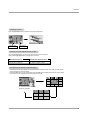
1. First, make all equipment connections. Plug the AC Adapter into the TV, then plug the AC Adapter into a power
outlet. At this time, the TV switches to standby mode.
• In standby mode, press the power, ch (D,E), tv/video, multimedia or number button on the remote control or on/off, ch (D,E), tv/video located on the TV to turn the TV on.
2. Select the viewing source by pressing tv/video or multimedia repeatedly.
• Note: See page 16 if you have not used EZ Scan and auto programmed TV to receive channels in your local
broadcast area.
3. After viewing, press the power button on the remote control or on/off located on the TV. The TV reverts to
standby mode.
NOTE
• If you intend to be away on vacation, disconnect the power plug from the wall power outlet.
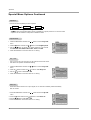
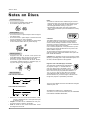
Menu Language Selection
- The menus can be shown on the screen in the selected language. First select your language.
1. Press the menu button and then use
2. Press the G button and then use D /
D
E
/
E
button to select the Special menu.
button to select Language.
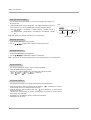
3. Use the F / G button to select your desired language.
From this point on, the on-screen menus will be shown in the language of your
choice.
Special
Captions
Caption / Text
Key lock
Auto off
Language
Off
CC 1
Off
Off
English
4. Press the exit button to save and return to TV viewing.
DE F G
Â
MENU EXIT
15