1
5
5-14
Setting up Network Servers
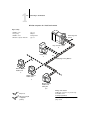
Fiery on a network with UNIX workstations
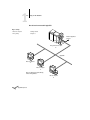
When a UNIX workstation is configured with the lpd protocol, and connected to the
Fiery over a TCP/IP network, it can print directly to the Fiery.
Setting up UNIX workstations requires an administrator with root privileges. After the
initial configuration, UNIX users simply submit print jobs to a named printer.
The job management tools, along with the other Fiery utilities and Fiery WebTools,
are not available on the UNIX platform. A Windows or Mac OS computer on the
same network as the UNIX computer that is set up to use TCP/IP for printing to the
Fiery can use the job management tools to manage print jobs that originate from all
workstations on the network.
Tips for experts—UNIX workstations
Setting up the Fiery in a UNIX environment has the same requirements as setting up
any printer or new device:
•
A distinct IP address is needed for the Fiery as well as for each workstation on the
network.
•
You select a name for the Fiery that goes with the IP address.
•
The IP address of the Fiery must be registered for the network in a host database, and
also on the Fiery itself.
•
The Print queue or the Hold queue (or both) must be published.
Lpd printing to the Direct connection is not supported.
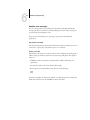
The following information applies especially to the Fiery:
•
Fiery is a printer controller that understands lpd protocols.
•
Fiery has a remote printer name you must use in order to communicate with it
successfully.
See the next section for details.