1
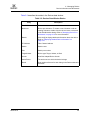
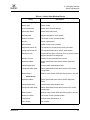
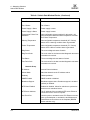
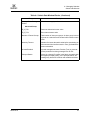
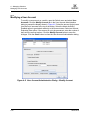
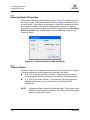
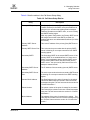
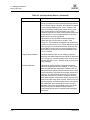
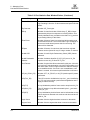
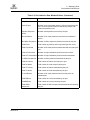
L 5 – Managing Ports Viewing and Configuring Ports The Port Properties dialog entries are listed below in Table 5-3. Table 5-3. Port Properties Dialog Entries State 59235-02 A Description Port The current port name Symbolic Name To change, click in the field and enter the new port symbolic name. Operational State The port state that is currently active. This value may be different from the administrative port state, for example due to an error condition. Configured State The port state (Online, Offline, Diagnostics, or Down) saved in the switch configuration, either by the user or at the factory. This value is persistent; it will be maintained during a switch reset, and will be used after a reset to set the port operational state. Operational Speed The port speed that is currently active. Configured Speed The port speed saved in the switch configuration. Running Type The port type that is currently active. Configured Type The port type saved in the switch configuration. To change, click in the field and select an option from the drop-down list. I/O Stream Guard The I/O Stream Guard option suppresses the Registered State Change Notification (RSCN) messages on a port basis. I/O Stream Guard should be enabled only on ports connected to initiator devices. To change, click in the field and select an option from the drop-down list. The options are: Enable - suppresses the reception of RSCN messages from other ports for which I/O Stream Guard is enabled. Disable - allows free transmission and reception of RSCN messages. Auto - suppresses the reception of RSCN messages when the port is connected to an initiator device with an HBA. The default is Auto. Device Scan The Device Scan feature queries the connected device during login for FC-4 descriptor information. Disable this option only if the scan creates a conflict with the connected device. Select to Propagate Changes to Entire Column To propagate the same change to all selected ports, select the check box before making a change to a port. 5-11